ignition FORD WINDSTAR 1998 1.G Owner's Manual
[x] Cancel search | Manufacturer: FORD, Model Year: 1998, Model line: WINDSTAR, Model: FORD WINDSTAR 1998 1.GPages: 370, PDF Size: 2.97 MB
Page 61 of 370
![FORD WINDSTAR 1998 1.G Owners Manual 60
%*
[AS21300(ALL)09/95]
Electronic Stereo and Stereo Cassette
Radios
*
[AS21400(ALL)03/96]
Using the Controls on Your New Radio
*
[AS21500(ALL)08/95]
How to turn the radio on and adjust the volume
*](/img/11/5414/w960_5414-60.png "FORD WINDSTAR 1998 1.G Owners Manual 60
%*
[AS21300(ALL)09/95]
Electronic Stereo and Stereo Cassette
Radios
*
[AS21400(ALL)03/96]
Using the Controls on Your New Radio
*
[AS21500(ALL)08/95]
How to turn the radio on and adjust the volume
*")
60
%*
[AS21300(ALL)09/95]
Electronic Stereo and Stereo Cassette
Radios
*
[AS21400(ALL)03/96]
Using the Controls on Your New Radio
*
[AS21500(ALL)08/95]
How to turn the radio on and adjust the volume
*
[AS21701(ALL)10/95]
Press the ªPOWERº button to turn the radio on. Press it again
to turn it off.
*
[AS21950(ALL)02/96]
Press the right (+) side of the ªVOLUMEº button to increase the
volume. Press the left (s) side of the button to decrease the
volume. Illuminated bars in the display show the relative
volume level.
*
[AS21975(ALL)02/96]
NOTE: If the volume level is set above a certain listening
level when the ignition switch is turned off, when the
ignition switch is turned back on, the volume will
come back to a ªnominalº listening level. However, if
the radio power is turned off, the volume will remain
in the position it was set at when radio power was
switched off.
*
[AS22100(ALL)03/96]
Selecting the AM or FM frequency band
*
[AS22225(ALL)02/96]
Push the ªAM/FMº button to select the desired frequency band.
Pushing the button more than once will alternate between AM,
FM1 and FM2. These functions are used with the station
memory buttons described underHow to tune radio stations.
*
[AS22300(ALL)02/96]
How to tune radio stations (Stereo Radio)
*
[AS22400(ALL)02/96]
There are three ways for you to tune in to a particular station.
You can manually locate the station by using the ªTUNEº
button, ªSEEKº the station or select the station by using the
memory preset buttons, which you can set to any desired
frequency.
File:04wnass.ex
Update:Fri Sep 27 13:16:38 1996
Page 83 of 370
![FORD WINDSTAR 1998 1.G Owners Manual Controls and Features
83
[CF08300(ALL)08/96]
If an A/C mode is chosen on the Function Selector Knob and
the Rear Control Knob is in a cool mode (blue dots), rear
passengers will receive FULL COOL (air](/img/11/5414/w960_5414-82.png "FORD WINDSTAR 1998 1.G Owners Manual Controls and Features
83
[CF08300(ALL)08/96]
If an A/C mode is chosen on the Function Selector Knob and
the Rear Control Knob is in a cool mode (blue dots), rear
passengers will receive FULL COOL (air")
Controls and Features
83
[CF08300(ALL)08/96]
If an A/C mode is chosen on the Function Selector Knob and
the Rear Control Knob is in a cool mode (blue dots), rear
passengers will receive FULL COOL (air-conditioned) air out of
the side and upper rear registers. If a non-A/C mode is chosen
on the Function Selector Knob and the Rear Control Knob is in
a cool mode (blue dots), rear passengers will receive recirculated
air out of the side and upper rear registers. If the Rear Control
Knob is in a heat mode (red dots), rear passengers will receive
FULL WARM air out of the floor registers.
[CF08400(ALL)01/96]
Rear passengers do not have the ability to adjust the
temperature or select the location of the airflow from the
auxiliary climate control system. Rear passengers can adjust the
Rear Fan Speed Control Knob and air discharge (adjust
registers) for comfort.
[CF08500(ALL)01/96]
NOTE: For maximum heating and cooling for front seat
passengers, set the rear fan switch to them(OFF)
position.
*
[CF08600(ALL)01/96]
Liftgate Window Features
%*
[CF08700(ALL)01/96]
Rear Window Defogger (If equipped)
*
[CF08800(ALL)01/96]
The defogger for the rear liftgate window clears frost, fog, or
thin ice from both the inside and outside of the rear window.
The defogger operates with the ignition in the ON position.
[CF08900(ALL)01/96]
The control switch is located on the instrument panel to the
right of the steering column and below the climate control
system.
File:05wncfs.ex
Update:Tue Oct 8 10:20:34 1996
Page 85 of 370
![FORD WINDSTAR 1998 1.G Owners Manual Controls and Features
85
% [CF09800(ALL)01/96]
Rear Wiper and Washer (If equipped)
[CF09900(ALL)01/96]
The controls for the rear wiper and washer can be found on the
instrument panel to the right of t](/img/11/5414/w960_5414-84.png "FORD WINDSTAR 1998 1.G Owners Manual Controls and Features
85
% [CF09800(ALL)01/96]
Rear Wiper and Washer (If equipped)
[CF09900(ALL)01/96]
The controls for the rear wiper and washer can be found on the
instrument panel to the right of t")
Controls and Features
85
% [CF09800(ALL)01/96]
Rear Wiper and Washer (If equipped)
[CF09900(ALL)01/96]
The controls for the rear wiper and washer can be found on the
instrument panel to the right of the instrument cluster below the
climate control system. The rear wiper and washer controls
operate with the ignition in the ACC or ON positions.
[CF10000(ALL)01/96]
10-1/2 pica
art:0050037-A
The rear wiper switches
[CF10100(ALL)10/96]
To operate the rear wiper, press the rear wiper switch. If the
front wipers are off, on intermittent or low speed operation, the
rear wiper will have an intermittent operation. If the front
wipers are in high speed operation, the rear wiper will
continuously operate.
[CF10200(ALL)10/96]
The rear wiper will also perform one wipe of the rear window
when the front wipers are in intermittent or low speed
operation and the transaxle is shifted into R (Reverse). If the
front wipers are in high speed operation and the transaxle is
shifted into R (Reverse), the rear wiper will continuously
operate.
*
[CF10300(ALL)01/96]
Do not activate the washer for longer than fifteen seconds
continuously. This could damage the washer pump system.
File:05wncfs.ex
Update:Tue Oct 8 10:20:34 1996
Page 88 of 370
![FORD WINDSTAR 1998 1.G Owners Manual 88
*
[CF11600(ALL)03/96]
To maximize fog lamp bulb life, it is recommended that the fog
lamp switch be turned off after each use prior to turning off the
headlamps.
[CF11700(ALL)01/96]
n
To turn the f](/img/11/5414/w960_5414-87.png "FORD WINDSTAR 1998 1.G Owners Manual 88
*
[CF11600(ALL)03/96]
To maximize fog lamp bulb life, it is recommended that the fog
lamp switch be turned off after each use prior to turning off the
headlamps.
[CF11700(ALL)01/96]
n
To turn the f")
88
*
[CF11600(ALL)03/96]
To maximize fog lamp bulb life, it is recommended that the fog
lamp switch be turned off after each use prior to turning off the
headlamps.
[CF11700(ALL)01/96]
n
To turn the fog lamps on, push the switch. An indicator light
will glow when the lamps are on.
*
[CF11800(ALL)03/96]
n
To turn off, push the switch again.
%*
[CF11900(ALL)03/96]
ªHeadlamps Onº Alert Chime
[CF12000(ALL)01/96]
The ªheadlamps onº alert chime acts as an indicator that you
have left the headlamps or parking lights on. This continuous
chime will activate when the following conditions are present:
[CF12100(ALL)01/96]
n
The headlamp and/or parking lamps are on
[CF12200(ALL)01/96]
n
There is no key in the ignition
[CF12300(ALL)01/96]
n
The driver's door is ajar (open)
%*
[CF12400(ALL)01/96]
Daytime Running Light (DRL) System (Canadian
vehicles only)
*
[CF12500(ALL)01/96]
The Daytime Running Light (DRL) system is designed to turn
the high beam headlamps on, with a reduced light output and
without illuminating the high beam indicator lamp in the
instrument panel. The DRL system operates when all of the
following conditions are met:
*
[CF12600(ALL)01/96]
n
the vehicle is ªrunningº
*
[CF12700(ALL)02/96]
n
the vehicle has a fully released parking brake
*
[CF12800(ALL)01/96]
n
the headlamp system is in the OFF position
File:05wncfs.ex
Update:Tue Oct 8 10:20:34 1996
Page 91 of 370
![FORD WINDSTAR 1998 1.G Owners Manual Controls and Features
91
*
[CF14400(ALL)04/96]
NOTE: Do not place heavy objects in the cupholders.
*
[CF14500(ALL)05/96]
The controls on the steering column and wheel are designed to
give you easy acc](/img/11/5414/w960_5414-90.png "FORD WINDSTAR 1998 1.G Owners Manual Controls and Features
91
*
[CF14400(ALL)04/96]
NOTE: Do not place heavy objects in the cupholders.
*
[CF14500(ALL)05/96]
The controls on the steering column and wheel are designed to
give you easy acc")
Controls and Features
91
*
[CF14400(ALL)04/96]
NOTE: Do not place heavy objects in the cupholders.
*
[CF14500(ALL)05/96]
The controls on the steering column and wheel are designed to
give you easy access to the controls while you are driving.
*
[CF14600(ALL)01/96]
Ignition
%*
[CF14700(ALL)01/96]
Understanding the Positions of the Ignition
*
[CF14800(ALL)01/96]
13-1/2 pica
art:0040047-D
The ignition positions
% [CF14900(ALL)12/95]
ACCESSORY allows you to operate some of your vehicle's
electrical accessories while the engine is not running. For
example, you can use ACCESSORY to turn on the radio or
windshield wipers without starting the engine.
[CF15000(ALL)12/95]
LOCK locks the steering wheel and the gearshift lever.
*
[CF15100(ALL)06/96]
OFF allows you to shut off the engine and all accessories
without locking the steering wheel, or the gearshift lever.
*
[CF15200(ALL)01/96]
ON allows you to test your vehicle's warning lights to make
sure they work before you start the engine. The key returns to
the ON position once the engine is started and remains in this
position while the engine runs.
File:05wncfs.ex
Update:Tue Oct 8 10:20:34 1996
Page 92 of 370
![FORD WINDSTAR 1998 1.G Owners Manual 92
[CF15300(ALL)12/95]
START cranks the engine. Release the key once the engine starts
so that you dont damage the starter. The key should return to
the ON position when you release it. The START pos](/img/11/5414/w960_5414-91.png "FORD WINDSTAR 1998 1.G Owners Manual 92
[CF15300(ALL)12/95]
START cranks the engine. Release the key once the engine starts
so that you dont damage the starter. The key should return to
the ON position when you release it. The START pos")
92
[CF15300(ALL)12/95]
START cranks the engine. Release the key once the engine starts
so that you don't damage the starter. The key should return to
the ON position when you release it. The START position also
allows you to test the brake warning light.
%*
[CF15400(ALL)03/96]
Removing the Key From the Ignition
[CF15500(ALL)12/95]
LOCK is the only position that allows you to remove the key
from the ignition. The LOCK feature helps to protect your
vehicle from theft, because it also locks the steering wheel and
the gearshift lever when the key is removed.
%*
[CF15600(ALL)01/96]
If your key is stuck in the LOCK position, and you are unable
to turn it, move your steering wheel left or right until the key
turns freely.
*
[CF15700(ALL)01/96]
To remove your key from the ignition:
[CF15750(ALL)09/96]1.
Maintain firm pressure on the service brake and set parking
brake fully. (This will avoid ªbindingº or ªloadingº the
powertrain, which may result in an objectionable noise
during park disengagement.)
[CF15800(ALL)09/96]2.
Put the gearshift lever in P (Park).
*
[CF16000(ALL)06/96]3.
Turn the ignition key to LOCK.
*
[CF16100(ALL)03/96]4.
Remove the key.
[CF16200(ALL)09/96]
RWARNING
When you leave your vehicle, set the parking brake fully,
place the gearshift lever in P (Park), and shut off the
engine. Never park your vehicle in N (Neutral). If you do
not take these precautions, your vehicle may move
suddenly and injure someone.
File:05wncfs.ex
Update:Tue Oct 8 10:20:34 1996
Page 96 of 370
![FORD WINDSTAR 1998 1.G Owners Manual 96
[CF18800(ALL)01/96]
Speed Dependent Wipers
[CF18900(ALL)01/96]
This feature compensates for the extra moisture that
accumulates on your windshield at higher speeds during rain.
At higher speeds, th](/img/11/5414/w960_5414-95.png "FORD WINDSTAR 1998 1.G Owners Manual 96
[CF18800(ALL)01/96]
Speed Dependent Wipers
[CF18900(ALL)01/96]
This feature compensates for the extra moisture that
accumulates on your windshield at higher speeds during rain.
At higher speeds, th")
96
[CF18800(ALL)01/96]
Speed Dependent Wipers
[CF18900(ALL)01/96]
This feature compensates for the extra moisture that
accumulates on your windshield at higher speeds during rain.
At higher speeds, the Speed Dependent feature shortens the
delay between wipes when you use the variable interval wipers.
Delay will automatically adjust at speeds between 10 and
65 mph (16 and 105 km/h).
[CF19000(ALL)01/96]
The Speed Dependent feature comes disabled from the factory,
but can be activated at any time by using the following
procedure.
[CF19100(ALL)01/96]1.
Make sure the two front doors are securely closed.
[CF19200(ALL)09/96]2.
Insert the key into the ignition and turn first to the ON
position (the gauges on the instrument panel willnot
illuminate) and then back to the OFF position. Remove the
key and within 30 seconds, perform the following sequence:
[CF19300(ALL)01/96]3.
Press and hold the washer button on the end of the turn
signal lever.
[CF19400(ALL)01/96]4.
Within two seconds, put the key back in the ignition and
turn to the ON position.
[CF19500(ALL)01/96]5.
Hold the washer button down until a long (two second) tone
is heard. Release the button while the tone is active.
[CF19600(ALL)09/96]6.
After the long tone, a confirmation sequence will be heard.
One beep indicates the feature is inactive. Two beeps
indicates the feature is active.
[CF19700(ALL)01/96]
Repeat this procedure any time you want to cancel or reactivate
the Speed Dependent feature.
File:05wncfs.ex
Update:Tue Oct 8 10:20:34 1996
Page 99 of 370
Controls and Features
99 only upshift and downshift from 1st through 3rd gears. The
vehicle will always return to the overdrive operation mode
when the ignition is turned off and back on.
[CF21000(ALL)01/96]
If the lamp does not come on when the Overdrive ON/OFF
button is depressed or if the lamp flashes when you are driving,
have your vehicle serviced at the first opportunity. If this
condition persists, damage could occur to the transaxle.
%*
[CF21200(ALL)05/96]
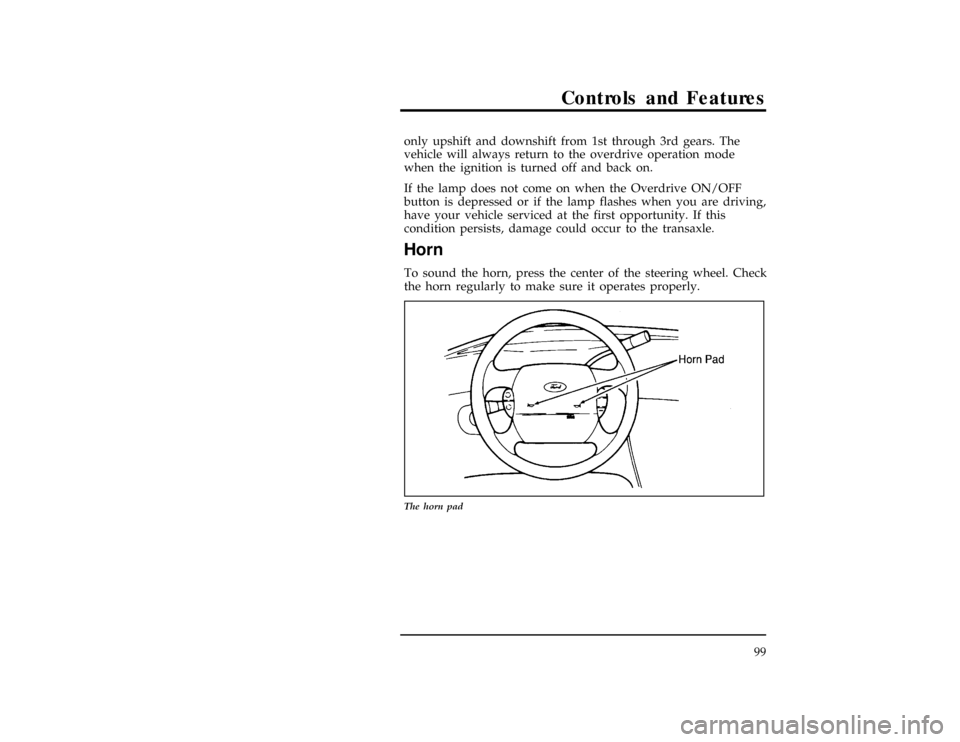
Horn
[CF21300(ALL)01/96]
To sound the horn, press the center of the steering wheel. Check
the horn regularly to make sure it operates properly.
[CF21400(ALL)01/96]
13-1/2 pica
art:0050017-A
The horn pad
File:05wncfs.ex
Update:Tue Oct 8 10:20:34 1996
Page 102 of 370
![FORD WINDSTAR 1998 1.G Owners Manual 102
%*
[CF22905(ALL)10/96]
To Turn Speed Control Off
*
[CF22907(ALL)10/96]
n
Press OFF,
*
[CF22909(ALL)10/96]
n
Turn off the vehicle ignition.
*
[CF22911(ALL)10/96]
Once speed control is switched off,](/img/11/5414/w960_5414-101.png "FORD WINDSTAR 1998 1.G Owners Manual 102
%*
[CF22905(ALL)10/96]
To Turn Speed Control Off
*
[CF22907(ALL)10/96]
n
Press OFF,
*
[CF22909(ALL)10/96]
n
Turn off the vehicle ignition.
*
[CF22911(ALL)10/96]
Once speed control is switched off,")
102
%*
[CF22905(ALL)10/96]
To Turn Speed Control Off
*
[CF22907(ALL)10/96]
n
Press OFF,
*
[CF22909(ALL)10/96]
n
Turn off the vehicle ignition.
*
[CF22911(ALL)10/96]
Once speed control is switched off, the previously programmed
set speed will be erased.
*
[CF22913(ALL)10/96]
To Turn Speed Control On
*
[CF22915(ALL)10/96]
n
Press ON
*
[CF22921(ALL)10/96]
To Set a Speed
*
[CF22923(ALL)09/96]
Press SET ACCEL. For speed control to operate, the speed
control must be ON and the vehicle speed must be greater than
30 mph (48 km/h).
*
[CF22925(ALL)09/96]
If you drive up or down a steep hill, your vehicle speed may
vary momentarily slower or faster than the set speed. This is
normal.
*
[CF22927(ALL)09/96]
Speed control cannot reduce the vehicle speed if it increases
above the set speed on a downhill. If your vehicle speed is
faster than the set speed while driving on a downhill in
j
(Overdrive), you may want to shift to the next lower gear to
reduce your vehicle speed.
*
[CF22929(ALL)09/96]
If your vehicle slows down more than 10 mph (16 km/h) below
your set speed on an uphill, your speed control will disengage.
This is normal. Pressing RESUME will re-engage it.
*
[CF22931(ALL)09/96]
RWARNING
To keep your vehicle under control, do not use speed
control in heavy traffic or on roads that are winding,
slippery, or unpaved.
File:05wncfs.ex
Update:Tue Oct 8 10:20:34 1996
Page 104 of 370
![FORD WINDSTAR 1998 1.G Owners Manual 104
*
[CF22963(ALL)09/96]
Indicator Light (If equipped)
*
[CF22965(ALL)09/96]
Lights when either the SET ACCEL or RESUME switches are
pressed and remains lit until it is either disengaged or turned
of](/img/11/5414/w960_5414-103.png "FORD WINDSTAR 1998 1.G Owners Manual 104
*
[CF22963(ALL)09/96]
Indicator Light (If equipped)
*
[CF22965(ALL)09/96]
Lights when either the SET ACCEL or RESUME switches are
pressed and remains lit until it is either disengaged or turned
of")
104
*
[CF22963(ALL)09/96]
Indicator Light (If equipped)
*
[CF22965(ALL)09/96]
Lights when either the SET ACCEL or RESUME switches are
pressed and remains lit until it is either disengaged or turned
off.
%*
[CF27200(ALL)05/96]
Setting the Autolamp Delay System (If equipped)
[CF27301(ALL)10/96]
Autolamp delay allows the headlamps to remain on after the
vehicle is parked and the ignition is turned off. The slide knob
on the bottom of the mirror controls whether Autolamp is ON
or OFF as well as the length of the delay. The delay can be
adjusted from 1 second (far left position, but not OFF) up to 3
minutes (far right position). A green indicator on the lamp lets
you know that the headlamps are being controlled by the
Autolamp system.
[CF27700(ALL)10/96]
10-1/2 pica
art:0050157-B
The autolamp system
File:05wncfs.ex
Update:Tue Oct 8 10:20:34 1996