light FORD WINDSTAR 2002 2.G Repair Manual
[x] Cancel search | Manufacturer: FORD, Model Year: 2002, Model line: WINDSTAR, Model: FORD WINDSTAR 2002 2.GPages: 296, PDF Size: 2.45 MB
Page 181 of 296
ABS warning lampABS
TheABSwarning lamp in the instrument cluster momentarily illuminates
when the ignition is turned to the ON position. If the light does not
illuminate momentarily at start up or remains on the ABS needs to be
serviced.
With the ABS light on, the anti-lock
brake system is disabled and normal
braking is still effective unless the
brake warning light also remains
illuminated with parking brake
released. (If your brake warning lamp illuminates, have your vehicle
serviced immediately.)
Parking brake
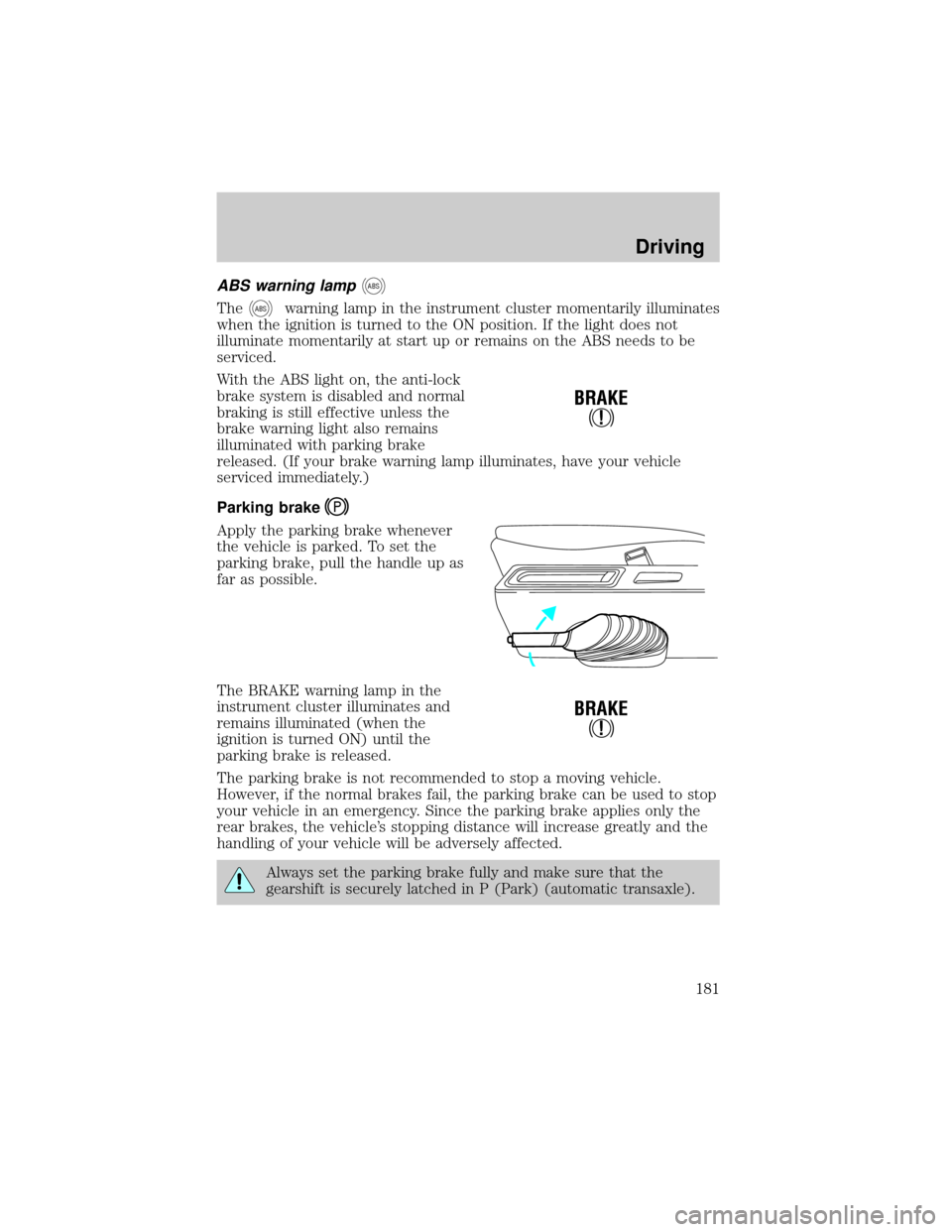
Apply the parking brake whenever
the vehicle is parked. To set the
parking brake, pull the handle up as
far as possible.
The BRAKE warning lamp in the
instrument cluster illuminates and
remains illuminated (when the
ignition is turned ON) until the
parking brake is released.
The parking brake is not recommended to stop a moving vehicle.
However, if the normal brakes fail, the parking brake can be used to stop
your vehicle in an emergency. Since the parking brake applies only the
rear brakes, the vehicle's stopping distance will increase greatly and the
handling of your vehicle will be adversely affected.
Always set the parking brake fully and make sure that the
gearshift is securely latched in P (Park) (automatic transaxle).
!
BRAKE
!
BRAKE
Driving
181
Page 184 of 296
AdvanceTracysystem are most noticeable when driving in wet/snowy/icy
road conditions and/or when performing emergency maneuvers. In an
emergency lane-change, the driver will experience better overall control
of the vehicle.
Driving conditions which may activate AdvanceTracyinclude:
²taking a turn too fast
²evasively maneuvering to avoid an accident, pedestrian or obstacle
²hitting a patch of ice
²changing lanes on a snow-rutted road
²entering a snow-covered side street from a snow-free road
²entering a gravel road from a paved road
²driving on slick surfaces
The AdvanceTracysystem is always ON when the engine is running.
The system does not work when the vehicle is traveling backwards. In
reverse, ABS and Traction Controlywill continue to function.
If you are operating the speed control system and road conditions
change causing the AdvanceTracyto activate, the AdvanceTracywill
disengage speed control. When driving conditions permit you can return
to speed control by pressing ªRESUMEº, refer toªSpeed Controlº
section in theDriver controlschapter.
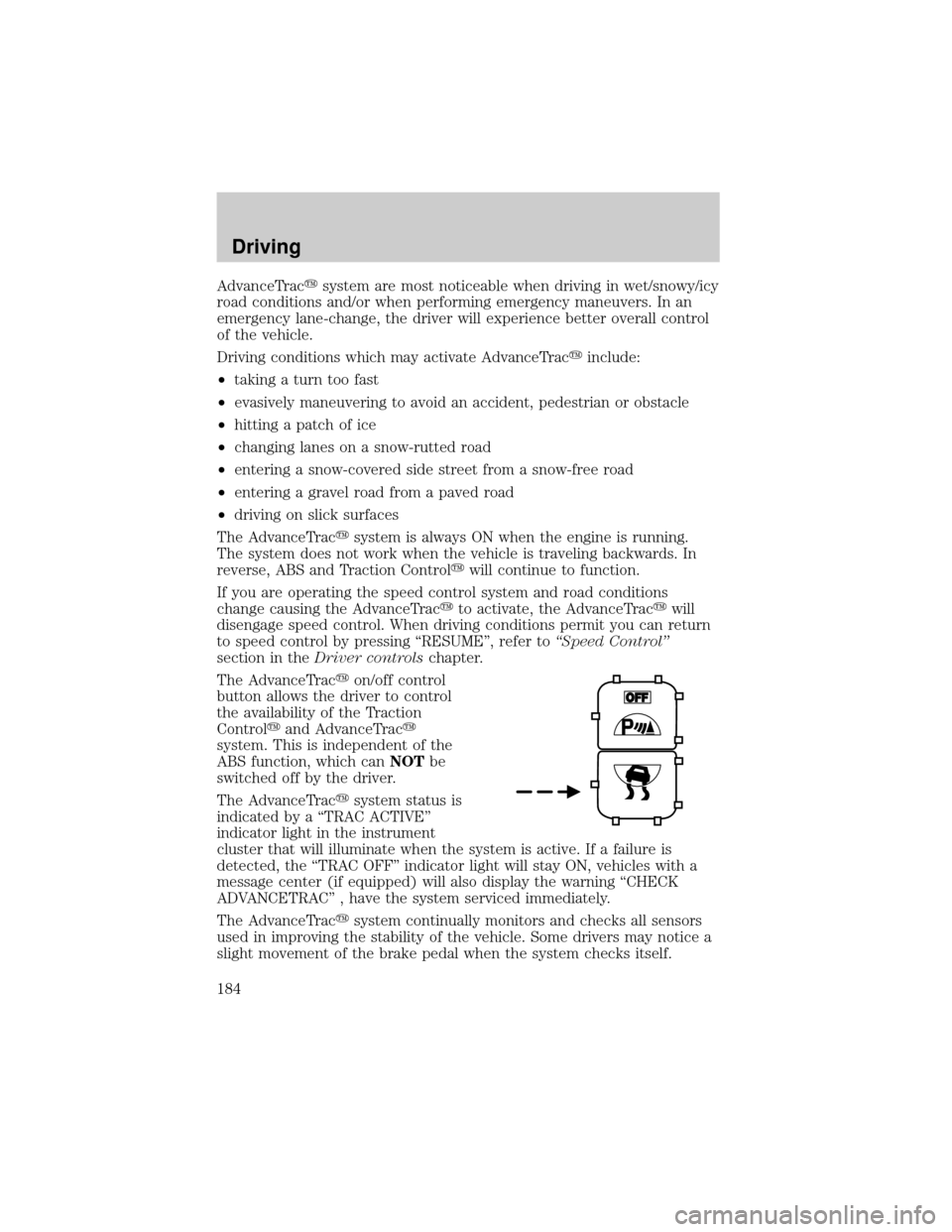
The AdvanceTracyon/off control
button allows the driver to control
the availability of the Traction
Controlyand AdvanceTracy
system. This is independent of the
ABS function, which canNOTbe
switched off by the driver.
The AdvanceTracysystem status is
indicated by a ªTRAC ACTIVEº
indicator light in the instrument
cluster that will illuminate when the system is active. If a failure is
detected, the ªTRAC OFFº indicator light will stay ON, vehicles with a
message center (if equipped) will also display the warning ªCHECK
ADVANCETRACº , have the system serviced immediately.
The AdvanceTracysystem continually monitors and checks all sensors
used in improving the stability of the vehicle. Some drivers may notice a
slight movement of the brake pedal when the system checks itself.
Driving
184
Page 185 of 296
During AdvanceTracyoperation you may experience the following:
²A rumble or clicking sound much like ABS or Traction Controly
²A slight deceleration or a reduction in the acceleration of the vehicle
²The ªTRAC ACTIVEº indicator light will illuminate
²If your foot is on the brake pedal, you will feel a vibration in the pedal
much like ABS. As with any vehicle equipped with four-wheel ABS, do
not pump the brakes, but instead, press firmly on the pedal.
²If your foot is not on the brake, the brake pedal will move to apply
higher brake forces. You may also hear a whoosh of air from under the
instrument panel during this kind of braking.
All these conditions are normal during AdvanceTracyoperation.
Aggressive driving in any road conditions can cause you to lose
control of your vehicle increasing the risk of severe personal
injury or property damage. The occurrence of an AdvanceTracyevent
is an indication that at least some of the tires have exceeded their
ability to grip the road and that you may lose control of the vehicle. If
you experience a severe road event, SLOW DOWN.
If you find yourself regularly experiencing AdvanceTracyevents,
you are driving too fast for conditions, you should reduce your
speed, and drive less aggressively. Speed Control should NOT be used
under these conditions. AdvanceTrac is limited by the laws of physics.
It is always possible to lose control of a vehicle due to inappropriate
driver inputs for the conditions. The occurrence of an AdvanceTracy
event is an indication that at least some of the tires have exceeded
their ability to grip the road; this may cause you to lose control of the
vehicle increasing the risk of severe personal injury or property
damage.
STEERING
Your vehicle is equipped with power steering. Power steering uses energy
from the engine to help steer the vehicle.
To prevent damage to the power steering pump:
²Never hold the steering wheel to the extreme right or the extreme left
for more than a few seconds when the engine is running.
Driving
185
Page 186 of 296
²Do not operate the vehicle with a low power steering pump fluid level
(below the MIN mark on the reservoir).
If the power steering system breaks down (or if the engine is turned
off), you can steer the vehicle manually, but it takes more effort.
If the steering wanders or pulls, the condition could be caused by any of
the following:
²underinflated tire(s) on any wheel(s)
²uneven vehicle loading
²high crown in center of road
²high crosswinds
²wheels out of alignment
²loose or worn suspension components
AUTOMATIC TRANSAXLE OPERATION
Brake-shift interlock
This vehicle is equipped with a brake-shift interlock feature that prevents
the gearshift lever from being moved from P (Park) unless the brake
pedal is depressed.
If the gearshift lever cannot be moved from P (Park) with the brake
pedal depressed, it is possible that a fuse has blown or the vehicle's
brakelamps are not operating properly. Refer toFuses and relaysin the
Roadside emergencieschapter.
Do not drive your vehicle until you verify that the brakelamps
are working.
If your vehicle gets stuck in mud or snow it may be rocked out by
shifting between forward and reverse gears, stopping between shifts, in a
steady pattern. Press lightly on the accelerator in each gear.
Do not rock the vehicle if the engine is not at normal operating
temperature or damage to the transaxle may occur.
Do not rock the vehicle for more than a few minutes or damage
to the transaxle and tires may occur or the engine may overheat.
Driving
186
Page 189 of 296
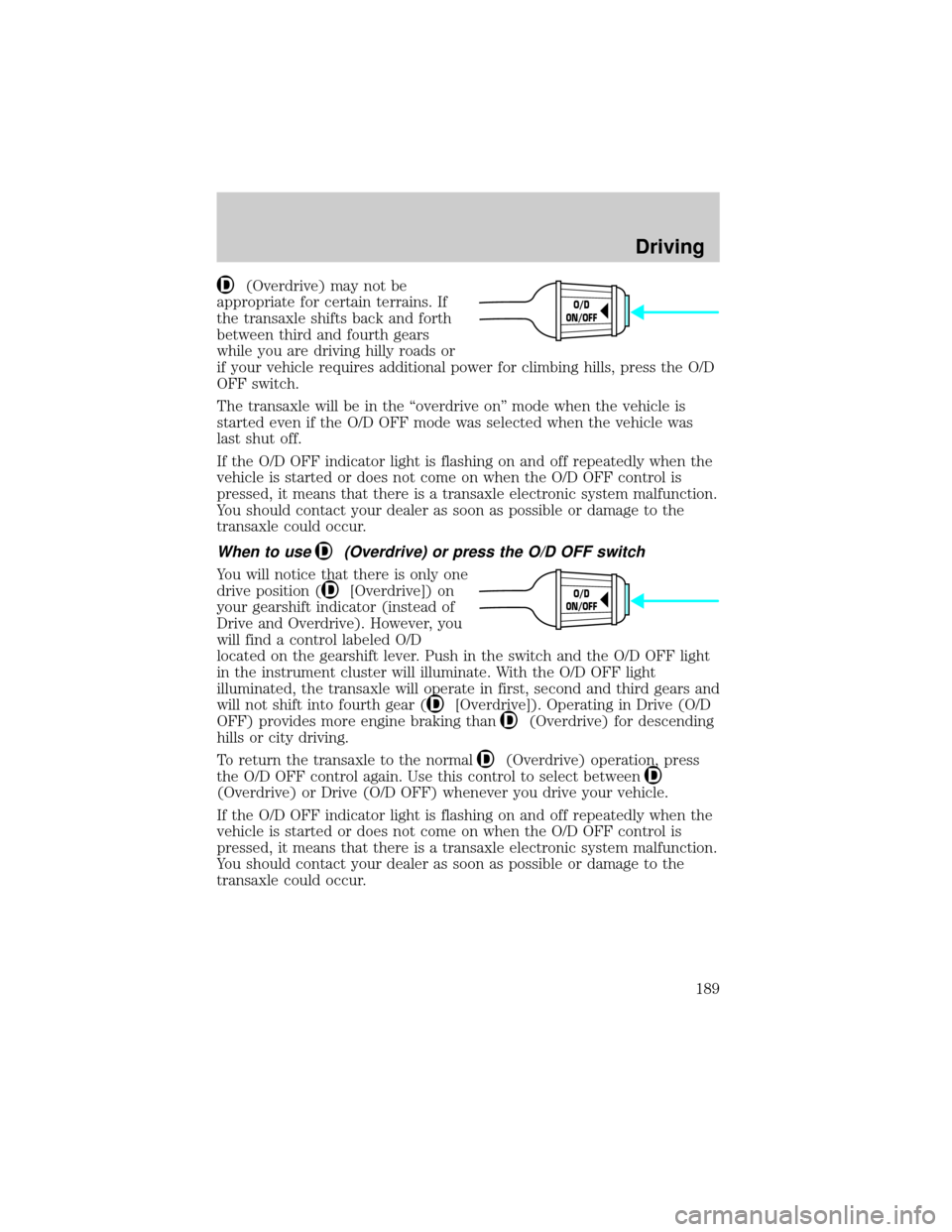
(Overdrive) may not be
appropriate for certain terrains. If
the transaxle shifts back and forth
between third and fourth gears
while you are driving hilly roads or
if your vehicle requires additional power for climbing hills, press the O/D
OFF switch.
The transaxle will be in the ªoverdrive onº mode when the vehicle is
started even if the O/D OFF mode was selected when the vehicle was
last shut off.
If the O/D OFF indicator light is flashing on and off repeatedly when the
vehicle is started or does not come on when the O/D OFF control is
pressed, it means that there is a transaxle electronic system malfunction.
You should contact your dealer as soon as possible or damage to the
transaxle could occur.
When to use(Overdrive) or press the O/D OFF switch
You will notice that there is only one
drive position (
[Overdrive]) on
your gearshift indicator (instead of
Drive and Overdrive). However, you
will find a control labeled O/D
located on the gearshift lever. Push in the switch and the O/D OFF light
in the instrument cluster will illuminate. With the O/D OFF light
illuminated, the transaxle will operate in first, second and third gears and
will not shift into fourth gear (
[Overdrive]). Operating in Drive (O/D
OFF) provides more engine braking than
(Overdrive) for descending
hills or city driving.
To return the transaxle to the normal
(Overdrive) operation, press
the O/D OFF control again. Use this control to select between
(Overdrive) or Drive (O/D OFF) whenever you drive your vehicle.
If the O/D OFF indicator light is flashing on and off repeatedly when the
vehicle is started or does not come on when the O/D OFF control is
pressed, it means that there is a transaxle electronic system malfunction.
You should contact your dealer as soon as possible or damage to the
transaxle could occur.
O/D
ON/OFF
O/D
ON/OFF
Driving
189
Page 192 of 296
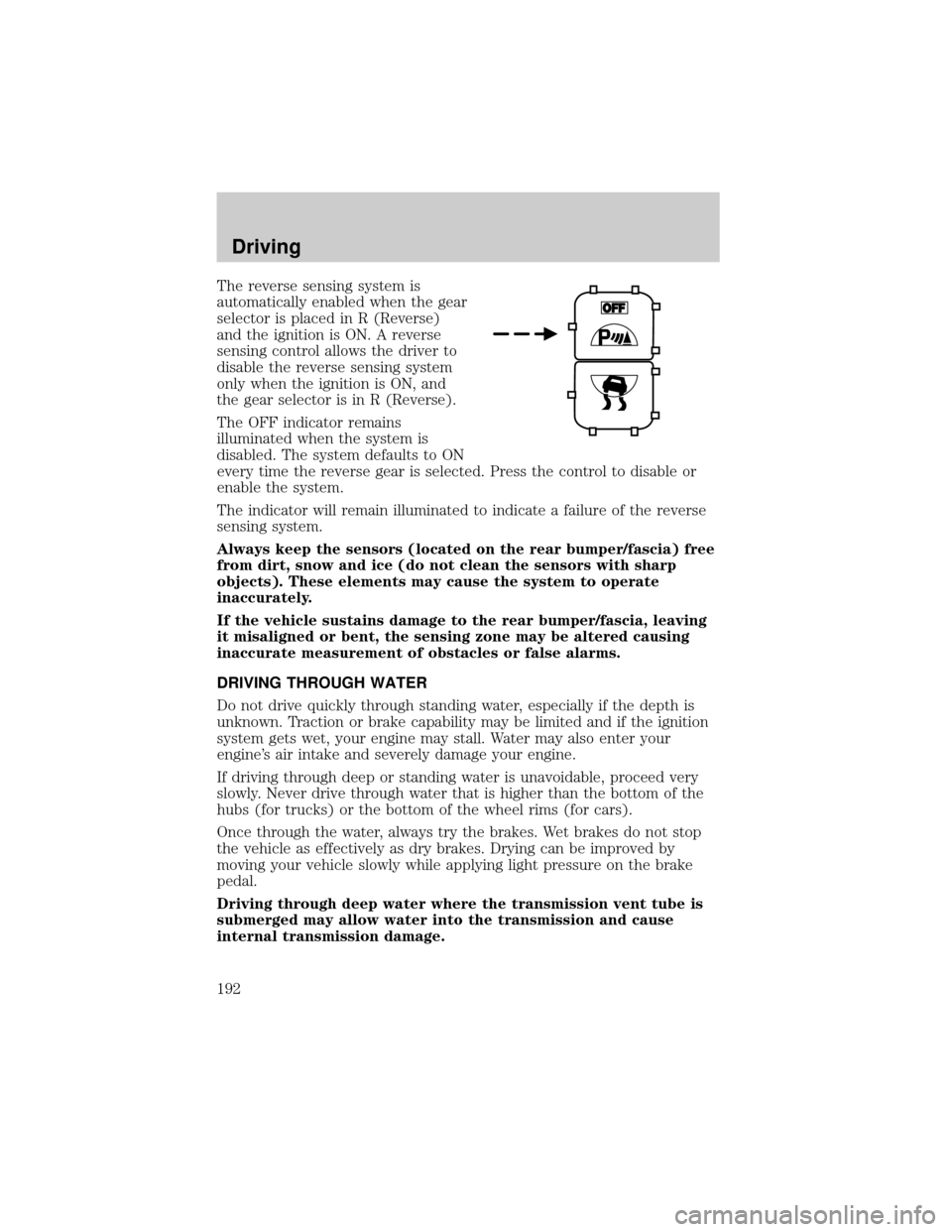
The reverse sensing system is
automatically enabled when the gear
selector is placed in R (Reverse)
and the ignition is ON. A reverse
sensing control allows the driver to
disable the reverse sensing system
only when the ignition is ON, and
the gear selector is in R (Reverse).
The OFF indicator remains
illuminated when the system is
disabled. The system defaults to ON
every time the reverse gear is selected. Press the control to disable or
enable the system.
The indicator will remain illuminated to indicate a failure of the reverse
sensing system.
Always keep the sensors (located on the rear bumper/fascia) free
from dirt, snow and ice (do not clean the sensors with sharp
objects). These elements may cause the system to operate
inaccurately.
If the vehicle sustains damage to the rear bumper/fascia, leaving
it misaligned or bent, the sensing zone may be altered causing
inaccurate measurement of obstacles or false alarms.
DRIVING THROUGH WATER
Do not drive quickly through standing water, especially if the depth is
unknown. Traction or brake capability may be limited and if the ignition
system gets wet, your engine may stall. Water may also enter your
engine's air intake and severely damage your engine.
If driving through deep or standing water is unavoidable, proceed very
slowly. Never drive through water that is higher than the bottom of the
hubs (for trucks) or the bottom of the wheel rims (for cars).
Once through the water, always try the brakes. Wet brakes do not stop
the vehicle as effectively as dry brakes. Drying can be improved by
moving your vehicle slowly while applying light pressure on the brake
pedal.
Driving through deep water where the transmission vent tube is
submerged may allow water into the transmission and cause
internal transmission damage.
Driving
192
Page 201 of 296
If you need to arrange roadside assistance for yourself, Ford Motor
Company will reimburse a reasonable amount. To obtain reimbursement
information, U.S. Ford or Mercury vehicles customers call
1-800-241-3673; Lincoln vehicle customers call 1±800±521±4140.
Canadian customers who need to obtain reimbursement information, call
1±800±665±2006.
ROADSIDE COVERAGE BEYOND BASIC WARRANTY
In the United States, you may purchase additional roadside assistance
coverage beyond this period through the Ford Auto Club by contacting
your Ford or Lincoln Mercury dealer.
Similarly in Canada, for uninterrupted Roadside Assistance coverage, you
may purchase extended coverage prior to your Basic Warranty's Roadside
Assistance expiring. For more information and enrollment, contact
1±877±294±2582 or visit our website at www.ford.ca.
HAZARD FLASHER
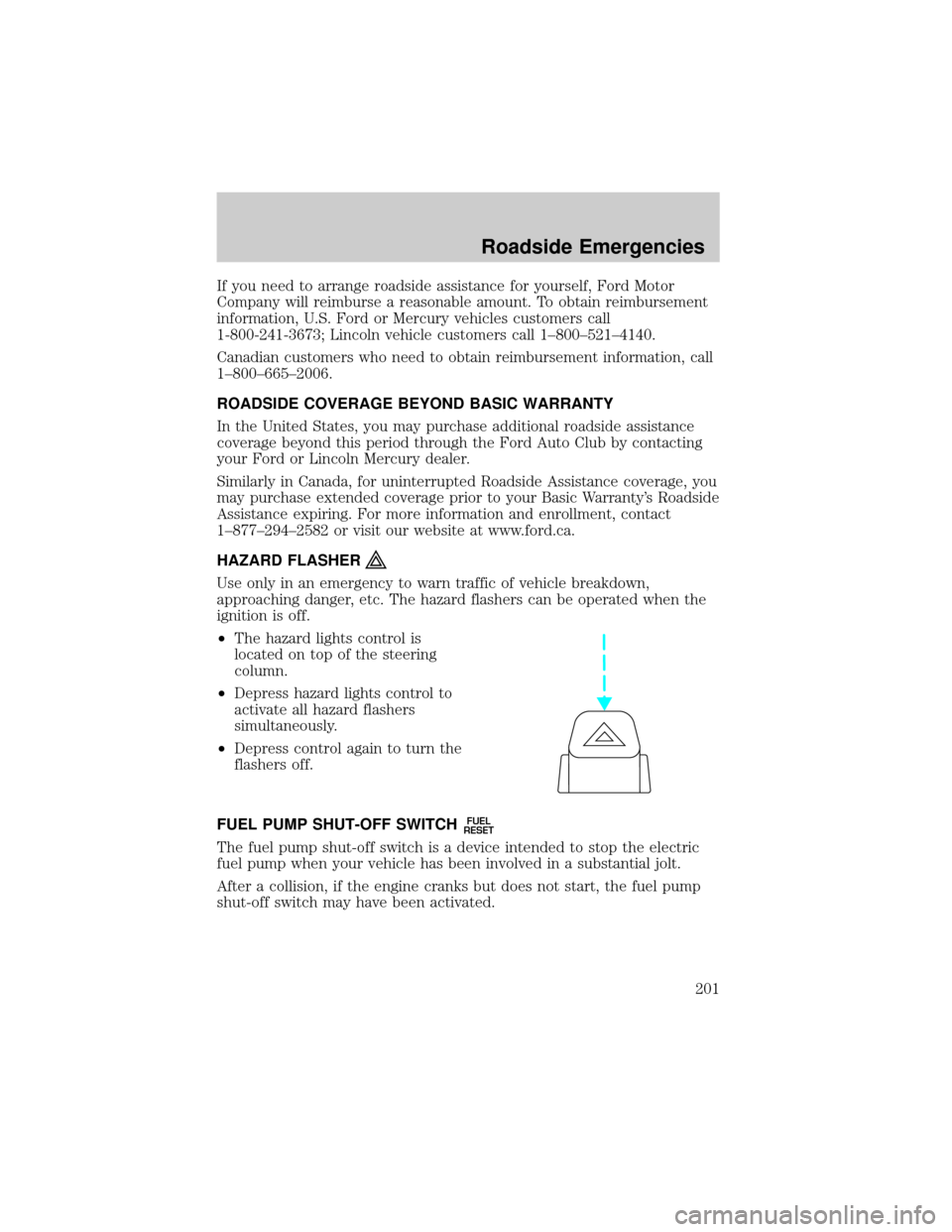
Use only in an emergency to warn traffic of vehicle breakdown,
approaching danger, etc. The hazard flashers can be operated when the
ignition is off.
²The hazard lights control is
located on top of the steering
column.
²Depress hazard lights control to
activate all hazard flashers
simultaneously.
²Depress control again to turn the
flashers off.
FUEL PUMP SHUT-OFF SWITCH
FUEL
RESET
The fuel pump shut-off switch is a device intended to stop the electric
fuel pump when your vehicle has been involved in a substantial jolt.
After a collision, if the engine cranks but does not start, the fuel pump
shut-off switch may have been activated.
Roadside Emergencies
201
Page 207 of 296
Fuse/Relay
LocationFuse Amp
RatingPassenger Compartment Fuse
Panel Description
11 15A Electric Brake Controller, Brake
Shift Interlock Solenoid, Rear
Electronic Module
12 20A Center High-Mount Stop Lamp
13 10A Right Rear Turn Lamp, Left Stop
Lamp, Left Rear Park Lamp
14 10A Autolamp Sensor, Transmission
Overdrive Cancel Switch, Front
Electronic Module, Compass
Module, Electrochromatic Mirror,
Power Sliding Door Overhead
Console Switch
15 20A Console Power Point
16 10A Cluster
17 20A Cigar Lighter/Powerpoint, Datalink
Connector
18 15A LH Quarter Window Motor, RH
Quarter Window Motor, RH
Window Switch Backlighting, RH
Lock Switch Backlighting, Master
Control Switch (LH) Backlighting,
Radio, Video Cassette Player,
Liquid Crystal Display, Front
Electronic Module
19 10A Starter Interrupt Relay (coil)
20 Ð Not Used
21 Ð Not Used
22 10A LH Heated Mirror, RH Heated
Mirror
23 20A Body Powerpoint, Auxiliary
Blower Relay #1 and #2 Coils
24 Ð Not Used
25 10A Radio (Anti-theft)
Roadside Emergencies
207
Page 211 of 296
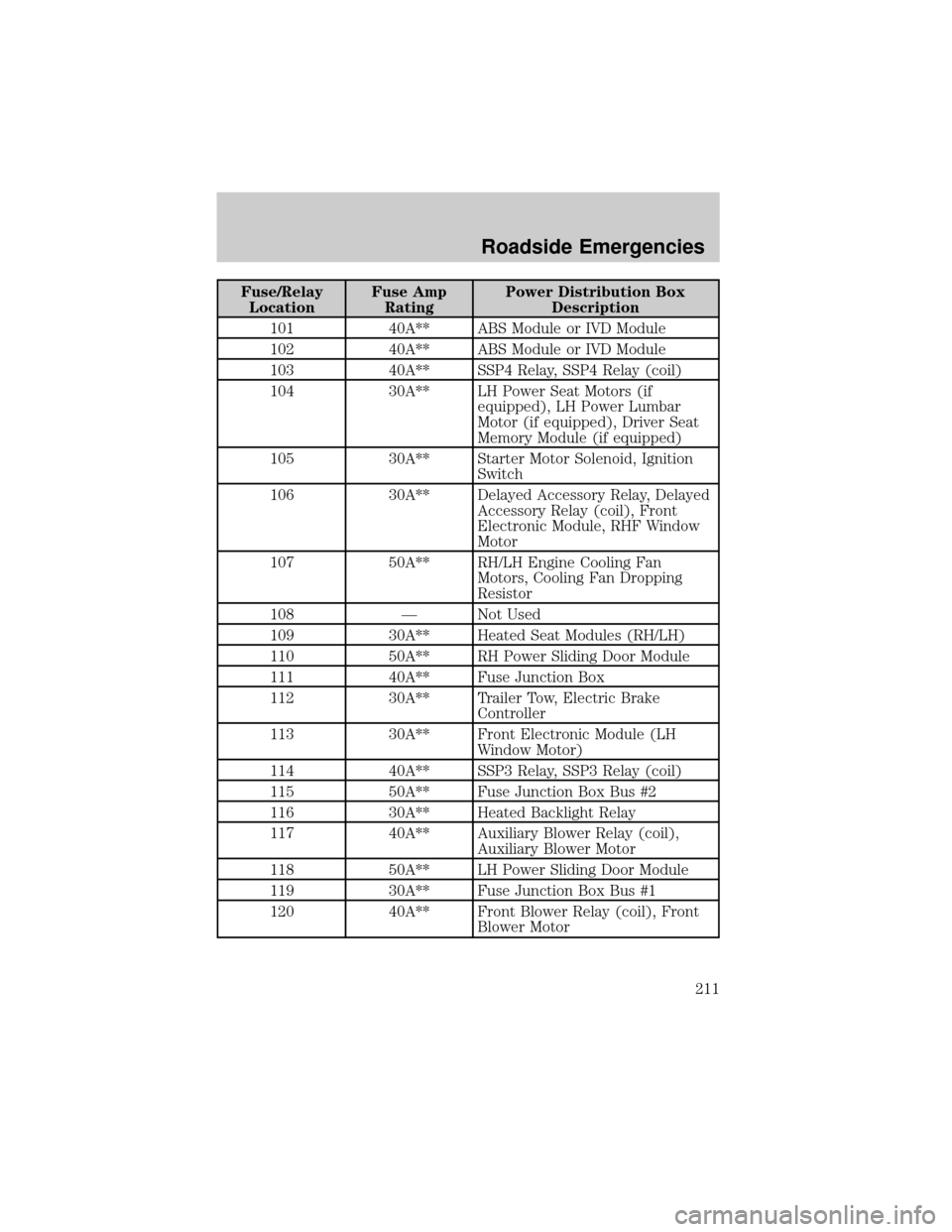
Fuse/Relay
LocationFuse Amp
RatingPower Distribution Box
Description
101 40A** ABS Module or IVD Module
102 40A** ABS Module or IVD Module
103 40A** SSP4 Relay, SSP4 Relay (coil)
104 30A** LH Power Seat Motors (if
equipped), LH Power Lumbar
Motor (if equipped), Driver Seat
Memory Module (if equipped)
105 30A** Starter Motor Solenoid, Ignition
Switch
106 30A** Delayed Accessory Relay, Delayed
Accessory Relay (coil), Front
Electronic Module, RHF Window
Motor
107 50A** RH/LH Engine Cooling Fan
Motors, Cooling Fan Dropping
Resistor
108 Ð Not Used
109 30A** Heated Seat Modules (RH/LH)
110 50A** RH Power Sliding Door Module
111 40A** Fuse Junction Box
112 30A** Trailer Tow, Electric Brake
Controller
113 30A** Front Electronic Module (LH
Window Motor)
114 40A** SSP3 Relay, SSP3 Relay (coil)
115 50A** Fuse Junction Box Bus #2
116 30A** Heated Backlight Relay
117 40A** Auxiliary Blower Relay (coil),
Auxiliary Blower Motor
118 50A** LH Power Sliding Door Module
119 30A** Fuse Junction Box Bus #1
120 40A** Front Blower Relay (coil), Front
Blower Motor
Roadside Emergencies
211
Page 212 of 296
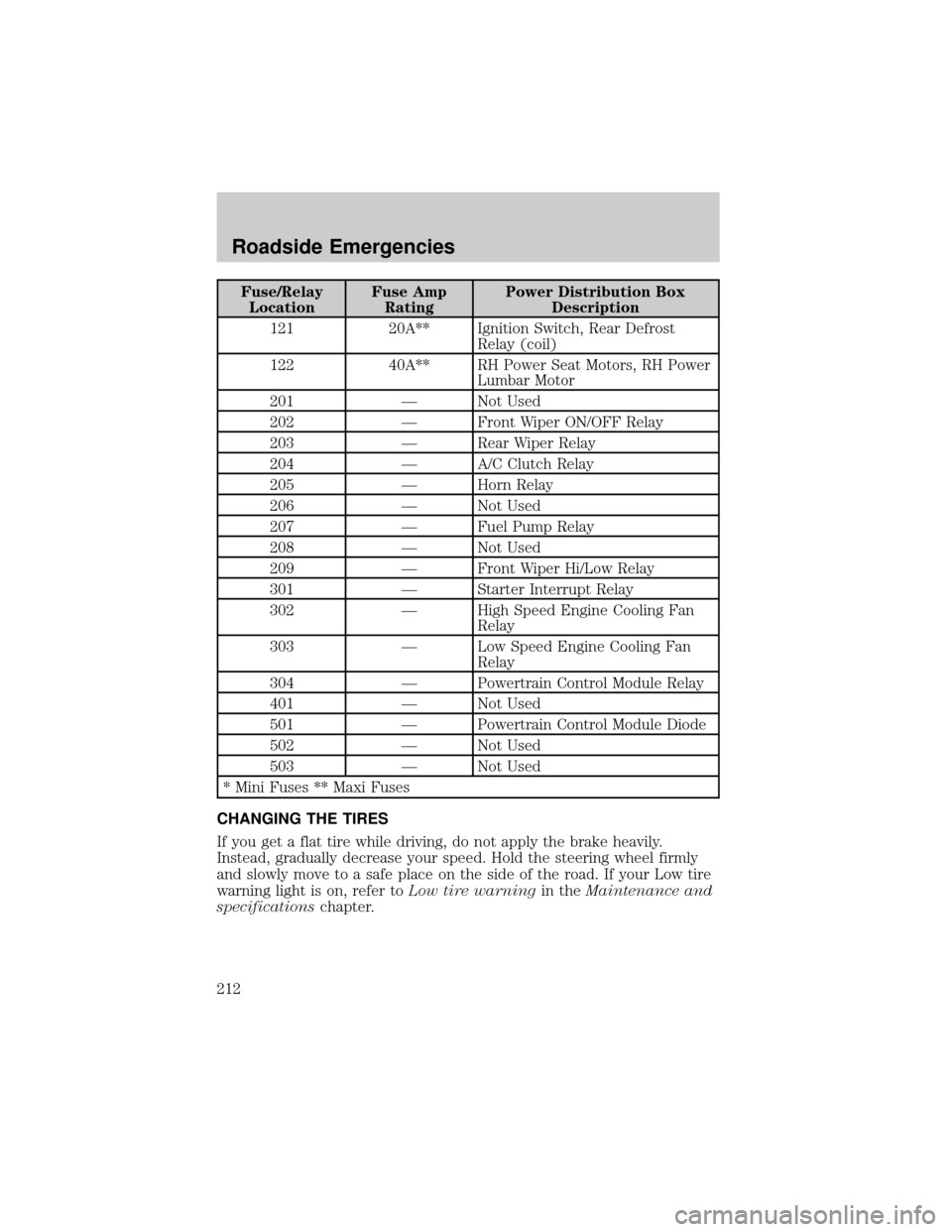
Fuse/Relay
LocationFuse Amp
RatingPower Distribution Box
Description
121 20A** Ignition Switch, Rear Defrost
Relay (coil)
122 40A** RH Power Seat Motors, RH Power
Lumbar Motor
201 Ð Not Used
202 Ð Front Wiper ON/OFF Relay
203 Ð Rear Wiper Relay
204 Ð A/C Clutch Relay
205 Ð Horn Relay
206 Ð Not Used
207 Ð Fuel Pump Relay
208 Ð Not Used
209 Ð Front Wiper Hi/Low Relay
301 Ð Starter Interrupt Relay
302 Ð High Speed Engine Cooling Fan
Relay
303 Ð Low Speed Engine Cooling Fan
Relay
304 Ð Powertrain Control Module Relay
401 Ð Not Used
501 Ð Powertrain Control Module Diode
502 Ð Not Used
503 Ð Not Used
* Mini Fuses ** Maxi Fuses
CHANGING THE TIRES
If you get a flat tire while driving, do not apply the brake heavily.
Instead, gradually decrease your speed. Hold the steering wheel firmly
and slowly move to a safe place on the side of the road. If your Low tire
warning light is on, refer toLow tire warningin theMaintenance and
specificationschapter.
Roadside Emergencies
212