outlet GENESIS G70 2021 Owner's Manual
[x] Cancel search | Manufacturer: GENESIS, Model Year: 2021, Model line: G70, Model: GENESIS G70 2021Pages: 516, PDF Size: 12.84 MB
Page 16 of 516
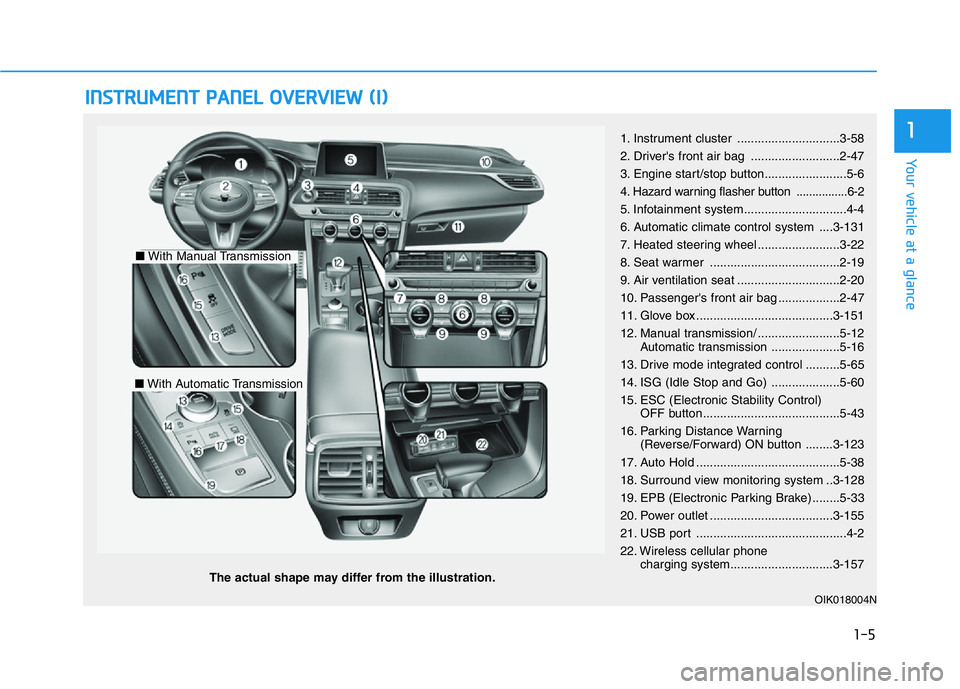
INSTRUMENT PANEL OVERVIEW (I)
The actual shape may differ from the illustration.
1-5
Your vehicle at a glance
11. Instrument cluster ..............................3-58
2. Driver's front air bag ..........................2-47
3. Engine start/stop button........................5-6
4
. Hazard warning flasher button ................6-2
5. Infotainment system..............................4-4
6. Automatic climate control system ....3-131
7. Heated steering wheel ........................3-22
8. Seat warmer ......................................2-19
9. Air ventilation seat ..............................2-20
10. Passenger's front air bag ..................2-47
11. Glove box ........................................3-151
12. Manual transmission/ ........................5-12
Automatic transmission ....................5-16
13. Drive mode integrated control ..........5-65
14. ISG (Idle Stop and Go) ....................5-60
15. ESC (Electronic Stability Control)
OFF button........................................5-43
16. Parking Distance Warning
(Reverse/Forward) ON button ........3-123
17. Auto Hold ..........................................5-38
18. Surround view monitoring system ..3-128
19. EPB (Electronic Parking Brake) ........5-33
20. Power outlet ....................................3-155
21. USB port ............................................4-2
22. Wireless cellular phone
charging system..............................3-157
OIK018004N
■With Manual Transmission
■With Automatic Transmission
Page 87 of 516
Light .....................................................................3-103
Exterior Lights ...............................................................3-103
Welcome System ...........................................................3-111
Interior Lights ................................................................3-112
Wipers and Washers..........................................3-116
Windshield Wipers ........................................................3-116
Windshield Washers .....................................................3-118
Driver Assist System .........................................3-119
Parking Distance Warning (Reverse) System ........3-119
Parking Distance Warning(Reverse/Forward)
System .............................................................................3-122
Rear View Monitor (Type A) ......................................3-126
Rear View Monitor (Type B) ......................................3-127
Surround View Monitor ...............................................3-128
Automatic Climate Control System ..................3-131
Automatic Heating and Air Conditioning.................3-133
Manual Heating and Air Conditioning......................3-134
System Operation .........................................................3-140
System Maintenance....................................................3-142
Windshield Defrosting and Defogging ............3-144
To Defog Inside Windshield ........................................3-144
To Defrost Outside Windshield ..................................3-145
Defogging Logic ............................................................3-145
Auto Defogging System ..............................................3-146
Rear Window Defroster ..............................................3-147
Climate Control Additional Features ...............3-149
Sunroof Inside Air Recirculation ...............................3-149
Automatic Ventilation ...................................................3-149
Smart Ventilation...........................................................3-149
Storage Compartment .......................................3-151
Center Console Storage ..............................................3-151
Glove Box ........................................................................3-151
Sunglass Holder.............................................................3-152
Interior Features ................................................3-153
Ashtray ............................................................................3-153
Cup Holder ......................................................................3-153
Sunvisor ...........................................................................3-154
Power Outlet ..................................................................3-155
USB Charger ...................................................................3-156
Wireless Cellular Phone Charging System..............3-157
Clock .................................................................................3-159
Coat Hook .......................................................................3-159
Floor Mat Anchor(s).....................................................3-160
Luggage Net Holder .....................................................3-160
3
Page 220 of 516

3-135
Convenient features of your vehicle
3
Mode selectionThe air flow outlet direction is cycled
as follows:
Face-Level (B, D, F)
Air flow is directed toward the upper
body and face. Additionally, each
outlet can be controlled to direct the
air discharged from the outlet.
Bi-Level (B, C, D, E, F)
Air flow is directed towards the face
and the floor.
Floor-Level (A, C, D, E, F)
Most of the air flow is directed to the
floor, with a small amount of the air
being directed to the windshield and
side window defrosters.OIK047307/OIK047305/OIK047306
■Type A
■Type B
Page 221 of 516

3-136
Convenient features of your vehicle
Floor & Defrost
(A, C, D, E, F)
Most of the air flow is directed to the
floor and the windshield with a small
amount directed to the side window
defrosters.
Defrost-Level (A)
Most of the air flow is directed to the
windshield with a small amount of air
directed to the side window defrosters.
Instrument panel vents
The outlet vents can be opened ( )
or closed ( ) separately using the
thumbwheel. Also, you can adjust the
direction of air delivered from these
vents using the vent control lever as
shown.
Temperature control
Turn the knob to the right to increase
the temperature. Turn the knob to the
left to decrease temperature.
The temperature will increase or
decrease by 1°F/0.5°C for each incre-
mental location. When set to the low-
est temperature setting, the air condi-
tioning will operate continuously.
OIK047308
OIK047309
■Front
OIK047310
■RearOIK047304
■Driver side■Passenger side
Page 240 of 516

3-155
Convenient features of your vehicle
3
Close the vanity mirror cover secure-
ly and return the sunvisor to its origi-
nal position after use.
Do not put several tickets in the
ticket holder at one time. This
could cause damage to the ticket
holder.Power Outlet
The power outlet is designed to pro-
vide power for mobile telephones or
other devices designed to operate
with vehicle electrical systems. The
devices should draw less than 180 W
with the engine running.
To use the power outlet, open the
cover (1) by pushing it straight up.
After use, to close the cover (1),
slightly push up the cover again.To prevent damage to the Power
Outlets :
• Use the power outlet only when
the engine is running and
remove the accessory plug after
use. Using the accessory plug
for prolonged periods of time
with the engine off could cause
the battery to discharge.
• Only use 12V electric acces-
sories which are less than 180 W
in electric capacity.
• Adjust the air-conditioner or
heater to the lowest operating
level when using the power out-
let.
• Close the cover when not in use.
NOTICE
NOTICE
Avoid electrical shocks. Do not
place your fingers or foreign
objects (pin, etc.) into a power
outlet or touch the power outlet
with a wet hand.
WARNING
OIK047066N
For your safety, do not block
your view when using the sunvi-
sor.
WARNING
Page 241 of 516
3-156
Convenient features of your vehicle
• Some electronic devices can
cause electronic interference
when plugged into a vehicle’s
power outlet. These devices may
cause excessive audio static
and malfunctions in other elec-
tronic systems or devices used
in your vehicle.
• Push the plug in as far as it will
go. If good contact is not made,
the plug may overheat and the
fuse may open.
• Plug in battery equipped electri-
cal/electronic devices with
reverse current protection. The
current from the battery may
flow into the vehicle's electri-
cal/electronic system and cause
system malfunction.
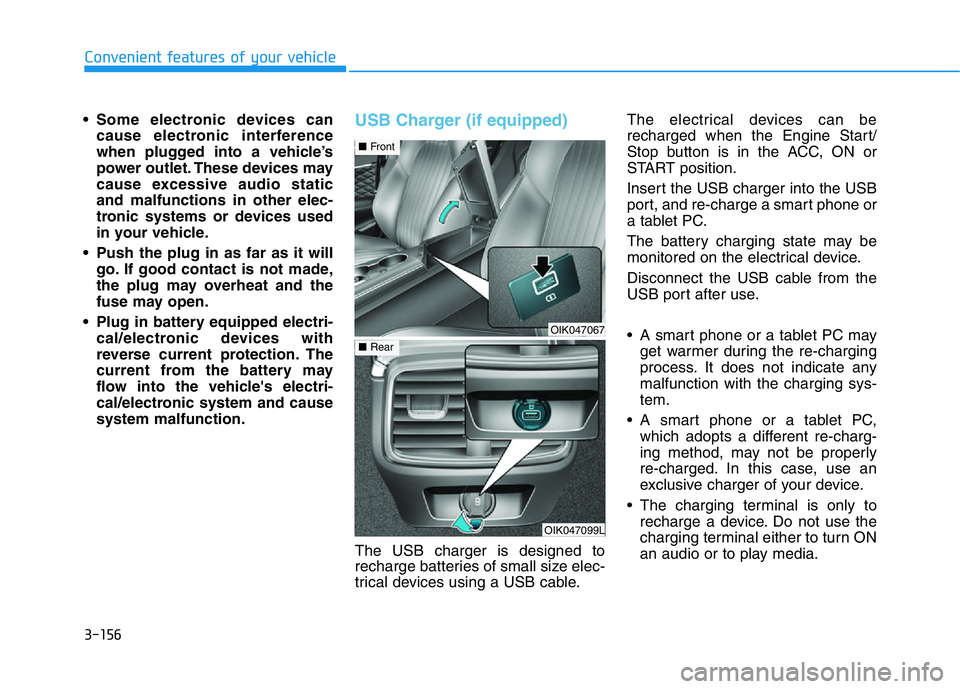
USB Charger (if equipped)
The USB charger is designed to
recharge batteries of small size elec-
trical devices using a USB cable.The electrical devices can be
recharged when the Engine Start/
Stop button is in the ACC, ON or
START position.
Insert the USB charger into the USB
port, and re-charge a smart phone or
a tablet PC.
The battery charging state may be
monitored on the electrical device.
Disconnect the USB cable from the
USB port after use.
• A smart phone or a tablet PC may
get warmer during the re-charging
process. It does not indicate any
malfunction with the charging sys-
tem.
• A smart phone or a tablet PC,
which adopts a different re-charg-
ing method, may not be properly
re-charged. In this case, use an
exclusive charger of your device.
• The charging terminal is only to
recharge a device. Do not use the
charging terminal either to turn ON
an audio or to play media.
OIK047067
■Front
OIK047099L
■Rear
Page 247 of 516
4-2
Infotainment system
• If you install an aftermarket HID
head lamp, your vehicle's audio
and electronic devices may not
function properly.
• Prevent chemicals such as per-
fume, cosmetic oil, sun cream,
hand cleaner, and air freshener
from contacting the interior
parts because they may cause
damage or discoloration.
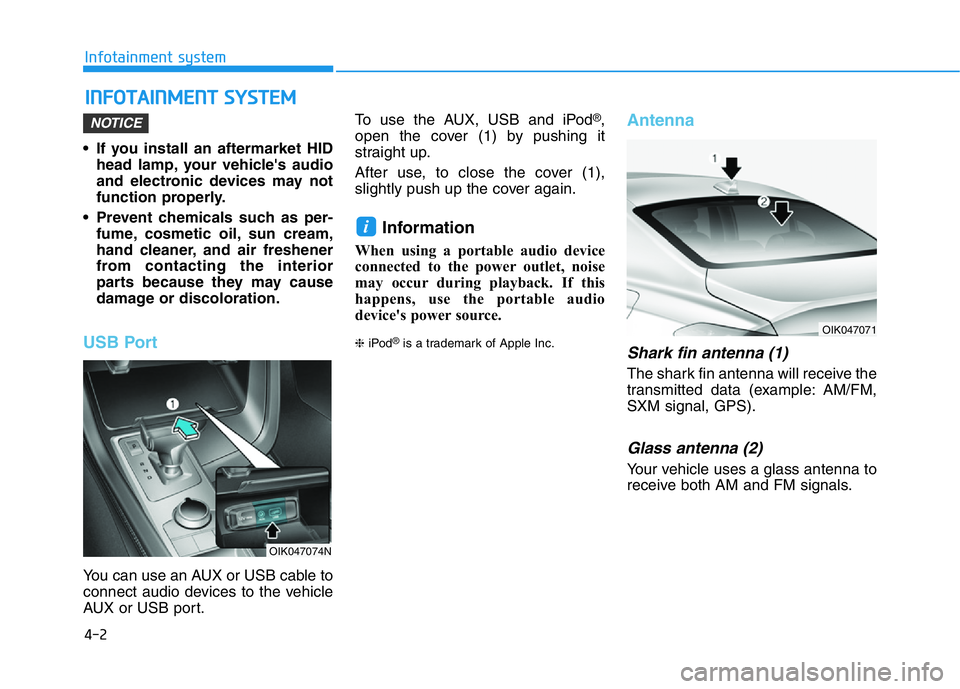
USB Port
You can use an AUX or USB cable to
connect audio devices to the vehicle
AUX or USB port.To use the AUX, USB and iPod
®,
open the cover (1) by pushing it
straight up.
After use, to close the cover (1),
slightly push up the cover again.
Information
When using a portable audio device
connected to the power outlet, noise
may occur during playback. If this
happens, use the portable audio
device's power source.
❈iPod®is a trademark of Apple Inc.
Antenna
Shark fin antenna (1)
The shark fin antenna will receive the
transmitted data (example: AM/FM,
SXM signal, GPS).
Glass antenna (2)
Your vehicle uses a glass antenna to
receive both AM and FM signals.
i
NOTICE
INFOTAINMENT SYSTEM
OIK047074N
OIK047071
Page 385 of 516

5-136
Driving your vehicle
Winter Precautions
Use high quality ethylene glycol
coolant
Your vehicle is delivered with high
quality ethylene glycol coolant in the
cooling system. It is the only type of
coolant that should be used because
it helps prevent corrosion in the cool-
ing system, lubricates the water
pump and prevents freezing. Be sure
to replace or replenish your coolant
in accordance with the maintenance
schedule in chapter 7. Before winter,
have your coolant tested to assure
that its freezing point is sufficient for
the temperatures anticipated during
the winter.
Change to "winter weight" oil if
necessary
In some climates it is recommended
that a lower viscosity "winter weight"
oil be used during cold weather. See
chapter 8 for recommendations. If
you aren't sure what weight oil you
should use, consult an authorized
retailer of Genesis Branded prod-
ucts.
Check battery and cables
Winter puts additional burdens on
the battery system. Visually inspect
the battery and cables as described
in chapter 7. The level of charge in
your battery can be checked by an
authorized retailer of Genesis
Branded products or a service sta-
tion.
Check spark plugs and ignition
system
Inspect your spark plugs as
described in chapter 7 and replace
them if necessary. Also check all
ignition wiring and components to be
sure they are not cracked, worn or
damaged in any way.
Use approved window washer
anti-freeze in system
To keep the water in the window
washer system from freezing, add an
approved window washer anti-freeze
solution in accordance with instruc-
tions on the container. Window wash-
er anti-freeze is available from an
authorized retailer of Genesis
Branded products and most auto
parts outlets. Do not use engine
coolant or other types of anti-freeze
as these may damage the paint fin-
ish.
Page 416 of 516

6-23
What to do in an emergency
1. Speed restriction label
2. Sealant bottle and label with
speed restriction
3. Filling hose from sealant bottle to
wheel
4. Connectors and cable for power
outlet direct connection5. Holder for the sealant bottle
6. Compressor
7. ON/OFF switch
8. Pressure gage for displaying the
tire inflation pressure
9. Button for reducing tire inflation
pressureConnectors, cable and connection
hose are stored in the compressor
housing.
Strictly follow the specified
sequence, otherwise the sealant
may escape under high pressure.
6
ODE067044
Components of the Tire Mobility Kit
Do not use the tire sealant after
the sealant has expired (i.e.
pasted the expiration date on
the sealant container). This can
increase the risk of tire failure.
WARNING
•Keep out of reach of children.
•Avoid contact with eyes.
•Do not swallow.
WARNING
Page 418 of 516

6-25
What to do in an emergency
5. Plug the compressor power cord
(4) into the vehicle power outlet.
6. With the Engine Start/Stop button
in the ON position, switch on the
compressor and let it run for
approximately 5~7 minutes to fill
the sealant up to proper pressure.
(refer to the Tire and Wheels,
chapter 8). The inflation pressure
of the tire after filling is unimpor-
tant and will be checked/corrected
later.
Be careful not to overinflate the
tire and stay away from the tire
when filling it.7. Switch off the compressor.
8. Detach the hoses from the sealant
bottle connector and from the tire
valve.
Return the Tire Mobility Kit to its stor-
age location in the vehicle.
Distributing the sealant
9. Immediately drive approximately
4~6miles (7~10km or about 10
minutes) to evenly distribute the
sealant in the tire.
Do not exceed a speed of 50 mph
(80 km/h). If possible, do not fall
below a speed of 12 mph (20 km/h).
While driving, if you experience any
unusual vibration, ride disturbance or
noise, reduce your speed and drive
with caution until you can safely pull
off of the side of the road.
Call for road side service or towing.
When you use the Tire Mobility Kit,
the tire pressure sensors and wheel
may be damaged by sealant, have it
inspected at an authorized retailer of
Genesis Branded products.
6
OIK069010
Do not attempt to drive your
vehicle if the tire pressure is
below 29 psi (200 kpa). This
could result in an accident due
to sudden tire failure.
CAUTION
Do not leave your vehicle run-
ning in a poorly ventilated area
for extended periods of time.
Carbon monoxide poisoning
and suffocation can occur.
WARNING