lane assist GENESIS G80 2017 User Guide
[x] Cancel search | Manufacturer: GENESIS, Model Year: 2017, Model line: G80, Model: GENESIS G80 2017Pages: 496, PDF Size: 12.82 MB
Page 326 of 496
5-71
Driving your vehicle
5
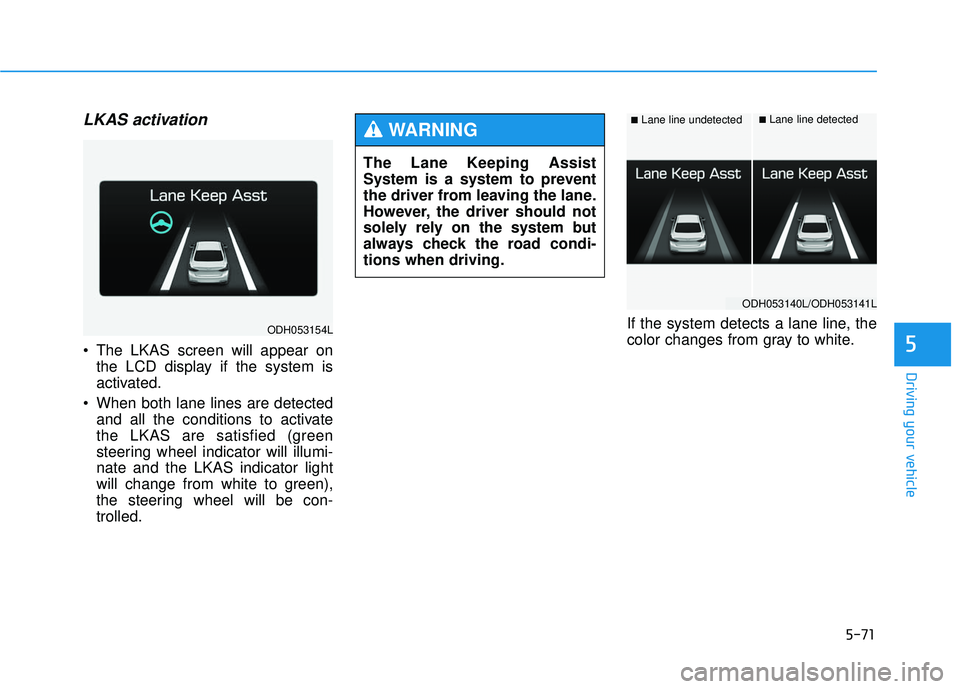
LKAS activation
The LKAS screen will appear onthe LCD display if the system is
activated.
When both lane lines are detected and all the conditions to activate
the LKAS are satisfied (green
steering wheel indicator will illumi-
nate and the LKAS indicator light
will change from white to green),
the steering wheel will be con-
trolled. If the system detects a lane line, the
color changes from gray to white.
The Lane Keeping Assist
System is a system to prevent
the driver from leaving the lane.
However, the driver should not
solely rely on the system but
always check the road condi-
tions when driving.
WARNING ■Lane line undetected■Lane line detected
ODH053154L
ODH053140L/ODH053141L
Page 329 of 496
5-74
Driving your vehicle
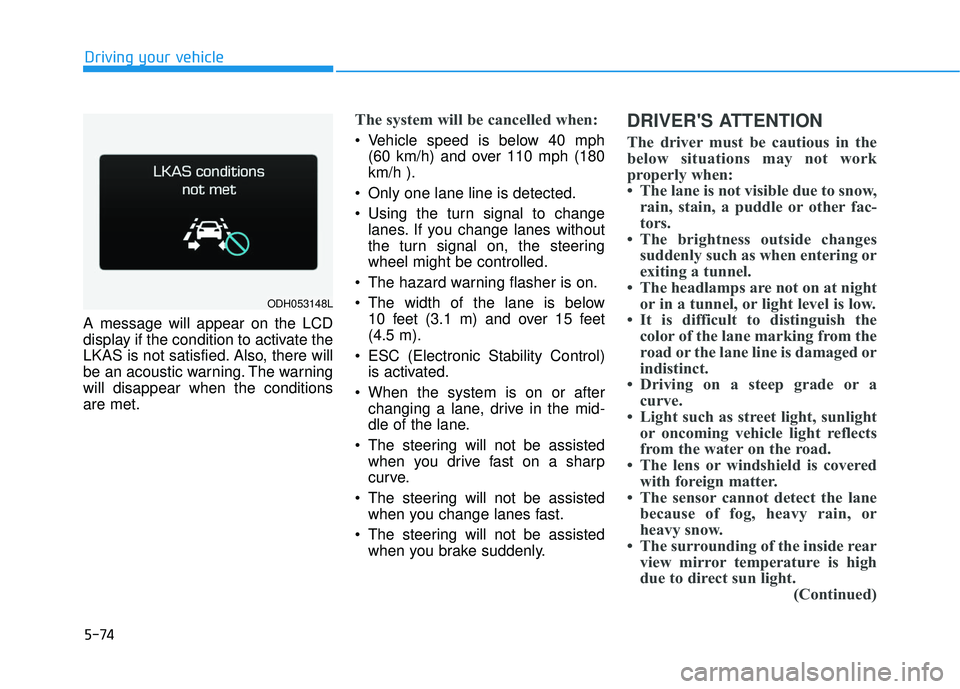
A message will appear on the LCD
display if the condition to activate the
LKAS is not satisfied. Also, there will
be an acoustic warning. The warning
will disappear when the conditions
are met.
The system will be cancelled when:
Vehicle speed is below 40 mph (60 km/h) and over 110 mph (180
km/h ).
Only one lane line is detected.
Using the turn signal to change lanes. If you change lanes without
the turn signal on, the steering
wheel might be controlled.
The hazard warning flasher is on.
The width of the lane is below 10 feet (3.1 m) and over 15 feet
(4.5 m).
ESC (Electronic Stability Control) is activated.
When the system is on or after changing a lane, drive in the mid-
dle of the lane.
The steering will not be assisted when you drive fast on a sharp
curve.
The steering will not be assisted when you change lanes fast.
The steering will not be assisted when you brake suddenly.
DRIVER'S ATTENTION
The driver must be cautious in the
below situations may not work
properly when:
• The lane is not visible due to snow,rain, stain, a puddle or other fac-
tors.
• The brightness outside changes suddenly such as when entering or
exiting a tunnel.
• The headlamps are not on at night or in a tunnel, or light level is low.
• It is difficult to distinguish the color of the lane marking from the
road or the lane line is damaged or
indistinct.
• Driving on a steep grade or a curve.
• Light such as street light, sunlight or oncoming vehicle light reflects
from the water on the road.
• The lens or windshield is covered with foreign matter.
• The sensor cannot detect the lane because of fog, heavy rain, or
heavy snow.
• The surrounding of the inside rear view mirror temperature is high
due to direct sun light. (Continued)
ODH053148L
Page 332 of 496

5-77
Driving your vehicle
5
Lane Departure Warning System(LDWS)
LDWS alerts the driver with a visual
warning and steering wheel vibration
warning when the system detects the
vehicle departing the lane. The steer-
ing wheel will not be controlled.
Pre-Departure Control
LKAS assists the driver by control-
ling the steering wheel before lane
departure. When the vehicle is near
the edge of the lane, LKAS starts
controlling the steering wheel to
assist the driver to stay in the lane.
Post-Departure Control
LKAS assists the driver by control-
ling the steering wheel when lane
departure has started. When the
vehicle's front wheel contacts the
inside edge of lane line, LKAS starts
controlling the steering wheel to
assist the driver to stay in the lane. This device complies with Part 15
of the FCC rules.
Operation is subject to the following
two conditions:
1. This device may not cause harm-
ful interference, and
2. This device must accept any inter- ference received, including inter-
ference that may cause undesired
operation.
Page 333 of 496

5-78
Driving your vehicle
The Blind Spot Detection System
(BSD) uses a radar sensor to alert
the driver.
It senses the rear side territory of the
vehicle and provides an indication to
the driver if it detects an object
approaching from these areas. (1) BSD (Blind Spot Detection)
The warning range depends on
your vehicle speed. However, if
your vehicle is much faster than
the other vehicle, the system will
not warn you.
(2) LCA (Lane Change Assist) If the system detects a vehicle
approaching you at high speed,
the system will warn you.
(3) RCTA (Rear Cross Traffic Alert) If the sensor detects an
approaching vehicle from the left
and right side as your vehicle
moves rearward, the system will
warn you.
B BL
LI
IN
N D
D
S
S P
P O
O T
T
D
D E
ET
T E
EC
CT
T I
IO
O N
N
S
S Y
Y S
ST
T E
EM
M
(
( B
B S
SD
D )
)
(
( I
IF
F
E
E Q
Q U
UI
IP
P P
PE
ED
D )
)
ODH053032
Blind spot area
Closing at high speed
Always check the road condi-
tion while driving for unex-
pected situations even
though the Blind Spot
Detection System (BSD) is
operating.
The Blind Spot Detection
System (BSD) is a supplemen-
tal system to assist you. Do
not solely rely on the system
and always pay attention and
drive safely.
The Blind Spot Detection
System (BSD) is not a substi-
tute for proper and safe driv-
ing. Always drive safely and
use caution when changing
lanes or backing the vehicle
up. The Blind Spot Detection
System (BSD) may not detect
every object alongside the
vehicle.
WARNING
Page 334 of 496

5-79
Driving your vehicle
5
BSD (Blind Spot Detection) /
LCA (Lane Change Assist)
Operating conditions
To operate:
Press the BSD switch with the
Engine Start/Stop button in the ON
position. The indicator illuminates on
the switch. If vehicle speed exceeds
20 mph (30km/h) the system will acti-
vate.To cancel:
Press the BSD switch again. The
indicator on the switch will go off.
When the system is not used, turn
the system off by turning off the
switch.
✽ ✽
NOTICE
• If the engine is turned off and on,
the system returns to the previous
state.
• When the system is turned on, the warning light will illuminate for 3
seconds on the outside rearview
mirror.
Warning type
The system will activate when:
1.The system is on.
2.Vehicle speed is above about 20
mph (30 km/h).
3.Other vehicles are detected in the rear side.
ODH053031
As the Blind Spot Detection
(BSD) system is a supplemental
device for your safe driving, it
may be dangerous to rely on
only the BSD information of the
head up display image when
changing the lane. Always pay
attention to drive safely.
WARNING
Page 488 of 496

I-2
Advanced smart cruise control system ...........................5-54
Air bags ........................................................................\
...2-46Driver’s and passenger’s front air bags......................2-48
Side air bags ...............................................................2-49
Curtain air bags ..........................................................2-50
Air bag warning light .................................................2-52
Occupant classification system ..................................2-57
Air bag warning labels ...............................................2-68
Air cleaner.......................................................................7\
-34
Air conditioning system................................................3-134
Alarm system ..................................................................3-15
All wheel drive (AWD) ..................................................5-19
Antenna ........................................................................\
.....4-3
Anti-lock brake system (ABS) .......................................5-35
Appearance care..............................................................7-87 Exterior care ...............................................................7-87
Interior care ................................................................7-92
Auto Hold .......................................................................5\
-31
Automatic climate control system ................................3-134 Automatic heating and air conditioning ...................3-135
Manual heating and air conditioning .......................3-136
Automatic transmission ..................................................5-11 Sports mode ................................................................5-14
Paddle shifter ..............................................................5-15
Shift lock system ........................................................5-16
Automatic Emergency Braking (AEB)...........................5-45 Bag hanger ....................................................................3-15\
9
Battery ........................................................................\
.....7-40
Battery saver function ...................................................3-115
Before driving ...................................................................5-4
Blind Spot Detection System (BSD) ..............................5-78
Blind Spot Detection/Lane Change Assist .................5-79
Rear Cross Traffic Alert .............................................5-82
Brake fluid ......................................................................7-\
32
Brake system ...................................................................5-23 Foot parking brake .....................................................5-24
Electronic parking brake (EPB) .................................5-26
Auto Hold ...................................................................5-31
Anti-lock brake system (ABS) ...................................5-35
Electronic Stability Control (ESC).............................5-38
Hill-Start Assist Control (HAC) .................................5-41
Good braking practices ..............................................5-41
Bulb replacement ............................................................7-79
Bulb wattage .....................................................................8-3\
Button start/stop, see engine start/stop button ..................5-6
Index
AB
Page 492 of 496

I-6
Power outlet..............................................................3-156
Clock ........................................................................\
3-158
Bag hanger................................................................3-159
Clothes hanger ..........................................................3-158
Floor mat anchor(s) ..................................................3-159
Rear curtain ..............................................................3-160
Side curtain...............................................................3-161
Luggage net holder ...................................................3-162
Interior light ..................................................................3-118
Interior overview...............................................................1-4
Jack and tools..................................................................6-15
Jack label........................................................................\
.6-21
Jump starting .....................................................................6-4\
Label Air bag warning label .................................................2-68
Tire loading information label....................................5-94
Certification label .......................................................5-97
Jack label ....................................................................6-21\
Vehicle certification label .............................................8-8
Tire specification and pressure label ............................8-9
Refrigerant label ...........................................................8-9
Lane keeping assist system (LKAS)...............................5-69 LCD display ....................................................................3-68\
LCD modes ................................................................3-68
Information modes .....................................................3-71
User settings mode .....................................................3-73
Warning messages ......................................................3-80
Light ........................................................................\
......3-110 Exterior lights ...........................................................3-110
Smart high beam.......................................................3-112
Battery saver function ..............................................3-115
Headlamp delay function..........................................3-115
Daytime running light ..............................................3-116
Headlamp leveling device ........................................3-117
Headlamp washer .....................................................3-117
Welcome system .......................................................3-117
Interior lights ............................................................3-118
Light bulbs ......................................................................7-\
79
Lubricants and capacities..................................................8-6
Luggage net (holder).....................................................3-162
Lumbar support ...............................................................2-10
Main fuse ........................................................................\
7-64
Maintenance Maintenance services ...................................................7-5
Owner maintenance ......................................................7-6
Scheduled maintenance service....................................7-8
Normal maintenance schedule .....................................7-9
Index
M
J
L