Bsd GENESIS G80 2017 Owner's Manual
[x] Cancel search | Manufacturer: GENESIS, Model Year: 2017, Model line: G80, Model: GENESIS G80 2017Pages: 496, PDF Size: 12.82 MB
Page 165 of 496
3-77
Convenient features of your vehicle
3
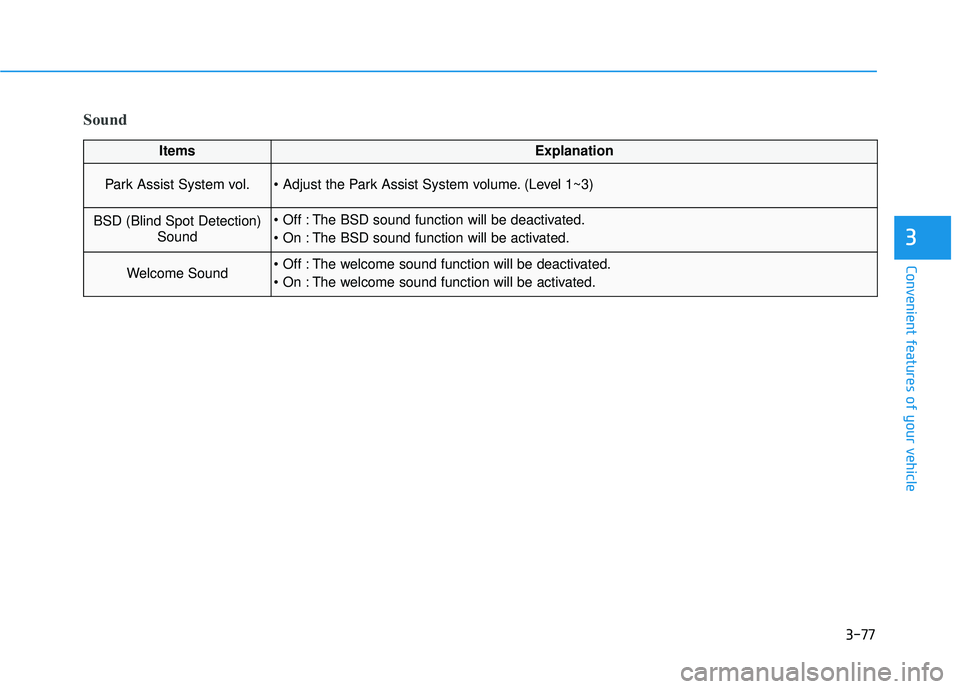
Sound
ItemsExplanation
Park Assist System vol. (Level 1~3)
BSD (Blind Spot Detection)Sound The BSD sound function will be deactivated.
The BSD sound function will be activated.
Welcome Sound The welcome sound function will be deactivated.
The welcome sound function will be activated.
Page 174 of 496

3-86
Convenient features of your vehicle
Low Washer Fluid
This warning message illuminateson the service reminder mode if
the washer fluid level in the reser-
voir is nearly empty.
It means that you should refill the washer fluid.
Check BSD System (if equipped)
This warning message illuminatesif there is a malfunction with the
Blind Spot Detection (BSD) sys-
tem. And the BSD system will be
automatically deactivated. In this
case, have your vehicle inspected
by an authorized retailer of
Genesis Branded products.
For more details, refer to "Blind
Spot Detection (BSD) System" in
chapter 5.
Check PSB
This warning message illuminates if there is a malfunction with the
Pre-active Seat Belt (PSB) system.
In this case, have your vehicle
inspected by an authorized retailer
of Genesis Branded products.
For more details, refer to "Seat
Belt" in chapter 2.
ODH043246LODH043254LODH053127L
Page 197 of 496
3-109
Convenient features of your vehicle
3
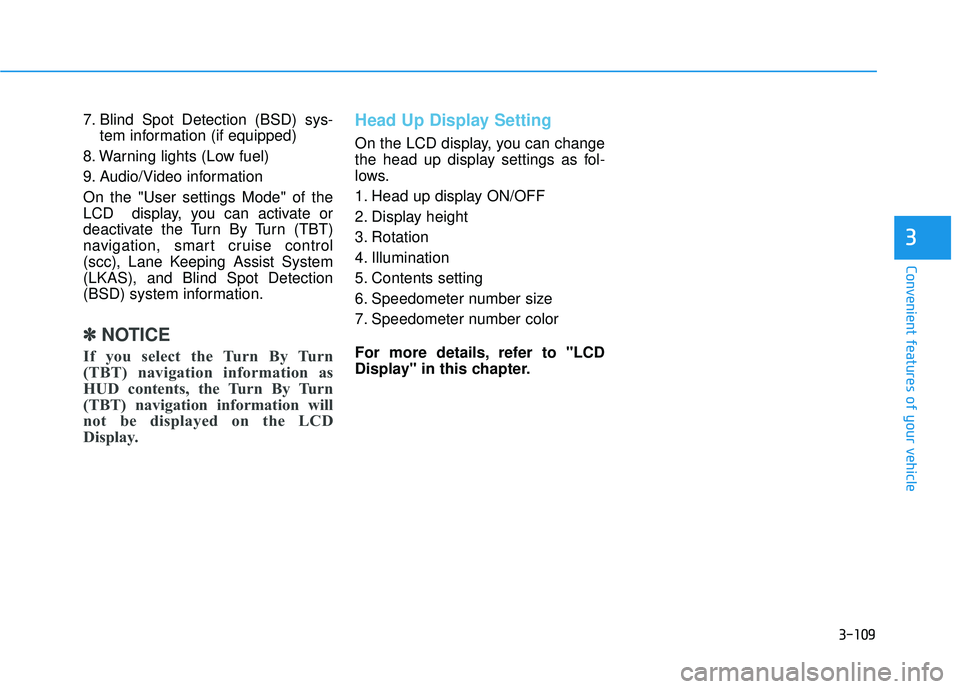
7. Blind Spot Detection (BSD) sys-tem information (if equipped)
8. Warning lights (Low fuel)
9. Audio/Video information
On the "User settings Mode" of the
LCD display, you can activate or
deactivate the Turn By Turn (TBT)
navigation, smart cruise control
(scc), Lane Keeping Assist System
(LKAS), and Blind Spot Detection
(BSD) system information.
✽ ✽ NOTICE
If you select the Turn By Turn
(TBT) navigation information as
HUD contents, the Turn By Turn
(TBT) navigation information will
not be displayed on the LCD
Display.
Head Up Display Setting
On the LCD display, you can change
the head up display settings as fol-
lows.
1. Head up display ON/OFF
2. Display height
3. Rotation
4. Illumination
5. Contents setting
6. Speedometer number size
7. Speedometer number color
For more details, refer to "LCD
Display" in this chapter.
Page 256 of 496
Driving your vehicle
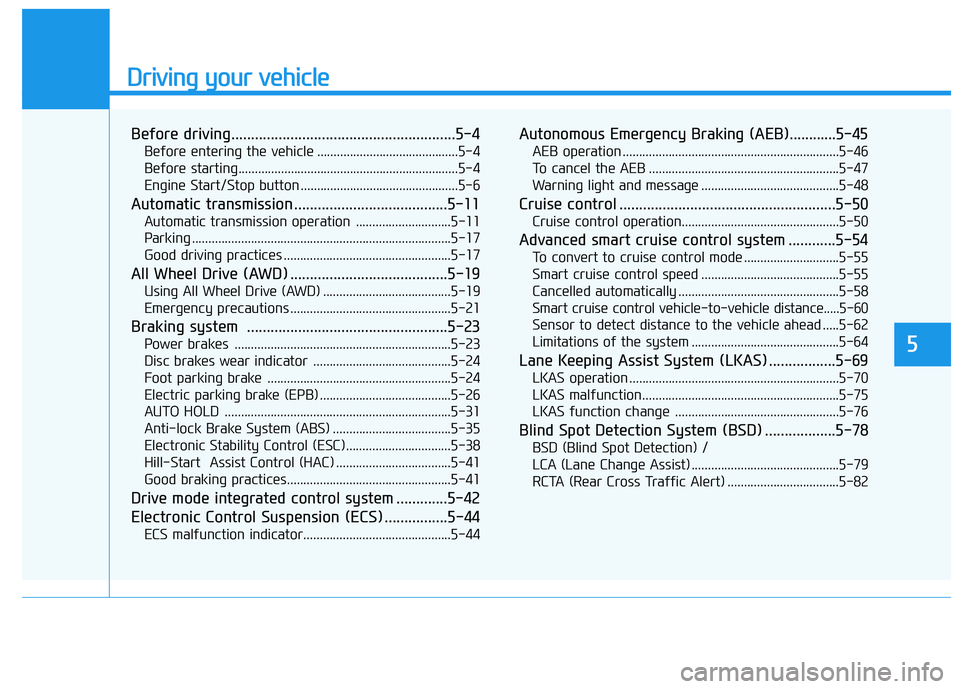
Before driving.........................................................5-4
Before entering the vehicle ...........................................5-4
Before starting...................................................................5-4
Engine Start/Stop button ................................................5-6
Automatic transmission .......................................5-11
Automatic transmission operation .............................5-11
Parking ........................................................................\
.......5-17
Good driving practices ...................................................5-17
All Wheel Drive (AWD) ........................................5-19
Using All Wheel Drive (AWD) .......................................5-19
Emergency precautions .................................................5-21
Braking system ...................................................5-23
Power brakes ..................................................................5-23
Disc brakes wear indicator ..........................................5-24
Foot parking brake ........................................................5-24
Electric parking brake (EPB) ........................................5-26
AUTO HOLD .....................................................................5-3\
1
Anti-lock Brake System (ABS) ....................................5-35
Electronic Stability Control (ESC)................................5-38
Hill-Start Assist Control (HAC) ...................................5-41
Good braking practices..................................................5-41
Drive mode integrated control system .............5-42
Electronic Control Suspension (ECS) ................5-44
ECS malfunction indicator.............................................5-44
Autonomous Emergency Braking (AEB)............5-45
AEB operation ..................................................................5-46
To cancel the AEB ..........................................................5-47
Warning light and message ..........................................5-48
Cruise control .......................................................5-50
Cruise control operation................................................5-50
Advanced smart cruise control system ............5-54
To convert to cruise control mode .............................5-55
Smart cruise control speed ..........................................5-55
Cancelled automatically .................................................5-58
Smart cruise control vehicle-to-vehicle distance.....5-60
Sensor to detect distance to the vehicle ahead .....5-62
Limitations of the system .............................................5-64
Lane Keeping Assist System (LKAS) .................5-69
LKAS operation ................................................................5-70
LKAS malfunction............................................................5-75
LKAS function change ..................................................5-76
Blind Spot Detection System (BSD) ..................5-78
BSD (Blind Spot Detection) /
LCA (Lane Change Assist) .............................................5-79
RCTA (Rear Cross Traffic Alert) ..................................5-82
5
Page 333 of 496

5-78
Driving your vehicle
The Blind Spot Detection System
(BSD) uses a radar sensor to alert
the driver.
It senses the rear side territory of the
vehicle and provides an indication to
the driver if it detects an object
approaching from these areas. (1) BSD (Blind Spot Detection)
The warning range depends on
your vehicle speed. However, if
your vehicle is much faster than
the other vehicle, the system will
not warn you.
(2) LCA (Lane Change Assist) If the system detects a vehicle
approaching you at high speed,
the system will warn you.
(3) RCTA (Rear Cross Traffic Alert) If the sensor detects an
approaching vehicle from the left
and right side as your vehicle
moves rearward, the system will
warn you.
B BL
LI
IN
N D
D
S
S P
P O
O T
T
D
D E
ET
T E
EC
CT
T I
IO
O N
N
S
S Y
Y S
ST
T E
EM
M
(
( B
B S
SD
D )
)
(
( I
IF
F
E
E Q
Q U
UI
IP
P P
PE
ED
D )
)
ODH053032
Blind spot area
Closing at high speed
Always check the road condi-
tion while driving for unex-
pected situations even
though the Blind Spot
Detection System (BSD) is
operating.
The Blind Spot Detection
System (BSD) is a supplemen-
tal system to assist you. Do
not solely rely on the system
and always pay attention and
drive safely.
The Blind Spot Detection
System (BSD) is not a substi-
tute for proper and safe driv-
ing. Always drive safely and
use caution when changing
lanes or backing the vehicle
up. The Blind Spot Detection
System (BSD) may not detect
every object alongside the
vehicle.
WARNING
Page 334 of 496

5-79
Driving your vehicle
5
BSD (Blind Spot Detection) /
LCA (Lane Change Assist)
Operating conditions
To operate:
Press the BSD switch with the
Engine Start/Stop button in the ON
position. The indicator illuminates on
the switch. If vehicle speed exceeds
20 mph (30km/h) the system will acti-
vate.To cancel:
Press the BSD switch again. The
indicator on the switch will go off.
When the system is not used, turn
the system off by turning off the
switch.
✽ ✽
NOTICE
• If the engine is turned off and on,
the system returns to the previous
state.
• When the system is turned on, the warning light will illuminate for 3
seconds on the outside rearview
mirror.
Warning type
The system will activate when:
1.The system is on.
2.Vehicle speed is above about 20
mph (30 km/h).
3.Other vehicles are detected in the rear side.
ODH053031
As the Blind Spot Detection
(BSD) system is a supplemental
device for your safe driving, it
may be dangerous to rely on
only the BSD information of the
head up display image when
changing the lane. Always pay
attention to drive safely.
WARNING
Page 338 of 496

5-83
Driving your vehicle
5
✽
✽NOTICE
• If the detected vehicle is out of the
sensing range of your vehicle,
move the vehicle away from the
detected object slowly; the warn-
ing will be cancelled.
• The system may not operate prop- erly due to other factors or cir-
cumstances. Always pay attention
to your surrounding.
• If your vehicle's left or right side bumper is blinded by barrier or
vehicles, the system sensing ability
may be reduced.
The warning light on the out-
side rearview mirror will illu-
minate whenever a vehicle is
detected at the rear side by
the system.
To avoid accidents, do not
focus only on the warning
light and neglect to see the
surrounding of the vehicle.
Drive safely even though the
vehicle is equipped with a
Blind Spot Detection System
(BSD) and Rear Cross Traffic
Alert (RCTA). Do not solely
rely on the system but check
your surrounding before
changing lanes or backing the
vehicle up.
The system may not alert the
driver in some conditions so
always check the surround-
ings while driving.
(Continued)
(Continued)
The Blind Spot Detection
System (BSD) and Rear Cross
Traffic Alert (RCTA) are not a
substitute for proper and safe
driving practices. Always
drive safely and use caution
when changing lanes or back-
ing the vehicles up. The Blind
Spot Detection System (BSD)
may not detect every object
alongside the vehicle.
WARNING
Page 488 of 496

I-2
Advanced smart cruise control system ...........................5-54
Air bags ........................................................................\
...2-46Driver’s and passenger’s front air bags......................2-48
Side air bags ...............................................................2-49
Curtain air bags ..........................................................2-50
Air bag warning light .................................................2-52
Occupant classification system ..................................2-57
Air bag warning labels ...............................................2-68
Air cleaner.......................................................................7\
-34
Air conditioning system................................................3-134
Alarm system ..................................................................3-15
All wheel drive (AWD) ..................................................5-19
Antenna ........................................................................\
.....4-3
Anti-lock brake system (ABS) .......................................5-35
Appearance care..............................................................7-87 Exterior care ...............................................................7-87
Interior care ................................................................7-92
Auto Hold .......................................................................5\
-31
Automatic climate control system ................................3-134 Automatic heating and air conditioning ...................3-135
Manual heating and air conditioning .......................3-136
Automatic transmission ..................................................5-11 Sports mode ................................................................5-14
Paddle shifter ..............................................................5-15
Shift lock system ........................................................5-16
Automatic Emergency Braking (AEB)...........................5-45 Bag hanger ....................................................................3-15\
9
Battery ........................................................................\
.....7-40
Battery saver function ...................................................3-115
Before driving ...................................................................5-4
Blind Spot Detection System (BSD) ..............................5-78
Blind Spot Detection/Lane Change Assist .................5-79
Rear Cross Traffic Alert .............................................5-82
Brake fluid ......................................................................7-\
32
Brake system ...................................................................5-23 Foot parking brake .....................................................5-24
Electronic parking brake (EPB) .................................5-26
Auto Hold ...................................................................5-31
Anti-lock brake system (ABS) ...................................5-35
Electronic Stability Control (ESC).............................5-38
Hill-Start Assist Control (HAC) .................................5-41
Good braking practices ..............................................5-41
Bulb replacement ............................................................7-79
Bulb wattage .....................................................................8-3\
Button start/stop, see engine start/stop button ..................5-6
Index
AB