cruise control GENESIS G80 2018 Owner's Guide
[x] Cancel search | Manufacturer: GENESIS, Model Year: 2018, Model line: G80, Model: GENESIS G80 2018Pages: 516, PDF Size: 81.01 MB
Page 340 of 516

5-85
Driving your vehicle
5
Smart Cruise Control Vehicle-
to-Vehicle Distance
To set Vehicle-to-Vehicle
Distance
When the Smart Cruise Control
System is ON, you can set and main-
tain the distance from the vehicle
ahead of you without pressing the
accelerator or brake pedal.Each time the button is pressed, the
vehicle to vehicle distance changes
as follows:
For example, if you drive at 56 mph
(90 km/h), the distance maintain as
follows:
Distance 4 - approximately 172 feet
(52.5 m)
Distance 3 - approximately 130 feet
(40 m)
Distance 2 - approximately 106 feet
(32.5 m)
Distance 1 - approximately 82 feet
(25 m)
✽ ✽
NOTICE
Distance 4 is always set when the
system is used for the first time after
starting the engine.
When the lane ahead is clear:
The vehicle speed will maintain the
set speed.
ODH047576N
Distance 4 Distance 3 Distance 2
Distance 1
ODH053027
Page 341 of 516

5-86
Driving your vehicle
When there is a vehicle ahead
of you in your lane:
Your vehicle speed will slow down
or speed up to maintain the select-
ed distance.
If the vehicle ahead speeds up,
your vehicle will travel at a steady
cruising speed after accelerating to
the set speed.(Continued)
Even if the warning chime is
not activated, always pay
attention to the driving condi-
tions to prevent dangerous
situations from occurring.
When using the Smart Cruise
Control System:
The warning chime sounds
and the Vehicle-to Vehicle
Distance indicator blinks if
the vehicle is unable to main-
tain the selected distance
from the vehicle ahead.
If the warning chime sounds,
depress the accelerator or
brake pedal to actively adjust
the vehicle speed, and the dis-
tance to the vehicle ahead.
(Continued)
WARNING
ODH057218N
Distance 4 Distance 3
Distance 2Distance 1
ODH047576N/ODH047481N/
ODH047487N/ODH047485N
Page 342 of 516

5-87
Driving your vehicle
5
In traffic situation
In traffic, your vehicle will stop if the
vehicle ahead of you stops. Also, if
the vehicle ahead of you starts mov-
ing, your vehicle will start as well.
However, if the vehicle stops for
more than 3 seconds, you must
depress the accelerator pedal or
push up the toggle switch (RES+) to
start driving.
If you push the advanced smart
cruise control toggle switch (RES+
or SET-) while Auto Hold and
advanced smart cruise control is
operating (The green AUTO HOLD
indicator), Auto Hold will be released
regardless of accelerator pedal
operation and the vehicle will start to
move.
Sensor to detect distance to
the vehicle ahead
The Smart Cruise Control uses a
sensor to detect distance to the vehi-
cle ahead.
ODH057028
ODH047493L
If the vehicle ahead (vehicle
speed: less than 20 mph
(30km/h)) disappears to the next
lane, the warning chime will
sound and a message will
appear. Adjust your vehicle
speed for vehicles or objects
that can suddenly appear in
front of you by depressing the
brake pedal.
Always pay attention to the road
condition ahead.
CAUTION
ODH057242L
Page 343 of 516

5-88
Driving your vehicle
Warning messages
Smart Cruise Control disabled.
Radar blocked
When the sensor lens cover is
blocked with dirt, snow, or debris, the
Smart Cruise Control System opera-
tion may stop temporarily. If this
occurs, a warning message will
appear on the LCD display. Remove
any dirt, snow, or debris and clean
the radar sensor lens cover before
operating the Smart Cruise Control
System. The Smart Cruise Control
system may not properly activate, if
the radar is totally contaminated, or if
any substance is not detected after
turning on the engine (e.g. in an
open terrain).
Check Smart Cruise Control
System
The message will appear when the
vehicle to vehicle distance control
system is not functioning normally.
Take your vehicle to an authorized
retailer of Genesis Branded products
and have the system checked.
Do not install accessories
around the sensor and do not
replace the bumper by your-
self. It may interfere with the
sensor performance.
Always keep the sensor and
bumper clean.
To prevent sensor cover dam-
age from occurring, wash the
car with a soft cloth. Do not
spray pressurized water
directly on the sensor or sen-
sor cover.
Do not paint the sensor cover.
Do not damage the sensor or
sensor area by a strong
impact. If the sensor moves
slightly off position, the Smart
Cruise Control System will
not operate correctly. If this
occurs, have your vehicle
checked by an authorized
retailer of Genesis Branded
products.
Use only a Genesis/Hyundai
sensor cover for your vehicle.
CAUTION
ODH047497L
ODH047495L
Page 344 of 516
5-89
Driving your vehicle
5
Limitations of the system
The Smart Cruise Control System
may have limits to its ability to detect
distance to the vehicle ahead due to
road and traffic conditions.
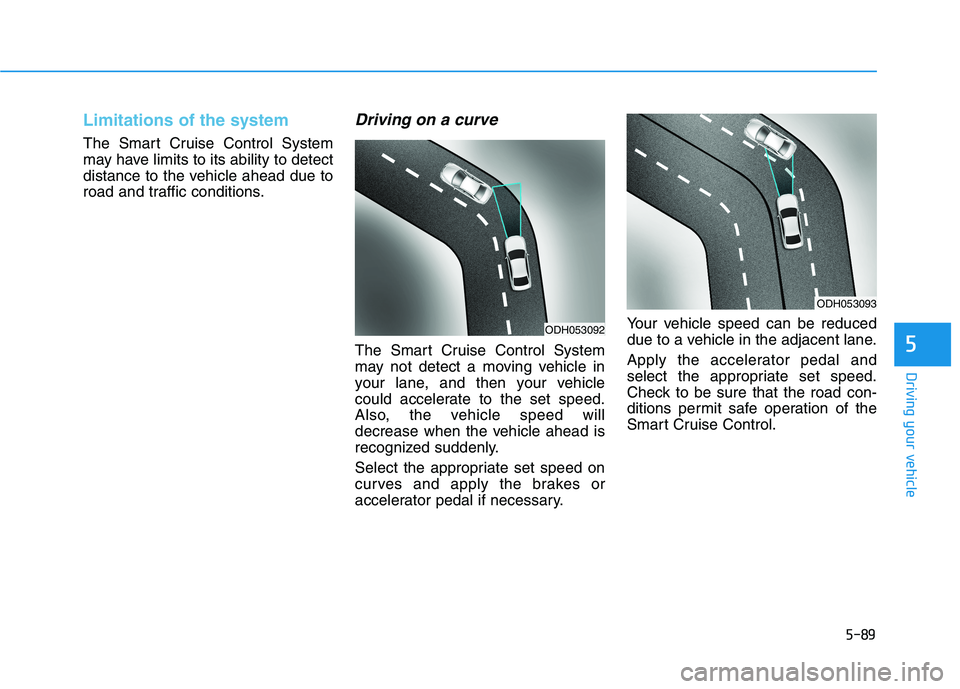
Driving on a curve
The Smart Cruise Control System
may not detect a moving vehicle in
your lane, and then your vehicle
could accelerate to the set speed.
Also, the vehicle speed will
decrease when the vehicle ahead is
recognized suddenly.
Select the appropriate set speed on
curves and apply the brakes or
accelerator pedal if necessary.Your vehicle speed can be reduced
due to a vehicle in the adjacent lane.
Apply the accelerator pedal and
select the appropriate set speed.
Check to be sure that the road con-
ditions permit safe operation of the
Smart Cruise Control.
ODH053093
ODH053092
Page 345 of 516

5-90
Driving your vehicle
Driving on a slope
During uphill or downhill driving, the
Smart Cruise Control System may
not detect a moving vehicle in your
lane, and cause your vehicle to
accelerate to the set speed. Also, the
vehicle speed will rapidly decrease
when the vehicle ahead is recog-
nized suddenly.
Select the appropriate set speed on
inclines and apply the brake or accel-
erator pedal if necessary.
Changing lanes
A vehicle which moves into your lane
from an adjacent lane cannot be rec-
ognized by the sensor until it is in the
sensor's detection range.
The sensor may not detect immedi-
ately when a vehicle cuts in sudden-
ly. Always pay attention to the traffic,
road and driving conditions.
If a slower vehicle moves into your
lane, your speed may decrease to
maintain the distance to the vehicle
ahead.
If a faster vehicle which moves into
your lane, your vehicle will acceler-
ate to the set speed.
Vehicle recognition
Some vehicles in your lane cannot
be recognized by the sensor:
- Narrow vehicles such as motorcy-
cles or bicycles
- Vehicles offset to one side
- Slow-moving vehicles or sudden-
decelerating vehicles
- Stopped vehicles
- Vehicles with small rear profile such
as trailers with no loads
ODH053096ODH053095ODH053094
Page 347 of 516

5-92
Driving your vehicle
Always look out for pedestrians when
your vehicle is maintaining a dis-
tance with the vehicle ahead.Always be cautious for vehicles with
higher height or vehicles carrying
loads that sticks out from the back of
the vehicle.When using the Smart Cruise
Control take the following pre-
cautions:
If an emergency stop is nec-
essary, you must apply the
brakes. The vehicle cannot be
stopped at every emergency
situation by using the Smart
Cruise Control System.
Keep a safe distance accord-
ing to road conditions and
vehicle speed. If the vehicle to
vehicle distance is too close
during a high-speed driving, a
serious collision may result.
Always maintain sufficient
braking distance and deceler-
ate your vehicle by applying
the brakes if necessary.
(Continued)
WARNING
ODH053100ODH053099
Page 348 of 516
5-93
Driving your vehicle
5
This device complies with Part 15
of the FCC rules.
Operation is subject to the following
two conditions:
1. This device may not cause harm-
ful interference, and
2. This device must accept any inter-
ference received, including inter-
ference that may cause undesired
operation. (Continued)
The Smart Cruise Control
System may not recognize
complex driving situations so
always pay attention to driv-
ing conditions and control
your vehicle speed.
The Smart Cruise Control
System may not operate tem-
porarily due to:
Electrical interference
Modifying the suspension
Differences of tire abrasion or
tire pressure
Installing different type of
tires
CAUTION
(Continued)
The Smart Cruise Control
System cannot recognize a
stopped vehicle, pedestrians
or an oncoming vehicle.
Always look ahead cautiously
to prevent unexpected and
sudden situations from occur-
ring.
Vehicles moving in front of
you with a frequent lane
change may cause a delay in
the system's reaction or may
cause the system to react to a
vehicle actually in an adjacent
lane. Always drive cautiously
to prevent unexpected and
sudden situations from occur-
ring.
Always be aware of the select-
ed speed and vehicle to vehi-
cle distance.
(Continued)
Page 363 of 516

5-108
Driving your vehicle
The Driver Attention Alert sys-
tem may not properly operate
with limited alerting in the fol-
lowing situations:
Not properly recognize lane
(See the LKAS)
Rough or intentionally eva-
sive driving
Large tire pressure deviation,
uneven wear, poor wheel
alignment, etc.
Severe winding road
Uneven road surface condi-
tion
Windy road
The vehicle drives through a
windy area.
(Continued)
(Continued)
The vehicle is controlled by
the following driving assist
systems:
- Lane Keeping Assist System
(LKAS)
- Autonomous Emergency
Braking (AEB) System
- Smart Cruise Control (SCC)
System
CAUTION
Page 366 of 516

5-111
Driving your vehicle
5
Driving in the rain
Rain and wet roads can make driving
dangerous. Here are a few things to
consider when driving in the rain or
on slick pavement:
Slow down and allow extra follow-
ing distance. A heavy rainfall
makes it harder to see and increas-
es the distance needed to stop
your vehicle.
Turn OFF your Cruise Control. (if
equipped)
Replace your windshield wiper
blades when they show signs of
streaking or missing areas on the
windshield.
Be sure your tires have enough
tread. If your tires do not have
enough tread, making a quick stop
on wet pavement can cause a skid
and possibly lead to an accident.
Refer to "Tire Tread" in chapter 7.
Turn on your headlamps to make it
easier for others to see you.
Driving too fast through large pud-
dles can affect your brakes. If you
must go through puddles, try to
drive through them slowly. If you believe your brakes may be
wet, apply them lightly while driv-
ing until normal braking operation
returns.
Hydroplaning
If the road is wet enough and you are
going fast enough, your vehicle may
have little or no contact with the road
surface and actually ride on the
water. The best advice is SLOW
DOWN when the road is wet. The
risk of hydroplaning increases as the
depth of tire tread decreases.(Refer
to "Tire Tread" in chapter 7.)
Driving in flooded areas
Avoid driving through flooded areas
unless you are sure the water is no
higher than the bottom of the wheel
hub. Drive through any water slowly.
Allow adequate stopping distance
because brake performance may be
reduced.
After driving through water, dry the
brakes by gently applying them sev-
eral times while the vehicle is moving
slowly.