driver GENESIS G80 2018 Quick Reference Guide
[x] Cancel search | Manufacturer: GENESIS, Model Year: 2018, Model line: G80, Model: GENESIS G80 2018Pages: 25, PDF Size: 8.69 MB
Page 19 of 25
Quick Reference Guide I 33
FEATURES AND CONTROLSDRIVING
32 I Quick Reference Guide GENESIS
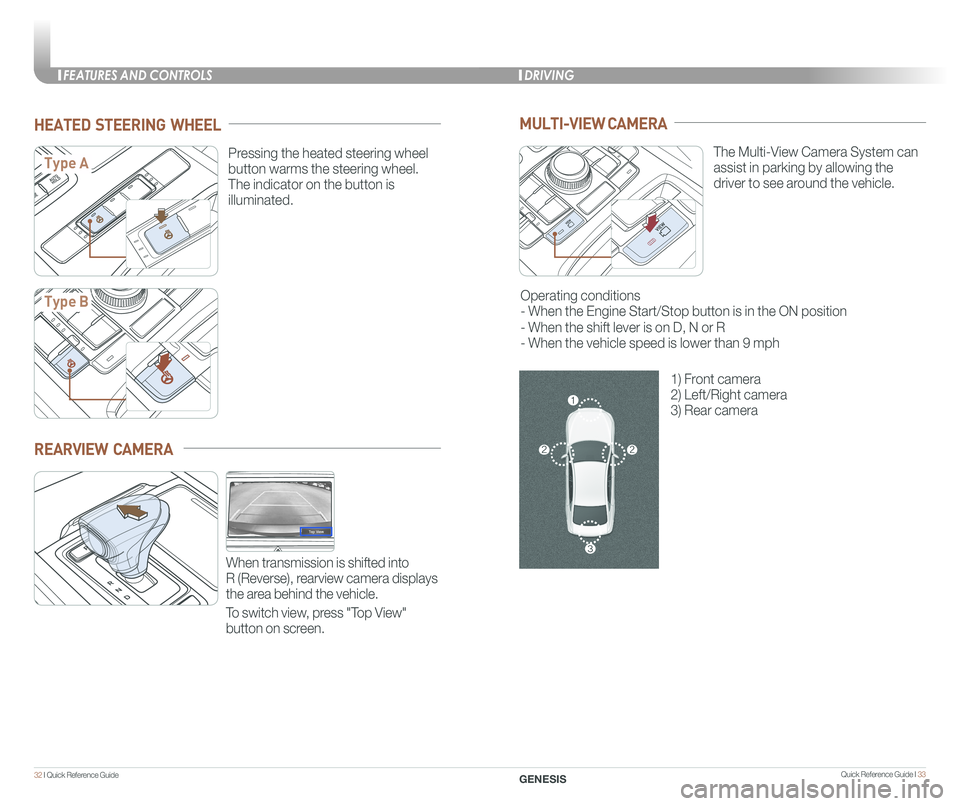
HEATED STEERING WHEEL
Pressing the heated steering wheel
button warms the steering wheel.
The indicator on the button is
illuminated.
Type A
Type B
REARVIEW CAMERA
When transmission is shifted into
R (Reverse), rearview camera displays
the area behind the vehicle.
To switch view, press "Top View"
button on screen.
MULTI-VIEW CAMERA
The Multi-View Camera System can
assist in parking by allowing the
driver to see around the vehicle.
Operating conditions
- When the Engine Start/Stop button is in the ON position
- When the shift lever is on D, N or R
- When the vehicle speed is lower than 9 mph
1) Front camera
2) Left/Right camera
3) Rear camera
Page 20 of 25
Quick Reference Guide I 35
DRIVING
34 I Quick Reference Guide GENESIS
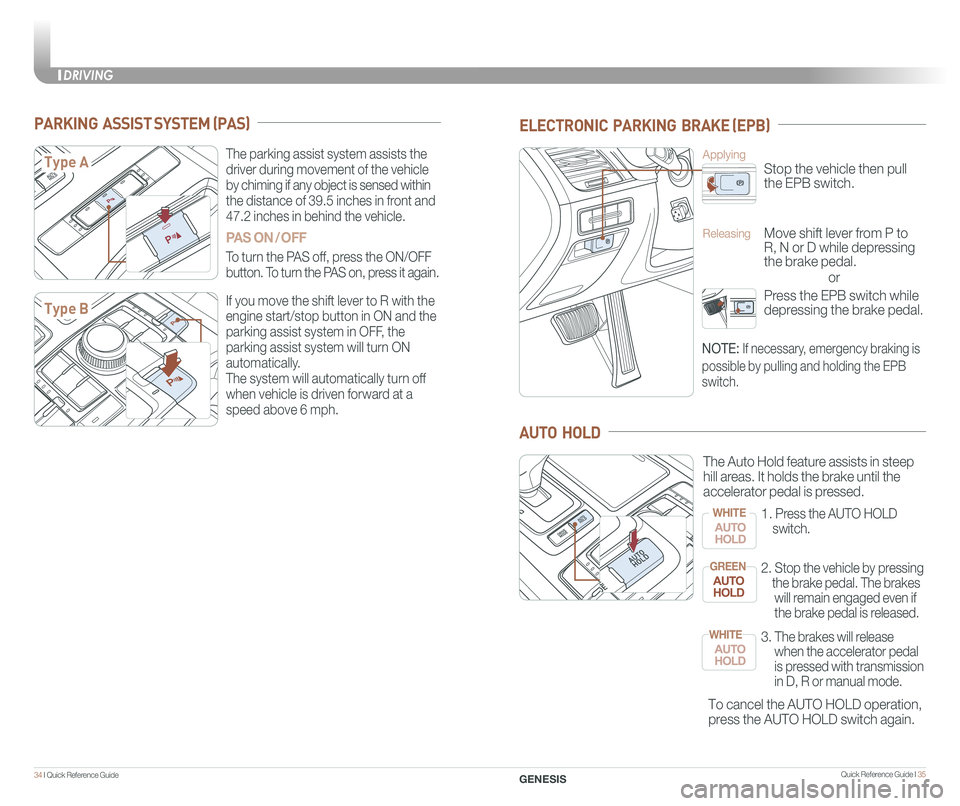
PARKING ASSIST SYSTEM (PAS)
The parking assist system assists the
driver during movement of the vehicle
by chiming if any object is sensed within
the distance of 39.5 inches in front and
47.2 inches in behind the vehicle.
PAS ON / OFF
To turn the PAS off, press the ON/OFF
button. To turn the PAS on, press it again.
If you move the shift lever to R with the
engine start/stop button in ON and the
parking assist system in OFF, the
parking assist system will turn ON
automatically.
The system will automatically turn off
when vehicle is driven forward at a
speed above 6 mph.
Type A
Type B
ELECTRONIC PARKING BRAKE (EPB)
or
Stop the vehicle then pull
the EPB switch.
Applying
Move shift lever from P to
R, N or D while depressing
the brake pedal.
Releasing
Press the EPB switch while
depressing the brake pedal.
NOTE: If necessary, emergency braking is
possible by pulling and holding the EPB
switch.
AUTO HOLD
To cancel the AUTO HOLD operation,
press the AUTO HOLD switch again.
The Auto Hold feature assists in steep
hill areas. It holds the brake until the
accelerator pedal is pressed.
1.
Press the AUTO HOLD
switch.
WHITE
2. Stop the vehicle by pressing
the brake pedal. The brakes
will remain engaged even if
the brake pedal is released.
GREEN
3. The brakes will release
when the accelerator pedal
is pressed with transmission
in D, R or manual mode.
WHITE
Page 21 of 25
Quick Reference Guide I 37
DRIVING
36 I Quick Reference Guide GENESIS
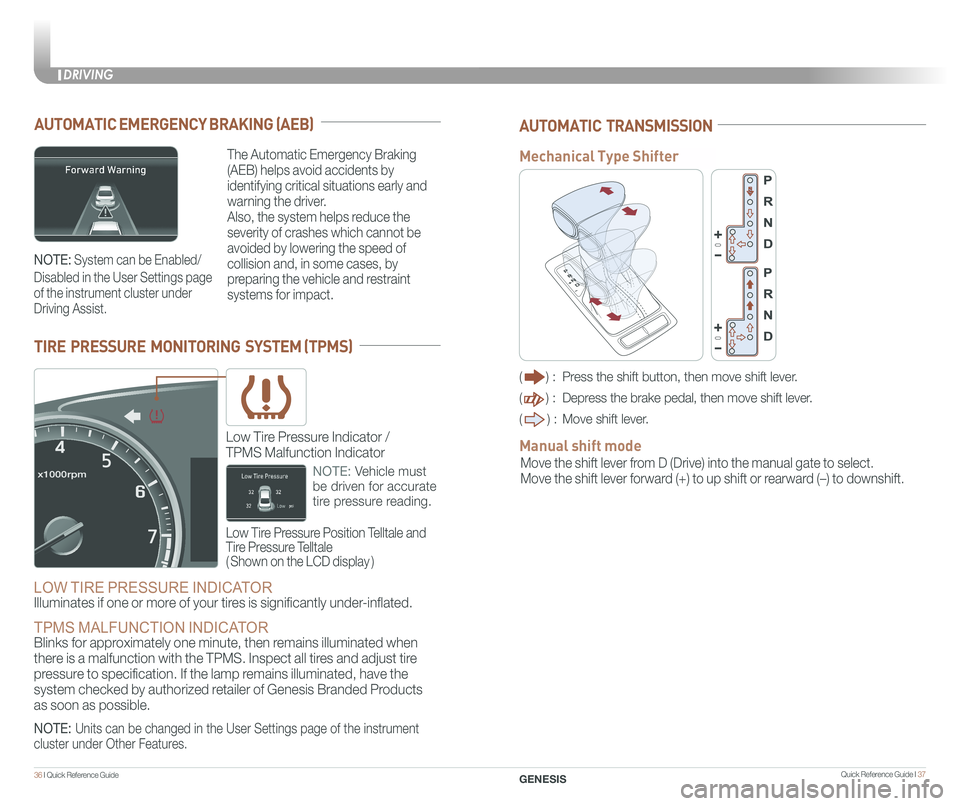
AUTOMATIC EMERGENCY BRAKING (AEB)
The Automatic Emergency Braking
(AEB) helps avoid accidents by
identifying critical situations early and
warning the driver.
Also, the system helps reduce the
severity of crashes which cannot be
avoided by lowering the speed of
collision and, in some cases, by
preparing the vehicle and restraint
systems for impact.
TIRE PRESSURE MONITORING SYSTEM (TPMS)
LOW TIRE PRESSURE INDICATOR
Illuminates if one or more of your tires is significantly under-inflated.
TPMS MALFUNCTION INDICATOR Blinks for approximately one minute, then remains illuminated when
there is a malfunction with the TPMS. Inspect all tires and adjust tire
pressure to specification. If the lamp remains illuminated, have the
system checked by authorized retailer of Genesis Branded Products
as soon as possible.
Low Tire Pressure Position Telltale and
Tire Pressure Telltale
( Shown on the LCD display )
Low Tire Pressure Indicator /
TPMS Malfunction Indicator
NOTE: Vehicle must
be driven for accurate
tire pressure reading.
NOTE: System can be Enabled/
Disabled in the User Settings page
of the instrument cluster under
Driving Assist.
NOTE: Units can be changed in the User Settings page of the instrument
cluster under Other Features.
AUTOMATIC TRANSMISSION
() : Press the shift button, then move shift lever.
() : Depress the brake pedal, then move shift lever.
() : Move shift lever.
Move the shift lever from D (Drive) into the manual gate to select.
Move the shift lever forward (+) to up shift or rearward (–) to downshift.
Manual shift mode
Mechanical Type Shifter
Page 23 of 25
 system displays the condition of the \
driver’s fatigue and inattention.
• Driver can adjust the Driver Attention Alert
System to the")
Quick Reference Guide I 41
The Driver Attention Alert (DAA) system displays the condition of the \
driver’s fatigue and inattention.
• Driver can adjust the Driver Attention Alert
System to the below settings. To adjust, go to
User Settings > Driving Assist > Driver
Attention Alert
Off - Driver Attention Alert system is
deactivated.
Normal - Driver Attention Alert system alerts
the driver of his/her fatigue level or inattentive
driving practices.
Early - Driver Attention Alert system alerts the
driver of his/her fatigue level or inattentive
driving practices faster than Normal mode.
The Driver Attention Alert system is operable,
when driving speed is between 40 mph and
110 mph .
40 I Quick Reference Guide
DRIVING
GENESIS
The BSD (Blind spot detection)
system uses a radar sensor to alert
the driver while driving.
It senses the rear side territory of the
vehicle and provides information to
the driver.
1 Blind spot detection
2 Lane change assist
3 Rear cross traffic alert
The BSD system will activate once vehicle speed exceeds 20 mph.
The rear cross traffic alert will activate, if vehicle is in reverse at speeds
below 6 mph and BSD is activated.
BLIND SPOT DETECTION SYSTEM (BSD)
DRIVER ATTENTION ALERT (DAA)
• To turn the BSD on, press the BSD
button. (indicator illuminated)
• To turn the BSD off, press the
BSD button again.
1
2
3
ELECTRONIC STABILITY CONTROL (ESC)
The ESC system is an electronic
system designed to help the driver
maintain vehicle control under
adverse conditions.
• To turn LKAS on,
press the LKAS switch.
• To turn LKAS off,
press the switch again.
The Lane Keeping Assist System
detects lane markers on the road,
and assists the driver’s steering to
help keep the vehicle between lanes.
LANE KEEPING ASSIST SYSTEM (LKAS)
ESC automatically selects the ON
position when the engine is started.
To turn off Traction Control
Press the ESC OFF button once.
To turn off Traction and Stability
Control
Press and hold the ESC OFF button
for more than 3 seconds.
NOTE: LKAS operates only when the
vehicle speed is above 38 mph and when
the LKAS indicator is green displayed in
the instrument cluster.
Refer to the Owner's Manual for more
detailed information.NOTE: LKAS Settings can be
adjusted in the User Settings page
of the instrument cluster under
Driving Assist.