driver GENESIS G80 2018 Quick Reference Guide
[x] Cancel search | Manufacturer: GENESIS, Model Year: 2018, Model line: G80, Model: GENESIS G80 2018Pages: 25, PDF Size: 8.69 MB
Page 1 of 25
Looking For more detailed information? This Quick Reference Guide does not replace your vehicle’sOwner’s Manual. If you require additional information or are unsure of a specific issue, we recommend that you always refer to the vehicle’s Owner’s Manual or contact your authorized retailer of Genesis Branded Products. The information contained in this Quick Reference Guide is correct at the time of printing; however, specifications and equipment can change without notice. No warranty or guarantee is being extended in this Quick Reference Guide, and Genesis Brand reserves the right to change product specifications and equipment at any time without incurring obligations. Some vehicles are shown with optional equipment.
MAINTENANCE
Low tire pressure indicator /
TPMS malfunction indicator
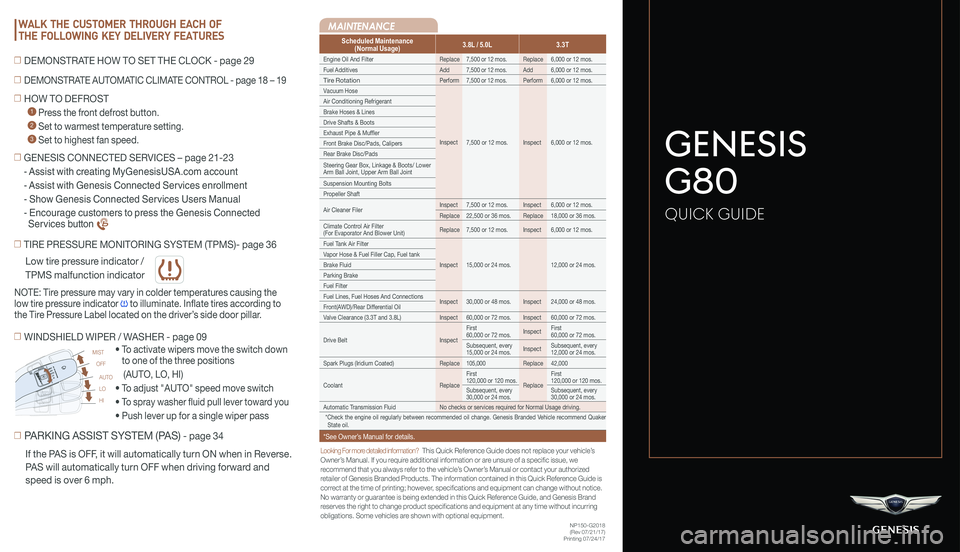
Scheduled Maintenance(Normal Usage)3.8L / 5.0L3.3T
Engine Oil And FilterReplace7,500 or 12 mos.Replace6,000 or 12 mos.
Fuel AdditivesAdd7,500 or 12 mos.Add6,000 or 12 mos.
Tire RotationPerform7,500 or 12 mos.Perform6,000 or 12 mos.
Vacuum Hose
Inspect7,500 or 12 mos.Inspect6,000 or 12 mos.
Air Conditioning Refrigerant
Brake Hoses & Lines
Drive Shafts & Boots
Exhaust Pipe & Muffler
Front Brake Disc/Pads, Calipers
Rear Brake Disc/Pads
Steering Gear Box, Linkage & Boots/ Lower Arm Ball Joint, Upper Arm Ball Joint
Suspension Mounting Bolts
Propeller Shaft
Air Cleaner FilerInspect7,500 or 12 mos.Inspect6,000 or 12 mos.
Replace22,500 or 36 mos.Replace18,000 or 36 mos.
Climate Control Air Filter (For Evaporator And Blower Unit)Replace7,500 or 12 mos.Inspect6,000 or 12 mos.
Fuel Tank Air Filter
Inspect15,000 or 24 mos.12,000 or 24 mos.
Vapor Hose & Fuel Filler Cap, Fuel tank
Brake Fluid
Parking Brake
Fuel Filter
Fuel Lines, Fuel Hoses And ConnectionsInspect30,000 or 48 mos.Inspect24,000 or 48 mos.Front(AWD)/Rear Differential Oil
Valve Clearance (3.3T and 3.8L)Inspect60,000 or 72 mos.Inspect60,000 or 72 mos.
Drive BeltInspect
First 60,000 or 72 mos.InspectFirst 60,000 or 72 mos.
Subsequent, every 15,000 or 24 mos.InspectSubsequent, every 12,000 or 24 mos.
Spark Plugs (Iridium Coated)Replace105,000Replace42,000
CoolantReplace
First 120,000 or 120 mos.Replace
First 120,000 or 120 mos.
Subsequent, every 30,000 or 24 mos.Subsequent, every 30,000 or 24 mos.
Automatic Transmission FluidNo checks or services required for Normal Usage driving.
*Check the engine oil regularly between recommended oil change. Genesis Branded Vehicle recommend Quaker State oil.
*See Owner’s Manual for details.
☐ TIRE PRESSURE MONITORING SYSTEM (TPMS)- page 36
☐ PARKING ASSIST SYSTEM (PAS) - page 34
• To activate wipers move the switch down
to one of the three positions
(AUTO, LO, HI)
• To adjust "AUTO" speed move switch
• To spray washer fluid pull lever toward you
• Push lever up for a single wiper pass
☐ WINDSHIELD WIPER / WASHER - page 09
AUTO
LO
HI
MIST
OFF
NOTE: Tire pressure may vary in colder temperatures causing the
low tire pressure indicator to illuminate. Inflate tires according to
the Tire Pressure Label located on the driver’s side door pillar.
If the PAS is OFF, it will automatically turn ON when in Reverse.
PAS will automatically turn OFF when driving forward and
speed is over 6 mph.
☐ HOW TO DEFROST
1 Press the front defrost button.
2 Set to warmest temperature setting.
3 Set to highest fan speed.
WALK THE CUSTOMER THROUGH EACH OF
THE FOLLOWING KEY DELIVERY FEATURES
☐ DEMONSTRATE AUTOMATIC CLIMATE CONTROL - page 18 – 19
☐ DEMONSTRATE HOW TO SET THE CLOCK - page 29
NP150-G2018(Rev 07/21/17)Printing 07/24/17
☐ GENESIS CONNECTED SERVICES – page 21-23
- Assist with creating MyGenesisUSA.com account
- Assist with Genesis Connected Services enrollment
- Show Genesis Connected Services Users Manual
- Encourage customers to press the Genesis Connected
Services button
GENESIS
G80
QUICK GUIDE
Page 3 of 25
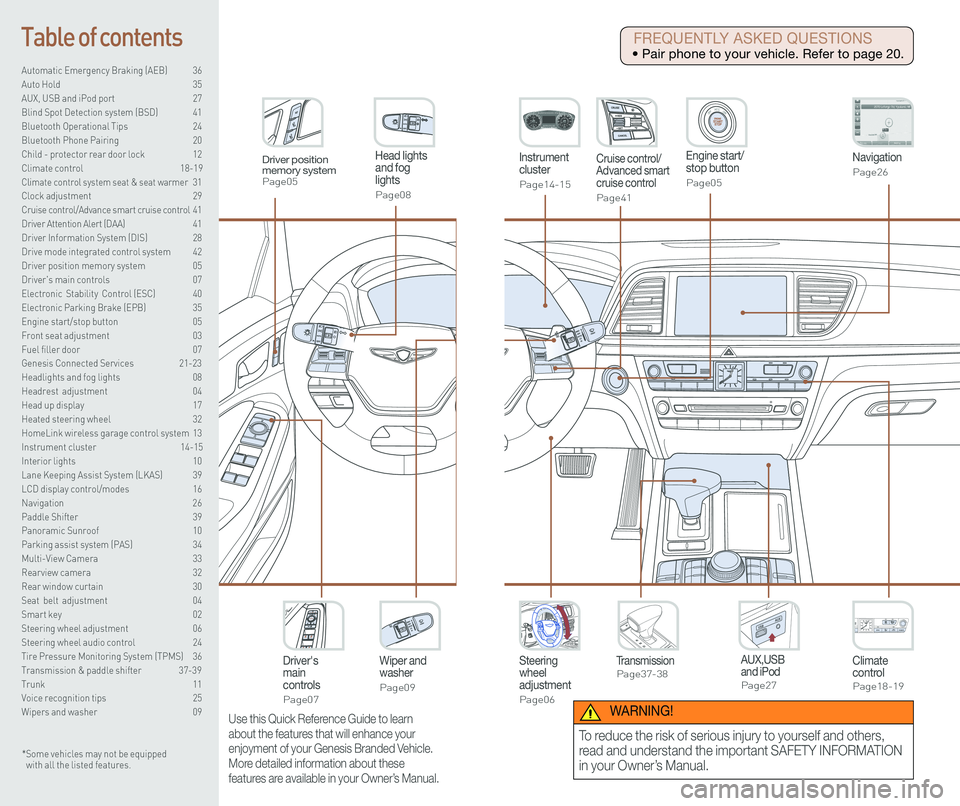
Steering wheel adjustment
Page06
Instrument cluster
Page14-15
Navigation
Page26
Head lights and fog lights
Page08
Climate controlPage18-19
Driver's main controls
Page07
Wiper and washer
Page09
TransmissionPage37-38
Table of contents
Automatic Emergency Braking (AEB) 36
Auto Hold 35
AUX, USB and iPod port 27
Blind Spot Detection system (BSD) 41
Bluetooth Operational Tips 24
Bluetooth Phone Pairing 20
Child - protector rear door lock 12
Climate control 18-19\
Climate control system seat & seat warmer 31
Clock adjustment 29
Cruise control/Advance smart cruise control 41
Driver Attention Alert (DAA) 41
Driver Information System (DIS) 28
Drive mode integrated control system 42
Driver position memory system 05
Driver's main controls 07
Electronic Stability Control (ESC) 40
Electronic Parking Brake (EPB) 35
Engine start/stop button 05
Front seat adjustment 03
Fuel filler door 07
Genesis Connected Services 21-23
Headlights and fog lights 08
Headrest adjustment 04
Head up display 17
Heated steering wheel 32
HomeLink wireless garage control system 13
Instrument cluster 14-15
Interior lights 10
Lane Keeping Assist System (LKAS) 39
LCD display control/modes 16
Navigation 26
Paddle Shifter 39
Panoramic Sunroof 10
Parking assist system (PAS) 34
Multi-View Camera 33
Rearview camera 32
Rear window curtain 30
Seat belt adjustment 04
Smart key 02
Steering wheel adjustment 06
Steering wheel audio control 24
Tire Pressure Monitoring System (TPMS) 36
Transmission & paddle shifter 37-39
Trunk 11
Voice recognition tips 25
Wipers and washer 09
Engine start/stop button
Page05
Cruise control/Advanced smart cruise control
Page41
AUX,USB and iPodPage27
Driver position memory systemPage05
* Some vehicles may not be equipped with all the listed features.
Use this Quick Reference Guide to learn
about the features that will enhance your
enjoyment of your Genesis Branded Vehicle.
More detailed information about these
features are available in your Owner’s Manual.
FREQUENTLY ASKED QUESTIONS
• Pair phone to your vehicle. Refer to page 20.
WARNING!
To reduce the risk of serious injury to yourself and others,
read and understand the important SAFETY INFORMATION
in your Owner’s Manual.
Page 4 of 25
GETTING STARTED
Quick Reference Guide I 0302 I Quick Reference Guide
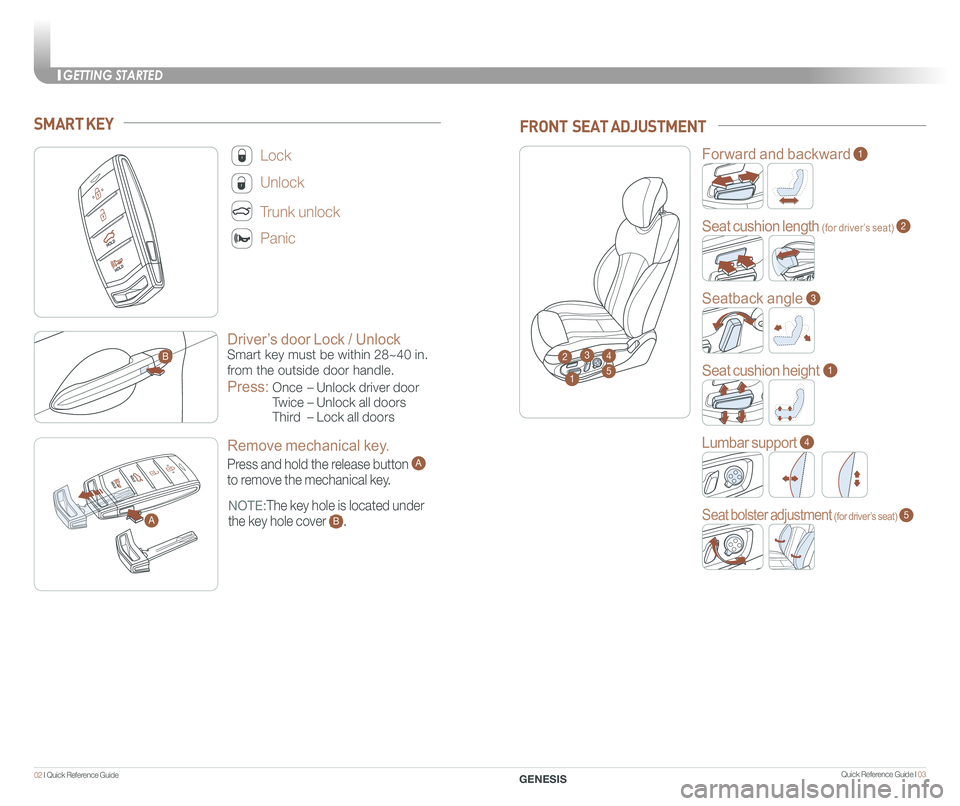
Driver’s door Lock / Unlock
Smart key must be within 28~40 in.
from the outside door handle.
Press:
Once – Unlock driver door
Twice – Unlock all doors
Third – Lock all doors
Lock
Unlock
Trunk unlock
Panic
NOTE:The key hole is located under
the key hole cover B.
SMART KEY
A
B
Remove mechanical key.
Press and hold the release button A
to remove the mechanical key.
GENESIS
FRONT SEAT ADJUSTMENT
2
Forward and backward1
Seat cushion length (for driver’s seat)2
Seatback angle3
Seat cushion height1
Lumbar support4
Seat bolster adjustment (for driver’s seat)5
1
34
5
A
Page 5 of 25
GETTING STARTED
Quick Reference Guide I 0504 I Quick Reference Guide
HEADREST ADJUSTMENT
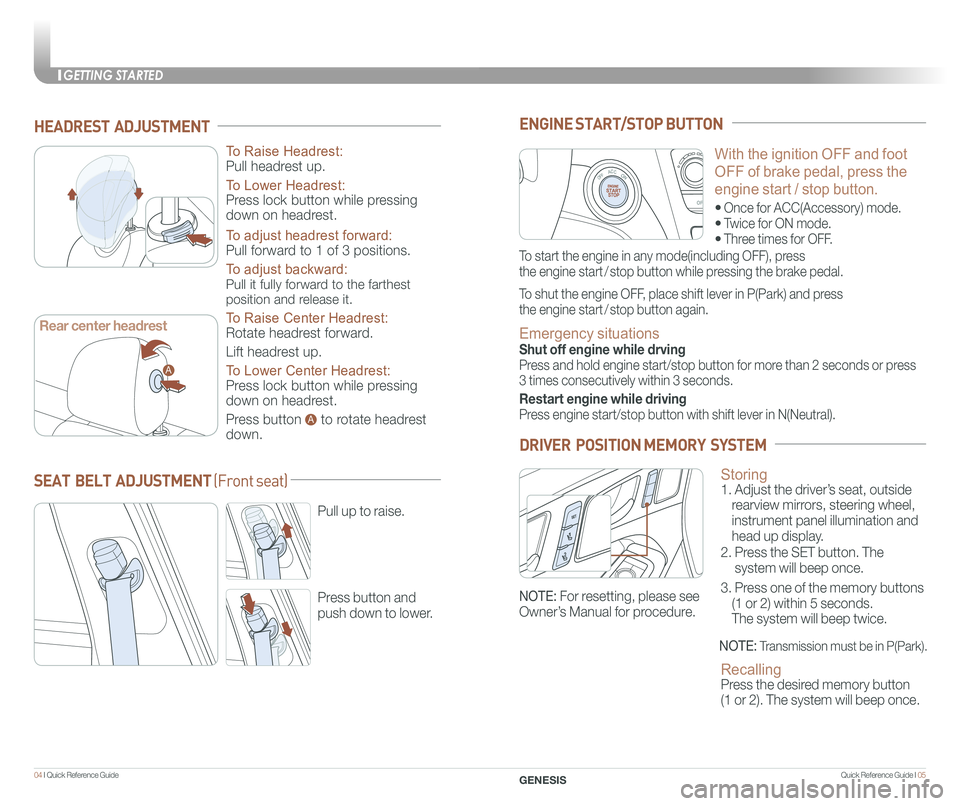
To Raise Headrest:
Pull headrest up.
To Lower Headrest:
Press lock button while pressing
down on headrest.
To adjust headrest forward:
Pull forward to 1 of 3 positions.
To adjust backward:
Pull it fully forward to the farthest
position and release it.
To Raise Center Headrest:
Rotate headrest forward.
Lift headrest up.
To Lower Center Headrest:
Press lock button while pressing
down on headrest.
Press button to rotate headrest
down.
GENESIS
With the ignition OFF and foot
OFF of brake pedal, press the
engine start / stop button.
• Once for ACC(Accessory) mode.
• Twice for ON mode.
• Three times for OFF.
ENGINE START/STOP BUTTON
To start the engine in any mode(including OFF), press
the engine start / stop button while pressing the brake pedal.
To shut the engine OFF, place shift lever in P(Park) and press
the engine start / stop button again.
Emergency situations
Shut off engine while drving
Press and hold engine start/stop button for more than 2 seconds or press
3 times consecutively within 3 seconds.
Restart engine while driving
Press engine start/stop button with shift lever in N(Neutral).
Storing 1. Adjust the driver’s seat, outside
rearview mirrors, steering wheel,
instrument panel illumination and
head up display.
2. Press the SET button. The
system will beep once.
3. Press one of the memory buttons
(1 or 2) within 5 seconds.
The system will beep twice.
Recalling Press the desired memory button
(1 or 2). The system will beep once.
DRIVER POSITION MEMORY SYSTEM
NOTE: Transmission must be in P(Park).
SEAT BELT ADJUSTMENT (Front seat)
Pull up to raise.
Press button and
push down to lower.
A
A
Rear center headrest
NOTE: For resetting, please see
Owner’s Manual for procedure.
Page 6 of 25
FEATURES AND CONTROLS
Quick Reference Guide I 0706 I Quick Reference Guide
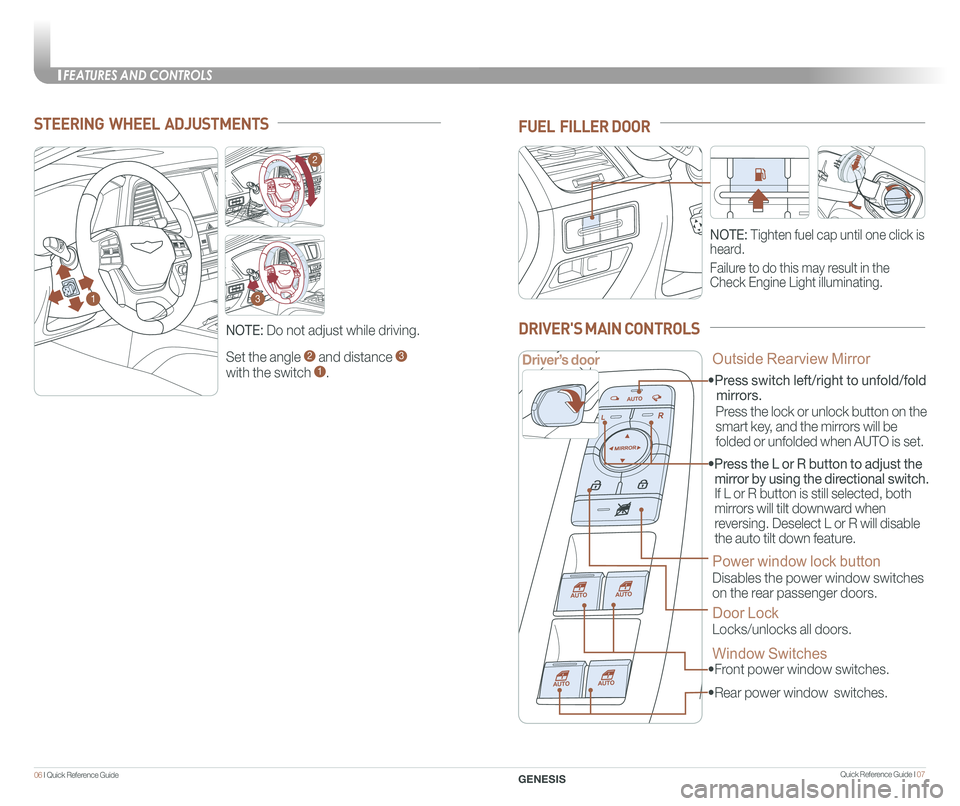
Set the angle 2 and distance 3
with the switch 1.
STEERING WHEEL ADJUSTMENTS
NOTE: Do not adjust while driving.
NOTE: Tighten fuel cap until one click is
heard.
Failure to do this may result in the
Check Engine Light illuminating.
FUEL FILLER DOOR
• Front power window switches.
•Press switch left/right to unfold/fold
mirrors.
• Rear power window switches.
• Press the L or R button to adjust the
mirror by using the directional switch.
If L or R button is still selected, both
mirrors will tilt downward when
reversing. Deselect L or R will disable
the auto tilt down feature.
Driver’s door
DRIVER'S MAIN CONTROLS
Outside Rearview Mirror
Press the lock or unlock button on the
smart key, and the mirrors will be
folded or unfolded when AUTO is set.
Power window lock button
Disables the power window switches
on the rear passenger doors.
Door Lock
Locks/unlocks all doors.
Window Switches
GENESIS
1
2
3
Page 11 of 25
INSTRUMENT CLUSTER
Quick Reference Guide I 1716 I Quick Reference Guide
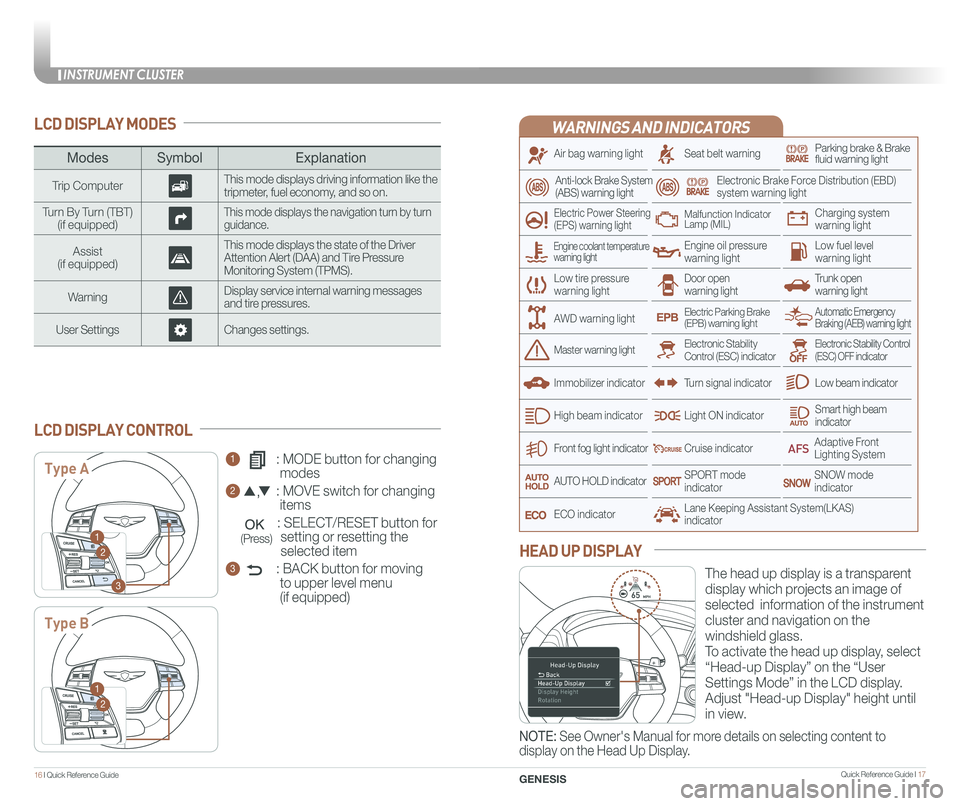
WARNINGS AND INDICATORS
Air bag warning light
Electric Power Steering (EPS) warning light
Seat belt warningParking brake & Brake fluid warning light
Electronic Brake Force Distribution (EBD) system warning light
Low tire pressurewarning lightTrunk open warning light
Low fuel level warning light
Front fog light indicator
Low beam indicator
Smart high beam indicator
SNOW modeindicator
Light ON indicator
ECO indicator
SPORT modeindicator
Anti-lock Brake System(ABS) warning light
High beam indicator
Door open warning light
Electronic Stability Control (ESC) indicatorMaster warning light
Automatic Emergency Braking (AEB) warning lightElectric Parking Brake(EPB) warning light
Engine oil pressure warning light
Charging system warning light
Immobilizer indicator
Malfunction IndicatorLamp (MIL)
Electronic Stability Control (ESC) OFF indicator
Cruise indicator
Lane Keeping Assistant System(LKAS)indicator
Adaptive Front Lighting System
AUTO HOLD indicator
Turn signal indicator
LCD DISPLAY MODES
The head up display is a transparent
display which projects an image of
selected information of the instrument
cluster and navigation on the
windshield glass.
To activate the head up display, select
“Head-up Display” on the “User
Settings Mode” in the LCD display.
Adjust "Head-up Display" height until
in view.
HEAD UP DISPLAY
1 : MODE button for changing
modes
2 : MOVE switch for changing
items
: SELECT/RESET button for
setting or resetting the
selected item
3 : BACK button for moving
to upper level menu
(if equipped)
LCD DISPLAY CONTROL
ModesSymbol Explanation
Trip ComputerThis mode displays driving information like the tripmeter, fuel economy, and so on.
Turn By Turn (TBT)(if equipped)This mode displays the navigation turn by turn guidance.
Assist(if equipped)
This mode displays the state of the Driver Attention Alert (DAA) and Tire Pressure Monitoring System (TPMS).
WarningDisplay service internal warning messages and tire pressures.
User SettingsChanges settings.
Type A
Type B
1
2
3
1
2
Engine coolant temperature warning light
AWD warning light
GENESIS
NOTE: See Owner's Manual for more details on selecting content to
display on the Head Up Display.
(Press)
Page 12 of 25
Quick Reference Guide I 19
CLIMATE CONTROL
1 8 I Quick Reference Guide
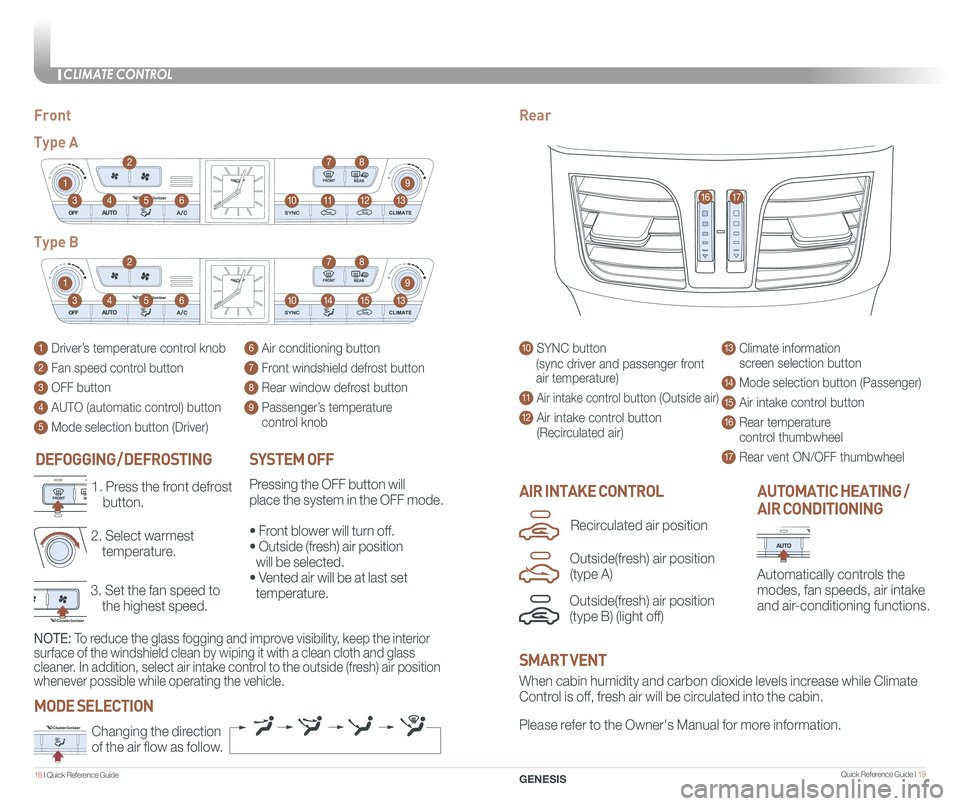
DEFOGGING / DEFROSTING
3. Set the fan speed to
the highest speed.
2. Select warmest
temperature.
1. Press the front defrost
button.AIR INTAKE CONTROL
SYSTEM OFF
Pressing the OFF button will
place the system in the OFF mode.
• Front blower will turn off.
• Outside (fresh) air position
will be selected.
• Vented air will be at last set
temperature.
Automatically controls the
modes, fan speeds, air intake
and air-conditioning functions.
AUTOMATIC HEATING /
AIR CONDITIONING
10 SYNC button
(sync driver and passenger front
air temperature)
11 Air intake control button (Outside air)
12 Air intake control button
(Recirculated air)
13 Climate information
screen selection button
14 Mode selection button (Passenger)
15 Air intake control button
16 Rear temperature
control thumbwheel
17 Rear vent ON/OFF thumbwheel
1 Driver’s temperature control knob
2 Fan speed control button
3 OFF button
4 AUTO (automatic control) button
5 Mode selection button (Driver)
6 Air conditioning button
7 Front windshield defrost button
8 Rear window defrost button
9 Passenger’s temperature
control knob
FrontRear
Type A
Type B
1
1
10
10
9
9
8
8
12
15
7
7
11
14
4
4
6
6
3
3
2
2
5
5
13
13
1617
When cabin humidity and carbon dioxide levels increase while Climate
Control is off, fresh air will be circulated into the cabin.
Please refer to the Owner's Manual for more information.Changing the direction
of the air flow as follow.
SMART VENT
MODE SELECTION
GENESIS
Outside(fresh) air position
(type B) (light off)
Recirculated air position
Outside(fresh) air position
(type A)
NOTE: To reduce the glass fogging and improve visibility, keep the interior
surface of the windshield clean by wiping it with a clean cloth and glas\
s
cleaner. In addition, select air intake control to the outside (fresh) air position
whenever possible while operating the vehicle.
Page 14 of 25
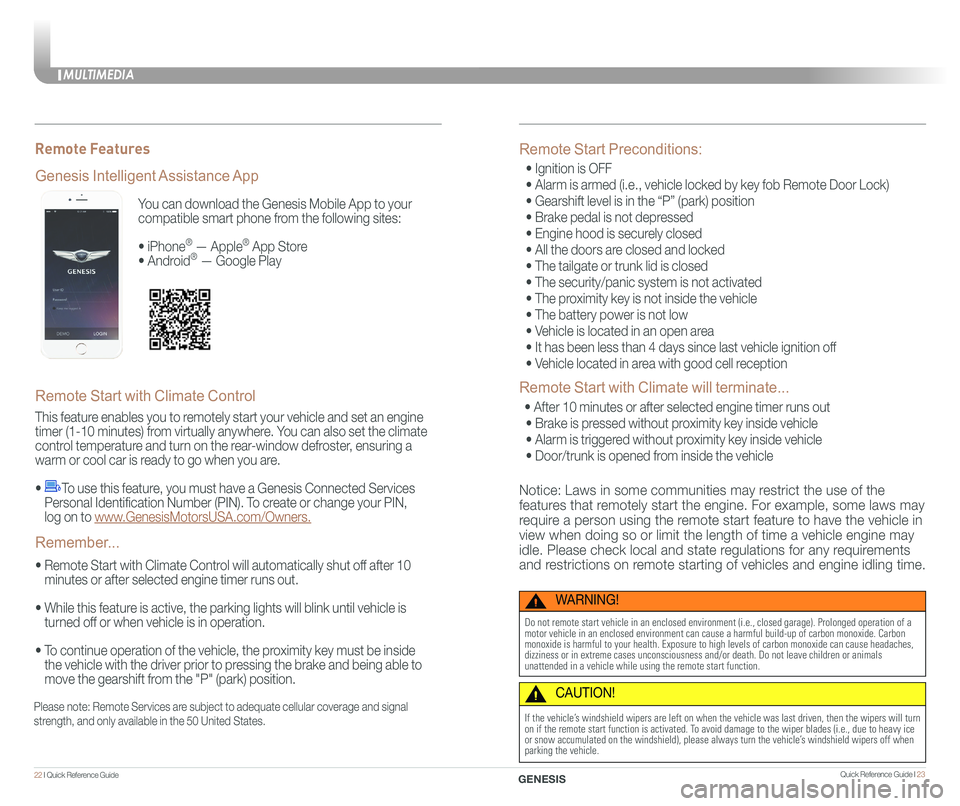
You can download the Genesis Mobile App to your
compatible smart phone from the following sites:
• iPhone® — Apple® App Store
• Android® — Google Play
Remote Start with Climate Control
This feature enables you to remotely start your vehicle and set an engine
timer (1-10 minutes) from virtually anywhere. You can also set the climate
control temperature and turn on the rear-window defroster, ensuring a
warm or cool car is ready to go when you are.
• To use this feature, you must have a Genesis Connected Services
Personal Identification Number (PIN). To create or change your PIN,
log on to www.GenesisMotorsUSA.com/Owners.
• Remote Start with Climate Control will automatically shut off after 10
minutes or after selected engine timer runs out.
• While this feature is active, the parking lights will blink until vehicle is
turned off or when vehicle is in operation.
• To continue operation of the vehicle, the proximity key must be inside
the vehicle with the driver prior to pressing the brake and being able to
move the gearshift from the "P" (park) position.
Genesis Intelligent Assistance App
Remember...
Remote Features
Please note: Remote Services are subject to adequate cellular coverage and signal
strength, and only available in the 50 United States.
Remote Start Preconditions:
• Ignition is OFF
• Alarm is armed (i.e., vehicle locked by key fob Remote Door Lock)
• Gearshift level is in the “P” (park) position
• Brake pedal is not depressed
• Engine hood is securely closed
• All the doors are closed and locked
• The tailgate or trunk lid is closed
• The security/panic system is not activated
• The proximity key is not inside the vehicle
• The battery power is not low
• Vehicle is located in an open area
• It has been less than 4 days since last vehicle ignition off
• Vehicle located in area with good cell reception
Remote Start with Climate will terminate...
• After 10 minutes or after selected engine timer runs out
• Brake is pressed without proximity key inside vehicle
• Alarm is triggered without proximity key inside vehicle
• Door/trunk is opened from inside the vehicle
Notice: Laws in some communities may restrict the use of the
features that remotely start the engine. For example, some laws may
require a person using the remote start feature to have the vehicle in
view when doing so or limit the length of time a vehicle engine may
idle. Please check local and state regulations for any requirements
and restrictions on remote starting of vehicles and engine idling time.
WARNING!
Do not remote start vehicle in an enclosed environment (i.e., closed ga\
rage). Prolonged operation of a motor vehicle in an enclosed environment can cause a harmful build-up of\
carbon monoxide. Carbon monoxide is harmful to your health. Exposure to high levels of carbon mo\
noxide can cause headaches, dizziness or in extreme cases unconsciousness and/or death. Do not leave\
children or animals unattended in a vehicle while using the remote start function.
CAUTION!
If the vehicle’s windshield wipers are left on when the vehicle was last driven, then t\
he wipers will turn on if the remote start function is activated. To avoid damage to the wiper blades (i.e., due to heavy ice or snow accumulated on the windshield), please always turn the vehicle’\
s windshield wipers off when parking the vehicle.
MULTIMEDIA
22 I Quick Reference Guide Quick Reference Guide I 23GENESIS
Page 15 of 25
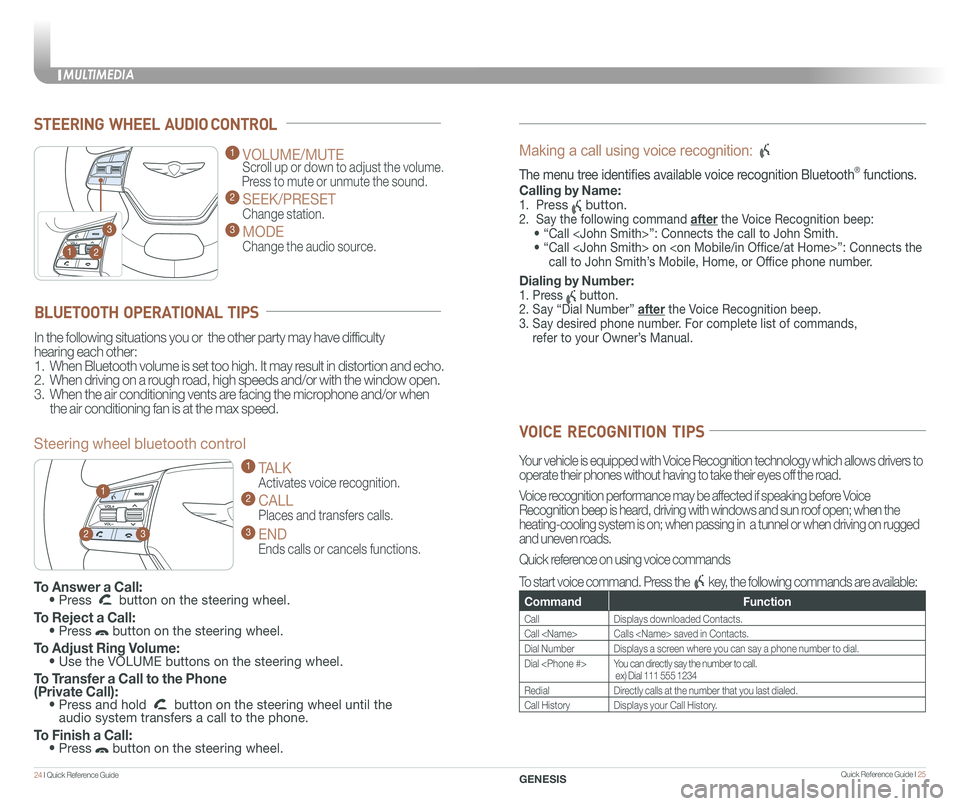
STEERING WHEEL AUDIO CONTROL
2
3
1
1 VOLUME/MUTE
Scroll up or down to adjust the volume.
Press to mute or unmute the sound.
2 SEEK/PRESET
Change station.
3 MODE
Change the audio source.
To Answer a Call: • Press button on the steering wheel.
To Reject a Call: • Press button on the steering wheel.
To Adjust Ring Volume: • Use the VOLUME buttons on the steering wheel.
To Transfer a Call to the Phone (Private Call): • Press and hold button on the steering wheel until the audio system transfers a call to the phone.
To Finish a Call: • Press button on the steering wheel.
BLUETOOTH OPERATIONAL TIPS
In the following situations you or the other party may have difficulty
hearing each other:
1. When Bluetooth volume is set too high. It may result in distortion and echo.
2. When driving on a rough road, high speeds and/or with the window open.
3. When the air conditioning vents are facing the microphone and/or when
the air conditioning fan is at the max speed.
Steering wheel bluetooth control
1 TALK
Activates voice recognition.
2 CALL
Places and transfers calls.
3 END
Ends calls or cancels functions.
23
1
Making a call using voice recognition:
The menu tree identifies available voice recognition Bluetooth® functions.
Calling by Name:
1. Press button.
2. Say the following command after the Voice Recognition beep:
• “Call
• “ Call
call to John Smith’s Mobile, Home, or Office phone number.
Dialing by Number:
1. Press button.
2. Say “Dial Number” after the Voice Recognition beep.
3. Say desired phone number. For complete list of commands,
refer to your Owner’s Manual.
VOICE RECOGNITION TIPS
Your vehicle is equipped with Voice Recognition technology which allows drivers to
operate their phones without having to take their eyes off the road.
Voice recognition performance may be affected if speaking before Voice
Recognition beep is heard, driving with windows and sun roof open; when the
heating-cooling system is on; when passing in a tunnel or when driving \
on rugged
and uneven roads.
Quick reference on using voice commands
To start voice command. Press the key, the following commands are available:
CommandFunction
CallDisplays downloaded Contacts.
Call
Dial NumberDisplays a screen where you can say a phone number to dial.
Dial
RedialDirectly calls at the number that you last dialed.
Call HistoryDisplays your Call History.
MULTIMEDIA
24 I Quick Reference Guide Quick Reference Guide I 25GENESIS
Page 17 of 25
Quick Reference Guide I 29
FEATURES AND CONTROLS
28 I Quick Reference Guide GENESIS
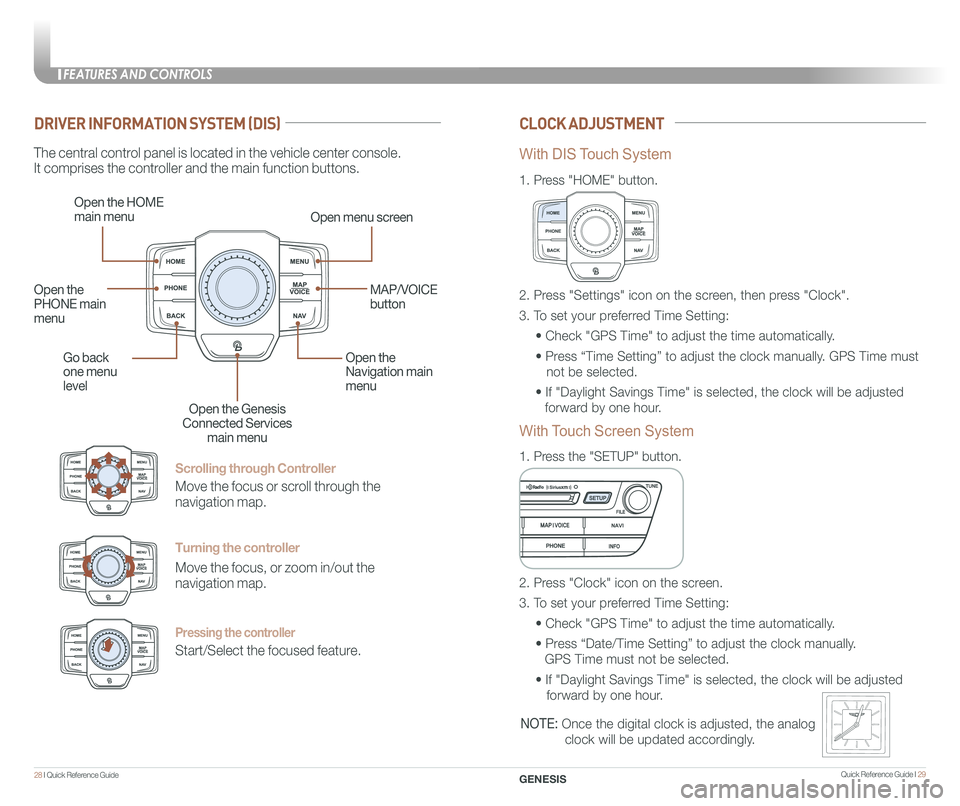
Scrolling through Controller
Move the focus or scroll through the
navigation map.
Turning the controller
Move the focus, or zoom in/out the
navigation map.
Pressing the controller
Start/Select the focused feature.
DRIVER INFORMATION SYSTEM (DIS)CLOCK ADJUSTMENT
The central control panel is located in the vehicle center console.
It comprises the controller and the main function buttons.
Open the HOME
main menuOpen menu screen
Go back
one menu
level
Open the
Navigation main
menu
Open the Genesis
Connected Services
main menu
Open the
PHONE main
menu
MAP/VOICE
button
1.
Press "HOME" button.
1.
Press the "SETUP" button.
2. Press "Settings" icon on the screen, then press "Clock".
3. To set your preferred Time Setting:
• Check "GPS Time" to adjust the time automatically.
• Press “Time Setting” to adjust the clock manually. GPS Time must
not be selected.
• If "Daylight Savings Time" is selected, the clock will be adjusted
forward by one hour.
2. Press "Clock" icon on the screen.
3. To set your preferred Time Setting:
• Check "GPS Time" to adjust the time automatically.
• Press “Date/Time Setting” to adjust the clock manually.
GPS Time must not be selected.
• If "Daylight Savings Time" is selected, the clock will be adjusted
forward by one hour.
With DIS Touch System
With Touch Screen System
NOTE: Once the digital clock is adjusted, the analog
clock will be updated accordingly.