lane assist GENESIS G80 2021 Owner's Manual
[x] Cancel search | Manufacturer: GENESIS, Model Year: 2021, Model line: G80, Model: GENESIS G80 2021Pages: 604, PDF Size: 11.47 MB
Page 18 of 604

2-6
Vehicle Information, Consumer Information and Reporting Safety Defects
INSTRUMENT PANEL OVERVIEW (III)
The actual shape may differ from the illustration.
ORG3010005
1. Audio remote control buttons ...........5-125
2. Bluetooth® hands-free phone button 5-127
3. Voice recognition button ...................5-126
4. Paddle shifter ........................................6-19
5. Lighting control lever ...........................5-78
6. Wiper and washer control lever ..........5-90
7. LCD display control ..............................4-27
8. Lane Driving Assist button ..................7-95
9. Driving Assist button ...................7-54, 7-7 0
10. Vehicle-to-vehicle distance button .....7-7 0
Page 118 of 604

04
4-17
Forward Safety warning light
(if equipped)
This warning light illuminates:
• When you set the Engine Start/Stop
button to the ON position.
- The Forward Safety warning light
illuminates for approximately 3
seconds and then goes off.
• Whenever there is a malfunction with
Forward Collision-Avoidance.
If this occurs, have the vehicle inspected
by an authorized retailer of Genesis
Branded products.
For more details, refer to “Forward
Collision-Avoidance Assist (FCA)”
section in chapter 7.
Lane Safety indicator light
(if equipped)
This indicator light illuminates:
• [Green] When the system operating
conditions are satisfied.
• [White] When the system operating
conditions are not satisfied.
• [Yellow] Whenever there is a
malfunction with Lane Keeping Assist.
If this occurs, have the vehicle
inspected by an authorized retailer of
Genesis Branded products.
For more details, refer to “Lane Keeping
Assist (LKA)” section in chapter 7.
All Wheel Drive (AWD)
warning light (if equipped)
This warning light illuminates:
Whenever there is a malfunction with the
AWD system.
If this occurs, have the vehicle inspected
by an authorized retailer of Genesis
Branded products.
For more details, refer to "All Wheel
Drive (AWD)" section in chapter 6.
Page 129 of 604
Instrument Cluster
4-28
ORG3040041N
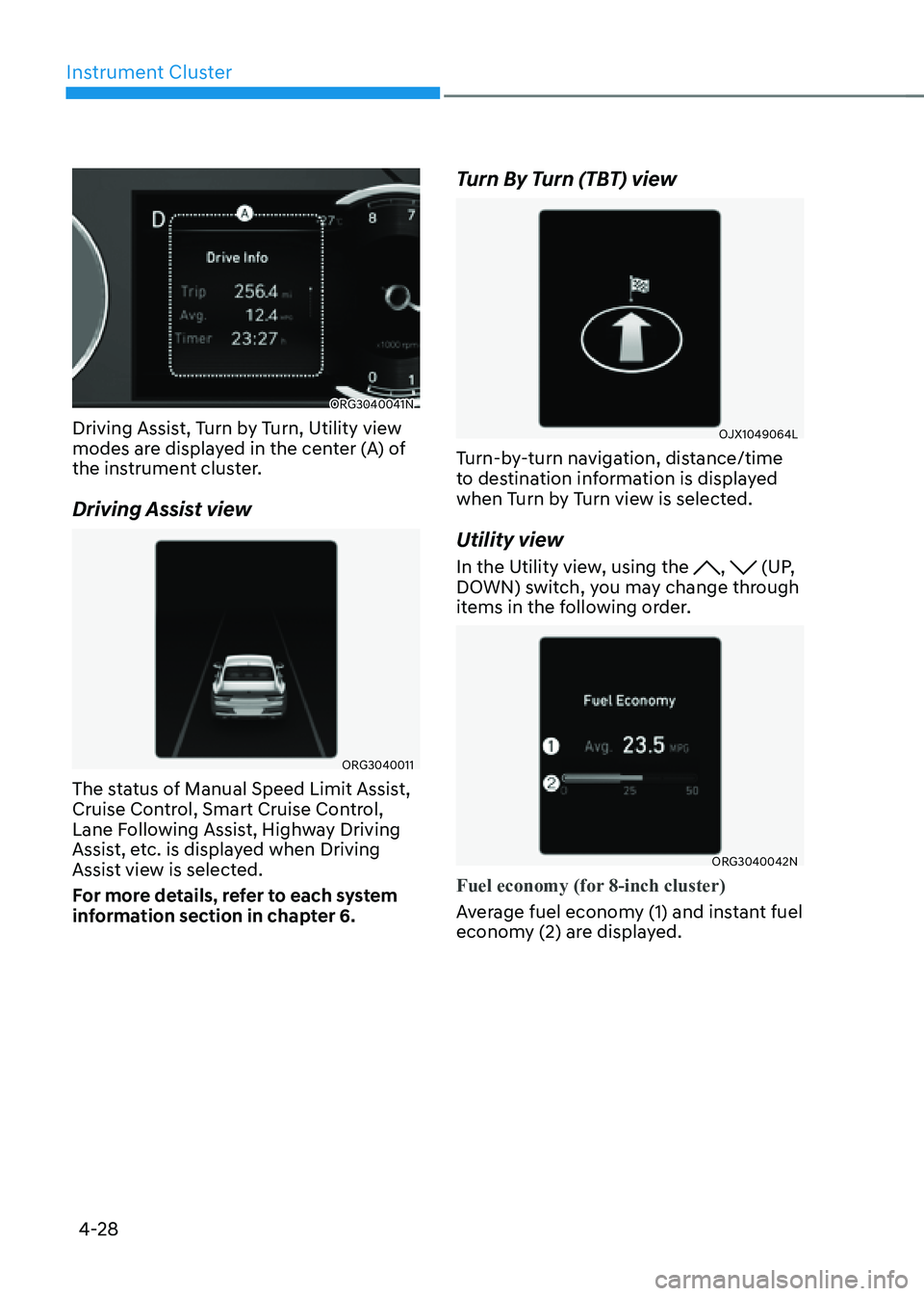
Driving Assist, Turn by Turn, Utility view
modes are displayed in the center (A) of
the instrument cluster.
Driving Assist view
ORG3040011
The status of Manual Speed Limit Assist,
Cruise Control, Smart Cruise Control,
Lane Following Assist, Highway Driving
Assist, etc. is displayed when Driving
Assist view is selected.
For more details, refer to each system
information section in chapter 6.
Turn By Turn (TBT) view
OJX1049064L
Turn-by-turn navigation, distance/time
to destination information is displayed
when Turn by Turn view is selected.
Utility view
In the Utility view, using the , (UP,
DOWN) switch, you may change through
items in the following order.
ORG3040042N
Fuel economy (for 8-inch cluster)
Average fuel economy (1) and instant fuel
economy (2) are displayed.
Page 133 of 604
Instrument Cluster
4-32
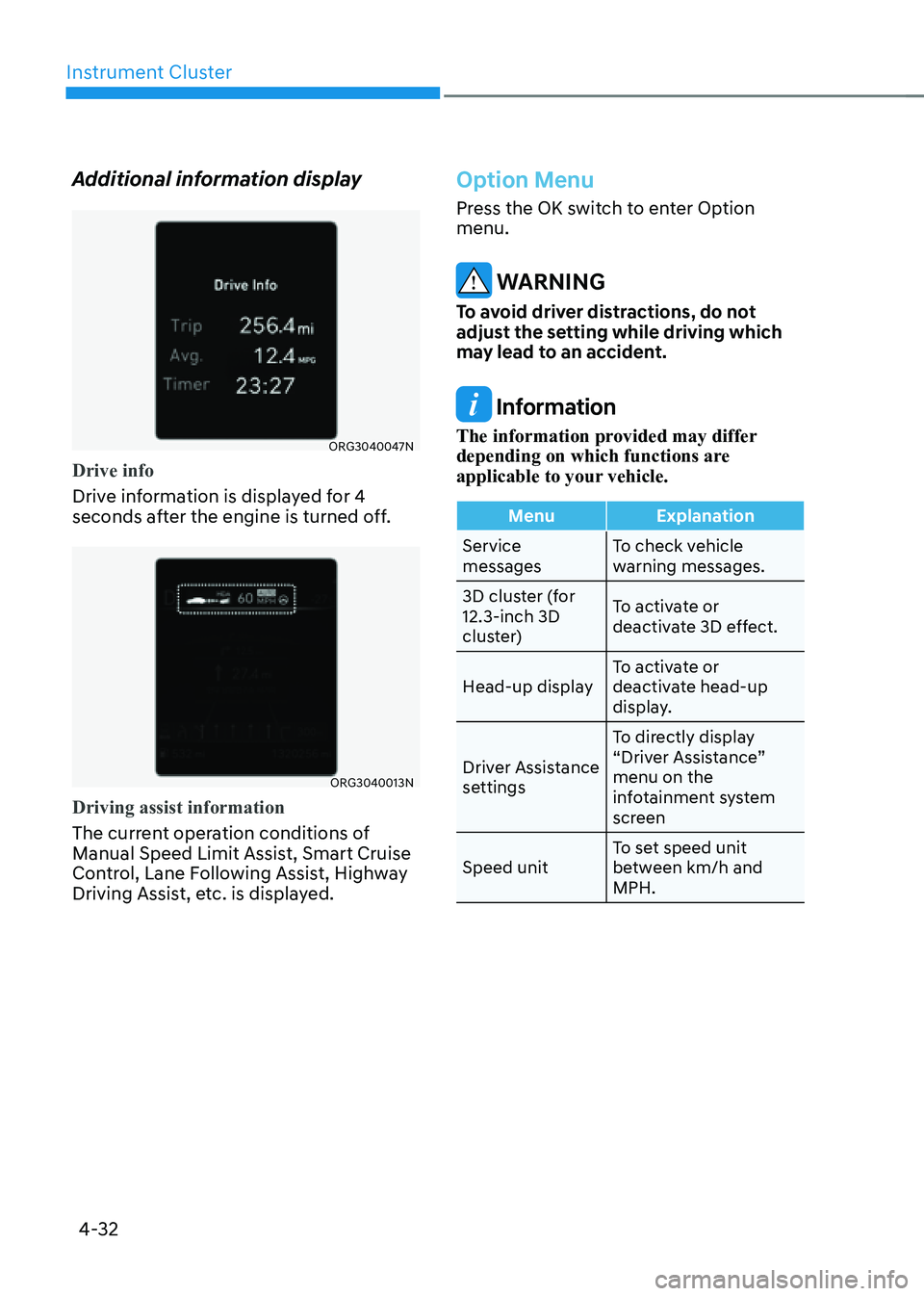
Additional information display
ORG3040047N
Drive info
Drive information is displayed for 4
seconds after the engine is turned off.
ORG3040013N
Driving assist information
The current operation conditions of
Manual Speed Limit Assist, Smart Cruise
Control, Lane Following Assist, Highway
Driving Assist, etc. is displayed.
Option Menu
Press the OK switch to enter Option
menu.
WARNING
To avoid driver distractions, do not
adjust the setting while driving which
may lead to an accident.
Information
The information provided may differ
depending on which functions are
applicable to your vehicle.
MenuExplanation
Service
messages To check vehicle
warning messages.
3D cluster (for
12.3-inch 3D
cluster) To activate or
deactivate 3D effect.
Head-up display To activate or
deactivate head-up
display.
Driver Assistance
settings To directly display
“Driver Assistance”
menu on the
infotainment system
screen
Speed unit To set speed unit
between km/h and
MPH.
Page 214 of 604
Convenient Features
5 -76
ORG3050056N
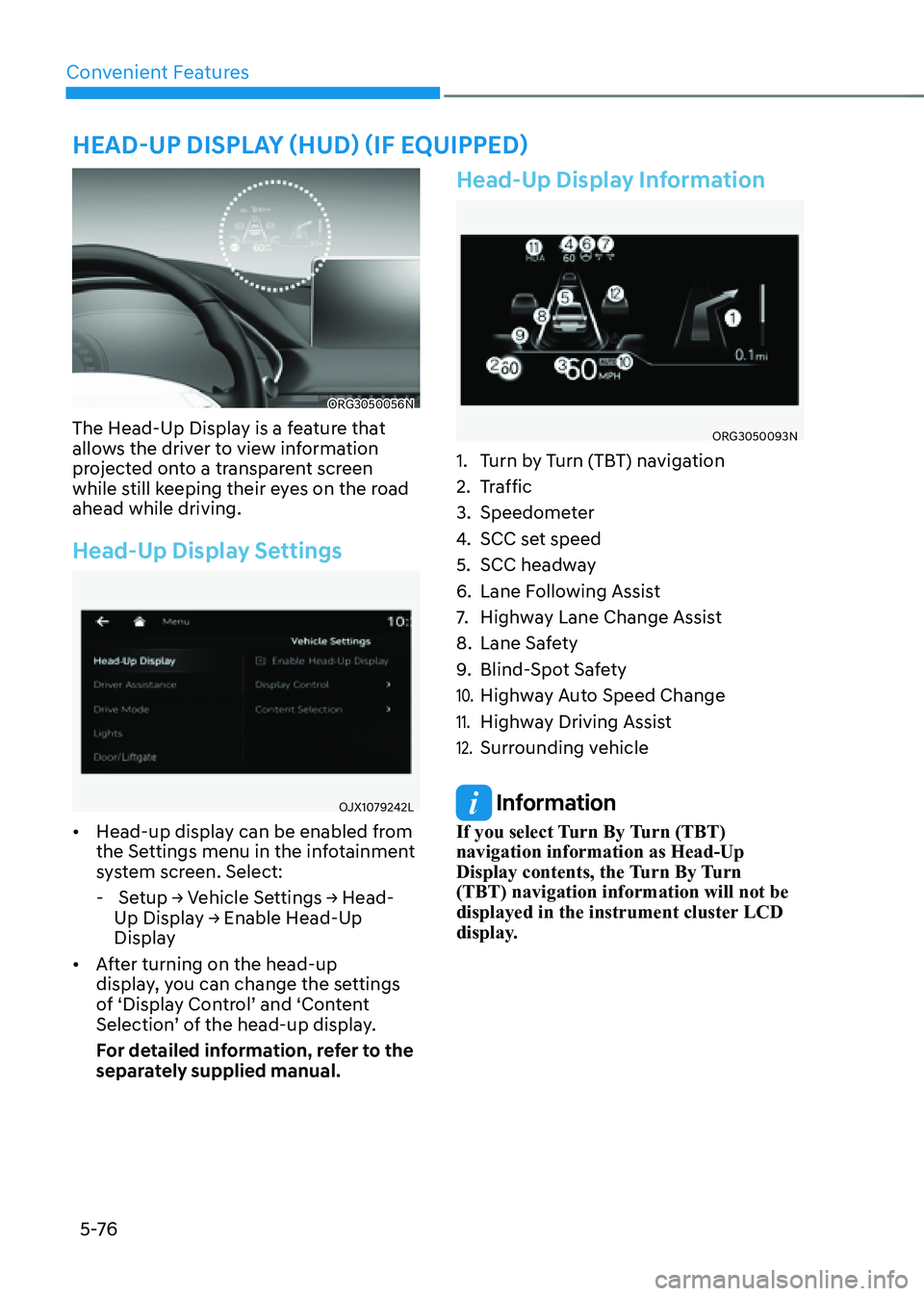
The Head-Up Display is a feature that
allows the driver to view information
projected onto a transparent screen
while still keeping their eyes on the road
ahead while driving.
Head-Up Display Settings
OJX1079242L
• Head-up display can be enabled from
the Settings menu in the infotainment
system screen. Select:
- Setup → Vehicle Settings → Head-
Up Display → Enable Head-Up
Display
• After turning on the head-up
display, you can change the settings
of ‘Display Control’ and ‘Content
Selection’ of the head-up display.
For detailed information, refer to the
separately supplied manual.
Head-Up Display Information
ORG3050093N
1. Turn by Turn (TBT) navigation
2. Traffic
3. Speedometer
4. SCC set speed
5. SCC headway
6. Lane Following Assist
7. Highway Lane Change Assist
8. Lane Safety
9. Blind-Spot Safety
10. Highway Auto Speed Change
11. Highway Driving Assist
12. Surrounding vehicle
Information
If you select Turn By Turn (TBT)
navigation information as Head-Up
Display contents, the Turn By Turn
(TBT) navigation information will not be
displayed in the instrument cluster LCD
display.
HEAD-UP DISPLAY (HUD) (IF EQUIPPED)
Page 329 of 604

7
Driving SafetyForward Collision–Avoidance Assist (FCA) .................................................................7-2
Lane Keeping Assist (LKA) ........................................................................\
................7-26
Blind-Spot Collision-Avoidance Assist (BCA) ..........................................................7-32
Safe Exit Warning (SEW) ........................................................................\
...................7-45
Safe Exit Assist (SEA) ........................................................................\
.........................7-49
Manual Speed Limit Assist (MSLA) ........................................................................\
...7-54
Driver Attention Warning (DAW) ........................................................................\
.......7-57
Forward Attention Warning (FAW) ........................................................................\
...7-63
Blind-Spot View Monitor (BVM) ........................................................................\
.......7-67
Driving ConvenienceSmart Cruise Control (SCC) ........................................................................\
...............7-69
Navigation-Based Smart Cruise Control (NSCC) ....................................................7-88
Lane Following Assist (LFA) ........................................................................\
...............7-95
Highway Driving Assist (HDA) ........................................................................\
..........7-99
Parking SafetyRear View Monitor (RVM) ........................................................................\
..................7-111
Surround View Monitor (SVM) ........................................................................\
.........7-113
Rear Cross-Traffic Collision-Avoidance Assist (RCCA) ............................................7-116
Forward/Reverse Parking Distance Warning (PDW)
...............................................7-126
Reverse Parking Collision-Avoidance Assist (PCA) ................................................7-132
Remote Smart Parking Assist (RSPA) .....................................................................7-140
Declaration of Conormity
........................................................................\
....................7-164
7. Driver Assistance system
Driver Assistance system
Page 330 of 604

Driver Assistance system
7-2
Basic function
ORG3070159
Forward Collision-Avoidance Assist is
designed to help detect and monitor the
vehicle ahead or help detect a pedestrian
or cyclist in the roadway and warn the
driver that a collision is imminent with
a warning message and an audible
warning, and if necessary, apply
emergency braking.
In addition, if equipped with front corner
radars, when driving at high speeds,
the system will help detect vehicles in
front and adjacent lanes. If a collision
is imminent when changing lanes, the
system will apply emergency braking to
help prevent a collision.Junction Turning function (if equipped)
ORG3070132
Junction Turning function will help avoid
a collision with an oncoming vehicle in
an adjacent lane when turning left at
a crossroad with the turn signal on by
applying emergency braking.
Junction Crossing function (if
equipped)
ORG3070131
Junction Crossing function will help
avoid a collision with oncoming vehicles
on the left or right side when crossing
an intersection by applying emergency
braking.
FORWARD COLLISION–AVOIDANCE ASSIST (FCA)
DRIVING SAFETY
Page 331 of 604
![GENESIS G80 2021 Owners Manual 07
7-3
Lane-Change Oncoming function (if
equipped)
ORG3070133 [A] : Oncoming vehicle
Lane-Change Oncoming function will
help avoid a collision with an oncoming
vehicle when changing lanes by assist](/img/46/35612/w960_35612-330.png "GENESIS G80 2021 Owners Manual 07
7-3
Lane-Change Oncoming function (if
equipped)
ORG3070133 [A] : Oncoming vehicle
Lane-Change Oncoming function will
help avoid a collision with an oncoming
vehicle when changing lanes by assist")
07
7-3
Lane-Change Oncoming function (if
equipped)
ORG3070133 [A] : Oncoming vehicle
Lane-Change Oncoming function will
help avoid a collision with an oncoming
vehicle when changing lanes by assisting
the driver’s steering.
Lane-Change Side function (if
equipped)
ORG3070134
[A] : Decelerating vehicle
Lane-Change Side function will help
avoid a collision with the vehicle ahead
in the next lane when changing lanes by
assisting the driver’s steering.Evasive Steering Assist function (if
equipped)
„„Driver steering assist
ORG3070160
• Driver steering assist
Evasive Steering Assist function will
help avoid a collision with a vehicle,
pedestrian or cyclist ahead in the
same lane. When a risk of collision
is detected, Evasive Steering Assist
function will warn the driver and if the
driver steers to avoid collision it will
assist the driver’s steering.
• Evasive steering assist
Evasive Steering Assist function helps
avoid a collision with a pedestrian or
cyclist ahead in the same lane. When
a risk of collision is detected, Evasive
Steering Assist function will warn the
driver and if there is space to avoid
collision in the lane, it will assist the
driver’s steering.
Page 334 of 604

Driver Assistance system
7-6
OJX1070249L
Forward Cross-Traffic Safety (if
equipped)
With the Engine Start/Stop button in the
ON position, select ‘Driver Assistance →
Forward Safety → Forward Cross-Traffic
Safety’ from the Settings menu to turn on
Junction Crossing function and deselect
to turn off the function.
WARNING
When the engine is restarted, Forward
Collision-Avoidance Assist will always
turn on. However, if ‘Off’ is selected
after the engine is restarted, the
driver should always be aware of the
surroundings and drive safely.
CAUTION
• If ‘Warning Only’ is selected, braking
and steering (if equipped) is not
assisted.
• The settings for Forward Safety
include ‘Basic function’ and ‘Junction
Turning’, Lane-Change Oncoming’,
‘Lane-Change Side’ and ‘Evasive
Steering Assist’ (if equipped).
• If Forward Safety is set to ‘Off’,
Junction Crossing function will
not operate even when ‘Forward
Cross-Traffic Safety’ (if equipped) is
selected.
• Steering wheel vibration can be
turned on or off. Select or deselect
‘Driver Assistance → Haptic Warning’
from the Settings menu.
Information
Forward Collision-Avoidance Assist
will turn off when ESC is turned off by
pressing and holding the ESC OFF button
for more than 3 seconds. The
warning
light will illuminate on the cluster.
Page 340 of 604

Driver Assistance system
7-12
ORG3070107L
Stopping vehicle and ending brake control
• When the vehicle is stopped due
to emergency braking, the ‘Drive
carefully’ warning message will
appear on the cluster.
For your safety, the driver should
depress the brake pedal immediately
and check the surroundings.
• Brake control will end after the vehicle
is stopped by emergency braking for
approximately 2 seconds.
CAUTION
If the collision angle with the crossing
vehicle is beyond a certain range,
Junction Crossing function warning and
control may be late or may not operate.
Lane-Change Oncoming function
(if equipped)
System warning and control
Lane-Change Oncoming function will
warn and control the vehicle depending
on collision level: ‘Collision Warning’ and
‘Emergency Steering’
ORG3070007L
Collision Warning
• To warn the driver of a collision, the
‘Collision Warning’ warning message
will appear on the cluster, an audible
warning will sound and the steering
wheel will vibrate.
• The system will operate when
your vehicle speed is between
approximately 37~85 mph
(60~140 km/h) and the oncoming
vehicle speed is approximately
above 6 mph (10 km/h) and the
relative speed with your vehicle is
approximately below 124 mph
(200 km/h).