ECO GENESIS G80 2021 Quick Reference Guide
[x] Cancel search | Manufacturer: GENESIS, Model Year: 2021, Model line: G80, Model: GENESIS G80 2021Pages: 25, PDF Size: 7.74 MB
Page 1 of 25
Looking For more detailed information? This Quick Reference Guide does not replace your vehicle’sOwner’s Manual. If you require additional information or are unsure of a specific issue, we recommend that you always refer to the vehicle’s Owner’s Manual or contact your authorized retailer of Genesis Branded Products. The information contained in this Quick Reference Guide is correct at the time of printing; however, specifications and equipment can change without notice. No warranty or guarantee is being extended in this Quick Reference Guide, and Genesis Brand reserves the right to change product specifications and equipment at any time without incurring obligations. Some vehicles are shown with optional equipment.
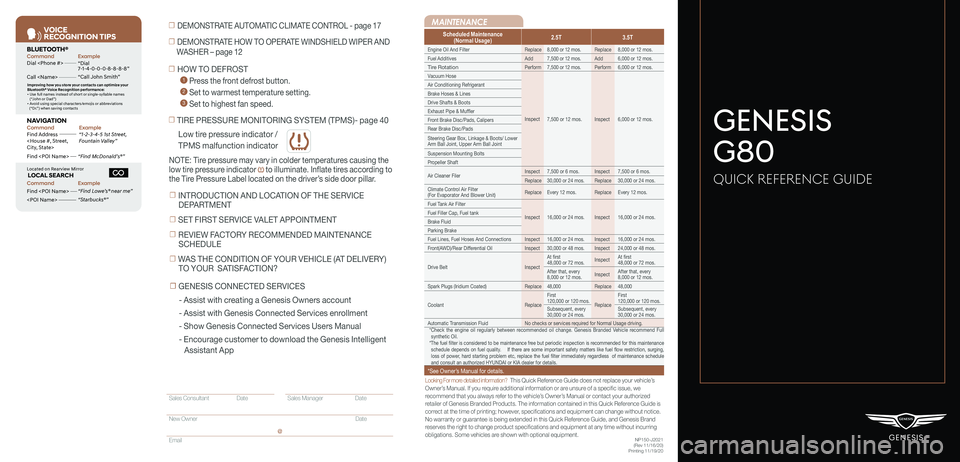
MAINTENANCE
Low tire pressure indicator /
TPMS malfunction indicator
Scheduled Maintenance(Normal Usage)2.5T3.5T
Engine Oil And FilterReplace8,000 or 12 mos.Replace8,000 or 12 mos.
Fuel AdditivesAdd7,500 or 12 mos.Add6,000 or 12 mos.
Tire RotationPerform7,500 or 12 mos.Perform6,000 or 12 mos.
Vacuum Hose
Inspect7,500 or 12 mos.Inspect6,000 or 12 mos.
Air Conditioning Refrigerant
Brake Hoses & Lines
Drive Shafts & Boots
Exhaust Pipe & Muffler
Front Brake Disc/Pads, Calipers
Rear Brake Disc/Pads
Steering Gear Box, Linkage & Boots/ Lower Arm Ball Joint, Upper Arm Ball Joint
Suspension Mounting Bolts
Propeller Shaft
Air Cleaner FilerInspect7,500 or 6 mos.Inspect7,500 or 6 mos.
Replace30,000 or 24 mos.Replace30,000 or 24 mos.
Climate Control Air Filter (For Evaporator And Blower Unit)ReplaceEvery 12 mos.ReplaceEvery 12 mos.
Fuel Tank Air Filter
Inspect16,000 or 24 mos.Inspect16,000 or 24 mos.Fuel Filler Cap, Fuel tank
Brake Fluid
Parking Brake
Fuel Lines, Fuel Hoses And ConnectionsInspect16,000 or 24 mos.Inspect16,000 or 24 mos.
Front(AWD)/Rear Differential OilInspect30,000 or 48 mos.Inspect24,000 or 48 mos.
Drive BeltInspect
At first48,000 or 72 mos.InspectAt first48,000 or 72 mos.
After that, every8,000 or 12 mos.InspectAfter that, every8,000 or 12 mos.
Spark Plugs (Iridium Coated)Replace48,000Replace48,000
CoolantReplace
First 120,000 or 120 mos.Replace
First 120,000 or 120 mos.
Subsequent, every 30,000 or 24 mos.Subsequent, every 30,000 or 24 mos.
Automatic Transmission FluidNo checks or services required for Normal Usage driving.*Check the engine oil regularly between recommended oil change. Genesis Branded Vehicle recommend Full synthetic Oil.*The fuel filter is considered to be maintenance free but periodic inspection is recommended for this maintenance schedule depends on fuel quality. If there are some important safety matters like fuel flow restriction, surging, loss of power, hard starting problem etc, replace the fuel filter immediately regardless of maintenance schedule and consult an authorized HYUNDAI or KIA dealer for details.
*See Owner’s Manual for details.
☐ TIRE PRESSURE MONITORING SYSTEM (TPMS)- page 40
NOTE: Tire pressure may vary in colder temperatures causing the
low tire pressure indicator to illuminate. Inflate tires according to
the Tire Pressure Label located on the driver’s side door pillar.
☐ HOW TO DEFROST
1 Press the front defrost button.
2 Set to warmest temperature setting.
3 Set to highest fan speed.
☐ DEMONSTRATE AUTOMATIC CLIMATE CONTROL - page 17
☐ DEMONSTRATE HOW TO OPERATE WINDSHIELD WIPER AND
WASHER – page 12
NP150-J2021(Rev 11/16/20)Printing 11/19/20
GENESIS
G80
QUICK REFERENCE GUIDE
Sales Consultant Date Sales Manager Date
New Owner Date
Email
@
☐ INTRODUCTION AND LOCATION OF THE SERVICE
DEPARTMENT
☐ SET FIRST SERVICE VALET APPOINTMENT
☐ REVIEW FACTORY RECOMMENDED MAINTENANCE
SCHEDULE
☐ WAS THE CONDITION OF YOUR VEHICLE (AT DELIVERY)
TO YOUR SATISFACTION?
☐ GENESIS CONNECTED SERVICES
- Assist with creating a Genesis Owners account
- Assist with Genesis Connected Services enrollment
- Show Genesis Connected Services Users Manual
- Encourage customer to download the Genesis Intelligent
Assistant App
VOICE
RE COGNITION TIPS
Command ExampleBL UET OOTH®
Dial
Call
7 -1-4- 0-0-0- 8-8-8-8”
“Call John Smith ”
Command ExampleNA VIG ATION
Find Addr ess
2-3-4-5 1s t Stree t,
F oun tain Valle y”
C ommand Example
Loca ted on R earview Mirr or L OC AL SEAR CH
Find
ow e’s ® near me”
“S tarbuck s®”
Impr oving ho w you s tor e your con tacts can op timize your
Blue too th® Voic e R ecognition perf ormance:
• U se full names ins tead o f short or single-s yllable names
(“ John or Dad”)
• Avoid using special char acters/emojis or abbrevia tions
(“Dr .”) when sa ving contacts
Find
Page 2 of 25

GENESIS BRANDED VEHICLE OWNER PRIVACY POLICY
Your Genesis Branded Vehicle may be equipped with technologies and
services that use information collected, generated, recorded or stored by the
vehicle. We have created a Vehicle Owner Privacy Policy to explain how these
technologies and services collect, use, and share this information.
You may read our Vehicle Owner Privacy Policy at www.genesis.com/us/en/
my-privacy-rights.html#owner. If you would like to receive a hard copy of our
Vehicle Owner Privacy Policy, please contact Customer Care at:
Genesis Customer Care
Genesis Motor America/Phoenix
P.O. Box 83835
Phoenix, AZ 85071-3835
[email protected]
Genesis Customer Care Center representatives are available Monday
through Friday, between the hours of 5:00 AM and 5:00 PM PST and
Saturday between 6:30 AM and 3:00 PM PST (English).
For Customer Care assistance in Spanish or Korean, representatives are
available Monday through Friday between 6:30 AM and 3:00 PM PST.
Roadside Assistance: 1-844-340-9742
SiriusXM®Radio: 1-800-967-2346
Genesis Customer Care &Connected Services:
www.MyGenesis.com
1-844-340-9741
Page 4 of 25
Quick Reference Guide I 0201 I Quick Reference Guide
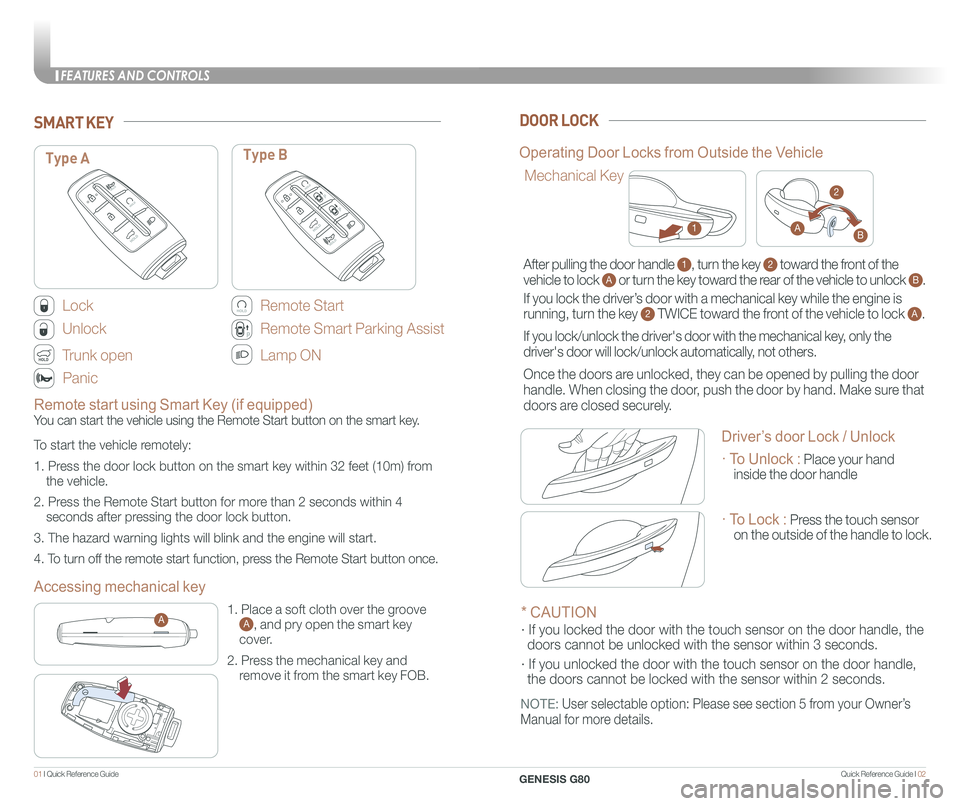
Lock
Unlock
Trunk open
Panic
SMART KEYDOOR LOCK
PP
PP
Type AType B
Remote Start
PPPP
PP
Remote Smart Parking Assist
Lamp ON
Accessing mechanical key
Operating Door Locks from Outside the Vehicle
1. Place a soft cloth over the groove A, and pry open the smart key
cover.
2. Press the mechanical key and
remove it from the smart key FOB.
A
Mechanical Key
1
2
AB
Remote start using Smart Key (if equipped)
You can start the vehicle using the Remote Start button on the smart key.
To start the vehicle remotely:
1. Press the door lock button on the smart key within 32 feet (10m) from
the vehicle.
2. Press the Remote Start button for more than 2 seconds within 4
seconds after pressing the door lock button.
3. The hazard warning lights will blink and the engine will start.
4. To turn off the remote start function, press the Remote Start button once.
After pulling the door handle 1, turn the key 2 toward the front of the
vehicle to lock A or turn the key toward the rear of the vehicle to unlock B.
If you lock the driver’s door with a mechanical key while the engine is
running, turn the key 2 TWICE toward the front of the vehicle to lock A.
If you lock/unlock the driver's door with the mechanical key, only the
driver's door will lock/unlock automatically, not others.
Once the doors are unlocked, they can be opened by pulling the door
handle. When closing the door, push the door by hand. Make sure that
doors are closed securely.
* CAUTION
· If you locked the door with the touch sensor on the door handle, th\
e
doors cannot be unlocked with the sensor within 3 seconds.
· If you unlocked the door with the touch sensor on the door handle, \
the doors cannot be locked with the sensor within 2 seconds.
NOTE: User selectable option: Please see section 5 from your Owner’s
Manual for more details.
Driver’s door Lock / Unlock
· To Unlock : Place your hand
inside the door handle
· To Lock : Press the touch sensor
on the outside of the handle to lock.
FEATURES AND CONTROLS
GENESIS G80
Page 5 of 25
Quick Reference Guide I 0403 I Quick Reference Guide
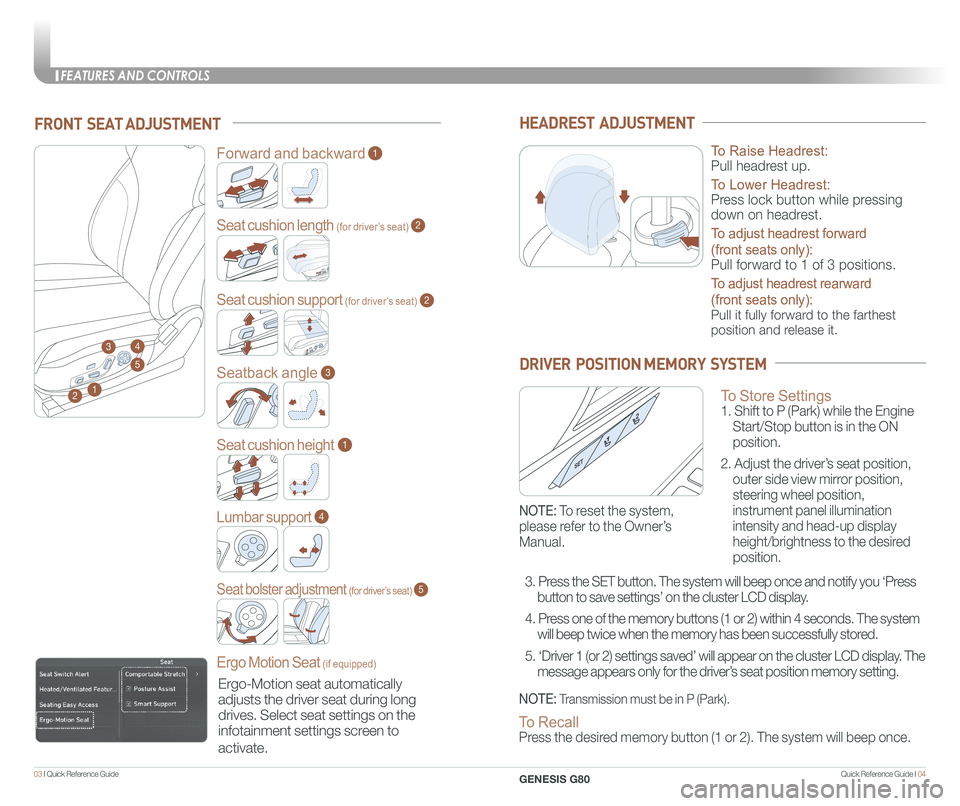
FRONT SEAT ADJUSTMENT
2
Forward and backward1
Seat cushion length (for driver’s seat)2
Seatback angle3
Seat cushion height1
Lumbar support
Ergo Motion Seat (if equipped)
4
Seat bolster adjustment (for driver’s seat)5
1
34
5
HEADREST ADJUSTMENT
To Raise Headrest:
Pull headrest up.
To Lower Headrest:
Press lock button while pressing
down on headrest.
To adjust headrest forward
(front seats only):
Pull forward to 1 of 3 positions.
To adjust headrest rearward
(front seats only):
Pull it fully forward to the farthest
position and release it.
DRIVER POSITION MEMORY SYSTEM
Seat cushion support (for driver’s seat)2
Ergo-Motion seat automatically
adjusts the driver seat during long
drives. Select seat settings on the
infotainment settings screen to
activate.
To Store Settings 1. Shift to P (Park) while the Engine
Start/Stop button is in the ON
position.
2. Adjust the driver’s seat position,
outer side view mirror position,
steering wheel position,
instrument panel illumination
intensity and head-up display
height/brightness to the desired
position.
NOTE: Transmission must be in P (Park).
NOTE: To reset the system,
please refer to the Owner’s
Manual.
To Recall Press the desired memory button (1 or 2). The system will beep once.
3. Press the SET button. The system will beep once and notify you ‘Press
button to save settings’ on the cluster LCD display.
4. Press one of the memory buttons (1 or 2) within 4 seconds. The system
will beep twice when the memory has been successfully stored.
5. ‘Driver 1 (or 2) settings saved’ will appear on the cluster L\
CD display. The
message appears only for the driver’s seat position memory setting.
FEATURES AND CONTROLS
GENESIS G80
Page 7 of 25
Quick Reference Guide I 0807 I Quick Reference Guide
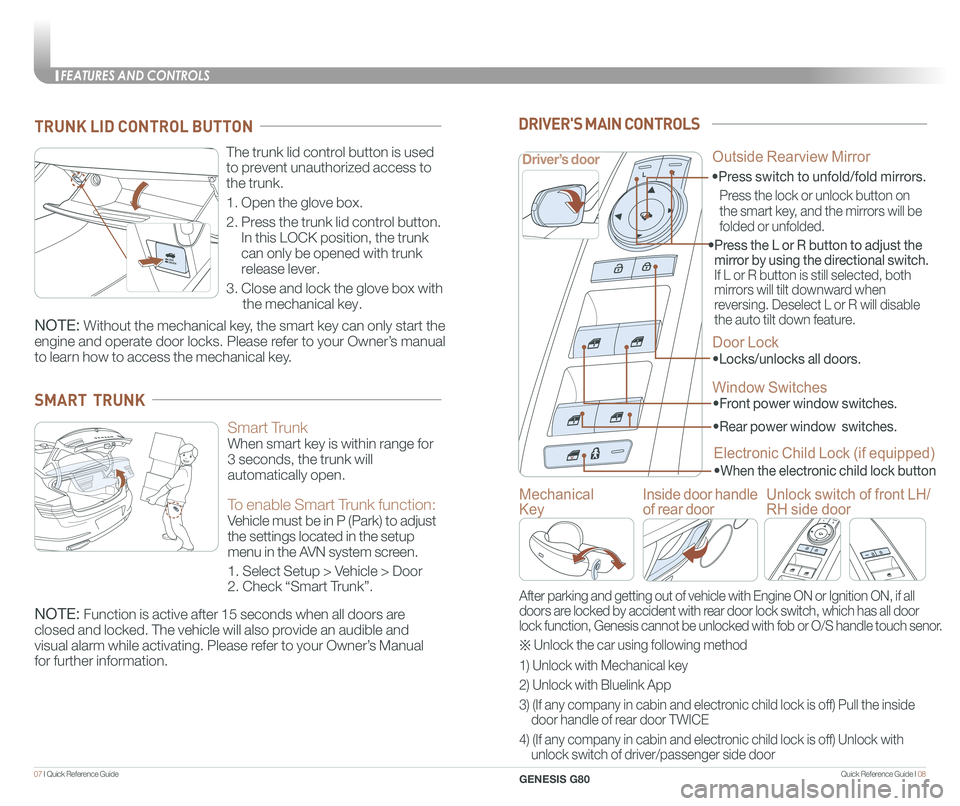
The trunk lid control button is used
to prevent unauthorized access to
the trunk.
1. Open the glove box.
2. Press the trunk lid control button.
In this LOCK position, the trunk
can only be opened with trunk
release lever.
3. Close and lock the glove box with
the mechanical key.
TRUNK LID CONTROL BUTTON
Smart Trunk
When smart key is within range for
3 seconds, the trunk will
automatically open.
To enable Smart Trunk function:
Vehicle must be in P (Park) to adjust
the settings located in the setup
menu in the AVN system screen.
1. Select Setup > Vehicle > Door
2. Check “Smart Trunk”.
NOTE: Function is active after 15 seconds when all doors are
closed and locked. The vehicle will also provide an audible and
visual alarm while activating. Please refer to your Owner’s Manual
for further information.
SMART TRUNK
NOTE: Without the mechanical key, the smart key can only start the
engine and operate door locks. Please refer to your Owner’s manual
to learn how to access the mechanical key.
• Front power window switches.
•
Rear power window switches.
• Press the L or R button to adjust the
mirror by using the directional switch.
If L or R button is still selected, both
mirrors will tilt downward when
reversing. Deselect L or R will disable
the auto tilt down feature.
Driver’s door
DRIVER'S MAIN CONTROLS
Outside Rearview Mirror
Door Lock
•Locks/unlocks all doors.
Window Switches
Electronic Child Lock (if equipped)
•When the electronic child lock button
•Press switch to unfold/fold mirrors.
Press the lock or unlock button on
the smart key, and the mirrors will be
folded or unfolded.
Mechanical
Key
Inside door handle
of rear door
Unlock switch of front LH/
RH side door
After parking and getting out of vehicle with Engine ON or Ignition ON, \
if all
doors are locked by accident with rear door lock switch, which has all door
lock function, Genesis cannot be unlocked with fob or O/S handle touch s\
enor.
※ Unlock the car using following method
1) Unlock with Mechanical key
2) Unlock with Bluelink App
3) (If any company in cabin and electronic child lock is off) Pull the inside
door handle of rear door TWICE
4) (If any company in cabin and electronic child lock is off) Unlock with
unlock switch of driver/passenger side door
FEATURES AND CONTROLS
GENESIS G80
Page 9 of 25
Quick Reference Guide I 1211 I Quick Reference Guide
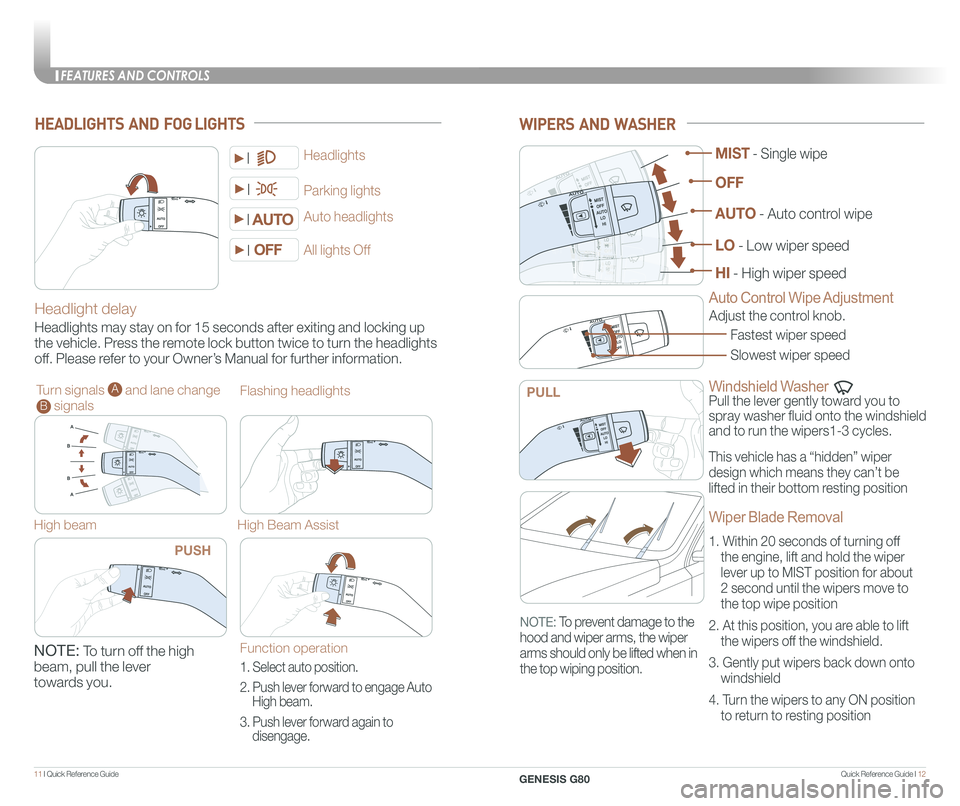
WIPERS AND WASHER
Windshield Washer
Pull the lever gently toward you to
spray washer fluid onto the windshield
and to run the wipers1-3 cycles.
Fastest wiper speed
Adjust the control knob.
Slowest wiper speed
MIST - Single wipe
AUTO - Auto control wipe
LO - Low wiper speed
HI - High wiper speed
OFF
PULL
Auto Control Wipe AdjustmentHeadlight delay
Headlights may stay on for 15 seconds after exiting and locking up
the vehicle. Press the remote lock button twice to turn the headlights
off. Please refer to your Owner’s Manual for further information.
Auto headlights
Headlights
Parking lights
All lights Off
Turn signals A and lane change B signals
High beam
NOTE: To turn off the high
beam, pull the lever
towards you.
Flashing headlights
High Beam Assist
HEADLIGHTS AND FOG LIGHTS
PUSH
Function operation
1. Select auto position.
2. Push lever forward to engage Auto
High beam.
3. Push lever forward again to
disengage.
This vehicle has a “hidden” wiper
design which means they can’t be
lifted in their bottom resting position
Wiper Blade Removal
1. Within 20 seconds of turning off
the engine, lift and hold the wiper
lever up to MIST position for about
2 second until the wipers move to
the top wipe position
2. At this position, you are able to lift
the wipers off the windshield.
3. Gently put wipers back down onto
windshield
4. Turn the wipers to any ON position
to return to resting position
NOTE: To prevent damage to the
hood and wiper arms, the wiper
arms should only be lifted when in
the top wiping position.
FEATURES AND CONTROLS
GENESIS G80
Page 11 of 25
Quick Reference Guide I 1615 I Quick Reference Guide
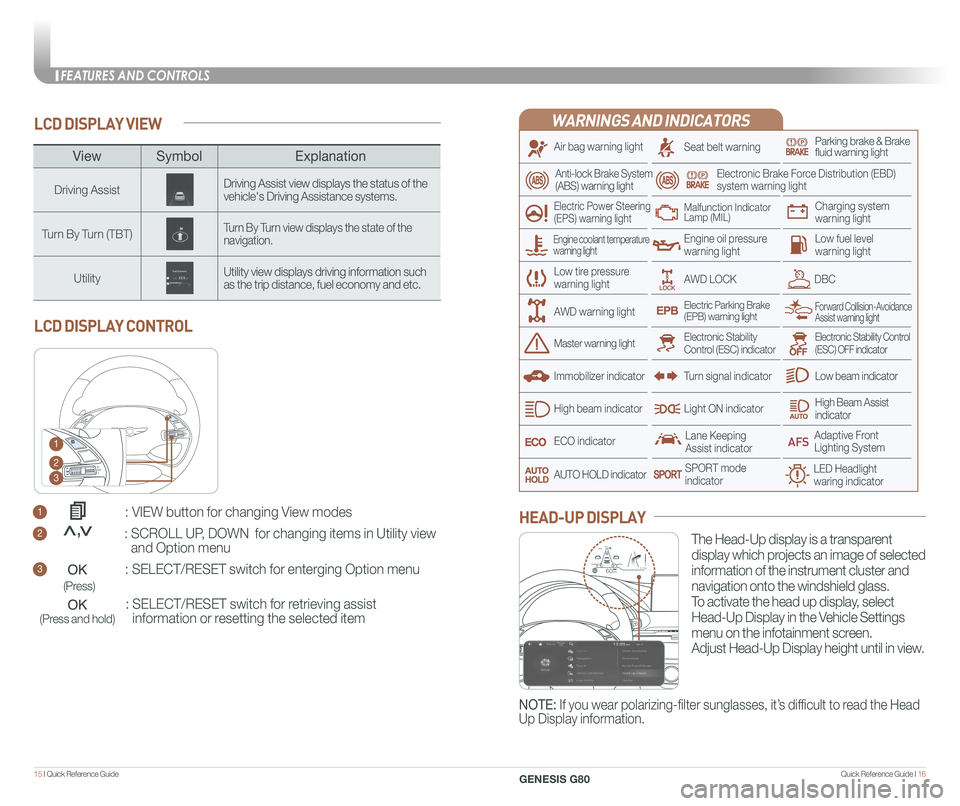
LCD DISPLAY VIEW
1 : VIEW button for changing View modes
2 : SCROLL UP, DOWN for changing items in Utility view
and Option menu
3 : SELECT/RESET switch for enterging Option menu
: SELECT/RESET switch for retrieving assist
information or resetting the selected item
LCD DISPLAY CONTROL
1
2
3
(Press)
(Press and hold)
<<,
ViewSymbol Explanation
Driving AssistDriving Assist view displays the status of the vehicle's Driving Assistance systems.
Turn By Turn (TBT)Turn By Turn view displays the state of the navigation.
UtilityUtility view displays driving information such as the trip distance, fuel economy and etc.
WARNINGS AND INDICATORS
Air bag warning light
Electric Power Steering (EPS) warning light
Seat belt warningParking brake & Brake fluid warning light
Electronic Brake Force Distribution (EBD) system warning light
Low tire pressurewarning light
Low fuel level warning light
Low beam indicator
High Beam Assist indicatorLight ON indicator
ECO indicator
SPORT modeindicator
Anti-lock Brake System(ABS) warning light
High beam indicator
Electronic Stability Control (ESC) indicatorMaster warning light
Forward Collision-Avoidance Assist warning lightElectric Parking Brake(EPB) warning light
Engine oil pressure warning light
AWD LOCKDBC
Charging system warning light
Immobilizer indicator
Malfunction IndicatorLamp (MIL)
Electronic Stability Control (ESC) OFF indicator
Lane Keeping Assist indicator
LED Headlight waring indicator
Adaptive Front Lighting System
AUTO HOLD indicator
Turn signal indicator
The Head-Up display is a transparent
display which projects an image of selected
information of the instrument cluster and
navigation onto the windshield glass.
To activate the head up display, select
Head-Up Display in the Vehicle Settings
menu on the infotainment screen.
Adjust Head-Up Display height until in view.
HEAD-UP DISPLAY
Engine coolant temperature warning light
AWD warning light
NOTE: If you wear polarizing-filter sunglasses, it’s difficult to read the Head
Up Display information.
HDA
MPH60
600.1mi60
FEATURES AND CONTROLS
GENESIS G80
Page 14 of 25
Quick Reference Guide I 2221 I Quick Reference Guide
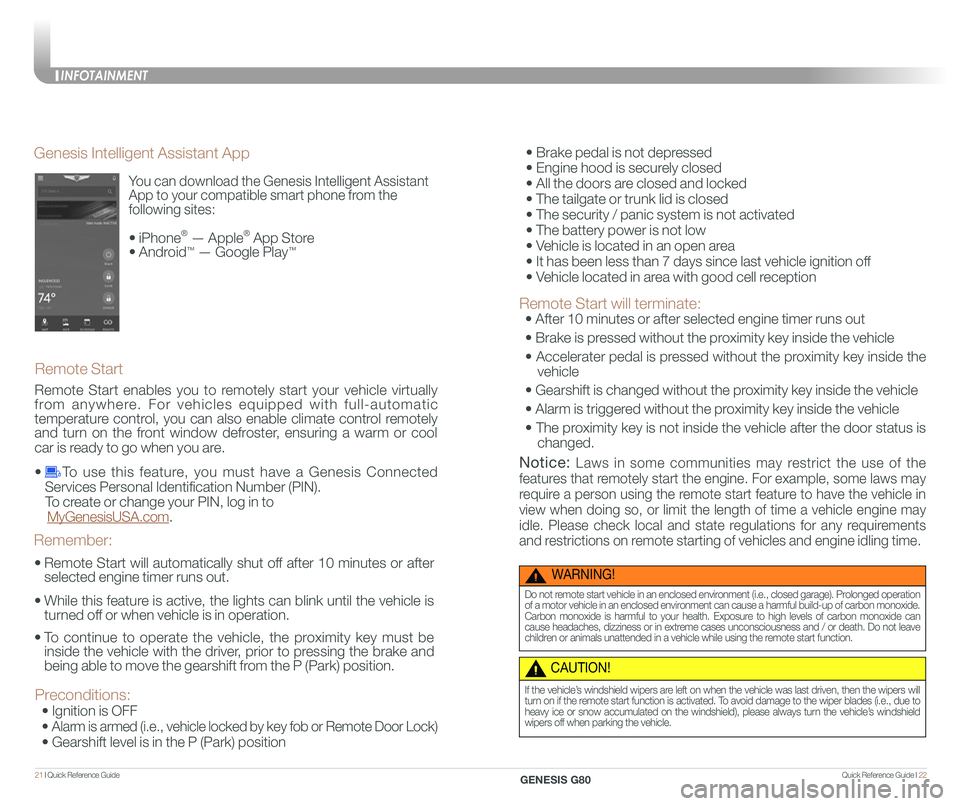
You can download the Genesis Intelligent Assistant
App to your compatible smart phone from the
following sites:
• iPhone® — Apple® App Store
• Android™ — Google Play™
Remote Start
Genesis Intelligent Assistant App
•
Remote Start will automatically shut off after 10 minutes or after
selected engine timer runs out.
•
While this feature is active, the lights can blink until the vehicle is
turned off or when vehicle is in operation.
•
To continue to operate the vehicle, the proximity key must be
inside the vehicle with the driver, prior to pressing the brake and
being able to move the gearshift from the P (Park) position.
Remember:
Remote Start enables you to remotely start your vehicle virtually
from anywhere. For vehicles equipped with full-automatic
temperature control, you can also enable climate control remotely
and turn on the front window defroster, ensuring a warm or cool
car is ready to go when you are.
• To use this feature, you must have a Genesis Connected
Services Personal Identification Number (PIN).
To create or change your PIN, log in to
MyGenesisUSA.com.
Preconditions:
• Ignition is OFF
•
Alarm is armed (i.e., vehicle locked by key fob or Remote Door Lock)
• Gearshift level is in the P (Park) position
WARNING!
Do not remote start vehicle in an enclosed environment (i.e., closed garage). Prolonged operation of a motor vehicle in an enclosed environment can cause a harmful build-up of carbon monoxide. Carbon monoxide is harmful to your health. Exposure to high levels of carbon monoxide can cause headaches, dizziness or in extreme cases unconsciousness and / or death. Do not leave children or animals unattended in a vehicle while using the remote start function.
CAUTION!
If the vehicle’s windshield wipers are left on when the vehicle was last driven, then the wipers will turn on if the remote start function is activated. To avoid damage to the wiper blades (i.e., due to heavy ice or snow accumulated on the windshield), please always turn the vehicle’s windshield wipers off when parking the vehicle.
• Brake pedal is not depressed
• Engine hood is securely closed
• All the doors are closed and locked
• The tailgate or trunk lid is closed
• The security / panic system is not activated
• The battery power is not low
• Vehicle is located in an open area
• It has been less than 7 days since last vehicle ignition off
• Vehicle located in area with good cell reception
Remote Start will terminate:
• After 10 minutes or after selected engine timer runs out
• Brake is pressed without the proximity key inside the vehicle
• Accelerater pedal is pressed without the proximity key inside the
vehicle
• Gearshift is changed without the proximity key inside the vehicle
• Alarm is triggered without the proximity key inside the vehicle
• The proximity key is not inside the vehicle after the door status is
changed.
Notice: Laws in some communities may restrict the use of the
features that remotely start the engine. For example, some laws may
require a person using the remote start feature to have the vehicle in
view when doing so, or limit the length of time a vehicle engine may
idle. Please check local and state regulations for any requirements
and restrictions on remote starting of vehicles and engine idling time.
INFOTAINMENT
GENESIS G80
Page 15 of 25
Quick Reference Guide I 2423 I Quick Reference Guide
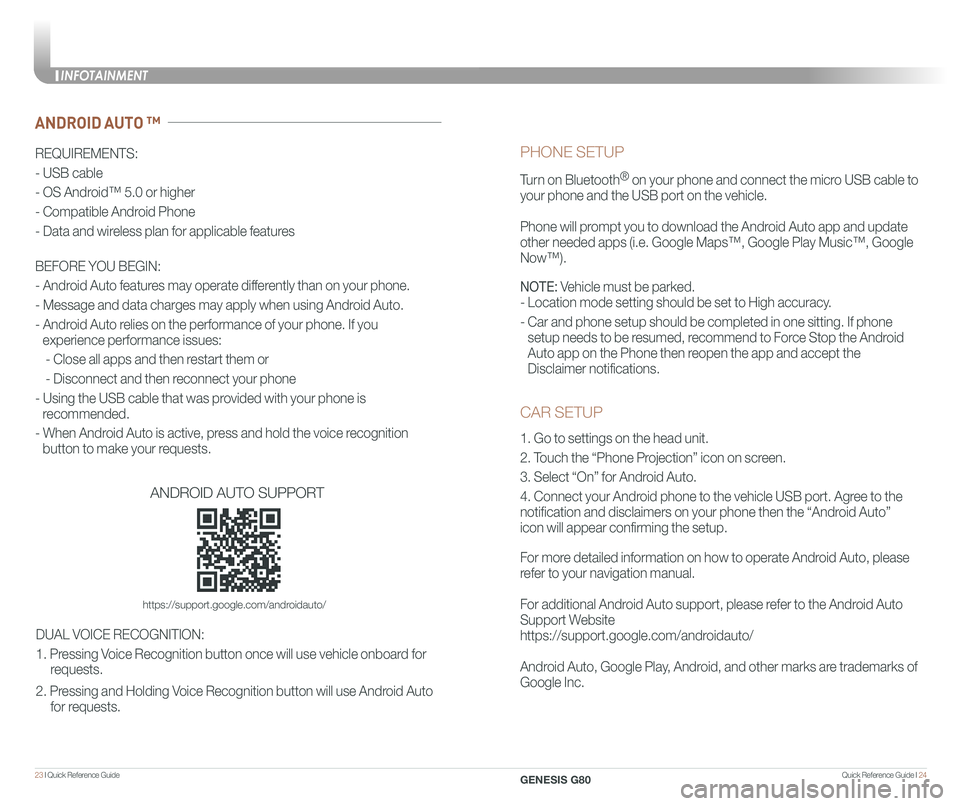
CAR SETUP
1. Go to settings on the head unit.
2. Touch the “Phone Projection” icon on screen.
3. Select “On” for Android Auto.
4. Connect your Android phone to the vehicle USB port. Agree to the
notification and disclaimers on your phone then the “Android Auto”
icon will appear confirming the setup.
For more detailed information on how to operate Android Auto, please
refer to your navigation manual.
For additional Android Auto support, please refer to the Android Auto
Support Website
https://support.google.com/androidauto/
Android Auto, Google Play, Android, and other marks are trademarks of
Google Inc.
PHONE SETUP
Turn on Bluetooth® on your phone and connect the micro USB cable to
your phone and the USB port on the vehicle.
Phone will prompt you to download the Android Auto app and update
other needed apps (i.e. Google Maps™, Google Play Music™, Google \
Now™).
NOTE: Vehicle must be parked.
- Location mode setting should be set to High accuracy.
- Car and phone setup should be completed in one sitting. If phone
setup needs to be resumed, recommend to Force Stop the Android
Auto app on the Phone then reopen the app and accept the
Disclaimer notifications.
ANDROID AUTO ™
REQUIREMENTS:
- USB cable
- OS Android™ 5.0 or higher
- Compatible Android Phone
- Data and wireless plan for applicable features
BEFORE YOU BEGIN:
- Android Auto features may operate differently than on your phone.
- Message and data charges may apply when using Android Auto.
- Android Auto relies on the performance of your phone. If you
experience performance issues:
- Close all apps and then restart them or
- Disconnect and then reconnect your phone
- Using the USB cable that was provided with your phone is
recommended.
- When Android Auto is active, press and hold the voice recognition
button to make your requests.
ANDROID AUTO SUPPORT
https://support.google.com/androidauto/
DUAL VOICE RECOGNITION:
1. Pressing Voice Recognition button once will use vehicle onboard for
requests.
2. Pressing and Holding Voice Recognition button will use Android Auto
for requests.
INFOTAINMENT
GENESIS G80
Page 16 of 25
Quick Reference Guide I 2625 I Quick Reference Guide
CAR SETUP
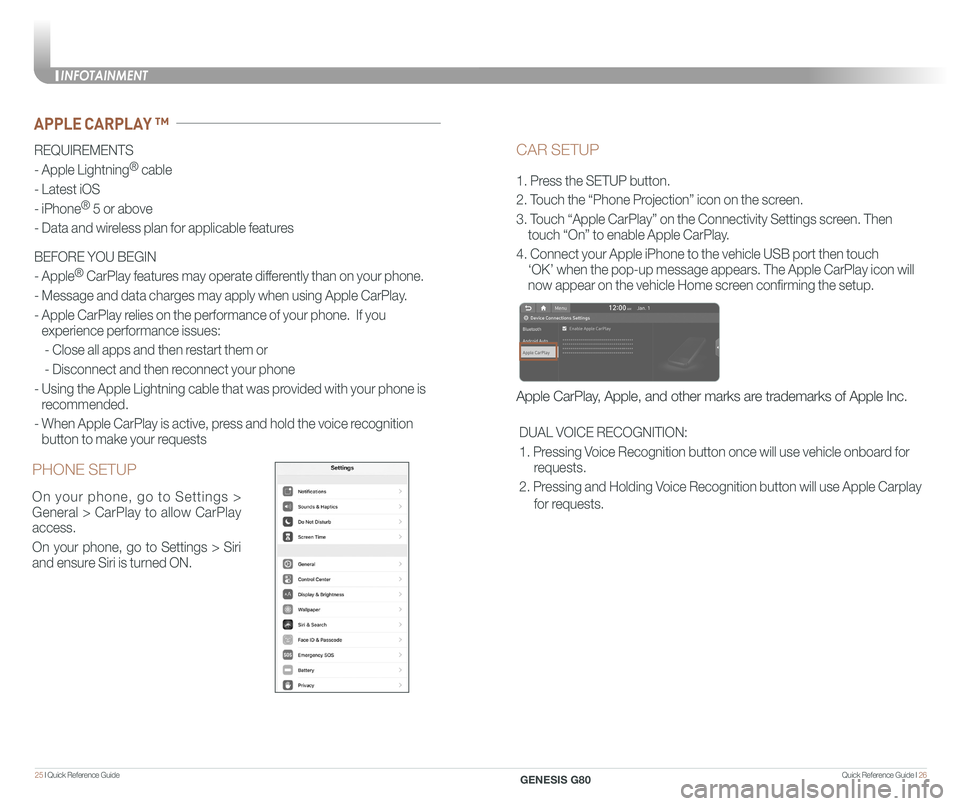
1. Press the SETUP button.
2. Touch the “Phone Projection” icon on the screen.
3. Touch “Apple CarPlay” on the Connectivity Settings screen. Then
touch “On” to enable Apple CarPlay.
4. Connect your Apple iPhone to the vehicle USB port then touch
‘OK’ when the pop-up message appears. The Apple CarPlay icon will \
now appear on the vehicle Home screen confirming the setup.
Apple CarPlay, Apple, and other marks are trademarks of Apple Inc.
REQUIREMENTS
- Apple Lightning® cable
- Latest iOS
- iPhone® 5 or above
- Data and wireless plan for applicable features
BEFORE YOU BEGIN
- Apple® CarPlay features may operate differently than on your phone.
- Message and data charges may apply when using Apple CarPlay.
- Apple CarPlay relies on the performance of your phone. If you
experience performance issues:
- Close all apps and then restart them or
- Disconnect and then reconnect your phone
- Using the Apple Lightning cable that was provided with your phone is
recommended.
- When Apple CarPlay is active, press and hold the voice recognition
button to make your requests
APPLE CARPLAY ™
PHONE SETUP
On your phone, go to Settings >
General > CarPlay to allow CarPlay
access.
On your phone, go to Settings > Siri
and ensure Siri is turned ON.
DUAL VOICE RECOGNITION:
1. Pressing Voice Recognition button once will use vehicle onboard for
requests.
2. Pressing and Holding Voice Recognition button will use Apple Carplay
for requests.
INFOTAINMENT
GENESIS G80