air conditioning GENESIS G90 2017 Owner's Manual
[x] Cancel search | Manufacturer: GENESIS, Model Year: 2017, Model line: G90, Model: GENESIS G90 2017Pages: 524, PDF Size: 19.3 MB
Page 105 of 524
C
Co
on
nv
ve
e n
n i
ie
e n
n t
t
f
f e
e a
at
tu
u r
re
e s
s
o
o f
f
y
y o
o u
ur
r
v
v e
e h
h i
ic
c l
le
e
Automatic Climate Control System ........................................3-122
Automatic Heating and Air Conditioning ...........................................3-123
Manual Heating and Air Conditioning ................................................3-124
System Operation ........................................................................\
............3-135
System Maintenance ........................................................................\
......3-136
Windshield Defrosting and Defogging ..................................3-138
Climate Control Additional Features .....................................3-141
Clean Air ........................................................................\
............................3-141
Automatic Ventilation ........................................................................\
.....3-141
Sunroof Inside Air Recirculation..........................................................3-141
DIS Navigation System Monitor ...........................................................3-141
Storage Compartment..............................................................3-143
Center Console Storage ........................................................................\
.3-143
Rear Console Storage........................................................................\
.....3-143
Glove Box.......................................................................\
............................3-144
Sunglass Holder ........................................................................\
...............3-144
Cellular Phone Holder........................................................................\
.....3-145
Wireless Cellular Phone Charging System ........................................3-145
Interior Features ......................................................................3-\
147
Cup Holder........................................................................\
.........................3-147
Sunvisor ........................................................................\
.............................3-148
Rear Vanity Mirror ........................................................................\
..........3-148
Power Outlet ........................................................................\
.....................3-149
USB Charger ........................................................................\
.....................3-150
Clock ........................................................................\
...................................3-151
Clothes Hanger........................................................................\
.................3-151
Bag Hanger ........................................................................\
.......................3-152
Floor Mat Anchor(s) ........................................................................\
.......3-152
Rear Curtain ........................................................................\
......................3-153
Rear Door Window Curtain ...................................................................3-154\
Luggage Net Holder ........................................................................\
........3-155
3
Page 224 of 524
A
AU
U T
TO
O M
M A
AT
TI
IC
C
C
C L
LI
IM
M A
AT
TE
E
C
C O
O N
NT
TR
R O
O L
L
S
S Y
Y S
ST
T E
EM
M
3-122
Convenient features of your vehicle
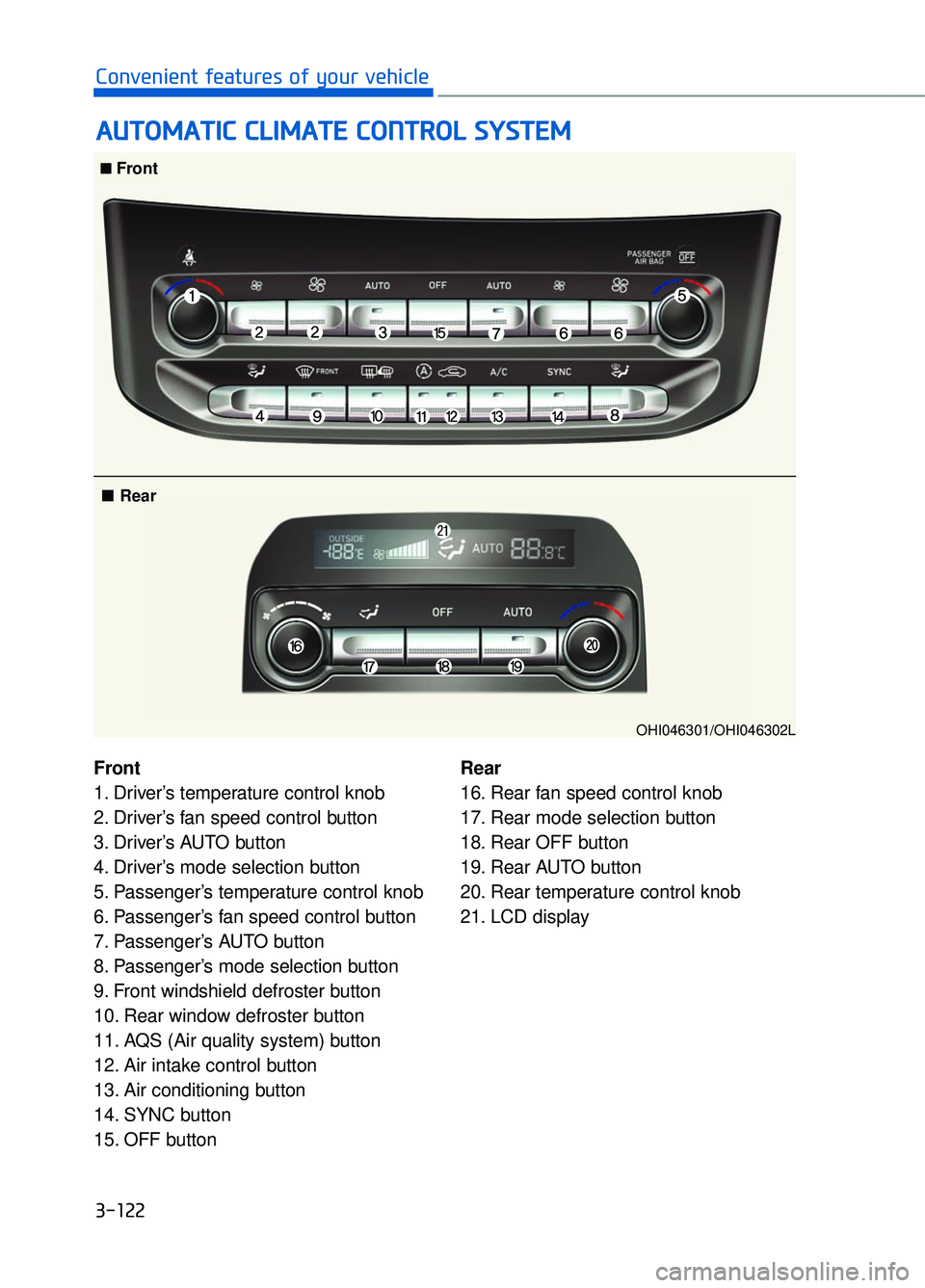
Front
1. Driver’s temperature control knob
2. Driver’s fan speed control button
3. Driver’s AUTO button
4. Driver’s mode selection button
5. Passenger’s temperature control knob
6. Passenger’s fan speed control button
7. Passenger’s AUTO button
8. Passenger’s mode selection button
9. Front windshield defroster button
10. Rear window defroster button
11. AQS (Air quality system) button
12. Air intake control button
13. Air conditioning button
14. SYNC button
15. OFF button Rear
16. Rear fan speed control knob
17. Rear mode selection button
18. Rear OFF button
19. Rear AUTO button
20. Rear temperature control knob
21. LCD display
■
■Front
■ Rear
OHI046301/OHI046302L
Page 225 of 524
Automatic Heating and Air
Conditioning
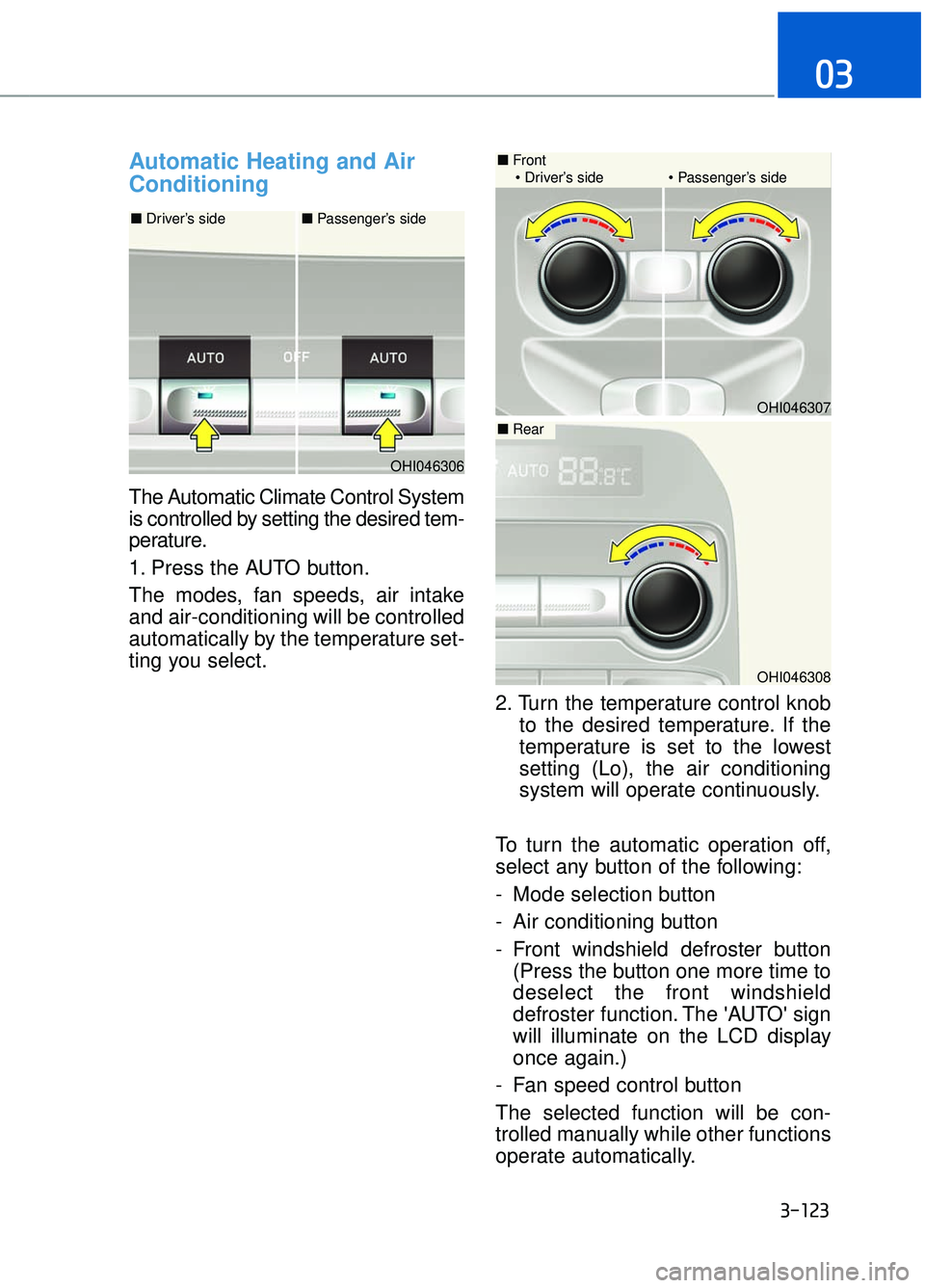
The Automatic Climate Control System
is controlled by setting the desired tem-
perature.
1. Press the AUTO button.
The modes, fan speeds, air intake
and air-conditioning will be controlled
automatically by the temperature set-
ting you select.2. Turn the temperature control knobto the desired temperature. If the
temperature is set to the lowest
setting (Lo), the air conditioning
system will operate continuously.
To turn the automatic operation off,
select any button of the following:
- Mode selection button
- Air conditioning button
- Front windshield defroster button (Press the button one more time to
deselect the front windshield
defroster function. The 'AUTO' sign
will illuminate on the LCD display
once again.)
- Fan speed control button
The selected function will be con-
trolled manually while other functions
operate automatically.
3-123
03
OHI046306
OHI046308
OHI046307
■ Front
Driver’s side Passenger’s side
■ Driver’s side ■ Passenger’s side
■Rear
Page 226 of 524
For your convenience and to improve
the effectiveness of the climate con-
trol, use the AUTO button and set the
temperature to 73°F (23°C).
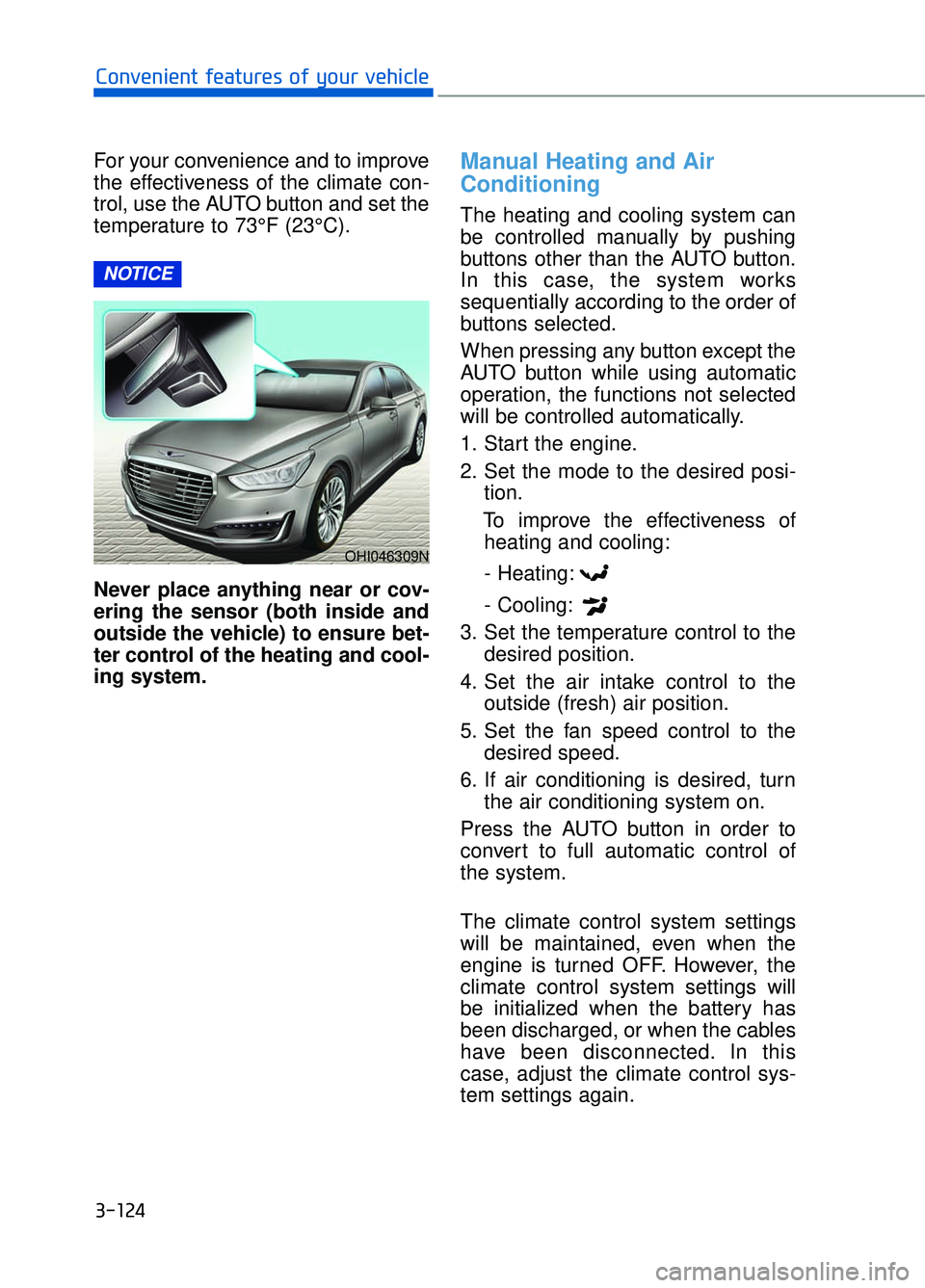
Never place anything near or cov-
ering the sensor (both inside and
outside the vehicle) to ensure bet-
ter control of the heating and cool-
ing system.Manual Heating and Air
Conditioning
The heating and cooling system can
be controlled manually by pushing
buttons other than the AUTO button.
In this case, the system works
sequentially according to the order of
buttons selected.
When pressing any button except the
AUTO button while using automatic
operation, the functions not selected
will be controlled automatically.
1. Start the engine.
2. Set the mode to the desired posi-tion.
To improve the effectiveness of heating and cooling:
- Heating:
- Cooling:
3. Set the temperature control to the desired position.
4. Set the air intake control to the outside (fresh) air position.
5. Set the fan speed control to the desired speed.
6. If air conditioning is desired, turn the air conditioning system on.
Press the AUTO button in order to
convert to full automatic control of
the system.
The climate control system settings
will be maintained, even when the
engine is turned OFF. However, the
climate control system settings will
be initialized when the battery has
been discharged, or when the cables
have been disconnected. In this
case, adjust the climate control sys-
tem settings again.
NOTICE
3-124
Convenient features of your vehicle
OHI046309N
Page 233 of 524

Air intake control
This button is used to select the out-
side (fresh) air position or recirculat-
ed air position.
Recirculated air position
With the recirculated airposition selected, air from
the passenger compart-
ment will be drawn
through the heating sys-
tem and heated or cooled
according to the function
selected.
Outside (fresh) air position
With the outside (fresh) air position selected, air
enters the vehicle from
outside and is heated or
cooled according to the
function selected.
Information
Prolonged operation of the heater in
the recirculated air position (without
air conditioning selected) may cause
fogging of the windshield and side
windows and the air within the pas-
senger compartment may become
stale.
In addition, prolonged use of the air
conditioning with the recirculated air
position selected will result in exces-
sively dry air in the passenger com-
partment.
i
3-131
03
OHI046321
Continued use of the climate control system operation in
the recirculated air position
can cause drowsiness or
sleepiness, that may cause
loss of vehicle control result-
ing in an accident. Set the air
intake control to the outside
(fresh) air position as much as
possible while driving.
Continued use of the climate control system operation in
the recirculated air position
(without the air conditioning
selected) may allow humidity
to increase inside the vehicle
which may fog the glass and
obscure visibility.
Do not sleep in a vehicle with the air conditioning or heating
system on. It may cause seri-
ous injury or death due to a
drop in the oxygen level
and/or body temperature.
WARNING
Page 236 of 524
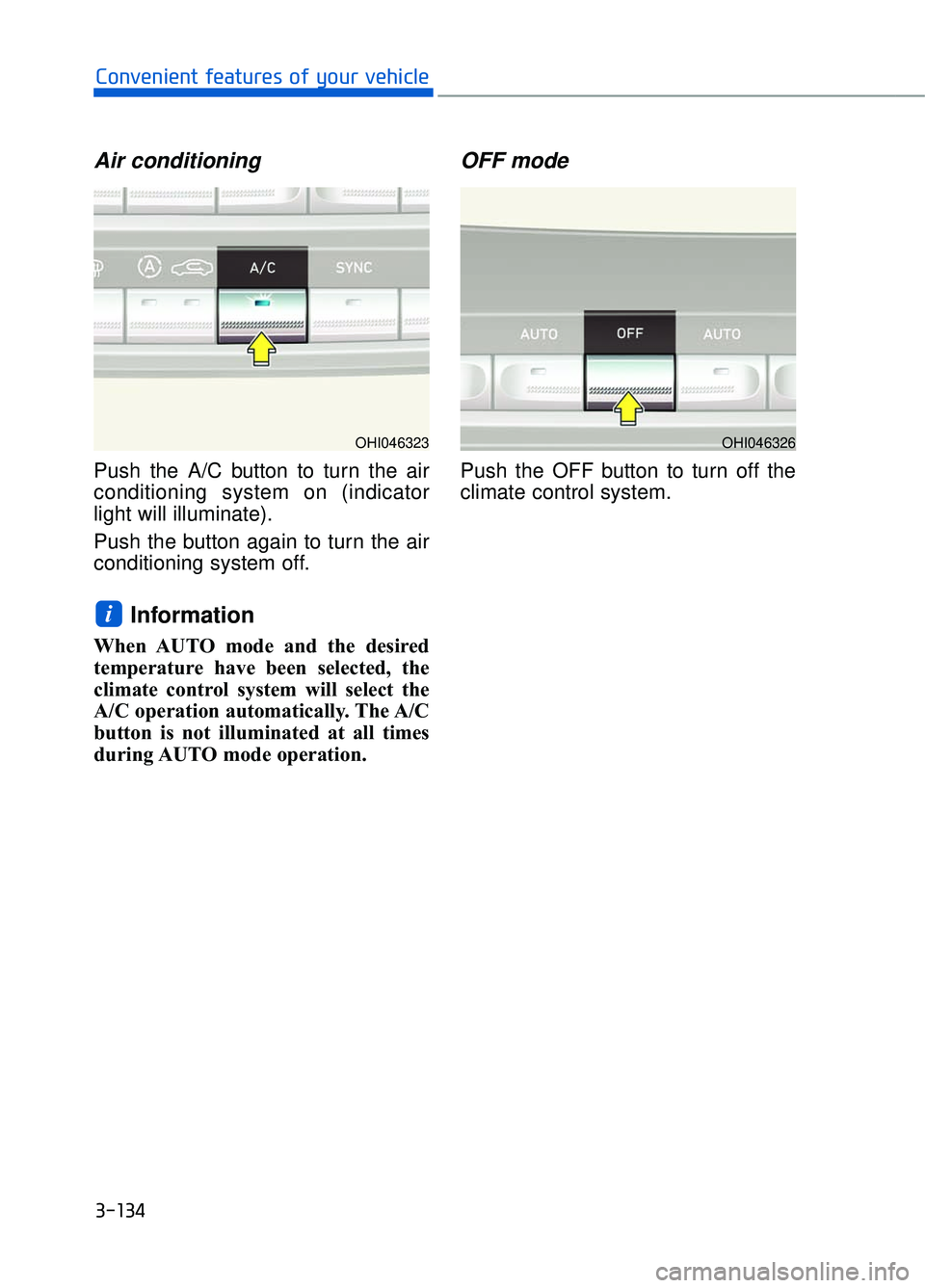
Air conditioning
Push the A/C button to turn the air
conditioning system on (indicator
light will illuminate).
Push the button again to turn the air
conditioning system off.
Information
When AUTO mode and the desired
temperature have been selected, the
climate control system will select the
A/C operation automatically. The A/C
button is not illuminated at all times
during AUTO mode operation.
OFF mode
Push the OFF button to turn off the
climate control system.
i
3-134
Convenient features of your vehicle
OHI046326OHI046323
Page 237 of 524
System Operation
Ventilation
1. Select the Face Level mode.
2. Set the air intake control to theoutside (fresh) air position.
3. Set the temperature control to the desired position.
4. Set the fan speed control to the desired speed.
Heating
1. Select the Floor Level mode.
2. Set the air intake control to theoutside (fresh) air position.
3. Set the temperature control to the desired position.
4. Set the fan speed control to the desired speed.
5. If dehumidified heating is desired, turn the air conditioning system on.
If the windshield fogs up, select the
Floor & Defrost mode or press
the Front Defrost mode.
Operation Tips
To keep dust or unpleasant fumes from entering the car through the
ventilation system, temporarily set
the air intake control to the recircu-
lated air position. Return the con-
trol to the fresh air position when
the irritation has passed. This will
help keep the driver alert and com-
fortable.
To prevent the inside of the wind- shield from fogging, set the air
intake control to the fresh air posi-
tion and fan speed to the desired
position, turn on the air conditioning
system, and adjust the temperature
control to desired temperature.
Air conditioning
All Genesis Brand Air Conditioning
Systems are filled with environmen-
tally friendly R-134a refrigerant.
1. Start the engine.
2. Push the air conditioning button.
3. Set the mode to the Face Level mode.
4. Set the air intake control to the recirculated air position. However,
prolonged operation of the recircu-
lated air position will excessively
dry the air. In this case, change the
air position.
5. Adjust the fan speed control and temperature control to maintain
maximum comfort.
When maximum cooling is desired,
set the temperature control to the
extreme left position then set the fan
speed control to the highest speed.
When using the air conditioning
system, monitor the engine tem-
perature gauge closely while driv-
ing up hills or in heavy traffic
when outside temperatures are
high. Air conditioning system
operation can cause engine over-
heating. Continue to use the blow-
er fan, but turn the air condition-
ing system off if the engine tem-
perature gauge indicates engine
overheating.
NOTICE
3-135
03
Page 238 of 524
Air conditioning system operation
tips
If the vehicle has been parked indirect sunlight during hot weather,
open the windows for a short time
to let the hot air inside the vehicle
escape.
After sufficient cooling has been achieved, switch back from the
recirculated air to the fresh outside
air position.
To help reduce moisture inside of the windows on rainy or humid
days, decrease the humidity inside
the vehicle by operating the air
conditioning system with the win-
dows and sunroof closed.
Use the air conditioning system every month only for a few minutes
to ensure maximum system per-
formance.
If you operate air conditioner excessively, the difference between
the temperature of the outside air
and that of the windshield could
cause the outer surface of the
windshield to fog up, causing loss
of visibility. In this case, set the
mode selection knob or button to
the position and fan speed
control to the lower speed.
System Maintenance
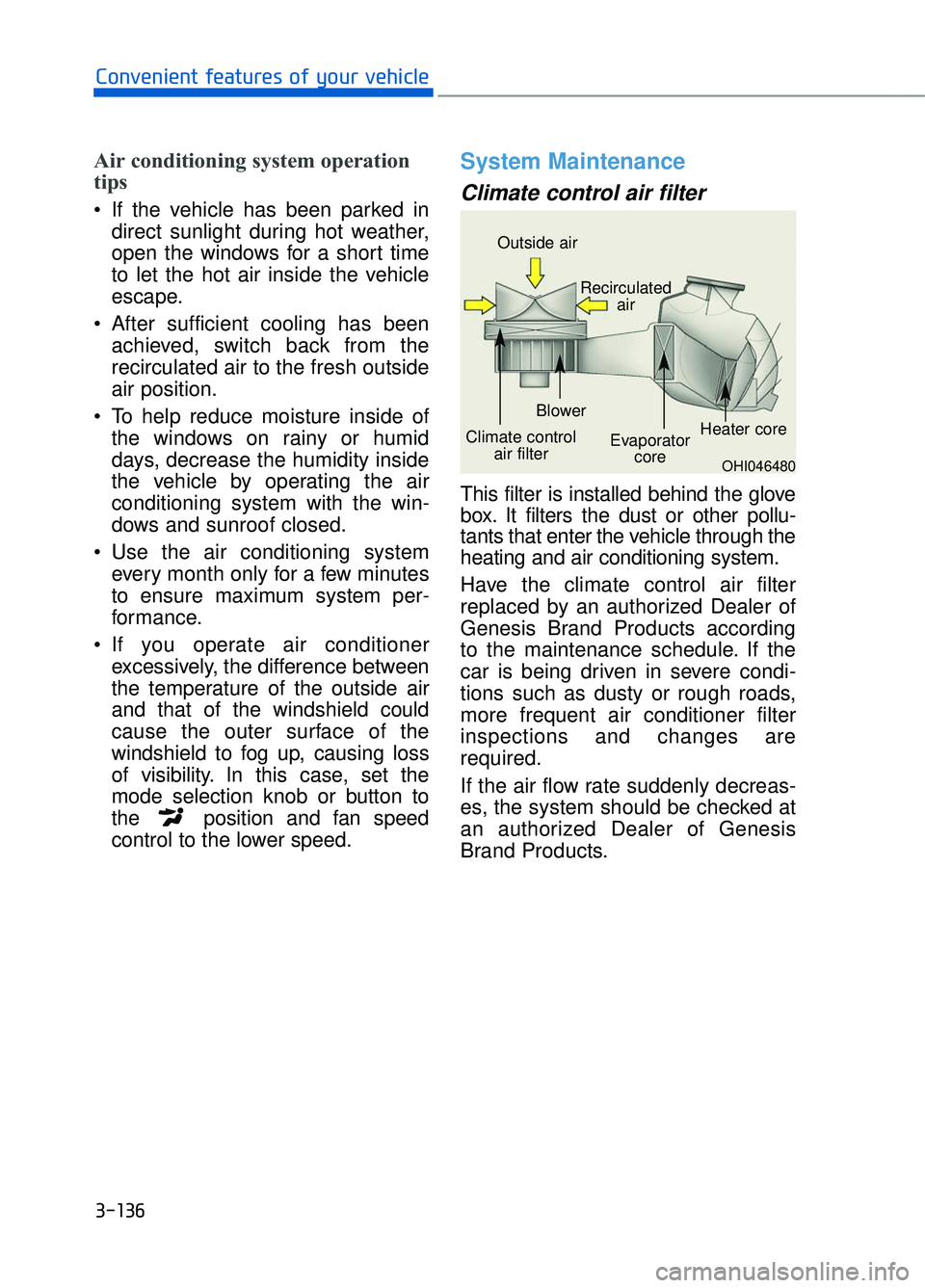
Climate control air filter
This filter is installed behind the glove
box. It filters the dust or other pollu-
tants that enter the vehicle through the
heating and air conditioning system.
Have the climate control air filter
replaced by an authorized Dealer of
Genesis Brand Products according
to the maintenance schedule. If the
car is being driven in severe condi-
tions such as dusty or rough roads,
more frequent air conditioner filter
inspections and changes are
required.
If the air flow rate suddenly decreas-
es, the system should be checked at
an authorized Dealer of Genesis
Brand Products.
3-136
Convenient features of your vehicle
OHI046480
Outside air
Recirculatedair
Climate control air filter Blower
Evaporatorcore Heater core
Page 239 of 524
Checking the amount of air conditioner refrigerant andcompressor lubricant
When the amount of refrigerant is
low, the performance of the air condi-
tioning is reduced. Overfilling also
has a negative influence on the air
conditioning system.
Therefore, if abnormal operation is
found, have the system inspected by
an authorized Dealer of Genesis
Brand Products.
It is important that the correct
type and amount of oil and refrig-
erant is used. Otherwise, damage
to the compressor and abnormal
system operation may occur.
The air conditioning system should
be serviced by an authorized Dealer
of Genesis Brand Products.
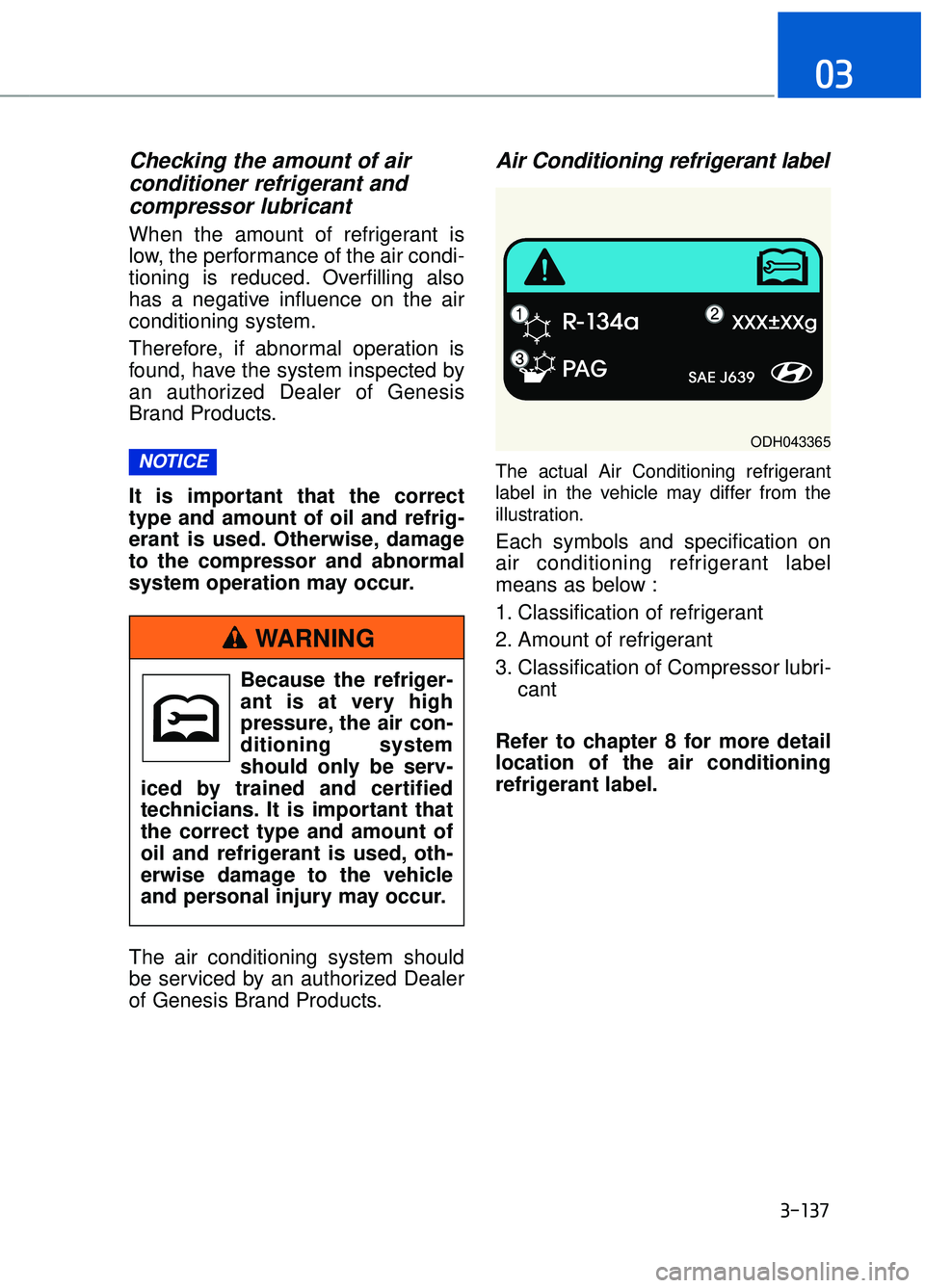
Air Conditioning refrigerant label
The actual Air Conditioning refrigerant
label in the vehicle may differ from the
illustration.
Each symbols and specification on
air conditioning refrigerant label
means as below :
1. Classification of refrigerant
2. Amount of refrigerant
3. Classification of Compressor lubri-
cant
Refer to chapter 8 for more detail
location of the air conditioning
refrigerant label.
NOTICE
3-137
03
ODH043365
Because the refriger-
ant is at very high
pressure, the air con-
ditioning system
should only be serv-
iced by trained and certified
technicians. It is important that
the correct type and amount of
oil and refrigerant is used, oth-
erwise damage to the vehicle
and personal injury may occur.
WARNING
Page 240 of 524
W
WI
IN
N D
DS
SH
H I
IE
E L
LD
D
D
D E
EF
FR
R O
O S
ST
T I
IN
N G
G
A
A N
N D
D
D
D E
EF
FO
O G
GG
GI
IN
N G
G
3-138
Convenient features of your vehicle
For maximum defrosting, set the temperature control to the extreme
right/hot position and the fan speed
control to the highest speed.
If warm air to the floor is desired while defrosting or defogging, set the
mode to the floor-defrost position.
Before driving, clear all snow and ice from the windshield, rear win-
dow, side view mirrors, and all side
windows.
Clear all snow and ice from the hood and air inlet in the cowl grill to
improve heater and defroster effi-
ciency and to reduce the probability
of fogging up the inside of the wind-
shield.
If the engine temperature is still
cold after starting, then a brief
engine warm up period may be
required for the vented air flow to
become warm or hot.
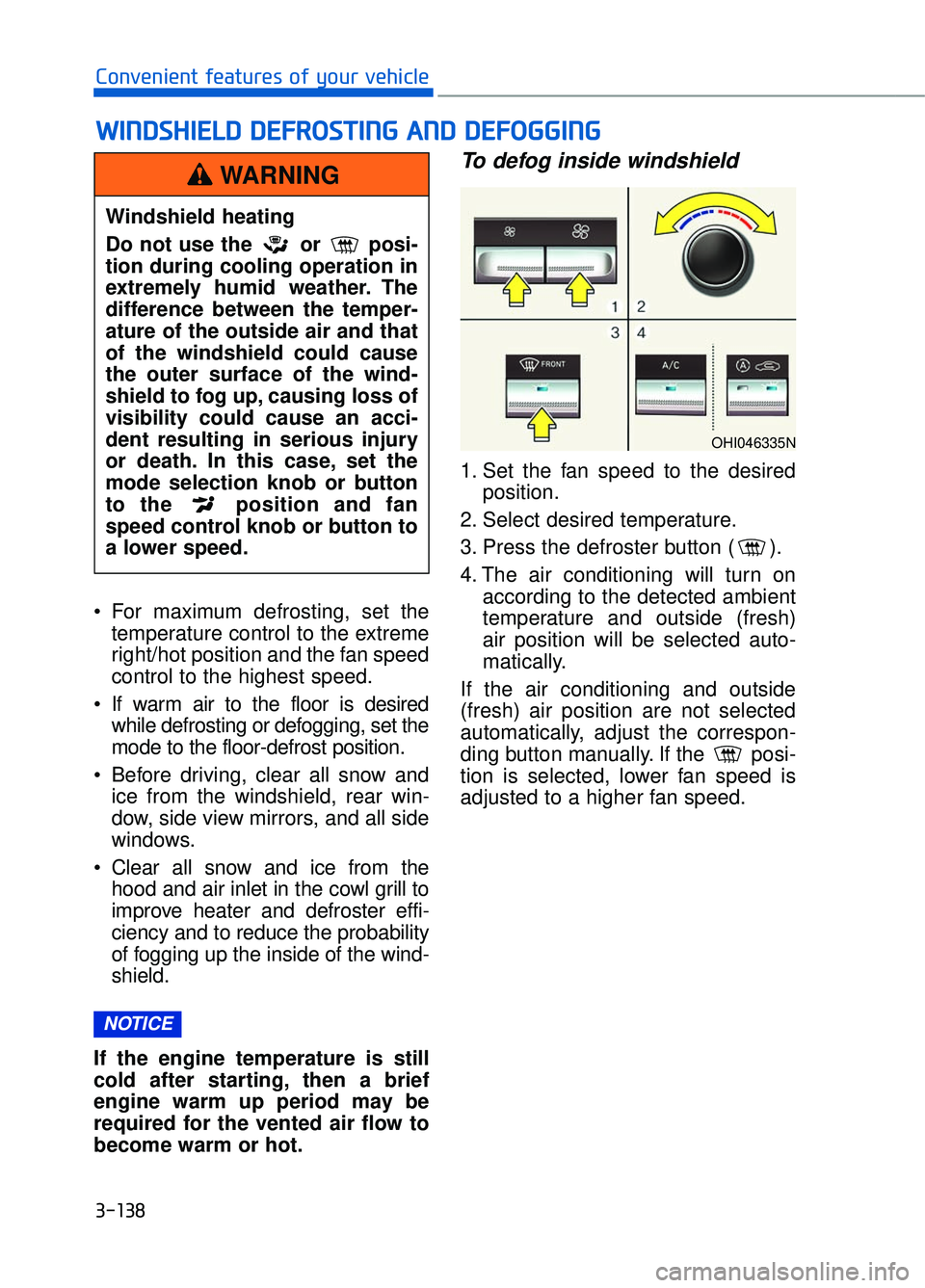
To defog inside windshield
1. Set the fan speed to the desired position.
2. Select desired temperature.
3. Press the defroster button ( ).
4. The air conditioning will turn on according to the detected ambient
temperature and outside (fresh)
air position will be selected auto-
matically.
If the air conditioning and outside
(fresh) air position are not selected
automatically, adjust the correspon-
ding button manually. If the posi-
tion is selected, lower fan speed is
adjusted to a higher fan speed.
NOTICE
Windshield heating
Do not use the or posi-
tion during cooling operation in
extremely humid weather. The
difference between the temper-
ature of the outside air and that
of the windshield could cause
the outer surface of the wind-
shield to fog up, causing loss of
visibility could cause an acci-
dent resulting in serious injury
or death. In this case, set the
mode selection knob or button
to the position and fan
speed control knob or button to
a lower speed.
WARNING
OHI046335N