noise GENESIS G90 2017 Owner's Manual
[x] Cancel search | Manufacturer: GENESIS, Model Year: 2017, Model line: G90, Model: GENESIS G90 2017Pages: 524, PDF Size: 19.3 MB
Page 60 of 524
2-40
Safety system of your vehicle
Information
• Both the driver's and front passen-ger's pre-tensioner seat belts may be
activated in certain frontal or side
collisions or rollovers.
• When the pre-tensioner seat belts are activated, a loud noise may be
heard and fine dust, which may
appear to be smoke, may be visible
in the passenger compartment.
These are normal operating condi-
tions and are not hazardous.
• Although it is non-toxic, the fine dust may cause skin irritation and
should not be breathed for pro-
longed periods. Wash all exposed
skin areas thoroughly after an acci-
dent in which the pre-tensioner seat
belts were activated.
• The pre-tensioner seat belt system may get adversely affected by
installing an audio system to the
center console or welding/painting
the frontal vehicle body.
In this case, consult an authorized
Dealer of Genesis Brand Products.
The air bag warning light illumi-
nates, if there is a malfunction with
the pre-tensioner seat belt system.
• In following situations, immediately have the air bag system and the pre-
tensioner seat belt system checked
by an authorized Dealer of Genesis
Brand Products.
- The air bag warning light does notilluminate at all after turning ON
the engine.
- The air bag warning light remains ON over 6 seconds after turning
ON the engine.
i
Fasten your seat belt while sitting properly in an upright
position to maximize the
effectiveness of the pre-ten-
sioner seat belt system.
A pre-tensioner seat belt sys- tem is designed to activate
only once. Replace the pre-
tensioner seat belt system, if
it was activated in an acci-
dent.
Properly fasten a seat belt in an upright position to maxi-
mize protection from a pre-
tensioner seat belt system.
The pre-tensioner seat belt
instantly tightens the seat belt
to hold an occupant body in
position in forward collision.
A pre-tensioner seat belt sys- tem is designed to activate
only once. Replace the pre-
tensioner seat belt system, if
it was activated in an acci-
dent.
WARNING
Page 88 of 524

2-68
Safety system of your vehicle
Noise and smoke from inflatingair bag
When the air bags inflate, they make
a loud noise and may produce
smoke and powder in the air inside of
the vehicle. This is normal and is a
result of the ignition of the air bag
inflator. After the air bag inflates, you
may feel substantial discomfort in
breathing because of the contact of
your chest with both the seat belt and
the air bag, as well as from breathing
the smoke and powder. The powder
may aggravate asthma for some
people. If you experience breathing
problems after an air bag deploy-
ment, seek medical attention imme-
diately.
Though the smoke and powder are
nontoxic, they may cause irritation to
the skin, eyes, nose, throat, etc. If
this is the case, wash and rinse with
cold water immediately and seek
medical attention if the symptoms
persist.
Occupant Classification
System (OCS)
Your vehicle is equipped with an
Occupant Classification System
(OCS) in the front passenger's seat.
The Occupant Classification System
sensor, which is equipped inside the
front passenger’s seat, distinguishes
whether the seat is occupied by an
adult or a child restraint system, and
sends this information to the ACU.
Then, the ACU integrates this infor-
mation with any impact information
while determining whether to deploy
the air bags for the front passenger’s
seat.
- The Occupant Classification
System properly detects a front
passenger, when a passenger sits
in upright position. In an accident, it
properly deploys the air bag.
- The Occupant Classification System detects a child restraint
system, which is installed on the
front passenger's seat. In this
case, the air bag system for the
front passenger's seat gets dis-
abled.
- The Occupant Classification System may not deploy the air bag
for the front passenger's seat,
when a tiny adult sits out of upright
position.
Page 119 of 524
3-17
03
S
ST
T E
EE
ER
R I
IN
N G
G
W
W H
HE
EE
EL
L
Motor-Driven Power Steering
(MDPS)
The system assists you with steering
the vehicle. If the engine is turned off
or if the power steering system
becomes inoperative, you may still
steer the vehicle, but it will require
increased steering effort.
Should you notice any change in the
effort required to steer during normal
vehicle operation, have the system
checked by an authorized Dealer of
Genesis Brand Products.
If the Motor-Driven Power Steering
(MDPS) System does not operate
normally, the warning light ( )
will illuminate on the instrument
cluster. You may steer the vehicle,
but it will require increased steer-
ing efforts. Take your vehicle to an
authorized Dealer of Genesis
Brand Products and have the sys-
tem checked as soon as possible.
Information
The following symptoms may occur
during normal vehicle operation:
• The steering effort may be high imme-
diately after the Engine Start/Stop
button is in the ON position.
This happens as the system per-
forms the MDPS system diagnostics.
When the diagnostics is completed,
the steering wheel will return to its
normal condition.
• A click noise may be heard from the MDPS relay after the Engine
Start/Stop button is in the ON or
OFF position.
(Continued)(Continued)
• Motor noise may be heard when the
vehicle is at a stop or at a low driv-
ing speed.
• When you operate the steering wheel in low temperature, abnormal
noise may occur. If temperature
rises, the noise will disappear. This
is a normal condition.
• When an error is detected from the MDPS, the assistant function of
steering effort will not be activated
in order to prevent fatal accidents.
Instrument cluster warning lights
may be on or the steering effort may
be high. When the following symp-
toms occur, immediately drive the
vehicle to a safe area and check it.
i
NOTICE
Page 143 of 524

The Engine Start/Stop button must
be in the ON position to be able to
raise or lower the windows. Each
door has a Power Window switch to
control that door's window. The driv-
er has a Power Window Lock switch
which can block the operation of pas-
senger windows. The power windows
will operate for approximately 30
seconds after the Engine Start/Stop
button is in the OFF position.
However, if the front doors are
opened, the Power Windows cannot
be operated even within the 30 sec-
ond period.
Information
• In cold and wet climates, power win-dows may not work properly due to
freezing conditions.
• While driving with the rear win- dows down or with the sunroof (if
equipped) opened (or partially
opened), your vehicle may demon-
strate a wind buffeting or pulsation
noise. This noise is normal and can
be reduced or eliminated by taking
the following actions. If the noise
occurs with one or both of the rear
windows down, partially lower both
front windows approximately one
inch. If you experience the noise
with the sunroof open, slightly close
the sunroof.
Window opening and closing
To open:
Press the window switch down to the
first detent position (5). Release the
switch when you want the window to
stop.
To close:
Pull the window switch up to the first
detent position (5). Release the win-
dow switch when you want the win-
dow to stop.
Auto up/down window
Pressing or pulling up the power win-
dow switch momentarily to the sec-
ond detent position (6) completely
lowers or lifts the window even when
the switch is released. To stop the
window at the desired position while
the window is in operation, pull up or
press down and release the switch.
i
3-41
03
To avoid serious injury or death,
do not extend your head, arms
or body outside the windows
while driving.
WARNING
OHI046029
Page 148 of 524
3-46
Convenient features of your vehicle
Periodically remove dirt accu- mulation over the sunroof guide
rails or between the sunroof and
roof panel, which may cause a
noise.
Do not attempt to open the sun- roof, when a temperature is
below the freezing point, or
when the sunroof is covered
with snow or ice. Otherwise, the
motor may be damaged. In a
cold and wet temperature, the
sunroof may not properly oper-
ate.
To prevent damage to the sun- roof and the motor, do not con-
tinuously press the sunroof con-
trol lever, after it is fully opened,
closed or tilted.
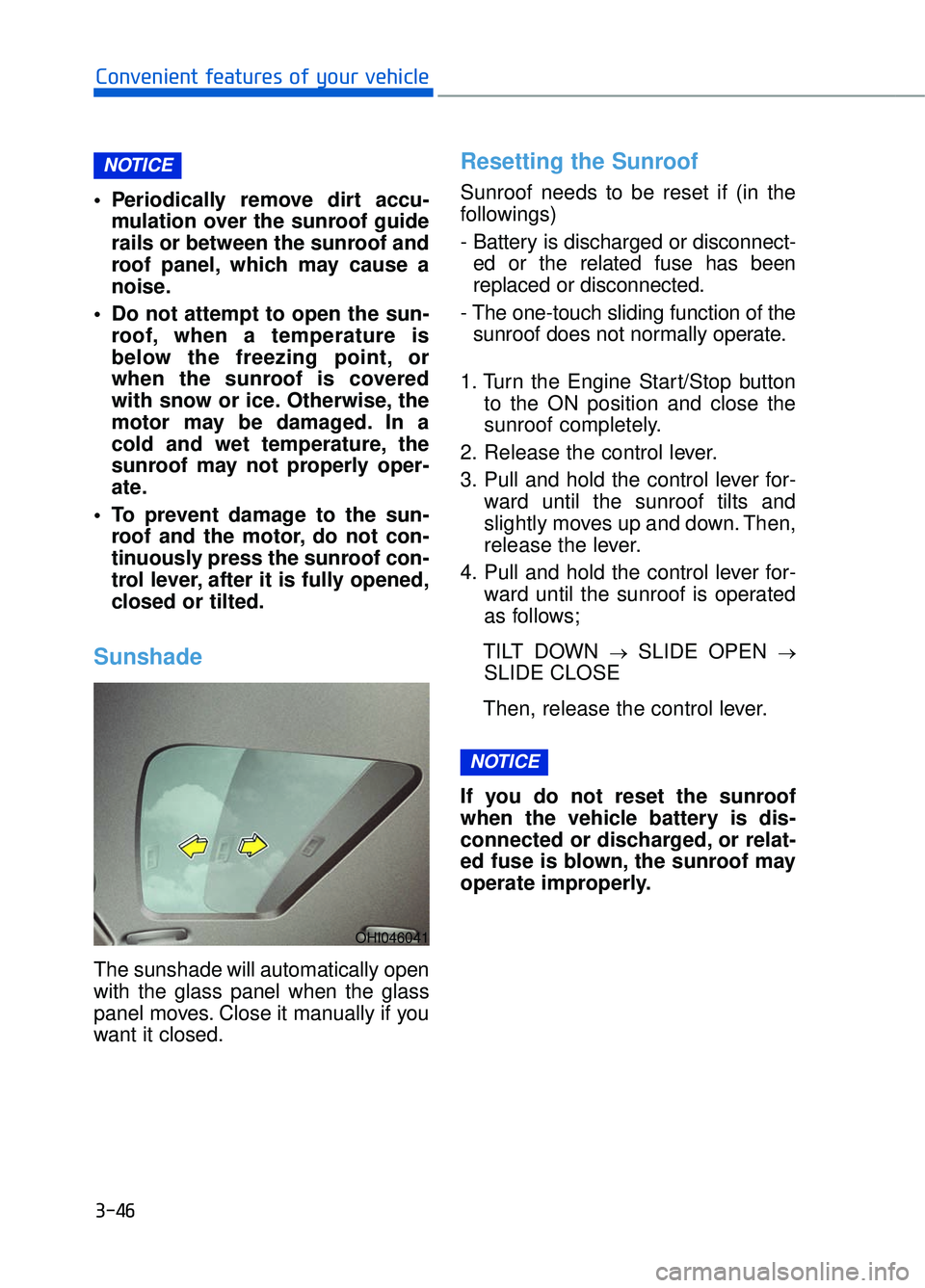
Sunshade
The sunshade will automatically open
with the glass panel when the glass
panel moves. Close it manually if you
want it closed.
Resetting the Sunroof
Sunroof needs to be reset if (in the
followings)
- Battery is discharged or disconnect-ed or the related fuse has been
replaced or disconnected.
- The one-touch sliding function of the sunroof does not normally operate.
1. Turn the Engine Start/Stop button to the ON position and close the
sunroof completely.
2. Release the control lever.
3. Pull and hold the control lever for- ward until the sunroof tilts and
slightly moves up and down. Then,
release the lever.
4. Pull and hold the control lever for- ward until the sunroof is operated
as follows;
TILT DOWN
→SLIDE OPEN →
SLIDE CLOSE
Then, release the control lever.
If you do not reset the sunroof
when the vehicle battery is dis-
connected or discharged, or relat-
ed fuse is blown, the sunroof may
operate improperly.
NOTICE
NOTICE
OHI046041
Page 159 of 524
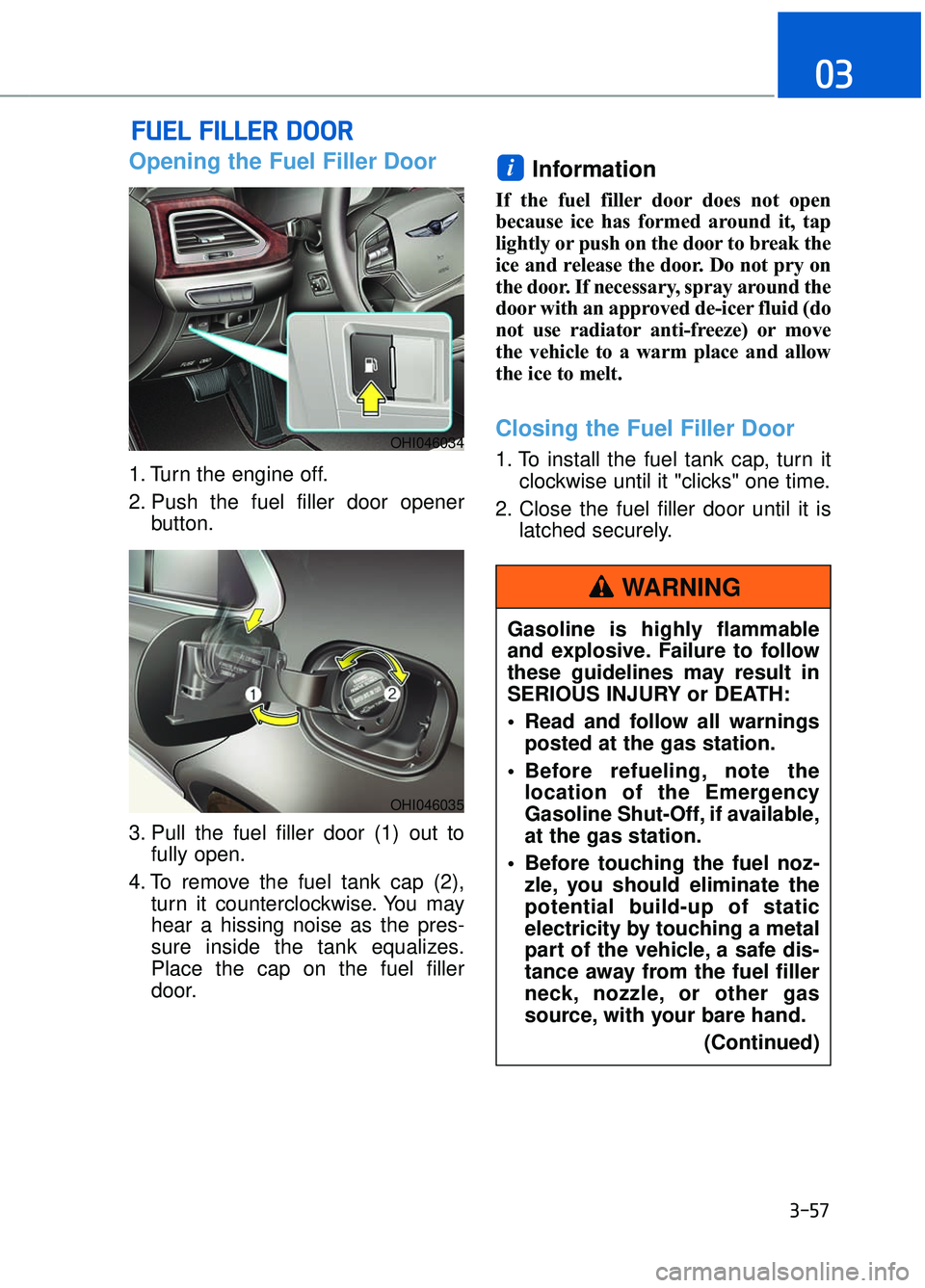
Opening the Fuel Filler Door
1. Turn the engine off.
2. Push the fuel filler door openerbutton.
3. Pull the fuel filler door (1) out to fully open.
4. To remove the fuel tank cap (2), turn it counterclockwise. You may
hear a hissing noise as the pres-
sure inside the tank equalizes.
Place the cap on the fuel filler
door.
Information
If the fuel filler door does not open
because ice has formed around it, tap
lightly or push on the door to break the
ice and release the door. Do not pry on
the door. If necessary, spray around the
door with an approved de-icer fluid (do
not use radiator anti-freeze) or move
the vehicle to a warm place and allow
the ice to melt.
Closing the Fuel Filler Door
1. To install the fuel tank cap, turn it clockwise until it "clicks" one time.
2. Close the fuel filler door until it is latched securely.
i
F FU
U E
EL
L
F
F I
IL
L L
LE
E R
R
D
D O
O O
OR
R
3-57
03
OHI046034
OHI046035
Gasoline is highly flammable
and explosive. Failure to follow
these guidelines may result in
SERIOUS INJURY or DEATH:
Read and follow all warnings
posted at the gas station.
Before refueling, note the location of the Emergency
Gasoline Shut-Off, if available,
at the gas station.
Before touching the fuel noz- zle, you should eliminate the
potential build-up of static
electricity by touching a metal
part of the vehicle, a safe dis-
tance away from the fuel filler
neck, nozzle, or other gas
source, with your bare hand.
(Continued)
WARNING
Page 222 of 524
3-120
Convenient features of your vehicle
Non-operational conditions ofparking assist system
Parking assist system may not
operate normally when:
Moisture is frozen to the sensor.
Sensor is covered with foreign mat-
ter, such as snow or water, or the
sensor cover is blocked.
There is a possibility of parking
assist system malfunction when:
Driving on uneven road surfacessuch as unpaved roads, gravel,
bumps, or gradient.
Objects generating excessive noise such as vehicle horns, loud motor-
cycle engines, or truck air brakes
can interfere with the sensor.
Heavy rain or water spray is present.
Wireless transmitters or mobile phones are present near the sensor.
The sensor is covered with snow.
Any non-factory equipment or accessories have been installed, or
if the vehicle bumper height or sen-
sor installation has been modified.
Detecting range may decrease when:
Outside air temperature is extremelyhot or cold.
Undetectable objects smaller than 40 inches (1 m) and narrower than
6 inches (14 cm) in diameter.
The following objects may not be
recognized by the sensor:
Sharp or slim objects such asropes, chains or small poles.
Objects, which tend to absorb sen- sor frequency such as clothes,
spongy material or snow.
Parking assist system precau-tions
The parking assist system may not
operate consistently in some cir-
cumstances depending on the
speed of the vehicle and the
shapes of the objects detected.
The parking assist system may mal- function if the vehicle bumper height
or sensor installation has been
modified or damaged. Any non-fac-
tory installed equipment or acces-
sories may also interfere with the
sensor performance.
The sensor may not recognize objects less than 15 in (40 cm)
from the sensor, or it may sense an
incorrect distance. Use caution.
When the sensor is blocked with snow, dirt, debris, or ice, the park-
ing assist system may be inopera-
tive until the snow or ice melts, or
the debris is removed. Use a soft
cloth to wipe debris away from the
sensor.
Do not push, scratch or strike the sensor with any hard objects that
could damage the surface of the
sensor. Sensor damage could occur.
Do not spray the sensors or its sur- rounding area directly with a high
pressure washer. Doing so may
cause the sensors to fail to operate
normally.
Your new vehicle warranty does
not cover any accidents or dam-
age to the vehicle or injuries to
its occupants related to a
Parking Assist System. Always
drive safely and cautiously.
WARNING
Page 259 of 524
• If you install an aftermarket HIDhead lamp, your vehicle's audio
and electronic devices may not
function properly.
Prevent chemicals such as per- fume, cosmetic oil, sun cream,
hand cleaner, and air freshener
from contacting the interior
parts because they may cause
damage or discoloration.
AUX, USB and iPod®Por t
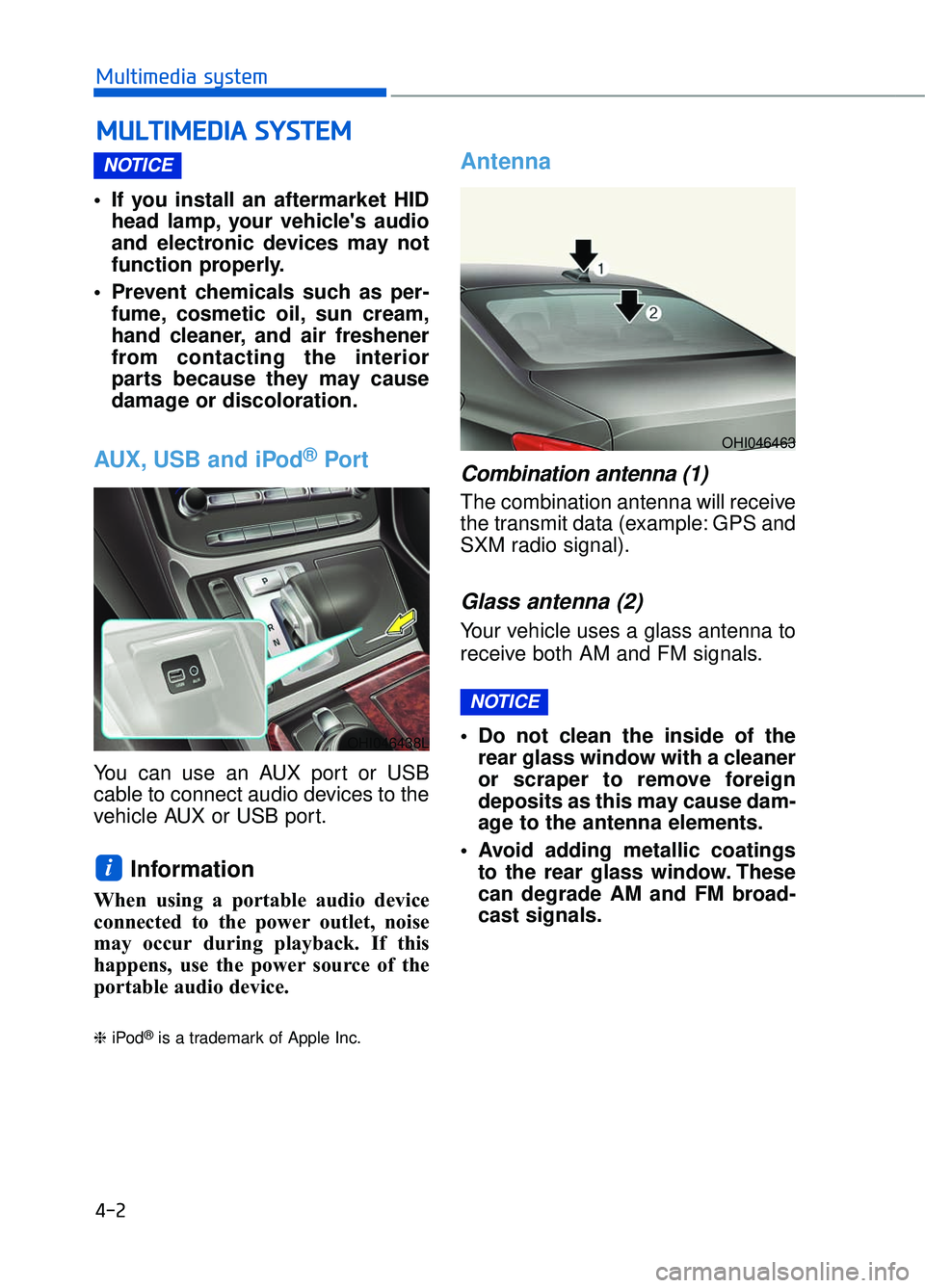
You can use an AUX port or USB
cable to connect audio devices to the
vehicle AUX or USB port.
Information
When using a portable audio device
connected to the power outlet, noise
may occur during playback. If this
happens, use the power source of the
portable audio device.
❈ iPod®is a trademark of Apple Inc.
Antenna
Combination antenna (1)
The combination antenna will receive
the transmit data (example: GPS and
SXM radio signal).
Glass antenna (2)
Your vehicle uses a glass antenna to
receive both AM and FM signals.
Do not clean the inside of the
rear glass window with a cleaner
or scraper to remove foreign
deposits as this may cause dam-
age to the antenna elements.
Avoid adding metallic coatings to the rear glass window. These
can degrade AM and FM broad-
cast signals.
NOTICE
i
NOTICE
M M U
UL
LT
T I
IM
M E
ED
D I
IA
A
S
S Y
Y S
ST
T E
EM
M
4-2
Multimedia system
OHI046463
OHI046438L
Page 292 of 524

5-31
05
Emergency braking
If there is a problem with the brake
pedal while driving, emergency brak-
ing is possible by pulling up and
holding the EPB switch. Braking is
possible only while you are holding
the EPB switch. However, braking
distance will be longer than normal.
Information
During emergency braking the park-
ing brake warning light will illumi-
nate to indicate that the system is
operating.
If you continuously notice a noise
or burning smell when the EPB is
used for emergency braking, have
your vehicle checked by an
authorized Dealer of Genesis
Brand Products as soon as possi-
ble.
Auto Hold
The Auto Hold maintains the vehicle
in a standstill even though the brake
pedal is not depressed after the driv-
er brings the vehicle to a complete
stop by depressing the brake pedal.
To apply:
1. With the driver's door, enginehood and trunk closed, fasten the
driver's seat belt or depress the
brake pedal and then press the
[AUTO HOLD] switch. The white
AUTO HOLD indicator will come
on and the system will be in the
standby position.
NOTICE
iOHI056131L
■Type A
OHI056034L
■Type B W
W
W
W
h
h
h
h
i
i
i
i
t
t
t
t
e
e
e
e
W
W
W
W
h
h
h
h
i
i
i
i
t
t
t
t
e
e
e
e
Do not operate the parking
brake while the vehicle is mov-
ing except in an emergency sit-
uation. It could damage the
brake system and lead to a
severe accident.
WARNING
Page 309 of 524
5-48
Driving your vehicle
When ECO mode is activated:
The acceleration response may beslightly reduced if the accelerator
pedal is depressed moderately.
The air conditioner performance may be limited.
The shift pattern of the automatic transmission may change.
The engine noise may be louder at some automatic transmission
shifts as down-shift requires press-
ing down more on the accelerator.
The above situations are normal
conditions when ECO mode is acti-
vated to improve fuel efficiency.
Limitation of ECO mode operation:
If the following conditions occur while
ECO mode is operating, the system
operation is limited even though
there is no change in the ECO indi-
cator.
When the coolant temperature is low:
The system will be limited until
engine performance becomes nor-
mal.
When driving up a hill: The system will be limited to gain
power when driving uphill because
engine torque is restricted.
When driving the vehicle with the automatic transmission gear shift
lever in manual mode.
The system will be limited accord-
ing to the shift location.
INDIVIDUAL mode
In INDIVIDUAL mode, thedriver can select separate
modes and combine them
on the DIS Navigation
System screen.
- Engine/Transmission:
ECO/SMART
- Steering wheel:COMFORT/SPORT
- Suspension:COMFORT +/
COMFORT/SPORT
- All-Wheel Drive (AWD) system:
ECO/COMFORT/SPORT
For more information, refer to the
separately supplied DIS Navigation
System manual.
When INDIVIDUAL mode is select- ed by pressing the DRIVE MODE
button, the INDIVIDUAL mode indi-
cator (blue color) will illuminate.