service GENESIS G90 2018 Owner's Manual
[x] Cancel search | Manufacturer: GENESIS, Model Year: 2018, Model line: G90, Model: GENESIS G90 2018Pages: 519, PDF Size: 19.52 MB
Page 3 of 519
F3
Your Genesis Branded vehicle may be equipped with technologies and
services that use information collected,
generated, recorded or stored by the vehicle. Genesis Branded Vehicle
has created a Vehicle Owner Privacy Policy to explain how these tech-
nologies and services collect use and share this information.
You may read our Vehicle Owner Privacy Policy on the
GenesisMotorsUSA.com website at:
http://www.genesismotorsusa.com/privacy-policy.html
If you would like to receive a hard copy of our Vehicle Owner Privacy
Policy, please contact our Genesis Customer Care at:
Genesis Customer Care
PO BOX 20650
Fountain Valley, CA 92728
844-340-9741
Genesis Customer Care representatives are available Monday through
Friday, between the hours of 5:00 AM and 7:00 PM PST and Saturday
and Sunday between 6:30 AM and 3:00 PM PST (English).
For Genesis Customer Care assistance in Spanish or Korean, repre-
sentatives are available Monday through Friday between 6:30 AM and
3:00 PM PST.
Genesis Branded Vehicle Owner Privacy Policy
Introduction
Page 4 of 519
I
IN
N T
TR
R O
O D
DU
U C
CT
T I
IO
O N
N
Introduction
F4
Congratulations, and thank you for choosing the Genesis Branded Vehicle.
We are pleased to welcome you to the growing number of distinguished peo-
ple who drive the Genesis Branded Vehicle. We are very proud of the
advanced engineering and high-quality construction of each Genesis
Branded Vehicle we build.
Your Owner’s Manual will introduce you to the features and operation of your
new Genesis Branded Vehicle. To become familiar with your new Genesis
Branded Vehicle, so that you can fully enjoy it, read this Owner's Manual care-
fully before driving your new vehicle.
This manual contains important safety information and instructions intended
to familiarize you with your vehicle’s controls and safety features so you can
safely operate your vehicle.
This manual also contains information on maintenance designed to enhance
safe operation of the vehicle. It is recommended that all service and mainte-
nance on your car be performed by an authorized retailer of Genesis Branded
products. Retailers of Genesis Branded products are prepared to provide
high-quality service, maintenance and any other assistance that may be
required.
This Owner's Manual should be considered a permanent part of your vehicle,
and should be kept in the vehicle so you can refer to it at any time. The man-
ual should stay with the vehicle if you sell it to provide the next owner with
important operating, safety and maintenance information.
Copyright 2017 Genesis Customer Care. All rights reserved. No part of this
publication may be reproduced, stored in any retrieval system or transmitted
in any form or by any means without the prior written permission of Genesis
Customer Care.Severe engine and transmission damage may result from the use of
poor quality fuels and lubricants that do not meet Genesis Branded
Vehicle specifications. You must always use high quality fuels and
lubricants that meet the specifications listed on Page 8-6 in the
Vehicle Specifications section of the Owner's Manual.
CAUTION
G G
E
EN
N E
ES
SI
IS
S
C
C U
U S
ST
T O
O M
M E
ER
R
C
C A
A R
RE
E
Page 59 of 519
2-39
02
Body work on the front area of the
vehicle may damage the pre-ten-
sioner seat belt (retractor pre-ten-
sioner seat belt and emergency
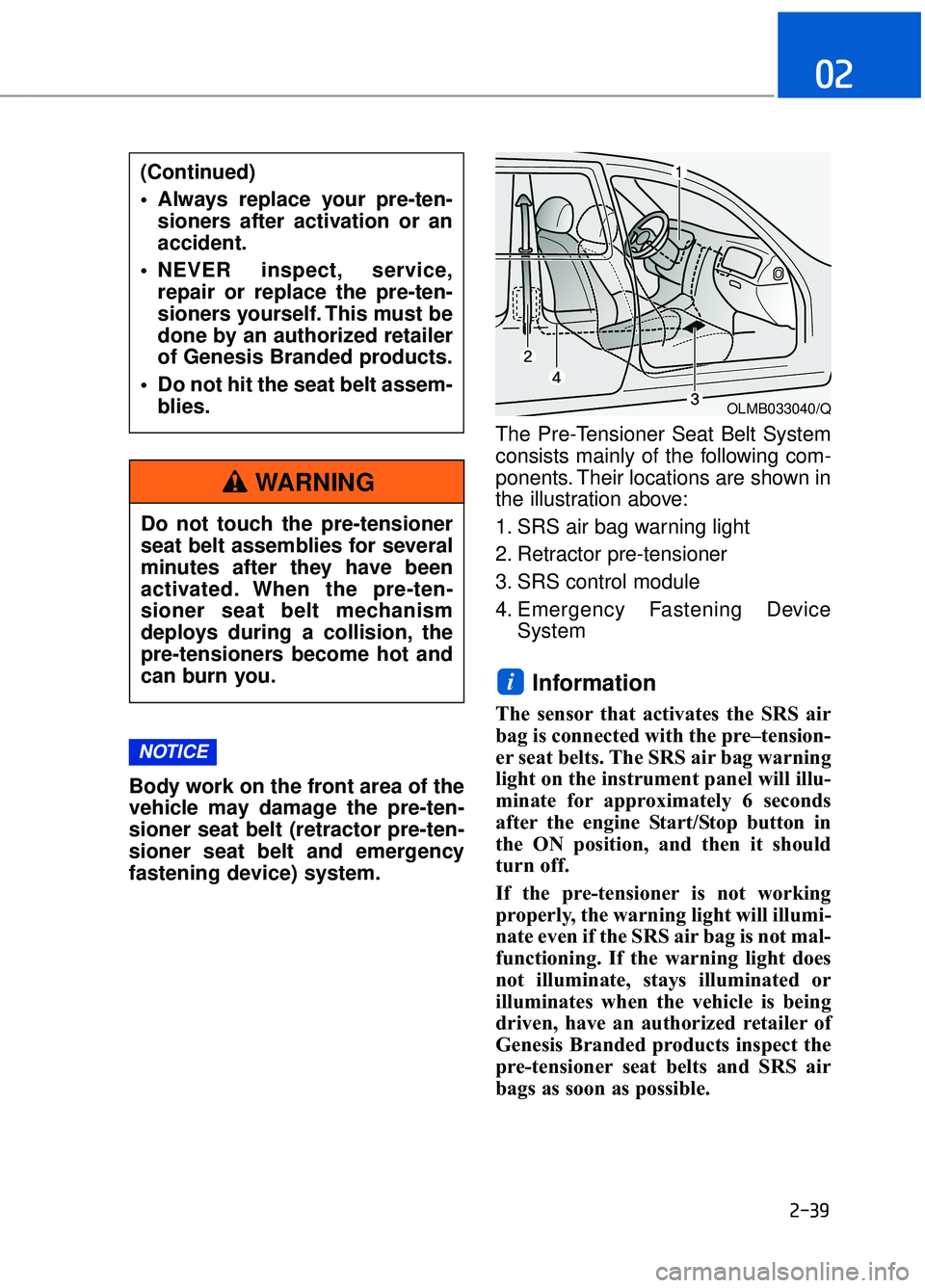
fastening device) system.The Pre-Tensioner Seat Belt System
consists mainly of the following com-
ponents. Their locations are shown in
the illustration above:
1. SRS air bag warning light
2. Retractor pre-tensioner
3. SRS control module
4. Emergency Fastening Device
System
Information
The sensor that activates the SRS air
bag is connected with the pre–tension-
er seat belts. The SRS air bag warning
light on the instrument panel will illu-
minate for approximately 6 seconds
after the engine Start/Stop button in
the ON position, and then it should
turn off.
If the pre-tensioner is not working
properly, the warning light will illumi-
nate even if the SRS air bag is not mal-
functioning. If the warning light does
not illuminate, stays illuminated or
illuminates when the vehicle is being
driven, have an authorized retailer of
Genesis Branded products inspect the
pre-tensioner seat belts and SRS air
bags as soon as possible.
i
NOTICE
(Continued)
Always replace your pre-ten-sioners after activation or an
accident.
NEVER inspect, service, repair or replace the pre-ten-
sioners yourself. This must be
done by an authorized retailer
of Genesis Branded products.
Do not hit the seat belt assem- blies.
Do not touch the pre-tensioner
seat belt assemblies for several
minutes after they have been
activated. When the pre-ten-
sioner seat belt mechanism
deploys during a collision, the
pre-tensioners become hot and
can burn you.
WARNING
OLMB033040/Q
Page 100 of 519
2-80
Safety system of your vehicle
SRS Care
The SRS is virtually maintenance-free
and there are no parts you can safely
service by yourself. If the SRS air bag
warning light does not illuminate
when the Engine Start/Stop button is
in the ON position, or continuously
remains on, have your vehicle imme-
diately inspected by an authorized
retailer of Genesis Branded products.
Any work on the SRS system, such
as removing, installing, repairing, or
any work on the steering wheel, the
front passenger's panel, front seats
and roof rails must be performed by
an authorized retailer of Genesis
Branded products. Improper han-
dling of the SRS system may result
in serious personal injury.To reduce the risk of serious
injury or death, take the follow-
ing precautions:
Do not attempt to modify or disconnect the SRS compo-
nents or wiring, including the
addition of any kind of badges
to the pad covers or modifica-
tions to the body structure.
Do not place objects over or near the air bag modules on
the steering wheel, instrument
panel, or the front passen-
ger’s panel above the glove
box.
Clean the air bag pad covers with a soft cloth moistened
with plain water. Solvents or
cleaners could adversely
affect the air bag covers and
proper deployment of the sys-
tem.
(Continued)
WARNING
(Continued)
Always have inflated air bagsreplaced by an authorized
retailer of Genesis Branded
products.
If components of the air bag system must be discarded, or
if the vehicle must be
scrapped, certain safety pre-
cautions must be observed.
Consult an authorized retailer
of Genesis Branded products
for the necessary information.
Failure to follow these precau-
tions could increase the risk
of personal injury.
Page 122 of 519
3-20
Convenient features of your vehicle
M
MI
IR
R R
RO
O R
RS
S
Inside Rearview Mirror
Before you start driving, adjust the
rearview mirror to the center on the
view through the rear window.
When cleaning the mirror, use a
paper towel or similar material
dampened with glass cleaner. Do
not spray glass cleaner directly on
the mirror as that may cause the
liquid cleaner to enter the mirror
housing.
Electric chromic mirror (ECM) with
HomeLink®system, compass and
Genesis Connected Service (Blue Link
®) (for U.S.A)
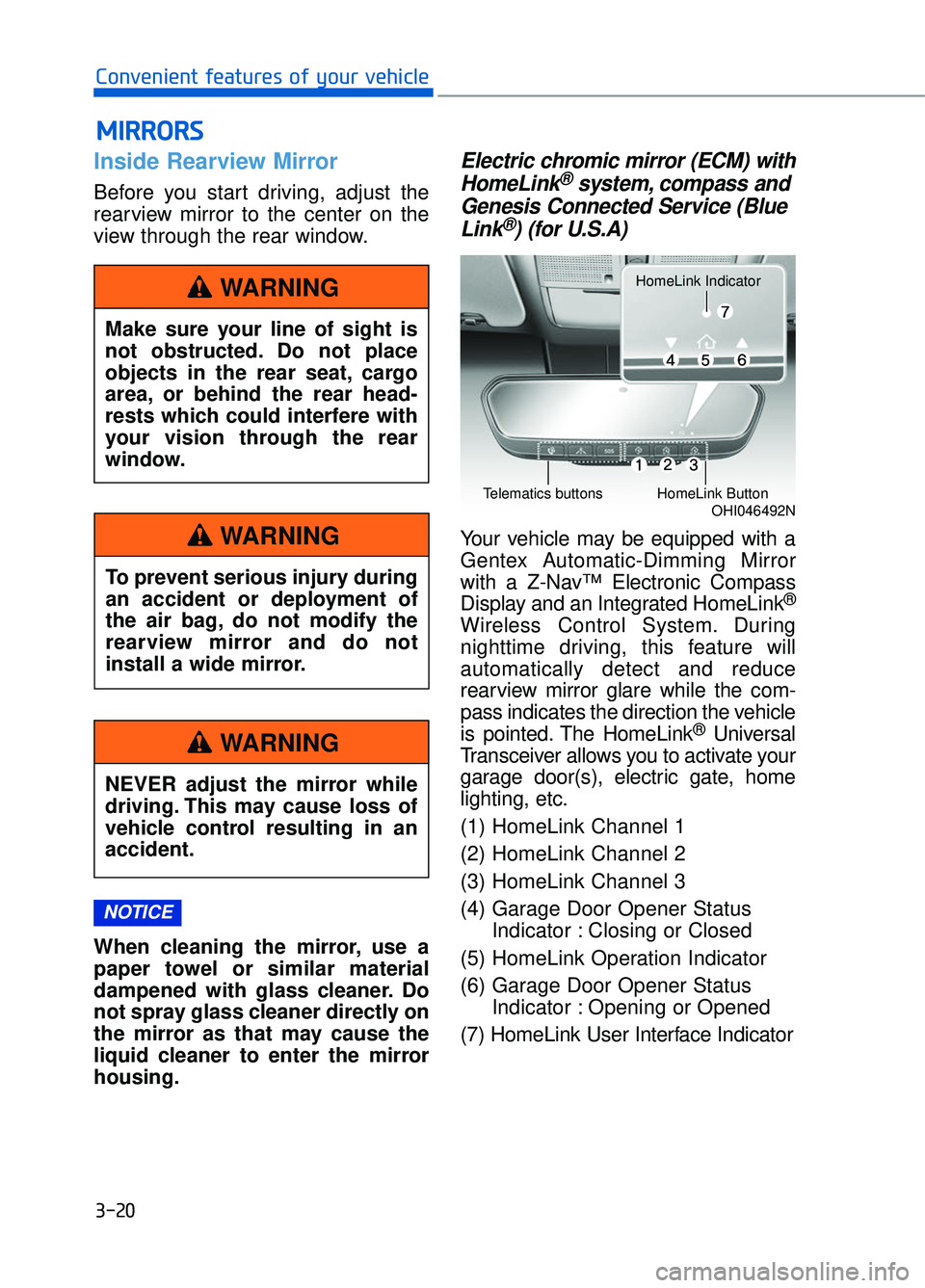
Your vehicle may be equipped with a
Gentex Automatic-Dimming Mirror
with a Z-Nav™ Electronic Compass
Display and an Integrated HomeLink
®
Wireless Control System. During
nighttime driving, this feature will
automatically detect and reduce
rearview mirror glare while the com-
pass indicates the direction the vehicle
is pointed. The HomeLink
®Universal
Transceiver allows you to activate your
garage door(s), electric gate, home
lighting, etc.
(1) HomeLink Channel 1
(2) HomeLink Channel 2
(3) HomeLink Channel 3
(4) Garage Door Opener Status Indicator : Closing or Closed
(5) HomeLink Operation Indicator
(6) Garage Door Opener Status Indicator : Opening or Opened
(7) HomeLink User Interface Indicator
NOTICE
Make sure your line of sight is
not obstructed. Do not place
objects in the rear seat, cargo
area, or behind the rear head-
rests which could interfere with
your vision through the rear
window.
WARNING
To prevent serious injury during
an accident or deployment of
the air bag, do not modify the
rearview mirror and do not
install a wide mirror.
WARNING
NEVER adjust the mirror while
driving. This may cause loss of
vehicle control resulting in an
accident.
WARNING
OHI046492NTelematics buttonsHomeLink Button
HomeLink Indicator
Page 183 of 519

Lights Mode
This indicator displays which exterior
light is selected using the lighting
control.
Wiper
This indicator displays which wiper
speed is selected using the wiper
control.
Low Washer Fluid
This warning message is displayed
in the service reminder mode if the
washer fluid level in the reservoir is
nearly empty.
Have the washer fluid reservoir
refilled.
Parking assist system malfunc-tion (if equipped)
This warning is displayed if there is a
problem with the Parking Assist
System. Have the vehicle inspected
by an authorized retailer of Genesis
Branded products.
For more information, refer to
"Parking Assist System" in chap-
ter 3.
3-81
03
OHI046148L
OHI046149L
OHI046150L
OHI046174
Page 192 of 519

User settings mode
In this mode, you can change the
setting of the head-up display, instru-
ment cluster, doors, lamps, etc.
1. Head-Up Display
2. Driving Assist
3. Door
4. Lights
5. Sound
6. Convenience
7. Service Interval
8. Other Features
9. Reset
The information provided differs
according to the items applied to your
vehicle.1. Head-Up Display
If this item is checked, it will turn on
the head-up display.
To adjust the height of the image.
To adjust the angle of the image.
To adjust the brightness of the image.
To select the information displayed
- Tu r n b y Tu r n
- Traffic information
- Smart cruise control
- Lane keeping assist system
- Blind spot detection system
To select the speedometer font size.
- Large/Medium/Small
To select the speedometer font color.
White/Orange/Green
For more information, refer to the
"Head-Up Display" in this chapter.
3-90
Convenient features of your vehicle
OHI046161L
OHI046162L
Page 196 of 519

7. Service Interval
To activate or deactivate the service
interval function.
To adjust the interval by mileage and
period.
To reset the service interval function.8. Other Features
- Off: The average fuel economy will
not reset automatically whenever
refueling.
- After Ignition: The average fuel economy will reset automatically
whenever it has passed 4 hours
after turning OFF the engine.
- After Refueling: The average fuel economy will reset automatically
when refueling.
For more information, refer to
"Trip Computer" in this chapter.
To select the fuel economy unit.
(km/L, L/100)
To select the temperature unit. (°C,°F)
To select the tire pressure unit.
(psi, kPa, bar)
9. Reset
You can reset the menus in the User
Settings mode. All menus in the User
Settings mode are initialized, except
language and service interval.
3-94
Convenient features of your vehicle
OHI046168LOHI046169L
Page 238 of 519

Checking the amount of air conditioner refrigerant andcompressor lubricant
When the amount of refrigerant is
low, the performance of the air condi-
tioning is reduced. Overfilling also
has a negative influence on the air
conditioning system.
Therefore, if abnormal operation is
found, have the system inspected by
an authorized retailer of Genesis
Branded products.
It is important that the correct
type and amount of oil and refrig-
erant is used. Otherwise, damage
to the compressor and abnormal
system operation may occur.
The air conditioning system should
be serviced by an authorized retailer
of Genesis Branded products.
Air Conditioning refrigerant label
The actual Air Conditioning refrigerant
label in the vehicle may differ from the
illustration.
Each symbols and specification on
air conditioning refrigerant label
means as below :
1. Classification of refrigerant
2. Amount of refrigerant
3. Classification of Compressor lubri-
cant
Refer to chapter 8 for more detail
location of the air conditioning
refrigerant label.
NOTICE
3-136
Convenient features of your vehicle
ODH043365
Because the refriger-
ant is at very high
pressure, the air con-
ditioning system
should only be serv-
iced by trained and certified
technicians. It is important that
the correct type and amount of
oil and refrigerant is used, oth-
erwise damage to the vehicle
and personal injury may occur.
WARNING
Page 368 of 519
5-107
05
Chain Installation
When installing AutoSock®(fabric
snow chain), follow the manufactur-
er's instructions and mount them as
tightly as possible. Drive slowly (less
than 20 mph (30 km/h)) with chains
installed. If you hear the chains con-
tacting the body or chassis, stop and
tighten them. If they still make con-
tact, slow down until the noise stops.
Remove the AutoSock
®(fabric snow
chain) as soon as you begin driving
on cleared roads.
When mounting AutoSock
®(fabric
snow chain), park the vehicle on
level ground away from traffic.
Turn on the vehicle Hazard Warning
Flasher and place a triangular emer-
gency warning device behind the
vehicle (if available).
Always place the vehicle in P (Park),
apply the parking brake and turn off
the engine before installing tire
chains.
When using AutoSock
®(fabric
snow chain):
Wrong size chains or improperly installed chains can damage
your vehicle's brake lines, sus-
pension, body and wheels.
If you hear noise caused by chains contacting the body,
retighten the chain to prevent
contact with the vehicle body.
To prevent body damage, retighten the chains after driving
0.3~0.6 miles (0.5~1.0 km).
AutoSock
®is a Registered trade-
mark of AutoSock.
Winter Precautions
Use high quality ethylene glycol coolant
Your vehicle is delivered with high
quality ethylene glycol coolant in the
cooling system. It is the only type of
coolant that should be used because
it helps prevent corrosion in the cool-
ing system, lubricates the water
pump and prevents freezing. Be sure
to replace or replenish your coolant
in accordance with the maintenance
schedule in chapter 7. Before winter,
have your coolant tested to assure
that its freezing point is sufficient for
the temperatures anticipated during
the winter.
Change to "winter weight" oil ifnecessary
In some climates it is recommended
that a lower viscosity "winter weight"
oil be used during cold weather. See
chapter 8 for recommendations. If
you aren't sure what weight oil you
should use, consult an authorized
retailer of Genesis Branded prod-
ucts.
Check battery and cables
Winter puts additional burdens on
the battery system. Visually inspect
the battery and cables as described
in chapter 7. The level of charge in
your battery can be checked by an
authorized retailer of Genesis
Branded products or a service sta-
tion.
NOTICE