GENESIS GV70 2023 Owners Manual
Manufacturer: GENESIS, Model Year: 2023, Model line: GV70, Model: GENESIS GV70 2023Pages: 637
Page 221 of 637
05
5-85
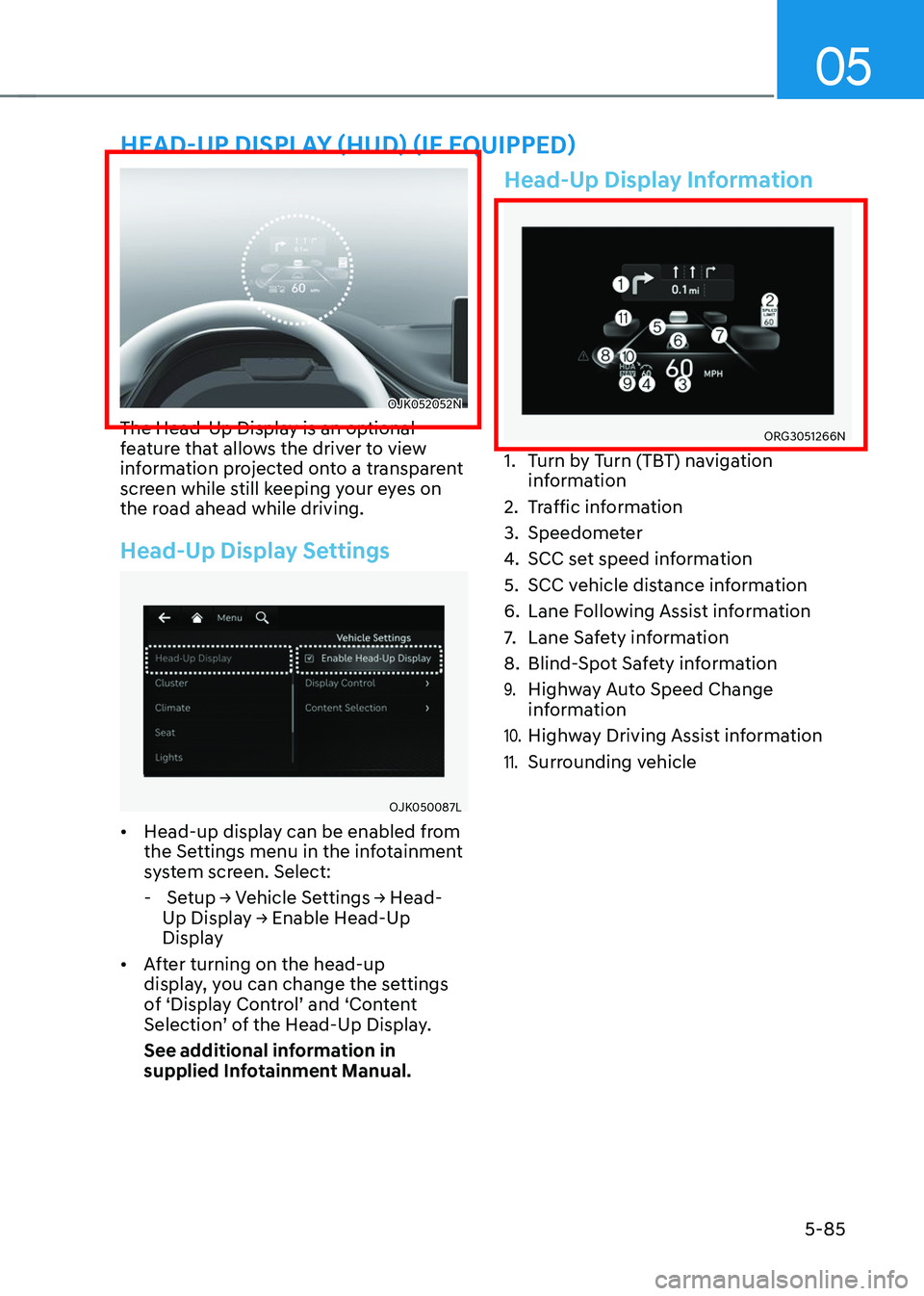
HEAD-UP DISPLAY (HUD) (IF EQUIPPED)
OJK052052NOJK052052N
The Head-Up Display is an optional
feature that allows the driver to view
information projected onto a transparent
screen while still keeping your eyes on
the road ahead while driving.
Head-Up Display Settings
OJK050087LOJK050087L
• Head-up display can be enabled from
the Settings menu in the infotainment
system screen. Select:
- Setup → Vehicle Settings → Head-
Up Display → Enable Head-Up
Display
• After turning on the head-up
display, you can change the settings
of ‘Display Control’ and ‘Content
Selection’ of the Head-Up Display.
See additional information in
supplied Infotainment Manual.
Head-Up Display Information
ORG3051266NORG3051266N
1. Turn by Turn (TBT) navigation
information
2. Traffic information
3. Speedometer
4. SCC set speed information
5. SCC vehicle distance information
6. Lane Following Assist information
7. Lane Safety information
8. Blind-Spot Safety information
9. Highway Auto Speed Change
information
10. Highway Driving Assist information
11. Surrounding vehicle
Page 222 of 637
Convenience Features
5-86
Precautions While Using the
Head-Up Display
• It may sometimes be difficult to read
information on the Head-Up Display in
the following situations.
-The driver is improperly positioned
in the driver’s seat
-The driver wears polarizing-filter
sunglasses
-An object is located above the
Head-Up Display cover
-The vehicle is driven on a wet road
-Any improper lighting accessory is
installed inside the vehicle, or there
is incoming light from outside of the
vehicle
-The driver wears glasses
-The driver wears contact lenses
When it is difficult to read the Head-
Up Display information, adjust the
image height or brightness level from
the Settings menu in the infotainment
system screen.
• For your safety, make sure to stop the
vehicle before adjusting the settings.
• Do not tint the front windshield glass
or add other types of metallic coating.
Otherwise, the Head-Up Display
image may be invisible.
• Do not place any accessories on the
crash pad or attach any objects on the
windshield glass.
• When replacing the front windshield
glass, replace it with a windshield
glass designed for Head-Up Display
operation. Otherwise, duplicated
images may be displayed on the
windshield glass.
WARNING
The warning information of Blind-Spot
Safety on the Head-Up Display are
supplemental. Do not solely depend on
them to change lanes. Always take a
look around before changing lanes.
Information
Head-up Display includes GPL, LGPL,
MPL and other open source license
softwares. All license notices including
related source code are provided at http://
www.mobis.co.kr/opensource/list.do.
If the driver requests on-board
software open source code via MOBIS_
[email protected] within 3 years
after buying this product, a CD-ROM or
other storage device will be sent with the
minimum cost covering storage device cost
and delivery cost.
Page 223 of 637
05
5-87
Exterior Lights
Lighting control
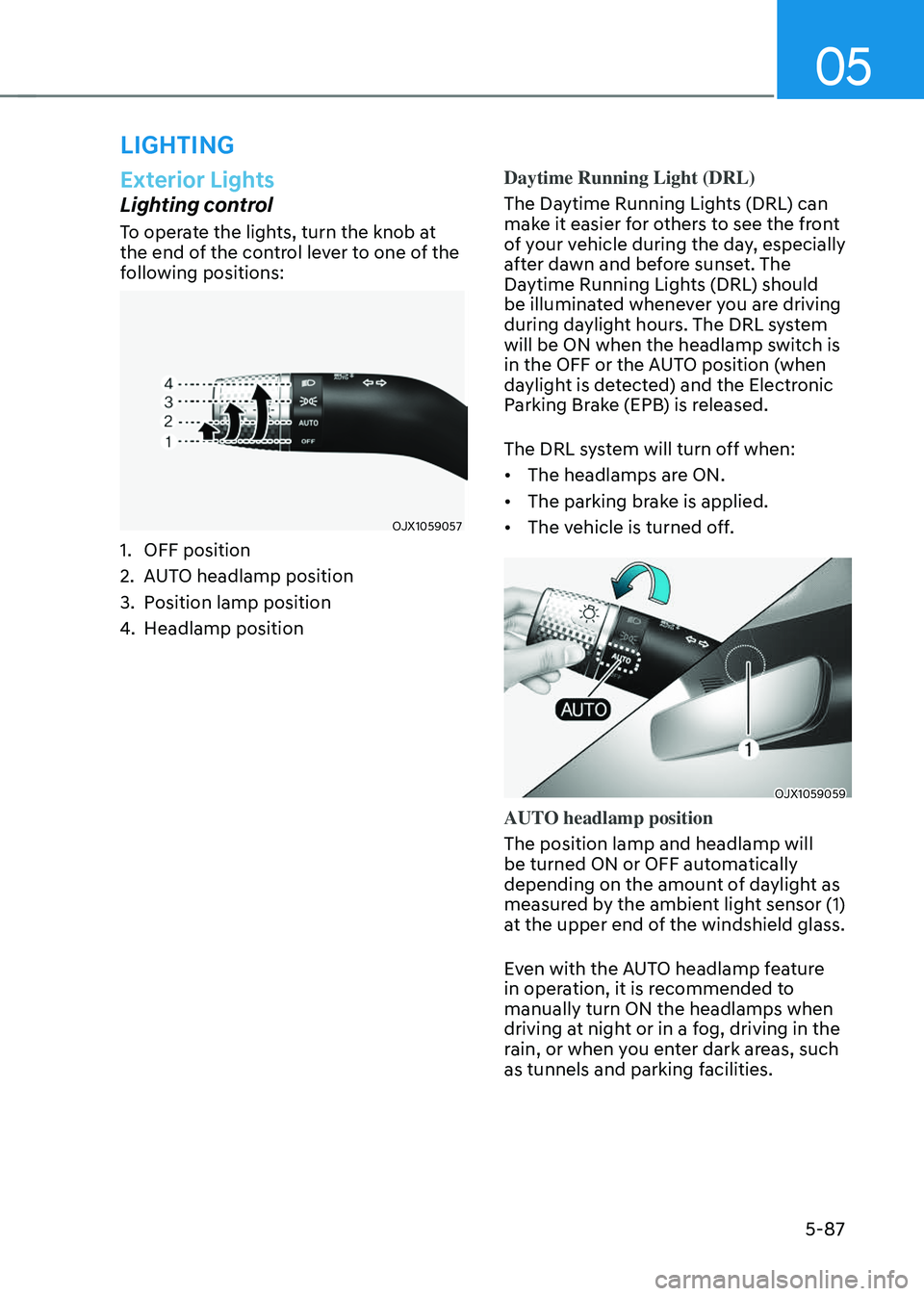
To operate the lights, turn the knob at
the end of the control lever to one of the
following positions:
OJX1059057OJX1059057
1. OFF position
2. AUTO headlamp position
3. Position lamp position
4. Headlamp positionDaytime Running Light (DRL)
The Daytime Running Lights (DRL) can
make it easier for others to see the front
of your vehicle during the day, especially
after dawn and before sunset. The
Daytime Running Lights (DRL) should
be illuminated whenever you are driving
during daylight hours. The DRL system
will be ON when the headlamp switch is
in the OFF or the AUTO position (when
daylight is detected) and the Electronic
Parking Brake (EPB) is released.
The DRL system will turn off when:
• The headlamps are ON.
• The parking brake is applied.
• The vehicle is turned off.
OJX1059059OJX1059059
AUTO headlamp position
The position lamp and headlamp will
be turned ON or OFF automatically
depending on the amount of daylight as
measured by the ambient light sensor (1)
at the upper end of the windshield glass.
Even with the AUTO headlamp feature
in operation, it is recommended to
manually turn ON the headlamps when
driving at night or in a fog, driving in the
rain, or when you enter dark areas, such
as tunnels and parking facilities.
LIGHTING
Page 224 of 637
Convenience Features
5-88
NOTICE
• Do not cover or spill anything on the
sensor (1) located at the upper end of
the windshield glass.
• Do not clean the sensor using
a window cleaner, the cleanser
may leave a light film which could
interfere with sensor operation.
• If your vehicle has window tint or
other types of metallic coating on
the front windshield, the AUTO
headlamp system may not work
properly.
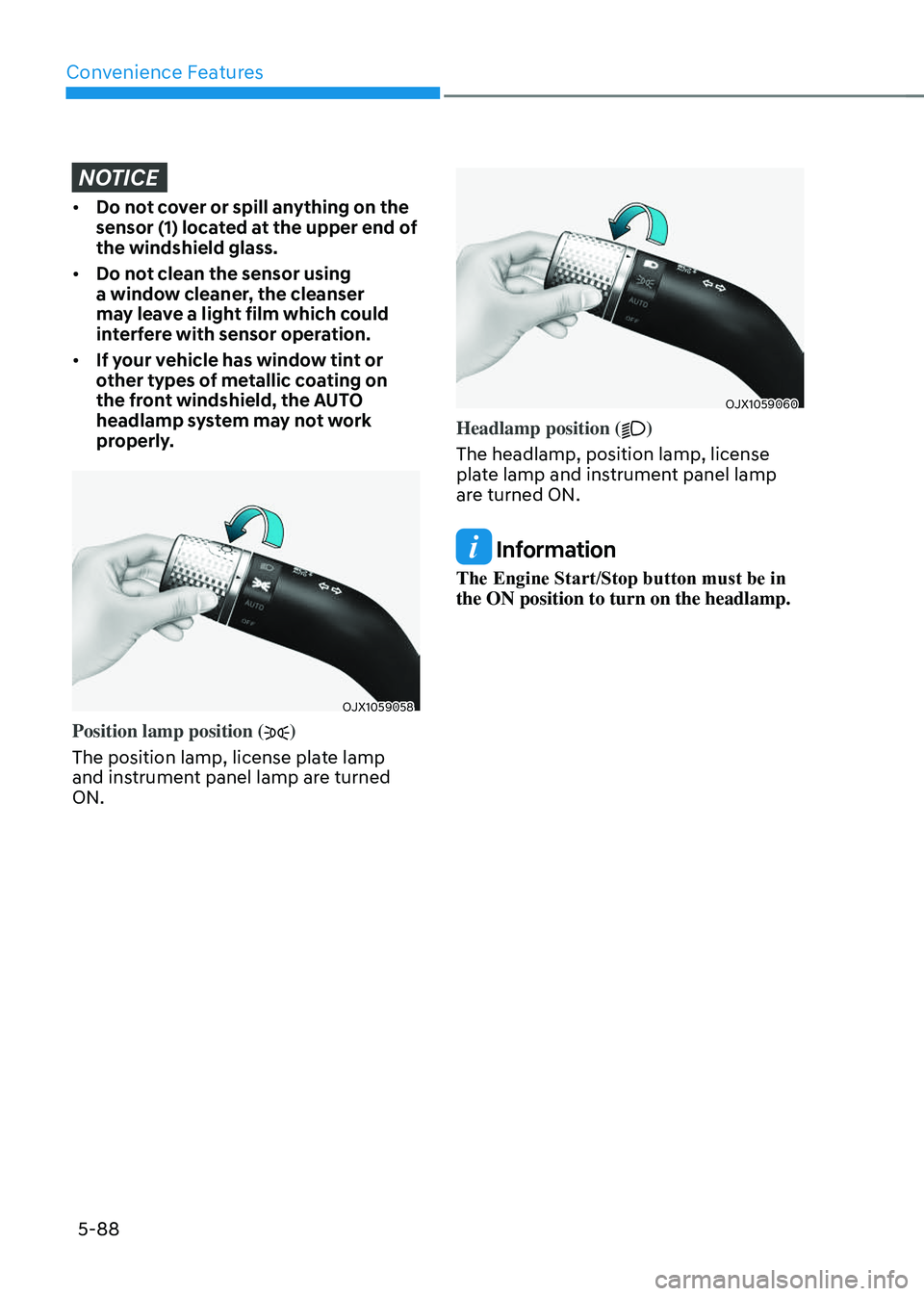
OJX1059058OJX1059058
Position lamp position ()
The position lamp, license plate lamp
and instrument panel lamp are turned
ON.
OJX1059060OJX1059060
Headlamp position ()
The headlamp, position lamp, license
plate lamp and instrument panel lamp
are turned ON.
Information
The Engine Start/Stop button must be in
the ON position to turn on the headlamp.
Page 225 of 637
05
5-89
High beam operation
OJX1059062OJX1059062
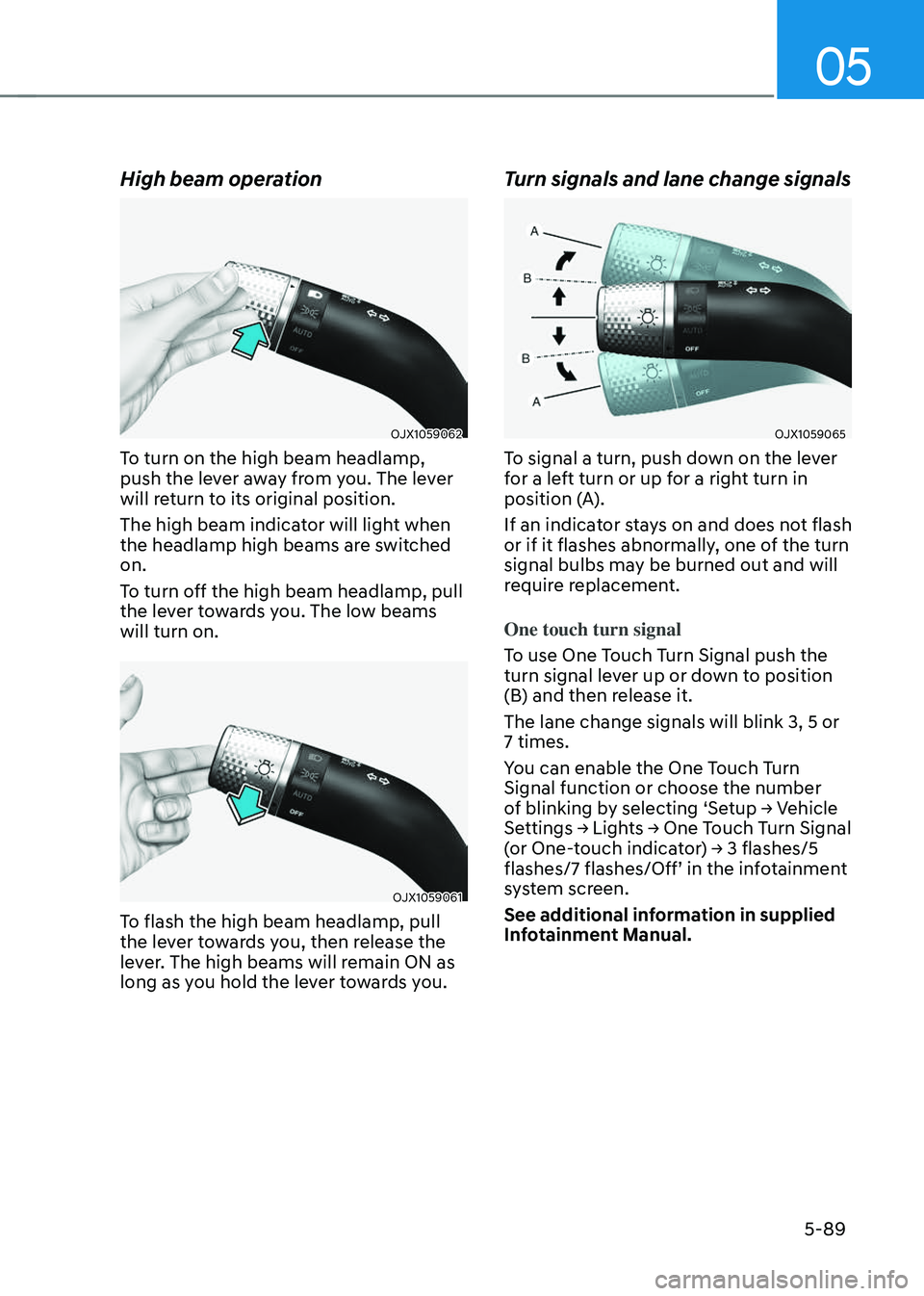
To turn on the high beam headlamp,
push the lever away from you. The lever
will return to its original position.
The high beam indicator will light when
the headlamp high beams are switched
on.
To turn off the high beam headlamp, pull
the lever towards you. The low beams
will turn on.
OJX1059061OJX1059061
To flash the high beam headlamp, pull
the lever towards you, then release the
lever. The high beams will remain ON as
long as you hold the lever towards you.
Turn signals and lane change signals
OJX1059065OJX1059065
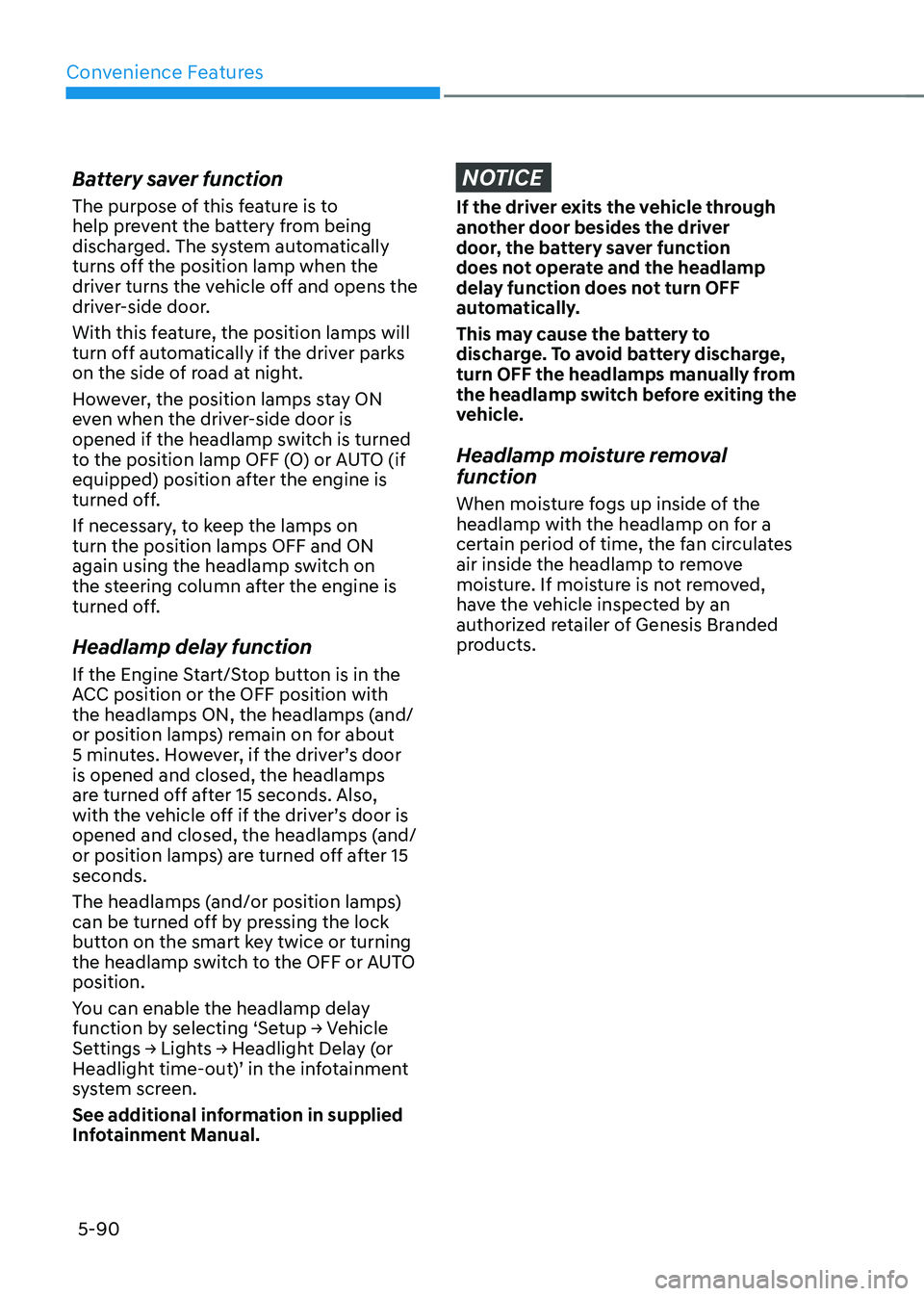
To signal a turn, push down on the lever
for a left turn or up for a right turn in
position (A).
If an indicator stays on and does not flash
or if it flashes abnormally, one of the turn
signal bulbs may be burned out and will
require replacement.
One touch turn signal
To use One Touch Turn Signal push the
turn signal lever up or down to position
(B) and then release it.
The lane change signals will blink 3, 5 or
7 times.
You can enable the One Touch Turn
Signal function or choose the number
of blinking by selecting ‘Setup → Vehicle
Settings → Lights → One Touch Turn Signal
(or One-touch indicator) → 3 flashes/5
flashes/7 flashes/Off’ in the infotainment
system screen.
See additional information in supplied
Infotainment Manual.
Page 226 of 637
Convenience Features
5-90
Battery saver function
The purpose of this feature is to
help prevent the battery from being
discharged. The system automatically
turns off the position lamp when the
driver turns the vehicle off and opens the
driver-side door.
With this feature, the position lamps will
turn off automatically if the driver parks
on the side of road at night.
However, the position lamps stay ON
even when the driver-side door is
opened if the headlamp switch is turned
to the position lamp OFF (O) or AUTO (if
equipped) position after the engine is
turned off.
If necessary, to keep the lamps on
turn the position lamps OFF and ON
again using the headlamp switch on
the steering column after the engine is
turned off.
Headlamp delay function
If the Engine Start/Stop button is in the
ACC position or the OFF position with
the headlamps ON, the headlamps (and/
or position lamps) remain on for about
5 minutes. However, if the driver’s door
is opened and closed, the headlamps
are turned off after 15 seconds. Also,
with the vehicle off if the driver’s door is
opened and closed, the headlamps (and/
or position lamps) are turned off after 15
seconds.
The headlamps (and/or position lamps)
can be turned off by pressing the lock
button on the smart key twice or turning
the headlamp switch to the OFF or AUTO
position.
You can enable the headlamp delay
function by selecting ‘Setup → Vehicle
Settings → Lights → Headlight Delay (or
Headlight time-out)’ in the infotainment
system screen.
See additional information in supplied
Infotainment Manual.
NOTICE
If the driver exits the vehicle through
another door besides the driver
door, the battery saver function
does not operate and the headlamp
delay function does not turn OFF
automatically.
This may cause the battery to
discharge. To avoid battery discharge,
turn OFF the headlamps manually from
the headlamp switch before exiting the
vehicle.
Headlamp moisture removal
function
When moisture fogs up inside of the
headlamp with the headlamp on for a
certain period of time, the fan circulates
air inside the headlamp to remove
moisture. If moisture is not removed,
have the vehicle inspected by an
authorized retailer of Genesis Branded
products.
Page 227 of 637
05
5-91
Interior Lights
WARNING
Do not use the interior lights when
driving in the dark. The interior lights
may obscure your view and cause an
accident.
NOTICE
Do not use the interior lights for
extended periods when the vehicle is
turned off or the battery will discharge.
Interior lamp AUTO off
The interior lamps will automatically go
off approximately 20 minutes after the
vehicle is turned off and the doors are
closed. If a door is opened, the lamp
will go off 25 minutes after the vehicle
is turned off. If the doors are locked by
the smart key and the vehicle enters the
armed stage of the theft alarm system,
the lamps will go off five seconds later.
Front lamps
OJX1050201NOJX1050201N
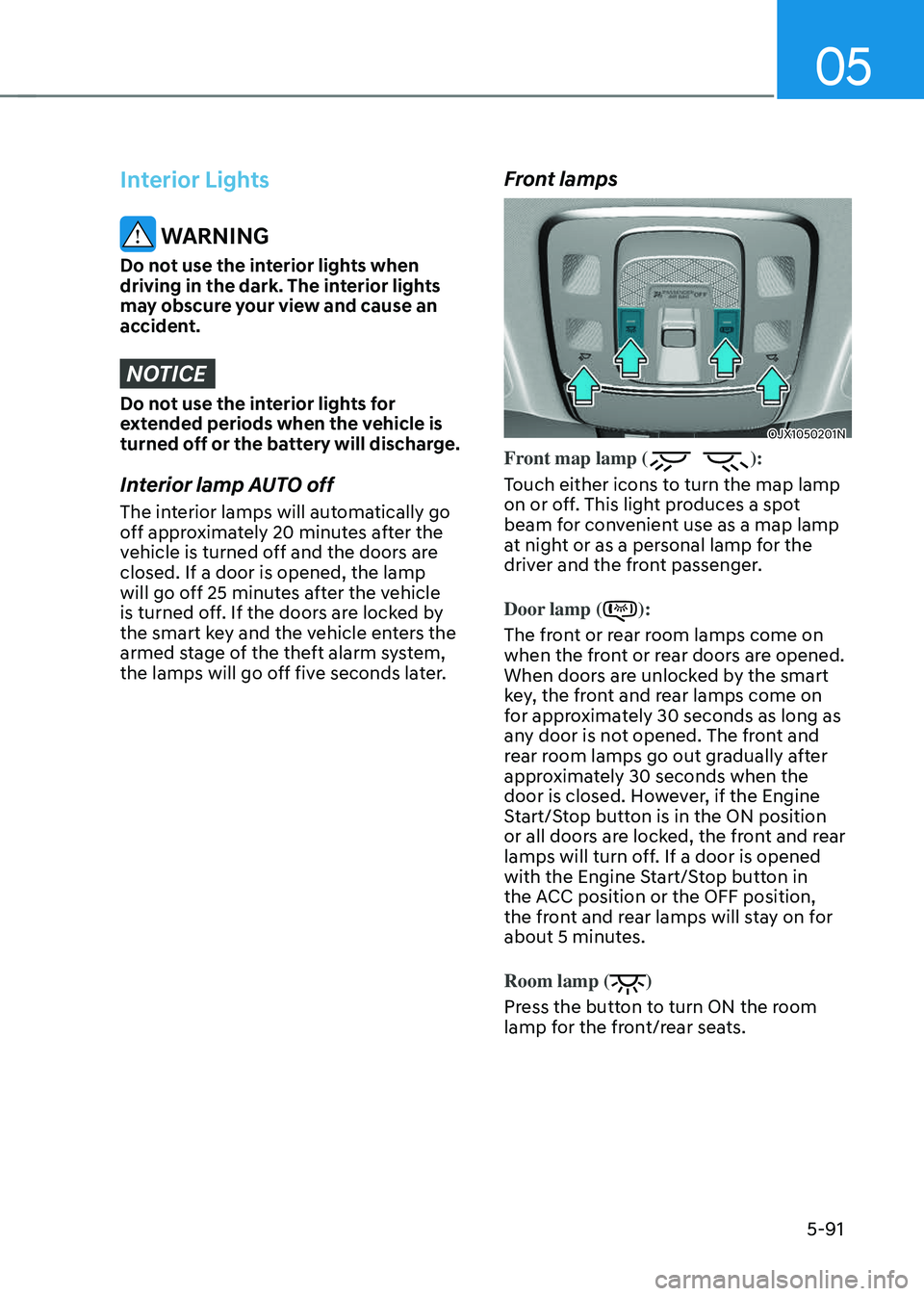
Front map lamp ():
Touch either icons to turn the map lamp
on or off. This light produces a spot
beam for convenient use as a map lamp
at night or as a personal lamp for the
driver and the front passenger.
Door lamp (
):
The front or rear room lamps come on
when the front or rear doors are opened.
When doors are unlocked by the smart
key, the front and rear lamps come on
for approximately 30 seconds as long as
any door is not opened. The front and
rear room lamps go out gradually after
approximately 30 seconds when the
door is closed. However, if the Engine
Start/Stop button is in the ON position
or all doors are locked, the front and rear
lamps will turn off. If a door is opened
with the Engine Start/Stop button in
the ACC position or the OFF position,
the front and rear lamps will stay on for
about 5 minutes.
Room lamp (
)
Press the button to turn ON the room
lamp for the front/rear seats.
Page 228 of 637
Convenience Features
5-92
Rear lamps
Page 229 of 637
05
5-93
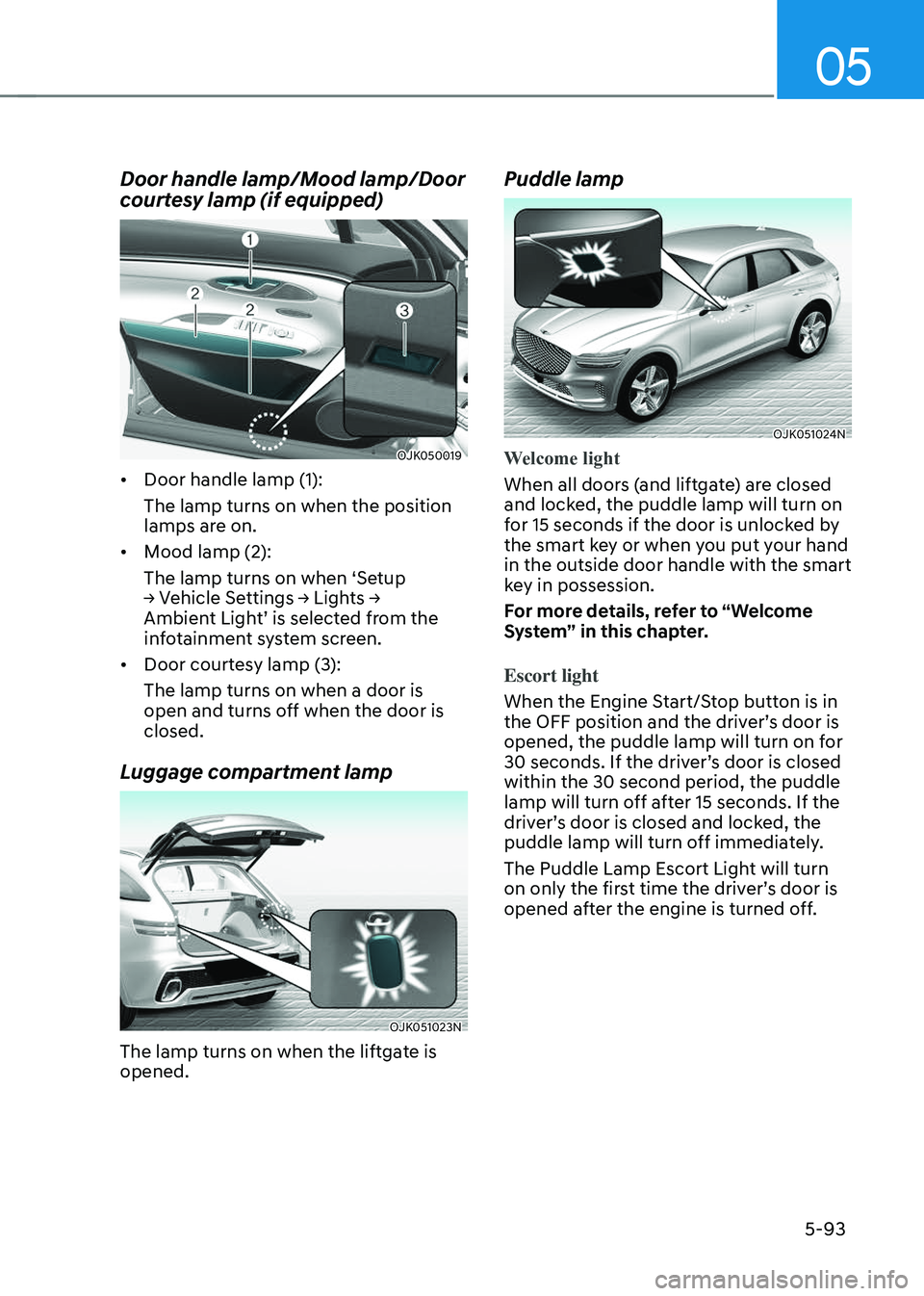
Door handle lamp/Mood lamp/Door
courtesy lamp (if equipped)
OJK050019OJK050019
• Door handle lamp (1):
The lamp turns on when the position
lamps are on.
• Mood lamp (2):
The lamp turns on when ‘Setup
→ Vehicle Settings → Lights →
Ambient Light’ is selected from the
infotainment system screen.
• Door courtesy lamp (3):
The lamp turns on when a door is
open and turns off when the door is
closed.
Luggage compartment lamp
OJK051023NOJK051023N
The lamp turns on when the liftgate is
opened.
Puddle lamp
OJK051024NOJK051024N
Welcome light
When all doors (and liftgate) are closed
and locked, the puddle lamp will turn on
for 15 seconds if the door is unlocked by
the smart key or when you put your hand
in the outside door handle with the smart
key in possession.
For more details, refer to “Welcome
System” in this chapter.
Escort light
When the Engine Start/Stop button is in
the OFF position and the driver’s door is
opened, the puddle lamp will turn on for
30 seconds. If the driver’s door is closed
within the 30 second period, the puddle
lamp will turn off after 15 seconds. If the
driver’s door is closed and locked, the
puddle lamp will turn off immediately.
The Puddle Lamp Escort Light will turn
on only the first time the driver’s door is
opened after the engine is turned off.
Page 230 of 637
Convenience Features
5-94
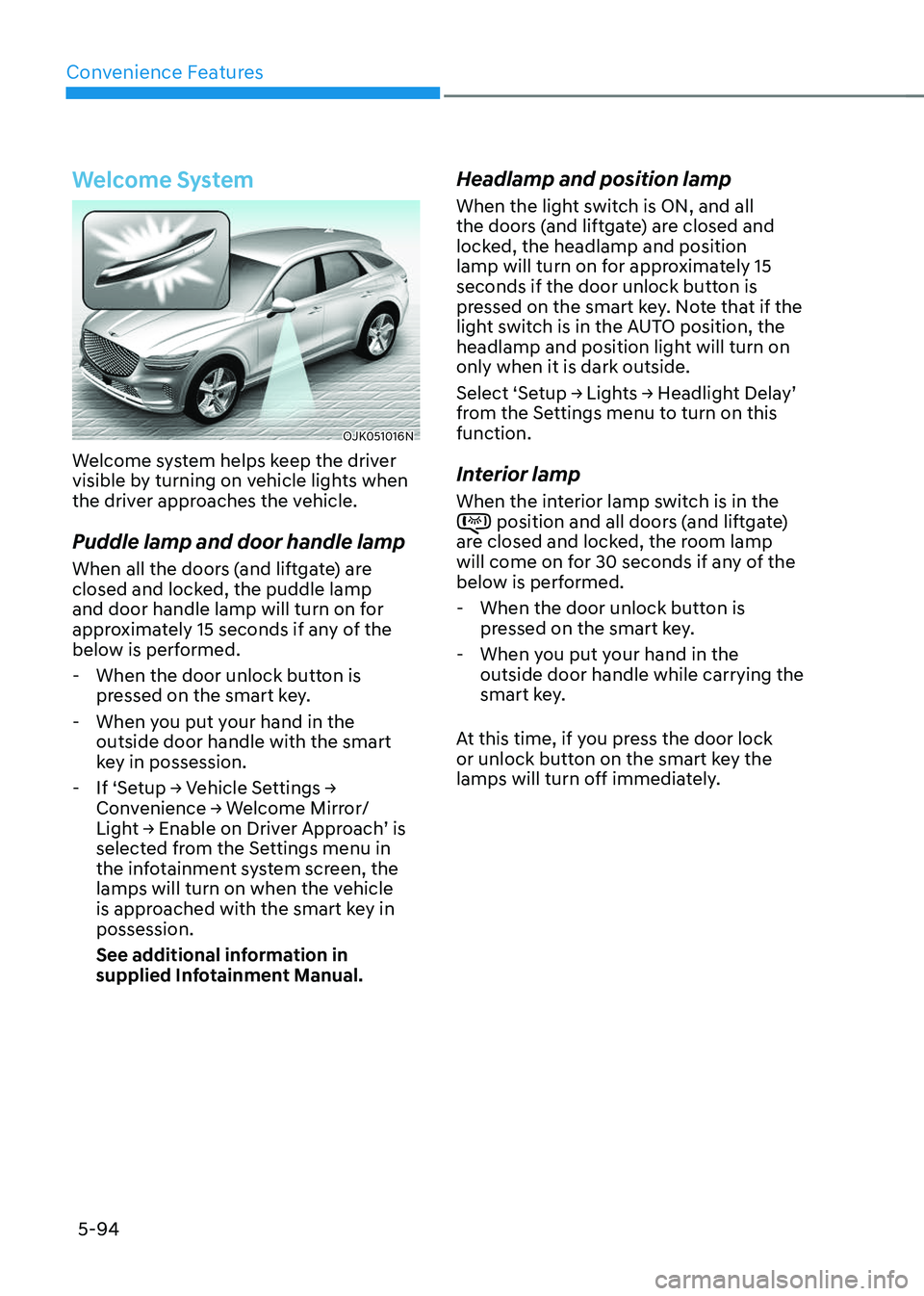
Welcome System
OJK051016NOJK051016N
Welcome system helps keep the driver
visible by turning on vehicle lights when
the driver approaches the vehicle.
Puddle lamp and door handle lamp
When all the doors (and liftgate) are
closed and locked, the puddle lamp
and door handle lamp will turn on for
approximately 15 seconds if any of the
below is performed.
-When the door unlock button is
pressed on the smart key.
-When you put your hand in the
outside door handle with the smart
key in possession.
-If ‘Setup → Vehicle Settings →
Convenience → Welcome Mirror/
Light → Enable on Driver Approach’ is
selected from the Settings menu in
the infotainment system screen, the
lamps will turn on when the vehicle
is approached with the smart key in
possession.
See additional information in
supplied Infotainment Manual.
Headlamp and position lamp
When the light switch is ON, and all
the doors (and liftgate) are closed and
locked, the headlamp and position
lamp will turn on for approximately 15
seconds if the door unlock button is
pressed on the smart key. Note that if the
light switch is in the AUTO position, the
headlamp and position light will turn on
only when it is dark outside.
Select ‘Setup → Lights → Headlight Delay’
from the Settings menu to turn on this
function.
Interior lamp
When the interior lamp switch is in the position and all doors (and liftgate) are closed and locked, the room lamp
will come on for 30 seconds if any of the
below is performed.
-When the door unlock button is
pressed on the smart key.
-When you put your hand in the
outside door handle while carrying the
smart key.
At this time, if you press the door lock
or unlock button on the smart key the
lamps will turn off immediately.