GENESIS GV70 2023 Owners Manual
Manufacturer: GENESIS, Model Year: 2023, Model line: GV70, Model: GENESIS GV70 2023Pages: 637
Page 211 of 637
05
5-75
• Do not modify or repair any
part of the power liftgate by
yourself. This must be done by an
authorized distributor of Genesis
Brandedproduct.
• Do not operate the power liftgate
under the following conditions.
The power liftgate may not operate
properly.
-One side of the vehicle is lifted to
inspect the vehicle or change a tire
-Parking on an uneven road such as
a slope, etc.
• Close the liftgate completely and
lock all doors and liftgate using the
central door lock button before using
an automatic car wash.
• Do not spray high pressure water
directly on the power liftgate outside
open/close button. The liftgate may
open unintentionally.
Information
• If the liftgate is not fully closed and
vehicle speed is at or above 3 km/h (1.8
mph), a warning will sound 10 times.
Immediately park the vehicle at a safe
place, close the liftgate, and check
that the liftgate open warning on the
instrument cluster is turned off.
• In cold and wet climates, the outside
power liftgate open/close button may
not work properly due to freezing
conditions. If this occurs, remove the
ice before using the outside power
liftgate open/close button or use the
power liftgate open/close button on the
smart key or the instrument panel.
• Operating the power liftgate more
than 5 times continuously could cause
damage to the operating motor. If
this occurs, the power liftgate will not
operate to prevent the motor from
overheating. If any of the power liftgate
buttons are pressed to try to open the
liftgate, the chime will sound 3 times,
but the liftgate will remain closed.
Allow the power liftgate system to cool
for about 1 minute before operating the
system again.
Page 212 of 637
Convenience Features
5 -76
Operating the power liftgate
OJX1059043OJX1059043
OJK050020LOJK050020L
Power liftgate open/close button (Smart
key, Instrument panel)
Press the power liftgate open/close
button for 1 second. The liftgate opens or
closes with a warning sound.
While the liftgate is opening or closing,
press the button to stop liftgate
operation.
If the smart key is not within operation
range (approximately 10 m) from the
vehicle, liftgate operation will stop with a
warning sound for 5 seconds.
OJK051021NOJK051021N
Power liftgate open/close button (Outside
the power liftgate)
When the liftgate is closed, press the
power liftgate open/close button to open
the liftgate.
If the vehicle is locked, press the power
liftgate open/close button with the smart
key in your possession.
If the liftgate is unlocked, the liftgate
will open or close with a warning sound
when the power liftgate open/close
button is pressed without carrying the
smart key.
Page 213 of 637
05
5-77
OJK051026NOJK051026N
Power liftgate open/close button (Inside
the power liftgate)
Press the power liftgate open/close
button. The liftgate opens or closes with
a warning sound.
OJK051027NOJK051027N
Power liftgate lock button (Inside the
power liftgate)
Press the power liftgate lock button
while carrying the smart key. The liftgate
closes and locks with a warning sound.
Additionally, all doors will lock.
The liftgate can be closed and locked,
and all doors locked only when the
button is pressed while the engine is off.Automatic reverse
During power liftgate operation if the
power liftgate senses any obstacle,
the liftgate will stop or will fully open.
The automatic reverse feature may
not operate properly, or it may operate
unexpectedly under the following
circumstances:
• The automatic reverse feature may
not detect the resistance if the
detected resistance is below a certain
level, or if the liftgate is almost fully
closed near the latched position.
• The automatic reverse feature may
operate if a strong impact is applied
with no obstructions placed.
WARNING
Never intentionally place any object
or part of your body in the path of
the power liftgate to make sure the
automatic reverse feature operates.
Serious injury, or damage to the vehicle
or object may occur.
Information
The power liftgate may stop operating if
the automatic reverse feature operates
more than two times while attempting to
open or close the liftgate. If this occurs,
carefully open or close the liftgate
manually, and then after 30 seconds try to
operate the power liftgate automatically
again.
Page 214 of 637
Convenience Features
5-78
Setting the power liftgate
To use each feature, you must select the
opening speed or opening height from
the settings menu. Deselect the settings
when you do not want to use the feature.
Power liftgate opening speed
To adjust the power liftgate speed,
select ‘Setup → Vehicle Settings → Door/
Liftgate → Power Liftgate Opening Speed
→ Fast/Slow’ in the infotainment system.
(Default setting is ‘Fast’.)
Power liftgate opening height
To adjust the power liftgate opening
height, select ‘Setup → Vehicle Settings →
Door/Liftgate → Power Liftgate Opening
Height → Full Open/Level 3/Level 2/Level
1/User Height Setting’ in the infotainment
system.
See additional information in supplied
Infotainment Manual. User height setting1. Position the liftgate manually to the
height you prefer.
2. Press the power liftgate open/close
button located inside the liftgate for
more than 3 seconds.
If ‘User Height Setting’ is selected for
the power liftgate opening height, the
power liftgate will automatically open
to the height manually set by you.
Information
• If the power liftgate opening height
has not been manually set, the power
liftgate will fully open when ‘User
Height Setting’ from the infotainment
system is selected.
• If one of the height setting (Full Open/
Level 3/Level 2/Level 1) is selected from
the settings menu in the infotainment
system, and then ‘User Height Setting’
is selected, the liftgate will open to the
height manually set by you.
• The power liftgate opening speed
and opening height settings change
according to the linked User Profile.
If the User Profile is changed, power
liftgate opening speed and opening
height settings will change accordingly.
Page 215 of 637
05
5-79
Resetting the power liftgate
In some circumstances resetting the
power liftgate operation may need to
be performed. Some instances where
resetting the power liftgate may be
required include:
• When the 12-volt battery is recharged
• When the 12-volt battery is reinstalled
after removal or replacement
• When the related fuse is reinstalled
after removal or replacement
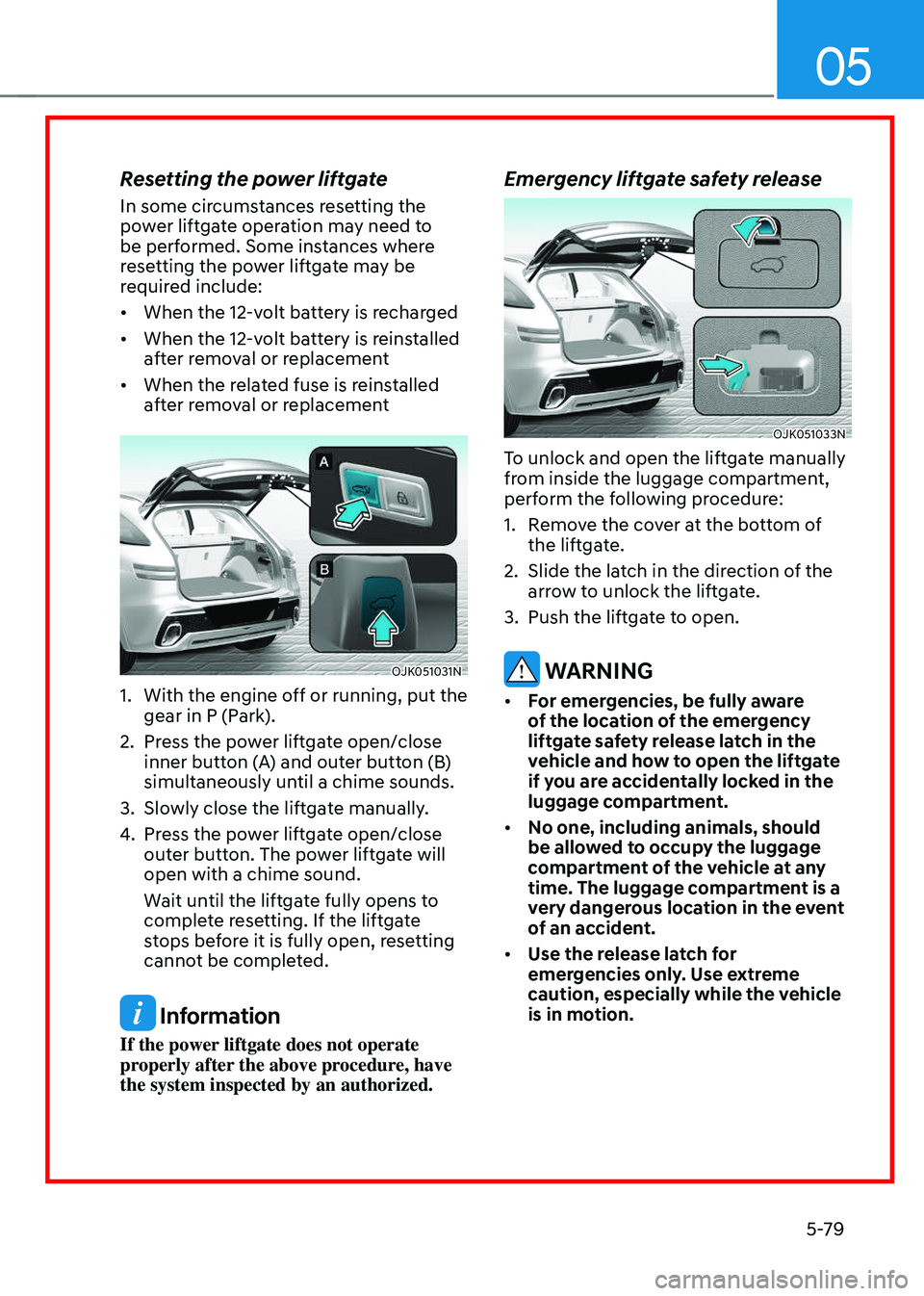
OJK051031NOJK051031N
1. With the engine off or running, put the
gear in P (Park).
2. Press the power liftgate open/close
inner button (A) and outer button (B)
simultaneously until a chime sounds.
3. Slowly close the liftgate manually.
4. Press the power liftgate open/close
outer button. The power liftgate will
open with a chime sound.
Wait until the liftgate fully opens to
complete resetting. If the liftgate
stops before it is fully open, resetting
cannot be completed.
Information
If the power liftgate does not operate
properly after the above procedure, have
the system inspected by an authorized.
Emergency liftgate safety release
OJK051033NOJK051033N
To unlock and open the liftgate manually
from inside the luggage compartment,
perform the following procedure:
1. Remove the cover at the bottom of
the liftgate.
2. Slide the latch in the direction of the
arrow to unlock the liftgate.
3. Push the liftgate to open.
WARNING
• For emergencies, be fully aware
of the location of the emergency
liftgate safety release latch in the
vehicle and how to open the liftgate
if you are accidentally locked in the
luggage compartment.
• No one, including animals, should
be allowed to occupy the luggage
compartment of the vehicle at any
time. The luggage compartment is a
very dangerous location in the event
of an accident.
• Use the release latch for
emergencies only. Use extreme
caution, especially while the vehicle
is in motion.
Page 216 of 637
Convenience Features
5-80
Smart Liftgate
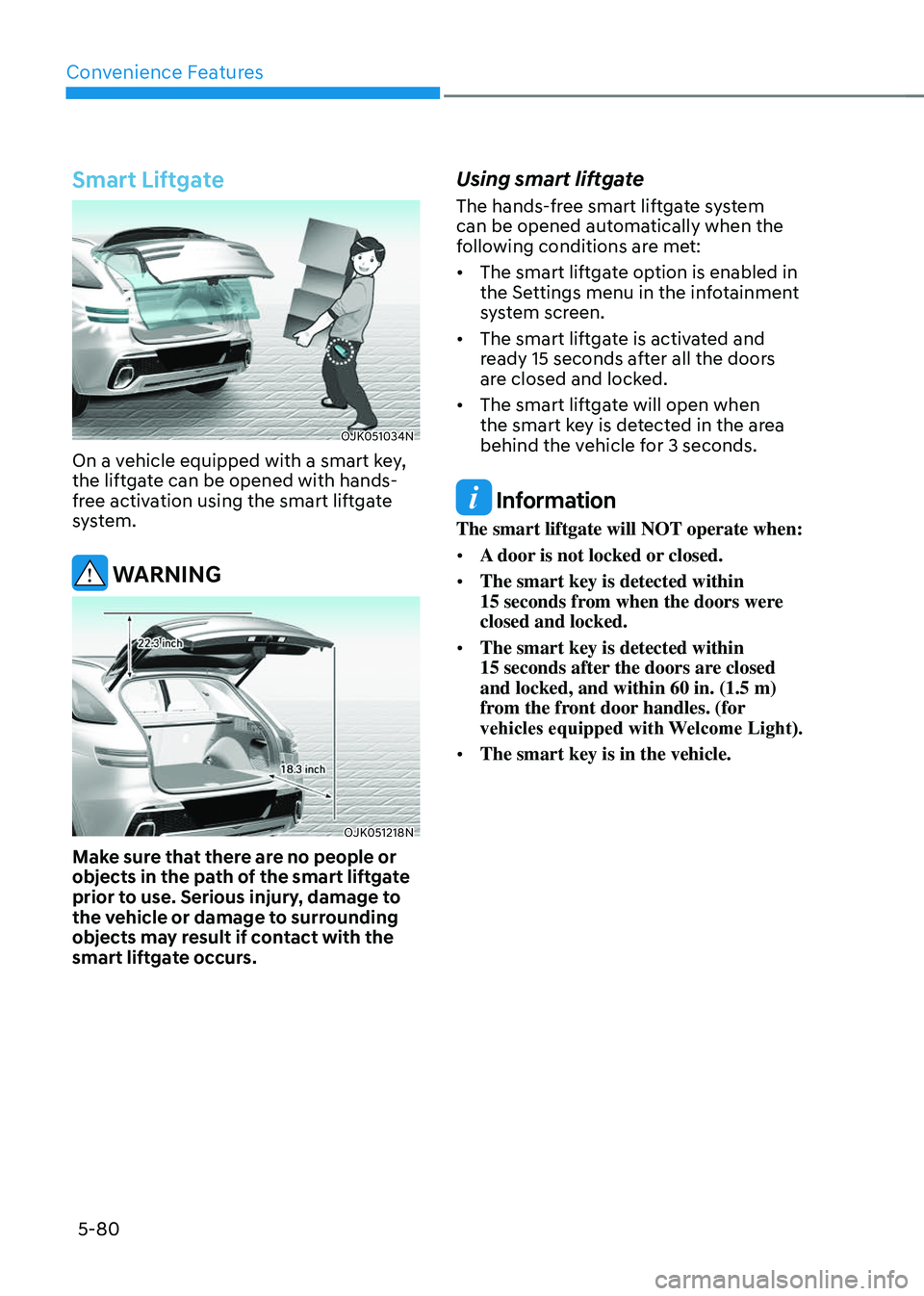
OJK051034NOJK051034N
On a vehicle equipped with a smart key,
the liftgate can be opened with hands-
free activation using the smart liftgate
system.
WARNING
OJK051218NOJK051218N
Make sure that there are no people or
objects in the path of the smart liftgate
prior to use. Serious injury, damage to
the vehicle or damage to surrounding
objects may result if contact with the
smart liftgate occurs.
Using smart liftgate
The hands-free smart liftgate system
can be opened automatically when the
following conditions are met:
• The smart liftgate option is enabled in
the Settings menu in the infotainment
system screen.
• The smart liftgate is activated and
ready 15 seconds after all the doors
are closed and locked.
• The smart liftgate will open when
the smart key is detected in the area
behind the vehicle for 3 seconds.
Information
The smart liftgate will NOT operate when:
• A door is not locked or closed.
• The smart key is detected within 15 seconds from when the doors were closed and locked.
• The smart key is detected within 15 seconds after the doors are closed and locked, and within 60 in. (1.5 m) from the front door handles. (for
vehicles equipped with Welcome Light).
• The smart key is in the vehicle.
Page 217 of 637
05
5-81
1. Settings
To use smart liftgate, it must be
enabled from the Settings menu in the
infotainment system screen. Select:
-Setup → Vehicle Settings → Door/
Liftgate → Smart Liftgate
See additional information in
supplied Infotainment Manual.
2. Detect and Alert
The smart liftgate detecting area
extends approximately 20-40 in. (50-
100 cm) behind the vehicle. If you are
positioned in the detecting area and
are carrying the smart key, the hazard
warning lights will blink and the chime
will sound to alert you that the smart
liftgate will open.
Information
Do not approach the detecting area if you
do not want the liftgate to open. If you
have unintentionally entered the detecting
area and the hazard warning lights and
chime starts to operate, move away from
the area behind the vehicle with the smart
key. The liftgate will remain closed.
3. Automatic opening
After the hazard warning lights blink
and the chime sounds 6 times, the
smart liftgate will open.
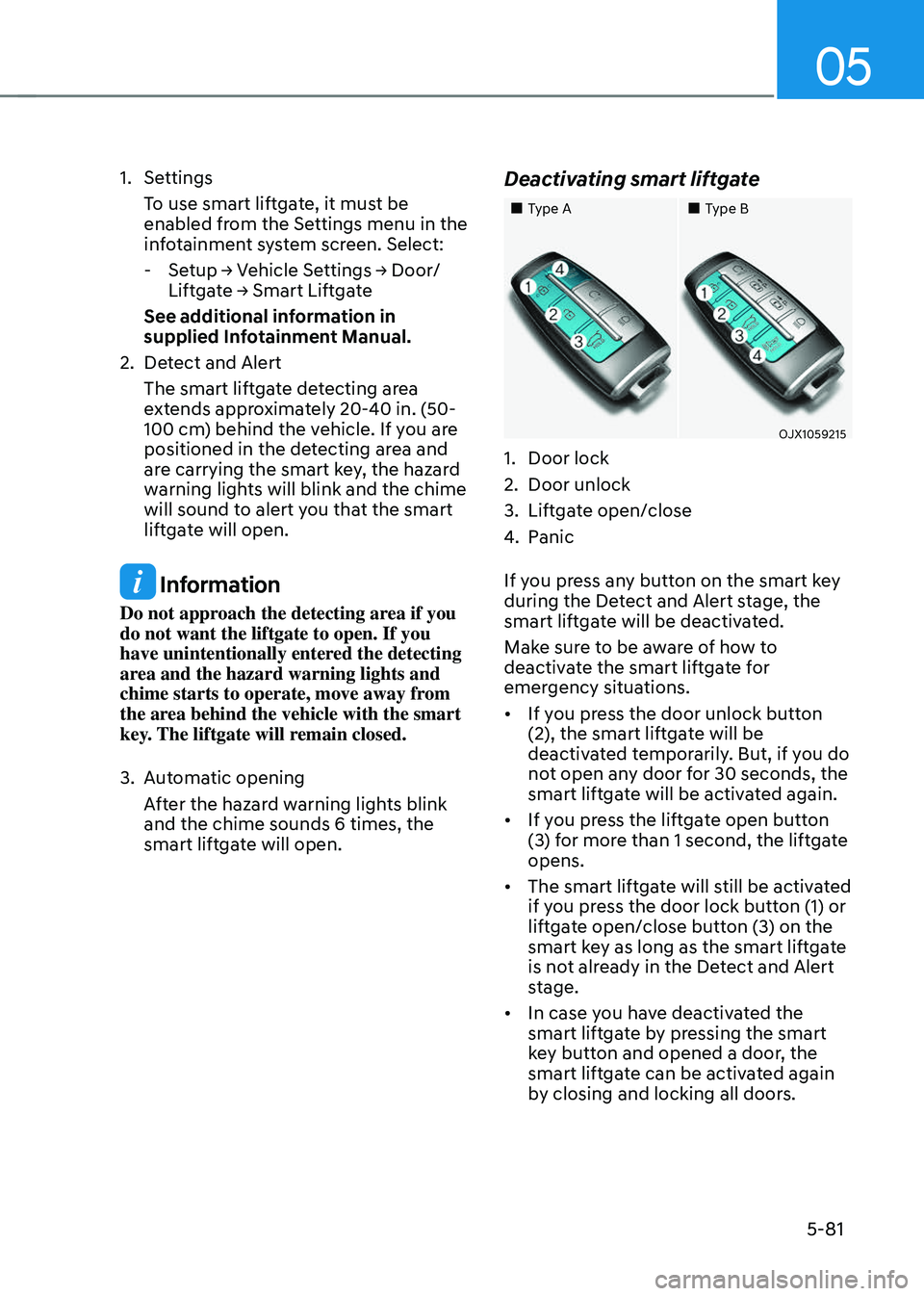
Deactivating smart liftgate
Page 218 of 637
Convenience Features
5-82
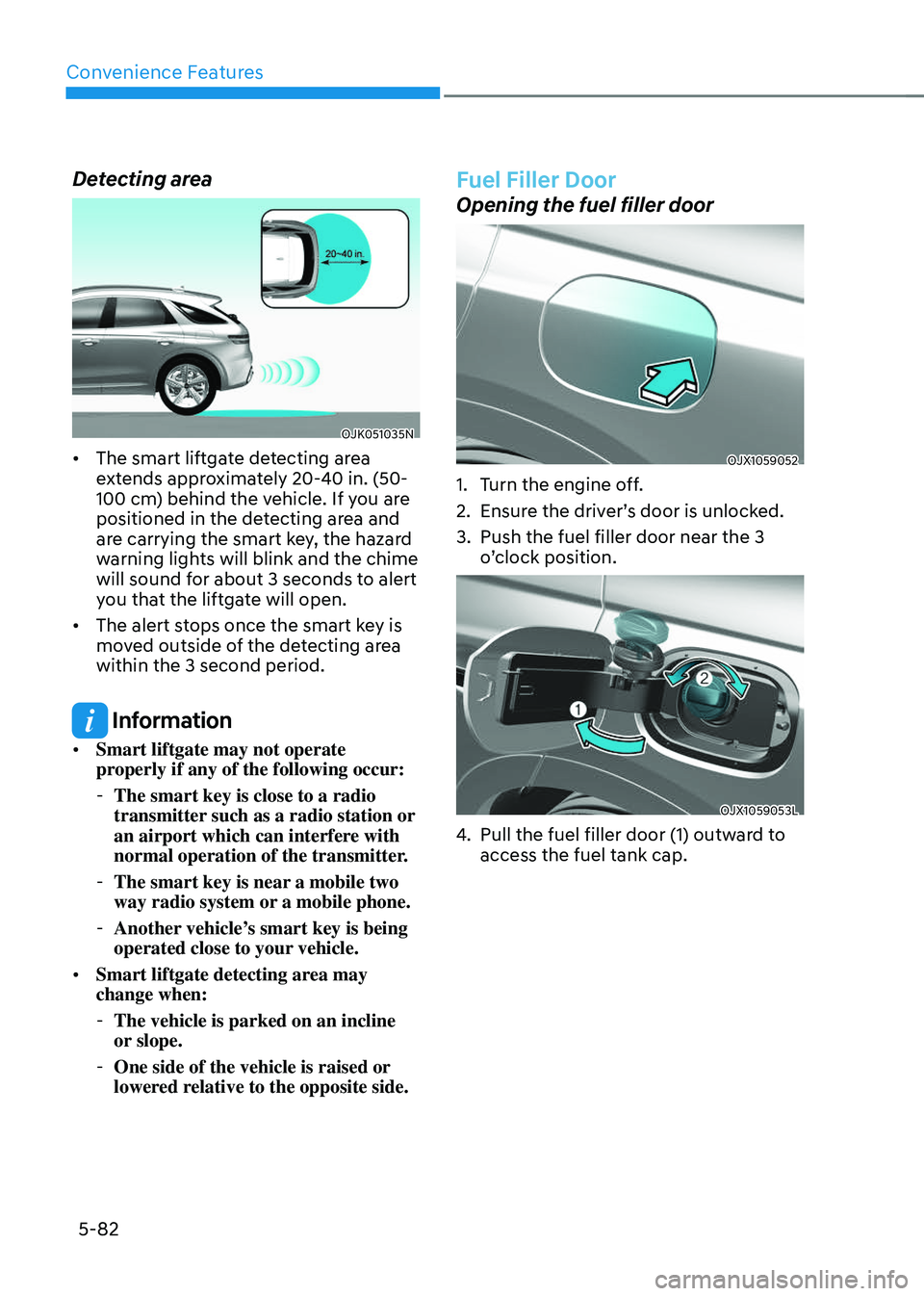
Detecting area
OJK051035NOJK051035N
• The smart liftgate detecting area
extends approximately 20-40 in. (50-
100 cm) behind the vehicle. If you are
positioned in the detecting area and
are carrying the smart key, the hazard
warning lights will blink and the chime
will sound for about 3 seconds to alert
you that the liftgate will open.
• The alert stops once the smart key is
moved outside of the detecting area
within the 3 second period.
Information
• Smart liftgate may not operate
properly if any of the following occur:
-The smart key is close to a radio
transmitter such as a radio station or
an airport which can interfere with
normal operation of the transmitter.
-The smart key is near a mobile two
way radio system or a mobile phone.
-Another vehicle’s smart key is being
operated close to your vehicle.
• Smart liftgate detecting area may
change when:
-The vehicle is parked on an incline
or slope.
-One side of the vehicle is raised or
lowered relative to the opposite side.
Fuel Filler Door
Opening the fuel filler door
OJX1059052OJX1059052
1. Turn the engine off.
2. Ensure the driver’s door is unlocked.
3. Push the fuel filler door near the 3
o’clock position.
OJX1059053LOJX1059053L
4. Pull the fuel filler door (1) outward to
access the fuel tank cap.
Page 219 of 637
05
5-83
5. To remove the fuel tank cap (2), turn
it counterclockwise. You may hear a
hissing noise as the pressure inside
the tank equalizes.
6. Place the cap on the fuel filler door.
Information
If the fuel filler door does not open
because ice has formed around it, tap
lightly or push on the door to break the
ice and release the door. Do not pry on the
door. If necessary, spray around the door
with an approved deicer fluid (do not use
radiator antifreeze) or move the vehicle to
a warm place and allow the ice to melt.
Closing the fuel filler door
1. To install the fuel tank cap, turn it
clockwise until it “clicks” one time.
2. Close the fuel filler door until it is
latched securely.
Information
The fuel filler door will not close if the
driver’s door is locked. If you lock the
driver’s door while fueling, unlock it
before closing the fuel filler door.
WARNING
Gasoline fuel is highly flammable
and explosive. Failure to follow these
guidelines may result in SERIOUS
INJURY or DEATH:
• Read and follow all warnings posted
at the gas station.
• Before refueling, note the location of
the Emergency Gasoline Fuel Shut-
Off, if available, at the gas station.
• Before touching the fuel nozzle, you
should eliminate the potential build-
up of static electricity by touching
a metal part of the vehicle, a safe
distance away from the fuel filler
neck, nozzle, or other gas source,
with your bare hand.
• Do not use mobile phones while
refueling. Electric current and/or
electronic interference from cellular
phones can potentially ignite fuel
vapors and cause a fire.
• Do not get back into a vehicle
once you have begun refueling.
You can generate a buildup of
static electricity by touching,
rubbing or sliding against any item
or fabric capable of producing
static electricity. Static electricity
discharge can ignite fuel vapors
causing a fire. If you must re-enter
the vehicle, you should once again
eliminate potentially dangerous
static electricity discharge by
touching a metal part of the vehicle,
away from the fuel filler neck, nozzle
or other gasoline source, with your
bare hand.
Page 220 of 637
Convenience Features
5-84
• When using an approved portable
fuel container, be sure to place the
container on the ground prior to
refueling. Static electricity discharge
from the container can ignite fuel
vapors causing a fire.
Once refueling has begun, contact
between your bare hand and the
vehicle should be maintained until
the filling is complete.
• Use only approved portable plastic
fuel containers designed to carry and
store gasoline.
• When refueling, always shift the
gear to the P (Park) position, set
the parking brake, and press the
Engine Start/Stop button to the
OFF position. Sparks produced by
electrical components related to the
engine can ignite fuel vapors causing
a fire.
• Do not use matches or a lighter and
do not smoke or leave a lit cigarette
in your vehicle while at a gas station,
especially during refueling.
• Do not over-fill or top-off your
vehicle tank, which can cause
gasoline spillage.
• If a fire breaks out during refueling,
leave the vicinity of the vehicle, and
immediately contact the manager
of the gas station and then contact
the local fire department. Follow any
safety instructions they provide.
• If pressurized fuel sprays out, it can
cover your clothes or skin and thus
subject you to the risk of fire and
burns. Always remove the fuel cap
carefully and slowly. If the cap is
venting fuel or if you hear a hissing
sound, wait until the condition stops
before completely removing the cap.
• Always check that the fuel cap is
installed securely to prevent fuel
spillage in the event of an accident.
Information
Make sure to refuel your vehicle according
to the “Fuel Requirements” section in
suggested in chapter 1.
NOTICE
• Do not spill fuel on the exterior
surfaces of the vehicle. Any type of
fuel spilled on painted surfaces may
damage the paint.
• If the fuel filler cap requires
replacement, use only a genuine
Genesis cap or the equivalent
specified for your vehicle. An
incorrect fuel filler cap can result
in a serious malfunction of the fuel
system or emission control system.