GENESIS GV70 2023 Owners Manual
Manufacturer: GENESIS, Model Year: 2023, Model line: GV70, Model: GENESIS GV70 2023Pages: 637
Page 271 of 637
05
5-135
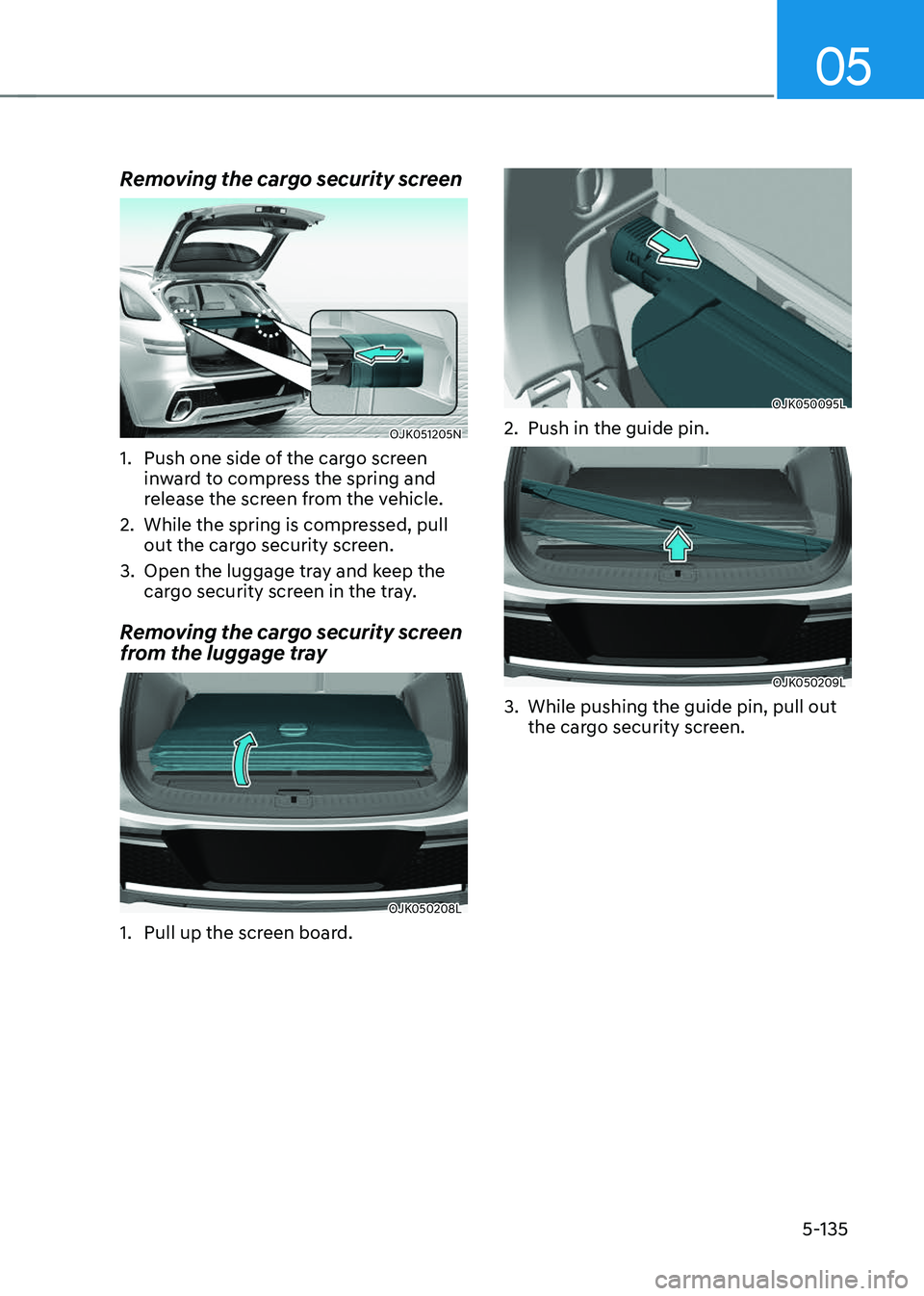
Removing the cargo security screen
OJK051205NOJK051205N
1. Push one side of the cargo screen
inward to compress the spring and
release the screen from the vehicle.
2. While the spring is compressed, pull
out the cargo security screen.
3. Open the luggage tray and keep the
cargo security screen in the tray.
Removing the cargo security screen
from the luggage tray
OJK050208LOJK050208L
1. Pull up the screen board.
OJK050095LOJK050095L
2. Push in the guide pin.
OJK050209LOJK050209L
3. While pushing the guide pin, pull out
the cargo security screen.
Page 272 of 637
Convenience Features
5-136
EXTERIOR FEATURES
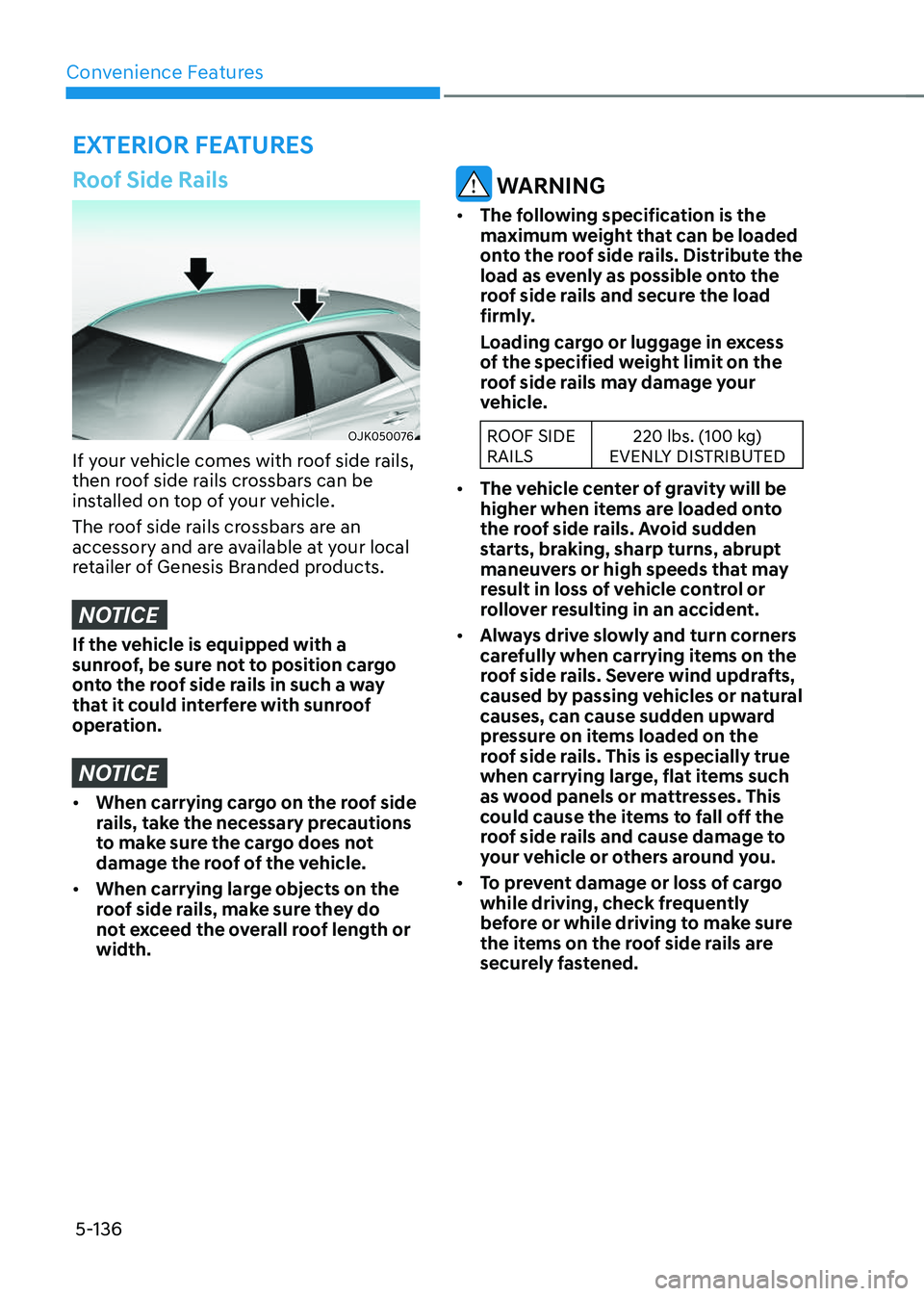
Roof Side Rails
OJK050076OJK050076
If your vehicle comes with roof side rails,
then roof side rails crossbars can be
installed on top of your vehicle.
The roof side rails crossbars are an
accessory and are available at your local
retailer of Genesis Branded products.
NOTICE
If the vehicle is equipped with a
sunroof, be sure not to position cargo
onto the roof side rails in such a way
that it could interfere with sunroof
operation.
NOTICE
• When carrying cargo on the roof side
rails, take the necessary precautions
to make sure the cargo does not
damage the roof of the vehicle.
• When carrying large objects on the
roof side rails, make sure they do
not exceed the overall roof length or
width.
WARNING
• The following specification is the
maximum weight that can be loaded
onto the roof side rails. Distribute the
load as evenly as possible onto the
roof side rails and secure the load
firmly.
Loading cargo or luggage in excess
of the specified weight limit on the
roof side rails may damage your
vehicle.
ROOF SIDE
RAILS220 lbs. (100 kg)
EVENLY DISTRIBUTED
• The vehicle center of gravity will be
higher when items are loaded onto
the roof side rails. Avoid sudden
starts, braking, sharp turns, abrupt
maneuvers or high speeds that may
result in loss of vehicle control or
rollover resulting in an accident.
• Always drive slowly and turn corners
carefully when carrying items on the
roof side rails. Severe wind updrafts,
caused by passing vehicles or natural
causes, can cause sudden upward
pressure on items loaded on the
roof side rails. This is especially true
when carrying large, flat items such
as wood panels or mattresses. This
could cause the items to fall off the
roof side rails and cause damage to
your vehicle or others around you.
• To prevent damage or loss of cargo
while driving, check frequently
before or while driving to make sure
the items on the roof side rails are
securely fastened.
Page 273 of 637
05
5-137
NOTICE
• If you install an aftermarket HID
head lamp, your vehicle’s audio and
electronic devices may not function
properly.
• Prevent chemicals such as perfume,
cosmetic oil, sun cream, hand
cleaner, and air freshener from
contacting the interior parts
because they may cause damage or
discoloration.
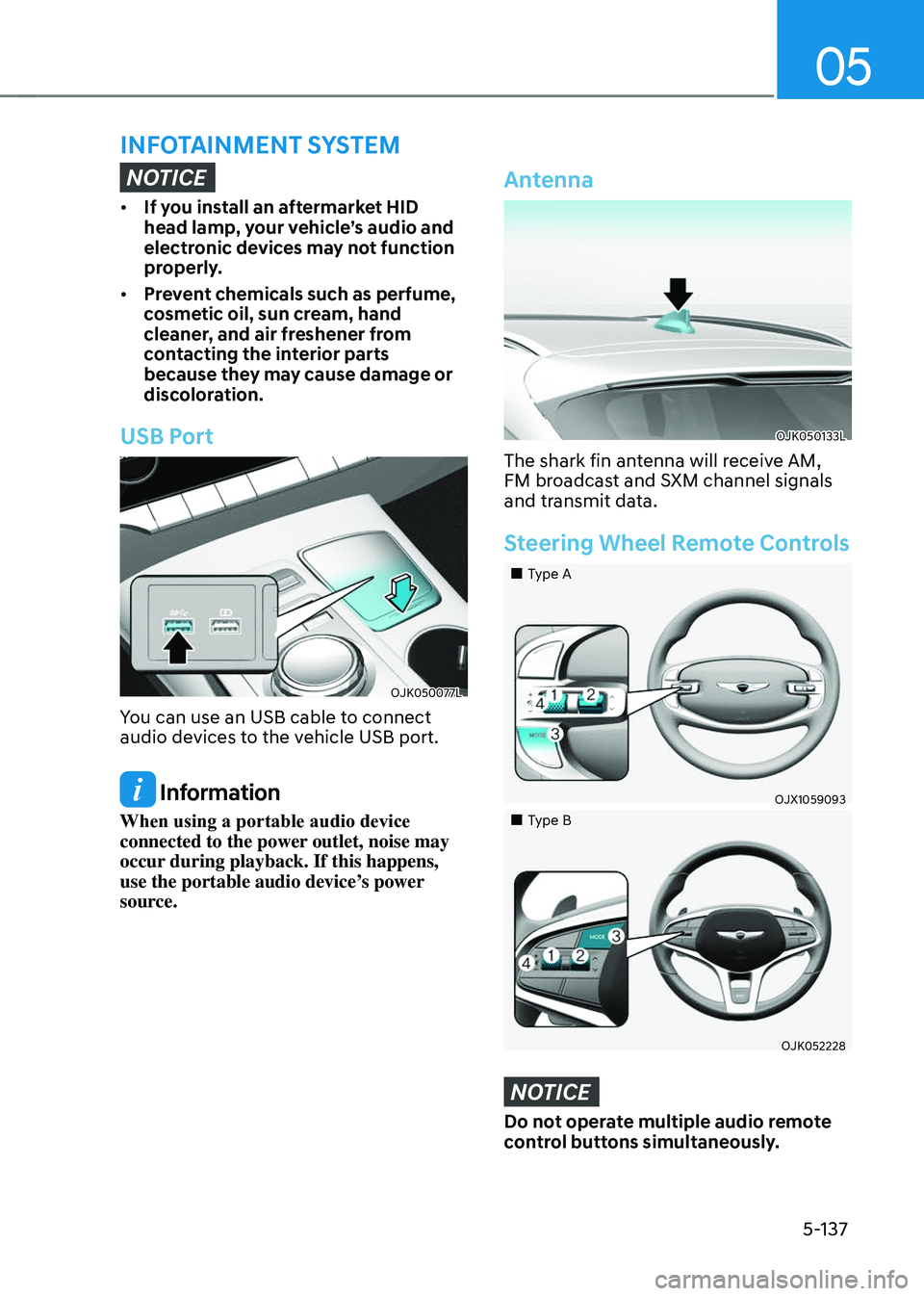
USB Port
OJK050077LOJK050077L
You can use an USB cable to connect
audio devices to the vehicle USB port.
Information
When using a portable audio device
connected to the power outlet, noise may
occur during playback. If this happens,
use the portable audio device’s power
source.
Antenna
OJK050133LOJK050133L
The shark fin antenna will receive AM,
FM broadcast and SXM channel signals
and transmit data.
Steering Wheel Remote Controls
Page 274 of 637
Convenience Features
5-138
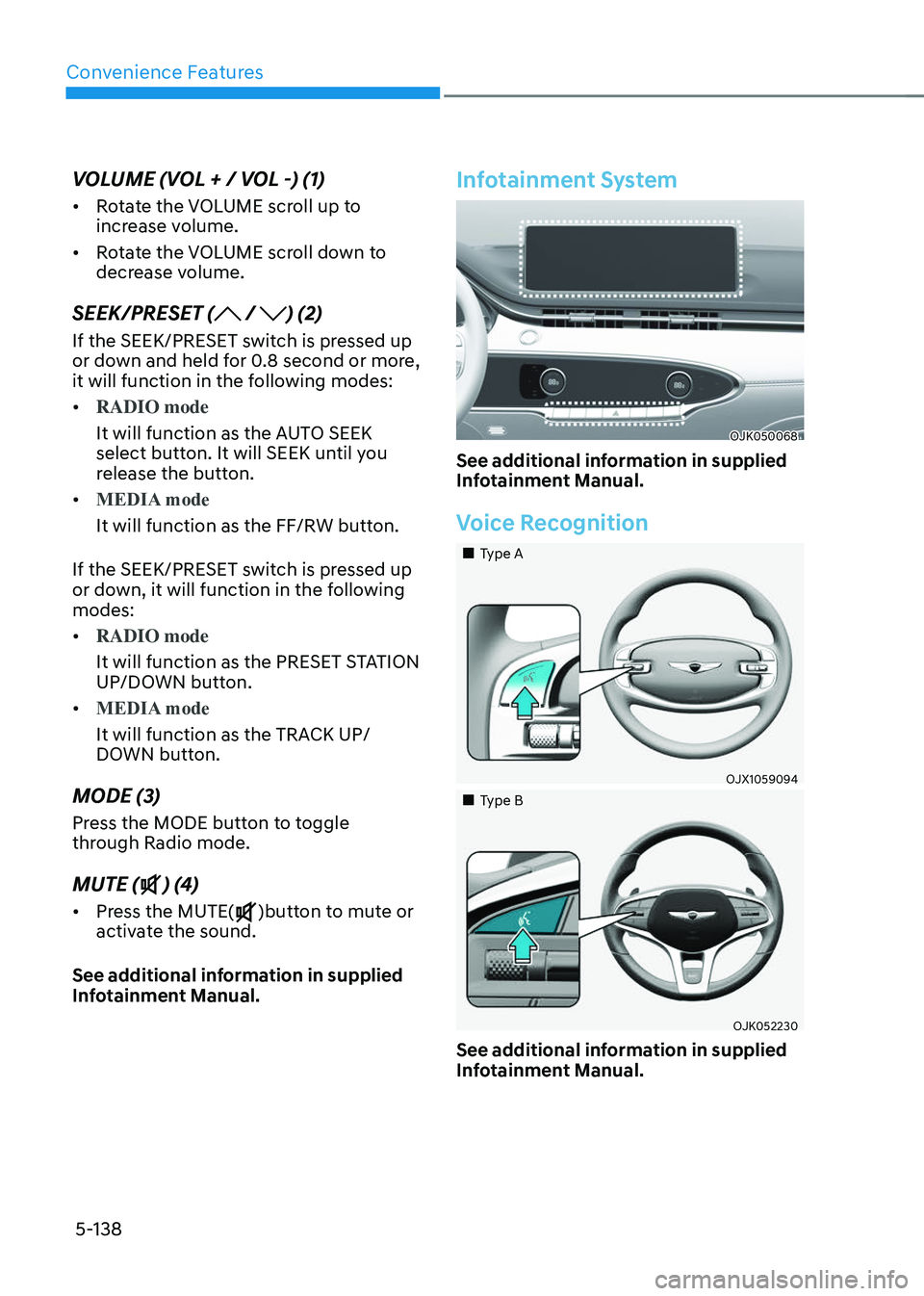
VOLUME (VOL + / VOL -) (1)
• Rotate the VOLUME scroll up to
increase volume.
• Rotate the VOLUME scroll down to
decrease volume.
SEEK/PRESET ( / ) (2)
If the SEEK/PRESET switch is pressed up
or down and held for 0.8 second or more,
it will function in the following modes:
• RADIO mode
It will function as the AUTO SEEK
select button. It will SEEK until you
release the button.
• MEDIA mode
It will function as the FF/RW button.
If the SEEK/PRESET switch is pressed up
or down, it will function in the following
modes:
• RADIO mode
It will function as the PRESET STATION
UP/DOWN button.
• MEDIA mode
It will function as the TRACK UP/
DOWN button.
MODE (3)
Press the MODE button to toggle
through Radio mode.
MUTE () (4)
• Press the MUTE()button to mute or
activate the sound.
See additional information in supplied
Infotainment Manual.
Infotainment System
OJK050068OJK050068
See additional information in supplied
Infotainment Manual.
Voice Recognition
Page 275 of 637
05
5-139
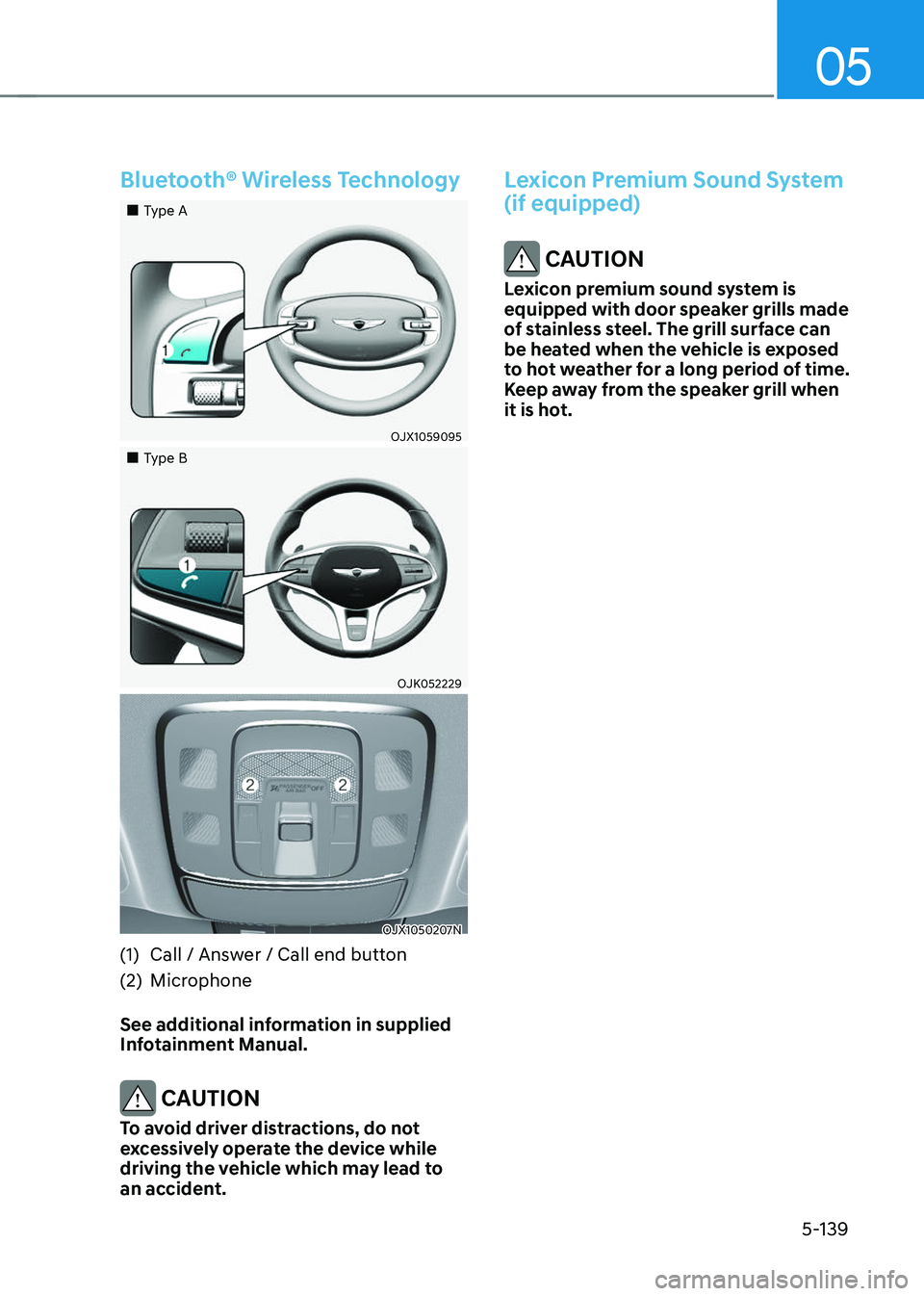
Bluetooth® Wireless Technology
Page 276 of 637

Before Driving ........................................................................\
...........................6-4Before Entering the Vehicle ........................................................................\
................6-4
Before Starting ........................................................................\
....................................6-4
Engine Start/Stop Button ........................................................................\
.........6-5Engine Stop/Start Button Positions ........................................................................\
...6-6
Starting the Engine ........................................................................\
..............................6 -7
Turning Off the Engine ........................................................................\
........................6-8
Remote Start ........................................................................\
........................................6-9
Automatic Transmission ........................................................................\
..........6-10Automatic Transmission Operation ........................................................................\
...6-10
LCD Display Messages (Cluster) ........................................................................\
........6-16
Paddle Shifter (Manual Shift Mode) ........................................................................\
..6-18
Good Driving Practices ........................................................................\
......................6-19
Braking System ........................................................................\
.......................6-20Power-Assist Brakes ........................................................................\
..........................6-20
Disc Brakes Wear Indicator ........................................................................\
............... 6-20
High Performance Brake........................................................................\
.................... 6-21
Electronic Parking Brake (EPB)
........................................................................\
..........6-21
Auto Hold ........................................................................\
...........................................6-25
Anti-Lock Brake System (ABS) ........................................................................\
...........6-29
Electronic Stability Control (ESC) ........................................................................\
....6-30
Vehicle Stability Management (VSM) .......................................................................6-33
Hill-Start Assist Control (HAC) ........................................................................\
...........6-34
Downhill Brake Control (DBC) ........................................................................\
...........6-34
Good Braking Practices ........................................................................\
.....................6-37
All Wheel Drive (AWD) ........................................................................\
............6-38All Wheel Drive (AWD) Operation ........................................................................\
.....6-38
Emergency Precautions ........................................................................\
....................6-40
Electronic Limited Slip Differential ................................................................6-42Drive Mode Selection ........................................................................\
........................6-42
Warning Messages ........................................................................\
............................6-42
Electronic Control Suspension .......................................................................6-43System Malfunction ........................................................................\
..........................6-43
Electronically Controlled Suspension with Road Preview ...........................6-43System Malfunction ........................................................................\
..........................6-44
Limitations of the System ........................................................................\
.................6-44
6. Driving Your Vehicle
Driving Your Vehicle
6
Page 277 of 637

Launch Control ........................................................................\
........................6-45Prerequisite for Activation ........................................................................\
................6-45
Launch Control Activation ........................................................................\
................6-45
Limited Use of Launch Control ........................................................................\
.........6-46
Idle Stop and Go (ISG) ........................................................................\
............6-47ISG System Operation ........................................................................\
........................6-47
ISG System Off ........................................................................\
..................................6-49
Forced to Restart Engine ........................................................................\
..................6-50
ISG Malfunction ........................................................................\
.................................6-50
Calibrating the Battery Sensor ........................................................................\
.........6-50
Coasting ........................................................................\
..................................6-52Coasting Setting ........................................................................\
.................................6-52
Coasting Operating Conditions ........................................................................\
.........6-52
Coasting Release Conditions ........................................................................\
............6-53
Drive Mode Integrated Control System .........................................................6-54Drive Mode ........................................................................\
........................................6-54
Active Sound Design ........................................................................\
............... 6-56
Special Driving Conditions
........................................................................\
.....6-56Hazardous Driving Conditions ........................................................................\
.........6-56
Rocking the Vehicle ........................................................................\
...........................6-57
Smooth Cornering ........................................................................\
..............................6-57
Driving at Night ........................................................................\
..................................6-57
Driving in the Rain ........................................................................\
.............................6-58
Driving in Flooded Areas ........................................................................\
...................6-58
Highway Driving ........................................................................\
................................6-58
Reducing the Risk of a Rollover ........................................................................\
.......6-59
Winter Driving ........................................................................\
.........................6-60Snow or Icy Conditions ........................................................................\
.....................6-60
Winter Precautions ........................................................................\
............................6-63
Trailer Towing ........................................................................\
..........................6-65If You Decide to Pull a Trailer? ........................................................................\
..........6-65
Trailer Towing Equipment ........................................................................\
..................6-67
Driving with a Trailer ........................................................................\
.........................6-68
Maintenance When Towing a Trailer ........................................................................\
..6-71
Vehicle Load Limit ........................................................................\
...................6-72The Loading Information Label ........................................................................\
.........6-73
6
Page 278 of 637
06
6-3
WARNING
Carbon monoxide (CO) gas is toxic. Breathing CO can cause unconsciousness and
death.
Engine exhaust contains carbon monoxide which cannot be seen or smelled.
Do not inhale engine exhaust.
If at any time you smell engine exhaust inside the vehicle, open the windows
immediately. Exposure to CO can cause unconsciousness and death by asphyxiation.
Be sure the exhaust system does not leak.
The exhaust system should be checked whenever the vehicle is raised to change the
oil or for any other purpose. If you hear a change in the sound of the exhaust or if you
drive over something that strikes the underneath side of the vehicle, have the exhaust
system checked as soon as possible by an authorized retailer of Genesis Branded
products.
Do not run the engine in an enclosed area.
Letting the engine idle in your garage, even with the garage door open, is a hazardous
practice. Run the engine only long enough to start the engine and to move the vehicle
out of the garage.
Avoid idling the engine for prolonged periods with people inside the vehicle.
If it is necessary to idle the engine for a prolonged period with people inside the
vehicle, be sure to do so only in an open area with the air intake set at “Fresh” and fan
control set to high so fresh air is drawn into the interior.
Keep the air intakes clear.
To assure proper operation of the ventilation system, keep the ventilation air intakes
located in front of the windshield clear of snow, ice, leaves, or other obstructions.
If you must drive with the liftgate open:
Close all windows.
Open instrument panel air vents.
Set the air intake control at “Fresh”, the air flow control at “Floor” or “Face”, and the fan
control set to high.
WARNING
CALIFORNIA PROPOSITION 65 WARNING
Engine exhaust and a wide variety of automobile components including
components found in the interior furnishings in a vehicle, contain or emit harmful
chemicals known to the State of California to cause cancer and birth defects and
reproductive harm. In addition, certain fluids contained in vehicles and certain
products of components contain or emit chemicals known to the State of California
to cause cancer and birth defects or other reproductive harm.
Page 279 of 637
Driving Your Vehicle
6-4
Before Entering the Vehicle
• Be sure all windows, outside mirror(s),
and outside lights are clean and
unobstructed.
• Remove frost, snow, or ice.
• Visually check the tires for uneven
wear and damage.
• Check under the vehicle for any sign
of leaks.
• Be sure there are no obstacles behind
you if you intend to back up.
Before Starting
• Make sure the hood, the liftgate, and
the doors are securely closed and
locked.
• Adjust the position of the seat and
steering wheel.
• Adjust the inside and outer side view
mirrors.
• Verify all the lights work.
• Fasten your seat belt. Check that all
passengers have fastened their seat
belts.
• Check the gauges and indicators
in the instrument panel and the
messages on the instrument display
when the Engine Start/Stop button is
in the ON position.
• Check that any items you are carrying
are stored properly or fastened down
securely.
WARNING
To reduce the risk of SERIOUS INJURY or
DEATH, take the following precautions:
• ALWAYS wear your seat belt. All
passengers must be properly belted
whenever the vehicle is moving.
For more information, refer to “Seat
Belts” section in chapter 3.
• Always drive defensively. Assume
other drivers or pedestrians may be
careless and make mistakes.
• Stay focused on the task of driving.
Driver distraction can cause
accidents.
• Leave plenty of space between you
and the vehicle in front of you.
WARNING
NEVER drink or take drugs and drive.
Drinking or taking drugs and driving
is dangerous and may result in an
accident and SERIOUS INJURY or
DEATH.
Drunk driving is the number one
contributor to the highway death
toll each year. Even a small amount
of alcohol will affect your reflexes,
perceptions and judgment. Just
one drink can reduce your ability to
respond to changing conditions and
emergencies and your reaction time
gets worse with each additional drink.
Driving while under the influence
of drugs is as dangerous as or more
dangerous than driving under the
influence of alcohol.
You are much more likely to have a
serious accident if you drink or take
drugs and drive. If you are drinking or
taking drugs, don’t drive. Do not ride
with a driver who has been drinking
or taking drugs. Choose a designated
driver or call a taxi.
BEFORE DRIVING
Page 280 of 637
06
6-5
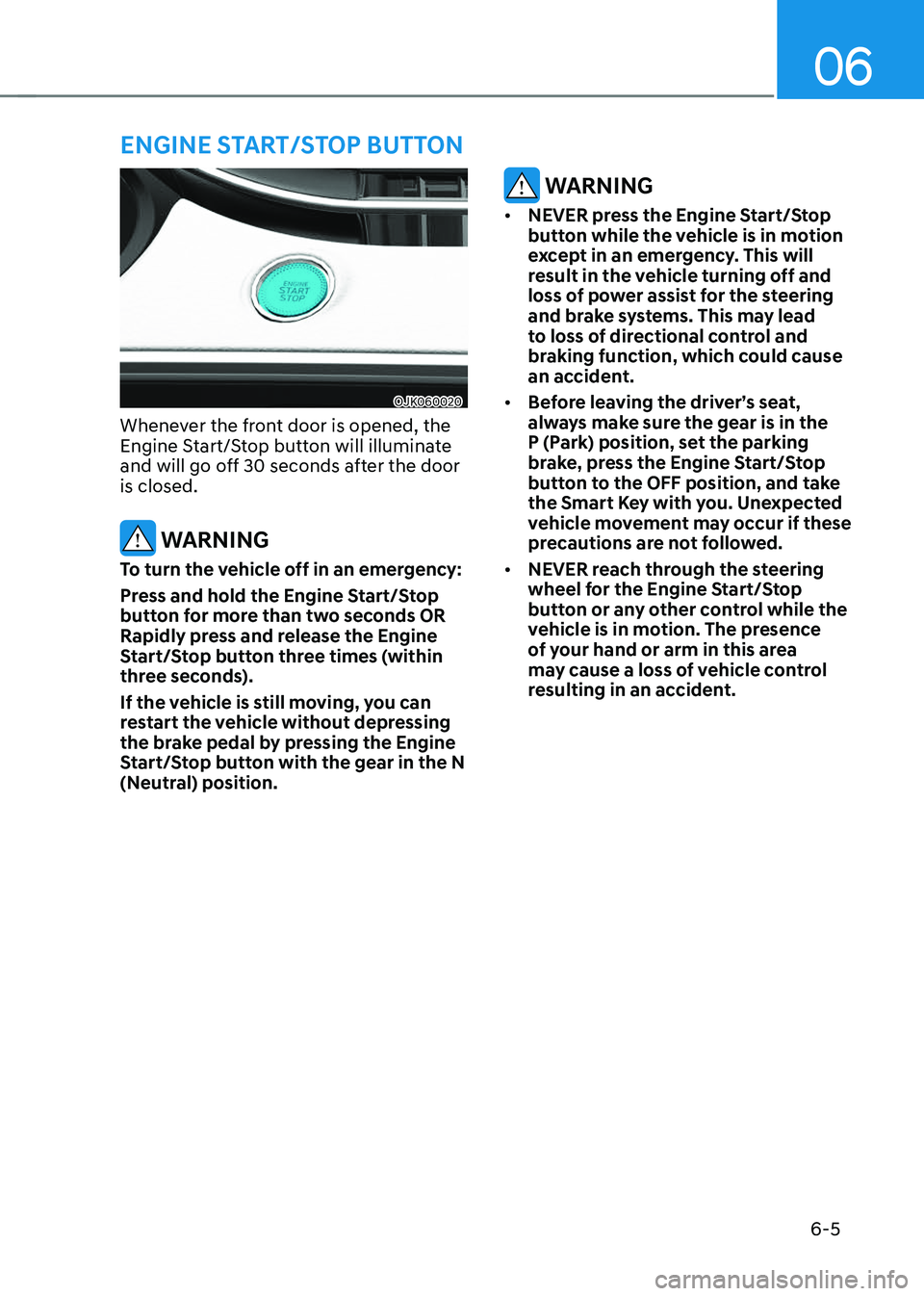
OJK060020OJK060020
Whenever the front door is opened, the
Engine Start/Stop button will illuminate
and will go off 30 seconds after the door
is closed.
WARNING
To turn the vehicle off in an emergency:
Press and hold the Engine Start/Stop
button for more than two seconds OR
Rapidly press and release the Engine
Start/Stop button three times (within
three seconds).
If the vehicle is still moving, you can
restart the vehicle without depressing
the brake pedal by pressing the Engine
Start/Stop button with the gear in the N
(Neutral) position.
WARNING
• NEVER press the Engine Start/Stop
button while the vehicle is in motion
except in an emergency. This will
result in the vehicle turning off and
loss of power assist for the steering
and brake systems. This may lead
to loss of directional control and
braking function, which could cause
an accident.
• Before leaving the driver’s seat,
always make sure the gear is in the
P (Park) position, set the parking
brake, press the Engine Start/Stop
button to the OFF position, and take
the Smart Key with you. Unexpected
vehicle movement may occur if these
precautions are not followed.
• NEVER reach through the steering
wheel for the Engine Start/Stop
button or any other control while the
vehicle is in motion. The presence
of your hand or arm in this area
may cause a loss of vehicle control
resulting in an accident.
ENGINE START/STOP BUTTON