parts GENESIS GV80 2021 User Guide
[x] Cancel search | Manufacturer: GENESIS, Model Year: 2021, Model line: GV80, Model: GENESIS GV80 2021Pages: 632, PDF Size: 9.37 MB
Page 252 of 632
Convenient Features
5-110
Turning the Auto Defogging System
ON or OFF
Climate control system
Press the front windshield defroster
button for 3 seconds when the Engine
Start/Stop button is in the ON position.
When the Auto Defogging System is
turned off, the ADS OFF symbol will blink
3 times and ADS OFF will be displayed on
the climate control information screen.
When the Auto Defogging System is
turned on, the ADS OFF symbol will blink
6 times without a signal.
Infotainment system
Auto Defogging System can be turned
on and off by selecting ‘Setup →
Vehicle Settings → Climate → Defog/
Defrost Options → Auto Defog’ from the
infotainment system screen.
See additional information in supplied
Infotainment Manual.
Information
• When the air conditioning is turned
on by Auto Defogging System, if you
try to turn off the air conditioning, the
indicator will blink 3 times and the air
conditioning will not be turned off.
• To maintain the effectiveness and
efficiency of the Auto Defogging
System, do not select Recirculation
mode while the system is operating.
• When Auto Defogging System is
operating, fan speed adjustment,
temperature adjustment, and air intake
control selection are all disabled.
NOTICE
Do not remove the sensor cover located
on the upper end of the windshield
glass.
Damage to system parts could occur
and may not be covered by your vehicle
warranty.
Auto Dehumidify (if equipped)
To increase cabin air quality and help
reduce windshield misting, Recirculation
mode switches off automatically after
about 5 to 30 minutes, depending on the
outside temperature, and the air intake
will change to Fresh mode.
Turning Auto Dehumidify ON or OFF
Climate control system
To turn the Auto Dehumidify feature
on or off, select Face level (
) mode
and press the air intake control ()
button at least five times within three
seconds. When Auto Dehumidify is
turned on, the air intake control button
indicator will blink 6 times. When turned
off, the indicator will blink 3 times.
Infotainment system
Auto Dehumidify can be turned on and
off by selecting ‘Setup → Vehicle Settings
→ Climate → Automatic Ventilation →
Auto Dehumidify’ from the infotainment
system screen.
See additional information in supplied
Infotainment Manual.
Page 270 of 632
Convenient Features
5-128
NOTICE
• If you install an aftermarket HID
head lamp, your vehicle’s audio and
electronic devices may not function
properly.
• Prevent chemicals such as perfume,
cosmetic oil, sun cream, hand
cleaner, and air freshener from
contacting the interior parts
because they may cause damage or
discoloration.
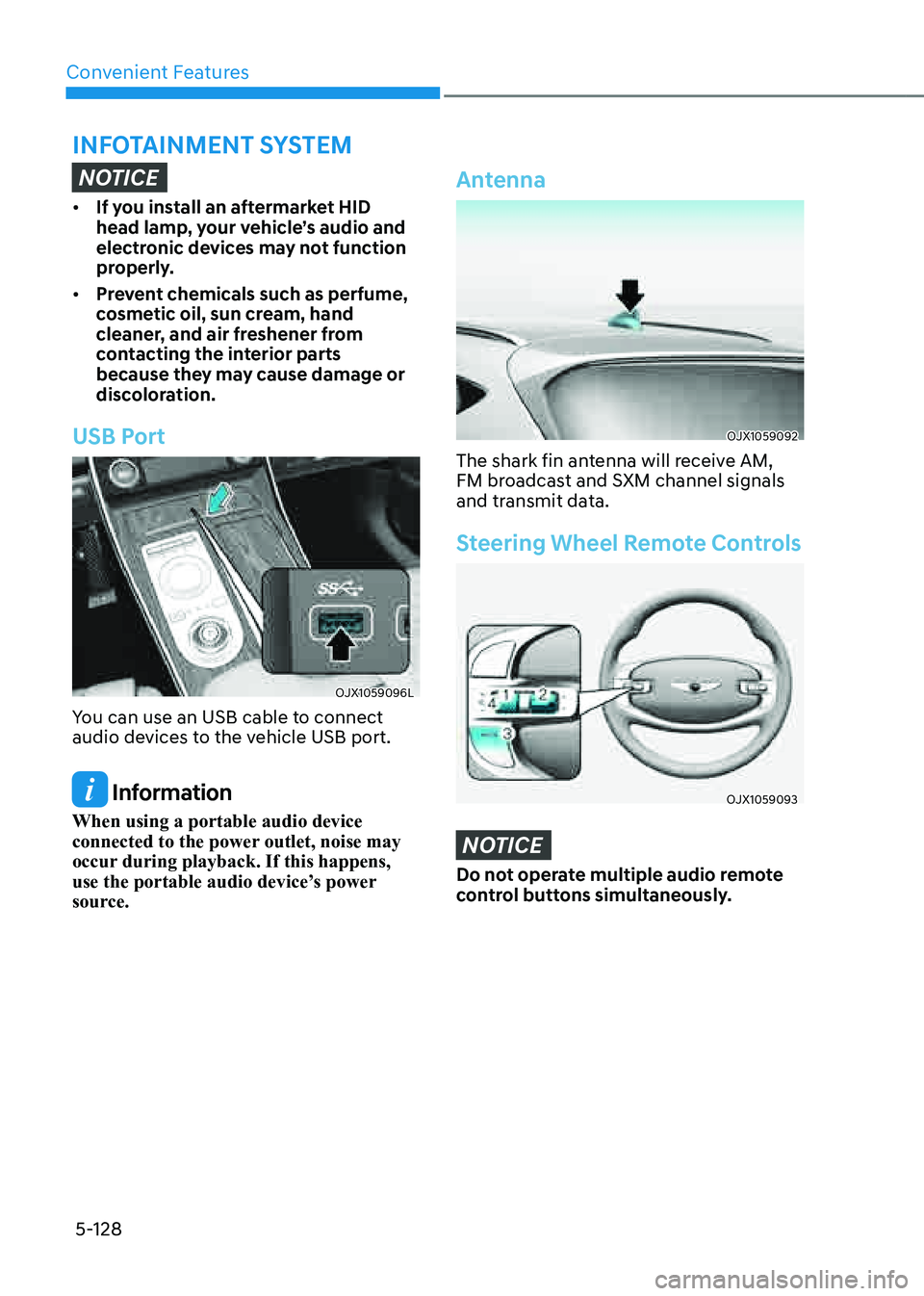
USB Port
OJX1059096LOJX1059096L
You can use an USB cable to connect
audio devices to the vehicle USB port.
Information
When using a portable audio device
connected to the power outlet, noise may
occur during playback. If this happens,
use the portable audio device’s power
source.
Antenna
OJX1059092OJX1059092
The shark fin antenna will receive AM,
FM broadcast and SXM channel signals
and transmit data.
Steering Wheel Remote Controls
OJX1059093OJX1059093
NOTICE
Do not operate multiple audio remote
control buttons simultaneously.
INFOTAINMENT SYSTEM
Page 297 of 632
06
6-25
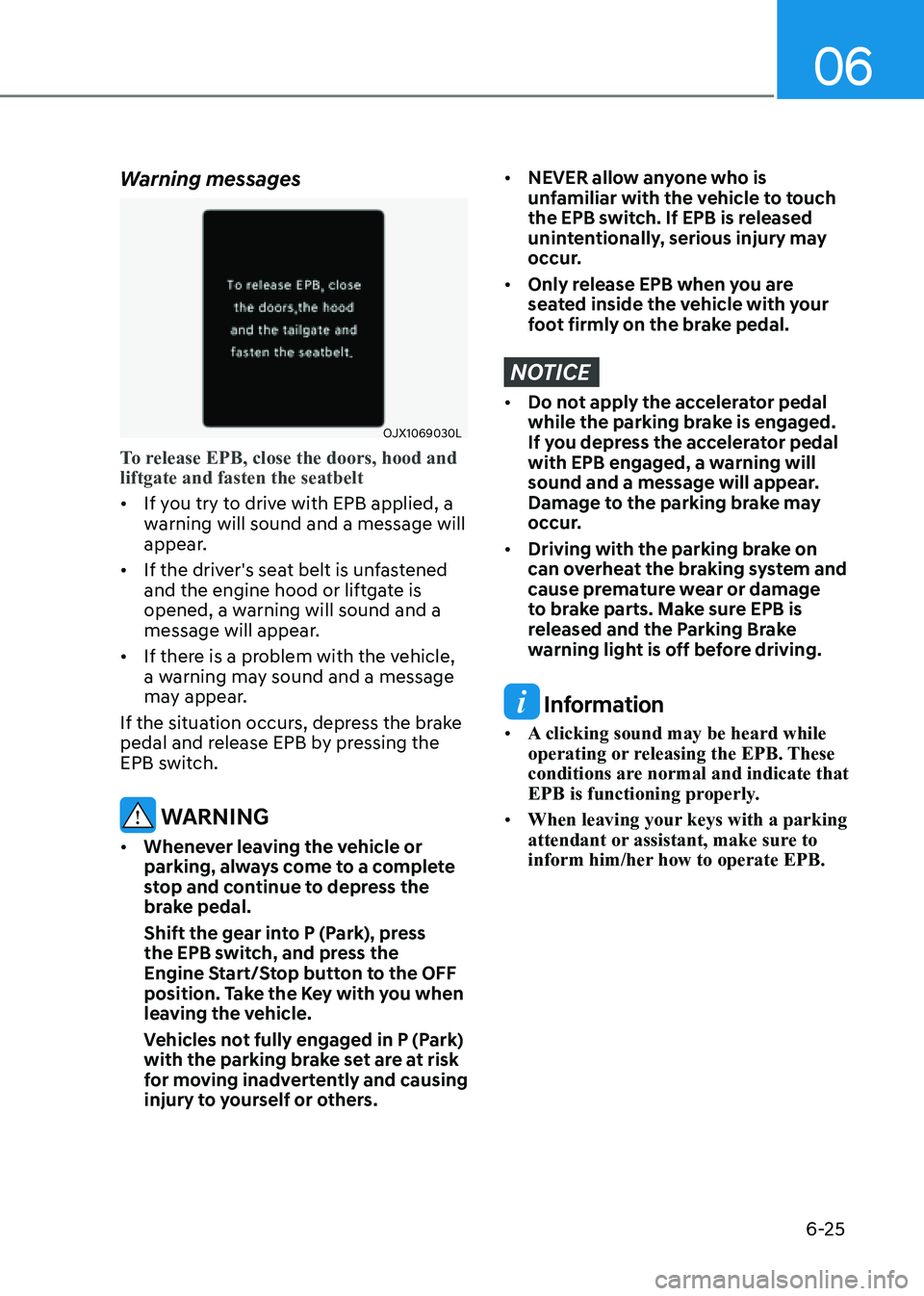
Warning messages
OJX1069030LOJX1069030L
To release EPB, close the doors, hood and
liftgate and fasten the seatbelt
• If you try to drive with EPB applied, a
warning will sound and a message will
appear.
• If the driver's seat belt is unfastened
and the engine hood or liftgate is
opened, a warning will sound and a
message will appear.
• If there is a problem with the vehicle,
a warning may sound and a message
may appear.
If the situation occurs, depress the brake
pedal and release EPB by pressing the
EPB switch.
WARNING
• Whenever leaving the vehicle or
parking, always come to a complete
stop and continue to depress the
brake pedal.
Shift the gear into P (Park), press
the EPB switch, and press the
Engine Start/Stop button to the OFF
position. Take the Key with you when
leaving the vehicle.
Vehicles not fully engaged in P (Park)
with the parking brake set are at risk
for moving inadvertently and causing
injury to yourself or others.
• NEVER allow anyone who is
unfamiliar with the vehicle to touch
the EPB switch. If EPB is released
unintentionally, serious injury may
occur.
• Only release EPB when you are
seated inside the vehicle with your
foot firmly on the brake pedal.
NOTICE
• Do not apply the accelerator pedal
while the parking brake is engaged.
If you depress the accelerator pedal
with EPB engaged, a warning will
sound and a message will appear.
Damage to the parking brake may
occur.
• Driving with the parking brake on
can overheat the braking system and
cause premature wear or damage
to brake parts. Make sure EPB is
released and the Parking Brake
warning light is off before driving.
Information
• A clicking sound may be heard while
operating or releasing the EPB. These
conditions are normal and indicate that
EPB is functioning properly.
• When leaving your keys with a parking
attendant or assistant, make sure to
inform him/her how to operate EPB.
Page 313 of 632
06
6-41
Selected modeDescription
Auto AWD
(Normal diving)
• Use this mode when driving on normal roads.
• Under normal operating conditions, the vehicle operates similar to
conventional 2WD vehicles. If the system determines there is a need
for four wheel drive, the engine's driving power is distributed to all four
wheels automatically.
AWD LOCK
• The main goal of AWD Lock mode is to allow a driver to maximize the
vehicle's traction under extreme driving conditions such as unpaved
off-road, sandy roads, and muddy roads.
• Press the AWD Lock mode switch again to switch back to Auto AWD.
Be sure to maintain Auto AWD mode when driving on normal roads. If you drive with
the AWD Lock mode on normal roads or curved roads, it may damage AWD parts and
cause vibration and noise. However, vibration and noise are normal conditions that will
disappear when Auto AWD mode is selected. Also, when the vehicle is changed from
AWD Lock to Auto AWD, a sensation may be felt as driving power is delivered to the
rear wheels.
WARNING
If the AWD () warning light stays on the instrument cluster, your vehicle may
have a malfunction with the AWD system. Whenever the AWD () warning light
illuminates we recommend that the vehicle be inspected by an authorized retailer of
Genesis Branded products as soon as possible.
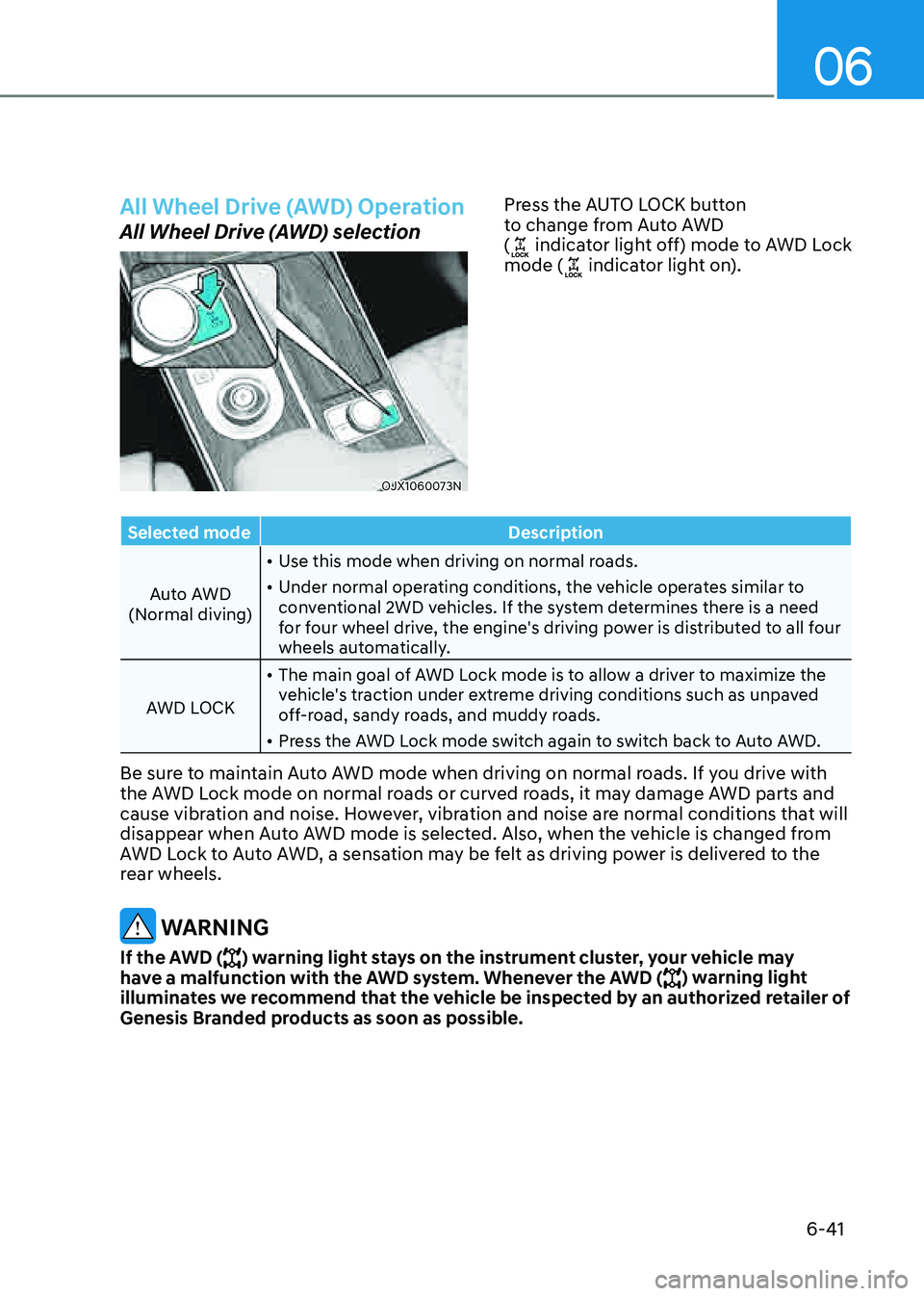
All Wheel Drive (AWD) Operation
All Wheel Drive (AWD) selection
OJX1060073NOJX1060073N
Press the AUTO LOCK button
to change from Auto AWD
(
indicator light off) mode to AWD Lock
mode ( indicator light on).
Page 317 of 632
06
6-45
ELECTRONIC LIMITED SLIP DIFFERENTIAL (IF EQUIPPED)
Electronic Limited Slip Differential
controls the differential functions of the
wheels to help:
-Improve steering performance when
circling at high speed.
-Improve launching performance.
-Prevent slipping on rainy or snowy
roads due to dissimilar friction of the
left and right wheels.
WARNING
Never run the wheels with one of
wheels lifted on a jack. It is extremely
dangerous for a vehicle equipped with
Electronic Limited Slip Differential.
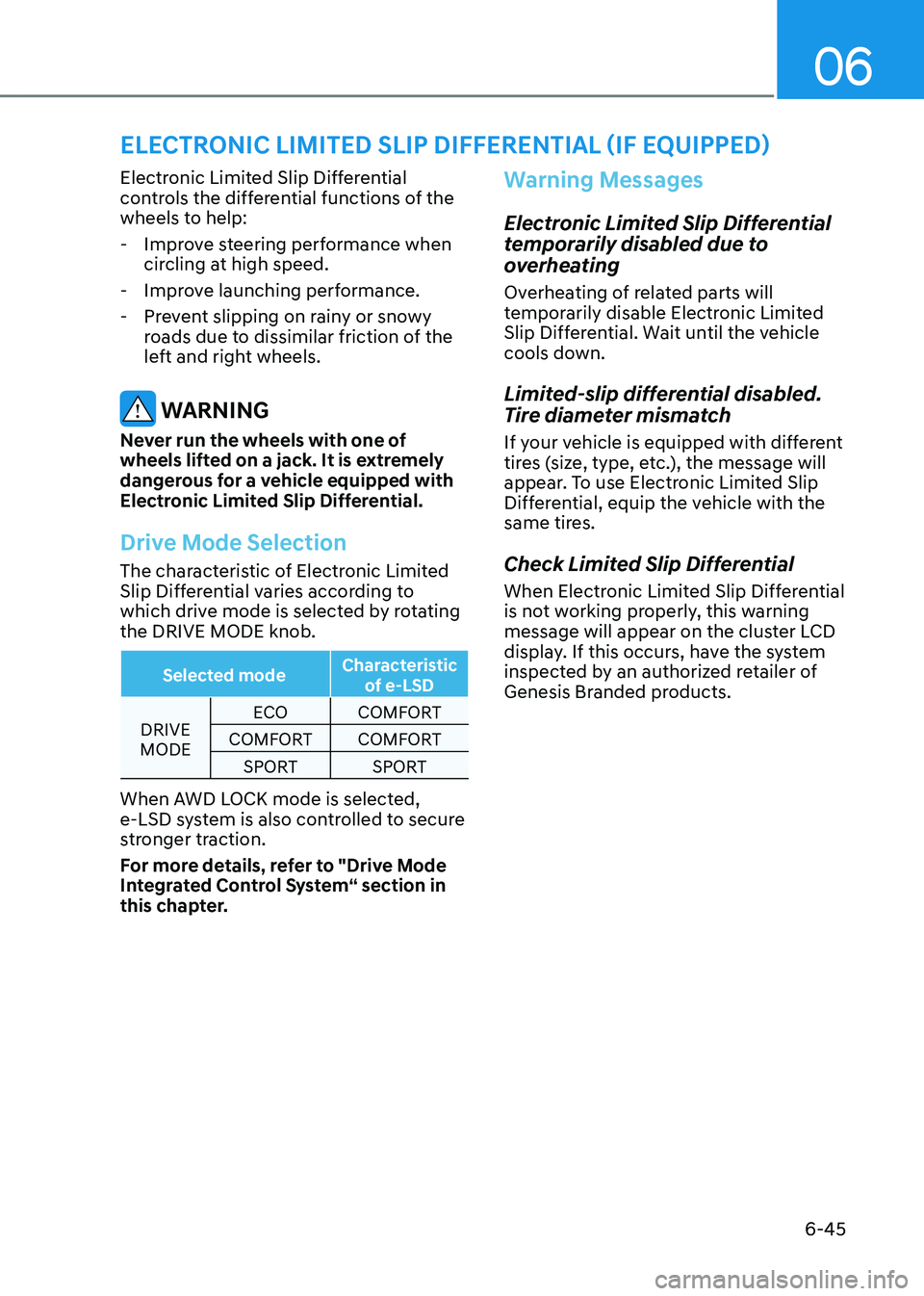
Drive Mode Selection
The characteristic of Electronic Limited
Slip Differential varies according to
which drive mode is selected by rotating
the DRIVE MODE knob.
Selected mode Characteristic
of e-LSD
DRIVE
MODE ECO
COMFORT
COMFORT COMFORT
SPORT SPORT
When AWD LOCK mode is selected,
e-LSD system is also controlled to secure
stronger traction.
For more details, refer to "Drive Mode
Integrated Control System“ section in
this chapter.
Warning Messages
Electronic Limited Slip Differential
temporarily disabled due to
overheating
Overheating of related parts will
temporarily disable Electronic Limited
Slip Differential. Wait until the vehicle
cools down.
Limited-slip differential disabled.
Tire diameter mismatch
If your vehicle is equipped with different
tires (size, type, etc.), the message will
appear. To use Electronic Limited Slip
Differential, equip the vehicle with the
same tires.
Check Limited Slip Differential
When Electronic Limited Slip Differential
is not working properly, this warning
message will appear on the cluster LCD
display. If this occurs, have the system
inspected by an authorized retailer of
Genesis Branded products.
Page 320 of 632
Driving Your Vehicle
6-48
Idle Stop and Go helps reduce fuel
consumption by automatically shutting
down the engine, when the vehicle is
at a standstill (i.e. red stop light, stop
sign, and traffic jam) subject to certain
prerequisite conditions being satisfied as
listed below.
The engine is automatically started upon
satisfying the starting conditions.
ISG system is always active, when the
engine is running.
Information
When the engine is automatically started
by ISG system, warning lights (i.e. ABS,
ESC, ESC OFF, EPS, and parking brake
warning light) may illuminate for a few
seconds due to low battery voltage.
However, it does not indicate a
malfunction with ISG system.
ISG System Operation
Prerequisite for activation
ISG system operates in the following
situations.
• The driver's seatbelt is fastened
• The driver's door and hood are closed
• The brake vacuum pressure is
adequate
• The battery sensor is activated and
the battery is sufficiently charged
• Outside temperature is not too low or
too high
• The vehicle is driven over a constant
speed and stops
• The climate control system satisfies
the conditions
• The vehicle is sufficiently warmed up
• ISG related parts are working properly
• The incline is gradual
• The steering wheel is turned less than
180 degrees and then the vehicle
stops
Information
ISG system is not activated, when the
prerequisites to activate the ISG system
are not satisfied. If this occurs, the ISG
OFF button indicator illuminates, and the
Auto Stop (
) indicator illuminates in
yellow on the instrument cluster.
When the Auto Stop (
) indicator stays
on the instrument cluster, have the system
inspected by an authorized retailer of
Genesis Branded products.
Auto stop
When ISG is on the engine will be
stopped automatically when both of the
following occurs:
1. Vehicle speed decreases to 0mph (0 km/h) full stop condition.
2. Brake pedal is depressed and gear is
in D (Drive) or N (Neutral).
The Auto Stop (
) indicator illuminates
in green on the instrument cluster, when
the engine stops.
Information
Idle stop cannot reoccur again until the vehicle speed goes above 3 mph (5 km/h) and then returns again to the automatic
stop conditions as previously mentioned.
IDLE STOP AND GO (ISG)
Page 333 of 632

06
6-61
Tire chains
OJX1069049OJX1069049
Since the sidewalls of radial tires are
thinner than other types of tires, they
may be damaged by mounting some
types of tire chains on them. Therefore,
the use of snow tires is recommended
instead of tire chains. If tire chains must
be used, use genuine Genesis parts
and install the tire chain after reviewing
the instructions provided with the tire
chains. Damage to your vehicle caused
by improper tire chain use is not covered
by your vehicle manufacturer’s warranty.
WARNING
The use of tire chains may adversely
affect vehicle handling:
• Drive less than 20 mph (30 km/h)
or the chain manufacturer’s
recommended speed limit,
whichever is lower.
• Drive carefully and avoid bumps,
holes, sharp turns, and other road
hazards, which may cause the
vehicle to bounce.
• Avoid sharp turns or locked wheel
braking.
Information
• Install tire chains only in pairs and on
the rear tires. It should be noted that
installing tire chains on the tires will
provide a greater driving force, but will
not prevent side skids.
• Do not install studded tires without
first checking local, state and municipal
regulations for possible restrictions
against their use.
Page 346 of 632
Driving Your Vehicle
6 -74
Steps for determining correct load
limit
1. Locate the statement "The combined
weight of occupants and cargo should
never exceed XXX kg or XXX lbs." on
your vehicle's placard.
2. Determine the combined weight of
the driver and passengers that will be
riding in your vehicle.
3. Subtract the combined weight of the
driver and passengers from XXX kg or
XXX lbs.
4. The resulting figure equals the
available amount of cargo and
luggage load capacity. For example,
if the "XXX" amount equals 1400
lbs. and there will be five 150 lb
passengers in your vehicle, the
amount of available cargo and
luggage load capacity is 650 lbs.
(1400 - 750 (5 x 150) = 650 lbs.)
5. Determine the combined weight of
luggage and cargo being loaded on
the vehicle. That weight may not
safely exceed the available cargo and
luggage load capacity calculated in
Step 4.
6. If your vehicle will be towing a
trailer, load from your trailer will be
transferred to your vehicle. Consult
this manual to determine how this
reduces the available cargo and
luggage load capacity of your vehicle.
WARNING
Do not overload the vehicle as there
is a limit to the total weight, or load
limit, including occupants and cargo,
the vehicle can carry. Overloading can
shorten the life of the vehicle. If the
GVWR or the GAWR is exceeded, parts
on the vehicle can break, and it can
change the handling of your vehicle.
These could cause you to lose control
and result in an accident.
Page 353 of 632
07
7-5
• If unnecessary force has been
applied to the radar or around the
radar, Forward Collision-Avoidance
Assist may not properly operate even
though a warning message does
not appear on the cluster. Have the
vehicle inspected by an authorized
retailer of Genesis Branded products.
• Use only genuine parts to repair or
replace a damaged front radar cover.
Do not apply paint to the front radar
cover.
• Vehicles equipped with front corner
radar and/or rear corner radar
-Do not apply license plate frame or
objects, such as a bumper sticker,
film or a bumper guard, near the
front corner radar or rear corner
radar.
-The system may not work properly
when the bumper has been
replaced, or the surroundings
of the front corner radar or rear
corner radar has been damaged or
paint has been applied.
-If a trailer, carrier, etc. is installed,
it may adversely affect the
performance of the rear corner
radar or the system may not
operate properly.
System Settings
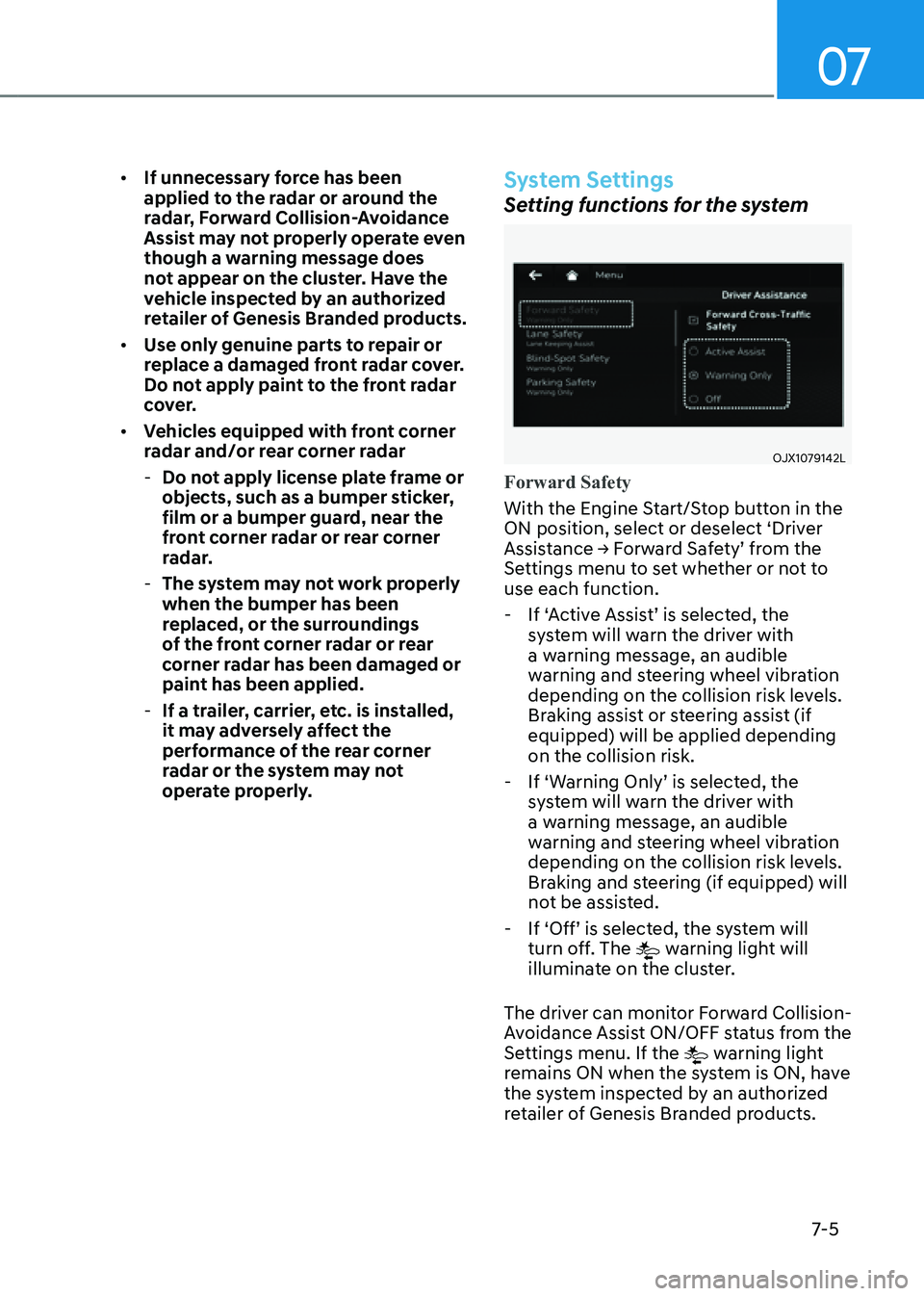
Setting functions for the system
OJX1079142LOJX1079142L
Forward Safety
With the Engine Start/Stop button in the
ON position, select or deselect ‘Driver
Assistance → Forward Safety’ from the
Settings menu to set whether or not to
use each function.
- If ‘Active Assist’ is selected, the
system will warn the driver with
a warning message, an audible
warning and steering wheel vibration
depending on the collision risk levels.
Braking assist or steering assist (if
equipped) will be applied depending
on the collision risk.
-If ‘Warning Only’ is selected, the
system will warn the driver with
a warning message, an audible
warning and steering wheel vibration
depending on the collision risk levels.
Braking and steering (if equipped) will
not be assisted.
-If ‘Off’ is selected, the system will
turn off. The warning light will
illuminate on the cluster.
The driver can monitor Forward Collision-
Avoidance Assist ON/OFF status from the
Settings menu. If the
warning light
remains ON when the system is ON, have
the system inspected by an authorized
retailer of Genesis Branded products.
Page 382 of 632

Driver Assistance System
7-34
• If the rear corner radars have been
replaced or repaired, have the
vehicle inspected by an authorized
retailer of Genesis Branded products.
• Use only genuine Genesis parts to
repair the rear bumper where the
rear corner radar is located.
• Do not apply license plate frame or
objects, such as a bumper sticker,
film or a bumper guard near the rear
corner radar.
• The system may not work properly
if the bumper has been replaced, or
the surroundings of the rear corner
radar has been damaged or paint has
been applied.
• If a trailer, carrier, etc. is installed,
it may adversely affect the
performance of the rear corner radar
or the system may not operate.
CAUTION
For more details on the precautions
of the front view camera, refer to
“Forward Collision-Avoidance Assist
(FCA)” section in chapter 7.
System Settings
Setting functions for the system
OJX1079144LOJX1079144L
Blind-Spot Safety
With the Engine Start/Stop button in the
ON position, select or deselect ‘Driver
Assistance → Blind-Spot Safety’ from the
Settings menu to set whether or not to
use each function.
-If ‘Active Assist’ is selected, the
system will warn the driver with a
warning message, an audible warning,
steering wheel vibration and braking
assist will be applied depending on
the collision risk levels.
-If ‘Warning Only’ is selected, the
system will warn the driver with
a warning message, an audible
warning and steering wheel vibration
depending on the collision risk levels.
Braking will not be assisted.
-If ‘Off’ is selected, the system will turn
off.