auto hold GENESIS GV80 2021 Owner's Guide
[x] Cancel search | Manufacturer: GENESIS, Model Year: 2021, Model line: GV80, Model: GENESIS GV80 2021Pages: 632, PDF Size: 9.37 MB
Page 323 of 632
06
6-51
Forced to Restart Engine
The engine is automatically restarted in
the following situations.
• The brake vacuum pressure is low
• The engine has stopped for about 5
minutes
• The air conditioning is ON with the fan
speed set to a certain high level
• The front defroster is ON
• The battery is weak
• The cooling and heating performance
of the climate control system is
unsatisfactory
• The vehicle is shifted to P (Park) or R
(Reverse) when Auto Hold is activated
• The door is opened or the seatbelt
is unfastened when Auto Hold is
activated
• The EPB switch is pressed when Auto
Hold is activated
The Auto Stop (
) indicator blinks in
green for 5 seconds on the instrument
cluster when the engine is restarted.
WARNING
When the engine is in Idle Stop mode,
the engine may restart without the
driver taking any action. Before leaving
the vehicle or working on the engine
compartment, turn off the engine by
pressing the ENGINE START/STOP
button to the OFF position.
ISG Malfunction
ISG system may not operate when there
is a malfunction with the ISG sensors or
ISG system.
The following will occur, when there is a
malfunction with the ISG system:
• The Auto Stop () indicator will blink
in yellow on the instrument cluster.
• The light on the ISG OFF button will
illuminate.
Contact an authorized retailer of Genesis
Branded products.
NOTICE
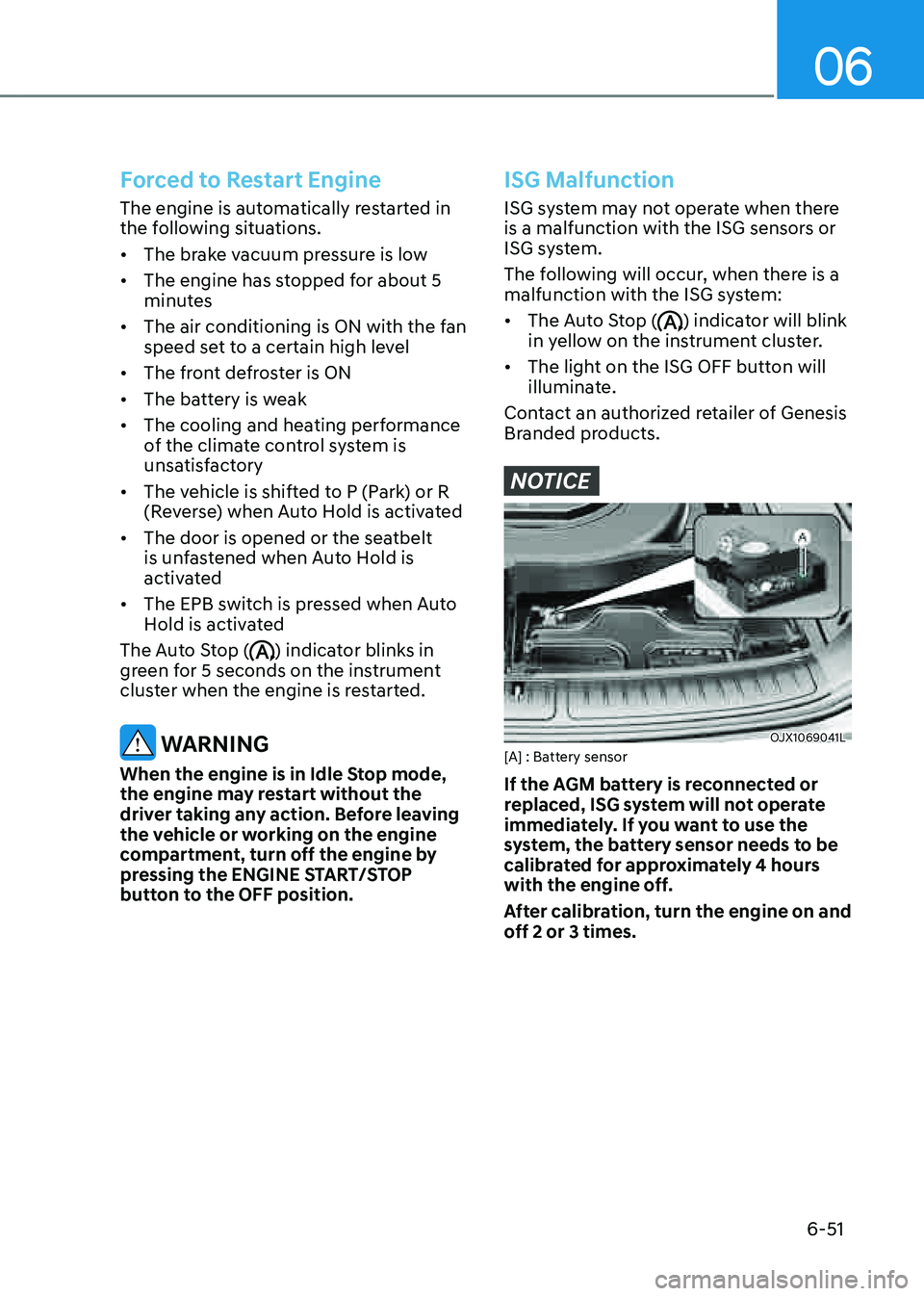
OJX1069041LOJX1069041L[A] : Battery sensor
If the AGM battery is reconnected or
replaced, ISG system will not operate
immediately. If you want to use the
system, the battery sensor needs to be
calibrated for approximately 4 hours
with the engine off.
After calibration, turn the engine on and
off 2 or 3 times.
Page 340 of 632
Driving Your Vehicle
6-68
Backing up
Hold the bottom of the steering wheel
with one hand. Then, to move the trailer
to the left, move your hand to the left. To
move the trailer to the right, move your
hand to the right. Always back up slowly
and, if possible, have someone guide
you.
Making turns
When you’re turning with a trailer, make
wider turns than normal. Do this so your
trailer won’t strike soft shoulders, curbs,
road signs, trees, or other objects. Avoid
jerky or sudden maneuvers. Signal well in
advance.
Turn signals
When you tow a trailer, your vehicle has
to have a different turn signal flasher and
extra wiring. The green arrows on your
instrument panel will flash whenever you
signal a turn or lane change. Properly
connected, the trailer lights will also flash
to alert other drivers you’re about to turn,
change lanes, or stop.
When towing a trailer, the green arrows
on your instrument panel will flash for
turns even if the bulbs on the trailer
are burned out. Thus, you may think
drivers behind you are seeing your
signals when, in fact, they are not. It’s
important to check frequently to be sure
the trailer bulbs are still working. You
must also check the lights every time
you disconnect and then reconnect the
wires.
WARNING
Do not connect a trailer lighting system
directly to your vehicle’s lighting
system. Use an approved trailer wiring
harness. Failure to do so could result in
damage to the vehicle electrical system
and/or personal injury. Consult an
authorized retailer of Genesis Branded
products for assistance.
Driving on hills
Reduce speed and shift to a lower gear
before you start down a long or steep
downgrade. If you don’t shift to a lower
gear, you may have to use your brakes
excessively and they would overheat and
may not operate efficiently.
On a long uphill grade, shift to a lower
gear and reduce your speed to around
45 mph (70 km/h) to reduce the possibility of engine and transmission
overheating.
If your trailer weighs more than the
maximum trailer weight without trailer
brakes and you have an automatic
transmission, you should drive in D
(Drive) when towing a trailer.
Operating your vehicle in D (Drive)
when towing a trailer will minimize heat
build-up and extend the life of your
transmission.
Page 364 of 632

Driver Assistance System
7-16
WARNING
Take the following precautions when
using Forward Collision-Avoidance
Assist:
• For your safety, change the Settings
after parking the vehicle at a safe
location.
• With ‘Active Assist’ or ‘Warning Only’
selected, when ESC is turned off by
pressing and holding the ESC OFF
button for more than 3 seconds,
Forward Collision-Avoidance Assist
will turn off automatically. In this
case, the system cannot be set
from the Settings menu and the
warning light will illuminate on the
cluster which is normal. If ESC is
turned on by pressing the ESC OFF
button, Forward Collision-Avoidance
Assist will maintain the last setting.
• Forward Collision-Avoidance Assist
does not operate in all situations or
cannot avoid all collisions.
• The driver should hold the
responsibility to control the vehicle.
Do not solely depend on Forward
Collision-Avoidance Assist. Rather,
maintain a safe braking distance, and
if necessary, depress the brake pedal
to reduce driving speed or to stop
the vehicle.
• Never deliberately operate Forward
Collision-Avoidance Assist on people,
animal, objects, etc. It may cause
serious injury or death.
• Forward Collision-Avoidance
Assist may not operate if the driver
depresses the brake pedal to avoid
collision.
• Depending on the road and driving
conditions, Forward Collision-
Avoidance Assist may warn the driver
late or may not warn the driver.
• During Forward Collision-Avoidance
Assist operation, the vehicle may
stop suddenly injuring passengers
and shifting loose objects. Always
have the seat belt on and keep loose
objects secured.
• If any other system’s warning
message is displayed or audible
warning is generated, Forward
Collision-Avoidance Assist warning
message may not be displayed
and audible warning may not be
generated.
• You may not hear the warning sound
of Forward Collision-Avoidance
Assist if the surrounding is noisy.
• Forward Collision-Avoidance
Assist may turn off or may not
operate properly or may operate
unnecessarily depending on the road
conditions and the surroundings.
WARNING
• Even if there is a problem with
Forward Collision-Avoidance
Assist, the vehicle’s basic braking
performance will operate normally.
• During emergency braking,
braking control by the system will
automatically cancel when the
driver excessively depresses the
accelerator pedal or sharply steers
the vehicle.
Page 468 of 632
Driver Assistance System
7-120
WARNING
Take the following precautions when
using Rear Cross-Traffic Safety system:
• For your safety, change the Settings
after parking the vehicle at a safe
location.
• If any other system’s warning
message is displayed or audible
warning is generated, Rear Cross-
Traffic Safety system’s warning
message may not be displayed
and audible warning may not be
generated.
• You may not hear the warning sound
of Rear Cross-Traffic Safety system if
the surrounding is noisy.
• Rear Cross-Traffic Safety system may
not operate if the driver applies the
brake pedal to avoid collision.
• During Rear Cross-Traffic Safety
system operation, the vehicle may
stop suddenly injuring passengers
and shifting loose objects. Always
have the seat belt on and keep loose
objects secured.
• Even if there is a problem with Rear
Cross-Traffic Safety system, the
vehicle’s basic braking performance
will operate normally.
• Rear Cross-Traffic Safety system does
not operate in all situations or cannot
avoid all collisions.
• During emergency braking,
braking control by the system will
automatically cancel when the
driver excessively depresses the
accelerator pedal.
• The driver should hold the
responsibility to control the vehicle.
Do not solely depend on Rear
Cross-Traffic Safety system. Rather,
maintain a safe braking distance, and
if necessary, depress the brake pedal
to reduce driving speed or to stop
the vehicle.
• Never deliberately operate Rear
Cross-Traffic Safety system on
people, animal, objects, etc. It may
cause serious injury or death.
CAUTION
The brake control may not operate
properly depending on the status of
ESC (Electronic Stability Control).
There will only be a warning when:
-The ESC (Electronic Stability Control)
warning light is on
-ESC (Electronic Stability Control) is
engaged in a different function
Information
• If the system assists you with braking,
the driver needs to pay attention as the
brake assist will end within 2 seconds.
The driver must immediately depress
the brake pedal and check vehicle
surroundings.
• Brake control will end when the
driver depresses the brake pedal with
sufficient power.
• After shifting the gear to R (Reverse),
braking control will operate once for
left and right vehicle approach.
Page 491 of 632

07
7-143
Remote Smart Parking Assist button
Parking/View buttonSmart keyDigital key
OJX1079107OJX1079107OJX1050005NOJX1050005NOJX1070306NOJX1070306N
LocationNameSymbol Description
Inside
vehicle Parking/View
button
• Press and hold the Parking/View button to turn
on Remote Smart Parking Assist. Also, Forward/
Reverse Parking Distance warning will automatically
turn on.
However, functions may differ depending on the
situations. Refer to each function's description for
more details in the following pages.
• Press and hold the Parking/View button while Smart
Parking or Smart Exit function is on to operate the
function.
Parking
Safety button
• Press the Parking Safety button while Remote Smart
Parking Assist is operating to end system operation.
Smart key Remote Start
button
• Press the Remote Start button after the door is
locked with the engine off to start the engine
remotely.
• Press the Remote Start button while Remote
Smart Parking or Remote Moving Forward/Reverse
function is operating to end function operation.
Forward button
• When using Remote Smart Parking function,
regardless of which direction button is pressed,
parking is supported while the button is pressed.
• When using the Remote Entry/Exit Parking function,
the vehicle moves in the direction of the button
while the button is pressed.
Reverse
button
Digital key Remote
Smart
Parking
Assist icon
• Press the Remote Smart Parking Assist icon on
the smartphone digital key application to activate
Remote Smart Parking.
• When using the Remote Entry/Exit Parking function,
the vehicle moves in the direction of the icon is
pushed and moves while the icon is pushed.
• When using Remote Smart Parking function,
regardless of which direction the icon is pushed,
parking is supported while the icon is pushed.
Page 494 of 632
Driver Assistance System
7-146
OJX1079187L OJX1079187L
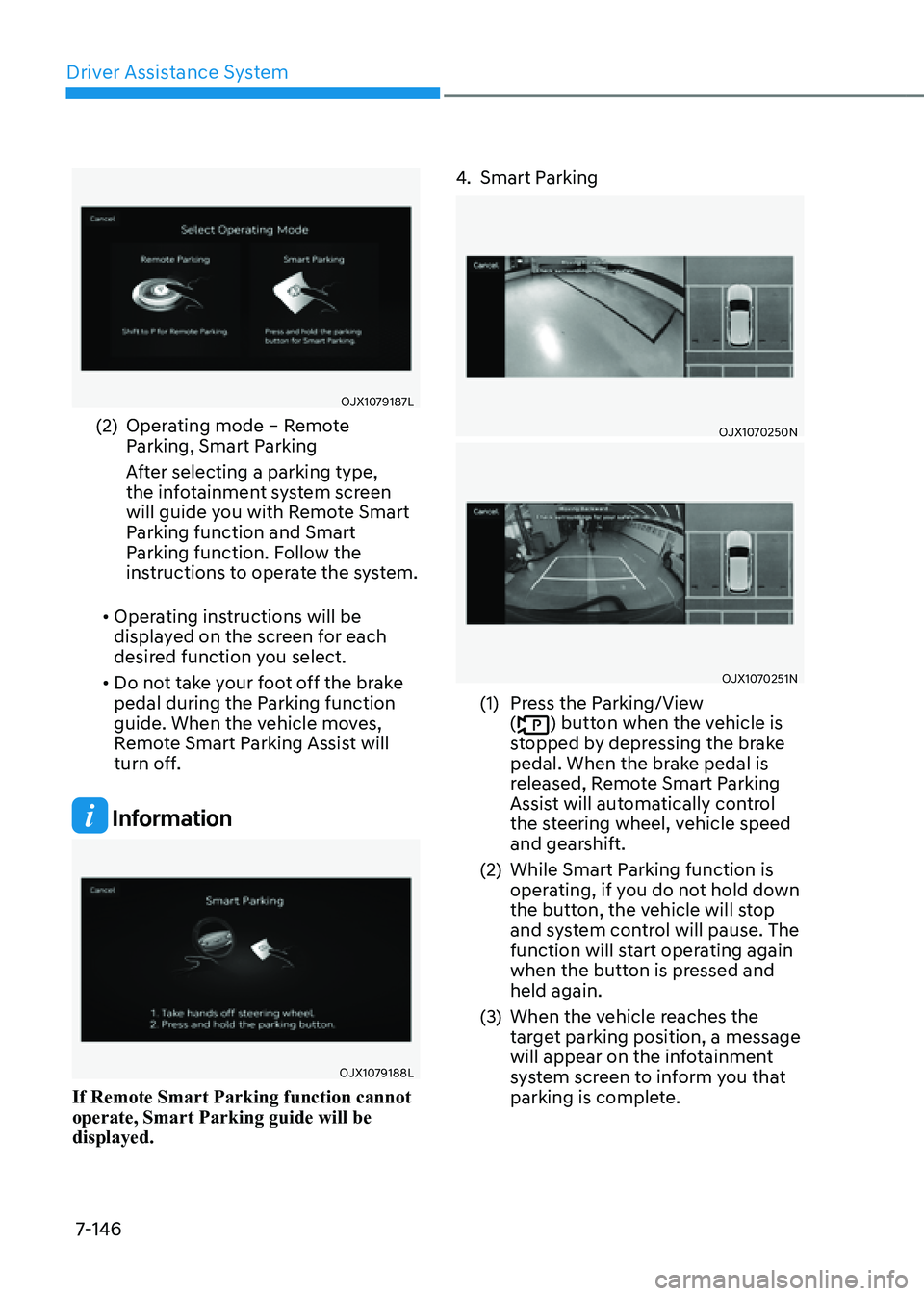
(2) Operating mode – Remote
Parking, Smart Parking
After selecting a parking type,
the infotainment system screen
will guide you with Remote Smart
Parking function and Smart
Parking function. Follow the
instructions to operate the system.
• Operating instructions will be
displayed on the screen for each
desired function you select.
• Do not take your foot off the brake
pedal during the Parking function
guide. When the vehicle moves,
Remote Smart Parking Assist will
turn off.
Information
OJX1079188L OJX1079188L
If Remote Smart Parking function cannot
operate, Smart Parking guide will be
displayed.
4. Smart Parking
OJX1070250NOJX1070250N
OJX1070251NOJX1070251N
(1) Press the Parking/View
() button when the vehicle is
stopped by depressing the brake
pedal. When the brake pedal is
released, Remote Smart Parking
Assist will automatically control
the steering wheel, vehicle speed
and gearshift.
(2) While Smart Parking function is
operating, if you do not hold down
the button, the vehicle will stop
and system control will pause. The
function will start operating again
when the button is pressed and
held again.
(3) When the vehicle reaches the
target parking position, a message
will appear on the infotainment
system screen to inform you that
parking is complete.
Page 495 of 632

07
7-147
• Smart Parking function will not
operate if the door is open or the
seat belt is not fastened.
• Vehicle speed can be adjusted
by depressing the brake pedal
while Smart Parking function is
operating. However, the vehicle
does not accelerate even when the
accelerator pedal is depressed.
• The parking location indicator is
displayed on Surround View Monitor
screen and is displayed until the
vehicle enters the parking space
for the first time by Smart Parking
function.
• When parking is completed, the
vehicle will automatically shift to P
(Park) and engage EPB (Electronic
Parking Brake).
• Depending on parking
environments, if the vehicle is
stopped by a stopper, parking may
be completed.
• If you need to change the vehicle's
position or location, manually
complete parking your vehicle.
5. Remote Smart Parking
OJX1079191LOJX1079191L
(1) Shift the gear to P (Park), get out
of the vehicle with the smart key,
and close all doors.
(2) Press and hold one of the Forward
() or Reverse () button on the
smart key. Remote Smart Parking
Assist will automatically control
the steering wheel, vehicle speed
and gearshift.
(3) While Remote Smart Parking
function is operating, if the you do
not hold down the Forward (
) or
Reverse () button, the vehicle
will stop and system control will
pause. The function will start
operating again when the button is
pressed and held again.
(4) When the vehicle reaches the
target parking position, a message
will appear on the infotainment
system screen to inform you that
parking is complete, and the
engine will turn off.
Page 498 of 632
Driver Assistance System
7-150
• Remote Smart Parking
-The gear is shifted while the vehicle
is moving
-Operating EPB while the vehicle is
moving
-The engine hood is open
-Vehicle speed is above 3 mph (5
km/h)
-Rapid acceleration occurs
-Vehicle skid occurs
-The wheel is stuck by an obstacle
and cannot move
-There are pedestrians, animals or
objects at the front and rear of the
vehicle at the same time
-Approximately 3 minutes and 50
seconds have past after Remote
Smart Parking function has started
to operate
-The slope of the road exceeds the
operational range
-The steering wheel, gearshift,
braking, and drive controls are not
working normally
-The function is paused for more
than 1 minute
-There is a problem with the smart
key or the smart key battery is low
-ABS, TCS or ESC system operates
due to slippery road conditions
-The brake pedal or accelerator
pedal is depressed when all the
doors are closed
-The smart key is outside the vehicle
when the brake pedal is depressed
while the driver's door is open.
-The alarm of the Theft Alarm System
sounds
When Remote Smart Parking function is
canceled, the vehicle will automatically
stop, shift the gear to P (Park) and
engage EPB (Electronic Parking Brake).
CAUTION
Check whether the doors are locked
when Remote Smart Parking function is
canceled.
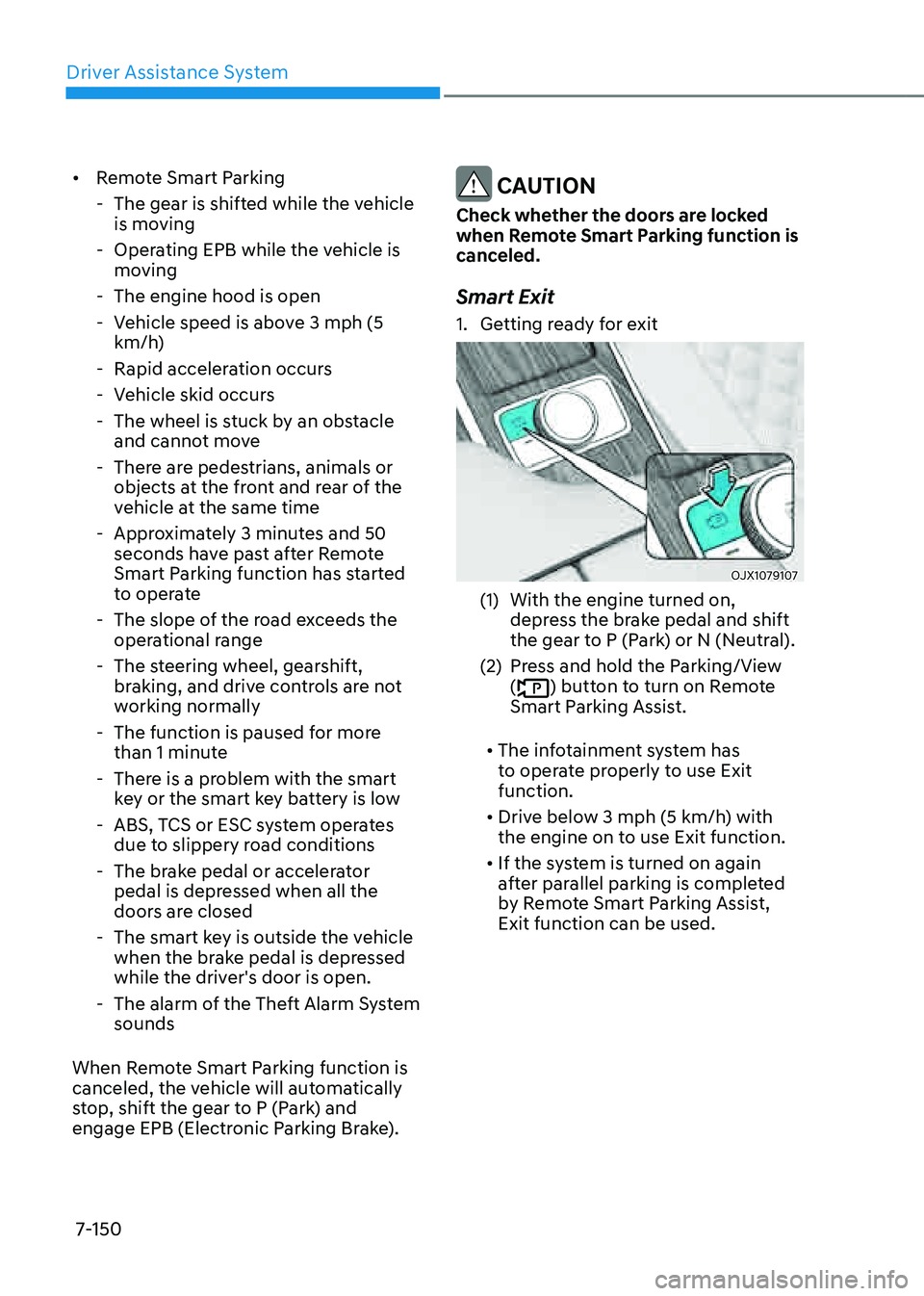
Smart Exit
1. Getting ready for exit
OJX1079107OJX1079107
(1) With the engine turned on,
depress the brake pedal and shift
the gear to P (Park) or N (Neutral).
(2) Press and hold the Parking/View
() button to turn on Remote
Smart Parking Assist.
• The infotainment system has
to operate properly to use Exit
function.
• Drive below 3 mph (5 km/h) with
the engine on to use Exit function.
• If the system is turned on again
after parallel parking is completed
by Remote Smart Parking Assist,
Exit function can be used.
Page 500 of 632

Driver Assistance System
7-152
4. Smart Exit
OJX1079195LOJX1079195L
(1) Press the Parking/View
() button when the vehicle is
stopped by depressing the brake
pedal. When the brake pedal is
released, Remote Smart Parking
Assist will automatically control
the steering wheel, vehicle speed
and gearshift.
(2) While Smart Exit function is
operating, if you do not hold down
the button, the vehicle will stop
and system control will pause. The
function will start operating again
when the button is pressed and
held again.
(3) When the vehicle reaches the
target exit location, a message will
appear on the infotainment system
screen to inform you that exit is
complete.
• Smart Exit function will not operate
if the door is open or the seat belt is
not fastened.
• Vehicle speed can be adjusted
by depressing the brake pedal
while Smart Exit function is
operating. However, the vehicle
does not accelerate even when the
accelerator pedal is depressed.
• If exit is completed while depressing
the brake pedal, Exit function will
complete with the gear in D (Drive).
• If exit is completed while depressing
the accelerator pedal, you must
take your foot off the accelerator
pedal once for the accelerator pedal
to operate.
• If there is no vehicle operation such
as depressing the brake pedal or
accelerator pedal within 4 seconds
after exit is complete, the vehicle
will automatically shift to P (Park)
and engage EPB (Electronic Parking
Brake).
• After Exit function is complete,
always check the surroundings
before driving.
CAUTION
If it is determined that the space is
too small when the vehicle is being
controlled to exit, Exit function will be
canceled.
Page 503 of 632

07
7-155
• The infotainment system has to
operate properly to use Remote
Entry/Exit Parking function.
• Method (2) can be used after the
vehicle has been driven above 3
mph (5 km/h).
• If the system is turned on again
after parallel parking is completed
by Remote Smart Parking Assist,
Remote Entry/Exit Parking function
can be used.
• Check that all smart keys are
outside the vehicle when using
Remote Entry/Exit Parking function.
2. Remote Entry/Exit Parking
OJX1079040OJX1079040
(1) Press and hold one of the Forward
() or Reverse () button on the
smart key. Remote Smart Parking
Assist will automatically control
the steering wheel, vehicle speed
and gearshift. The vehicle will
move in the direction of the button
pressed.
(2) While Remote Entry/Exit Parking
function is operating, if the you do
not hold down the Forward (
) or
Reverse () button, the vehicle
will stop and system control will
pause. The function will start
operating again when the button is
pressed and held again.
(3) When the vehicle reaches the
target location, the function will
turn off.
(4) When the driver gets in the vehicle
with the smart key, a message
will appear informing the driver
Remote Entry/Exit Parking
function is complete on the
infotainment system screen.
In addition, when the Remote
Start (
) button is pressed on the
smart key, a message will appear
informing the driver Remote Entry/
Exit Parking function is complete
and the engine will turn off.
• Remote Entry/Exit Parking function
will operate only when the smart
key is within 13 ft. (4 m) from
the vehicle. If there is no vehicle
movement even when the Forward
or Reverse button is pressed on the
smart key, check the distance to the
vehicle and press the button again.
• The detecting range of the smart
key may vary depending on the
surroundings that are affected by
radio waves such as transmission
tower, broadcast station, etc.