GENESIS GV80 2023 Owners Manual
Manufacturer: GENESIS, Model Year: 2023, Model line: GV80, Model: GENESIS GV80 2023Pages: 650
Page 141 of 650
04
4-35
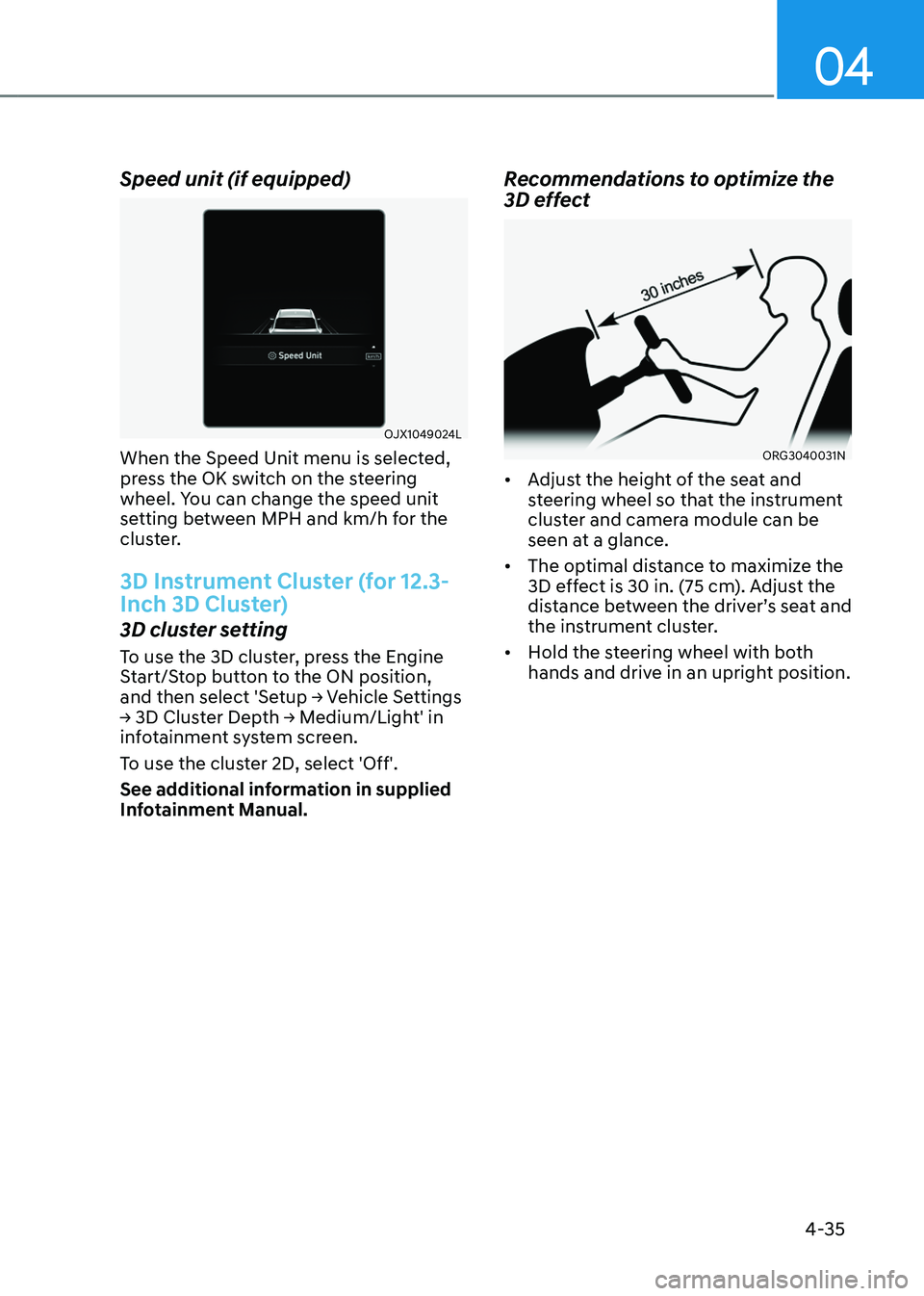
Speed unit (if equipped)
OJX1049024LOJX1049024L
When the Speed Unit menu is selected,
press the OK switch on the steering
wheel. You can change the speed unit
setting between MPH and km/h for the
cluster.
3D Instrument Cluster (for 12.3-
Inch 3D Cluster)
3D cluster setting
To use the 3D cluster, press the Engine
Start/Stop button to the ON position,
and then select 'Setup → Vehicle Settings
→ 3D Cluster Depth → Medium/Light' in
infotainment system screen.
To use the cluster 2D, select 'Off'.
See additional information in supplied
Infotainment Manual.
Recommendations to optimize the
3D effect
ORG3040031NORG3040031N
• Adjust the height of the seat and
steering wheel so that the instrument
cluster and camera module can be
seen at a glance.
• The optimal distance to maximize the
3D effect is 30 in. (75 cm). Adjust the
distance between the driver’s seat and
the instrument cluster.
• Hold the steering wheel with both
hands and drive in an upright position.
Page 142 of 650
Instrument Cluster
4-36
Information
• When your face gets too close or far to
the instrument cluster, or the camera
on the instrument cluster is blocked by
the steering wheel or other objects, the
3D cluster changes to 2D automatically.
However if the object blocking the
camera is removed, the cluster changes
back to 3D automatically.
• If outside temperature is below 39°F
(4°C), it may change to 2D about 1 to
10 minutes.
• Two red lights may appear on the
camera in the following conditions
when:
-The outside brightness is dim or
driving at night
-The vehicle drives inside a building,
such as a basement parking lot
-The camera case of the instrument
cluster is partially damaged
CAUTION
• It may sometimes be difficult to
read information on the 3D cluster
in the following situations. You must
change the cluster to 2D for safe
driving.
-The driver is wearing sunglasses,
special glasses, infrared cutoff
glasses, refracting glasses or thick
glasses
-The driver has heavy eye makeup
(eyeliner, mascara, color makeup,
false eyelash) or eye piercing
-The driver’s view is blocked by his/
her hair, etc.
-The driver is winking or wearing an
eye patch on one eye
-The driver’s face is covered
partially by a mask, muffler, hood,
etc.
-The driver’s view is blocked by
incoming light from outside of the
vehicle
-Light from outside, sunlight or
infrared LED light of the camera
is reflected on the glasses or
sunglasses
-The driver turns or lowers his/her
head so that the face or an eye is
hidden from the camera
-The driver shakes his/her head
up and down, or adverse road
conditions cause excessive vehicle
vibrations while driving
-The driver is too tall or short
-More than two people are
looking at the instrument cluster
simultaneously from the driver’s
seat
-The driver’s eyesight of both eyes
are severely different
-The driver has a severe headache
• Do not look toward the camera
within 8 in (20 cm) for longer than a
minute.
• If you use the 3D cluster while your
vehicle is stopped, it can cause eye
strains or dizziness.
• People who are pregnant, elderly or
has motion sickness, have to avoid
using the cluster in 3D.
Page 143 of 650
04
4-37
WARNING
• You should not use the 3D cluster if
you or any of your family members
or relatives has a history of epilepsy,
convulsions, etc. Flashing or
flickering lights or specific or regular
patterns shown on the cluster may
stimulate epilepsy, convulsions, etc.
• You should not use the 3D effect
immediately if you feel any of the
following symptoms:
Haziness, unconsciousness,
disorientation, nausea, headache,
fatigue, dizziness, etc.
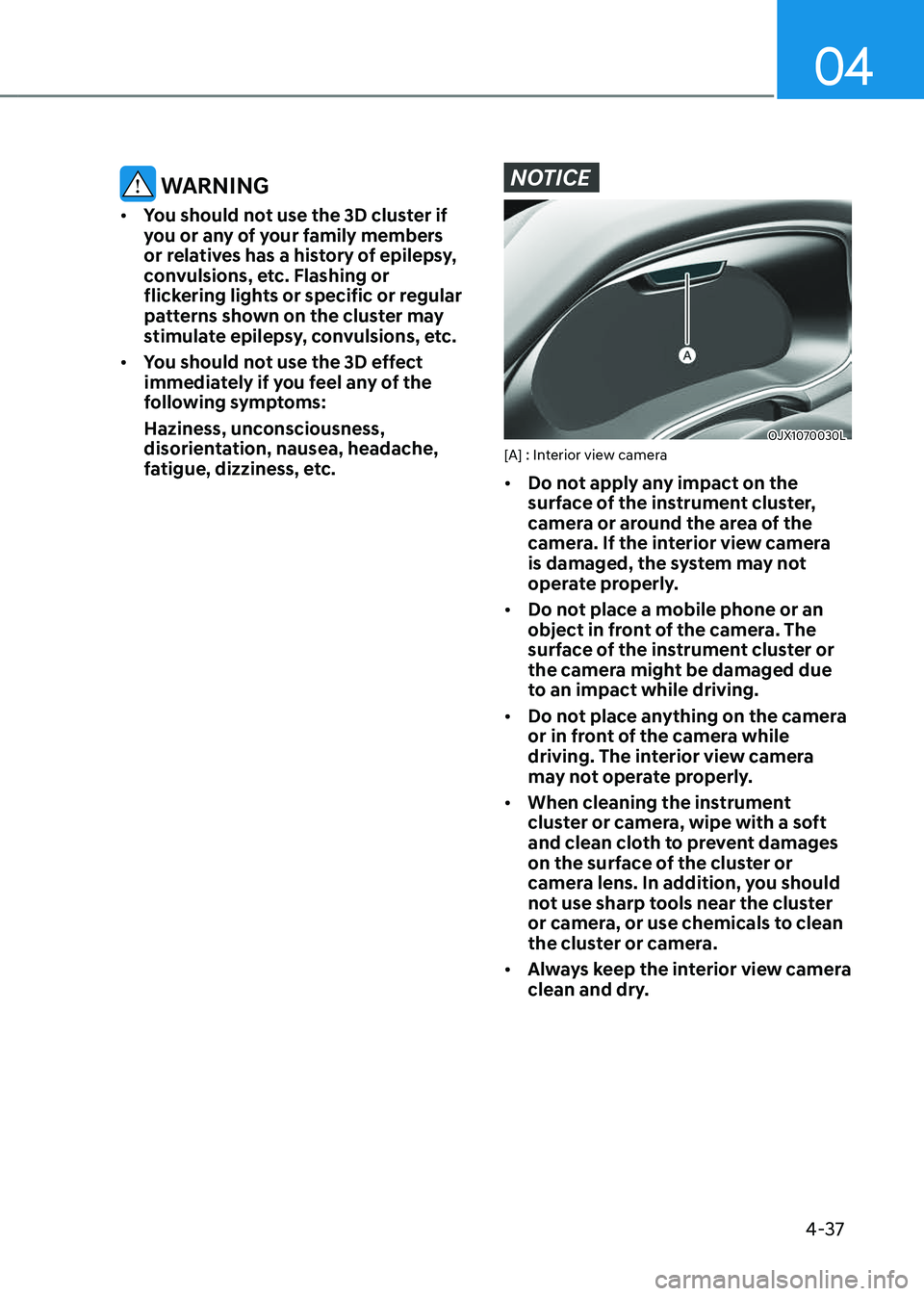
NOTICE
OJX1070030LOJX1070030L[A] : Interior view camera
• Do not apply any impact on the
surface of the instrument cluster,
camera or around the area of the
camera. If the interior view camera
is damaged, the system may not
operate properly.
• Do not place a mobile phone or an
object in front of the camera. The
surface of the instrument cluster or
the camera might be damaged due
to an impact while driving.
• Do not place anything on the camera
or in front of the camera while
driving. The interior view camera
may not operate properly.
• When cleaning the instrument
cluster or camera, wipe with a soft
and clean cloth to prevent damages
on the surface of the cluster or
camera lens. In addition, you should
not use sharp tools near the cluster
or camera, or use chemicals to clean
the cluster or camera.
• Always keep the interior view camera
clean and dry.
Page 144 of 650
Instrument Cluster
4-38
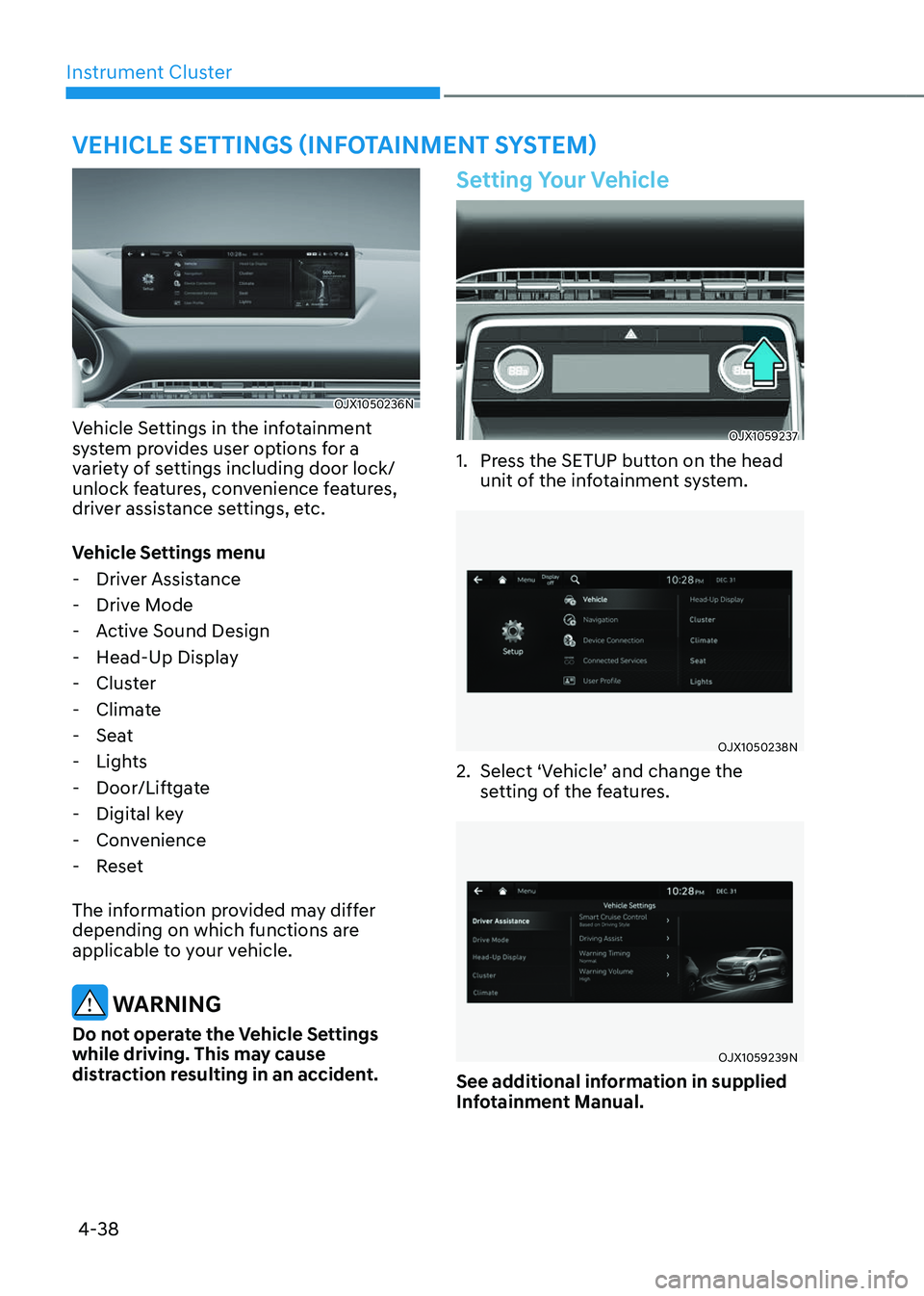
VEHICLE SETTINGS (INFOTAINMENT SYSTEM)
OJX1050236NOJX1050236N
Vehicle Settings in the infotainment
system provides user options for a
variety of settings including door lock/
unlock features, convenience features,
driver assistance settings, etc.
Vehicle Settings menu
-Driver Assistance
-Drive Mode
-Active Sound Design
-Head-Up Display
-Cluster
-Climate
-Seat
-Lights
-Door/Liftgate
-Digital key
-Convenience
-Reset
The information provided may differ
depending on which functions are
applicable to your vehicle.
WARNING
Do not operate the Vehicle Settings
while driving. This may cause
distraction resulting in an accident.
Setting Your Vehicle
OJX1059237OJX1059237
1. Press the SETUP button on the head
unit of the infotainment system.
OJX1050238NOJX1050238N
2. Select ‘Vehicle’ and change the
setting of the features.
OJX1059239NOJX1059239N
See additional information in supplied
Infotainment Manual.
Page 145 of 650

Convenience Features
Accessing Your Vehicle ........................................................................\
.............5-4Smart Key ........................................................................\
..............................................5-4
Immobilizer System ........................................................................\
............................5-11
Genesis Digital Key ........................................................................\
..................5-12Digital Key (Smart Phone) ........................................................................\
...................5-12
Digital Key (Card Key) ........................................................................\
.........................5-19
Personalized User Profile and Vehicle Settings ........................................................5-22
Used Vehicle/Digital Key Maintenance ....................................................................5-25
Limitations of the System ........................................................................\
..................5-25
Door Locks ........................................................................\
...............................5-26Operating Door Locks From Outside the Vehicle ....................................................5-26
Operating Door Locks From Inside the Vehicle ........................................................5-28
Automatic Door Lock and Unlock Features
..............................................................5-30
Child-Protector Rear Door Locks ........................................................................\
.......5-31
Electronic Child Safety Lock ........................................................................\
...............5-31
Vehicle Auto-Shut Off ........................................................................\
.............5-33System Setting ........................................................................\
.................................... 5-33
Operating Conditions ........................................................................\
.........................5-33
Deactivating Conditions ........................................................................\
....................5-33
System Operation ........................................................................\
...............................5-33
Theft-Alarm System ........................................................................\
................5-34
Rear Occupant Alert (ROA)
........................................................................\
....5-35System Setting ........................................................................\
.................................... 5-35
System Operation ........................................................................\
...............................5-35
System Precautions ........................................................................\
............................5-35
Integrated Memory System ........................................................................\
..... 5-37Storing Memory Positions ........................................................................\
.................5-37
Recalling Memory Positions ........................................................................\
..............5-38
Resetting the System ........................................................................\
.........................5-38
Seat Easy Access ........................................................................\
................................5-39
Smart Posture Care System ........................................................................\
...5-40
Steering Wheel
........................................................................\
.........................5-41Motor Driven Power Steering (MDPS) ......................................................................5-41
Tilt / Telescopic Steering ........................................................................\
...................5-42
Horn ........................................................................\
..................................................... 5-43
Heated Steering Wheel
........................................................................\
.....................5-44
Mirrors ........................................................................\
.....................................5-45Inside Rearview Mirror ........................................................................\
.......................5-45
5. Convenience Features
5
Page 146 of 650

Side View Mirrors ........................................................................\
...............................5-54
Reverse Parking Aid ........................................................................\
...........................5-56
Windows ........................................................................\
..................................5-57Power Windows ........................................................................\
..................................5-58
Panoramic Sunroof ........................................................................\
..................5-61Power sunshade ........................................................................\
.................................5-62
Tilt open/close ........................................................................\
....................................5-62
Slide open/close ........................................................................\
.................................5-63
Resetting the Sunroof ........................................................................\
.......................5-64
Sunroof Open Warning ........................................................................\
......................5-65
Exterior Features ........................................................................\
.....................5-66Hood ........................................................................\
...................................................5-66
Power liftgate ........................................................................\
.....................................5-67
Resetting the power liftgate ........................................................................\
..............5-72
Emergency liftgate safety release ........................................................................\
.....5-72
Smart Liftgate ........................................................................\
.....................................5-73
Fuel Filler Door ........................................................................\
...................................5-75
Head-Up Display (HUD) ........................................................................\
.......... 5-78Head-Up Display Settings ........................................................................\
.................5-78
Head-Up Display Information ........................................................................\
...........5-78
Precautions While Using the Head-Up Display ........................................................5-79
Lighting ........................................................................\
....................................5-80Exterior Lights ........................................................................\
...................................5-80
Interior Lights ........................................................................\
.....................................5-83
Welcome System ........................................................................\
................................5-87
High Beam Assist (HBA) ........................................................................\
........5-88High Beam Assist Setting ........................................................................\
.................5-88
High Beam Assist Operation ........................................................................\
.............5-89
High Beam Assist Malfunction and Limitations ......................................................5-89
Wipers and Washers ........................................................................\
................5-91Front Windshield Wipers ........................................................................\
...................5-91
Front Windshield Washers ........................................................................\
.................5-92
Rear Window Wiper and Washer ........................................................................\
......5-93
Automatic Climate Control System ...............................................................5-94Automatic Temperature Control Mode .....................................................................5-97
Manual Temperature Control Mode ........................................................................\
.5-98
System Operation ........................................................................\
.............................5-106
System Maintenance ........................................................................\
.......................5-108
5
Page 147 of 650

Windshield Defrosting and Defogging .........................................................5-110To Defog Inside Windshield ........................................................................\
..............5-110
To Defrost Outside Windshield ........................................................................\
..........5-111
Defogging Logic ........................................................................\
.................................5-111
Rear Window Defroster ........................................................................\
..................... 5-112
Climate Control Additional Features .............................................................5-113Auto Defogging System ........................................................................\
....................5-113
Auto Dehumidify ........................................................................\
...............................5-114
Recirculating Air When Washer Fluid Is Used .........................................................5-115
Sunroof Inside Air Recirculation ........................................................................\
.......5-115
Storage Compartment ........................................................................\
............5-116Center Console Storage ........................................................................\
....................5-116
Glove Box ........................................................................\
...........................................5-116
Sunglass Holder ........................................................................\
................................5-117
Storage Tray ........................................................................\
.......................................5-117
Interior Features ........................................................................\
.....................5-118Cup Holder ........................................................................\
.........................................5-118
Sunvisor ........................................................................\
.............................................5-119
Rear Mirror ........................................................................\
........................................5-120
Power Outlet ........................................................................\
.....................................5-120
USB Charger ........................................................................\
......................................5-121
AC Inverter ........................................................................\
.........................................5-122
Wireless Smart Phone Charging System .................................................................5-123
Clock ........................................................................\
.................................................5-126
Coat Hook ........................................................................\
.........................................5-126
Floor Mat Anchor(s) ........................................................................\
..........................5-126
Rear Side Window Sunshades ........................................................................\
..........5-127
Cargo Net Holder ........................................................................\
.............................5-129
Cargo Security Screen ........................................................................\
.....................5-129
Exterior Features ........................................................................\
....................5-132Roof Side Rails ........................................................................\
...................................5-132
Infotainment System ........................................................................\
.............5-133
USB Port ........................................................................\
............................................5-133
Antenna ........................................................................\
.............................................5-133
Steering Wheel Remote Controls ........................................................................\
....5-133
Infotainment System ........................................................................\
........................5-134
Voice Recognition ........................................................................\
.............................5-135
Bluetooth® Wireless Technology ........................................................................\
......5-135
Lexicon Premium Sound System ........................................................................\
.....5-135
5. Convenience Features
5
Page 148 of 650
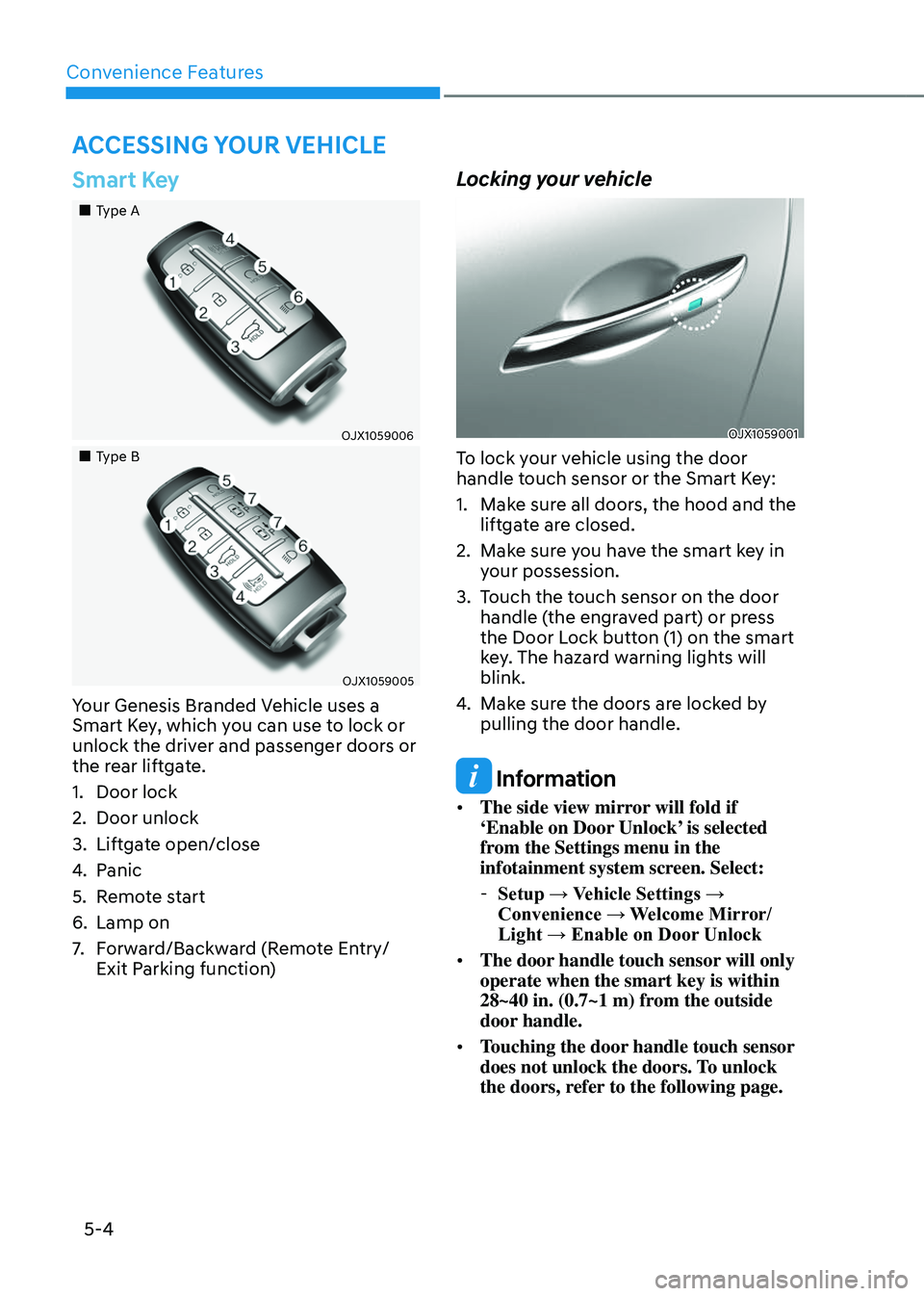
Convenience Features
5-4
Smart Key
Page 149 of 650
05
5-5
Note that you cannot lock your vehicle
using the door handle touch sensor if any
of the following occur:
• The Smart Key is in the vehicle.
• The Engine Start/Stop button is from
ACC or ON position.
• Any of the doors are open except for
the liftgate.
WARNING
Do not leave the Smart Key in your
vehicle with unsupervised children.
Unattended children could press the
Engine Start/ Stop button and may lock
the doors, operate power windows or
other controls, or even make the vehicle
move, which could result in serious
injury or death.
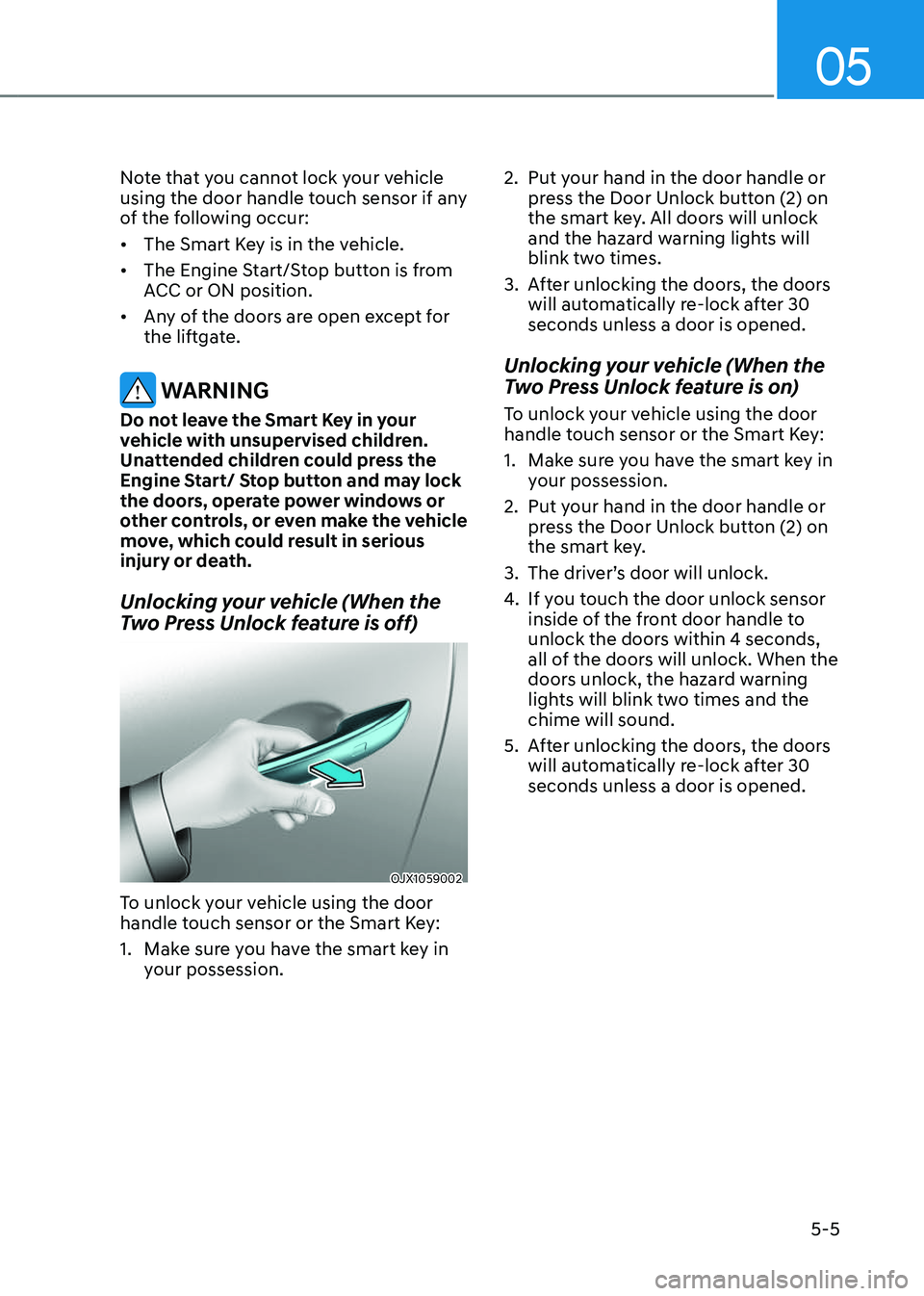
Unlocking your vehicle (When the
Two Press Unlock feature is off)
OJX1059002OJX1059002
To unlock your vehicle using the door
handle touch sensor or the Smart Key:
1. Make sure you have the smart key in
your possession.
2. Put your hand in the door handle or
press the Door Unlock button (2) on
the smart key. All doors will unlock
and the hazard warning lights will
blink two times.
3. After unlocking the doors, the doors
will automatically re-lock after 30
seconds unless a door is opened.
Unlocking your vehicle (When the
Two Press Unlock feature is on)
To unlock your vehicle using the door
handle touch sensor or the Smart Key:
1. Make sure you have the smart key in
your possession.
2. Put your hand in the door handle or
press the Door Unlock button (2) on
the smart key.
3. The driver’s door will unlock.
4. If you touch the door unlock sensor
inside of the front door handle to
unlock the doors within 4 seconds,
all of the doors will unlock. When the
doors unlock, the hazard warning
lights will blink two times and the
chime will sound.
5. After unlocking the doors, the doors
will automatically re-lock after 30
seconds unless a door is opened.
Page 150 of 650
Convenience Features
5-6
Two Press Unlock Feature
The priority for unlocking the driver door
only, or unlocking all the doors with one
press may be adjusted in the Settings
menu in the infotainment system screen.
The Two Press Unlock feature, when
enabled, will require the user to press
the door unlock button once for driver
door only and twice for unlocking all the
doors.
Setup → Vehicle Settings → Door → Two
Press Unlock
The Two Press Unlock feature can also be
enabled or disabled by pressing the door
lock and unlock buttons simultaneously
on the Key FOB:
Press and hold both the Door Lock
button and the Door Unlock button
simultaneously until the hazard warning
lights blink.
This will enable or disable the Two Press
Unlock feature. Repeat this procedure to
enable/disable the mode again.
Information
• If you press the front passenger outside
door handle with the smart key in your
possession, all the doors will unlock.
• The Two Press Unlock feature is off
when the vehicle is first delivered. To
use the feature, enable the feature from
the Settings menu in the infotainment
system screen.
Information
• The side view mirror will unfold if
‘Enable on Door Unlock’ is selected
from the Settings menu in the
infotainment system screen. Select:
-Setup → Vehicle Settings →
Convenience → Welcome Mirror/
Light → Enable on Door Unlock
• The door handle touch sensor will only
operate when the smart key is within
28~40 in. (0.7~1 m) from the outside
door handle.
• The doors may lock or unlock if the
touch sensor of the outer door handle is
recognized while washing your car or
due to heavy rain.
• To prevent unintentional door lock or
unlock:
Press the lock button on the smart
key and immediately press the unlock
button along with the lock button
for more than 4 seconds. The hazard
warning lights will blink four times.
At this time, the doors will not lock or
unlock even though the touch sensor is
touched on the outside door handle.
To deactivate the function, press the
door lock or unlock button on the
smart key.
• During a car wash or rain, in order
to minimize unintentional operation
of the touch sensor, the touch sensor may become insensitive. This is not a
malfunction.
• The doors may not lock or unlock in
the following situations:
-If the touch sensor is touched with
gloves on
-If the door is suddenly approached