GENESIS GV80 2023 Owners Manual
Manufacturer: GENESIS, Model Year: 2023, Model line: GV80, Model: GENESIS GV80 2023Pages: 650
Page 161 of 650
05
5-17
CAUTION
• If the vehicle windows are tinted
with a film containing metallic
substances, it may cause poor
Bluetooth connection and poor
performance of the Digital Key App.
• If multiple users use the digital key
at the same time, the functions of
the Digital Key App may not work
properly. Only the necessary user
should operate the Digital Key App
remote control.
• When using the Digital Key App
remote control, the driver (the
remote control user) should leave
the vehicle after checking that the
doors are locked. When the doors are
locked, the chime will sound and the
hazard warning lights will blink once.
• The remote functions of the Digital
Key App enables the vehicle to be
controlled when the user is within
operating range. If the digital key
is out of the operating range, the
remote control function may not
operate properly.
• If the smart phone is moved away
from the vehicle while the smart
phone and the vehicle is connected,
Digital Key App remote control may
not operate properly.
• When using Digital Key App
remote control via Bluetooth,
communication may be slow or the
operating range may be reduced in
the following circumstances:
-Smart phone mobile data is weak
-Bluetooth connection is weak due
to many Bluetooth devices
-There is an object such as metal or
concrete between the vehicle and
smart phone
-The smart phone is wrapped in
your hand or other electronic
devices that cause interference is
placed near the smart phone
• If you use a smart phone cover that
uses wireless communication or is
made of metal, the digital key NFC
function may not work properly.
Remove the smart phone cover
before using the digital key NFC
function.
• If Digital Key App remote control
does not operate properly, use the
smart phone’s NFC function to lock
and unlock the doors.
Page 162 of 650
Convenience Features
5-18
How to delete Digital Key (Smart
Phone)
1. Turn the vehicle on with the smart key
and make sure to keep the smart key
inside the vehicle during the digital
key (smart phone) deleting process.
ORG3050223N ORG3050223N
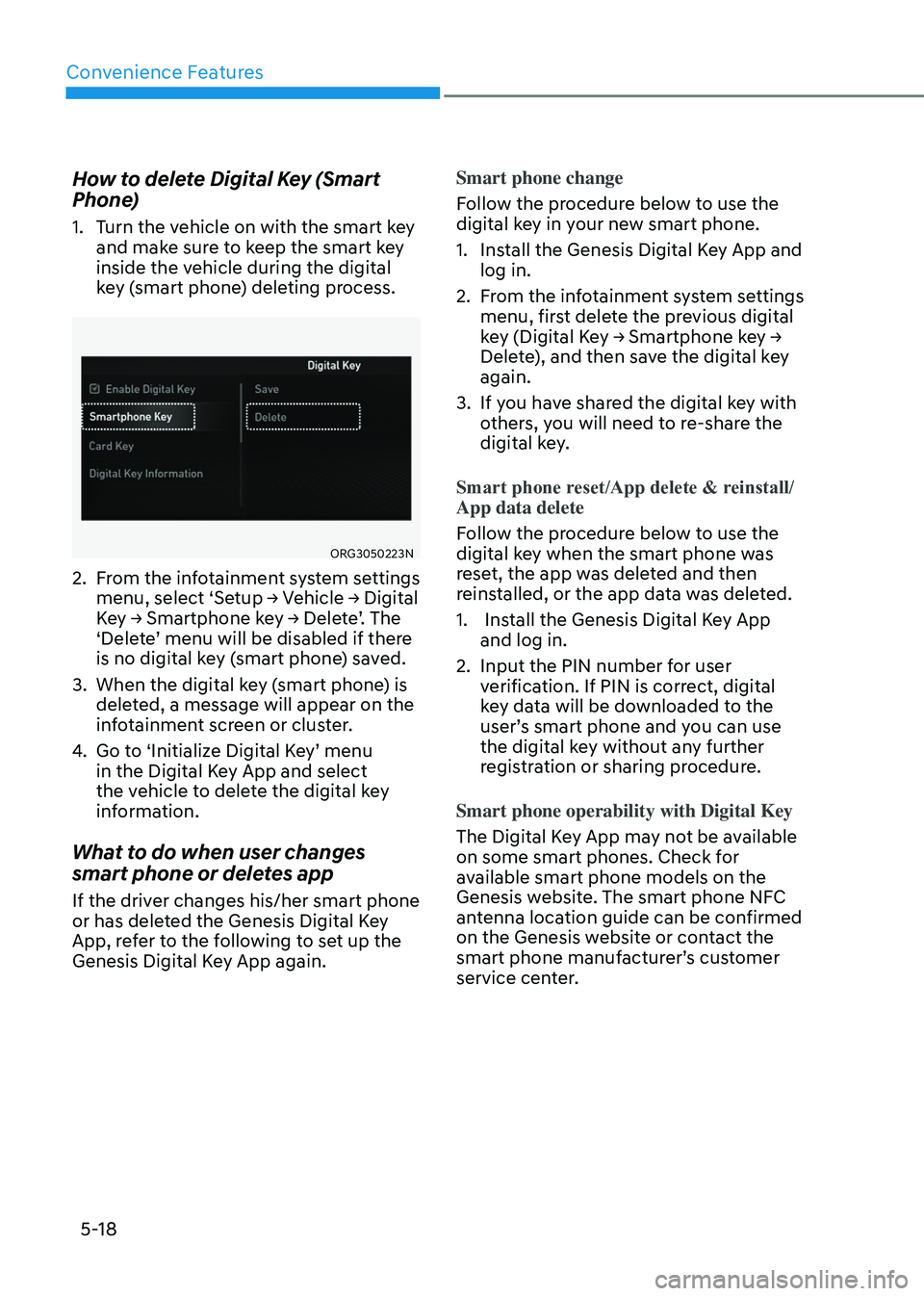
2. From the infotainment system settings
menu, select ‘Setup → Vehicle → Digital
Key → Smartphone key → Delete’. The
‘Delete’ menu will be disabled if there
is no digital key (smart phone) saved.
3. When the digital key (smart phone) is
deleted, a message will appear on the
infotainment screen or cluster.
4. Go to ‘Initialize Digital Key’ menu
in the Digital Key App and select
the vehicle to delete the digital key
information.
What to do when user changes
smart phone or deletes app
If the driver changes his/her smart phone
or has deleted the Genesis Digital Key
App, refer to the following to set up the
Genesis Digital Key App again.Smart phone change
Follow the procedure below to use the
digital key in your new smart phone.
1. Install the Genesis Digital Key App and
log in.
2. From the infotainment system settings
menu, first delete the previous digital
key (Digital Key → Smartphone key →
Delete), and then save the digital key
again.
3. If you have shared the digital key with
others, you will need to re-share the
digital key.
Smart phone reset/App delete & reinstall/
App data delete
Follow the procedure below to use the
digital key when the smart phone was
reset, the app was deleted and then
reinstalled, or the app data was deleted.
1. Install the Genesis Digital Key App
and log in.
2. Input the PIN number for user
verification. If PIN is correct, digital
key data will be downloaded to the
user’s smart phone and you can use
the digital key without any further
registration or sharing procedure.
Smart phone operability with Digital Key
The Digital Key App may not be available
on some smart phones. Check for
available smart phone models on the
Genesis website. The smart phone NFC
antenna location guide can be confirmed
on the Genesis website or contact the
smart phone manufacturer’s customer
service center.
Page 163 of 650
05
5-19
Digital Key (Card Key)
How to register Digital Key (Card
Key)
To use the card key as a digital key,
follow the following procedure.
For Android smart phones
1. Install Genesis Digital Key App in the
main user’s smart phone and register
the digital key (smart phone). Refer
to “How to register Digital Key (Smart
Phone)”.
1-1. Open Genesis Digital Key
App, and then select ‘Menu →
Settings → Card Key Registration
Authentication’. Follow the digital
key authentication procedure
according to the app.
-Bluetooth authentication:
Before starting the process, the
driver needs to make sure to
check whether the Bluetooth
connection is working
properly. Then select ‘Menu
→ Settings → Card Key Enroll
Authentication’ in the top right
corner of the Digital Key App.
The card saving process should
be completed within 5 minutes
after the authentication
process is done in the vehicle.
-NFC authentication: After
selecting NFC authentication,
touch the smart phone on the
driver’s or passenger’s outside
door handle.
1-2. Get in the vehicle with the smart
key. Except Android smart phones
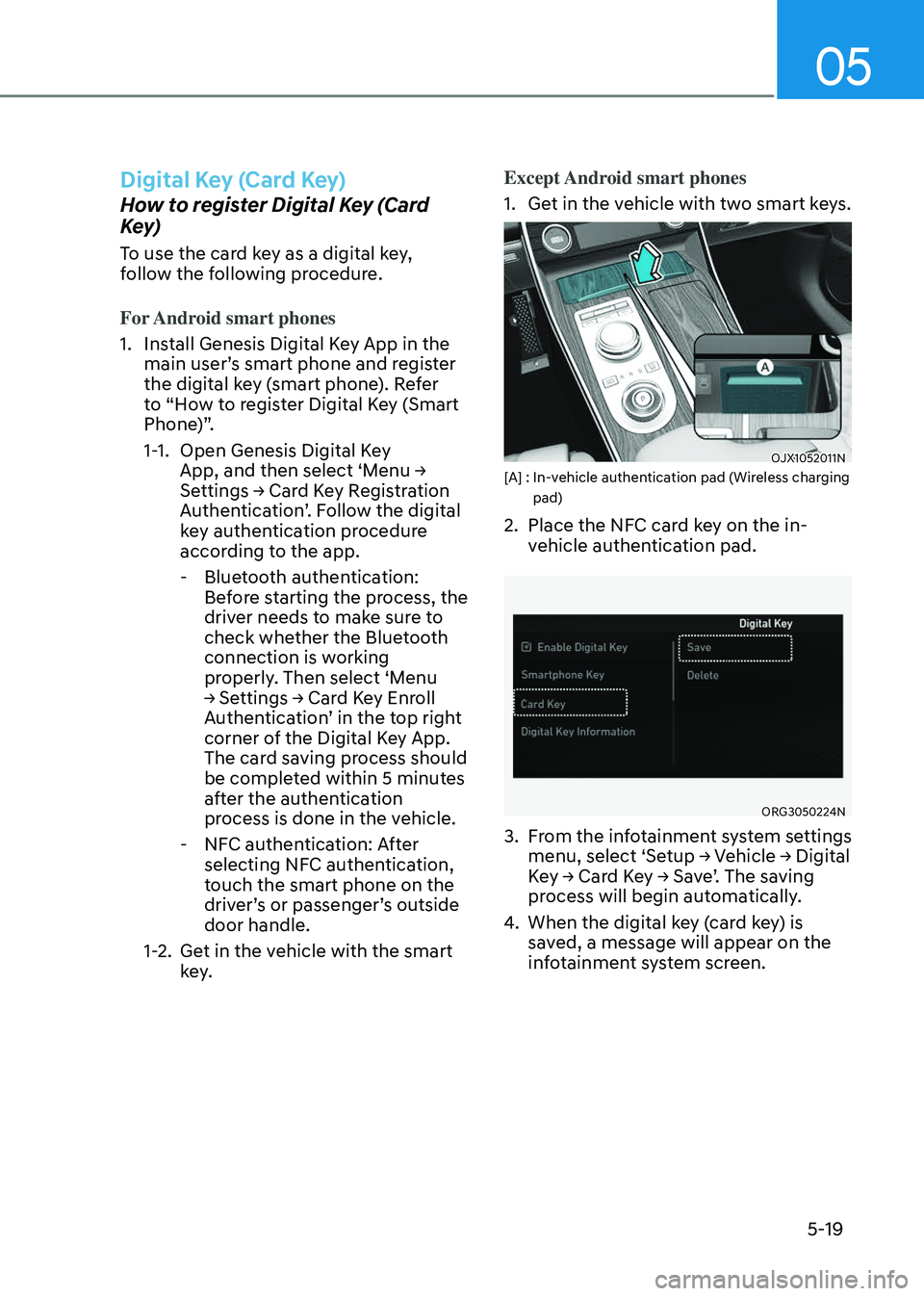
1. Get in the vehicle with two smart keys.
OJX1052011NOJX1052011N[A] : In-vehicle authentication pad (Wireless charging pad)
2. Place the NFC card key on the in-
vehicle authentication pad.
ORG3050224NORG3050224N
3. From the infotainment system settings
menu, select ‘Setup → Vehicle → Digital
Key → Card Key → Save’. The saving
process will begin automatically.
4. When the digital key (card key) is
saved, a message will appear on the
infotainment system screen.
Page 164 of 650
Convenience Features
5-20
Information
• When there is a digital key (card key)
already saved in the vehicle, the ‘Save’
menu is disabled. If you want to save
a digital key again, refer to “How to
delete Digital Key (Card key)” and
follow the deleting procedure first
before saving a digital key.
• When registering a digital key (card
key), authentication is required once
through a smart phone. Complete the
registration within 5 minutes after
authentication.
• To register the digital key (card key),
the smart key must be in the vehicle.
• The registered digital key (card key)
cannot be used for another vehicle.
• The previously saved digital key (card
key) cannot be used if a new digital key
(card key) is registered.
How to use the Digital key (Card key)
Card key touch control
The driver can lock and unlock the door
by touching the card key on the door
handle. Also, the engine can be started
by placing the card key on the in-vehicle
authentication pad (wireless charging
pad).
OJX1059226 OJX1059226 [A] : Door handle authentication pad,
[B] : Card key NFC antenna
• Locking/Unlocking the doors
-If the driver touches the card key
on the driver’s or passenger’s door
handle authentication pad for more
than 2 seconds, the door will lock or
unlock.
-If Two Press Unlock function is
set, only the driver’s door will be
unlocked by touching the card key
on the driver’s door handle. Touch
the card key once more within 4
seconds to unlock all doors.
-After unlocking the doors, the doors
will automatically re-lock after 30
seconds unless a door is opened.
Note that you cannot lock your vehicle
using the NFC antenna if any of the
following occur:
- The Smart Key is in the vehicle
-The Engine Start/Stop button is in
ACC or ON position
-Any of the doors are open except for
the engine hood or liftgate
Page 165 of 650
05
5-21
• Starting the engine
After placing your registered card
key on the in-vehicle authentication
pad (wireless charger pad), depress
the brake pedal and press the Engine
Start/ Stop button.
For more details, refer to the “Engine
Start/Stop Button” section in chapter
6.
WARNING
The engine can be started when the
registered card key is placed on the
in-vehicle authentication pad (wireless
charging pad). Therefore, do not leave
unsupervised children or people who
are not aware of the system since it
can result in serious injury or death. In
addition, always have the registered
card key with you to prevent vehicle
theft when leaving the vehicle.
CAUTION
• The digital key (card key) may not
work under the following conditions:
-The card key is not touching
the center of the door handle
authentication pad or in-vehicle
authentication pad (wireless
charging pad) correctly.
-The card key is used overlapped
with NFC-enabled cards such as
credit card or smart phone
If the card key does not work, move
the card key approximately 4 in. (10
cm) away from the authentication
pad and then touch it again.
• The card key can be damaged by
impacts. If the key is damaged,
replace the card key with a new one
and register it again.
• Long-time exposure to high
temperature may cause the card
key to malfunction. Be careful not to
expose the key to direct sunlight or
high temperature.
• The card key is consumable and it
is not covered by your warranty.
Therefore, the result of misuse by
customers such as breakage or loss is
not subject to guarantee.
• Always have the card key with you
when leaving the vehicle. If the
authenticated phone has a dead
battery, or it is lost or stolen, you may
be locked out of the vehicle.
Page 166 of 650
Convenience Features
5-22
How to delete Digital Key (Card key)
1. Turn the vehicle on with the smart key
and make sure to keep the smart key
inside the vehicle during the digital
key (card key) deleting process.
ORG3050225NORG3050225N
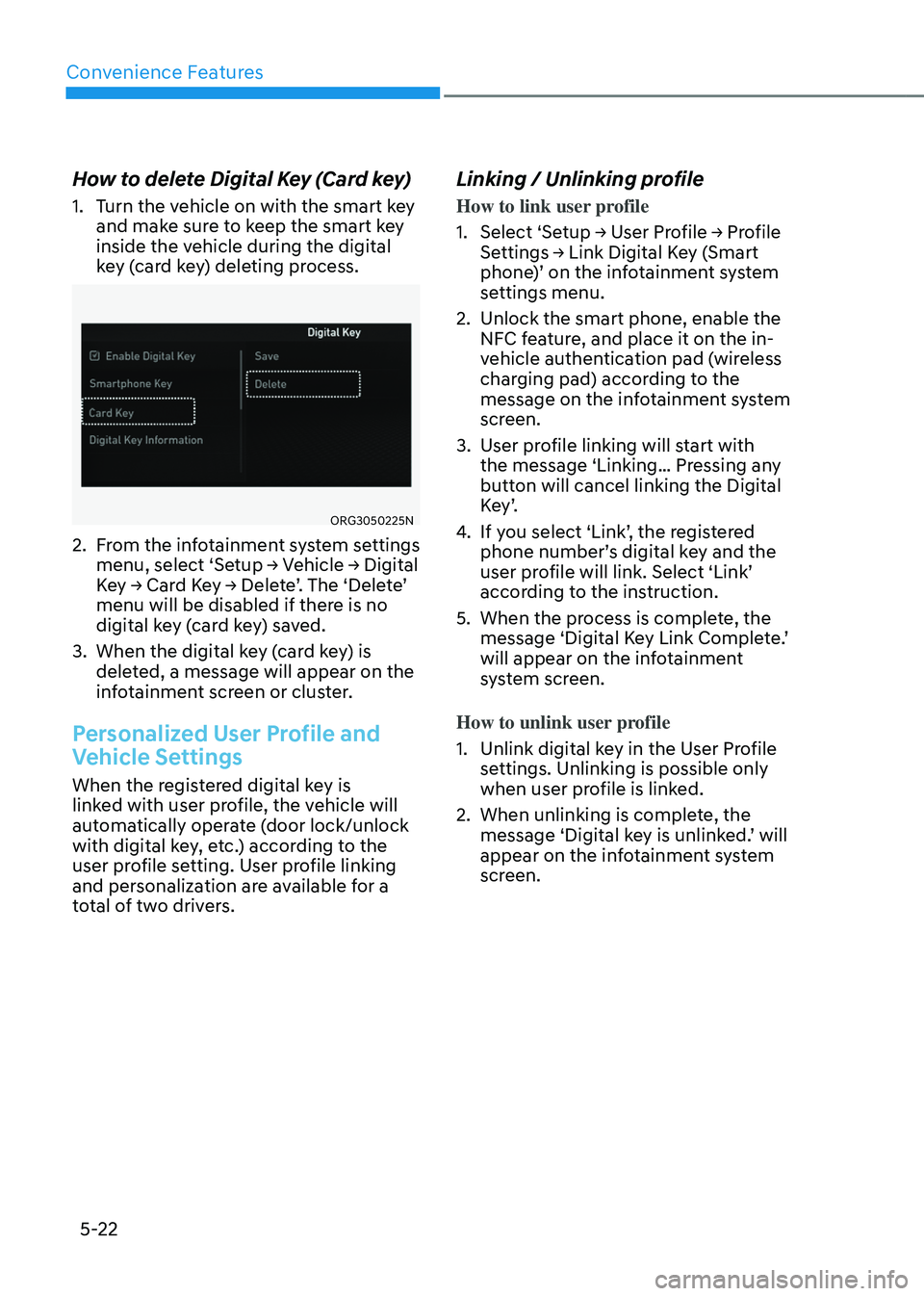
2. From the infotainment system settings
menu, select ‘Setup → Vehicle → Digital
Key → Card Key → Delete’. The ‘Delete’
menu will be disabled if there is no
digital key (card key) saved.
3. When the digital key (card key) is
deleted, a message will appear on the
infotainment screen or cluster.
Personalized User Profile and
Vehicle Settings
When the registered digital key is
linked with user profile, the vehicle will
automatically operate (door lock/unlock
with digital key, etc.) according to the
user profile setting. User profile linking
and personalization are available for a
total of two drivers.
Linking / Unlinking profile
How to link user profile
1. Select ‘Setup → User Profile → Profile
Settings → Link Digital Key (Smart
phone)’ on the infotainment system
settings menu.
2. Unlock the smart phone, enable the
NFC feature, and place it on the in-
vehicle authentication pad (wireless
charging pad) according to the
message on the infotainment system
screen.
3. User profile linking will start with
the message ‘Linking… Pressing any
button will cancel linking the Digital
K e y ’.
4. If you select ‘Link’, the registered
phone number’s digital key and the
user profile will link. Select ‘Link’
according to the instruction.
5. When the process is complete, the
message ‘Digital Key Link Complete.’
will appear on the infotainment
system screen.
How to unlink user profile
1. Unlink digital key in the User Profile
settings. Unlinking is possible only
when user profile is linked.
2. When unlinking is complete, the
message ‘Digital key is unlinked.’ will
appear on the infotainment system
screen.
Page 167 of 650
05
5-23
Information
• Use profile cannot be linked to
both Driver 1 and Driver 2 that are
connected to a single smart phone.
Personalization will operate with the
recently linked user profile, and the
previously linked user profile will be
automatically canceled.
• User profile can be linked when digital
key is enabled (Set up→ Vehicle →
Digital Key → Enable Digital Key).
The linked user profile information is
maintained even when the digital key
function is disabled.
User profile can be linked to a smart
phone with the Digital Key App
installed.
• User profile can be linked when
a digital key is registered on the
smartphone and the vehicle. The smart
phone with another vehicle’s digital key
cannot be linked.
• If you remove the smart phone from the
in-vehicle authentication pad (wireless
charging pad) before completing the
user profile link, the linking process
will not be completed normally.
• To unlink the user profile, the smart
phone does not need to be on the in-
vehicle authentication pad (wireless
charging pad).
• Once the user profile linked digital
key in the smart phone is deleted, the
digital key should be re-registered and
personalized by linking the user profile
again.
Vehicle personalization operation
The personalization function linked with
digital key works under the following
conditions:
• Touch the driver’s door handle with
the profile linked smart phone to lock
or unlock the doors (Personalization
does not operate when locking or
unlocking the front passenger door.).
• When the remote door unlock with
the profile linked smartphone digital
key app works, the user profile linked
with digital key can be changed
manually from the infotainment
system settings.
Information
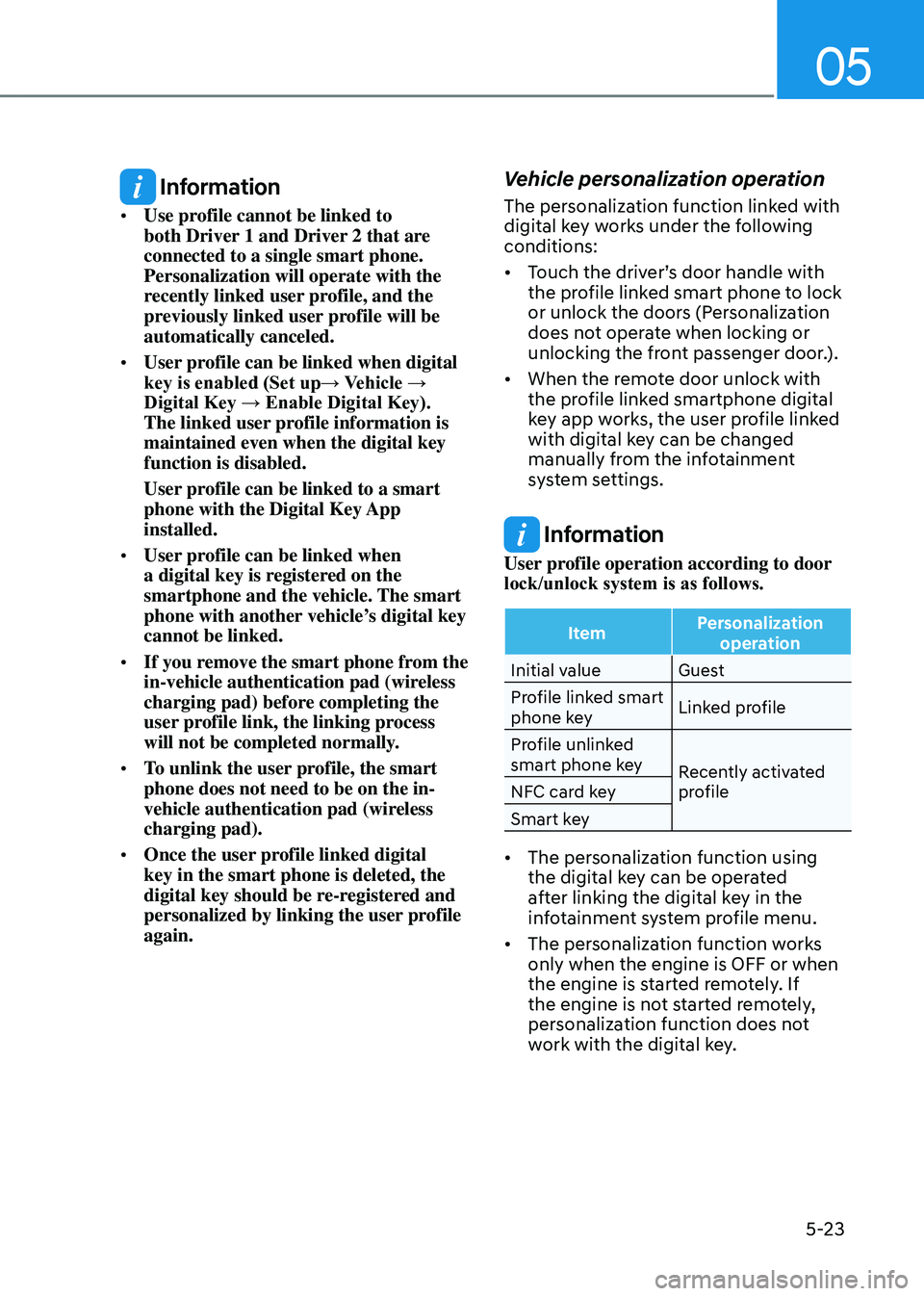
User profile operation according to door
lock/unlock system is as follows.
ItemPersonalization
operation
Initial value Guest
Profile linked smart
phone key Linked profile
Profile unlinked
smart phone key Recently activated
profile
NFC card key
Smart key
• The personalization function using
the digital key can be operated
after linking the digital key in the
infotainment system profile menu.
• The personalization function works
only when the engine is OFF or when
the engine is started remotely. If
the engine is not started remotely,
personalization function does not
work with the digital key.
Page 168 of 650
Convenience Features
5-24
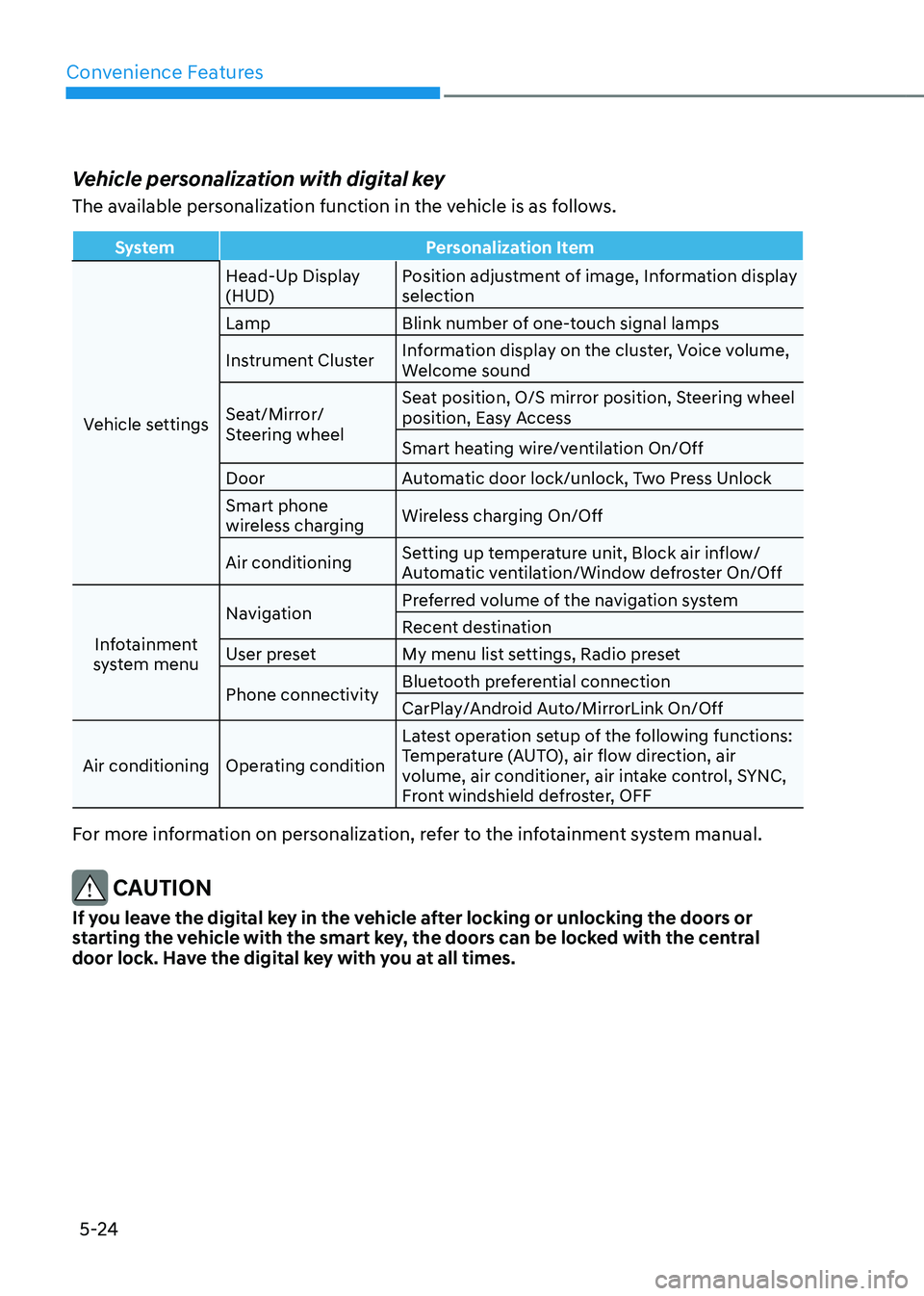
Vehicle personalization with digital key
The available personalization function in the vehicle is as follows.
SystemPersonalization Item
Vehicle settings Head-Up Display
(HUD)
Position adjustment of image, Information display
selection
Lamp Blink number of one-touch signal lamps
Instrument Cluster Information display on the cluster, Voice volume,
Welcome sound
Seat/Mirror/
Steering wheel Seat position, O/S mirror position, Steering wheel
position, Easy Access
Smart heating wire/ventilation On/Off
Door Automatic door lock/unlock, Two Press Unlock
Smart phone
wireless charging Wireless charging On/Off
Air conditioning Setting up temperature unit, Block air inflow/
Automatic ventilation/Window defroster On/Off
Infotainment
system menu Navigation
Preferred volume of the navigation system
Recent destination
User preset My menu list settings, Radio preset
Phone connectivity Bluetooth preferential connection
CarPlay/Android Auto/MirrorLink On/Off
Air conditioning Operating condition Latest operation setup of the following functions:
Temperature (AUTO), air flow direction, air
volume, air conditioner, air intake control, SYNC,
Front windshield defroster, OFF
For more information on personalization, refer to the infotainment system manual.
CAUTION
If you leave the digital key in the vehicle after locking or unlocking the doors or
starting the vehicle with the smart key, the doors can be locked with the central
door lock. Have the digital key with you at all times.
Page 169 of 650
05
5-25
Used Vehicle/Digital Key
Maintenance
Purchasing used vehicle
If any of the digital key devices
(smartphone key, card key) are registered
in the vehicle, the message ‘Digital key(s)
active’ will appear on the instrument
cluster once when the vehicle is turned
on after unlocking the vehicle door.
When purchasing a used car, be sure to
check the message and delete the smart
phone key and card key registered by
the previous user. Please let us know
the purchase of a used vehicle through
Genesis Customer Care.
Check whether the card key that came
with the used vehicle operates properly.
If the card key does not work properly,
delete the card key and register the
smartphone key, and then re-register the
card key.
Digital key maintenance
If you need to have your Digital Key
System repaired or replaced, the
registered smart key/card key can be
deleted. In this case, you should delete
the digital key on the smart phone and
re-register the key.
Limitations of the System
• Genesis Digital Key App on the
smartphone and card key may not
work if any of the following occurs:
-The Digital Key App in the
smartphone is deleted (reinstall the
app)
-Account log information of Genesis
Digital Key App is expired (required
to re-log in)
-When you try to log in from
another smart phone instead of the
registered smart phone with same
user account
-Smart phone rooting or app hacking
is detected
-Smart phone battery or the vehicle
battery is discharged
- Smartphone’s screen is off or
locked
-NFC or Bluetooth is turned off in the
smartphone settings
-Smartphone’s mobile network
setting is off or airplane mode is
activated
-A credit card is overlapped in the
back of your smart phone, or metal
or thick smart phone case is used
-Using the card key with other cards,
or using it in a wallet or card holder
-There is electronic interference by
other vehicles, objects, etc.
• The vehicle may not be controlled
by the smart phone if any of the
following occurs:
-Basic and necessary functions of
the smart phone are operating
(general call, urgent call, audio or
NFC payment)
-Using wireless earphone
Page 170 of 650
Convenience Features
5-26
Operating Door Locks From
Outside the Vehicle
Mechanical key
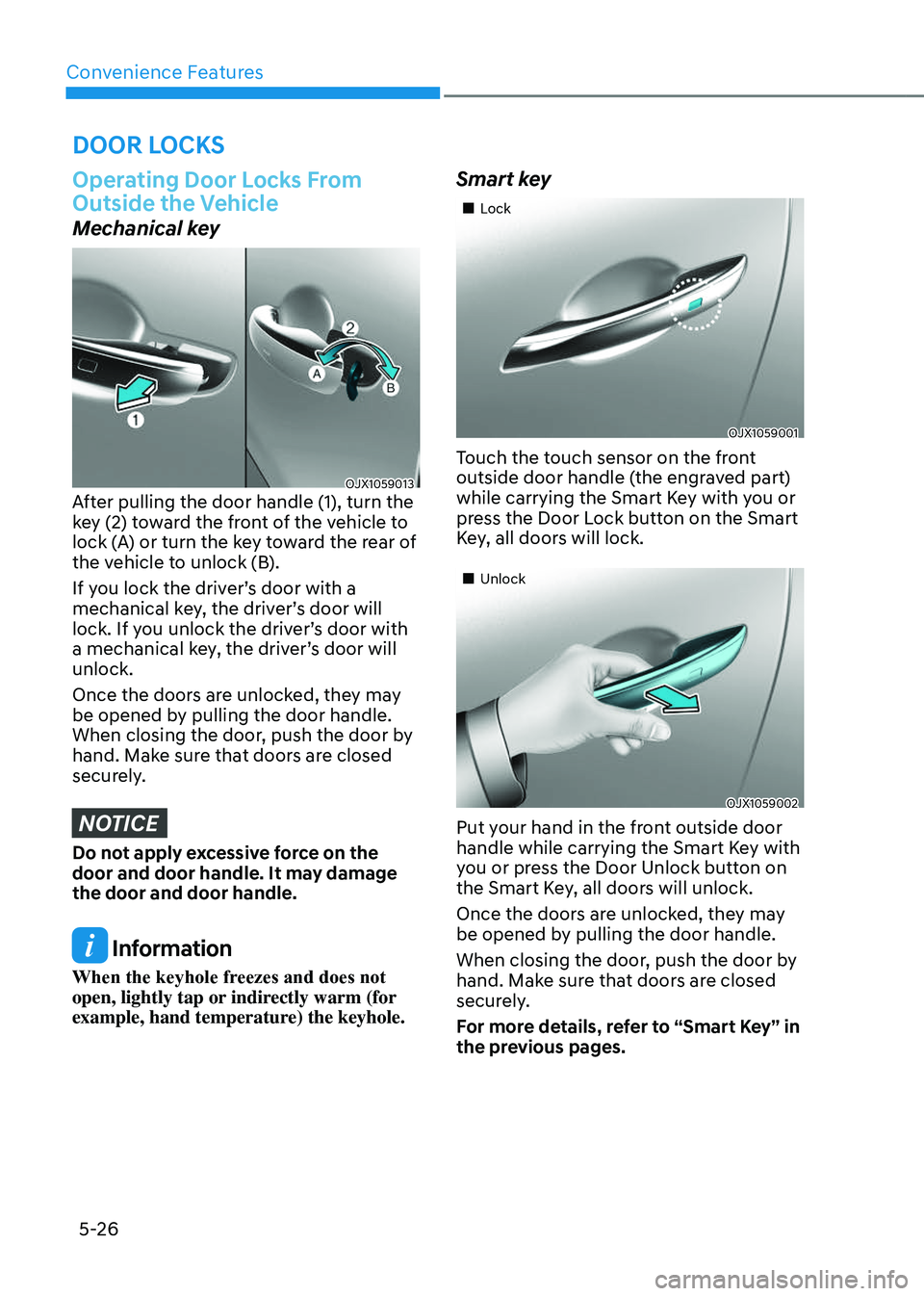
OJX1059013OJX1059013After pulling the door handle (1), turn the
key (2) toward the front of the vehicle to
lock (A) or turn the key toward the rear of
the vehicle to unlock (B).
If you lock the driver’s door with a
mechanical key, the driver’s door will
lock. If you unlock the driver’s door with
a mechanical key, the driver’s door will
unlock.
Once the doors are unlocked, they may
be opened by pulling the door handle.
When closing the door, push the door by
hand. Make sure that doors are closed
securely.
NOTICE
Do not apply excessive force on the
door and door handle. It may damage
the door and door handle.
Information
When the keyhole freezes and does not
open, lightly tap or indirectly warm (for
example, hand temperature) the keyhole.
Smart key