GENESIS GV80 2023 Owners Manual
Manufacturer: GENESIS, Model Year: 2023, Model line: GV80, Model: GENESIS GV80 2023Pages: 650
Page 481 of 650
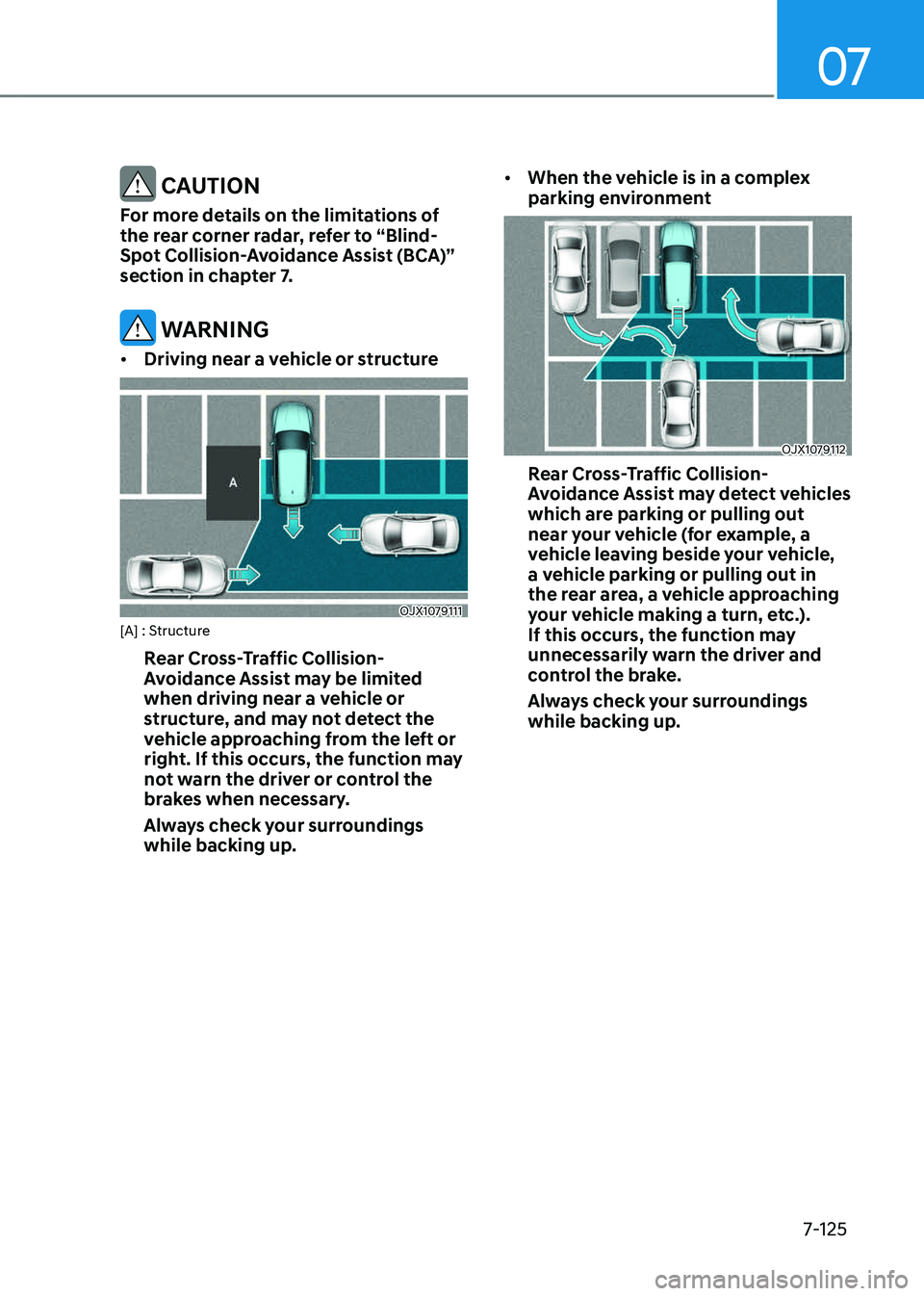
07
7-125
CAUTION
For more details on the limitations of
the rear corner radar, refer to “Blind-
Spot Collision-Avoidance Assist (BCA)”
section in chapter 7.
WARNING
• Driving near a vehicle or structure
OJX1079111OJX1079111[A] : Structure
Rear Cross-Traffic Collision-
Avoidance Assist may be limited
when driving near a vehicle or
structure, and may not detect the
vehicle approaching from the left or
right. If this occurs, the function may
not warn the driver or control the
brakes when necessary.
Always check your surroundings
while backing up.
• When the vehicle is in a complex
parking environment
OJX1079112OJX1079112
Rear Cross-Traffic Collision-
Avoidance Assist may detect vehicles
which are parking or pulling out
near your vehicle (for example, a
vehicle leaving beside your vehicle,
a vehicle parking or pulling out in
the rear area, a vehicle approaching
your vehicle making a turn, etc.).
If this occurs, the function may
unnecessarily warn the driver and
control the brake.
Always check your surroundings
while backing up.
Page 482 of 650
![GENESIS GV80 2023 Owners Manual Driver Assistance System
7-126
• When the vehicle is parked
diagonally
OJX1079113OJX1079113[A] : Vehicle
Rear Cross-Traffic Collision-
Avoidance Assist may be limited
when backing up diagonally,](/img/46/58828/w960_58828-481.png "GENESIS GV80 2023 Owners Manual Driver Assistance System
7-126
• When the vehicle is parked
diagonally
OJX1079113OJX1079113[A] : Vehicle
Rear Cross-Traffic Collision-
Avoidance Assist may be limited
when backing up diagonally,")
Driver Assistance System
7-126
• When the vehicle is parked
diagonally
OJX1079113OJX1079113[A] : Vehicle
Rear Cross-Traffic Collision-
Avoidance Assist may be limited
when backing up diagonally,
and may not detect the vehicle
approaching from the left or right.
If this occurs, the function may not
warn the driver or control the brakes
when necessary.
Always check your surroundings
while backing up.
• When the vehicle is on or near a
slope
OJX1079114OJX1079114
Rear Cross-Traffic Collision-
Avoidance Assist may be limited
when the vehicle is on a uphill or
downhill slope, or near it, and may
not detect the vehicle approaching
from the left or right. If this occurs,
the function may not warn the
driver or control the brakes when
necessary.
Always check your surroundings
while backing up.
Page 483 of 650
![GENESIS GV80 2023 Owners Manual 07
7-127
• Pulling into the parking space where
there is a structure
OJX1079115OJX1079115[A] : Structure, [B] : Wall
Rear Cross-Traffic Collision-
Avoidance Assist may detect vehicles
passing by](/img/46/58828/w960_58828-482.png "GENESIS GV80 2023 Owners Manual 07
7-127
• Pulling into the parking space where
there is a structure
OJX1079115OJX1079115[A] : Structure, [B] : Wall
Rear Cross-Traffic Collision-
Avoidance Assist may detect vehicles
passing by")
07
7-127
• Pulling into the parking space where
there is a structure
OJX1079115OJX1079115[A] : Structure, [B] : Wall
Rear Cross-Traffic Collision-
Avoidance Assist may detect vehicles
passing by in front of you when
parking in reverse into a parking
space with a wall or structure in the
rear or side area. If this occurs, the
function may unnecessarily warn the
driver and control the brake.
Always check your surroundings
while backing up.
• When the vehicle is parked rearward
OJX1079116OJX1079116
Rear Cross-Traffic Collision-
Avoidance Assist may detect vehicles
passing by behind you when parking
in reverse into a parking space.
If this occurs, the function may
unnecessarily warn the driver and
control the brake.
Always check your surroundings
while backing up.
Page 484 of 650
Driver Assistance System
7-128
WARNING
• When you are towing a trailer or
another vehicle, have Rear Cross-
Traffic Collision Avoidance Assist
turned off due to safety reasons.
• Rear Cross-Traffic Collision-
Avoidance Assist may not operate
properly if interfered by strong
electromagnetic waves.
• Rear Cross-Traffic Collision-
Avoidance Assist may not operate
for 15 seconds after the vehicle is
started, or the rear corner radars are
initialized.
Information
This device complies with Part 15 of the
FCC rules.
Operation is subject to the following three
conditions:
1. This device may not cause harmful
interference, and
2. This device must accept any
interference received, including
interference that may cause undesired
operation.
3. Changes or modifications not expressly
approved by the party responsible
for compliance could void the user's
authority to operate the device.
Information
Radio frequency radiation exposure
information:
This equipment complies with FCC
radiation exposure limits set forth for an
uncontrolled environment.
This equipment should be installed and
operated with minimum distance of 8 in.
(20 cm) between the radiator (antenna)
and your body.
This transmitter must not be co-located or
operating in conjunction with any other
antenna or transmitter.
Page 485 of 650
07
7-129
FORWARD/REVERSE PARKING DISTANCE WARNING (PDW)
Forward/Reverse Parking Distance
Warning will help warn the driver if an
obstacle is detected when the vehicle
is moving forward or in reverse at low
speeds.
Detecting sensor
OJX1070122L OJX1070122L
OJX1079123L OJX1079123L [1] : Front ultrasonic sensors,
[2] : Rear ultrasonic sensors
Refer to the picture above for the
detailed location of the detecting
sensors.
Forward/Reverse Parking
Distance Warning Settings
Warning Volume
ORG3SP071192NORG3SP071192N
With the Engine Start/Stop button in the
ON position, select ‘Driver Assistance →
Warning Volume’ from the Settings menu
to change the Warning Volume to ‘High’,
‘Medium’, ‘Low’ or ‘Off’ for Forward/
Reverse Parking Distance Warning.
However, even if ‘Off’ is selected,
Forward/Reverse Parking Distance
Warning volume will not turn off but the
volume will sound as ‘Low’.
If you change the Warning Volume,
the Warning Volume of other Driver
Assistance systems may change.
Parking Distance Warning Auto On
To use Parking Distance Warning AutoOn
function, select ‘Driver Assistance→
Parking Safety → Parking Distance
Warning Auto On’ from the cluster or
infotainment system Settings menu
Page 486 of 650
Driver Assistance System
7-130
Forward/Reverse Parking
Distance Warning Operation
Operating button
OJX1079124 OJX1079124
Parking Safety button
• When the Parking Safety ()
button is pressed while the engine
running, the button indicator light will
illuminate and will operate when the
vehicle moves forward or in reverse.
• When the button is off (button
indicator light off), if you shift the
gear to R (Reverse), Forward/Reverse
Parking Distance Warning will
automatically turn on.
• Forward/Reverse Parking Distance
Warning may not operate properly
at speeds above 3 mph (5 km/h). If vehicle speed is above 6 mph (10 km/h), Forward/Reverse Parking Distance Warning will not warn the
driver, and if vehicle speed is above 12
mph (20 km/h), the function will turn
off (button indicator light off).
à If equipped with Remote Smart
Parking Assist, Forward/Reverse
Parking Distance Warning will turn
off (button indicator light off) when
vehicle speed is above 18 mph (30
km/h).
Information
Although you drive below 12 mph
(20 km/h) again, Forward/Reverse
Parking Distance Warning will not turn
on. If necessary, press the Parking Safety
(
) button again.
Forward Parking Distance Warning
• Forward Parking Distance Warning will
operate when one of the condition is
satisfied.
- The gear is shifted from R (Reverse)
to D (Drive) with Reverse Parking
Distance Warning on
-The gear is in D (Drive) and the
Parking Safety () button
indicator light is on
- `Parking Distance Warning Auto
On' is selected from the Settings
menu and the gear is in D (Drive)
• Forward Parking Distance Warning
helps detect a person, animal or
object in front when the vehicle's
forward speed is below (6 mph) 10
km/h.
• Forward Parking Distance Warning
does not operate when the vehicle's
forward speed is above (6 mph) 10
km/h even when the Parking Safety
(
) button indicator is on. Forward
Parking Distance Warning will operate
again when the vehicle's forward
speed decreases below (6 mph) 10
km/h while the Parking Safety (
)
button indicator is on.
• When ‘Parking Distance Warning Auto
On’ is selected, the Parking Safety
(
) button indicator light stays on.
Page 487 of 650
07
7-131
• When ‘Parking Distance Warning Auto
On’ is deselected, and the vehicle’s
forward speed is above 20 km/h (12
mph), the Parking Safety (
) button
indicator will turn off. Although you
drive below 10 km/h (6 mph), Forward
Parking Distance Warning will not turn
on.
à If equipped with Reverse Parking
Collision-Avoidance Assist or
Remote Smart Parking Assist,
Forward/Reverse Parking Distance
Warning will turn off when vehicle
speed is above 30 km/h (18 mph).
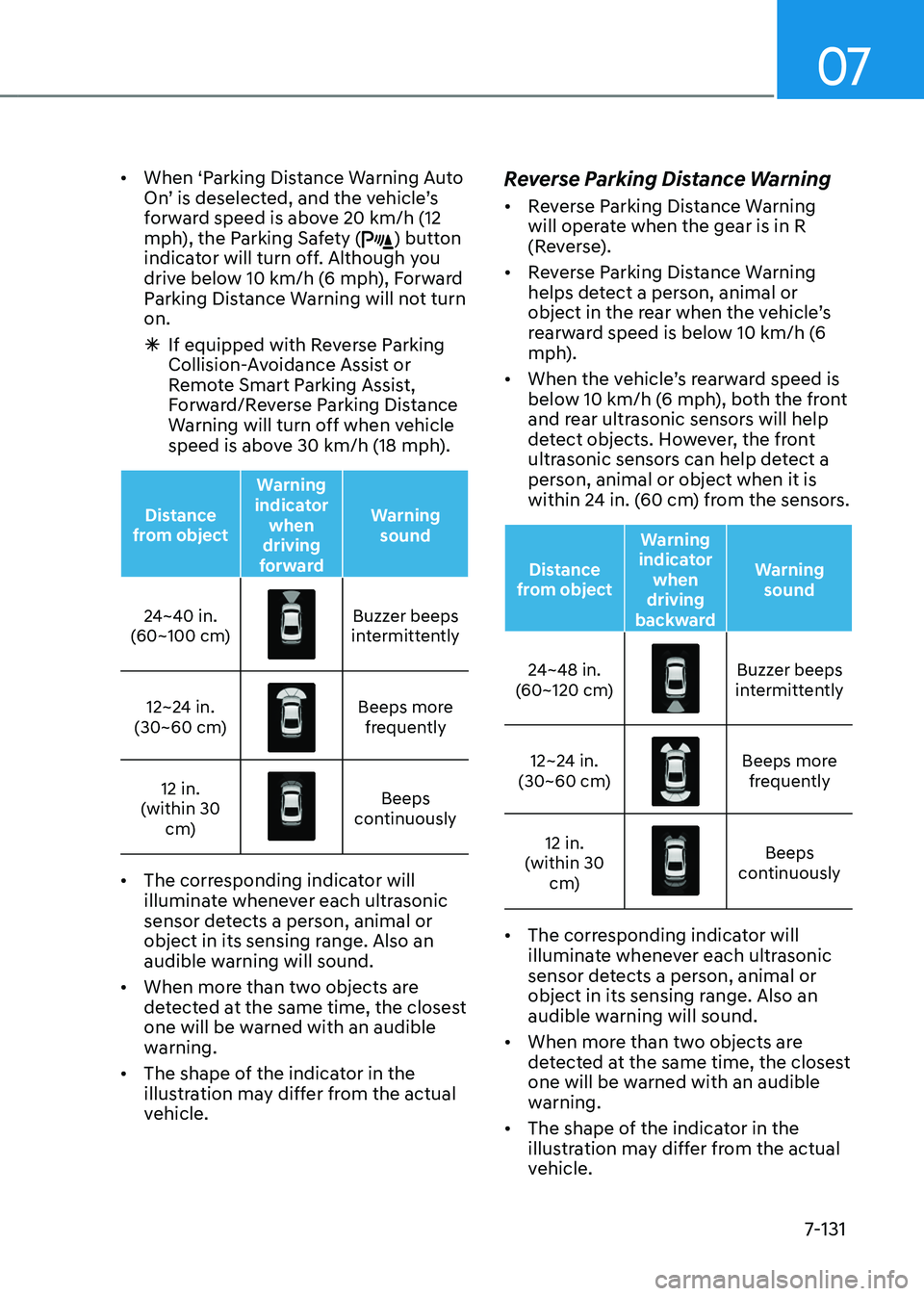
Distance
from object Warning
indicator when
driving
forward Warning
sound
24~40 in.
(60~100 cm)
Buzzer beeps intermittently
12~24 in.
(30~60 cm)
Beeps more frequently
12 in.
(within 30 cm)
Beeps continuously
• The corresponding indicator will
illuminate whenever each ultrasonic
sensor detects a person, animal or
object in its sensing range. Also an
audible warning will sound.
• When more than two objects are
detected at the same time, the closest
one will be warned with an audible
warning.
• The shape of the indicator in the
illustration may differ from the actual
vehicle.
Reverse Parking Distance Warning
• Reverse Parking Distance Warning
will operate when the gear is in R
(Reverse).
• Reverse Parking Distance Warning
helps detect a person, animal or
object in the rear when the vehicle’s
rearward speed is below 10 km/h (6
mph).
• When the vehicle’s rearward speed is
below 10 km/h (6 mph), both the front
and rear ultrasonic sensors will help
detect objects. However, the front
ultrasonic sensors can help detect a
person, animal or object when it is
within 24 in. (60 cm) from the sensors.
Distance
from object Warning
indicator when
driving
backward Warning
sound
24~48 in.
(60~120 cm)
Buzzer beeps intermittently
12~24 in.
(30~60 cm)
Beeps more frequently
12 in.
(within 30 cm)
Beeps continuously
• The corresponding indicator will
illuminate whenever each ultrasonic
sensor detects a person, animal or
object in its sensing range. Also an
audible warning will sound.
• When more than two objects are
detected at the same time, the closest
one will be warned with an audible
warning.
• The shape of the indicator in the
illustration may differ from the actual
vehicle.
Page 488 of 650
Driver Assistance System
7-132
Forward/Reverse Parking
Distance Warning Malfunction
and Precautions
Forward/Reverse Parking Distance
Warning malfunction
Forward/Reverse Parking Distance
Warning has a self-diagnosis function
that can determine whether the
ultrasonic sensor is working properly.
After starting the engine, a beep will
sound when the gear is shifted to R
(Reverse) to indicate Forward/Reverse
Parking Distance Warning is operating
normally.
However, if one or more of the following
occurs, first check whether the ultrasonic
sensor is damaged or whether Forward/
Reverse Parking Distance Warning is in
a non-operating condition. If it still does
not work properly, have the function
inspected by an authorized retailer of
Genesis products.
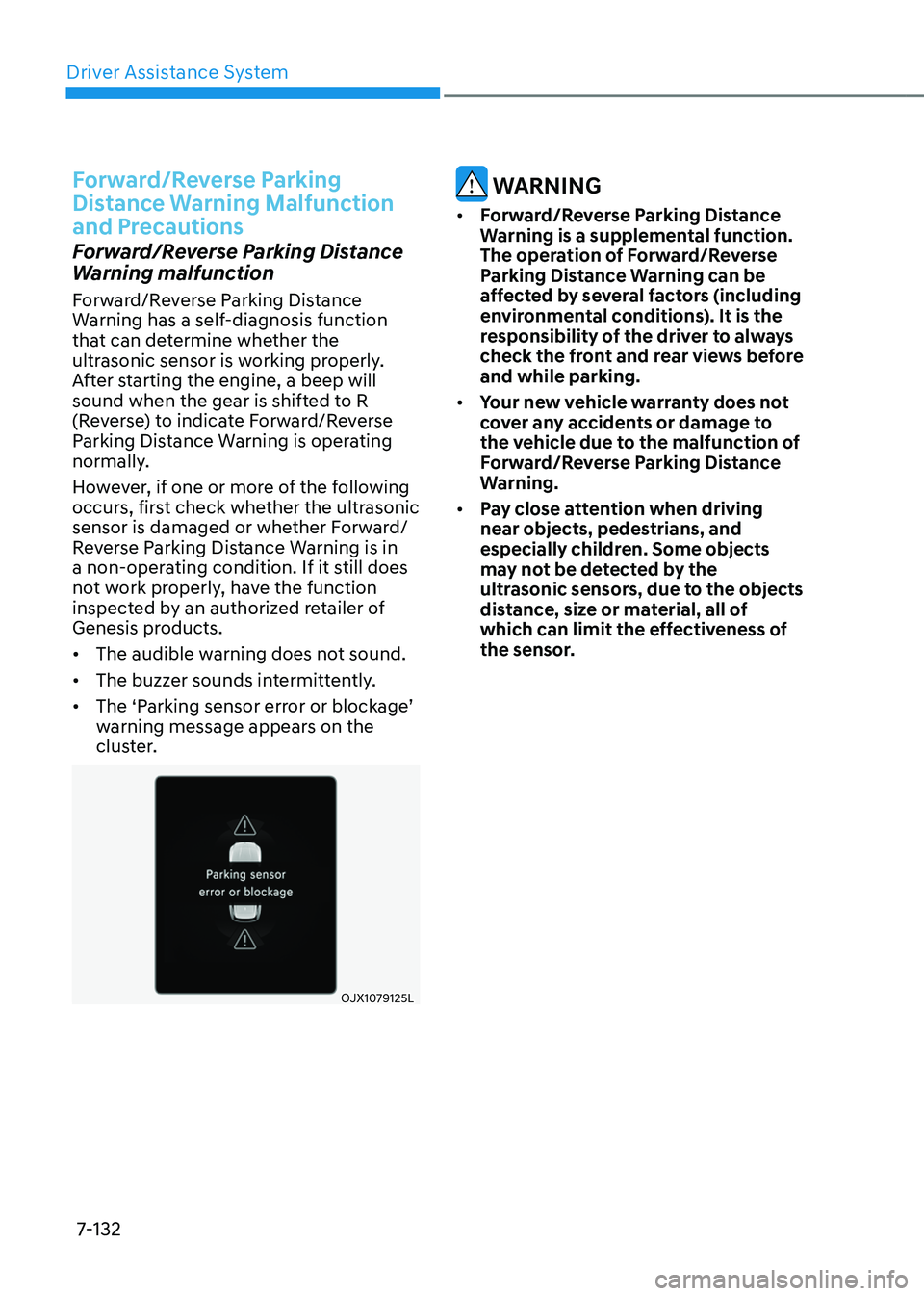
• The audible warning does not sound.
• The buzzer sounds intermittently.
• The ‘Parking sensor error or blockage’
warning message appears on the
cluster.
OJX1079125LOJX1079125L
WARNING
• Forward/Reverse Parking Distance
Warning is a supplemental function.
The operation of Forward/Reverse
Parking Distance Warning can be
affected by several factors (including
environmental conditions). It is the
responsibility of the driver to always
check the front and rear views before
and while parking.
• Your new vehicle warranty does not
cover any accidents or damage to
the vehicle due to the malfunction of
Forward/Reverse Parking Distance
Warning.
• Pay close attention when driving
near objects, pedestrians, and
especially children. Some objects
may not be detected by the
ultrasonic sensors, due to the objects
distance, size or material, all of
which can limit the effectiveness of
the sensor.
Page 489 of 650
07
7-133
Limitations of Forward/Reverse
Parking Distance Warning
• Forward/Reverse Parking Distance
Warning may not operate properly
when:
-Moisture is frozen to the sensor
-Sensor is covered with substance,
such as snow or water (Forward/
Reverse Parking Distance Warning
will operate properly when such
substance is removed.)
-The weather is extremely hot or cold
-The sensor or sensor assembly is
disassembled
-The surface of the sensor is pressed
hard or hit by a hard object
-The surface of the sensor is
scratched with a sharp object
-The sensors or its surrounding
area is directly sprayed with high
pressure washer
• Forward/Reverse Parking Distance
Warning may malfunction when:
-Heavy rain or water spray is present
-Water flows on the surface of the
sensor
-Affected by another vehicle’s
sensors
-The sensor is covered with snow
-Driving on uneven road, gravel
roads or bushes
-Objects that generates ultrasonic
waves are near the sensor
-License plate is installed in a
different spot from the original
location
-The vehicle bumper height or
ultrasonic sensor installation has
been modified
-Attaching equipments or
accessories next to the ultrasonic
sensors
• The following objects may not be
detected:
-Sharp or slim objects, such as ropes,
chains or small poles.
-Narrow objects such as edge of
square pillar
-Objects, which tend to absorb
sensor frequency, such as clothes,
spongy material or snow.
-Objects smaller than 40 in. (100 cm)
in length and narrower than 6 in. (14
cm) in diameter.
-Pedestrians, animals or objects
that are very close to the ultrasonic
sensors
• Parking Distance Warning Indicators
may be displayed differently from
the actual detected location when
the obstacle is located between the
sensors.
• Parking Distance Warning indicator
may not occur sequentially depending
on vehicle speed or obstacle shape.
• If Forward/Reverse Parking Distance
Warning needs repair, have the
vehicle inspected by an authorized
retailer of Genesis Branded products.
Page 490 of 650
Driver Assistance System
7-134
Reverse Parking Collision-Avoidance
Assist can warn the driver or assist with
braking to help reduce the possibility of
collision with a pedestrian or an object
when backing up.
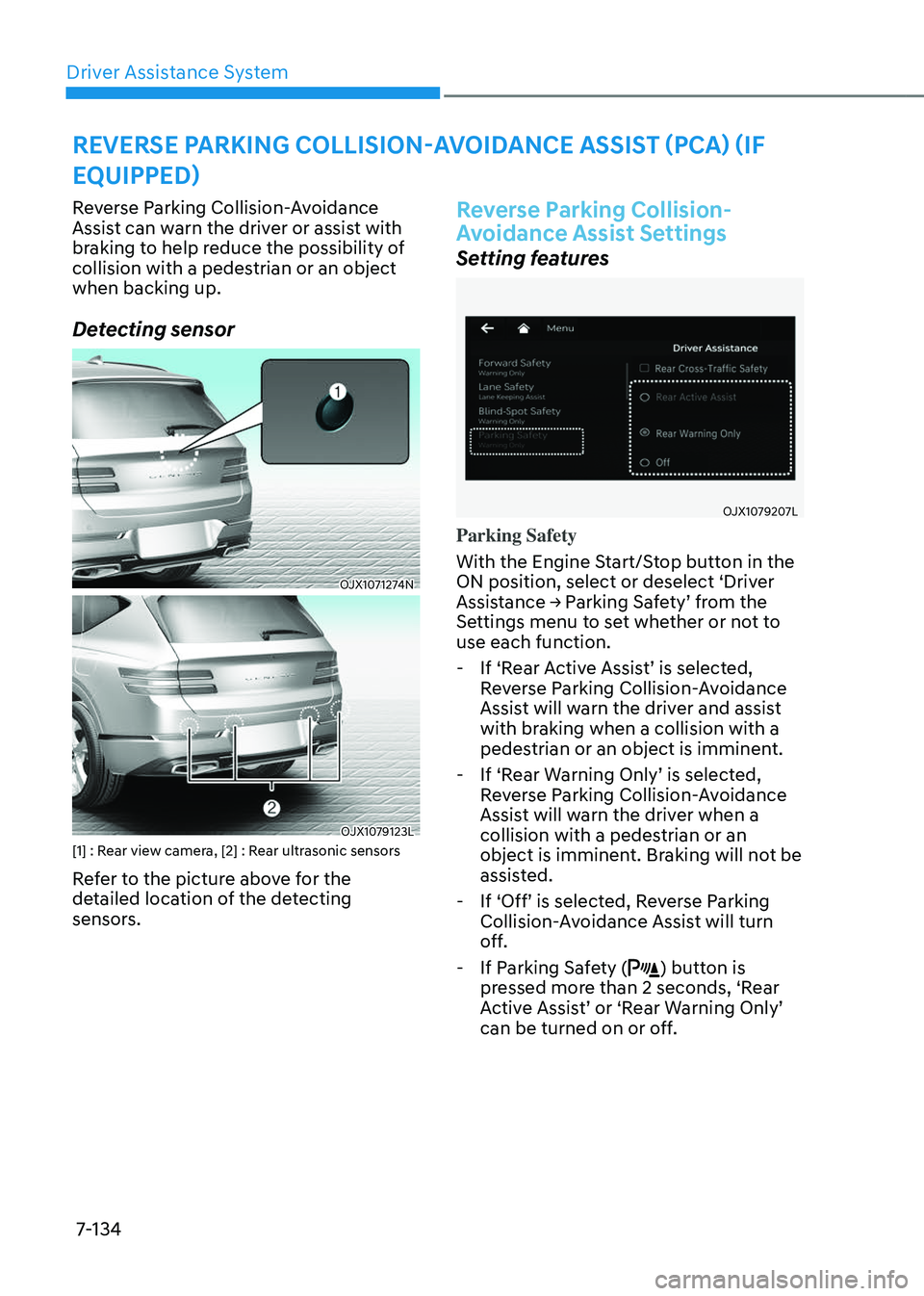
Detecting sensor
OJX1071274N OJX1071274N
OJX1079123LOJX1079123L[1] : Rear view camera, [2] : Rear ultrasonic sensors
Refer to the picture above for the
detailed location of the detecting
sensors.
Reverse Parking Collision-
Avoidance Assist Settings
Setting features
OJX1079207L OJX1079207L
Parking Safety
With the Engine Start/Stop button in the
ON position, select or deselect ‘Driver
Assistance → Parking Safety’ from the
Settings menu to set whether or not to
use each function.
-If ‘Rear Active Assist’ is selected,
Reverse Parking Collision-Avoidance
Assist will warn the driver and assist
with braking when a collision with a
pedestrian or an object is imminent.
-If ‘Rear Warning Only’ is selected,
Reverse Parking Collision-Avoidance
Assist will warn the driver when a
collision with a pedestrian or an
object is imminent. Braking will not be
assisted.
-If ‘Off’ is selected, Reverse Parking
Collision-Avoidance Assist will turn
off.
-If Parking Safety () button is
pressed more than 2 seconds, ‘Rear
Active Assist’ or ‘Rear Warning Only’
can be turned on or off.
REVERSE PARKING COLLISION-AVOIDANCE ASSIST (PCA) (IF
EQUIPPED)