AUX GMC ACADIA 2007 Owner's Guide
[x] Cancel search | Manufacturer: GMC, Model Year: 2007, Model line: ACADIA, Model: GMC ACADIA 2007Pages: 554, PDF Size: 2.76 MB
Page 321 of 554
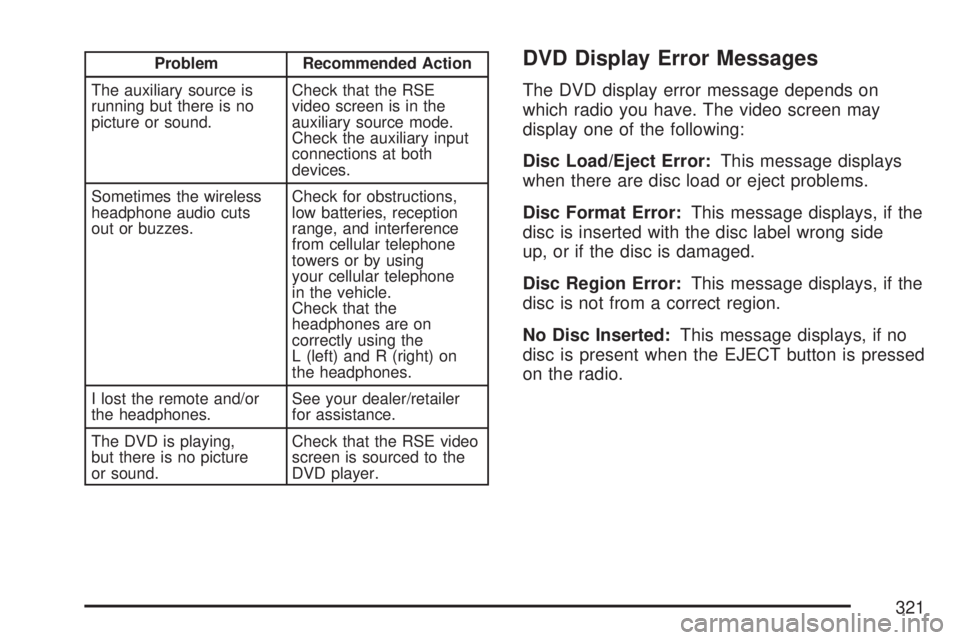
Problem Recommended Action
The auxiliary source is
running but there is no
picture or sound.Check that the RSE
video screen is in the
auxiliary source mode.
Check the auxiliary input
connections at both
devices.
Sometimes the wireless
headphone audio cuts
out or buzzes.Check for obstructions,
low batteries, reception
range, and interference
from cellular telephone
towers or by using
your cellular telephone
in the vehicle.
Check that the
headphones are on
correctly using the
L (left) and R (right) on
the headphones.
I lost the remote and/or
the headphones.See your dealer/retailer
for assistance.
The DVD is playing,
but there is no picture
or sound.Check that the RSE video
screen is sourced to the
DVD player.DVD Display Error Messages
The DVD display error message depends on
which radio you have. The video screen may
display one of the following:
Disc Load/Eject Error:This message displays
when there are disc load or eject problems.
Disc Format Error:This message displays, if the
disc is inserted with the disc label wrong side
up, or if the disc is damaged.
Disc Region Error:This message displays, if the
disc is not from a correct region.
No Disc Inserted:This message displays, if no
disc is present when the EJECT button is pressed
on the radio.
321
Page 322 of 554
DVD Distortion
Video distortion may occur when operating cellular
phones, scanners, CB radios, Global Position
Systems (GPS)*, two-way radios, mobile fax, or
walkie talkies.
It may be necessary to turn off the DVD player
when operating one of these devices in or near
the vehicle.
*Excludes the OnStar
®System.
Cleaning the RSE Overhead Console
When cleaning the RSE overhead console surface,
use only a clean cloth dampened with clean water.
Cleaning the Video Screen
When cleaning the video screen, use only a clean
cloth dampened with clean water. Use care
when directly touching or cleaning the screen,
as damage could result.
Rear Seat Audio (RSA)
This feature allows rear seat passengers to listen
to and control any of the music sources: radio,
CDs, DVDs, or other auxiliary sources. However,
the rear seat passengers can only control the
music sources the front seat passengers are not
listening to (except on some radios where
dual control is allowed). For example, rear seat
passengers can listen to and control a CD through
the headphones, while the driver listens to the
radio through the front speakers. The rear
seat passengers have control of the volume for
each set of headphones.
You can operate the RSA functions even when
the main radio is off.
Audio can be heard through wired headphones
(not included) plugged into the jacks on the RSA.
If your vehicle has this feature, audio can also
be heard on Channel 2 of the wireless
headphones.
The audio system mutes the rear speakers when
the RSA audio is active through the headphones.
322
Page 323 of 554
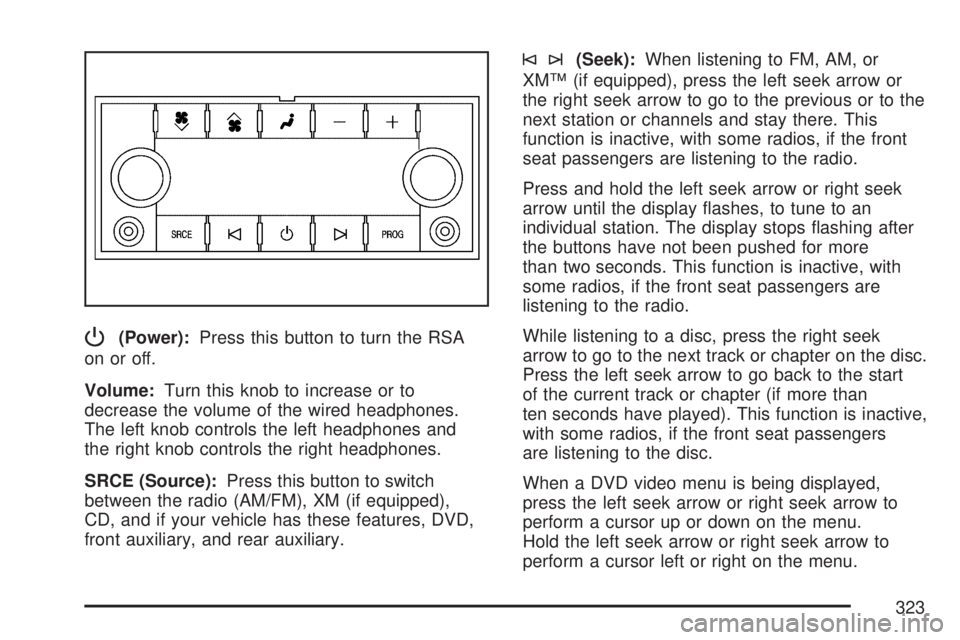
P(Power):Press this button to turn the RSA
on or off.
Volume:Turn this knob to increase or to
decrease the volume of the wired headphones.
The left knob controls the left headphones and
the right knob controls the right headphones.
SRCE (Source):Press this button to switch
between the radio (AM/FM), XM (if equipped),
CD, and if your vehicle has these features, DVD,
front auxiliary, and rear auxiliary.
©¨(Seek):When listening to FM, AM, or
XM™ (if equipped), press the left seek arrow or
the right seek arrow to go to the previous or to the
next station or channels and stay there. This
function is inactive, with some radios, if the front
seat passengers are listening to the radio.
Press and hold the left seek arrow or right seek
arrow until the display ashes, to tune to an
individual station. The display stops ashing after
the buttons have not been pushed for more
than two seconds. This function is inactive, with
some radios, if the front seat passengers are
listening to the radio.
While listening to a disc, press the right seek
arrow to go to the next track or chapter on the disc.
Press the left seek arrow to go back to the start
of the current track or chapter (if more than
ten seconds have played). This function is inactive,
with some radios, if the front seat passengers
are listening to the disc.
When a DVD video menu is being displayed,
press the left seek arrow or right seek arrow to
perform a cursor up or down on the menu.
Hold the left seek arrow or right seek arrow to
perform a cursor left or right on the menu.
323
Page 325 of 554
©SEEK¨:Press the SEEK arrows to go to the
previous or to the next radio station while in
AM, FM, or XM™ (if equipped). Press the SEEK
arrows to go to the previous or to the next track or
chapter while sourced to the DVD slot.
SRCE (Source):Press this button to switch
between the radio (AM, FM), XM™ (if equipped),
CD, and if your vehicle has these features,
DVD, front auxiliary, and rear auxiliary.
>(Mute):Press this button to silence the
system. Press this button again, or any other
radio button, to turn the sound on.
+/−
x(Volume):Press the plus or minus volume
buttons to increase or to decrease the volume.
Theft-Deterrent Feature
THEFTLOCK®is designed to discourage theft
of your vehicle’s radio. The feature works
automatically by learning a portion of the Vehicle
Identication Number (VIN). If the radio is moved
to a different vehicle, it does not operate and
LOCKED displays.
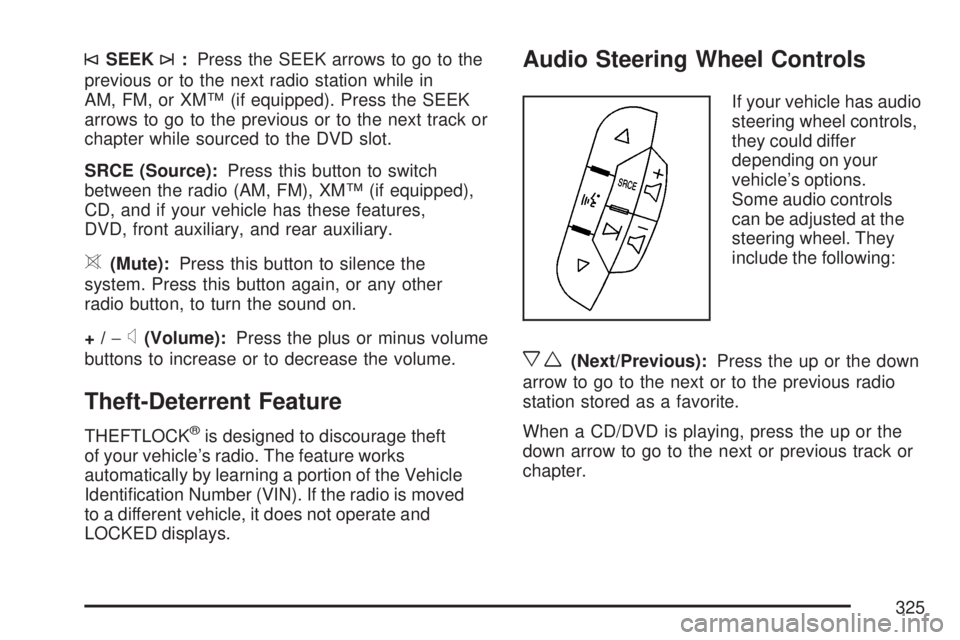
Audio Steering Wheel Controls
If your vehicle has audio
steering wheel controls,
they could differ
depending on your
vehicle’s options.
Some audio controls
can be adjusted at the
steering wheel. They
include the following:
xw(Next/Previous):Press the up or the down
arrow to go to the next or to the previous radio
station stored as a favorite.
When a CD/DVD is playing, press the up or the
down arrow to go to the next or previous track or
chapter.
325
Page 326 of 554
g(Mute/Voice Recognition):Press and release
this button to silence the vehicle speakers only.
The audio of the wireless and wired headphones,
if your vehicle has these features, does not
mute. Press and release this button again, to
turn the sound on.
If your vehicle has the navigation system, press
and hold this button for longer than one second to
initiate voice recognition. See “Voice Recognition”
in the Navigation System manual for more
information.
If your vehicle has OnStar
®, press and hold this
button for longer than one second to interact
with the OnStar
®system. If your vehicle also has
the navigation system, press and hold this
button for longer than one second to initiate voice
recognition and say “OnStar” to enter OnStar
®
mode. See theOnStar®System on page 145in
this manual for more information.SRCE (Source):Press this button to switch
between the radio (AM, FM), XM™ (if equipped),
CD, and if your vehicle has these features,
DVD, front auxiliary, and rear auxiliary.
+
e−e(Volume):Press the plus or minus
button to increase or to decrease the radio volume.
¨(Seek):Press the seek arrow to go to the
next radio station while in AM, FM, or XM™
(if equipped). Press this button to go to the next
track or chapter while sourced to the CD or
DVD slot.
Radio Reception
Frequency interference and static can occur
during normal radio reception if items such as cell
phone chargers, vehicle convenience accessories,
and external electronic devices are plugged
into the accessory power outlet. If there is
interference or static, unplug the item from the
accessory power outlet.
326
Page 495 of 554
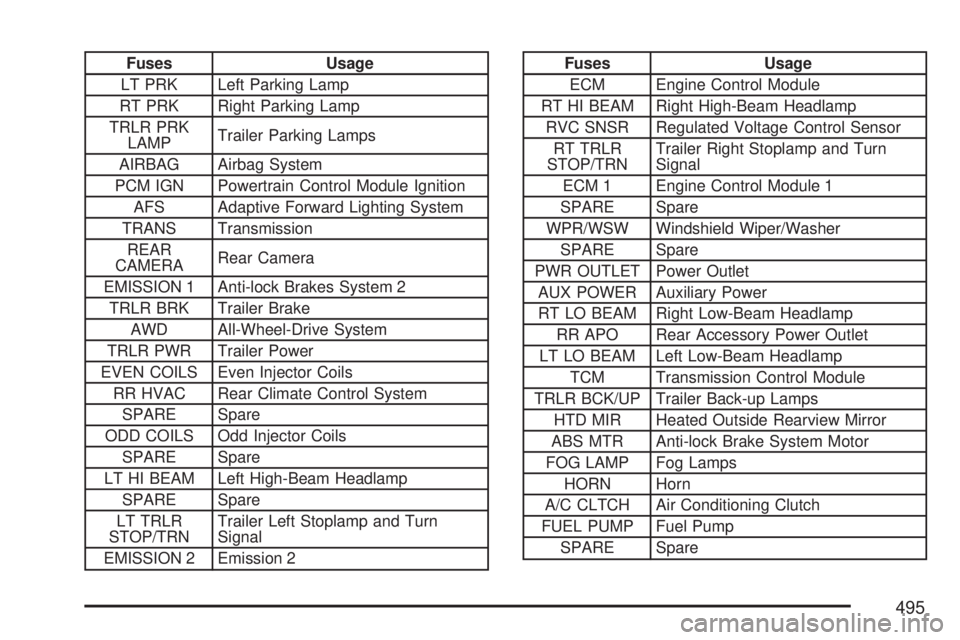
Fuses Usage
LT PRK Left Parking Lamp
RT PRK Right Parking Lamp
TRLR PRK
LAMPTrailer Parking Lamps
AIRBAG Airbag System
PCM IGN Powertrain Control Module Ignition
AFS Adaptive Forward Lighting System
TRANS Transmission
REAR
CAMERARear Camera
EMISSION 1 Anti-lock Brakes System 2
TRLR BRK Trailer Brake
AWD All-Wheel-Drive System
TRLR PWR Trailer Power
EVEN COILS Even Injector Coils
RR HVAC Rear Climate Control System
SPARE Spare
ODD COILS Odd Injector Coils
SPARE Spare
LT HI BEAM Left High-Beam Headlamp
SPARE Spare
LT TRLR
STOP/TRNTrailer Left Stoplamp and Turn
Signal
EMISSION 2 Emission 2Fuses Usage
ECM Engine Control Module
RT HI BEAM Right High-Beam Headlamp
RVC SNSR Regulated Voltage Control Sensor
RT TRLR
STOP/TRNTrailer Right Stoplamp and Turn
Signal
ECM 1 Engine Control Module 1
SPARE Spare
WPR/WSW Windshield Wiper/Washer
SPARE Spare
PWR OUTLET Power Outlet
AUX POWER Auxiliary Power
RT LO BEAM Right Low-Beam Headlamp
RR APO Rear Accessory Power Outlet
LT LO BEAM Left Low-Beam Headlamp
TCM Transmission Control Module
TRLR BCK/UP Trailer Back-up Lamps
HTD MIR Heated Outside Rearview Mirror
ABS MTR Anti-lock Brake System Motor
FOG LAMP Fog Lamps
HORN Horn
A/C CLTCH Air Conditioning Clutch
FUEL PUMP Fuel Pump
SPARE Spare
495