mirror GMC ACADIA 2007 Owner's Manual
[x] Cancel search | Manufacturer: GMC, Model Year: 2007, Model line: ACADIA, Model: GMC ACADIA 2007Pages: 554, PDF Size: 2.76 MB
Page 1 of 554
Seats and Restraint Systems
........................ 7
Front Seats
.............................................. 9
Rear Seats
............................................. 18
Safety Belts
............................................ 24
Child Restraints
...................................... 48
Airbag System
........................................ 76
Restraint System Check
......................... 92
Features and Controls
................................. 95
Keys
....................................................... 97
Doors and Locks
.................................. 106
Windows
............................................... 114
Theft-Deterrent Systems
....................... 118
Starting and Operating Your Vehicle
..... 123
Mirrors
.................................................. 140
OnStar
®System
................................... 145
Universal Home Remote System
.......... 149
Storage Areas
...................................... 161
Sunroof
................................................ 164Instrument Panel
........................................ 167
Instrument Panel Overview
................... 170
Climate Controls
................................... 199
Warning Lights, Gages, and Indicators
... 214
Driver Information Center (DIC)
............ 232
Audio System(s)
................................... 264
Driving Your Vehicle
.................................. 329
Your Driving, the Road, and
Your Vehicle
..................................... 330
Towing
................................................. 367
Service and Appearance Care
................... 383
Service
................................................. 385
Fuel
...................................................... 387
Checking Things Under the Hood
......... 394
All-Wheel Drive
..................................... 430
Headlamp Aiming
................................. 431
Bulb Replacement
................................ 432
Windshield Wiper Blade Replacement
... 434
2007 GMC Acadia Owner ManualM
1
Page 7 of 554
Front Seats..................................................... 9
Manual Seats................................................ 9
Driver Seat Height Adjuster......................... 10
Power Seats............................................... 10
Manual Lumbar........................................... 11
Power Lumbar............................................. 12
Heated Seats.............................................. 12
Memory Seat and Mirrors............................ 13
Reclining Seatbacks.................................... 15
Head Restraints.......................................... 17
Rear Seats.................................................... 18
Rear Seat Operation................................... 18
Third Row Seats......................................... 21
Safety Belts.................................................. 24
Safety Belts: They Are for Everyone........... 24
Questions and Answers About
Safety Belts............................................. 28
How to Wear Safety Belts Properly............. 29Driver Position............................................. 30
Shoulder Belt Height Adjustment................. 38
Safety Belt Use During Pregnancy.............. 39
Right Front Passenger Position................... 39
Rear Seat Passengers................................ 40
Rear Safety Belt Comfort Guides................ 43
Safety Belt Pretensioners............................ 47
Safety Belt Extender................................... 47
Child Restraints............................................ 48
Older Children............................................. 48
Infants and Young Children......................... 51
Child Restraint Systems.............................. 55
Where to Put the Restraint.......................... 60
Lower Anchors and Tethers for
Children (LATCH).................................... 61
Securing a Child Restraint in a Rear
Seat Position........................................... 69
Securing a Child Restraint in the Right
Front Seat Position.................................. 72
Section 1 Seats and Restraint Systems
7
Page 11 of 554
Move the seat forward or rearward by sliding the
control forward or rearward.
Your vehicle may have additional features to
adjust your vehicle’s power seat:
Raise or lower the entire seat by moving the
entire control up or down.
Raise or lower the front part of the seat
cushion by moving the front of the control up
or down.
Raise or lower the rear part of the seat
cushion by moving the rear of the control up
or down.
Your vehicle may have a memory function which
allows seat settings to be saved and recalled.
SeeMemory Seat and Mirrors on page 13for more
information.
Manual Lumbar
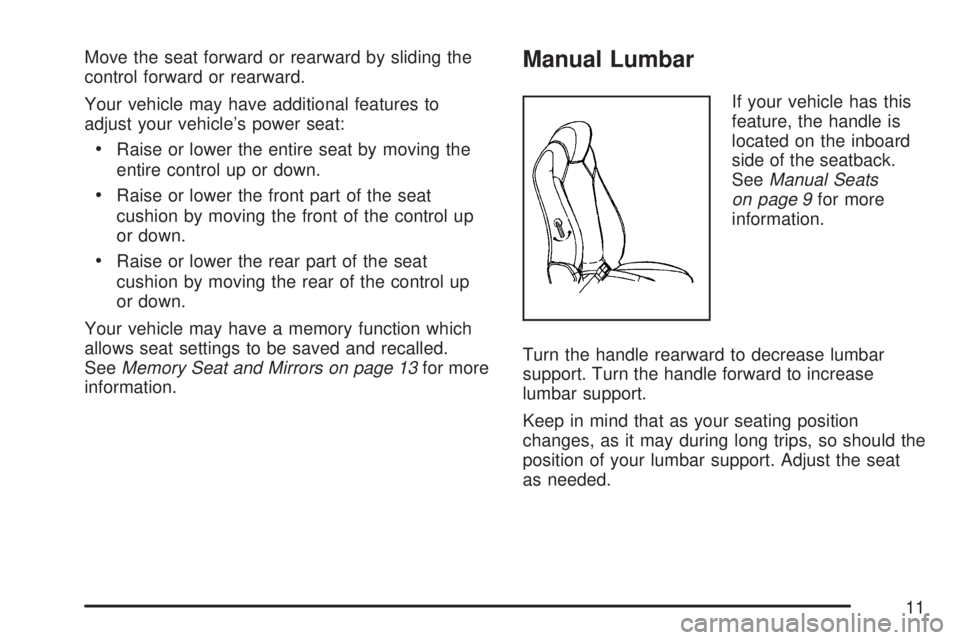
If your vehicle has this
feature, the handle is
located on the inboard
side of the seatback.
SeeManual Seats
on page 9for more
information.
Turn the handle rearward to decrease lumbar
support. Turn the handle forward to increase
lumbar support.
Keep in mind that as your seating position
changes, as it may during long trips, so should the
position of your lumbar support. Adjust the seat
as needed.
11
Page 13 of 554
The heated seats will turn off ten seconds after
the ignition is turned off. If you want to use
the heated seat feature after you restart your
vehicle, you will need to press the heated seat
or seatback button again.
If your vehicle has remote vehicle start and is
started using the remote keyless entry transmitter,
the front heated seats will be turned on to the
high setting if it is cold outside. See “Remote
Vehicle Start” underRemote Keyless Entry (RKE)
System Operation on page 100. When the key is
inserted into the ignition and the ignition is turned
on, the heated seat feature will turn off. To turn
the heated seat feature back on, press the
desired button.Memory Seat and Mirrors
Your vehicle may have the memory package.
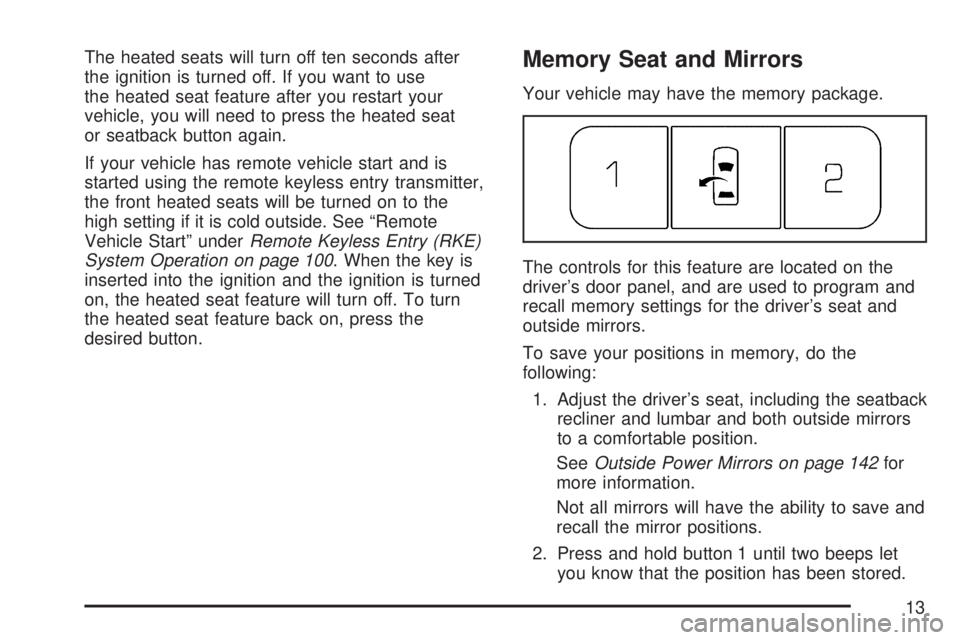
The controls for this feature are located on the
driver’s door panel, and are used to program and
recall memory settings for the driver’s seat and
outside mirrors.
To save your positions in memory, do the
following:
1. Adjust the driver’s seat, including the seatback
recliner and lumbar and both outside mirrors
to a comfortable position.
SeeOutside Power Mirrors on page 142for
more information.
Not all mirrors will have the ability to save and
recall the mirror positions.
2. Press and hold button 1 until two beeps let
you know that the position has been stored.
13
Page 14 of 554
A second seating and mirror position can be
programmed by repeating the above steps and
pressing button 2.
To recall the memory positions, the vehicle must
be in PARK (P). Press and release either button 1
or button 2 corresponding to the desired driving
position. The seat and outside mirrors will move to
the position previously stored. You will hear a
single beep.
If you use the Remote Keyless Entry (RKE)
transmitter to enter your vehicle and the remote
recall memory feature is on, automatic seat
and mirror movement will occur. See “MEMORY
SEAT RECALL” underDIC Vehicle Customization
(With DIC Buttons) on page 255for more
information.
To stop recall movement of the memory feature at
any time, press one of the power seat controls,
memory buttons, or power mirror buttons.
If something has blocked the driver’s seat while
recalling a memory position, the driver’s seat recall
may stop working. If this happens, press the
appropriate control for the area that is not recalling
for two seconds, after the obstruction is removed.Then try recalling the memory position again by
pressing the appropriate memory button. If
the memory position is still not being recalled, see
your dealer/retailer for service.
Easy Exit Seat
The control for this feature is located on the
driver’s door panel between buttons 1 and 2.
With the vehicle in PARK (P), the exit position can
be recalled by pressing the exit button. You will
hear a single beep. The driver’s seat will
move back.
If the easy exit seat feature is on in the Driver
Information Center (DIC), automatic seat
movement will occur when the key is removed
from the ignition. See “EASY EXIT SEAT” under
DIC Vehicle Customization (With DIC Buttons)
on page 255for more information.
Further programming for the memory seat feature
can be done using the DIC. You can select or
cancel the following:
The automatic easy exit seat feature.
The remote memory seat recall feature.
For programming information, seeDIC Vehicle
Customization (With DIC Buttons) on page 255.
14
Page 96 of 554
Mirrors......................................................... 140
Manual Rearview Mirror with OnStar®....... 140
Automatic Dimming Rearview Mirror with
OnStar
®and Compass........................... 140
Outside Power Mirrors............................... 142
Outside Power Foldaway Mirrors............... 143
Outside Convex Mirror............................... 144
Outside Heated Mirrors............................. 145
OnStar
®System.......................................... 145
Universal Home Remote System................ 149
System Identication.................................. 149
Universal Home Remote System............... 150
Universal Home Remote System
Operation (With One Triangular LED)..... 150
Universal Home Remote System
Operation (With Three Round LED)....... 154Storage Areas............................................. 161
Glove Box................................................. 161
Cupholder(s).............................................. 161
Instrument Panel Storage Area.................. 161
Center Console Storage Area.................... 161
Floor Mats................................................. 162
Luggage Carrier........................................ 162
Rear Seat Armrest.................................... 163
Convenience Net....................................... 163
Cargo Cover............................................. 163
Cargo Tie Downs...................................... 163
Cargo Management System...................... 164
Sunroof....................................................... 164
Section 2 Features and Controls
96
Page 117 of 554
Programming the Power Windows
If the battery one your vehicle has been recharged,
disconnected, or replaced, windows with the
express-up feature need to be reprogrammed for
this feature to work. To program the window:
1. With the ignition in the ACCESSORY or RUN
positions, or when Retained Accessory
Power (RAP) is active, close all doors. See
Retained Accessory Power (RAP) on
page 125.
2. Press and continue to hold the window switch
until the window is fully open.
3. Pull up and hold the window switch to close the
window. Continue to hold it briey after the
window is fully closed.
4. Repeat for each window that has the express
up feature.
Anti-Pinch Feature
The anti-pinch feature is on windows with the
express-up feature. If an object is in the way of the
window as it is express-closing, or in certain
weather conditions like severe icing, the window will
stop and open to a factory preset position. The
window functions normally once the obstruction is
removed.
Window Lockout
o
(Window Lockout):The window lockout
switch is located with the power window switches
on the driver’s door armrest. This feature
prevents the rear passenger windows from
operating, except from the driver’s position. Press
the switch to turn the lockout feature on or off.
An indicator light will come on to show the lockout
feature is on.
Sun Visors
Pull the sun visor down to block glare. Detach the
sun visor from the center mount and slide it
along the rod from side-to-side to cover the driver
or passenger side of the front window. Swing
the sun visor to the side to cover the side window.
It can be moved along the rod from side-to-side
in this position also.
Lighted Visor Vanity Mirror
Your vehicle has lighted visor vanity mirrors on
both the driver’s and passenger’s sun visors. Pull
the sun visor down and lift the mirror cover to
turn the lamps on.
117
Page 140 of 554
Mirrors
Manual Rearview Mirror with
OnStar
®
When you are sitting in a comfortable driving
position, adjust the mirror so you can see clearly
behind your vehicle. Hold the mirror in the
center to move it up or down and side to side. The
day/night adjustment allows you to adjust the
mirror to avoid glare from the lamps behind you.
Move the lever to the right for nighttime use and to
the left for daytime use.
There may also be three OnStar
®buttons located
at the bottom of the mirror face. SeeOnStar®
System on page 145for more information.
Automatic Dimming Rearview Mirror
with OnStar
®and Compass
Your vehicle may have an automatic-dimming
rearview mirror with a compass.There may be three additional buttons for the
OnStar
®system. See your dealer/retailer for more
information on the system and how to subscribe
to OnStar
®. SeeOnStar®System on page 145for
more information about the services OnStar®
provides.
O(On/Off):This is the on/off button.
Automatic Dimming Mirror Operation
The automatic dimming mirror comes on each time
the ignition is turned to start. To turn the
automatic dimming feature off or back on, press
the on/off button. The indicator light on the mirror is
lit when the automatic dimming feature is on.
Compass Operation
Press the on/off button once to turn the compass
on or off.
There is a compass display in the window in the
upper right corner of the mirror face.
Compass Calibration
Press and hold the on/off button to activate the
compass calibration mode. CAL will be displayed
in the compass window on the mirror.
140
Page 141 of 554
The compass can be calibrated by driving the
vehicle in circles at 5 mph (8 km/h) or less until the
display reads a direction.
If after a few seconds the display does not show a
compass direction, (N for North for example),
there may be a strong magnetic eld interfering
with the compass. Such interference may be
caused by a magnetic antenna mount, note pad
holder, or similar object. If the letter C or CAL
appears in the compass window, the compass may
need to be reset or calibrated.
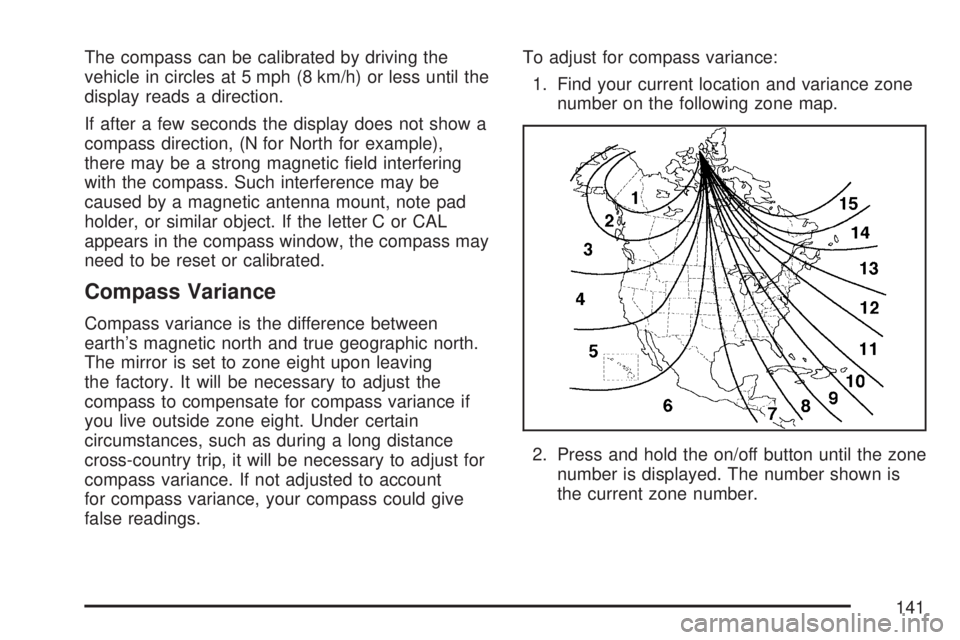
Compass Variance
Compass variance is the difference between
earth’s magnetic north and true geographic north.
The mirror is set to zone eight upon leaving
the factory. It will be necessary to adjust the
compass to compensate for compass variance if
you live outside zone eight. Under certain
circumstances, such as during a long distance
cross-country trip, it will be necessary to adjust for
compass variance. If not adjusted to account
for compass variance, your compass could give
false readings.To adjust for compass variance:
1. Find your current location and variance zone
number on the following zone map.
2. Press and hold the on/off button until the zone
number is displayed. The number shown is
the current zone number.
141
Page 142 of 554
3. Scroll through the zone numbers that appear
in the window on the mirror by pressing the
on/off button. Once you nd your zone
number, release the button. After about
four seconds, the mirror will return to the
compass display, and the new zone number
will be set. If C or CAL appears in the
compass window, the compass may need
calibration. See “Compass Calibration” listed
previously.
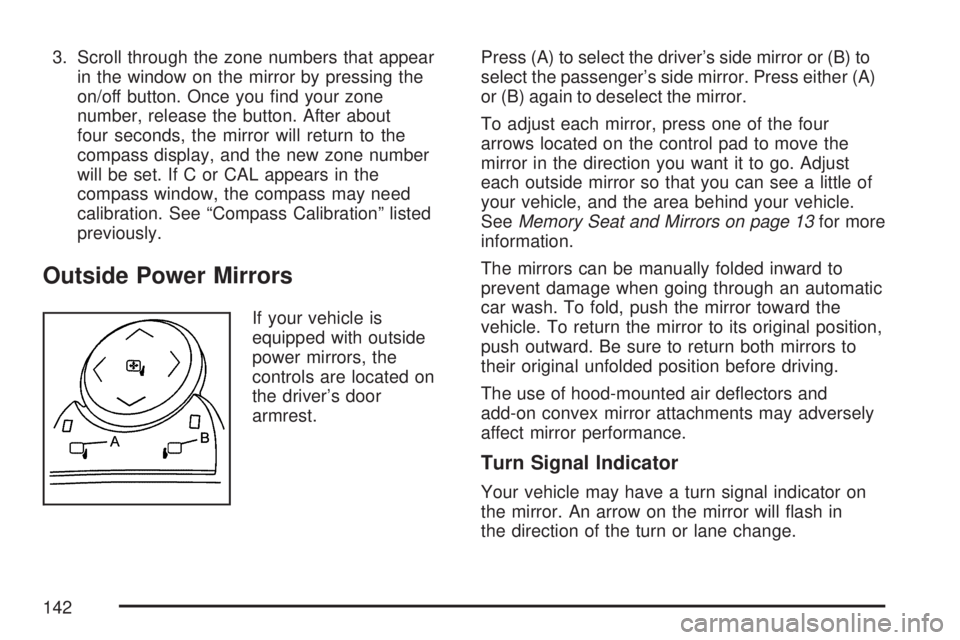
Outside Power Mirrors
If your vehicle is
equipped with outside
power mirrors, the
controls are located on
the driver’s door
armrest.Press (A) to select the driver’s side mirror or (B) to
select the passenger’s side mirror. Press either (A)
or (B) again to deselect the mirror.
To adjust each mirror, press one of the four
arrows located on the control pad to move the
mirror in the direction you want it to go. Adjust
each outside mirror so that you can see a little of
your vehicle, and the area behind your vehicle.
SeeMemory Seat and Mirrors on page 13for more
information.
The mirrors can be manually folded inward to
prevent damage when going through an automatic
car wash. To fold, push the mirror toward the
vehicle. To return the mirror to its original position,
push outward. Be sure to return both mirrors to
their original unfolded position before driving.
The use of hood-mounted air deectors and
add-on convex mirror attachments may adversely
affect mirror performance.
Turn Signal Indicator
Your vehicle may have a turn signal indicator on
the mirror. An arrow on the mirror will ash in
the direction of the turn or lane change.
142