fuel cap GMC ACADIA 2008 User Guide
[x] Cancel search | Manufacturer: GMC, Model Year: 2008, Model line: ACADIA, Model: GMC ACADIA 2008Pages: 472, PDF Size: 5.72 MB
Page 325 of 472
When replacing the fuel cap, turn it clockwise until it
clicks. Make sure the cap is fully installed. The
diagnostic system can determine if the fuel cap has
been left off or improperly installed. This would allow fuel
to evaporate into the atmosphere. SeeMalfunction
Indicator Lamp on page 3-50.
If your vehicle has a Driver Information Center (DIC),
the TIGHTEN GAS CAP message will be displayed if the
fuel cap is not properly installed.
{CAUTION:
If a re starts while you are refueling, do not
remove the nozzle. Shut off the ow of fuel by
shutting off the pump or by notifying the
station attendant. Leave the area immediately.
Notice:If you need a new fuel cap, be sure to get
the right type. Your dealer/ retailer can get one
for you. If you get the wrong type, it may not
t properly. This may cause your malfunction
indicator lamp to light and may damage your fuel
tank and emissions system. SeeMalfunction
Indicator Lamp on page 3-50.
5-11
Page 327 of 472
{CAUTION:
Things that burn can get on hot engine parts
and start a re. These include liquids like fuel,
oil, coolant, brake uid, windshield washer and
other uids, and plastic or rubber. You or
others could be burned. Be careful not to drop
or spill things that will burn onto a hot engine.
Hood Release
To open the hood, do the following:
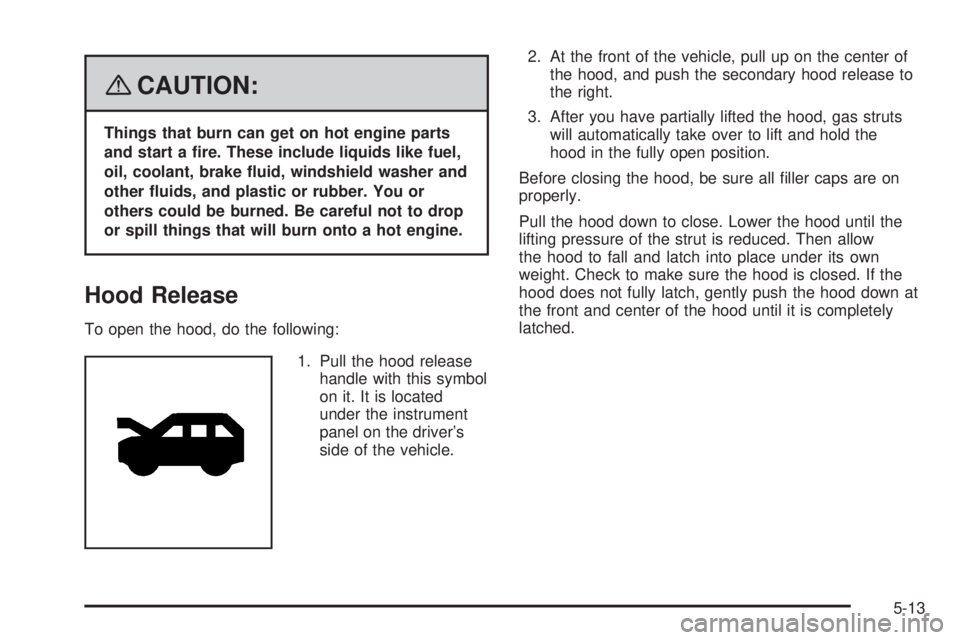
1. Pull the hood release
handle with this symbol
on it. It is located
under the instrument
panel on the driver’s
side of the vehicle.2. At the front of the vehicle, pull up on the center of
the hood, and push the secondary hood release to
the right.
3. After you have partially lifted the hood, gas struts
will automatically take over to lift and hold the
hood in the fully open position.
Before closing the hood, be sure all ller caps are on
properly.
Pull the hood down to close. Lower the hood until the
lifting pressure of the strut is reduced. Then allow
the hood to fall and latch into place under its own
weight. Check to make sure the hood is closed. If the
hood does not fully latch, gently push the hood down at
the front and center of the hood until it is completely
latched.
5-13
Page 329 of 472
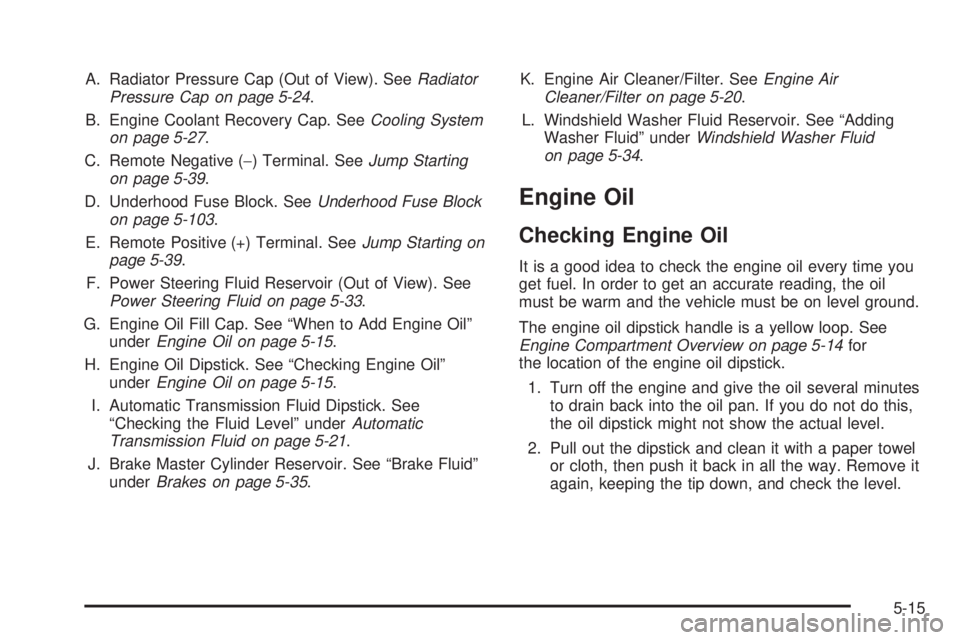
A. Radiator Pressure Cap (Out of View). SeeRadiator
Pressure Cap on page 5-24.
B. Engine Coolant Recovery Cap. SeeCooling System
on page 5-27.
C. Remote Negative (−) Terminal. SeeJump Starting
on page 5-39.
D. Underhood Fuse Block. SeeUnderhood Fuse Block
on page 5-103.
E. Remote Positive (+) Terminal. SeeJump Starting on
page 5-39.
F. Power Steering Fluid Reservoir (Out of View). See
Power Steering Fluid on page 5-33.
G. Engine Oil Fill Cap. See “When to Add Engine Oil”
underEngine Oil on page 5-15.
H. Engine Oil Dipstick. See “Checking Engine Oil”
underEngine Oil on page 5-15.
I. Automatic Transmission Fluid Dipstick. See
“Checking the Fluid Level” underAutomatic
Transmission Fluid on page 5-21.
J. Brake Master Cylinder Reservoir. See “Brake Fluid”
underBrakes on page 5-35.K. Engine Air Cleaner/Filter. SeeEngine Air
Cleaner/Filter on page 5-20.
L. Windshield Washer Fluid Reservoir. See “Adding
Washer Fluid” underWindshield Washer Fluid
on page 5-34.
Engine Oil
Checking Engine Oil
It is a good idea to check the engine oil every time you
get fuel. In order to get an accurate reading, the oil
must be warm and the vehicle must be on level ground.
The engine oil dipstick handle is a yellow loop. See
Engine Compartment Overview on page 5-14for
the location of the engine oil dipstick.
1. Turn off the engine and give the oil several minutes
to drain back into the oil pan. If you do not do this,
the oil dipstick might not show the actual level.
2. Pull out the dipstick and clean it with a paper towel
or cloth, then push it back in all the way. Remove it
again, keeping the tip down, and check the level.
5-15
Page 366 of 472
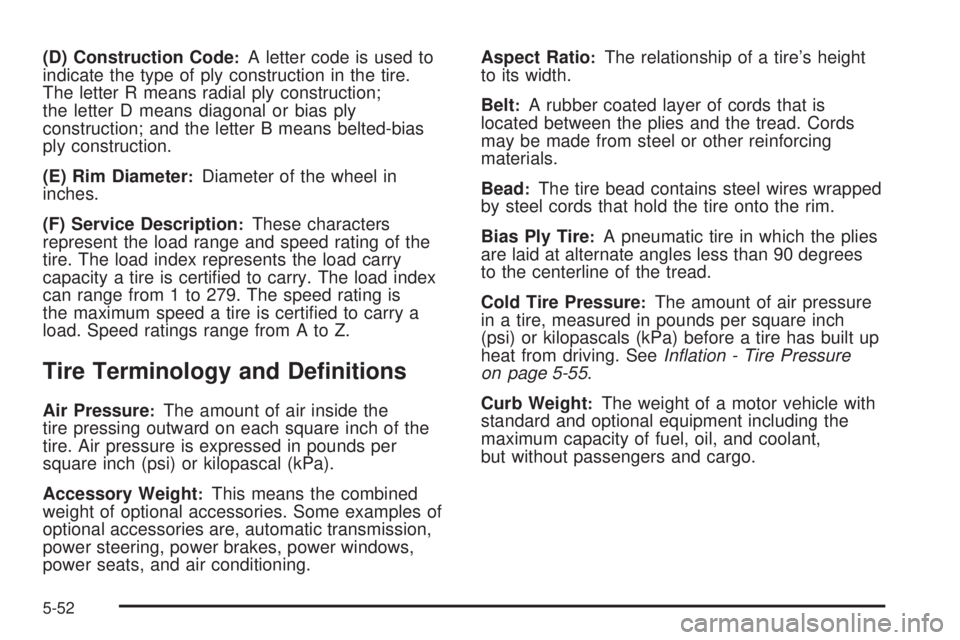
(D) Construction Code:A letter code is used to
indicate the type of ply construction in the tire.
The letter R means radial ply construction;
the letter D means diagonal or bias ply
construction; and the letter B means belted-bias
ply construction.
(E) Rim Diameter
:Diameter of the wheel in
inches.
(F) Service Description
:These characters
represent the load range and speed rating of the
tire. The load index represents the load carry
capacity a tire is certied to carry. The load index
can range from 1 to 279. The speed rating is
the maximum speed a tire is certied to carry a
load. Speed ratings range from A to Z.
Tire Terminology and Denitions
Air Pressure:The amount of air inside the
tire pressing outward on each square inch of the
tire. Air pressure is expressed in pounds per
square inch (psi) or kilopascal (kPa).
Accessory Weight
:This means the combined
weight of optional accessories. Some examples of
optional accessories are, automatic transmission,
power steering, power brakes, power windows,
power seats, and air conditioning.Aspect Ratio
:The relationship of a tire’s height
to its width.
Belt
:A rubber coated layer of cords that is
located between the plies and the tread. Cords
may be made from steel or other reinforcing
materials.
Bead
:The tire bead contains steel wires wrapped
by steel cords that hold the tire onto the rim.
Bias Ply Tire
:A pneumatic tire in which the plies
are laid at alternate angles less than 90 degrees
to the centerline of the tread.
Cold Tire Pressure
:The amount of air pressure
in a tire, measured in pounds per square inch
(psi) or kilopascals (kPa) before a tire has built up
heat from driving. SeeInflation - Tire Pressure
on page 5-55.
Curb Weight
:The weight of a motor vehicle with
standard and optional equipment including the
maximum capacity of fuel, oil, and coolant,
but without passengers and cargo.
5-52
Page 369 of 472
Vehicle Capacity Weight:The number of
designated seating positions multiplied by 150 lbs
(68 kg) plus the rated cargo load. SeeLoading
Your Vehicle on page 4-21.
Vehicle Maximum Load on the Tire
:Load on an
individual tire due to curb weight, accessory
weight, occupant weight, and cargo weight.
Vehicle Placard
:A label permanently attached to
a vehicle showing the vehicle’s capacity weight
and the original equipment tire size and
recommended ination pressure. See “Tire and
Loading Information Label” underLoading
Your Vehicle on page 4-21.
Ination - Tire Pressure
Tires need the correct amount of air pressure to
operate effectively.
Notice:Do not let anyone tell you that
under-ination or over-ination is all right. It is
not. If your tires do not have enough air
(under-ination), you can get the following:
Too much exing
Too much heat
Tire overloading
Premature or irregular wear
Poor handling
Reduced fuel economy
If your tires have too much air (over-ination),
you can get the following:
Unusual wear
Poor handling
Rough ride
Needless damage from road hazards
5-55
Page 421 of 472
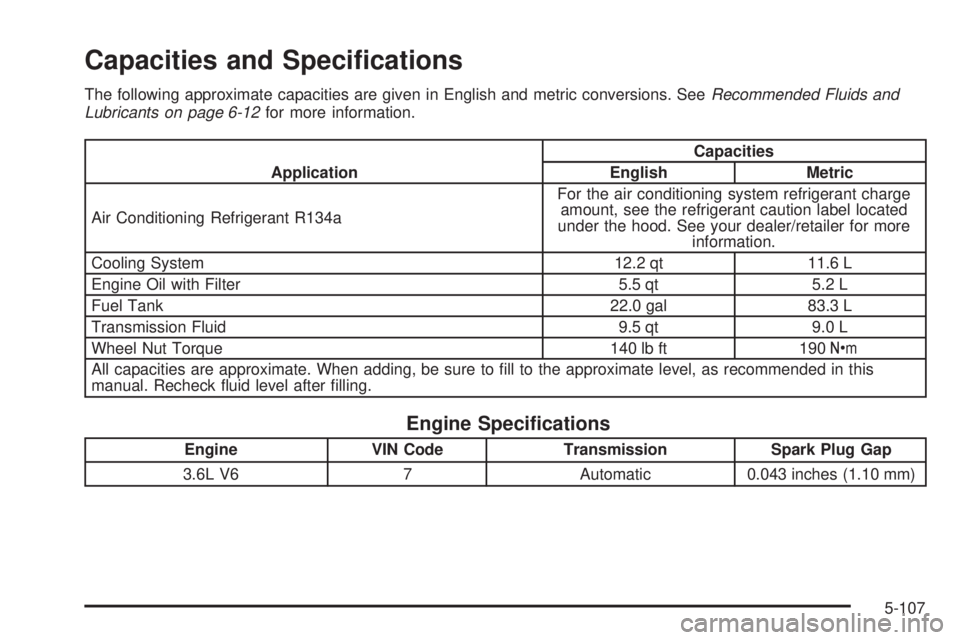
Capacities and Specications
The following approximate capacities are given in English and metric conversions. SeeRecommended Fluids and
Lubricants on page 6-12for more information.
ApplicationCapacities
English Metric
Air Conditioning Refrigerant R134aFor the air conditioning system refrigerant charge
amount, see the refrigerant caution label located
under the hood. See your dealer/retailer for more
information.
Cooling System 12.2 qt 11.6 L
Engine Oil with Filter 5.5 qt 5.2 L
Fuel Tank 22.0 gal 83.3 L
Transmission Fluid 9.5 qt 9.0 L
Wheel Nut Torque 140 lb ft 190Y
All capacities are approximate. When adding, be sure to ll to the approximate level, as recommended in this
manual. Recheck uid level after lling.
Engine Specications
Engine VIN Code Transmission Spark Plug Gap
3.6L V6 7 Automatic 0.043 inches (1.10 mm)
5-107
Page 430 of 472
(i)Drain, flush, and refill cooling system. This service
can be complex; you should have your dealer/retailer
perform this service. See Engine Coolant on page 5-22
for what to use. Inspect hoses. Clean radiator,
condenser, pressure cap, and filler neck. Pressure test
the cooling system and pressure cap.
(j)Check system for interference or binding and for
damaged or missing parts. Replace parts as needed.
Replace any components that have high effort or
excessive wear. Do not lubricate accelerator or cruise
control cables.
(k)Visually inspect belt for fraying, excessive cracks,
or obvious damage. Replace belt if necessary.
(l)If you drive regularly under dusty conditions, inspect
the filter at each engine oil change.
Owner Checks and Services
These owner checks and services should be performed
at the intervals specied to help ensure the safety,
dependability, and emission control performance of your
vehicle. Your dealer/retailer can assist you with these
checks and services.
Be sure any necessary repairs are completed at once.
Whenever any uids or lubricants are added to your
vehicle, make sure they are the proper ones, as shown
inRecommended Fluids and Lubricants on page 6-12.
At Each Fuel Fill
It is important to perform these underhood checks at
each fuel fill.
Engine Oil Level Check
Notice:It is important to check the engine oil
regularly and keep it at the proper level. Failure to
keep the engine oil at the proper level can cause
damage to the engine not covered by your warranty.
Check the engine oil level and add the proper oil if
necessary. SeeEngine Oil on page 5-15.
Engine Coolant Level Check
Check the engine coolant level and add DEX-COOL®
coolant mixture if necessary. SeeEngine Coolant
on page 5-22.
Windshield Washer Fluid Level Check
Check the windshield washer uid level in the windshield
washer uid reservoir and add the proper uid if
necessary.
6-8
Page 460 of 472
Audio System (cont.)
Setting the Time..........................................3-85
Theft-Deterrent Feature...............................3-127
Audio System(s).............................................3-87
Automatic Transmission
Fluid..........................................................5-21
Operation...................................................2-30
B
Battery..........................................................5-38
Electric Power Management..........................3-19
Run-Down Protection...................................3-20
Brake
Emergencies................................................ 4-6
Brakes..........................................................5-35
System Warning Light..................................3-47
Braking........................................................... 4-4
Braking in Emergencies..................................... 4-6
Break-In, New Vehicle.....................................2-25
Bulb Replacement...........................................5-45
Halogen Bulbs............................................5-45
Headlamp Aiming........................................5-45
License Plate Lamps....................................5-46
Replacement Bulbs......................................5-46
Buying New Tires...........................................5-64
C
Calibration.....................................................2-40
California Fuel.................................................. 5-7
California Perchlorate Materials Requirements....... 5-4
California Proposition 65 Warning....................... 5-4
Canadian Owners................................................ ii
Capacities and Specications..........................5-107
Carbon Monoxide...................2-14, 2-38, 4-17, 4-30
Care of
Safety Belts................................................5-92
Cargo Cover..................................................2-58
Cargo Management System.............................2-59
Cargo Tie Downs............................................2-59
CD, MP3 ............................................3-104, 3-108
Center Console Storage Area...........................2-56
Chains, Tire...................................................5-70
Charging System Light....................................3-45
Check
Engine Light...............................................3-50
Checking Things Under the Hood......................5-12
Chemical Paint Spotting...................................5-96
Child Restraints
Child Restraint Systems...............................1-43
Infants and Young Children...........................1-39
Lower Anchors and Tethers for Children..........1-47
Older Children.............................................1-36
2