mirror GMC ACADIA 2008 User Guide
[x] Cancel search | Manufacturer: GMC, Model Year: 2008, Model line: ACADIA, Model: GMC ACADIA 2008Pages: 472, PDF Size: 5.72 MB
Page 124 of 472
Outside Power Mirrors
If your vehicle is equipped
with outside power mirrors,
the controls are located
on the driver’s door
armrest.
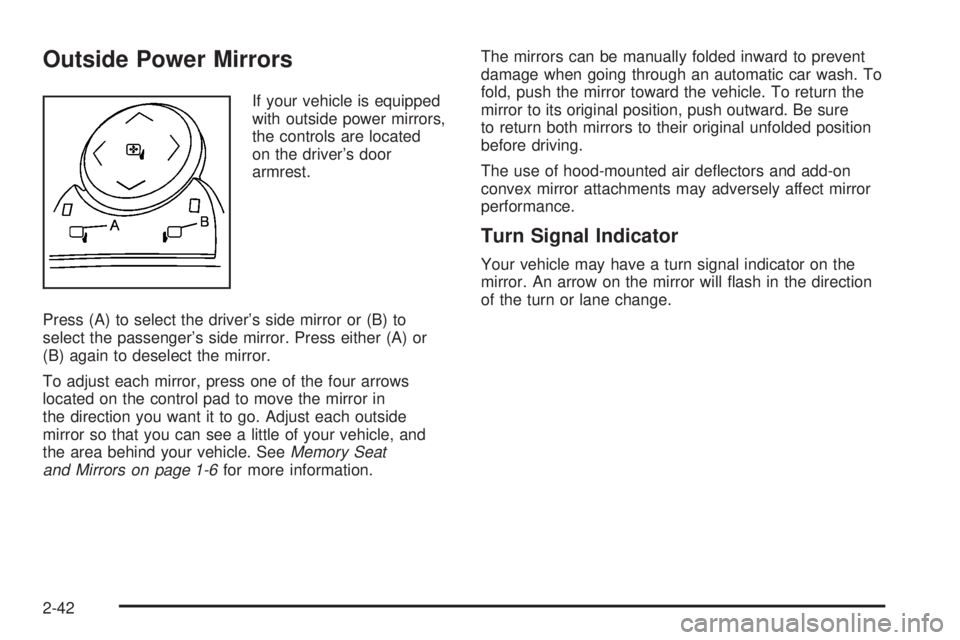
Press (A) to select the driver’s side mirror or (B) to
select the passenger’s side mirror. Press either (A) or
(B) again to deselect the mirror.
To adjust each mirror, press one of the four arrows
located on the control pad to move the mirror in
the direction you want it to go. Adjust each outside
mirror so that you can see a little of your vehicle, and
the area behind your vehicle. SeeMemory Seat
and Mirrors on page 1-6for more information.The mirrors can be manually folded inward to prevent
damage when going through an automatic car wash. To
fold, push the mirror toward the vehicle. To return the
mirror to its original position, push outward. Be sure
to return both mirrors to their original unfolded position
before driving.
The use of hood-mounted air deectors and add-on
convex mirror attachments may adversely affect mirror
performance.
Turn Signal Indicator
Your vehicle may have a turn signal indicator on the
mirror. An arrow on the mirror will ash in the direction
of the turn or lane change.
2-42
Page 125 of 472
Outside Power Foldaway Mirrors
If your vehicle is equipped
with outside power
foldaway mirrors, the
controls are located on the
driver’s door armrest.
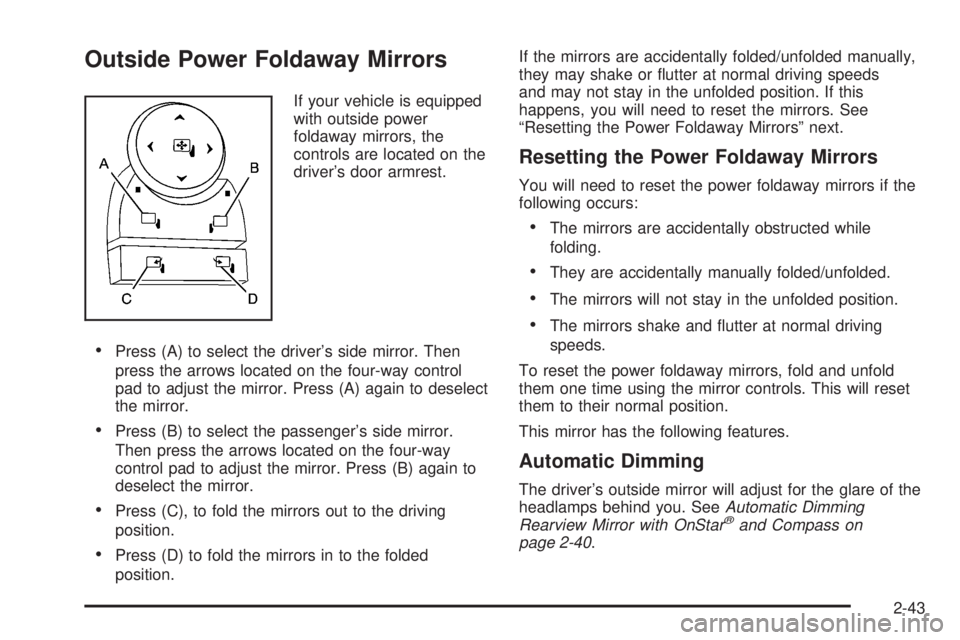
Press (A) to select the driver’s side mirror. Then
press the arrows located on the four-way control
pad to adjust the mirror. Press (A) again to deselect
the mirror.
Press (B) to select the passenger’s side mirror.
Then press the arrows located on the four-way
control pad to adjust the mirror. Press (B) again to
deselect the mirror.
Press (C), to fold the mirrors out to the driving
position.
Press (D) to fold the mirrors in to the folded
position.If the mirrors are accidentally folded/unfolded manually,
they may shake or utter at normal driving speeds
and may not stay in the unfolded position. If this
happens, you will need to reset the mirrors. See
“Resetting the Power Foldaway Mirrors” next.
Resetting the Power Foldaway Mirrors
You will need to reset the power foldaway mirrors if the
following occurs:
The mirrors are accidentally obstructed while
folding.
They are accidentally manually folded/unfolded.
The mirrors will not stay in the unfolded position.
The mirrors shake and utter at normal driving
speeds.
To reset the power foldaway mirrors, fold and unfold
them one time using the mirror controls. This will reset
them to their normal position.
This mirror has the following features.
Automatic Dimming
The driver’s outside mirror will adjust for the glare of the
headlamps behind you. SeeAutomatic Dimming
Rearview Mirror with OnStar
®and Compass on
page 2-40.
2-43
Page 126 of 472
Park Tilt Mirrors
If your vehicle has the memory package, the outside
mirrors are able to perform the park tilt function. This
feature may be useful in allowing the driver to view the
curb when parallel parking. This feature will cause the
passenger’s and/or driver’s mirror to tilt to a preselected
position when the vehicle is in REVERSE (R).
The passenger’s and/or driver’s mirror will return to its
original position when the vehicle is shifted out of
REVERSE (R), or the ignition is turned off or to
OFF/LOCK.
This feature can be turned on or off through the Driver
Information Center (DIC). SeeDIC Vehicle
Customization (With DIC Buttons) on page 3-75and
Memory Seat and Mirrors on page 1-6for more
information.
Turn Signal Indicator
Your vehicle may have a turn signal indicator on the
mirror. An arrow on the mirror will ash in the direction
of the turn or lane change.
Outside Convex Mirror
{CAUTION:
A convex mirror can make things (like other
vehicles) look farther away than they really are.
If you cut too sharply into the right lane, you
could hit a vehicle on your right. Check your
inside mirror or glance over your shoulder
before changing lanes.
The passenger’s side mirror may have convex glass. A
convex mirror’s surface is curved so more can be
seen from the driver’s seat.
Outside Heated Mirrors
Press the rear window defogger button, located on the
climate control panel, to also turn the outside heated
mirrors on or off. The mirrors will heat to help clear fog
or frost from the surface of the mirror.
See “Rear Window Defogger” underDual Automatic
Climate Control System on page 3-29for more
information.
2-44
Page 127 of 472
Object Detection Systems
Ultrasonic Rear Parking
Assist (URPA)
If your vehicle has the Ultrasonic Rear Parking Assist
(URPA) system, it helps you park easier and avoid other
vehicles while in REVERSE (R). It operates at speeds
less than 5 mph (8 km/h). It can determine how
close objects are to the rear bumper, up to 8 feet (2.5 m)
behind your vehicle. The distance sensors are located
on the rear bumper.
{CAUTION:
The Ultrasonic Rear Parking Assist (URPA)
system does not replace driver vision. It
cannot detect:
objects that are below the bumper,
underneath the vehicle, or if they are too
close or far from the vehicle
children, pedestrians, bicyclists, or pets.
If you do not use proper care before and while
backing; vehicle damage, injury, or death
could occur. Even with URPA, always check
behind your vehicle before backing up. While
backing, be sure to look for objects and check
your vehicle’s mirrors.
2-45
Page 142 of 472
Sunroof
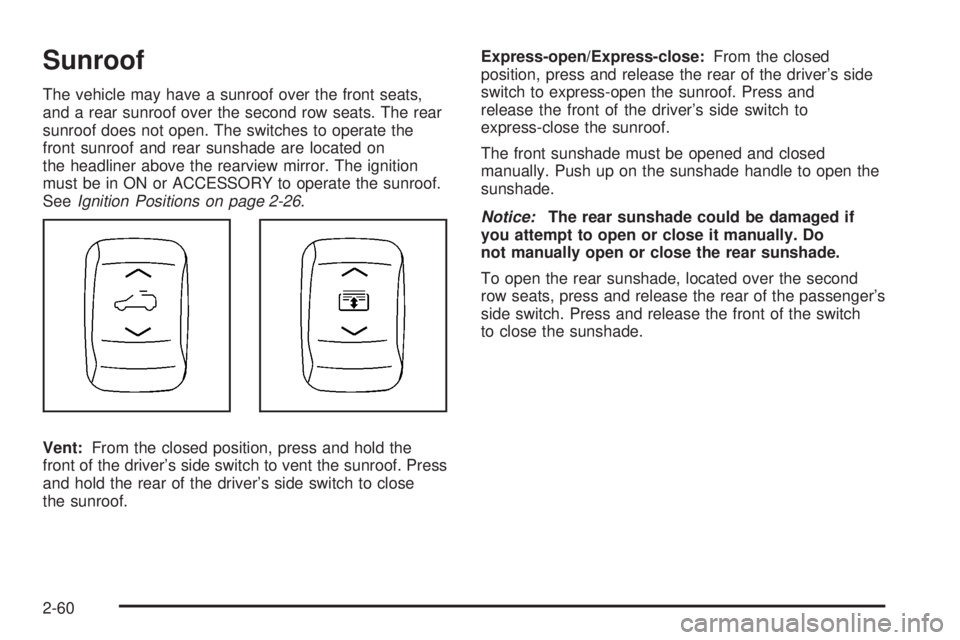
The vehicle may have a sunroof over the front seats,
and a rear sunroof over the second row seats. The rear
sunroof does not open. The switches to operate the
front sunroof and rear sunshade are located on
the headliner above the rearview mirror. The ignition
must be in ON or ACCESSORY to operate the sunroof.
SeeIgnition Positions on page 2-26.
Vent:From the closed position, press and hold the
front of the driver’s side switch to vent the sunroof. Press
and hold the rear of the driver’s side switch to close
the sunroof.Express-open/Express-close:From the closed
position, press and release the rear of the driver’s side
switch to express-open the sunroof. Press and
release the front of the driver’s side switch to
express-close the sunroof.
The front sunshade must be opened and closed
manually. Push up on the sunshade handle to open the
sunshade.
Notice:The rear sunshade could be damaged if
you attempt to open or close it manually. Do
not manually open or close the rear sunshade.
To open the rear sunshade, located over the second
row seats, press and release the rear of the passenger’s
side switch. Press and release the front of the switch
to close the sunshade.
2-60
Page 159 of 472
Instrument Panel Brightness
D(Instrument Panel Brightness):The knob with
this symbol on it is located next to the exterior lamps
control. Push the knob in all the way until it extends
out and then turn the knob clockwise to brighten
or counterclockwise to dim the lights. Push the knob
back in when nished.
Courtesy Lamps
When a door is opened, the courtesy lamps automatically
come on. They make it easy for you to enter and leave
your vehicle. You can also manually turn these lamps on
by fully turning the instrument panel brightness control
clockwise.
The reading lamps, located on the headliner above the
rearview mirror, can be turned on or off independent
of the automatic courtesy lamps, when the doors
are closed.
Dome Lamps
The dome lamps automatically come on when a door
is opened, unless the dome lamp override button
is pressed in.
The lamps can also be turned on and off by turning
the instrument panel brightness control clockwise to
the farthest position.
Dome Lamp Override
The dome lamp override button is located next to the
exterior lamps control.
The dome lamp override is used to set the dome lamps
to remain off or come on automatically when a door
is opened.
E(Dome Lamp Override):Press the button in and
the dome lamps remain off when a door is opened.
Press the button again to return it to the extended
position so that the dome lamps come on when a
door is opened.
Entry Lighting
Your vehicle may have courtesy lamps that will come
on and stay on for a set time whenever the unlock
symbol is pressed on the Remote Keyless Entry (RKE)
Transmitter, if the vehicle has one.
If a door is opened, the lamps stay on while it is open
and then turn off automatically about 25 seconds
after the door is closed. If the unlock symbol is pressed
and you do not open a door, the lamps turn off after
about 20 seconds.
3-17
Page 171 of 472
AUX (Auxiliary):Press this button to turn the
rear heating and air conditioning on. SeeRear Air
Conditioning and Heating System on page 3-36or
Rear Air Conditioning and Heating System and
Electronic Climate Controls on page 3-38.
Rear Window Defogger
The rear window defogger uses a warming grid to
remove fog from the rear window.
<(Rear Window Defogger):Press this button on the
right knob to turn the rear window defogger on or off.
The rear window defogger stays on about 10 minutes
after the button is pressed, before turning off. The
defogger can also be turned off by pressing the button
again or by turning off the engine. Do not drive the
vehicle until all the windows are clear.
If your vehicle has heated outside rearview mirrors, the
mirrors heat to help clear fog or frost from the surface of
the mirror when the rear window defog button is pressed.
Notice:Do not use anything sharp on the inside of
the rear window. If you do, you could cut or damage
the warming grid, and the repairs would not be
covered by your warranty. Do not attach a temporary
vehicle license, tape, a decal or anything similar to
the defogger grid.
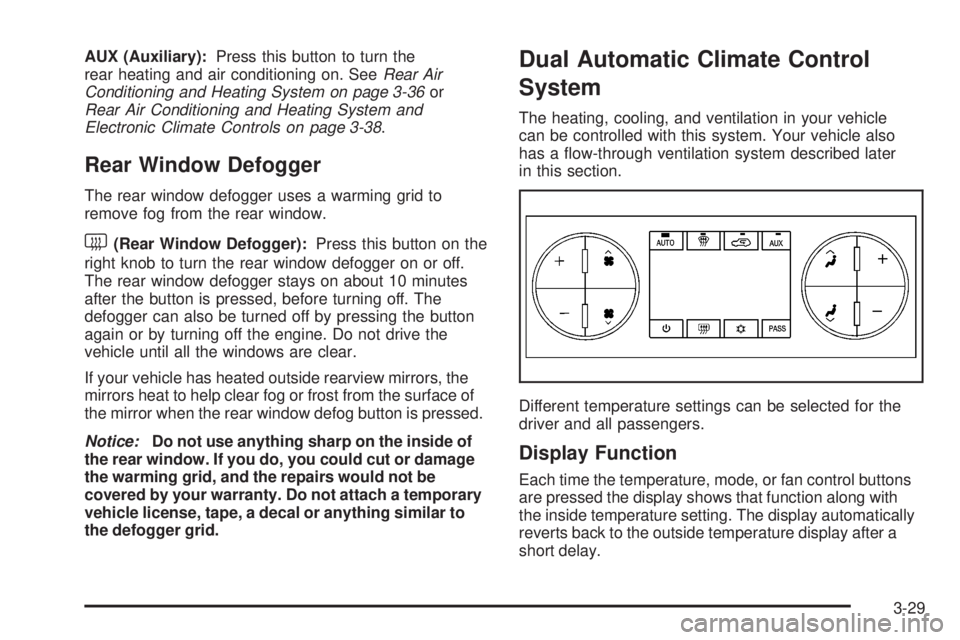
Dual Automatic Climate Control
System
The heating, cooling, and ventilation in your vehicle
can be controlled with this system. Your vehicle also
has a ow-through ventilation system described later
in this section.
Different temperature settings can be selected for the
driver and all passengers.
Display Function
Each time the temperature, mode, or fan control buttons
are pressed the display shows that function along with
the inside temperature setting. The display automatically
reverts back to the outside temperature display after a
short delay.
3-29
Page 177 of 472
To clear fog from the rear seat side windows, select the
bi-level mode on the rear climate control system and
direct the headliner outlets toward the side windows.
0(Defrost):Press this button to remove fog or
frost from the windshield more quickly. This mode
directs most of the air to the windshield and side window
vents and some to the oor vents. In this mode, the
system automatically forces outside air into the vehicle.
The recirculation mode cannot be selected while in
the defrost mode. The air conditioning compressor
runs automatically in this setting, unless the outside
temperature is close to freezing. Do not drive the
vehicle until all the windows are clear.
While in defrost mode, if the PASS button is pressed,
the PASS button indicator will ash three times to
let you know that the passenger climate control system
cannot be activated. If the passenger temperature
buttons are adjusted while in defrost mode, the driver
temperature indicator will change. The passenger
temperature will not be displayed.
AUX (Auxiliary):Press this button to turn the
rear heating and air conditioning on. SeeRear Air
Conditioning and Heating System on page 3-36or
Rear Air Conditioning and Heating System and
Electronic Climate Controls on page 3-38.
Rear Window Defogger
The rear window defogger uses a warming grid to
remove fog from the rear window.
<(Rear Window Defogger):Press this button to
turn the rear window defogger on or off. The rear
window defogger stays on for about 10 minutes after
the button is pressed, before turning off. The defogger
can also be turned off by pressing the button again
or by turning off the engine. Do not drive the vehicle
until all the windows are clear.
If your vehicle has heated outside rearview mirrors,
the mirrors will heat to help clear fog or frost from the
surface of the mirror when the rear window defog
button is pressed.
Notice:Do not use a razor blade or sharp object
to clear the inside rear window. Do not adhere
anything to the defogger grid lines in the rear glass.
These actions may damage the rear defogger.
Repairs would not be covered by your warranty.
3-35
Page 223 of 472
PARK TILT MIRRORS
If your vehicle has this feature, it allows you to select
whether or not the outside mirror(s) will automatically
tilt down when the vehicle is shifted into REVERSE (R).
SeeOutside Power Foldaway Mirrors on page 2-43
for more information.
Press the customization button until PARK TILT
MIRRORS appears on the DIC display. Press the
set/reset button once to access the settings for
this feature. Then press the customization button to
scroll through the following settings:
OFF (default):Neither outside mirror will be tilted
down when the vehicle is shifted into REVERSE (R).
DRIVER MIRROR:The driver’s outside mirror will
be tilted down when the vehicle is shifted into
REVERSE (R).
PASSENGER MIRROR:The passenger’s outside
mirror will be tilted down when the vehicle is shifted
into REVERSE (R).
BOTH MIRRORS:The driver’s and passenger’s
outside mirrors will be tilted down when the vehicle
is shifted into REVERSE (R).
NO CHANGE:No change will be made to this feature.
The current setting will remain.
To select a setting, press the set/reset button while the
desired setting is displayed on the DIC.
EASY EXIT SEAT
If your vehicle has this feature, it allows you to select
your preference for the automatic easy exit seat feature.
SeeMemory Seat and Mirrors on page 1-6for more
information.
Press the customization button until EASY EXIT SEAT
appears on the DIC display. Press the set/reset
button once to access the settings for this feature.
Then press the customization button to scroll through
the following settings:
OFF (default):No automatic seat exit recall will occur.
ON:The driver’s seat will move back when the key
is removed from the ignition.
The automatic easy exit seat movement will only occur
one time after the key is removed from the ignition. If the
automatic movement has already occurred, and you put
the key back in the ignition and remove it again, the seat
will stay in the original exit position, unless a memory
recall took place prior to removing the key again.
NO CHANGE:No change will be made to this feature.
The current setting will remain.
To select a setting, press the set/reset button while the
desired setting is displayed on the DIC.
3-81
Page 224 of 472
MEMORY SEAT RECALL
If your vehicle has this feature, it allows you to select
your preference for the remote memory seat recall
feature. SeeMemory Seat and Mirrors on page 1-6for
more information.
Press the customization button until MEMORY SEAT
RECALL appears on the DIC display. Press the set/reset
button once to access the settings for this feature.
Then press the customization button to scroll through
the following settings:
OFF (default):No remote memory seat recall will
occur.
ON:The driver’s seat and outside mirrors will
automatically move to the stored driving position when
the unlock button on the Remote Keyless Entry
(RKE) transmitter is pressed. See “Relearn Remote
Key” underDIC Operation and Displays (With DIC
Buttons) on page 3-57orDIC Operation and Displays
(Without DIC Buttons) on page 3-63for more information
on matching transmitters to driver ID numbers.
NO CHANGE:No change will be made to this feature.
The current setting will remain.
To select a setting, press the set/reset button while the
desired setting is displayed on the DIC.
REMOTE START
If your vehicle has this feature, it allows you to turn the
remote start off or on. The remote start feature allows
you to start the engine from outside of the vehicle using
the Remote Keyless Entry (RKE) transmitter. See
Remote Vehicle Start on page 2-7for more information.
Press the customization button until REMOTE START
appears on the DIC display. Press the set/reset
button once to access the settings for this feature.
Then press the customization button to scroll through
the following settings:
OFF:The remote start feature will be disabled.
ON (default):The remote start feature will be enabled.
NO CHANGE:No change will be made to this
feature. The current setting will remain.
To select a setting, press the set/reset button while the
desired setting is displayed on the DIC.
3-82