tire size GMC ACADIA 2008 User Guide
[x] Cancel search | Manufacturer: GMC, Model Year: 2008, Model line: ACADIA, Model: GMC ACADIA 2008Pages: 472, PDF Size: 5.72 MB
Page 371 of 472
Tire Pressure Monitor System
The Tire Pressure Monitor System (TPMS) uses radio
and sensor technology to check tire pressure levels. The
TPMS sensors monitor the air pressure in your
vehicle’s tires and transmit tire pressure readings to a
receiver located in the vehicle.
Each tire, including the spare (if provided), should be
checked monthly when cold and inated to the ination
pressure recommended by the vehicle manufacturer
on the vehicle placard or tire ination pressure label. (If
your vehicle has tires of a different size than the size
indicated on the vehicle placard or tire ination pressure
label, you should determine the proper tire ination
pressure for those tires.)
As an added safety feature, your vehicle has been
equipped with a tire pressure monitoring system (TPMS)
that illuminates a low tire pressure telltale when one
or more of your tires is signicantly under-inated.
Accordingly, when the low tire pressure telltale
illuminates, you should stop and check your tires as
soon as possible, and inate them to the proper
pressure. Driving on a signicantly under-inated tire
causes the tire to overheat and can lead to tire failure.
Under-ination also reduces fuel efficiency and tire
tread life, and may affect the vehicle’s handling
and stopping ability.Please note that the TPMS is not a substitute for proper
tire maintenance, and it is the driver’s responsibility to
maintain correct tire pressure, even if under-ination has
not reached the level to trigger illumination of the
TPMS low tire pressure telltale.
Your vehicle has also been equipped with a TPMS
malfunction indicator to indicate when the system is not
operating properly. The TPMS malfunction indicator
is combined with the low tire pressure telltale. When the
system detects a malfunction, the telltale will ash for
approximately one minute and then remain continuously
illuminated. This sequence will continue upon
subsequent vehicle start-ups as long as the malfunction
exists.
When the malfunction indicator is illuminated, the
system may not be able to detect or signal low tire
pressure as intended. TPMS malfunctions may occur for
a variety of reasons, including the installation of
replacement or alternate tires or wheels on the vehicle
that prevent the TPMS from functioning properly.
Always check the TPMS malfunction telltale after
replacing one or more tires or wheels on your vehicle to
ensure that the replacement or alternate tires and
wheels allow the TPMS to continue to function properly.
SeeTire Pressure Monitor Operation on page 5-58,
for additional information.
5-57
Page 373 of 472
At the same time a message to check the pressure in a
specic tire appears on the Driver Information Center
(DIC) display. The low tire pressure warning light
and the DIC warning message come on at each ignition
cycle until the tires are inated to the correct ination
pressure. Using the DIC, tire pressure levels can
be viewed by the driver. For additional information and
details about the DIC operation and displays see
DIC Operation and Displays (With DIC Buttons) on
page 3-57orDIC Operation and Displays (Without DIC
Buttons) on page 3-63andDIC Warnings and
Messages on page 3-66.
The low tire pressure warning light may come on in cool
weather when the vehicle is rst started, and then
turn off as you start to drive. This could be an early
indicator that the air pressure in the tire(s) are getting
low and need to be inated to the proper pressure.A Tire and Loading Information label, attached to your
vehicle, shows the size of your vehicle’s original
equipment tires and the correct ination pressure for
your vehicle’s tires when they are cold. SeeLoading
Your Vehicle on page 4-21, for an example of the Tire
and Loading Information label and its location on
your vehicle. Also seeInflation - Tire Pressure on
page 5-55.
Your vehicle’s TPMS can warn you about a low tire
pressure condition but it does not replace normal
tire maintenance. SeeTire Inspection and Rotation on
page 5-62andTires on page 5-48.
Notice:Liquid tire sealants could damage the Tire
Pressure Monitor System (TPMS) sensors. Sensor
damage caused by using a tire sealant is not
covered by your warranty. Do not use liquid tire
sealants.
5-59
Page 378 of 472
You need new tires if any of the following statements
are true:
You can see the indicators at three or more places
around the tire.
You can see cord or fabric showing through the
tire’s rubber.
The tread or sidewall is cracked, cut, or snagged
deep enough to show cord or fabric.
The tire has a bump, bulge, or split.
The tire has a puncture, cut, or other damage that
cannot be repaired well because of the size or
location of the damage.
The rubber in tires degrades over time, even if they are
not being used. This is also true for the spare tire, if
your vehicle has one. Multiple conditions affect how fast
this aging takes place, including temperatures, loading
conditions, and ination pressure maintenance. With
proper care and maintenance tires will typically wear out
before they degrade due to age. If you are unsure
about the need to replace your tires as they get older,
consult the tire manufacturer for more information.
Buying New Tires
GM has developed and matched specic tires for
your vehicle. The original equipment tires
installed on your vehicle, when it was new, were
designed to meet General Motors Tire
Performance Criteria Specication (TPC Spec)
system rating. If you need replacement tires, GM
strongly recommends that you get tires with
the same TPC Spec rating. This way, your vehicle
will continue to have tires that are designed to
give the same performance and vehicle safety,
during normal use, as the original tires.
GM’s exclusive TPC Spec system considers over
a dozen critical specications that impact the
overall performance of your vehicle, including
brake system performance, ride and handling,
traction control, and tire pressure monitoring
performance. GM’s TPC Spec number is molded
onto the tire’s sidewall near the tire size. If the
tires have an all-season tread design, the
TPC Spec number will be followed by an MS for
mud and snow. SeeTire Sidewall Labeling on
page 5-49for additional information.
5-64
Page 379 of 472
GM recommends replacing tires in sets of four.
This is because uniform tread depth on all tires will
help keep your vehicle performing most like it
did when the tires were new. Replacing less than
a full set of tires can affect the braking and
handling performance of your vehicle. SeeTire
Inspection and Rotation on page 5-62for
information on proper tire rotation.
{CAUTION:
Mixing tires could cause you to lose
control while driving. If you mix tires of
different sizes, brands, or types (radial
and bias-belted tires), the vehicle may not
handle properly, and you could have a
crash. Using tires of different sizes,
brands, or types may also cause damage
to your vehicle. Be sure to use the correct
size, brand, and type of tires on all
wheels. It is all right to drive with your
compact spare temporarily, as it was
developed for use on your vehicle. See
Compact Spare Tire on page 5-88.
{CAUTION:
If you use bias-ply tires on your vehicle,
the wheel rim anges could develop
cracks after many miles of driving. A tire
and/or wheel could fail suddenly, causing
a crash. Use only radial-ply tires with the
wheels on your vehicle.
If you must replace your vehicle’s tires with those
that do not have a TPC Spec number, make
sure they are the same size, load range, speed
rating, and construction type (radial and
bias-belted tires) as your vehicle’s original tires.
Vehicles that have a tire pressure monitoring
system could give an inaccurate low-pressure
warning if non-TPC Spec rated tires are installed
on your vehicle. Non-TPC Spec rated tires
may give a low-pressure warning that is higher or
lower than the proper warning level you would
get with TPC Spec rated tires. SeeTire Pressure
Monitor System on page 5-57.
5-65
Page 380 of 472
Your vehicle’s original equipment tires are listed
on the Tire and Loading Information Label.
SeeLoading Your Vehicle on page 4-21, for more
information about the Tire and Loading Information
Label and its location on your vehicle.
Different Size Tires and Wheels
If you add wheels or tires that are a different size than
your original equipment wheels and tires, this could
affect the way your vehicle performs, including its
braking, ride and handling characteristics, stability, and
resistance to rollover. Additionally, if your vehicle
has electronic systems such as anti-lock brakes, rollover
airbags, traction control, and electronic stability control,
the performance of these systems can be affected.
{CAUTION:
If you add different sized wheels, your vehicle
may not provide an acceptable level of
performance and safety if tires not
recommended for those wheels are selected.
You may increase the chance that you will
crash and suffer serious injury. Only use GM
specic wheel and tire systems developed for
your vehicle, and have them properly installed
by a GM certied technician.
SeeBuying New Tires on page 5-64andAccessories
and Modifications on page 5-4for additional information.
5-66
Page 384 of 472
Used Replacement Wheels
{CAUTION:
Putting a used wheel on your vehicle is
dangerous. You cannot know how it has been
used or how far it has been driven. It could fail
suddenly and cause a crash. If you have to
replace a wheel, use a new GM original
equipment wheel.
Tire Chains
{CAUTION:
Do not use tire chains. There is not enough
clearance. Tire chains used on a vehicle
without the proper amount of clearance can
cause damage to the brakes, suspension or
other vehicle parts. The area damaged by the
tire chains could cause you to lose control of
your vehicle and you or others may be injured
in a crash.
Use another type of traction device only if its
manufacturer recommends it for use on your
vehicle and tire size combination and road
conditions. Follow that manufacturer’s
instructions. To help avoid damage to your
vehicle, drive slowly, readjust or remove the
device if it is contacting your vehicle, and do
not spin your vehicle’s wheels. If you do nd
traction devices that will t, install them on the
front tires.
5-70
Page 389 of 472
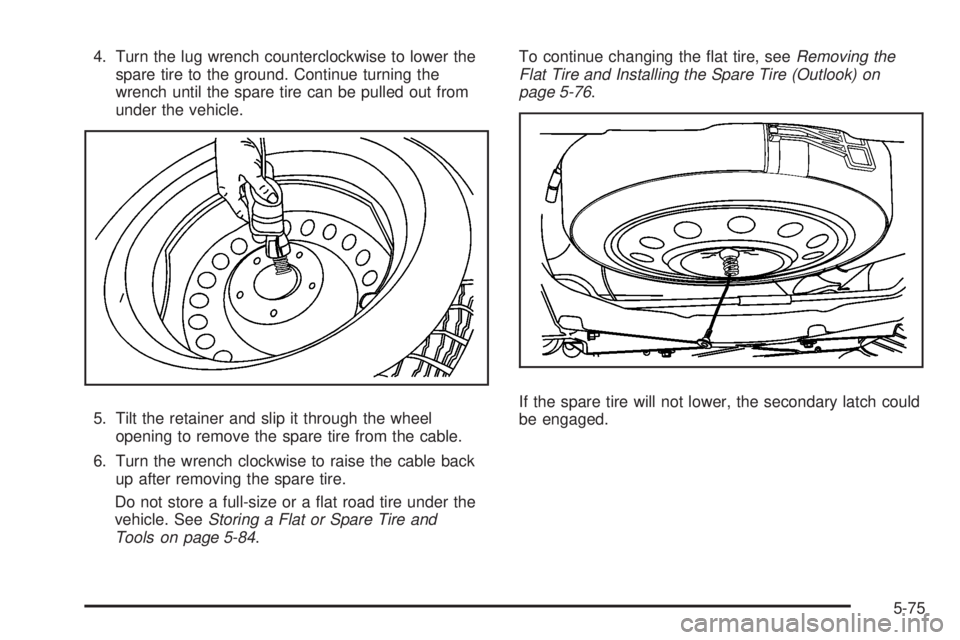
4. Turn the lug wrench counterclockwise to lower the
spare tire to the ground. Continue turning the
wrench until the spare tire can be pulled out from
under the vehicle.
5. Tilt the retainer and slip it through the wheel
opening to remove the spare tire from the cable.
6. Turn the wrench clockwise to raise the cable back
up after removing the spare tire.
Do not store a full-size or a at road tire under the
vehicle. SeeStoring a Flat or Spare Tire and
Tools on page 5-84.To continue changing the at tire, seeRemoving the
Flat Tire and Installing the Spare Tire (Outlook) on
page 5-76.
If the spare tire will not lower, the secondary latch could
be engaged.
5-75
Page 399 of 472
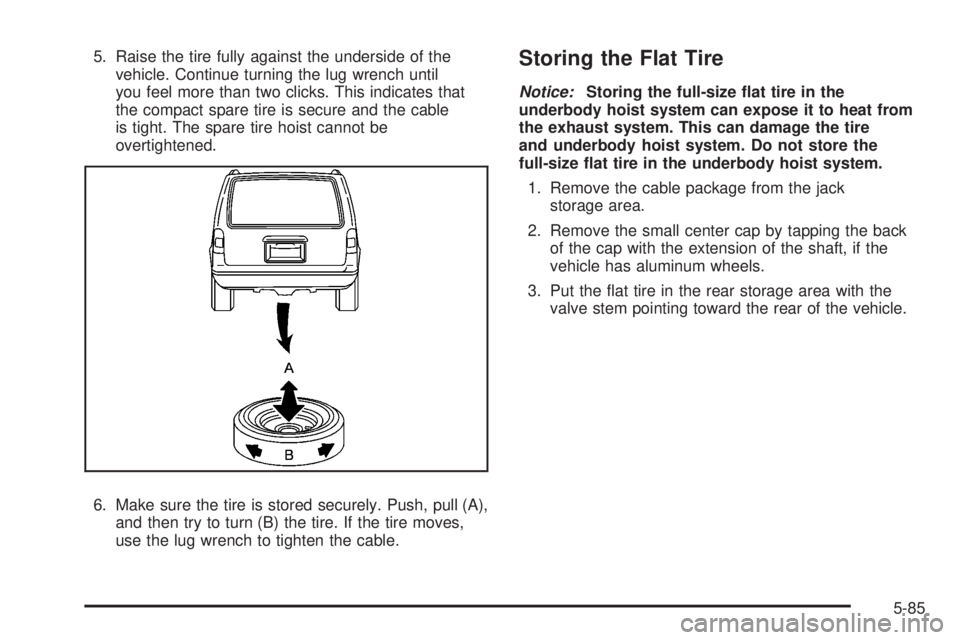
5. Raise the tire fully against the underside of the
vehicle. Continue turning the lug wrench until
you feel more than two clicks. This indicates that
the compact spare tire is secure and the cable
is tight. The spare tire hoist cannot be
overtightened.
6. Make sure the tire is stored securely. Push, pull (A),
and then try to turn (B) the tire. If the tire moves,
use the lug wrench to tighten the cable.Storing the Flat Tire
Notice:Storing the full-size at tire in the
underbody hoist system can expose it to heat from
the exhaust system. This can damage the tire
and underbody hoist system. Do not store the
full-size at tire in the underbody hoist system.
1. Remove the cable package from the jack
storage area.
2. Remove the small center cap by tapping the back
of the cap with the extension of the shaft, if the
vehicle has aluminum wheels.
3. Put the at tire in the rear storage area with the
valve stem pointing toward the rear of the vehicle.
5-85
Page 402 of 472
Put back all tools as they were stored in the jack
storage compartment and put the compartment cover
back on.
1. Attach the tool bag to the jack.
2. Make sure that the bottom of the jack is facing
toward you.
3. Turn the jack (C) on its side and place it down on
the holding bracket.
4. Reinstall the wing bolt (B) by turning it clockwise.
5. To replace the cover, line up the tabs on the bottom
of the cover with the slots in the cover opening.
Push the cover in place, insuring that the upper front
and rear tabs are in the opening and push the
cover closed. Make sure that the center latch is fully
engaged. This secures the cover in place.
Store the center cap or the plastic bolt-on wheel covers
until a full size tire is put back on the vehicle. When you
replace the compact spare with a full-size tire, reinstall
the bolt-on wheel covers or the center cap. Hand-tighten
them over the wheel nuts, using the lug wrench.Compact Spare Tire
Although the compact spare tire was fully inated when
the vehicle was new, it can lose air after a time.
Check the ination pressure regularly. It should be
60 psi (420 kPa).
After installing the compact spare on the vehicle, stop
as soon as possible and make sure the spare tire
is correctly inated. The compact spare is made to
perform well at speeds up to 65 mph (105 km/h)
for distances up to 3,000 miles (5 000 km), so you can
nish your trip and have the full-size tire repaired or
replaced at your convenience. Of course, it is best
to replace the spare with a full-size tire as soon as
possible. The spare tire will last longer and be in good
shape in case it is needed again.
Notice:When the compact spare is installed, do
not take your vehicle through an automatic car wash
with guide rails. The compact spare can get
caught on the rails. That can damage the tire and
wheel, and maybe other parts of your vehicle.
Do not use the compact spare on other vehicles.
And do not mix the compact spare tire or wheel with
other wheels or tires. They will not t. Keep the
spare tire and its wheel together.
5-88
Page 403 of 472
The All-Wheel Drive (AWD) system will be automatically
disabled when you use the compact spare. To restore
the AWD and prevent excessive wear on the clutch
in your AWD, replace the compact spare tire with
a full-size tire as soon as possible.
Notice:Tire chains will not t your compact spare.
Using them can damage your vehicle and can
damage the chains too. Do not use tire chains on
your compact spare.
Appearance Care
Interior Cleaning
Your vehicle’s interior will continue to look its best if it is
cleaned often. Although not always visible, dust and
dirt can accumulate on your upholstery. Dirt can damage
carpet, fabric, leather, and plastic surfaces. Regular
vacuuming is recommended to remove particles
from your upholstery. It is important to keep your
upholstery from becoming and remaining heavily soiled.
Soils should be removed as quickly as possible. Your
vehicle’s interior may experience extremes of heat
that could cause stains to set rapidly.
Lighter colored interiors may require more frequent
cleaning. Use care because newspapers and garments
that transfer color to your home furnishings may also
transfer color to your vehicle’s interior.When cleaning your vehicle’s interior, only use cleaners
specically designed for the surfaces being cleaned.
Permanent damage may result from using cleaners on
surfaces for which they were not intended. Use glass
cleaner only on glass. Remove any accidental over-spray
from other surfaces immediately. To prevent over-spray,
apply cleaner directly to the cleaning cloth.
Notice:If you use abrasive cleaners when cleaning
glass surfaces on your vehicle, you could scratch
the glass and/or cause damage to the rear window
defogger. When cleaning the glass on your
vehicle, use only a soft cloth and glass cleaner.
Many cleaners contain solvents that may become
concentrated in your vehicle’s breathing space. Before
using cleaners, read and adhere to all safety
instructions on the label. While cleaning your vehicle’s
interior, maintain adequate ventilation by opening
your vehicle’s doors and windows.
Dust may be removed from small buttons and knobs
using a small brush with soft bristles.
Your dealer/retailer has a product for cleaning your
vehicle’s glass. Should it become necessary, you can
also obtain a product from your dealer/retailer to remove
odors from your vehicle’s upholstery.
5-89