wheel size GMC ACADIA 2008 User Guide
[x] Cancel search | Manufacturer: GMC, Model Year: 2008, Model line: ACADIA, Model: GMC ACADIA 2008Pages: 472, PDF Size: 5.72 MB
Page 399 of 472
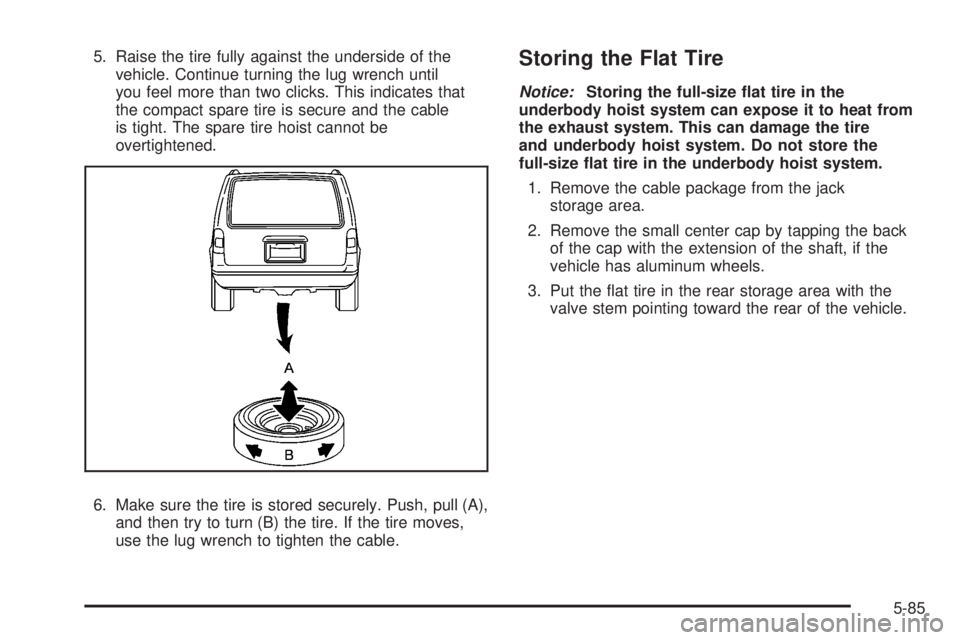
5. Raise the tire fully against the underside of the
vehicle. Continue turning the lug wrench until
you feel more than two clicks. This indicates that
the compact spare tire is secure and the cable
is tight. The spare tire hoist cannot be
overtightened.
6. Make sure the tire is stored securely. Push, pull (A),
and then try to turn (B) the tire. If the tire moves,
use the lug wrench to tighten the cable.Storing the Flat Tire
Notice:Storing the full-size at tire in the
underbody hoist system can expose it to heat from
the exhaust system. This can damage the tire
and underbody hoist system. Do not store the
full-size at tire in the underbody hoist system.
1. Remove the cable package from the jack
storage area.
2. Remove the small center cap by tapping the back
of the cap with the extension of the shaft, if the
vehicle has aluminum wheels.
3. Put the at tire in the rear storage area with the
valve stem pointing toward the rear of the vehicle.
5-85
Page 402 of 472
Put back all tools as they were stored in the jack
storage compartment and put the compartment cover
back on.
1. Attach the tool bag to the jack.
2. Make sure that the bottom of the jack is facing
toward you.
3. Turn the jack (C) on its side and place it down on
the holding bracket.
4. Reinstall the wing bolt (B) by turning it clockwise.
5. To replace the cover, line up the tabs on the bottom
of the cover with the slots in the cover opening.
Push the cover in place, insuring that the upper front
and rear tabs are in the opening and push the
cover closed. Make sure that the center latch is fully
engaged. This secures the cover in place.
Store the center cap or the plastic bolt-on wheel covers
until a full size tire is put back on the vehicle. When you
replace the compact spare with a full-size tire, reinstall
the bolt-on wheel covers or the center cap. Hand-tighten
them over the wheel nuts, using the lug wrench.Compact Spare Tire
Although the compact spare tire was fully inated when
the vehicle was new, it can lose air after a time.
Check the ination pressure regularly. It should be
60 psi (420 kPa).
After installing the compact spare on the vehicle, stop
as soon as possible and make sure the spare tire
is correctly inated. The compact spare is made to
perform well at speeds up to 65 mph (105 km/h)
for distances up to 3,000 miles (5 000 km), so you can
nish your trip and have the full-size tire repaired or
replaced at your convenience. Of course, it is best
to replace the spare with a full-size tire as soon as
possible. The spare tire will last longer and be in good
shape in case it is needed again.
Notice:When the compact spare is installed, do
not take your vehicle through an automatic car wash
with guide rails. The compact spare can get
caught on the rails. That can damage the tire and
wheel, and maybe other parts of your vehicle.
Do not use the compact spare on other vehicles.
And do not mix the compact spare tire or wheel with
other wheels or tires. They will not t. Keep the
spare tire and its wheel together.
5-88
Page 403 of 472
The All-Wheel Drive (AWD) system will be automatically
disabled when you use the compact spare. To restore
the AWD and prevent excessive wear on the clutch
in your AWD, replace the compact spare tire with
a full-size tire as soon as possible.
Notice:Tire chains will not t your compact spare.
Using them can damage your vehicle and can
damage the chains too. Do not use tire chains on
your compact spare.
Appearance Care
Interior Cleaning
Your vehicle’s interior will continue to look its best if it is
cleaned often. Although not always visible, dust and
dirt can accumulate on your upholstery. Dirt can damage
carpet, fabric, leather, and plastic surfaces. Regular
vacuuming is recommended to remove particles
from your upholstery. It is important to keep your
upholstery from becoming and remaining heavily soiled.
Soils should be removed as quickly as possible. Your
vehicle’s interior may experience extremes of heat
that could cause stains to set rapidly.
Lighter colored interiors may require more frequent
cleaning. Use care because newspapers and garments
that transfer color to your home furnishings may also
transfer color to your vehicle’s interior.When cleaning your vehicle’s interior, only use cleaners
specically designed for the surfaces being cleaned.
Permanent damage may result from using cleaners on
surfaces for which they were not intended. Use glass
cleaner only on glass. Remove any accidental over-spray
from other surfaces immediately. To prevent over-spray,
apply cleaner directly to the cleaning cloth.
Notice:If you use abrasive cleaners when cleaning
glass surfaces on your vehicle, you could scratch
the glass and/or cause damage to the rear window
defogger. When cleaning the glass on your
vehicle, use only a soft cloth and glass cleaner.
Many cleaners contain solvents that may become
concentrated in your vehicle’s breathing space. Before
using cleaners, read and adhere to all safety
instructions on the label. While cleaning your vehicle’s
interior, maintain adequate ventilation by opening
your vehicle’s doors and windows.
Dust may be removed from small buttons and knobs
using a small brush with soft bristles.
Your dealer/retailer has a product for cleaning your
vehicle’s glass. Should it become necessary, you can
also obtain a product from your dealer/retailer to remove
odors from your vehicle’s upholstery.
5-89
Page 471 of 472
Tires (cont.)
Changing a Flat Tire....................................5-72
Cleaning....................................................5-95
Compact Spare Tire.....................................5-88
Different Size..............................................5-66
If a Tire Goes Flat.......................................5-71
Ination - Tire Pressure................................5-55
Inspection and Rotation................................5-62
Installing the Spare Tire................................5-76
Pressure Monitor Operation...........................5-58
Pressure Monitor System..............................5-57
Removing the Flat Tire.................................5-76
Removing the Spare Tire and Tools...............5-73
Secondary Latch System..............................5-81
Storing a Flat or Spare Tire and Tools............5-84
Tire Sidewall Labeling..................................5-49
Tire Terminology and Denitions....................5-52
Uniform Tire Quality Grading.........................5-67
Wheel Alignment and Tire Balance.................5-68
Wheel Replacement.....................................5-68
When It Is Time for New Tires......................5-63
Tow/Haul Mode...............................................2-34
Tow/Haul Mode Light.......................................3-55
Towing
Recreational Vehicle.....................................4-26
Towing a Trailer..........................................4-30
Your Vehicle...............................................4-26Traction
StabiliTrak®System....................................... 4-6
Transmission
Fluid, Automatic...........................................5-21
Transmission Operation, Automatic....................2-30
Turn and Lane-Change Signals.......................... 3-8
Turn Signal/Multifunction Lever........................... 3-8
U
Ultrasonic Rear Parking Assist (URPA)...............2-45
Uniform Tire Quality Grading............................5-67
Universal Home Remote System.......................2-50
Operation...................................................2-51
Using this Manual............................................... iii
V
Vehicle
Control........................................................ 4-3
Damage Warnings........................................... iv
Loading......................................................4-21
Symbols......................................................... iv
Vehicle Customization, DIC..............................3-75
Vehicle Data Recording and Privacy..................7-15
13
Page 472 of 472
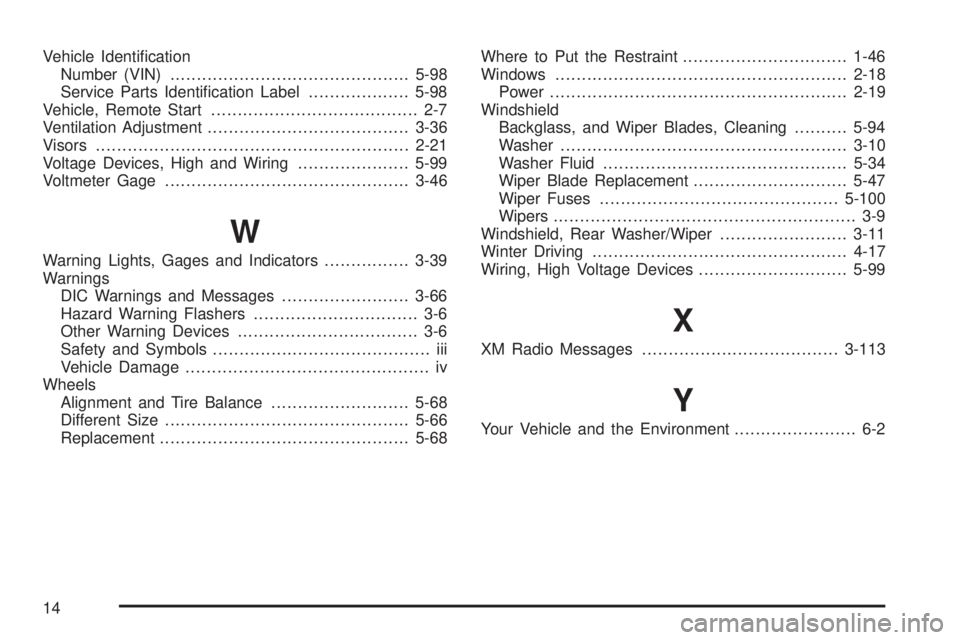
Vehicle Identication
Number (VIN).............................................5-98
Service Parts Identication Label...................5-98
Vehicle, Remote Start....................................... 2-7
Ventilation Adjustment......................................3-36
Visors...........................................................2-21
Voltage Devices, High and Wiring.....................5-99
Voltmeter Gage..............................................3-46
W
Warning Lights, Gages and Indicators................3-39
Warnings
DIC Warnings and Messages........................3-66
Hazard Warning Flashers............................... 3-6
Other Warning Devices.................................. 3-6
Safety and Symbols......................................... iii
Vehicle Damage.............................................. iv
Wheels
Alignment and Tire Balance..........................5-68
Different Size..............................................5-66
Replacement...............................................5-68Where to Put the Restraint...............................1-46
Windows.......................................................2-18
Power........................................................2-19
Windshield
Backglass, and Wiper Blades, Cleaning..........5-94
Washer......................................................3-10
Washer Fluid..............................................5-34
Wiper Blade Replacement.............................5-47
Wiper Fuses.............................................5-100
Wipers......................................................... 3-9
Windshield, Rear Washer/Wiper........................3-11
Winter Driving................................................4-17
Wiring, High Voltage Devices............................5-99
X
XM Radio Messages.....................................3-113
Y
Your Vehicle and the Environment....................... 6-2
14