battery GMC ACADIA 2008 Owner's Guide
[x] Cancel search | Manufacturer: GMC, Model Year: 2008, Model line: ACADIA, Model: GMC ACADIA 2008Pages: 472, PDF Size: 5.72 MB
Page 195 of 472
Have you recently changed brands of fuel?
If so, be sure to fuel your vehicle with quality fuel.
SeeGasoline Octane on page 5-6. Poor fuel quality
causes the engine not to run as efficiently as
designed. You might notice this as stalling after
start-up, stalling when you put the vehicle into gear,
misring, hesitation on acceleration, or stumbling
on acceleration — these conditions might go away
once the engine is warmed up. This will be detected
by the system and cause the light to turn on.
If you experience one or more of these conditions,
change the fuel brand you use. It will require at least
one full tank of the proper fuel to turn the light off.
If none of the above steps have made the light turn
off, your dealer/retailer can check the vehicle. Your
dealer/retailer has the proper test equipment and
diagnostic tools to x any mechanical or electrical
problems that might have developed.Emissions Inspection and
Maintenance Programs
Some state/provincial and local governments have
or might begin programs to inspect the emission
control equipment on your vehicle. Failure to pass
this inspection could prevent you from getting a
vehicle registration.
Here are some things you need to know to help
your vehicle pass an inspection:
Your vehicle will not pass this inspection if the
check engine light is on or not working properly.
Your vehicle will not pass this inspection if the
OBD (on-board diagnostic) system determines that
critical emission control systems have not been
completely diagnosed by the system. The vehicle
would be considered not ready for inspection.
This can happen if you have recently replaced the
battery or if the battery has run down. The diagnostic
system is designed to evaluate critical emission
control systems during normal driving. This can take
several days of routine driving. If you have done this
and your vehicle still does not pass the inspection
for lack of OBD system readiness, your dealer/retailer
can prepare the vehicle for inspection.
3-53
Page 209 of 472
BATTERY SAVER ACTIVE
This message displays when the system detects
that the battery voltage is dropping below expected
levels. The battery saver system starts reducing
certain features of the vehicle that you may be able
to notice. At the point that the features are disabled,
this message is displayed. It means that the vehicle
is trying to save the charge in the battery.
Turn off all unnecessary accessories to allow the
battery to recharge.
The normal battery voltage range is 11.5 to 15.5 volts.
CHANGE ENGINE OIL SOON
This message displays when the engine oil needs to
be changed. When you change the engine oil, be sure
to reset the CHANGE ENGINE OIL SOON message.
SeeEngine Oil Life System on page 5-18for information
on how to reset the message. SeeEngine Oil on
page 5-15andScheduled Maintenance on page 6-4
for more information.
CHECK TIRE PRESSURE
This message displays when the pressure in one or
more of the vehicle’s tires needs to be checked.
This message also displays LEFT FRONT, RIGHT
FRONT, LEFT REAR, or RIGHT REAR to indicate
which tire needs to be checked. You can receive more
than one tire pressure message at a time. To read
the other messages that may have been sent at
the same time, press the set/reset button or the trip
odometer reset stem. If a tire pressure message
appears on the DIC, stop as soon as you can. Have
the tire pressures checked and set to those shown
on the Tire Loading Information label. SeeTires
on page 5-48,Loading Your Vehicle on page 4-21,
andInflation - Tire Pressure on page 5-55. The DIC
also shows the tire pressure values. See “DIC Operation
and Displays (With DIC Buttons)” earlier in this section.
If the tire pressure is low, the low tire pressure
warning light comes on. SeeTire Pressure Light
on page 3-50.
CRUISE SET TO XXX
This message displays whenever the cruise control
is set. SeeCruise Control on page 3-12for more
information.
3-67
Page 213 of 472
PARK ASSIST OFF
If your vehicle has the Ultrasonic Rear Parking
Assist (URPA) system, after the vehicle has been
started and shifted out of PARK (P), this message
displays to remind the driver that the URPA system
has been turned off. Press the set/reset button or
the trip odometer reset stem to acknowledge this
message and clear it from the DIC display. To turn
the URPA system back on, seeUltrasonic Rear
Parking Assist (URPA) on page 2-45.
PASSENGER DOOR OPEN
This message displays and a chime sounds if the
passenger door is not fully closed and the vehicle is
in a drive gear. Stop and turn off the vehicle, check
the door for obstructions, and close the door again.
Check to see if the message still appears on the DIC.
REMOTE KEY LEARNING ACTIVE
This message displays while you are matching a
Remote Keyless Entry (RKE) transmitter to your vehicle.
See “Matching Transmitter(s) to Your Vehicle” under
Remote Keyless Entry (RKE) System Operation on
page 2-5andDIC Operation and Displays (With DIC
Buttons) on page 3-57orDIC Operation and Displays
(Without DIC Buttons) on page 3-63for more information.
REPLACE BATTERY IN REMOTE KEY
This message displays if a Remote Keyless Entry (RKE)
transmitter battery is low. The battery needs to be
replaced in the transmitter. See “Battery Replacement”
underRemote Keyless Entry (RKE) System Operation
on page 2-5.
RIGHT REAR DOOR OPEN
This message displays and a chime sounds if the
passenger side rear door is not fully closed and the
vehicle is in a drive gear. Stop and turn off the vehicle,
check the door for obstructions, and close the door
again. Check to see if the message still appears
on the DIC.
SERVICE A/C (Air Conditioning)
SYSTEM
This message displays when the electronic sensors
that control the air conditioning and heating systems
are no longer working. Have the climate control
system serviced by your dealer/retailer if you notice
a drop in heating and air conditioning efficiency.
3-71
Page 214 of 472
SERVICE AIR BAG
This message displays if there is a problem with the
airbag system. Have your dealer/retailer inspect
the system for problems. SeeAirbag Readiness Light
on page 3-42andAirbag System on page 1-61for
more information.
SERVICE ALL WHEEL DRIVE
If your vehicle has the All-Wheel Drive (AWD) system,
this message displays if there is a problem with this
system. If this message appears, stop as soon as
possible and turn off the vehicle. Restart the vehicle
after 30 seconds and check for the message on the
DIC display. If the message is still displayed or appears
again when you begin driving, the AWD system
needs service. See your dealer/retailer.
SERVICE BATTERY CHARGING
SYSTEM
On some vehicles, this message displays if there is a
problem with the battery charging system. Under certain
conditions, the charging system light may also turn
on in the instrument panel cluster. SeeCharging System
Light on page 3-45. Driving with this problem could
drain the battery. Turn off all unnecessary accessories.
Have the electrical system checked as soon as
possible. See your dealer/retailer.
SERVICE BRAKE SYSTEM
This message displays along with the brake system
warning light if there is a problem with the brake system.
SeeBrake System Warning Light on page 3-47. If this
message appears, stop as soon as possible and turn
off the vehicle. Restart the vehicle and check for
the message on the DIC display. If the message is
still displayed or appears again when you begin driving,
the brake system needs service as soon as possible.
See your dealer/retailer.
SERVICE PARK ASSIST
If your vehicle has the Ultrasonic Rear Parking Assist
(URPA) system, this message displays if there is a
problem with the URPA system. Do not use this
system to help you park. SeeUltrasonic Rear Parking
Assist (URPA) on page 2-45for more information.
See your dealer/retailer for service.
SERVICE POWER STEERING
This message displays when a problem is detected
with the power steering system. When this message
is displayed, you may notice that the effort required to
steer the vehicle increases or feels heavier, but you
will still be able to steer the vehicle. Have your vehicle
serviced by your dealer/retailer immediately.
3-72
Page 218 of 472
To change customization preferences, use the following
procedure.
Entering the Feature Settings Menu
1. Turn the ignition on and place the vehicle in
PARK (P).
To avoid excessive drain on the battery, it is
recommended that the headlamps are turned off.
2. Press the customization button to enter the
feature settings menu.
If the menu is not available, FEATURE SETTINGS
AVAILABLE IN PARK will display. Before entering
the menu, make sure the vehicle is in PARK (P).
Feature Settings Menu Items
The following are customization features that allow
you to program settings to the vehicle:
DISPLAY IN ENGLISH
This feature will only display if a language other than
English has been set. This feature allows you to
change the language in which the DIC messages
appear to English.
Press the customization button until the PRESS
VTO
DISPLAY IN ENGLISH screen appears on the DIC
display. Press the set/reset button once to display all
DIC messages in English.
DISPLAY LANGUAGE
This feature allows you to select the language in which
the DIC messages will appear.
Press the customization button until the DISPLAY
LANGUAGE screen appears on the DIC display.
Press the set/reset button once to access the settings
for this feature. Then press the customization button
to scroll through the following settings:
ENGLISH (default):All messages will appear in English.
FRANCAIS:All messages will appear in French.
ESPANOL:All messages will appear in Spanish.
NO CHANGE:No change will be made to this feature.
The current setting will remain.
To select a setting, press the set/reset button while
the desired setting is displayed on the DIC.
You can also change the language by pressing the
trip odometer reset stem. See “Language” under DIC
Operation and Displays (Without DIC Buttons) earlier
in this section for more information.
AUTO DOOR LOCK
This feature allows you to select when the vehicle’s
doors will automatically lock. SeeProgrammable
Automatic Door Locks on page 2-11for more
information.
3-76
Page 258 of 472
Headphones
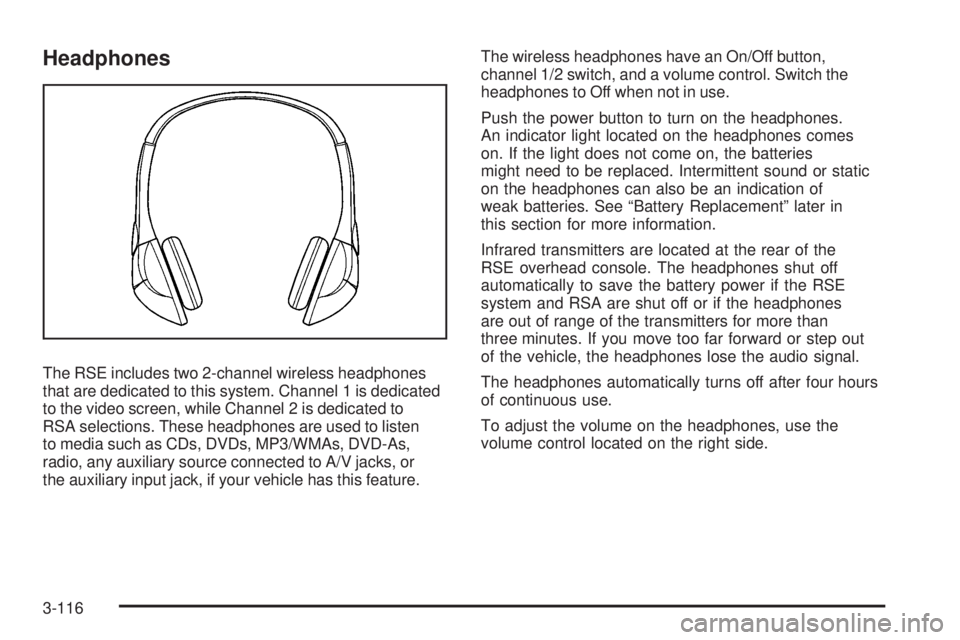
The RSE includes two 2-channel wireless headphones
that are dedicated to this system. Channel 1 is dedicated
to the video screen, while Channel 2 is dedicated to
RSA selections. These headphones are used to listen
to media such as CDs, DVDs, MP3/WMAs, DVD-As,
radio, any auxiliary source connected to A/V jacks, or
the auxiliary input jack, if your vehicle has this feature.The wireless headphones have an On/Off button,
channel 1/2 switch, and a volume control. Switch the
headphones to Off when not in use.
Push the power button to turn on the headphones.
An indicator light located on the headphones comes
on. If the light does not come on, the batteries
might need to be replaced. Intermittent sound or static
on the headphones can also be an indication of
weak batteries. See “Battery Replacement” later in
this section for more information.
Infrared transmitters are located at the rear of the
RSE overhead console. The headphones shut off
automatically to save the battery power if the RSE
system and RSA are shut off or if the headphones
are out of range of the transmitters for more than
three minutes. If you move too far forward or step out
of the vehicle, the headphones lose the audio signal.
The headphones automatically turns off after four hours
of continuous use.
To adjust the volume on the headphones, use the
volume control located on the right side.
3-116
Page 259 of 472
For optimal audio performance, the headphones must
be worn correctly. The symbol L (Left) appears on
the upper left side, above the ear pad and should be
positioned on the left ear. The symbol R (Right) appears
on the upper right side, above the ear pad and should
be positioned on the right ear.
Notice:Do not store the headphones in heat or
direct sunlight. This could damage the headphones
and repairs will not be covered by your warranty.
Storage in extreme cold can weaken the batteries.
Keep the headphones stored in a cool, dry place.
If the foam ear pads attached to the headphones
become worn or damaged, the pads can be replaced
separately from the headphone set. See your
dealer/retailer for more information.
Headphones should be stored in the front oor console
and not in the front seat back pocket. Headphone
damage can occur when the second row seats are
folded forward.Battery Replacement
To change the batteries on the headphones, do the
following:
1. Turn the screw to loosen the battery door
located on the left side of the headphones.
Slide the battery door open.
2. Replace the two batteries in the compartment.
Make sure that they are installed correctly,
using the diagram on the inside of the battery
compartment.
3. Replace the battery door and tighten the
door screw.
If the headphones are to be stored for a long period
of time, remove the batteries and keep them in a cool,
dry place.
3-117
Page 262 of 472
Remote Control
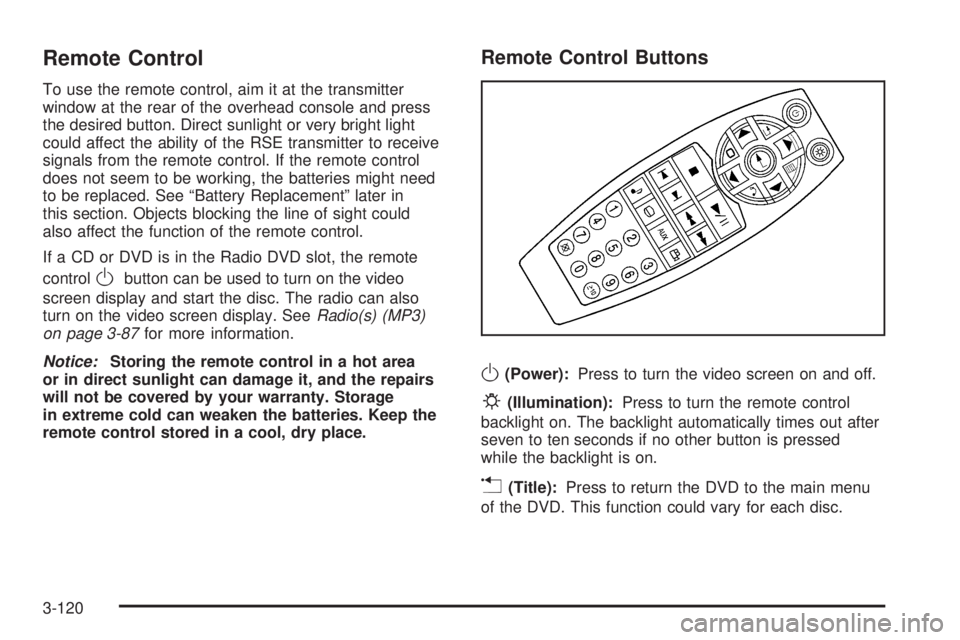
To use the remote control, aim it at the transmitter
window at the rear of the overhead console and press
the desired button. Direct sunlight or very bright light
could affect the ability of the RSE transmitter to receive
signals from the remote control. If the remote control
does not seem to be working, the batteries might need
to be replaced. See “Battery Replacement” later in
this section. Objects blocking the line of sight could
also affect the function of the remote control.
If a CD or DVD is in the Radio DVD slot, the remote
control
Obutton can be used to turn on the video
screen display and start the disc. The radio can also
turn on the video screen display. SeeRadio(s) (MP3)
on page 3-87for more information.
Notice:Storing the remote control in a hot area
or in direct sunlight can damage it, and the repairs
will not be covered by your warranty. Storage
in extreme cold can weaken the batteries. Keep the
remote control stored in a cool, dry place.
Remote Control Buttons
O(Power):Press to turn the video screen on and off.
P(Illumination):Press to turn the remote control
backlight on. The backlight automatically times out after
seven to ten seconds if no other button is pressed
while the backlight is on.
v(Title):Press to return the DVD to the main menu
of the DVD. This function could vary for each disc.
3-120
Page 264 of 472
[(Fast Forward):Press to fast forward the DVD or
CD. To stop fast forwarding a DVD video, press the
play/pause button. To stop fast forwarding a DVD audio
or CD, release the fast forward button. This button
might not work when the DVD is playing the copyright
information or the previews.
e(Audio):Press to change audio tracks on DVDs that
have this feature when the DVD is playing. The format
and content of this function vary for each disc.
{(Subtitles):Press to turn ON/OFF subtitles and to
move through subtitle options when a DVD is playing.
The format and content of this function vary for
each disc.
AUX (Auxiliary):Press to switch the system between
the DVD player and an auxiliary source.
d(Camera):Press to change camera angles on DVDs
that have this feature when a DVD is playing. The format
and content of this function vary for each disc.
1 through 0 (Numeric Keypad):The numeric keypad
provides the capability of direct chapter or track
number selection.
\(Clear):Press within three seconds after entering
a numeric selection, to clear all numerical inputs.
}10 (Double Digit Entries):Press to select chapter
or track numbers greater than nine. Press this button
before entering the number.
If the remote control becomes lost or damaged, a new
universal remote control can be purchased. If this
happens, make sure the universal remote control uses
a code set of Toshiba
®.
Battery Replacement
To change the remote control batteries, do the following:
1. Slide the rear cover back, on the remote control.
2. Replace the two batteries in the compartment.
Make sure that they are installed correctly,
using the diagram on the inside of the battery
compartment.
3. Replace the battery cover.
If the remote control is to be stored for a long period
of time, remove the batteries and keep them in a cool,
dry place.
3-122
Page 291 of 472
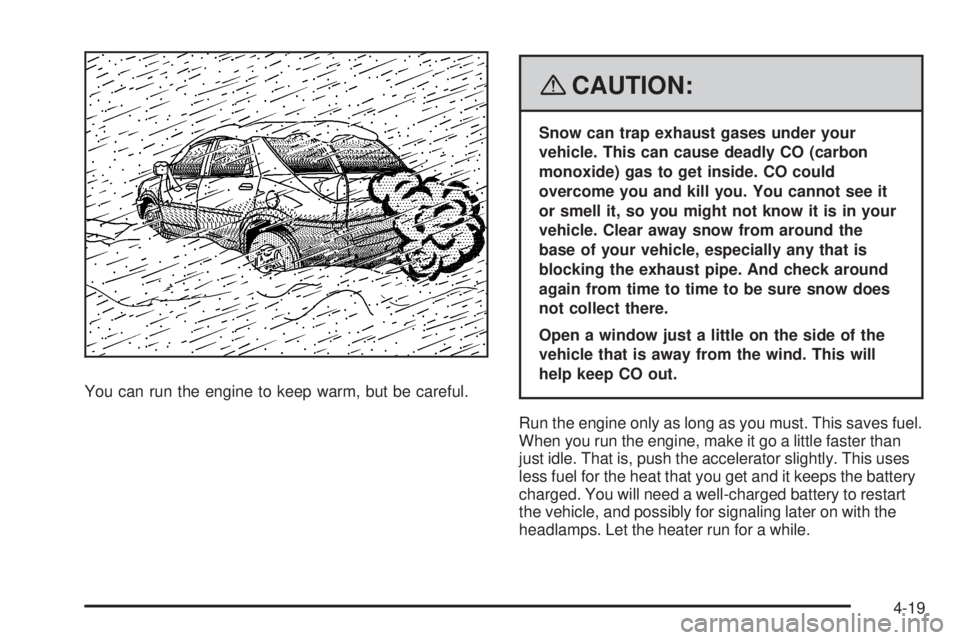
You can run the engine to keep warm, but be careful.
{CAUTION:
Snow can trap exhaust gases under your
vehicle. This can cause deadly CO (carbon
monoxide) gas to get inside. CO could
overcome you and kill you. You cannot see it
or smell it, so you might not know it is in your
vehicle. Clear away snow from around the
base of your vehicle, especially any that is
blocking the exhaust pipe. And check around
again from time to time to be sure snow does
not collect there.
Open a window just a little on the side of the
vehicle that is away from the wind. This will
help keep CO out.
Run the engine only as long as you must. This saves fuel.
When you run the engine, make it go a little faster than
just idle. That is, push the accelerator slightly. This uses
less fuel for the heat that you get and it keeps the battery
charged. You will need a well-charged battery to restart
the vehicle, and possibly for signaling later on with the
headlamps. Let the heater run for a while.
4-19