buttons GMC ACADIA 2008 Workshop Manual
[x] Cancel search | Manufacturer: GMC, Model Year: 2008, Model line: ACADIA, Model: GMC ACADIA 2008Pages: 472, PDF Size: 5.72 MB
Page 263 of 472
y(Main Menu):Press to access the DVD menu. The
DVD menu is different on every DVD. Use the navigation
arrows to move the cursor around the DVD menu.
After making a selection press the enter button. This
button only operates when using a DVD.
n,q,p,o(Menu Navigation Arrows):Use the
arrow buttons to navigate through a menu.
r(Enter):Press to select the choice that is
highlighted in any menu.
z(Display Menu):Press to adjust the brightness,
screen display mode (normal, full, or zoom), and display
the language menu.
q(Return):Press to exit the current active menu
and return to the previous menu. This button operates
only when the display menu or a DVD menu is active.
c(Stop):Press to stop playing, rewinding, or
fast forwarding a DVD. Press twice to return to the
beginning of the DVD.
s(Play/Pause):Press to start playing a DVD.
Press while a DVD is playing to pause it. Press again to
continue playing the DVD.When the DVD is playing, depending on the radio,
you might be able to do slow play by pressing the
play/pause button then pressing the
[(fast forward)
button. The DVD continues playing in a slow play
mode. You could also, depending on the radio, perform
reverse slow play by pressing the play/pause button
and then pressing the fast forward button. To cancel
slow play mode, press the play/pause button.
t(Previous Track/Chapter):Press to return to the
start of the current track or chapter. Press again to go to
the previous track or chapter. This button might not
work when the DVD is playing the copyright information
or the previews.
u(Next Track/Chapter):Press to go to the beginning
of the next chapter or track. This button might not
work when the DVD is playing the copyright information
or the previews.
r(Fast Reverse):Press to quickly reverse the
DVD or CD. To stop fast reversing a DVD video, press
the play/pause button. To stop fast reversing a DVD
audio or CD, release the fast reverse button. This button
might not work when the DVD is playing the copyright
information or the previews.
3-121
Page 268 of 472
©¨(Seek):When listening to FM, AM, or XM™
(if equipped), press either the seek arrows to go to the
previous or to the next station or channels and stay
there. This function is inactive, with some radios, if the
front seat passengers are listening to the radio.
Press and hold either seek arrow until the display
ashes, to tune to an individual station. The display
stops ashing after the buttons have not been pushed
for more than two seconds. This function is inactive,
with some radios, if the front seat passengers are
listening to the radio.
While listening to a disc, press the right seek arrow to
go to the next track or chapter on the disc. Press the left
seek arrow to go back to the start of the current track
or chapter (if more than ten seconds have played). This
function is inactive, with some radios, if the front seat
passengers are listening to the disc.When a DVD video menu is being displayed, press
either seek arrow to perform a cursor up or down on
the menu. Hold either seek arrow to perform a cursor
left or right on the menu.
PROG (Program):Press this button to go to the
next preset radio station or channel set on the main
radio. This function is inactive, with some radios, if the
front seat passengers are listening to the radio.
When a CD or DVD audio disc is playing, press this
button to go to the beginning of the CD or DVD audio.
This function is inactive, with some radios, if the
front seat passengers are listening to the disc.
When a disc is playing in the CD or DVD changer,
press this button to select the next disc, if multiple discs
are loaded. This function is inactive, with some radios,
if the front seat passengers are listening to the disc.
When a DVD video menu is being displayed, press
the PROG button to perform the menu function, enter.
3-126
Page 269 of 472
Rear Audio Controller (RAC)
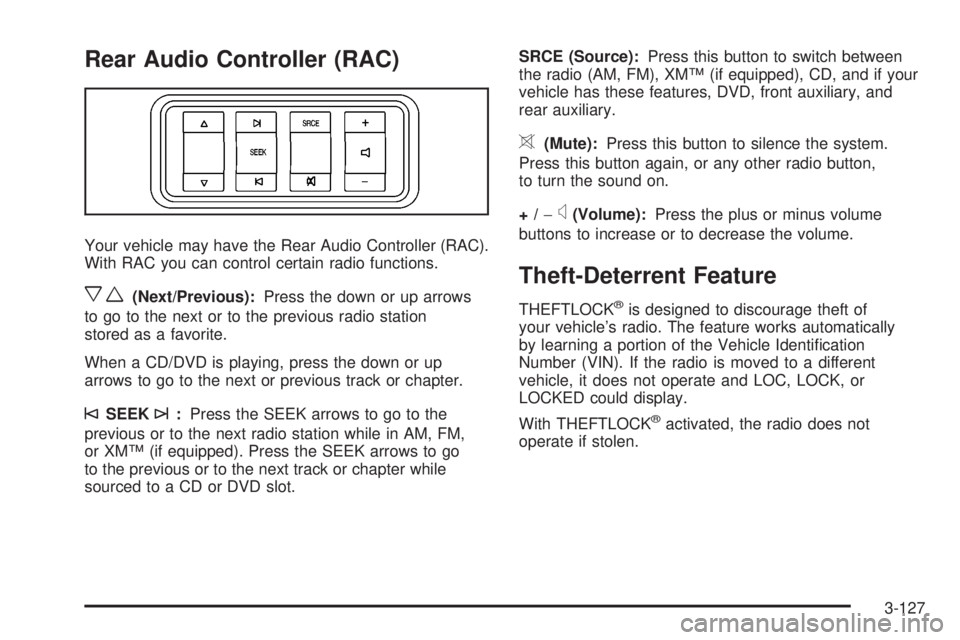
Your vehicle may have the Rear Audio Controller (RAC).
With RAC you can control certain radio functions.
xw(Next/Previous):Press the down or up arrows
to go to the next or to the previous radio station
stored as a favorite.
When a CD/DVD is playing, press the down or up
arrows to go to the next or previous track or chapter.
©SEEK¨:Press the SEEK arrows to go to the
previous or to the next radio station while in AM, FM,
or XM™ (if equipped). Press the SEEK arrows to go
to the previous or to the next track or chapter while
sourced to a CD or DVD slot.SRCE (Source):Press this button to switch between
the radio (AM, FM), XM™ (if equipped), CD, and if your
vehicle has these features, DVD, front auxiliary, and
rear auxiliary.
>(Mute):Press this button to silence the system.
Press this button again, or any other radio button,
to turn the sound on.
+/−
x(Volume):Press the plus or minus volume
buttons to increase or to decrease the volume.
Theft-Deterrent Feature
THEFTLOCK®is designed to discourage theft of
your vehicle’s radio. The feature works automatically
by learning a portion of the Vehicle Identication
Number (VIN). If the radio is moved to a different
vehicle, it does not operate and LOC, LOCK, or
LOCKED could display.
With THEFTLOCK
®activated, the radio does not
operate if stolen.
3-127
Page 333 of 472
If your vehicle does not have Driver Information Center
(DIC) buttons:
1. Turn the ignition to ON/RUN, with the engine off.
The vehicle must be in PARK (P) to access this
display. Press the trip odometer reset stem until OIL
LIFE REMAINING displays.
2. Press and hold the trip odometer reset stem until
OIL LIFE REMAINING shows 100%. You will hear
three chimes and the CHANGE ENGINE OIL
SOON message will go off.
3. Turn the key to LOCK/OFF.
If the CHANGE ENGINE OIL SOON message
comes back on when you start your vehicle, the
engine oil life system has not reset. Repeat
the procedure.
If your vehicle has Driver Information Center (DIC)
buttons:
1. Turn the ignition to ON/RUN, with the engine off.
2. Press the vehicle information button until OIL LIFE
REMAINING displays.
3. Press and hold the set/reset button until 100% is
displayed. You will hear three chimes and the
CHANGE ENGINE OIL SOON message will go off.
4. Turn the key to LOCK/OFF.If the CHANGE ENGINE OIL SOON message comes
back on when you start your vehicle, the engine oil
life system has not reset. Repeat the procedure.
What to Do with Used Oil
Used engine oil contains certain elements that can be
unhealthy for your skin and could even cause cancer.
Do not let used oil stay on your skin for very long. Clean
your skin and nails with soap and water, or a good
hand cleaner. Wash or properly dispose of clothing or
rags containing used engine oil. See the manufacturer’s
warnings about the use and disposal of oil products.
Used oil can be a threat to the environment. If you
change your own oil, be sure to drain all the oil from the
lter before disposal. Never dispose of oil by putting it
in the trash, pouring it on the ground, into sewers, or into
streams or bodies of water. Instead, recycle it by
taking it to a place that collects used oil. If you have a
problem properly disposing of used oil, ask your
dealer/retailer, a service station, or a local recycling
center for help.
5-19
Page 373 of 472
At the same time a message to check the pressure in a
specic tire appears on the Driver Information Center
(DIC) display. The low tire pressure warning light
and the DIC warning message come on at each ignition
cycle until the tires are inated to the correct ination
pressure. Using the DIC, tire pressure levels can
be viewed by the driver. For additional information and
details about the DIC operation and displays see
DIC Operation and Displays (With DIC Buttons) on
page 3-57orDIC Operation and Displays (Without DIC
Buttons) on page 3-63andDIC Warnings and
Messages on page 3-66.
The low tire pressure warning light may come on in cool
weather when the vehicle is rst started, and then
turn off as you start to drive. This could be an early
indicator that the air pressure in the tire(s) are getting
low and need to be inated to the proper pressure.A Tire and Loading Information label, attached to your
vehicle, shows the size of your vehicle’s original
equipment tires and the correct ination pressure for
your vehicle’s tires when they are cold. SeeLoading
Your Vehicle on page 4-21, for an example of the Tire
and Loading Information label and its location on
your vehicle. Also seeInflation - Tire Pressure on
page 5-55.
Your vehicle’s TPMS can warn you about a low tire
pressure condition but it does not replace normal
tire maintenance. SeeTire Inspection and Rotation on
page 5-62andTires on page 5-48.
Notice:Liquid tire sealants could damage the Tire
Pressure Monitor System (TPMS) sensors. Sensor
damage caused by using a tire sealant is not
covered by your warranty. Do not use liquid tire
sealants.
5-59
Page 375 of 472
TPMS Sensor Matching Process
Each TPMS sensor has a unique identication code.
Any time you rotate your vehicle’s tires or replace one or
more of the TPMS sensors, the identication codes
will need to be matched to the new tire/wheel position.
The sensors are matched to the tire/wheel positions
in the following order: driver side front tire, passenger
side front tire, passenger side rear tire, and driver
side rear tire using a TPMS diagnostic tool. See your
dealer/retailer for service.
The TPMS sensors can also be matched to each
tire/wheel position by increasing or decreasing the tire’s
air pressure. If increasing the tire’s air pressure, do
not exceed the maximum ination pressure indicated on
the tire’s sidewall.
To decrease air-pressure out of a tire you can use the
pointed end of the valve cap, a pencil-style air pressure
gage, or a key.
You have two minutes to match the rst tire/wheel
position, and ve minutes overall to match all four
tire/wheel positions. If it takes longer than two minutes,
to match the rst tire and wheel, or more than ve
minutes to match all four tire and wheel positions the
matching process stops and you need to start over.The TPMS sensor matching process is outlined below:
1. Set the parking brake.
2. Turn the ignition switch to ON/RUN with the
engine off.
3. Press the Remote Keyless Entry (RKE) transmitter’s
LOCK and UNLOCK buttons at the same time for
approximately ve seconds. The horn sounds twice
to signal the receiver is in relearn mode and
TIRE LEARNING ACTIVE message displays on the
DIC screen.
4. Start with the driver side front tire.
5. Remove the valve cap from the valve cap stem.
Activate the TPMS sensor by increasing or
decreasing the tire’s air pressure for ve seconds,
or until a horn chirp sounds. The horn chirp,
which may take up to 30 seconds to sound,
conrms that the sensor identication code has
been matched to this tire and wheel position.
6. Proceed to the passenger side front tire, and repeat
the procedure in Step 5.
7. Proceed to the passenger side rear tire, and repeat
the procedure in Step 5.
5-61
Page 403 of 472
The All-Wheel Drive (AWD) system will be automatically
disabled when you use the compact spare. To restore
the AWD and prevent excessive wear on the clutch
in your AWD, replace the compact spare tire with
a full-size tire as soon as possible.
Notice:Tire chains will not t your compact spare.
Using them can damage your vehicle and can
damage the chains too. Do not use tire chains on
your compact spare.
Appearance Care
Interior Cleaning
Your vehicle’s interior will continue to look its best if it is
cleaned often. Although not always visible, dust and
dirt can accumulate on your upholstery. Dirt can damage
carpet, fabric, leather, and plastic surfaces. Regular
vacuuming is recommended to remove particles
from your upholstery. It is important to keep your
upholstery from becoming and remaining heavily soiled.
Soils should be removed as quickly as possible. Your
vehicle’s interior may experience extremes of heat
that could cause stains to set rapidly.
Lighter colored interiors may require more frequent
cleaning. Use care because newspapers and garments
that transfer color to your home furnishings may also
transfer color to your vehicle’s interior.When cleaning your vehicle’s interior, only use cleaners
specically designed for the surfaces being cleaned.
Permanent damage may result from using cleaners on
surfaces for which they were not intended. Use glass
cleaner only on glass. Remove any accidental over-spray
from other surfaces immediately. To prevent over-spray,
apply cleaner directly to the cleaning cloth.
Notice:If you use abrasive cleaners when cleaning
glass surfaces on your vehicle, you could scratch
the glass and/or cause damage to the rear window
defogger. When cleaning the glass on your
vehicle, use only a soft cloth and glass cleaner.
Many cleaners contain solvents that may become
concentrated in your vehicle’s breathing space. Before
using cleaners, read and adhere to all safety
instructions on the label. While cleaning your vehicle’s
interior, maintain adequate ventilation by opening
your vehicle’s doors and windows.
Dust may be removed from small buttons and knobs
using a small brush with soft bristles.
Your dealer/retailer has a product for cleaning your
vehicle’s glass. Should it become necessary, you can
also obtain a product from your dealer/retailer to remove
odors from your vehicle’s upholstery.
5-89