key GMC ACADIA 2008 Workshop Manual
[x] Cancel search | Manufacturer: GMC, Model Year: 2008, Model line: ACADIA, Model: GMC ACADIA 2008Pages: 472, PDF Size: 5.72 MB
Page 253 of 472
Depending on the format of the disc, a softkey menu
appears and allows navigation of the disc. The menu
reads left to right as RDM (Randomize song play order),
a Folder icon with left and right arrows (to move up or
down through available folders), a PL tag if the disc has a
Playlist available, and a Music Navigator tag. If a Playlist
tag is shown, toggling this key brings up a Folder softkey
only or the menu as previously described.
If you turn off the ignition or radio with a CD-R or
CD-RW disc in the player it stays in the player. When
you turn on the ignition or radio, the CD-R or CD-RW
starts to play where it stopped, if it was the last selected
audio source.
As each new track starts to play, the track number and
song title displays.
ZCD (Eject):Press and release this button to eject
the CD-R or CD-RW that is currently playing in the
bottom slot. A beep sounds and Ejecting Disc displays.
Once the disc is ejected, Remove Disc displays. The
CD-R or CD-RW disc can be removed. If the CD-R
or CD-RW disc is not removed, after several seconds,
the CD-R or CD-RW disc automatically pulls back
into the player.
If loading and reading of a CD cannot be completed,
such as unknown format, etc., and the disc fails to eject,
press and hold this button for more than ve seconds
to force the disc to eject.
ZDVD (Eject):Press and release this button to
eject the CD-R or CD-RW that is currently playing in
the top slot. A beep sounds and Ejecting Disc displays.
Once the disc is ejected, Remove Disc displays. The
CD-R or CD-RW disc can be removed. If the CD-R
or CD-RW disc is not removed, after several seconds,
the CD-R or CD-RW disc automatically pulls back
into the player. If loading and reading of a CD cannot
be completed, such as unknown format, etc., and
the disc fails to eject, press and hold this button for
more than ve seconds to force the disc to eject.
f(Tune):Turn this knob to select MP3/WMA les on
the CD-R or CD-RW that is currently playing.
©SEEK¨:Press the left SEEK arrow to go to
the start of the current MP3/WMA le, if more than
ve seconds have played. If less than ve seconds have
played, the previous MP3/WMA le plays. Press the
right SEEK arrow to go to the next MP3/WMA le.
If either SEEK arrow is held, or pressed multiple times,
the player continues moving backward or forward
through the MP3/WMA les on the CD.
Sc(Previous Folder):Press the pushbutton
positioned under the Folder label to go to the rst track
in the previous folder.
3-111
Page 264 of 472
[(Fast Forward):Press to fast forward the DVD or
CD. To stop fast forwarding a DVD video, press the
play/pause button. To stop fast forwarding a DVD audio
or CD, release the fast forward button. This button
might not work when the DVD is playing the copyright
information or the previews.
e(Audio):Press to change audio tracks on DVDs that
have this feature when the DVD is playing. The format
and content of this function vary for each disc.
{(Subtitles):Press to turn ON/OFF subtitles and to
move through subtitle options when a DVD is playing.
The format and content of this function vary for
each disc.
AUX (Auxiliary):Press to switch the system between
the DVD player and an auxiliary source.
d(Camera):Press to change camera angles on DVDs
that have this feature when a DVD is playing. The format
and content of this function vary for each disc.
1 through 0 (Numeric Keypad):The numeric keypad
provides the capability of direct chapter or track
number selection.
\(Clear):Press within three seconds after entering
a numeric selection, to clear all numerical inputs.
}10 (Double Digit Entries):Press to select chapter
or track numbers greater than nine. Press this button
before entering the number.
If the remote control becomes lost or damaged, a new
universal remote control can be purchased. If this
happens, make sure the universal remote control uses
a code set of Toshiba
®.
Battery Replacement
To change the remote control batteries, do the following:
1. Slide the rear cover back, on the remote control.
2. Replace the two batteries in the compartment.
Make sure that they are installed correctly,
using the diagram on the inside of the battery
compartment.
3. Replace the battery cover.
If the remote control is to be stored for a long period
of time, remove the batteries and keep them in a cool,
dry place.
3-122
Page 300 of 472
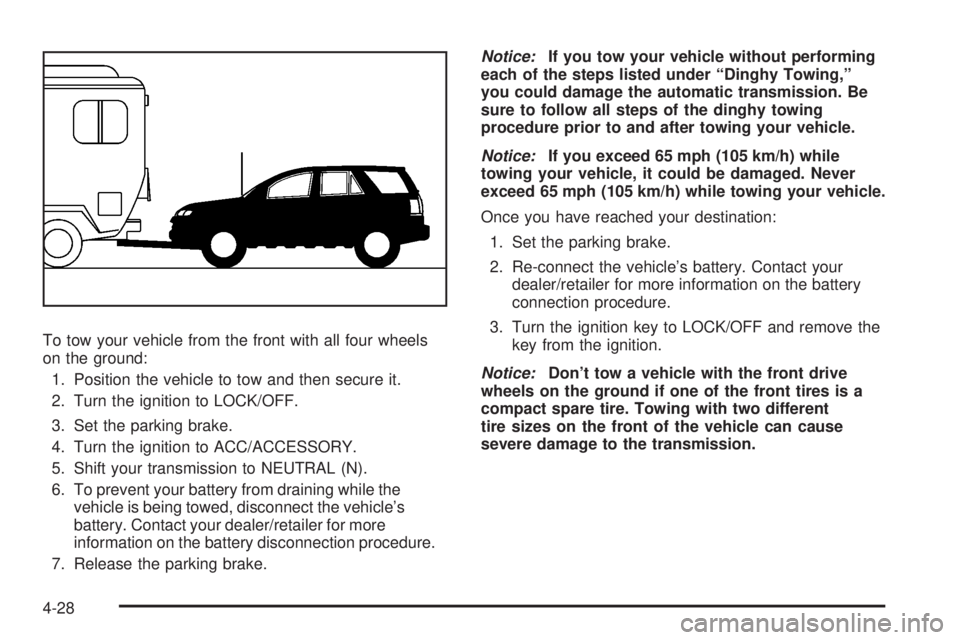
To tow your vehicle from the front with all four wheels
on the ground:
1. Position the vehicle to tow and then secure it.
2. Turn the ignition to LOCK/OFF.
3. Set the parking brake.
4. Turn the ignition to ACC/ACCESSORY.
5. Shift your transmission to NEUTRAL (N).
6. To prevent your battery from draining while the
vehicle is being towed, disconnect the vehicle’s
battery. Contact your dealer/retailer for more
information on the battery disconnection procedure.
7. Release the parking brake.Notice:If you tow your vehicle without performing
each of the steps listed under “Dinghy Towing,”
you could damage the automatic transmission. Be
sure to follow all steps of the dinghy towing
procedure prior to and after towing your vehicle.
Notice:If you exceed 65 mph (105 km/h) while
towing your vehicle, it could be damaged. Never
exceed 65 mph (105 km/h) while towing your vehicle.
Once you have reached your destination:
1. Set the parking brake.
2. Re-connect the vehicle’s battery. Contact your
dealer/retailer for more information on the battery
connection procedure.
3. Turn the ignition key to LOCK/OFF and remove the
key from the ignition.
Notice:Don’t tow a vehicle with the front drive
wheels on the ground if one of the front tires is a
compact spare tire. Towing with two different
tire sizes on the front of the vehicle can cause
severe damage to the transmission.
4-28
Page 301 of 472
Dolly Towing (All-Wheel-Drive Vehicles)
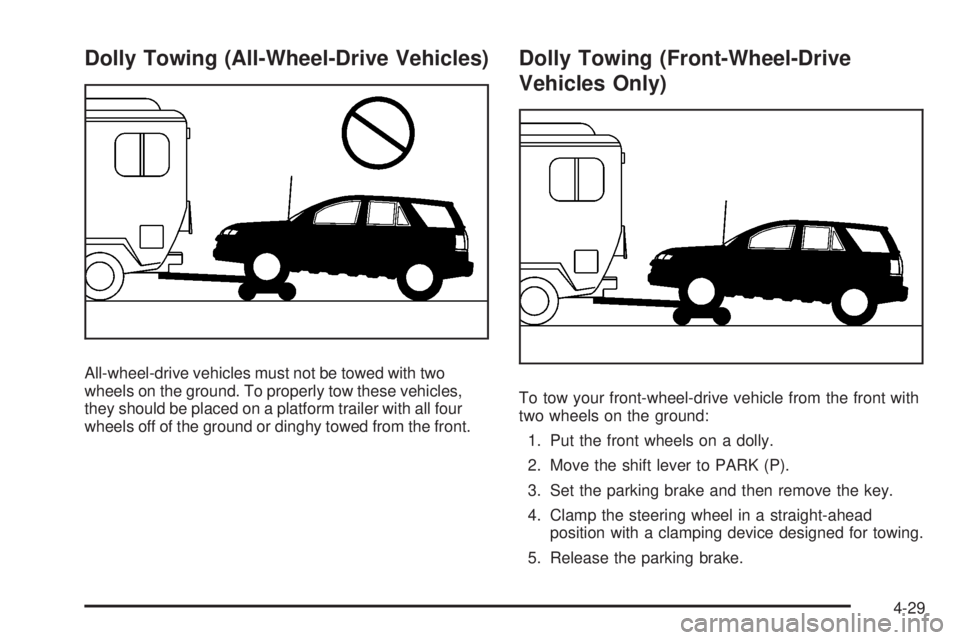
All-wheel-drive vehicles must not be towed with two
wheels on the ground. To properly tow these vehicles,
they should be placed on a platform trailer with all four
wheels off of the ground or dinghy towed from the front.
Dolly Towing (Front-Wheel-Drive
Vehicles Only)
To tow your front-wheel-drive vehicle from the front with
two wheels on the ground:
1. Put the front wheels on a dolly.
2. Move the shift lever to PARK (P).
3. Set the parking brake and then remove the key.
4. Clamp the steering wheel in a straight-ahead
position with a clamping device designed for towing.
5. Release the parking brake.
4-29
Page 318 of 472
Accessories and Modications
When non-dealer/non-retailer accessories are added to
your vehicle they can affect your vehicle’s performance
and safety, including such things as, airbags, braking,
stability, ride and handling, emissions systems,
aerodynamics, durability, and electronic systems like
antilock brakes, traction control and stability control.
Some of these accessories could even cause
malfunction or damage not covered by warranty.
GM Accessories are designed to complement and
function with other systems on your vehicle. Your GM
dealer/retailer can accessorize your vehicle using
genuine GM Accessories. When you go to your GM
dealer/retailer and ask for GM Accessories, you
will know that GM-trained and supported service
technicians will perform the work using genuine GM
Accessories.
Also, seeAdding Equipment to Your Airbag-Equipped
Vehicle on page 1-76.
California Proposition 65 Warning
Most motor vehicles, including this one, contain and/or
emit chemicals known to the State of California to
cause cancer and birth defects or other reproductive
harm. Engine exhaust, many parts and systems
(including some inside the vehicle), many uids, and
some component wear by-products contain and/or emit
these chemicals.
California Perchlorate Materials
Requirements
Certain types of automotive applications, such as airbag
initiators, seat belt pretensioners, and lithium batteries
contained in remote keyless entry transmitters, may
contain perchlorate materials. Special handling may be
necessary. For additional information, see
www.dtsc.ca.gov/hazardouswaste/perchlorate.
5-4
Page 333 of 472
If your vehicle does not have Driver Information Center
(DIC) buttons:
1. Turn the ignition to ON/RUN, with the engine off.
The vehicle must be in PARK (P) to access this
display. Press the trip odometer reset stem until OIL
LIFE REMAINING displays.
2. Press and hold the trip odometer reset stem until
OIL LIFE REMAINING shows 100%. You will hear
three chimes and the CHANGE ENGINE OIL
SOON message will go off.
3. Turn the key to LOCK/OFF.
If the CHANGE ENGINE OIL SOON message
comes back on when you start your vehicle, the
engine oil life system has not reset. Repeat
the procedure.
If your vehicle has Driver Information Center (DIC)
buttons:
1. Turn the ignition to ON/RUN, with the engine off.
2. Press the vehicle information button until OIL LIFE
REMAINING displays.
3. Press and hold the set/reset button until 100% is
displayed. You will hear three chimes and the
CHANGE ENGINE OIL SOON message will go off.
4. Turn the key to LOCK/OFF.If the CHANGE ENGINE OIL SOON message comes
back on when you start your vehicle, the engine oil
life system has not reset. Repeat the procedure.
What to Do with Used Oil
Used engine oil contains certain elements that can be
unhealthy for your skin and could even cause cancer.
Do not let used oil stay on your skin for very long. Clean
your skin and nails with soap and water, or a good
hand cleaner. Wash or properly dispose of clothing or
rags containing used engine oil. See the manufacturer’s
warnings about the use and disposal of oil products.
Used oil can be a threat to the environment. If you
change your own oil, be sure to drain all the oil from the
lter before disposal. Never dispose of oil by putting it
in the trash, pouring it on the ground, into sewers, or into
streams or bodies of water. Instead, recycle it by
taking it to a place that collects used oil. If you have a
problem properly disposing of used oil, ask your
dealer/retailer, a service station, or a local recycling
center for help.
5-19
Page 347 of 472
Power Steering Fluid
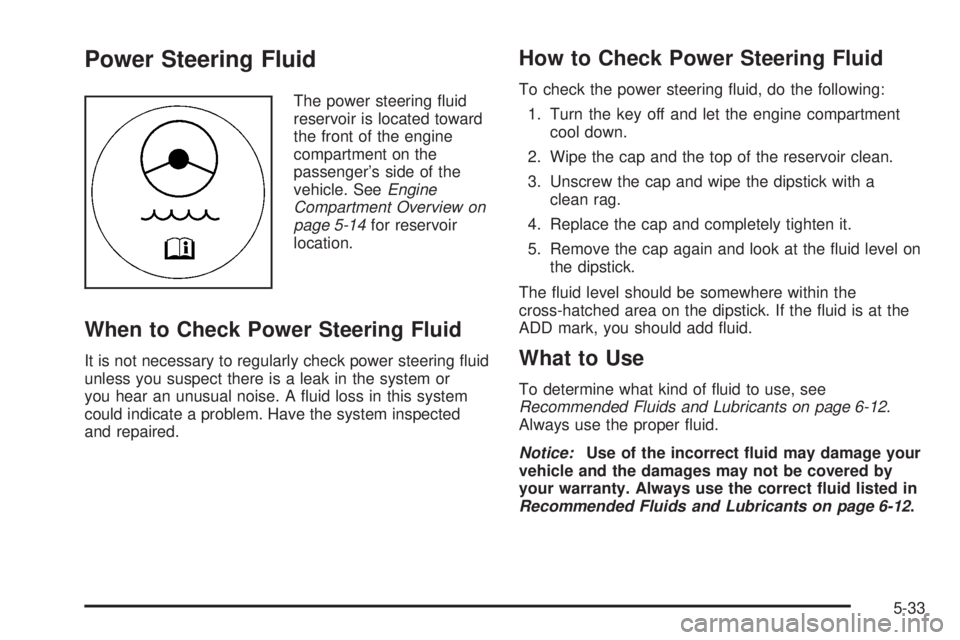
The power steering uid
reservoir is located toward
the front of the engine
compartment on the
passenger’s side of the
vehicle. SeeEngine
Compartment Overview on
page 5-14for reservoir
location.
When to Check Power Steering Fluid
It is not necessary to regularly check power steering uid
unless you suspect there is a leak in the system or
you hear an unusual noise. A uid loss in this system
could indicate a problem. Have the system inspected
and repaired.
How to Check Power Steering Fluid
To check the power steering uid, do the following:
1. Turn the key off and let the engine compartment
cool down.
2. Wipe the cap and the top of the reservoir clean.
3. Unscrew the cap and wipe the dipstick with a
clean rag.
4. Replace the cap and completely tighten it.
5. Remove the cap again and look at the uid level on
the dipstick.
The uid level should be somewhere within the
cross-hatched area on the dipstick. If the uid is at the
ADD mark, you should add uid.
What to Use
To determine what kind of uid to use, see
Recommended Fluids and Lubricants on page 6-12.
Always use the proper uid.
Notice:Use of the incorrect uid may damage your
vehicle and the damages may not be covered by
your warranty. Always use the correct uid listed in
Recommended Fluids and Lubricants on page 6-12.
5-33
Page 375 of 472
TPMS Sensor Matching Process
Each TPMS sensor has a unique identication code.
Any time you rotate your vehicle’s tires or replace one or
more of the TPMS sensors, the identication codes
will need to be matched to the new tire/wheel position.
The sensors are matched to the tire/wheel positions
in the following order: driver side front tire, passenger
side front tire, passenger side rear tire, and driver
side rear tire using a TPMS diagnostic tool. See your
dealer/retailer for service.
The TPMS sensors can also be matched to each
tire/wheel position by increasing or decreasing the tire’s
air pressure. If increasing the tire’s air pressure, do
not exceed the maximum ination pressure indicated on
the tire’s sidewall.
To decrease air-pressure out of a tire you can use the
pointed end of the valve cap, a pencil-style air pressure
gage, or a key.
You have two minutes to match the rst tire/wheel
position, and ve minutes overall to match all four
tire/wheel positions. If it takes longer than two minutes,
to match the rst tire and wheel, or more than ve
minutes to match all four tire and wheel positions the
matching process stops and you need to start over.The TPMS sensor matching process is outlined below:
1. Set the parking brake.
2. Turn the ignition switch to ON/RUN with the
engine off.
3. Press the Remote Keyless Entry (RKE) transmitter’s
LOCK and UNLOCK buttons at the same time for
approximately ve seconds. The horn sounds twice
to signal the receiver is in relearn mode and
TIRE LEARNING ACTIVE message displays on the
DIC screen.
4. Start with the driver side front tire.
5. Remove the valve cap from the valve cap stem.
Activate the TPMS sensor by increasing or
decreasing the tire’s air pressure for ve seconds,
or until a horn chirp sounds. The horn chirp,
which may take up to 30 seconds to sound,
conrms that the sensor identication code has
been matched to this tire and wheel position.
6. Proceed to the passenger side front tire, and repeat
the procedure in Step 5.
7. Proceed to the passenger side rear tire, and repeat
the procedure in Step 5.
5-61
Page 391 of 472
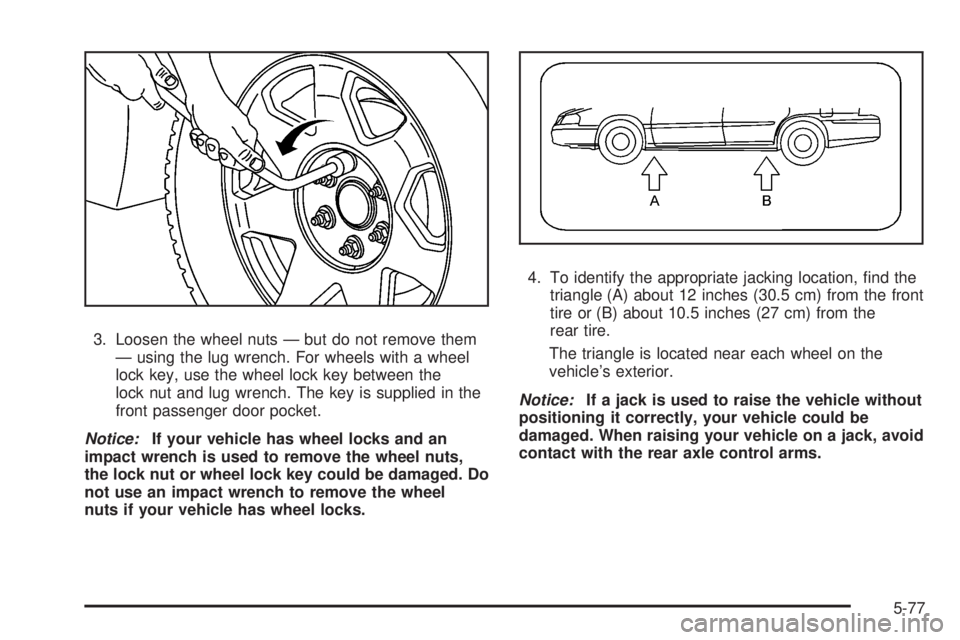
3. Loosen the wheel nuts — but do not remove them
— using the lug wrench. For wheels with a wheel
lock key, use the wheel lock key between the
lock nut and lug wrench. The key is supplied in the
front passenger door pocket.
Notice:If your vehicle has wheel locks and an
impact wrench is used to remove the wheel nuts,
the lock nut or wheel lock key could be damaged. Do
not use an impact wrench to remove the wheel
nuts if your vehicle has wheel locks.4. To identify the appropriate jacking location, nd the
triangle (A) about 12 inches (30.5 cm) from the front
tire or (B) about 10.5 inches (27 cm) from the
rear tire.
The triangle is located near each wheel on the
vehicle’s exterior.
Notice:If a jack is used to raise the vehicle without
positioning it correctly, your vehicle could be
damaged. When raising your vehicle on a jack, avoid
contact with the rear axle control arms.
5-77
Page 415 of 472
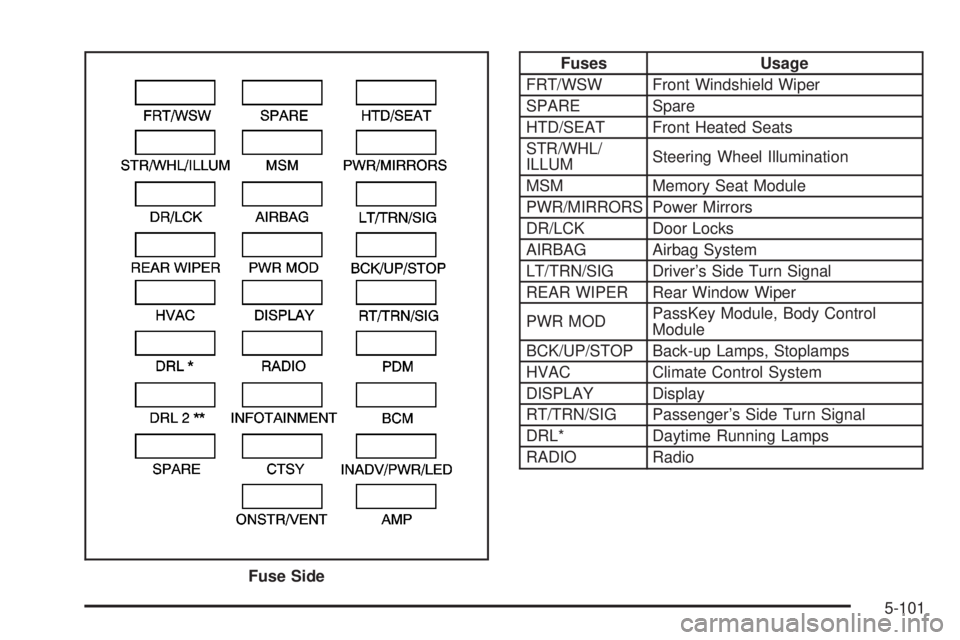
Fuses Usage
FRT/WSW Front Windshield Wiper
SPARE Spare
HTD/SEAT Front Heated Seats
STR/WHL/
ILLUMSteering Wheel Illumination
MSM Memory Seat Module
PWR/MIRRORS Power Mirrors
DR/LCK Door Locks
AIRBAG Airbag System
LT/TRN/SIG Driver’s Side Turn Signal
REAR WIPER Rear Window Wiper
PWR MODPassKey Module, Body Control
Module
BCK/UP/STOP Back-up Lamps, Stoplamps
HVAC Climate Control System
DISPLAY Display
RT/TRN/SIG Passenger’s Side Turn Signal
DRL* Daytime Running Lamps
RADIO Radio
Fuse Side
5-101