climate control GMC ACADIA 2009 User Guide
[x] Cancel search | Manufacturer: GMC, Model Year: 2009, Model line: ACADIA, Model: GMC ACADIA 2009Pages: 420, PDF Size: 2.23 MB
Page 136 of 420
If the vehicle has a voltmeter gage
or a voltage display on the Driver
Information Center (DIC), you
may see the voltage move up or
down. This is normal. If there
is a problem, an alert will be
displayed.
The battery can be discharged at
idle if the electrical loads are
very high. This is true for all
vehicles. This is because the
generator (alternator) may not be
spinning fast enough at idle to
produce all the power that is needed
for very high electrical loads.
A high electrical load occurs when
several of the following are on, such
as: headlamps, high beams, fog
lamps, rear window defogger,
climate control fan at high speed,
heated seats, engine cooling
fans, trailer loads, and loads
plugged into accessory power
outlets.EPM works to prevent excessive
discharge of the battery. It does this
by balancing the generator’s
output and the vehicle’s electrical
needs. It can increase engine
idle speed to generate more power,
whenever needed. It can temporarily
reduce the power demands of
some accessories.
Normally, these actions occur in
steps or levels, without being
noticeable. In rare cases at the
highest levels of corrective action,
this action may be noticeable
to the driver. If so, a Driver
Information Center (DIC) message
might be displayed, such as
BATTERY SAVER ACTIVE,
BATTERY VOLTAGE LOW, or
LOW BATTERY. If this message is
displayed, it is recommended
that the driver reduce the electrical
loads as much as possible. See
DIC Warnings and Messages
on page 3-56.Battery Run-Down
Protection
This feature helps prevent the
battery from being drained, if the
interior courtesy lamps, reading/map
lamps, visor vanity lamps or trunk
lamp are accidentally left on.
If any of these lamps are left on,
they automatically turn off after
10 minutes, if the ignition is off.
The lamps will not come back on
again until one of the following
occurs:
The ignition is turned on.
The exterior lamps control is
turned off, then on again.
The headlamps will timeout after
10 minutes, if they are manually
turned on before the ignition is off.
3-16 Instrument Panel
Page 140 of 420
If You Cannot See the HUD
Image When the Ignition Is On
Is anything covering the
HUD lens?
Is the HUD dimmer setting bright
enough?
Is the HUD image adjusted to the
proper height?
Are you wearing polarized
sunglasses?
Still no HUD image? Check the
fuse in the instrument panel
fuse block. SeeInstrument Panel
Fuse Block on page 5-90.
If the HUD Image Is Not Clear
Is the HUD image too bright?
Are the windshield and HUD
lens clean?
If the HUD image is not correct,
contact your dealer/retailer.
Keep in mind that the windshield is
part of the HUD system.
Accessory Power
Outlet(s)
The vehicle has three 12-volt outlets
which can be used to plug in
electrical equipment, such as a
cellular telephone, a compact disc
player, etc.
The power outlets are located on
the instrument panel below the
climate controls, at the rear of the
center console, and in the rear cargo
area. Lift the cover to access the
outlet. Close the cover when
not using the outlet.
Notice:Leaving electrical
equipment plugged in for an
extended period of time while
the vehicle is off will drain
the battery. Power is always
supplied to the outlets. Always
unplug electrical equipment when
not in use and do not plug in
equipment that exceeds the
maximum 20 ampere rating.Certain accessory plugs may not be
compatible to the accessory
power outlet and could result in
blown vehicle and adapter fuses.
If a problem is experienced,
see your dealer/retailer for additional
information on the power accessory
outlets.
Notice:Adding any electrical
equipment to the vehicle can
damage it or keep other
components from working as
they should. The repairs would
not be covered by the vehicle
warranty. Do not use equipment
exceeding maximum amperage
rating of 20 amperes. Check with
your dealer/retailer before
adding electrical equipment.
When adding electrical equipment,
be sure to follow the proper
installation instructions included with
the equipment.
3-20 Instrument Panel
Page 142 of 420
Climate Controls
Climate Control System
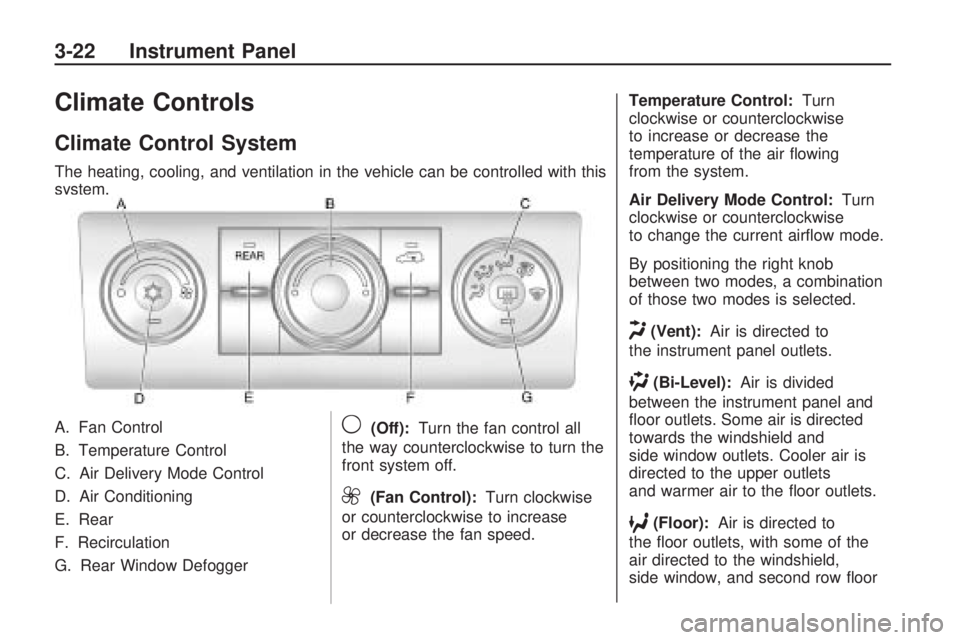
The heating, cooling, and ventilation in the vehicle can be controlled with this
system.
A. Fan Control
B. Temperature Control
C. Air Delivery Mode Control
D. Air Conditioning
E. Rear
F. Recirculation
G. Rear Window Defogger
9(Off):Turn the fan control all
the way counterclockwise to turn the
front system off.
9(Fan Control): Turn clockwise
or counterclockwise to increase
or decrease the fan speed. Temperature Control:
Turn
clockwise or counterclockwise
to increase or decrease the
temperature of the air owing
from the system.
Air Delivery Mode Control: Turn
clockwise or counterclockwise
to change the current airow mode.
By positioning the right knob
between two modes, a combination
of those two modes is selected.
H(Vent): Air is directed to
the instrument panel outlets.
)(Bi-Level): Air is divided
between the instrument panel and
oor outlets. Some air is directed
towards the windshield and
side window outlets. Cooler air is
directed to the upper outlets
and warmer air to the oor outlets.
6(Floor): Air is directed to
the oor outlets, with some of the
air directed to the windshield,
side window, and second row oor
3-22 Instrument Panel
Page 144 of 420
This mode recirculates and helps to
quickly cool the air inside the
vehicle. It can be used to prevent
outside air and odors from entering
the vehicle.
The recirculation mode cannot be
used with oor, defrost, or defogging
modes. If recirculation is selected
in these modes, the indicator ashes
three times and turns off. The air
conditioning also comes on when
this mode is activated unless
the outside air temperature is
less than 40°F (4°C). While in
recirculation mode the windows can
fog when the weather is cold and
damp. To clear the fog, select either
the defog or defrost mode and
increase the fan speed.Rear Window Defogger
The rear window defogger uses a
warming grid to remove fog from the
rear window.
<(Rear Window Defogger):
Press to turn the rear window
defogger on or off. The rear
window defogger stays on for about
10 minutes, before automatically
turning off. The defogger will
also turn off when the engine is
turned off.
Do not drive the vehicle until all the
windows are clear.
For vehicles with heated outside
rearview mirrors, fog or frost
is cleared from the surface of the
mirror when
window. If you do, you could cut
or damage the warming grid, and
the repairs would not be covered
by the vehicle warranty. Do not
attach a temporary vehicle
license, tape, a decal or anything
similar to the defogger grid.
REAR:Press to turn the rear
heating and air conditioning on or
off. SeeRear Air Conditioning
and Heating System on page 3-31
orRear Air Conditioning and
Heating System and Electronic
Climate Controls on page 3-32.
3-24 Instrument Panel
Page 145 of 420
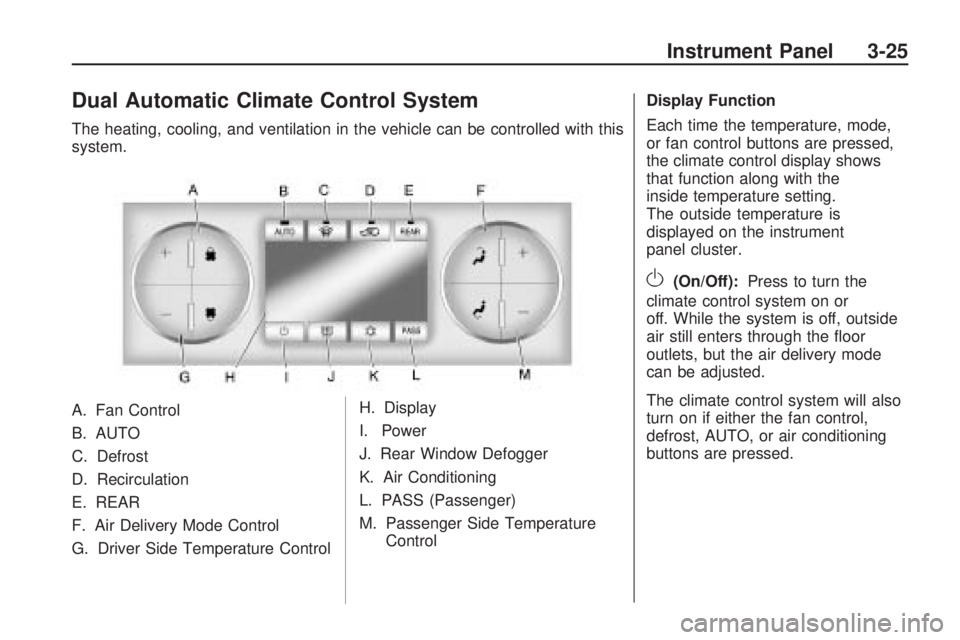
Dual Automatic Climate Control System
The heating, cooling, and ventilation in the vehicle can be controlled with this
system.
A. Fan Control
B. AUTO
C. Defrost
D. Recirculation
E. REAR
F. Air Delivery Mode Control
G. Driver Side Temperature ControlH. Display
I. Power
J. Rear Window Defogger
K. Air Conditioning
L. PASS (Passenger)
M. Passenger Side Temperature
Control Display Function
Each time the temperature, mode,
or fan control buttons are pressed,
the climate control display shows
that function along with the
inside temperature setting.
The outside temperature is
displayed on the instrument
panel cluster.
O(On/Off):
Press to turn the
climate control system on or
off. While the system is off, outside
air still enters through the oor
outlets, but the air delivery mode
can be adjusted.
The climate control system will also
turn on if either the fan control,
defrost, AUTO, or air conditioning
buttons are pressed.
Instrument Panel 3-25
Page 148 of 420
While in defrost mode, if the PASS
button is pressed, the PASS button
indicator ashes three times to show
that the passenger climate control
system cannot be activated. If the
passenger temperature buttons are
adjusted while in defrost mode, the
driver temperature indicator will
change. The passenger temperature
will not be displayed.
@(Recirculation):Press to turn
the recirculation mode on or off.
An indicator light comes on
when recirculation is on. When the
engine is turned off, the recirculation
mode automatically turns off and
must be re-selected when the
engine is turned on again.
This mode recirculates and helps to
quickly cool the air inside the vehicle.
It can be used to prevent outside air
and odors from entering the vehicle.
The recirculation mode cannot be
used with oor, defog, or defrosting
modes. If recirculation is selected in
these modes, the indicator ashesthree times and turns off. The air
conditioning compressor also comes
on when this mode is activated.
While in recirculation mode the
windows can fog when the weather
is cold and damp. To clear the fog,
select either the defog or defrost
mode and increase the fan speed.
Air Conditioning
#(Air Conditioning):Press to
turn the air conditioning (A/C)
on and off. An indicator light comes
on when A/C is on.
The A/C does not work when the
outside temperature is below
40°F (4°C). If
#is pressed the
indicator ashes three times
and turns off to show that the
A/C mode is not available. If the
A/C is on and the outside
temperature drops below a
temperature which is too cool for
air conditioning to be effective,
the A/C indicator turns off to show
that the A/C mode has been
canceled.On hot days, open the windows
briey to let hot inside air escape.
This helps reduce the time it
takes for the interior of the vehicle
to cool down.
The air conditioning system removes
moisture from the air, so a small
amount of water might drip under the
vehicle while idling or after turning off
the engine. This is normal.
Rear Window Defogger
The rear window defogger uses a
warming grid to remove fog from the
rear window.
<(Rear Window Defogger):
Press to turn the rear window
defogger on or off. The rear window
defogger stays on for about
10 minutes, before turning off.
The defogger also turns off when
the engine is turned off. Do not drive
the vehicle until all the windows
are clear.
3-28 Instrument Panel
Page 149 of 420
For vehicles with heated outside
rearview mirrors, fog or frost
is cleared from the surface of the
mirror when the rear window
defog button is pressed.
Notice:Do not use a razor blade
or sharp object to clear the
inside rear window. Do not adhere
anything to the defogger grid
lines in the rear glass. These
actions may damage the rear
defogger. Repairs would not be
covered by your warranty.
REAR:Press to turn the rear
heating and air conditioning on or
off. SeeRear Air Conditioning
and Heating System on page 3-31
orRear Air Conditioning and
Heating System and Electronic
Climate Controls on page 3-32.Sensors
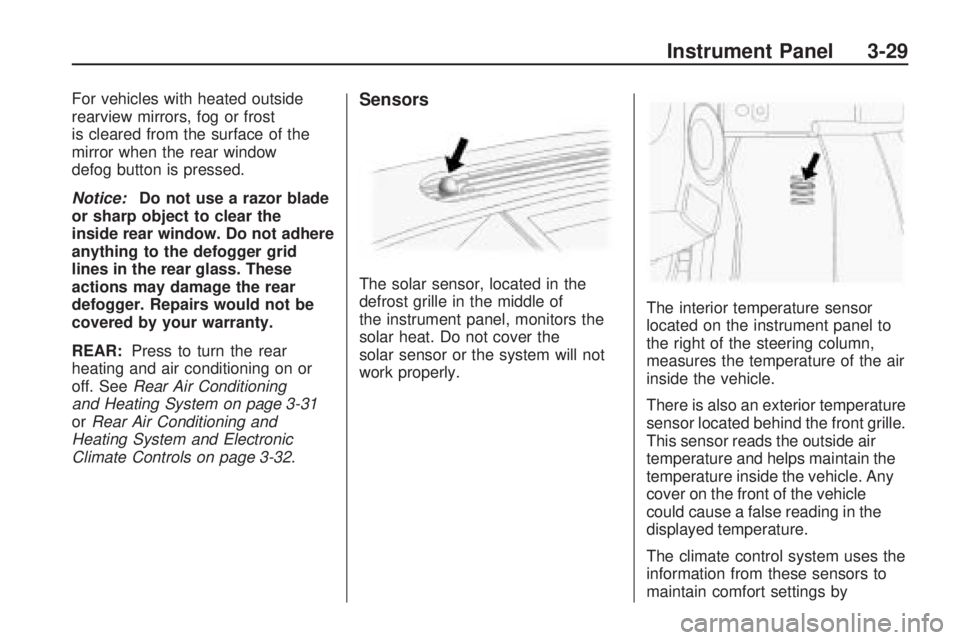
The solar sensor, located in the
defrost grille in the middle of
the instrument panel, monitors the
solar heat. Do not cover the
solar sensor or the system will not
work properly.The interior temperature sensor
located on the instrument panel to
the right of the steering column,
measures the temperature of the air
inside the vehicle.
There is also an exterior temperature
sensor located behind the front grille.
This sensor reads the outside air
temperature and helps maintain the
temperature inside the vehicle. Any
cover on the front of the vehicle
could cause a false reading in the
displayed temperature.
The climate control system uses the
information from these sensors to
maintain comfort settings by
Instrument Panel 3-29
Page 151 of 420
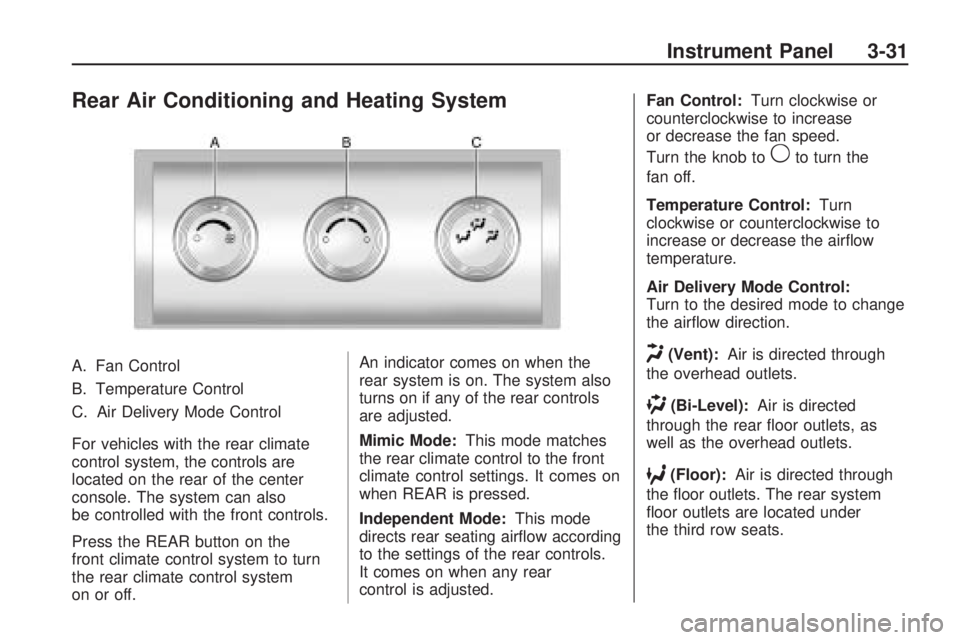
Rear Air Conditioning and Heating System
A. Fan Control
B. Temperature Control
C. Air Delivery Mode Control
For vehicles with the rear climate
control system, the controls are
located on the rear of the center
console. The system can also
be controlled with the front controls.
Press the REAR button on the
front climate control system to turn
the rear climate control system
on or off.An indicator comes on when the
rear system is on. The system also
turns on if any of the rear controls
are adjusted.
Mimic Mode:
This mode matches
the rear climate control to the front
climate control settings. It comes on
when REAR is pressed.
Independent Mode: This mode
directs rear seating airow according
to the settings of the rear controls.
It comes on when any rear
control is adjusted. Fan Control:
Turn clockwise or
counterclockwise to increase
or decrease the fan speed.
Turn the knob to
9to turn the
fan off.
Temperature Control: Turn
clockwise or counterclockwise to
increase or decrease the airow
temperature.
Air Delivery Mode Control:
Turn to the desired mode to change
the airow direction.
H(Vent): Air is directed through
the overhead outlets.
)(Bi-Level): Air is directed
through the rear oor outlets, as
well as the overhead outlets.
6(Floor): Air is directed through
the oor outlets. The rear system
oor outlets are located under
the third row seats.
Instrument Panel 3-31
Page 152 of 420
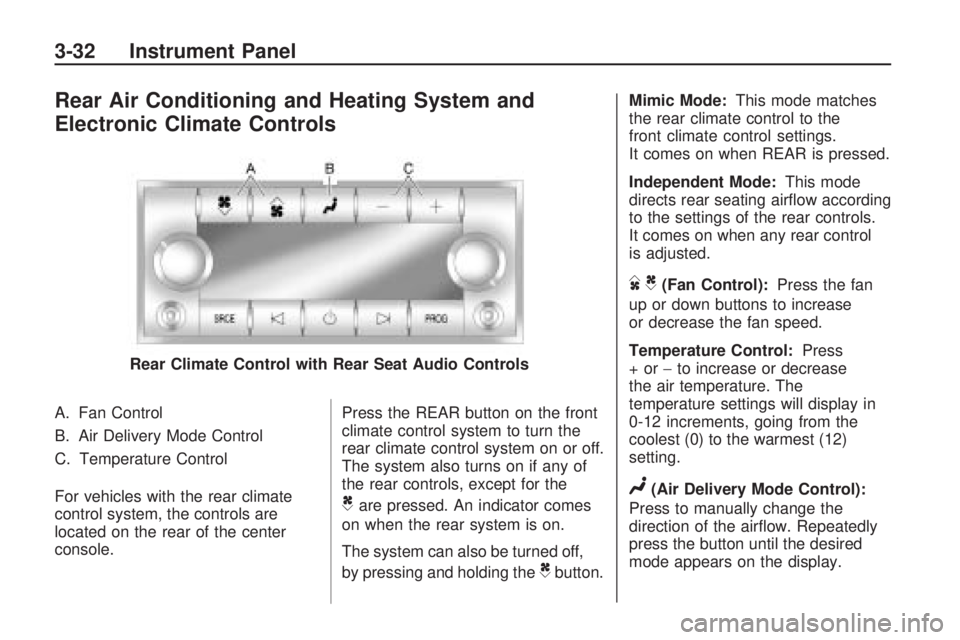
Rear Air Conditioning and Heating System and
Electronic Climate Controls
A. Fan Control
B. Air Delivery Mode Control
C. Temperature Control
For vehicles with the rear climate
control system, the controls are
located on the rear of the center
console.Press the REAR button on the front
climate control system to turn the
rear climate control system on or off.
The system also turns on if any of
the rear controls, except for the
Care pressed. An indicator comes
on when the rear system is on.
The system can also be turned off,
by pressing and holding the
Cbutton. Mimic Mode:
This mode matches
the rear climate control to the
front climate control settings.
It comes on when REAR is pressed.
Independent Mode: This mode
directs rear seating airow according
to the settings of the rear controls.
It comes on when any rear control
is adjusted.
DC(Fan Control): Press the fan
up or down buttons to increase
or decrease the fan speed.
Temperature Control: Press
+or− to increase or decrease
the air temperature. The
temperature settings will display in
0-12 increments, going from the
coolest (0) to the warmest (12)
setting.
N(Air Delivery Mode Control):
Press to manually change the
direction of the airow. Repeatedly
press the button until the desired
mode appears on the display.
Rear Climate Control with Rear Seat Audio Controls
3-32 Instrument Panel
Page 175 of 420
2. Find the vehicle’s current
location and variance zone
number on the map.
Zones 1 through 15 are available.
3. Press the set/reset button
to scroll through and select the
appropriate variance zone.
4. Press the trip/fuel button until the
vehicle heading, for example,
N for North, is displayed in
the DIC.
5. If calibration is necessary,
calibrate the compass.
See “Compass Calibration
Procedure” following.
Compass Calibration
The compass can be manually
calibrated. Only calibrate the
compass in a magnetically clean
and safe location, such as an open
parking lot, where driving the
vehicle in circles is not a danger.
It is suggested to calibrate away
from tall buildings, utility wires,
manhole covers, or other industrial
structures, if possible.If CAL should ever appear in the
DIC display, the compass should be
calibrated.
If the DIC display does not show a
heading, for example, N for North,
or the heading does not change
after making turns, there may be a
strong magnetic eld interfering
with the compass. Such interference
may be caused by a magnetic CB
or cell phone antenna mount, a
magnetic emergency light, magnetic
note pad holder, or any other
magnetic item. Turn off the vehicle,
move the magnetic item, then
turn on the vehicle and calibrate the
compass.
To calibrate the compass, use the
following procedure:
Compass Calibration Procedure
1. Before calibrating the compass,
make sure the compass zone is
set to the variance zone in
which the vehicle is located.
See “Compass Variance (Zone)
Procedure” earlier in this section.Do not operate any switches
such as window, sunroof, climate
controls, seats, etc. during the
calibration procedure.
2. Press the vehicle information
button until PRESS
VTO
CALIBRATE COMPASS
displays.
3. Press the set/reset button to start
the compass calibration.
4. The DIC will display
CALIBRATING: DRIVE IN
CIRCLES. Drive the vehicle in
tight circles at less than
5 mph (8 km/h) to complete the
calibration. The DIC will
display CALIBRATION
COMPLETE for a few seconds
when the calibration is complete.
The DIC display will then
return to the previous menu.
Instrument Panel 3-55