battery GMC ACADIA 2009 Owner's Guide
[x] Cancel search | Manufacturer: GMC, Model Year: 2009, Model line: ACADIA, Model: GMC ACADIA 2009Pages: 420, PDF Size: 2.23 MB
Page 176 of 420
DIC Warnings and
Messages
Messages are displayed on the DIC
to notify the driver that the status
of the vehicle has changed and that
some action may be needed by
the driver to correct the condition.
Multiple messages may appear one
after another.
Some messages may not require
immediate action, but you can press
any of the DIC buttons on the
instrument panel or the trip odometer
reset stem on the instrument panel
cluster to acknowledge that you
received the messages and to clear
them from the display.
Some messages cannot be cleared
from the DIC display because
they are more urgent. These
messages require action before they
can be cleared. You should take
any messages that appear on
the display seriously and remember
that clearing the messages will
only make the messages disappear,
not correct the problem.The following are the possible
messages that can be displayed
and some information about them.ALL WHEEL DRIVE OFF
If your vehicle has the All-Wheel
Drive (AWD) system, this message
displays when there is a compact
spare tire on the vehicle, when
the Antilock Brake System (ABS)
warning light comes on, or when the
rear differential uid is overheating.
This message turns off when
the differential uid cools.
The AWD system is disabled until
the compact spare tire is replaced
by a full-size tire. If the warning
message is still on after putting on
the full-size tire, you need to reset
the warning message. To reset
the warning message, turn
the ignition off and then back on
again after 30 seconds. If the
message stays on, see your
dealer/retailer right away. See
All-Wheel Drive (AWD) System on
page 4-7for more information.
AUTOMATIC LIGHT
CONTROL OFF
This message displays when the
automatic headlamps are turned off.
This message clears itself after
10 seconds.
AUTOMATIC LIGHT
CONTROL ON
This message displays when the
automatic headlamps are turned on.
This message clears itself after
10 seconds.
BATTERY SAVER ACTIVE
This message displays when
the system detects that the battery
voltage is dropping below
expected levels. The battery saver
system starts reducing certain
features of the vehicle that you may
be able to notice. At the point
that the features are disabled, this
message is displayed. It means that
the vehicle is trying to save the
charge in the battery.
3-56 Instrument Panel
Page 177 of 420
Turn off all unnecessary accessories
to allow the battery to recharge.
The normal battery voltage range is
11.5 to 15.5 volts.
CHANGE ENGINE OIL SOON
This message displays when
the engine oil needs to be changed.
When you change the engine oil,
be sure to reset the CHANGE
ENGINE OIL SOON message.
SeeEngine Oil Life System
on page 5-13for information on how
to reset the message. SeeEngine
Oil on page 5-11andScheduled
Maintenance on page 6-3for more
information.
CHECK TIRE PRESSURE
On vehicles with the Tire Pressure
Monitor System (TPMS), this
message displays when the
pressure in one or more of the
vehicle’s tires needs to be checked.
This message also displays LEFT
FRONT, RIGHT FRONT, LEFT
REAR, or RIGHT REAR to indicate
which tire needs to be checked.You can receive more than one tire
pressure message at a time.
To read the other messages that
may have been sent at the
same time, press the set/reset
button or the trip odometer reset
stem. If a tire pressure message
appears on the DIC, stop as soon as
you can. Have the tire pressures
checked and set to those shown on
the Tire Loading Information
label. SeeTires on page 5-35,
Loading the Vehicle on page 4-16,
andInflation - Tire Pressure on
page 5-41. The DIC also shows the
tire pressure values. See “DIC
Operation and Displays (With DIC
Buttons)” earlier in this section. If the
tire pressure is low, the low tire
pressure warning light comes
on. SeeTire Pressure Light on
page 3-41.
CRUISE SET TO XXX
This message displays whenever
the cruise control is set. SeeCruise
Control on page 3-9for more
information.
DRIVER DOOR OPEN
This message displays and a chime
sounds if the driver door is not
fully closed and the vehicle is shifted
out of P (Park). Stop and turn off
the vehicle, check the door for
obstructions, and close the door
again. Check to see if the message
still appears on the DIC.
ENGINE HOT A/C (Air
Conditioning) OFF
This message displays when the
engine coolant becomes hotter than
the normal operating temperature.
SeeEngine Coolant Temperature
Gage on page 3-40. To avoid added
strain on a hot engine, the air
conditioning compressor
automatically turns off. When the
coolant temperature returns to
normal, the air conditioning
compressor turns back on. You can
continue to drive your vehicle.
Instrument Panel 3-57
Page 180 of 420
OIL PRESSURE LOW STOP
ENGINE
Notice:If you drive your vehicle
while the engine oil pressure
is low, severe engine damage
may occur. If a low oil pressure
warning appears on the Driver
Information Center (DIC), stop the
vehicle as soon as possible.
Do not drive the vehicle until the
cause of the low oil pressure
is corrected. SeeEngine Oil on
page 5-11for more information.
This message displays if low
oil pressure levels occur. Stop the
vehicle as soon as safely possible
and do not operate it until the cause
of the low oil pressure has been
corrected. Check the oil as soon as
possible and have your vehicle
serviced by your dealer/retailer.
SeeEngine Oil on page 5-11.
PARK ASSIST OFF
If your vehicle has the Ultrasonic
Rear Parking Assist (URPA) system,
after the vehicle has been started
and shifted out of P (Park), this
message displays to remind the
driver that the URPA system has
been turned off. Press the set/reset
button or the trip odometer reset
stem to acknowledge this message
and clear it from the DIC display.
To turn the URPA system back on,
seeUltrasonic Rear Parking Assist
(URPA) on page 2-34.
PASSENGER DOOR OPEN
This message displays and a chime
sounds if the passenger door is
not fully closed and the vehicle is
shifted out of P (Park). Stop and turn
off the vehicle, check the door for
obstructions, and close the door
again. Check to see if the message
still appears on the DIC.
REMOTE KEY LEARNING
ACTIVE
This message displays while you
are matching a Remote Keyless
Entry (RKE) transmitter to your
vehicle. See “Matching
Transmitter(s) to Your Vehicle”
underRemote Keyless Entry (RKE)
System Operation on page 2-3
andDIC Operation and Displays
(With DIC Buttons) on page 3-46or
DIC Operation and Displays
(Without DIC Buttons) on page 3-51
for more information.
REPLACE BATTERY IN
REMOTE KEY
This message displays if a Remote
Keyless Entry (RKE) transmitter
battery is low. The battery needs to
be replaced in the transmitter.
See “Battery Replacement” under
Remote Keyless Entry (RKE)
System Operation on page 2-3.
3-60 Instrument Panel
Page 181 of 420
RIGHT REAR DOOR OPEN
This message displays and a chime
sounds if the passenger side rear
door is not fully closed and the
vehicle is shifted out of P (Park).
Stop and turn off the vehicle, check
the door for obstructions, and
close the door again. Check to see
if the message still appears on
the DIC.
SERVICE A/C (Air
Conditioning) SYSTEM
This message displays when the
electronic sensors that control
the air conditioning and heating
systems are no longer working.
Have the climate control system
serviced by your dealer/retailer
if you notice a drop in heating and
air conditioning efficiency.
SERVICE AIR BAG
This message displays if there is a
problem with the airbag system.
Have your dealer/retailer inspect the
system for problems. SeeAirbagReadiness Light on page 3-36and
Airbag System on page 1-48for
more information.
SERVICE ALL WHEEL DRIVE
If your vehicle has the All-Wheel
Drive (AWD) system, this message
displays if there is a problem
with this system. If this message
appears, stop as soon as possible
and turn off the vehicle. Restart
the vehicle after 30 seconds
and check for the message on the
DIC display. If the message is
still displayed or appears again
when you begin driving, the AWD
system needs service. See your
dealer/retailer.
SERVICE BATTERY
CHARGING SYSTEM
On some vehicles, this message
displays if there is a problem
with the battery charging system.
Under certain conditions, the
charging system light may also turn
on in the instrument panel cluster.
SeeCharging System Light onpage 3-37. Driving with this problem
could drain the battery. Turn off
all unnecessary accessories.
Have the electrical system checked
as soon as possible. See your
dealer/retailer.
SERVICE BRAKE SYSTEM
This message displays along with
the brake system warning light
if there is a problem with the brake
system. SeeBrake System
Warning Light on page 3-38. If this
message appears, stop as soon
as possible and turn off the vehicle.
Restart the vehicle and check for
the message on the DIC display.
If the message is still displayed or
appears again when you begin
driving, the brake system needs
service as soon as possible.
See your dealer/retailer.
SERVICE PARK ASSIST
If your vehicle has the Ultrasonic
Rear Parking Assist (URPA) system,
this message displays if there is a
problem with the URPA system.
Instrument Panel 3-61
Page 185 of 420
The customization preferences are
automatically recalled.
To change customization
preferences, use the following
procedure.
Entering the Feature
Settings Menu
1. Turn the ignition on and place
the vehicle in P (Park).
To avoid excessive drain on the
battery, it is recommended that
the headlamps are turned off.
2. Press the customization button to
enter the feature settings menu.
If the menu is not available,
FEATURE SETTINGS
AVAILABLE IN PARK will
display. Before entering the
menu, make sure the vehicle is
in P (Park).
Feature Settings Menu Items
The following are customization
features that allow you to program
settings to the vehicle:
DISPLAY IN ENGLISH
This feature will only display if a
language other than English has
been set. This feature allows you to
change the language in which the
DIC messages appear to English.
Press the customization button until
the PRESS
VTO DISPLAY IN
ENGLISH screen appears on the
DIC display. Press the set/reset
button once to display all DIC
messages in English.
DISPLAY LANGUAGE
This feature allows you to select the
language in which the DIC messages
will appear.
Press the customization button until
the DISPLAY LANGUAGE screen
appears on the DIC display.Press the set/reset button once to
access the settings for this feature.
Then press the customization
button to scroll through the following
settings:
ENGLISH (default):All messages
will appear in English.
FRANCAIS:All messages will
appear in French.
ESPANOL:All messages will
appear in Spanish.
NO CHANGE:No change will be
made to this feature. The current
setting will remain.
To select a setting, press the
set/reset button while the desired
setting is displayed on the DIC.
You can also change the language
by pressing the trip odometer
reset stem. See “Language” under
DIC Operation and Displays
(Without DIC Buttons) earlier in this
section for more information.
Instrument Panel 3-65
Page 230 of 420
Headphones
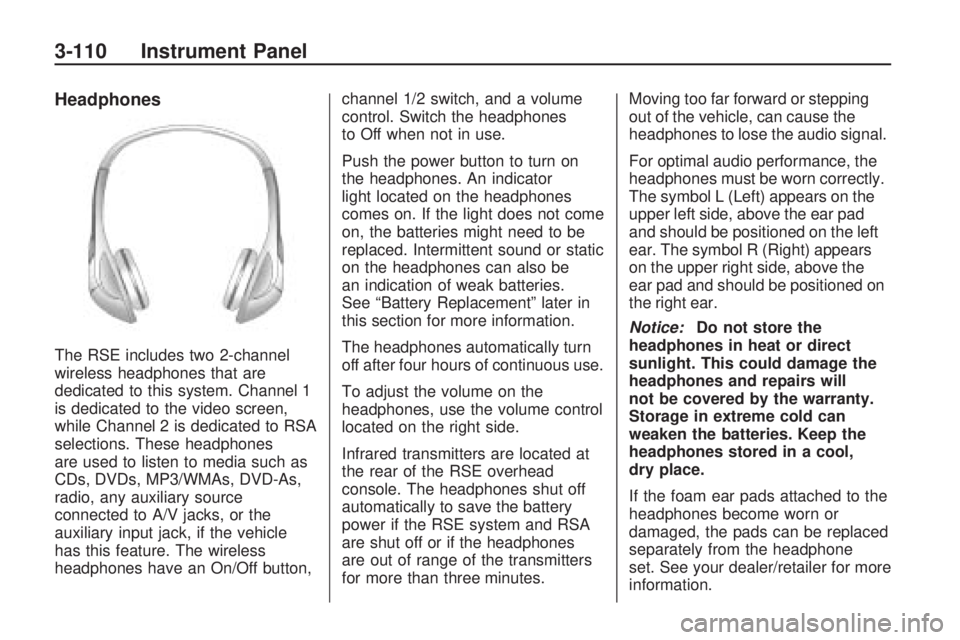
The RSE includes two 2-channel
wireless headphones that are
dedicated to this system. Channel 1
is dedicated to the video screen,
while Channel 2 is dedicated to RSA
selections. These headphones
are used to listen to media such as
CDs, DVDs, MP3/WMAs, DVD-As,
radio, any auxiliary source
connected to A/V jacks, or the
auxiliary input jack, if the vehicle
has this feature. The wireless
headphones have an On/Off button,channel 1/2 switch, and a volume
control. Switch the headphones
to Off when not in use.
Push the power button to turn on
the headphones. An indicator
light located on the headphones
comes on. If the light does not come
on, the batteries might need to be
replaced. Intermittent sound or static
on the headphones can also be
an indication of weak batteries.
See “Battery Replacement” later in
this section for more information.
The headphones automatically turn
off after four hours of continuous use.
To adjust the volume on the
headphones, use the volume control
located on the right side.
Infrared transmitters are located at
the rear of the RSE overhead
console. The headphones shut off
automatically to save the battery
power if the RSE system and RSA
are shut off or if the headphones
are out of range of the transmitters
for more than three minutes.Moving too far forward or stepping
out of the vehicle, can cause the
headphones to lose the audio signal.
For optimal audio performance, the
headphones must be worn correctly.
The symbol L (Left) appears on the
upper left side, above the ear pad
and should be positioned on the left
ear. The symbol R (Right) appears
on the upper right side, above the
ear pad and should be positioned on
the right ear.
Notice:Do not store the
headphones in heat or direct
sunlight. This could damage the
headphones and repairs will
not be covered by the warranty.
Storage in extreme cold can
weaken the batteries. Keep the
headphones stored in a cool,
dry place.
If the foam ear pads attached to the
headphones become worn or
damaged, the pads can be replaced
separately from the headphone
set. See your dealer/retailer for more
information.
3-110 Instrument Panel
Page 231 of 420
Headphones should be stored in the
front oor console and not in the
front seat back pocket. Headphone
damage can occur when the
second row seats are folded
forward.
Battery Replacement
To change the batteries on the
headphones:
1. Turn the screw to loosen the
battery door located on the
left side of the headphones.
Slide the battery door open.
2. Replace the two batteries in the
compartment. Make sure that
they are installed correctly, using
the diagram on the inside of
the battery compartment.
3. Replace the battery door and
tighten the door screw.
If the headphones are to be stored
for a long period of time, remove
the batteries and keep them
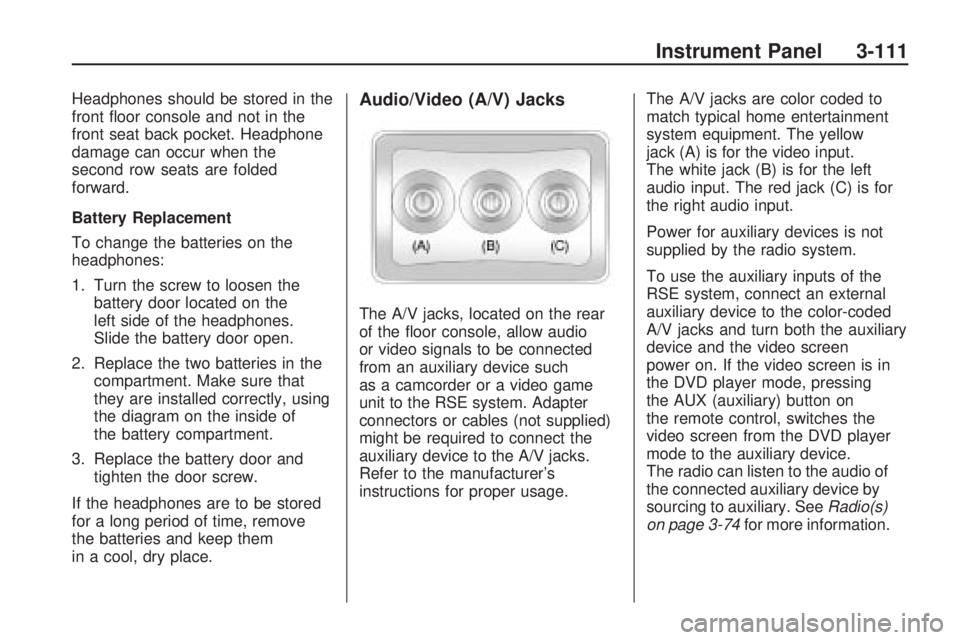
in a cool, dry place.Audio/Video (A/V) Jacks
The A/V jacks, located on the rear
of the oor console, allow audio
or video signals to be connected
from an auxiliary device such
as a camcorder or a video game
unit to the RSE system. Adapter
connectors or cables (not supplied)
might be required to connect the
auxiliary device to the A/V jacks.
Refer to the manufacturer’s
instructions for proper usage.The A/V jacks are color coded to
match typical home entertainment
system equipment. The yellow
jack (A) is for the video input.
The white jack (B) is for the left
audio input. The red jack (C) is for
the right audio input.
Power for auxiliary devices is not
supplied by the radio system.
To use the auxiliary inputs of the
RSE system, connect an external
auxiliary device to the color-coded
A/V jacks and turn both the auxiliary
device and the video screen
power on. If the video screen is in
the DVD player mode, pressing
the AUX (auxiliary) button on
the remote control, switches the
video screen from the DVD player
mode to the auxiliary device.
The radio can listen to the audio of
the connected auxiliary device by
sourcing to auxiliary. SeeRadio(s)
on page 3-74for more information.
Instrument Panel 3-111
Page 233 of 420
If a DVD is playing and the screen
is raised to its locked position,
the screen remains on; this
is normal, and the DVD continues to
play through the previous audio
source. Press
Pon the remote
control or eject the disc to turn off
the screen.
The infrared receivers for the
wireless headphones and the
remote control are located at the
rear of the overhead console.
Notice:Avoid directly touching
the video screen, as damage
may occur. See “Cleaning
the Video Screen” later in this
section for more information.
Remote Control
To use the remote control, aim it at
the transmitter window at the
rear of the overhead console and
press the desired button. Direct
sunlight or very bright light could
affect the ability of the RSE
transmitter to receive signals from
the remote control. If the remote
control does not seem to be
working, the batteries might need
to be replaced. See “Battery
Replacement” later in this section.
Objects blocking the line of sight
could also affect the function of the
remote control.If a CD or DVD is in the Radio DVD
slot, the remote controlObutton
can be used to turn on the video
screen display and start the disc.
The radio can also turn on the video
screen display. SeeRadio(s) on
page 3-74for more information.
Notice:Storing the remote
control in a hot area or in direct
sunlight can damage it, and
the repairs will not be covered by
the warranty. Storage in extreme
cold can weaken the batteries.
Keep the remote control stored in
a cool, dry place.
Instrument Panel 3-113
Page 236 of 420
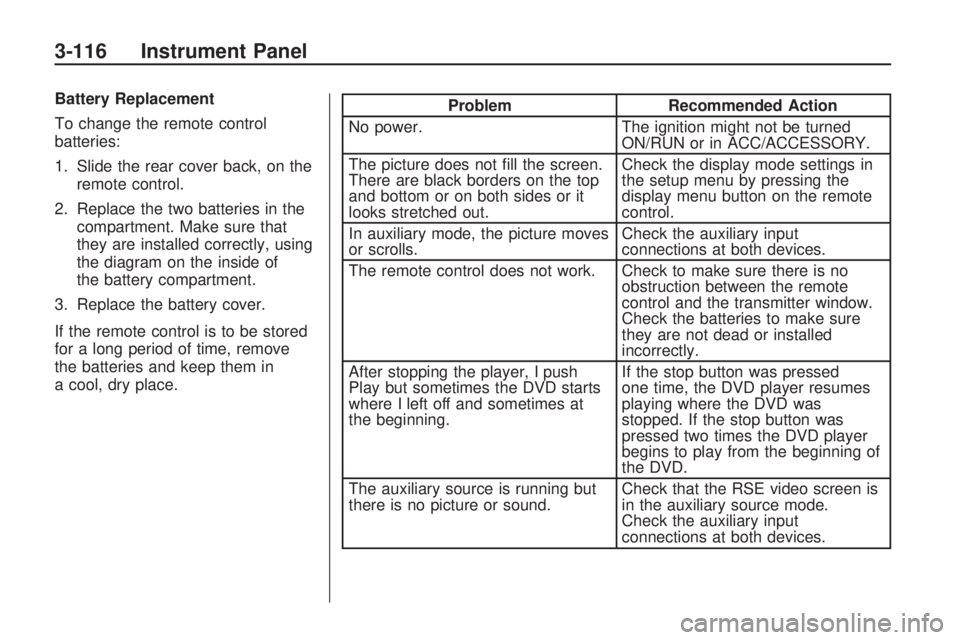
Battery Replacement
To change the remote control
batteries:
1. Slide the rear cover back, on theremote control.
2. Replace the two batteries in the compartment. Make sure that
they are installed correctly, using
the diagram on the inside of
the battery compartment.
3. Replace the battery cover.
If the remote control is to be stored
for a long period of time, remove
the batteries and keep them in
a cool, dry place.Problem Recommended Action
No power. The ignition might not be turned
ON/RUN or in ACC/ACCESSORY.
The picture does not ll the screen.
There are black borders on the top
and bottom or on both sides or it
looks stretched out. Check the display mode settings in
the setup menu by pressing the
display menu button on the remote
control.
In auxiliary mode, the picture moves
or scrolls. Check the auxiliary input
connections at both devices.
The remote control does not work. Check to make sure there is no obstruction between the remote
control and the transmitter window.
Check the batteries to make sure
they are not dead or installed
incorrectly.
After stopping the player, I push
Play but sometimes the DVD starts
where I left off and sometimes at
the beginning. If the stop button was pressed
one time, the DVD player resumes
playing where the DVD was
stopped. If the stop button was
pressed two times the DVD player
begins to play from the beginning of
the DVD.
The auxiliary source is running but
there is no picture or sound. Check that the RSE video screen is
in the auxiliary source mode.
Check the auxiliary input
connections at both devices.
3-116 Instrument Panel
Page 242 of 420
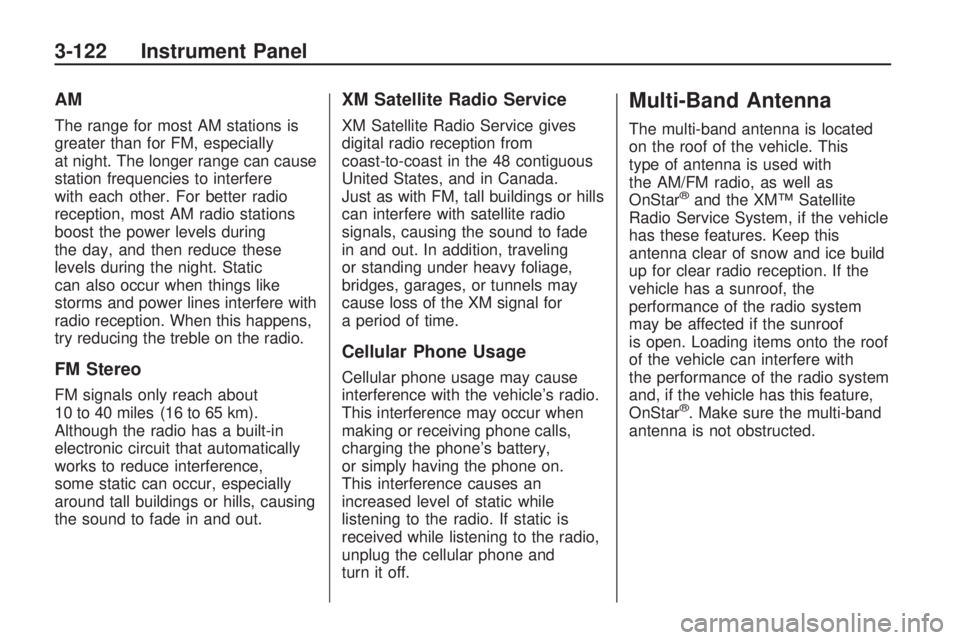
AM
The range for most AM stations is
greater than for FM, especially
at night. The longer range can cause
station frequencies to interfere
with each other. For better radio
reception, most AM radio stations
boost the power levels during
the day, and then reduce these
levels during the night. Static
can also occur when things like
storms and power lines interfere with
radio reception. When this happens,
try reducing the treble on the radio.
FM Stereo
FM signals only reach about
10 to 40 miles (16 to 65 km).
Although the radio has a built-in
electronic circuit that automatically
works to reduce interference,
some static can occur, especially
around tall buildings or hills, causing
the sound to fade in and out.
XM Satellite Radio Service
XM Satellite Radio Service gives
digital radio reception from
coast-to-coast in the 48 contiguous
United States, and in Canada.
Just as with FM, tall buildings or hills
can interfere with satellite radio
signals, causing the sound to fade
in and out. In addition, traveling
or standing under heavy foliage,
bridges, garages, or tunnels may
cause loss of the XM signal for
a period of time.
Cellular Phone Usage
Cellular phone usage may cause
interference with the vehicle’s radio.
This interference may occur when
making or receiving phone calls,
charging the phone’s battery,
or simply having the phone on.
This interference causes an
increased level of static while
listening to the radio. If static is
received while listening to the radio,
unplug the cellular phone and
turn it off.
Multi-Band Antenna
The multi-band antenna is located
on the roof of the vehicle. This
type of antenna is used with
the AM/FM radio, as well as
OnStar
®and the XM™ Satellite
Radio Service System, if the vehicle
has these features. Keep this
antenna clear of snow and ice build
up for clear radio reception. If the
vehicle has a sunroof, the
performance of the radio system
may be affected if the sunroof
is open. Loading items onto the roof
of the vehicle can interfere with
the performance of the radio system
and, if the vehicle has this feature,
OnStar
®. Make sure the multi-band
antenna is not obstructed.
3-122 Instrument Panel