buttons GMC ACADIA 2009 Owner's Guide
[x] Cancel search | Manufacturer: GMC, Model Year: 2009, Model line: ACADIA, Model: GMC ACADIA 2009Pages: 420, PDF Size: 2.23 MB
Page 122 of 420
Brake System Warning
Light................................3-38
Antilock Brake System
(ABS) Warning Light.......3-39
StabiliTrak®Indicator
Light................................3-39
Engine Coolant
Temperature
Warning Light
..................3-40
Engine Coolant
Temperature Gage..........3-40
Tire Pressure Light...........3-41
Malfunction
Indicator Lamp................3-41
Oil Pressure Light.............3-44
Security Light....................3-44
Fog Lamp Light................3-44
Cruise Control Light..........3-44
Highbeam On Light...........3-45
Tow/Haul Mode Light........3-45
Fuel Gage........................3-45
Driver Information
Center (DIC)
Driver Information
Center (DIC)...................3-46
DIC Operation
and Displays
(With DIC Buttons)
..........3-46
DIC Operation
and Displays
(Without DIC Buttons)
.....3-51
DIC Compass...................3-54
DIC Warnings and
Messages........................3-56
DIC Vehicle
Customization
(With DIC Buttons)
..........3-64
Audio System(s)
Audio System(s)................3-72
Setting the Clock..............3-73
Radio(s)............................3-74
Using an MP3
(Radio with CD)..............3-89
Using an MP3
(Radio with CD and
DVD Player)
....................3-93
XM Radio Messages.........3-98
Navigation/Radio System. . .3-99
Bluetooth®........................3-99
Rear Seat Entertainment
(RSE) System................3-109
Rear Seat Audio (RSA). . .3-118
Rear Audio
Controller (RAC)............3-120
Theft-Deterrent Feature. . .3-120
Audio Steering Wheel
Controls.........................3-121
Radio Reception..............3-121
Multi-Band Antenna.........3-122
3-2 Instrument Panel
Page 130 of 420
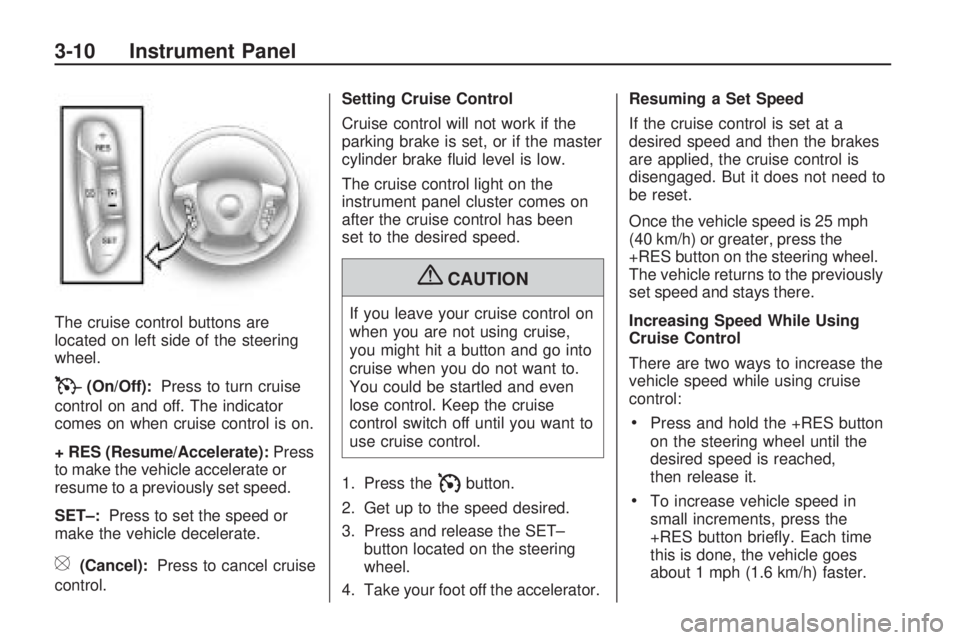
The cruise control buttons are
located on left side of the steering
wheel.
T(On/Off):Press to turn cruise
control on and off. The indicator
comes on when cruise control is on.
+ RES (Resume/Accelerate):Press
to make the vehicle accelerate or
resume to a previously set speed.
SET–:Press to set the speed or
make the vehicle decelerate.
[(Cancel):Press to cancel cruise
control.Setting Cruise Control
Cruise control will not work if the
parking brake is set, or if the master
cylinder brake uid level is low.
The cruise control light on the
instrument panel cluster comes on
after the cruise control has been
set to the desired speed.
{CAUTION
If you leave your cruise control on
when you are not using cruise,
you might hit a button and go into
cruise when you do not want to.
You could be startled and even
lose control. Keep the cruise
control switch off until you want to
use cruise control.
1. Press the
Ibutton.
2. Get up to the speed desired.
3. Press and release the SET–
button located on the steering
wheel.
4. Take your foot off the accelerator.Resuming a Set Speed
If the cruise control is set at a
desired speed and then the brakes
are applied, the cruise control is
disengaged. But it does not need to
be reset.
Once the vehicle speed is 25 mph
(40 km/h) or greater, press the
+RES button on the steering wheel.
The vehicle returns to the previously
set speed and stays there.
Increasing Speed While Using
Cruise Control
There are two ways to increase the
vehicle speed while using cruise
control:
Press and hold the +RES button
on the steering wheel until the
desired speed is reached,
then release it.
To increase vehicle speed in
small increments, press the
+RES button briey. Each time
this is done, the vehicle goes
about 1 mph (1.6 km/h) faster.
3-10 Instrument Panel
Page 132 of 420
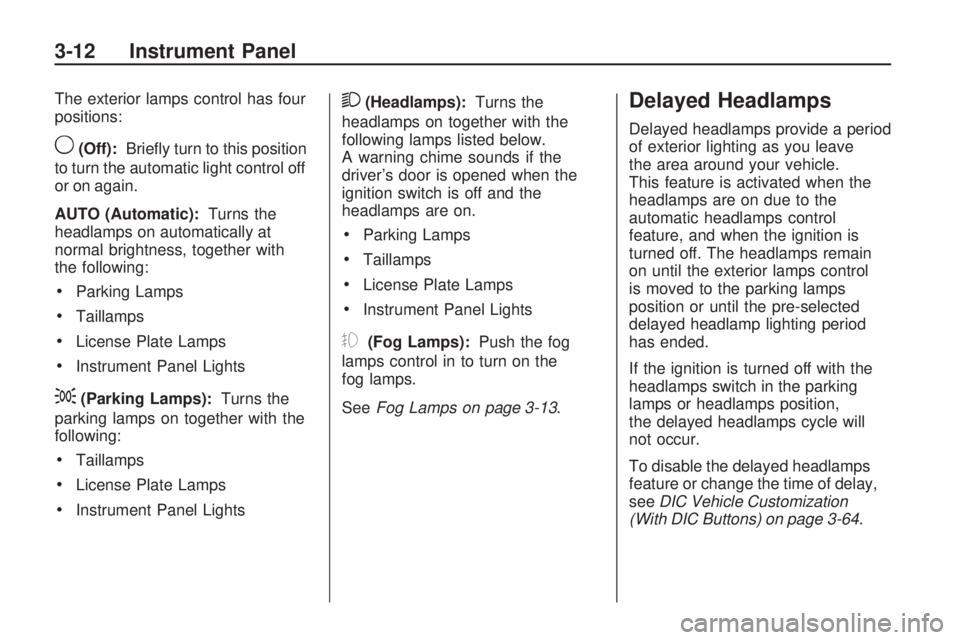
The exterior lamps control has four
positions:
9(Off):Briey turn to this position
to turn the automatic light control off
or on again.
AUTO (Automatic):Turns the
headlamps on automatically at
normal brightness, together with
the following:
Parking Lamps
Taillamps
License Plate Lamps
Instrument Panel Lights
;(Parking Lamps):Turns the
parking lamps on together with the
following:
Taillamps
License Plate Lamps
Instrument Panel Lights
2(Headlamps):Turns the
headlamps on together with the
following lamps listed below.
A warning chime sounds if the
driver’s door is opened when the
ignition switch is off and the
headlamps are on.
Parking Lamps
Taillamps
License Plate Lamps
Instrument Panel Lights
#(Fog Lamps):Push the fog
lamps control in to turn on the
fog lamps.
SeeFog Lamps on page 3-13.
Delayed Headlamps
Delayed headlamps provide a period
of exterior lighting as you leave
the area around your vehicle.
This feature is activated when the
headlamps are on due to the
automatic headlamps control
feature, and when the ignition is
turned off. The headlamps remain
on until the exterior lamps control
is moved to the parking lamps
position or until the pre-selected
delayed headlamp lighting period
has ended.
If the ignition is turned off with the
headlamps switch in the parking
lamps or headlamps position,
the delayed headlamps cycle will
not occur.
To disable the delayed headlamps
feature or change the time of delay,
seeDIC Vehicle Customization
(With DIC Buttons) on page 3-64.
3-12 Instrument Panel
Page 137 of 420
Head-Up Display (HUD)
{CAUTION
If the HUD image is too bright or
too high in your eld of view, it
may take you more time to see
things you need to see when it is
dark outside. Be sure to keep the
HUD image dim and placed low in
your eld of view.
For vehicles with the Head-Up
Display (HUD), some information
concerning the operation of the
vehicle is projected onto the
windshield. This includes the
speedometer reading, RPM reading,
transmission position, outside air
temperature, the tap shift gear, and
a brief display of the current
radio station, including XM
information or CD track. It will also
display turn-by-turn navigationinformation if the vehicle has a
navigation radio. The images are
projected by the HUD lens located
on the driver’s side of the
instrument panel.
The tap shift gear will also appear
on the HUD if the vehicle has
tap shift and it is active.
The HUD information can be
displayed in one of three languages,
English, French, or Spanish.
The speedometer reading and other
numerical values can be displayed
in either English or metric units.
The language selection and
the units of measurement are
changed through the trip computer
in the Driver Information Center
(DIC). SeeDIC Vehicle
Customization (With DIC Buttons)
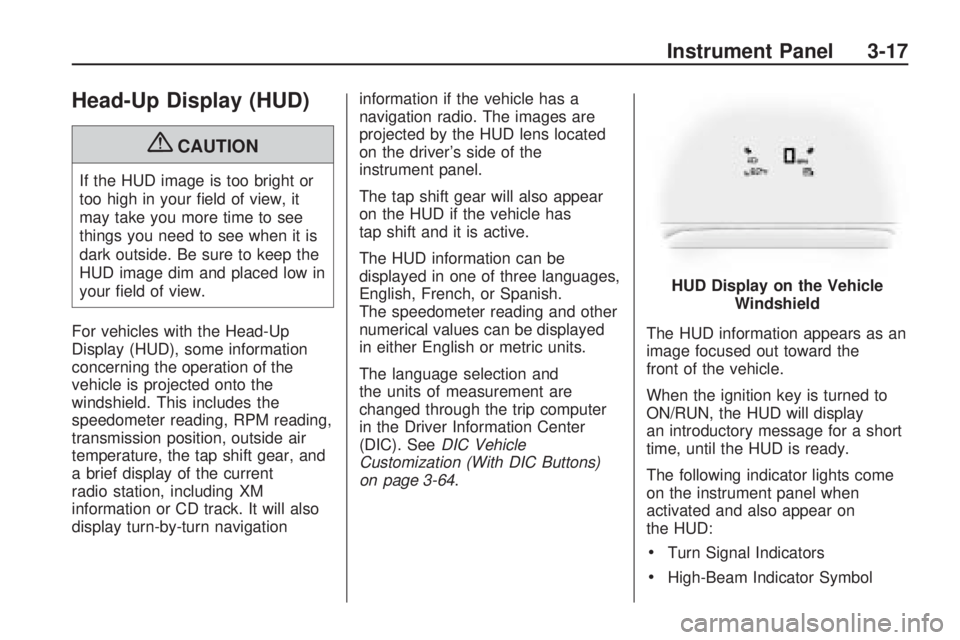
on page 3-64.The HUD information appears as an
image focused out toward the
front of the vehicle.
When the ignition key is turned to
ON/RUN, the HUD will display
an introductory message for a short
time, until the HUD is ready.
The following indicator lights come
on the instrument panel when
activated and also appear on
the HUD:
Turn Signal Indicators
High-Beam Indicator SymbolHUD Display on the Vehicle
Windshield
Instrument Panel 3-17
Page 145 of 420
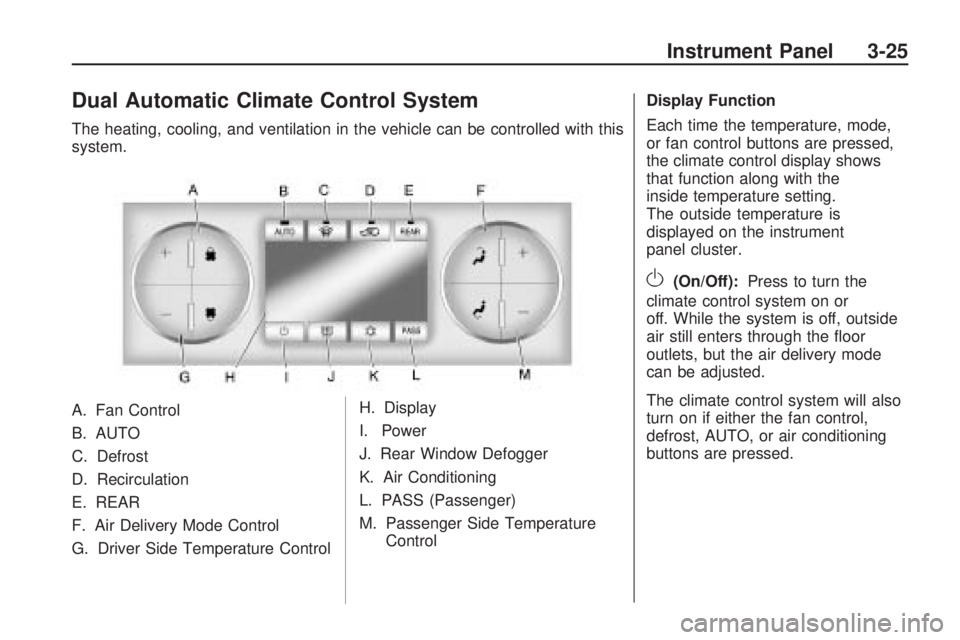
Dual Automatic Climate Control System
The heating, cooling, and ventilation in the vehicle can be controlled with this
system.
A. Fan Control
B. AUTO
C. Defrost
D. Recirculation
E. REAR
F. Air Delivery Mode Control
G. Driver Side Temperature ControlH. Display
I. Power
J. Rear Window Defogger
K. Air Conditioning
L. PASS (Passenger)
M. Passenger Side Temperature
Control Display Function
Each time the temperature, mode,
or fan control buttons are pressed,
the climate control display shows
that function along with the
inside temperature setting.
The outside temperature is
displayed on the instrument
panel cluster.
O(On/Off):
Press to turn the
climate control system on or
off. While the system is off, outside
air still enters through the oor
outlets, but the air delivery mode
can be adjusted.
The climate control system will also
turn on if either the fan control,
defrost, AUTO, or air conditioning
buttons are pressed.
Instrument Panel 3-25
Page 146 of 420
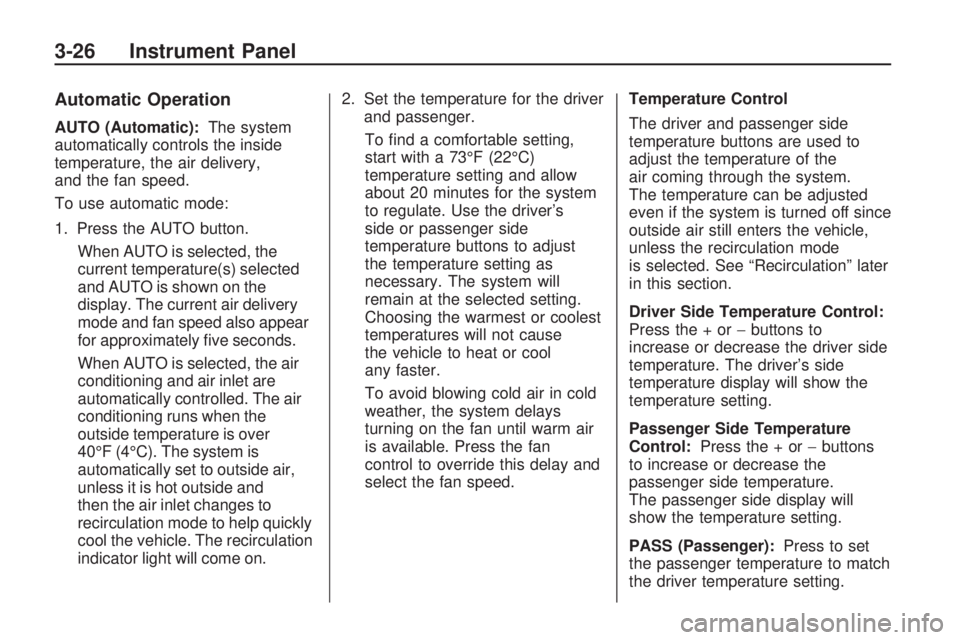
Automatic Operation
AUTO (Automatic):The system
automatically controls the inside
temperature, the air delivery,
and the fan speed.
To use automatic mode:
1. Press the AUTO button.
When AUTO is selected, the
current temperature(s) selected
and AUTO is shown on the
display. The current air delivery
mode and fan speed also appear
for approximately ve seconds.
When AUTO is selected, the air
conditioning and air inlet are
automatically controlled. The air
conditioning runs when the
outside temperature is over
40°F (4°C). The system is
automatically set to outside air,
unless it is hot outside and
then the air inlet changes to
recirculation mode to help quickly
cool the vehicle. The recirculation
indicator light will come on.2. Set the temperature for the driver
and passenger.
To nd a comfortable setting,
start with a 73°F (22°C)
temperature setting and allow
about 20 minutes for the system
to regulate. Use the driver’s
side or passenger side
temperature buttons to adjust
the temperature setting as
necessary. The system will
remain at the selected setting.
Choosing the warmest or coolest
temperatures will not cause
the vehicle to heat or cool
any faster.
To avoid blowing cold air in cold
weather, the system delays
turning on the fan until warm air
is available. Press the fan
control to override this delay and
select the fan speed.Temperature Control
The driver and passenger side
temperature buttons are used to
adjust the temperature of the
air coming through the system.
The temperature can be adjusted
even if the system is turned off since
outside air still enters the vehicle,
unless the recirculation mode
is selected. See “Recirculation” later
in this section.
Driver Side Temperature Control:
Press the + or−buttons to
increase or decrease the driver side
temperature. The driver’s side
temperature display will show the
temperature setting.
Passenger Side Temperature
Control:Press the + or−buttons
to increase or decrease the
passenger side temperature.
The passenger side display will
show the temperature setting.
PASS (Passenger):Press to set
the passenger temperature to match
the driver temperature setting.
3-26 Instrument Panel
Page 148 of 420
While in defrost mode, if the PASS
button is pressed, the PASS button
indicator ashes three times to show
that the passenger climate control
system cannot be activated. If the
passenger temperature buttons are
adjusted while in defrost mode, the
driver temperature indicator will
change. The passenger temperature
will not be displayed.
@(Recirculation):Press to turn
the recirculation mode on or off.
An indicator light comes on
when recirculation is on. When the
engine is turned off, the recirculation
mode automatically turns off and
must be re-selected when the
engine is turned on again.
This mode recirculates and helps to
quickly cool the air inside the vehicle.
It can be used to prevent outside air
and odors from entering the vehicle.
The recirculation mode cannot be
used with oor, defog, or defrosting
modes. If recirculation is selected in
these modes, the indicator ashesthree times and turns off. The air
conditioning compressor also comes
on when this mode is activated.
While in recirculation mode the
windows can fog when the weather
is cold and damp. To clear the fog,
select either the defog or defrost
mode and increase the fan speed.
Air Conditioning
#(Air Conditioning):Press to
turn the air conditioning (A/C)
on and off. An indicator light comes
on when A/C is on.
The A/C does not work when the
outside temperature is below
40°F (4°C). If
#is pressed the
indicator ashes three times
and turns off to show that the
A/C mode is not available. If the
A/C is on and the outside
temperature drops below a
temperature which is too cool for
air conditioning to be effective,
the A/C indicator turns off to show
that the A/C mode has been
canceled.On hot days, open the windows
briey to let hot inside air escape.
This helps reduce the time it
takes for the interior of the vehicle
to cool down.
The air conditioning system removes
moisture from the air, so a small
amount of water might drip under the
vehicle while idling or after turning off
the engine. This is normal.
Rear Window Defogger
The rear window defogger uses a
warming grid to remove fog from the
rear window.
<(Rear Window Defogger):
Press to turn the rear window
defogger on or off. The rear window
defogger stays on for about
10 minutes, before turning off.
The defogger also turns off when
the engine is turned off. Do not drive
the vehicle until all the windows
are clear.
3-28 Instrument Panel
Page 152 of 420
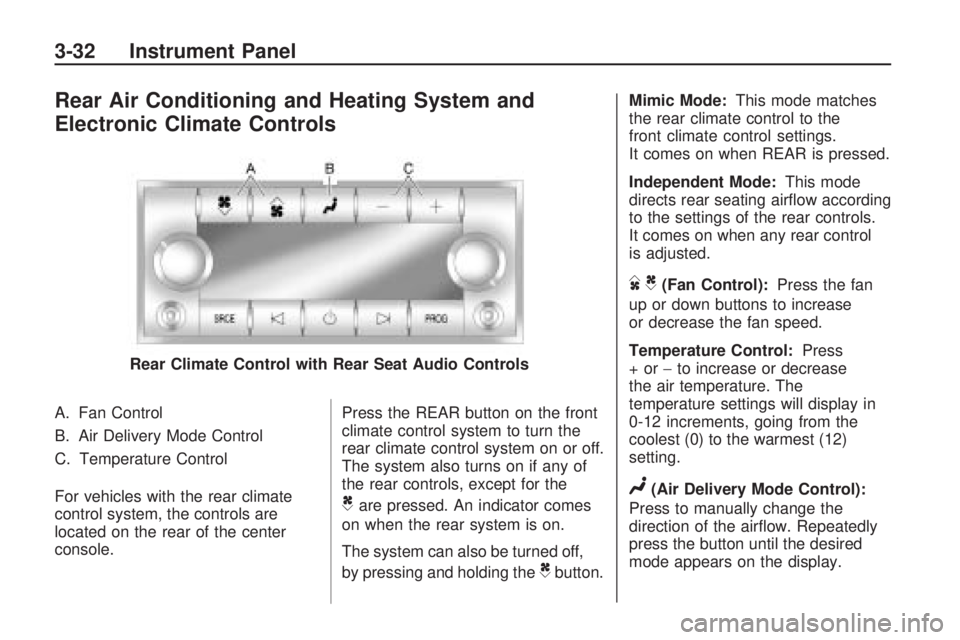
Rear Air Conditioning and Heating System and
Electronic Climate Controls
A. Fan Control
B. Air Delivery Mode Control
C. Temperature Control
For vehicles with the rear climate
control system, the controls are
located on the rear of the center
console.Press the REAR button on the front
climate control system to turn the
rear climate control system on or off.
The system also turns on if any of
the rear controls, except for the
Care pressed. An indicator comes
on when the rear system is on.
The system can also be turned off,
by pressing and holding the
Cbutton. Mimic Mode:
This mode matches
the rear climate control to the
front climate control settings.
It comes on when REAR is pressed.
Independent Mode: This mode
directs rear seating airow according
to the settings of the rear controls.
It comes on when any rear control
is adjusted.
DC(Fan Control): Press the fan
up or down buttons to increase
or decrease the fan speed.
Temperature Control: Press
+or− to increase or decrease
the air temperature. The
temperature settings will display in
0-12 increments, going from the
coolest (0) to the warmest (12)
setting.
N(Air Delivery Mode Control):
Press to manually change the
direction of the airow. Repeatedly
press the button until the desired
mode appears on the display.
Rear Climate Control with Rear Seat Audio Controls
3-32 Instrument Panel
Page 166 of 420
Driver Information
Center (DIC)
Your vehicle has a Driver
Information Center (DIC).
The DIC displays information about
your vehicle. It also displays
warning messages if a system
problem is detected.
All messages will appear in the DIC
display located at the top of the
instrument panel cluster.
The DIC comes on when the
ignition is on. After a short delay,
the DIC will display the information
that was last displayed before
the engine was turned off.
The DIC also displays a shift lever
position indicator on the bottom
line of the display. SeeAutomatic
Transmission Operation on
page 2-24for more information.
The outside air temperature
and compass, if equipped, also
displays on the DIC when viewing
the trip and fuel information.The outside air temperature
automatically appears in the top
right corner of the DIC display.
If there is a problem with the system
that controls the temperature
display, the numbers will be
replaced with dashes. If this occurs,
have the vehicle serviced. The
compass will be shown in the bottom
right corner of the DIC display.
SeeDIC Compass on page 3-54for
more information.
If your vehicle has DIC buttons,
see “DIC Operation and Displays
(With DIC Buttons)” later in this
section andDIC Vehicle
Customization (With DIC Buttons)
on page 3-64for the displays
available.
If your vehicle does not have
DIC buttons, see “DIC Operation
and Displays (Without DIC Buttons)”
later in this section for the displays
available.
DIC Operation and
Displays (With DIC
Buttons)
If your vehicle has DIC buttons, the
information below explains the
operation of this system.
The DIC has different displays
which can be accessed by pressing
the DIC buttons located on the
instrument panel. SeeInstrument
Panel Overview on page 3-4
for more information.
The DIC displays trip, fuel, and
vehicle system information, and
warning messages if a system
problem is detected.
The DIC also allows some features
to be customized. SeeDIC
Vehicle Customization (With DIC
Buttons) on page 3-64for more
information.
If your vehicle has DIC buttons,
you can also use the trip odometer
reset stem to view the odometer
and trip odometers.
3-46 Instrument Panel
Page 167 of 420
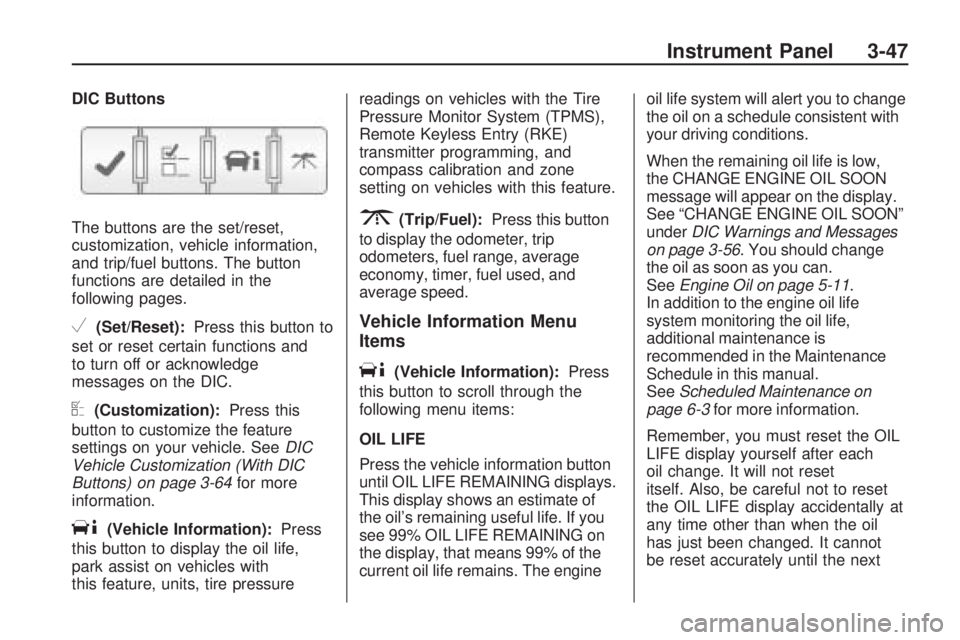
DIC Buttons
The buttons are the set/reset,
customization, vehicle information,
and trip/fuel buttons. The button
functions are detailed in the
following pages.
V(Set/Reset):Press this button to
set or reset certain functions and
to turn off or acknowledge
messages on the DIC.
U(Customization):Press this
button to customize the feature
settings on your vehicle. SeeDIC
Vehicle Customization (With DIC
Buttons) on page 3-64for more
information.
T(Vehicle Information):Press
this button to display the oil life,
park assist on vehicles with
this feature, units, tire pressurereadings on vehicles with the Tire
Pressure Monitor System (TPMS),
Remote Keyless Entry (RKE)
transmitter programming, and
compass calibration and zone
setting on vehicles with this feature.
3(Trip/Fuel):Press this button
to display the odometer, trip
odometers, fuel range, average
economy, timer, fuel used, and
average speed.
Vehicle Information Menu
Items
T(Vehicle Information):Press
this button to scroll through the
following menu items:
OIL LIFE
Press the vehicle information button
until OIL LIFE REMAINING displays.
This display shows an estimate of
the oil’s remaining useful life. If you
see 99% OIL LIFE REMAINING on
the display, that means 99% of the
current oil life remains. The engineoil life system will alert you to change
the oil on a schedule consistent with
your driving conditions.
When the remaining oil life is low,
the CHANGE ENGINE OIL SOON
message will appear on the display.
See “CHANGE ENGINE OIL SOON”
underDIC Warnings and Messages
on page 3-56. You should change
the oil as soon as you can.
SeeEngine Oil on page 5-11.
In addition to the engine oil life
system monitoring the oil life,
additional maintenance is
recommended in the Maintenance
Schedule in this manual.
SeeScheduled Maintenance on
page 6-3for more information.
Remember, you must reset the OIL
LIFE display yourself after each
oil change. It will not reset
itself. Also, be careful not to reset
the OIL LIFE display accidentally at
any time other than when the oil
has just been changed. It cannot
be reset accurately until the next
Instrument Panel 3-47