maintenance GMC ACADIA 2011 User Guide
[x] Cancel search | Manufacturer: GMC, Model Year: 2011, Model line: ACADIA, Model: GMC ACADIA 2011Pages: 478, PDF Size: 5.52 MB
Page 155 of 478
Black plate (23,1)GMC Acadia/Acadia Denali Owner Manual - 2011
Instruments and Controls 5-23
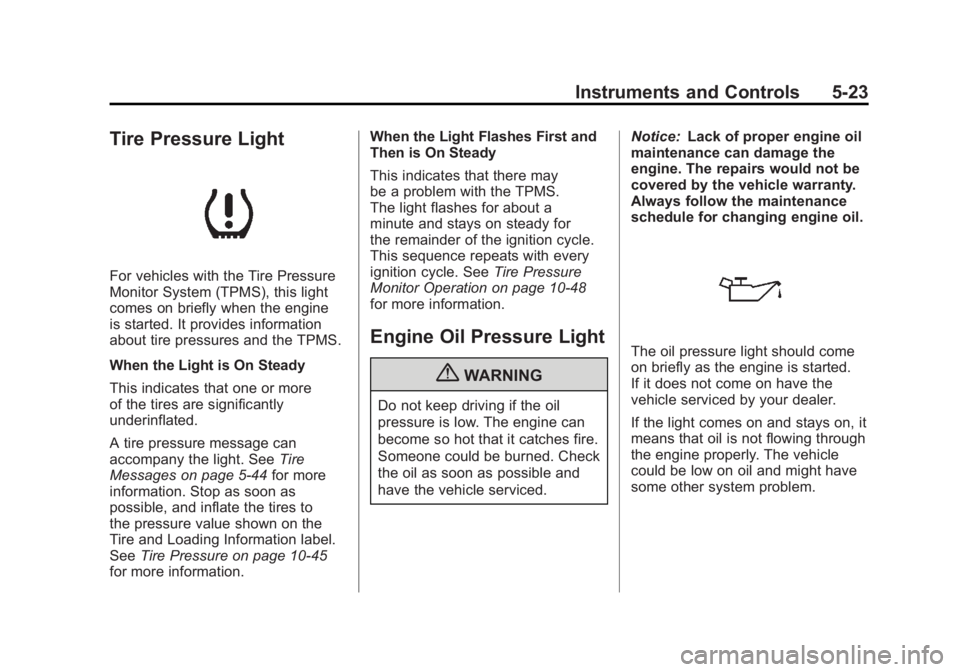
Tire Pressure Light
For vehicles with the Tire Pressure
Monitor System (TPMS), this light
comes on briefly when the engine
is started. It provides information
about tire pressures and the TPMS.
When the Light is On Steady
This indicates that one or more
of the tires are significantly
underinflated.
A tire pressure message can
accompany the light. SeeTire
Messages on page 5‑44 for more
information. Stop as soon as
possible, and inflate the tires to
the pressure value shown on the
Tire and Loading Information label.
See Tire Pressure on page 10‑45
for more information. When the Light Flashes First and
Then is On Steady
This indicates that there may
be a problem with the TPMS.
The light flashes for about a
minute and stays on steady for
the remainder of the ignition cycle.
This sequence repeats with every
ignition cycle. See
Tire Pressure
Monitor Operation on page 10‑48
for more information.
Engine Oil Pressure Light
{WARNING
Do not keep driving if the oil
pressure is low. The engine can
become so hot that it catches fire.
Someone could be burned. Check
the oil as soon as possible and
have the vehicle serviced. Notice:
Lack of proper engine oil
maintenance can damage the
engine. The repairs would not be
covered by the vehicle warranty.
Always follow the maintenance
schedule for changing engine oil.
The oil pressure light should come
on briefly as the engine is started.
If it does not come on have the
vehicle serviced by your dealer.
If the light comes on and stays on, it
means that oil is not flowing through
the engine properly. The vehicle
could be low on oil and might have
some other system problem.
Page 158 of 478
Black plate (26,1)GMC Acadia/Acadia Denali Owner Manual - 2011
5-26 Instruments and Controls
T(Vehicle Information):Press
this button to display the oil life,
park assist on vehicles with this
feature, units, tire pressure readings
on vehicles with this feature, and
compass calibration and zone
setting on vehicles with this feature.
3(Trip/Fuel): Press this
button to display the odometer, trip
odometers, fuel range, average
economy, timer, fuel used, and
average speed.
Vehicle Information Menu
Items
T(Vehicle Information): Press
this button to scroll through the
following menu items:
OIL LIFE
Press the vehicle information
button until OIL LIFE REMAINING
displays. This display shows an
estimate of the oil's remaining
useful life. If you see 99% OIL LIFE
REMAINING on the display, that
means 99% of the current oil life
remains. The engine oil life system will alert you to change the oil on
a schedule consistent with your
driving conditions.
When the remaining oil life is low,
the CHANGE ENGINE OIL SOON
message will appear on the display.
See
“CHANGE ENGINE OIL SOON”
under Engine Oil Messages on
page 5‑40. You should change the
oil as soon as you can. See Engine
Oil on page 10‑8. In addition to the
engine oil life system monitoring the
oil life, additional maintenance is
recommended in the Maintenance
Schedule in this manual. See
Scheduled Maintenance on
page 11‑2 for more information.
Remember, you must reset the
OIL LIFE display yourself after each
oil change. It will not reset itself.
Also, be careful not to reset the
OIL LIFE display accidentally at any
time other than when the oil has just
been changed. It cannot be reset
accurately until the next oil change.
To reset the engine oil life system,
see Engine Oil Life System on
page 10‑11. PARK ASSIST
If your vehicle has the Ultrasonic
Rear Parking Assist (URPA) system,
press the vehicle information button
until PARK ASSIST displays.
This display allows the system
to be turned on or off. Once in this
display, press the set/reset button to
select between ON or OFF. If you
choose ON, the system will be
turned on. If you choose OFF, the
system will be turned off. The URPA
system automatically turns back on
after each vehicle start. When the
URPA system is turned off and the
vehicle is shifted out of P (Park), the
DIC will display the PARK ASSIST
OFF message as a reminder that
the system has been turned off.
See
Object Detection System
Messages on page 5‑42 and
Ultrasonic Parking Assist on
page 9‑35 for more information.
Page 163 of 478
Black plate (31,1)GMC Acadia/Acadia Denali Owner Manual - 2011
Instruments and Controls 5-31
To use the retroactive reset feature,
press and hold the trip odometer
reset stem for at least four seconds.
The trip odometer will display
the number of kilometers (km)
or miles (mi) driven since the
ignition was last turned on and
the vehicle was moving. Once the
vehicle begins moving, the trip
odometer will accumulate mileage.
For example, if the vehicle was
driven 8 km (5 miles) before it
is started again, and then the
retroactive reset feature is activated,
the display will show 8 km (5 miles).
As the vehicle begins moving, the
display will then increase to 8.2 km
(5.1 miles), 8.4 km (5.2 miles), etc.
If the retroactive reset feature is
activated after the vehicle is started,
but before it begins moving, the
display will show the number of
kilometers (km) or miles (mi) that
were driven during the last ignition
cycle.OIL LIFE
To access this display, the vehicle
must be in P (Park). Press the
trip odometer reset stem until
OIL LIFE REMAINING displays.
This display shows an estimate of
the oil's remaining useful life. If you
see 99% OIL LIFE REMAINING on
the display, that means 99% of the
current oil life remains. The engine
oil life system will alert you to
change the oil on a schedule
consistent with your driving
conditions.
When the remaining oil life is low,
the CHANGE ENGINE OIL SOON
message will appear on the display.
See
“CHANGE ENGINE OIL SOON”
under Engine Oil Messages on
page 5‑40. You should change the oil as soon as you can. See
Engine
Oil on page 10‑8. In addition to the
engine oil life system monitoring
the oil life, additional maintenance
is recommended in the Maintenance
Schedule in this manual.
See Scheduled Maintenance on
page 11‑2 for more information.
Remember, you must reset the
OIL LIFE display yourself after each
oil change. It will not reset itself.
Also, be careful not to reset the
OIL LIFE display accidentally at any
time other than when the oil has just
been changed. It cannot be reset
accurately until the next oil change.
To reset the engine oil life system,
see Engine Oil Life System on
page 10‑11.
Page 172 of 478
Black plate (40,1)GMC Acadia/Acadia Denali Owner Manual - 2011
5-40 Instruments and Controls
ENGINE OVERHEATED STOP
ENGINE
Notice:If you drive the vehicle
while the engine is overheating,
severe engine damage may
occur. If an overheat warning
appears on the instrument panel
cluster and/or DIC, stop the
vehicle as soon as possible.
Do not increase the engine speed
above normal idling speed.
See Engine Overheating on
page 10‑19 for more information.
This message displays and a
continuous chime sounds if the
engine cooling system reaches
unsafe temperatures for operation.
Stop and turn off the vehicle as
soon as it is safe to do so to avoid
severe damage. This message
clears when the engine has cooled
to a safe operating temperature.
Engine Oil Messages
CHANGE ENGINE OIL SOON
This message displays when the
engine oil needs to be changed.
When you change the engine oil,
be sure to reset the CHANGE
ENGINE OIL SOON message.
See Engine Oil Life System on
page 10‑11 for information on how
to reset the message. See Engine
Oil on page 10‑8 andScheduled
Maintenance on page 11‑2 for
more information.
OIL PRESSURE LOW STOP
ENGINE
Notice: If you drive the vehicle
while the engine oil pressure
is low, severe engine damage
may occur. If a low oil pressure
warning appears on the
instrument panel cluster and/or
DIC, stop the vehicle as soon
as possible. Do not drive the
vehicle until the cause of the
low oil pressure is corrected.
See Engine Oil on page 10‑8
for more information.
This message displays if low oil
pressure levels occur. Stop the
vehicle as soon as safely possible
and do not operate it until the cause
of the low oil pressure has been
corrected. Check the oil as soon
as possible and have your vehicle
serviced by your dealer. See Engine
Oil on page 10‑8.
Page 259 of 478
Black plate (1,1)GMC Acadia/Acadia Denali Owner Manual - 2011
Climate Controls 8-1
Climate Controls
Climate Control Systems
Climate Control Systems . . . . . . 8-1
Dual Automatic Climate ControlSystem . . . . . . . . . . . . . . . . . . . . . . 8-4
Rear Climate Control System (Rear Climate
Control Only) . . . . . . . . . . . . . . . 8-10
Rear Climate Control System (Rear Climate with
Rear Seat Audio) . . . . . . . . . . . 8-11
Air Vents
Air Vents . . . . . . . . . . . . . . . . . . . . . 8-12
Maintenance
Passenger Compartment AirFilter . . . . . . . . . . . . . . . . . . . . . . . 8-13
Climate Control Systems
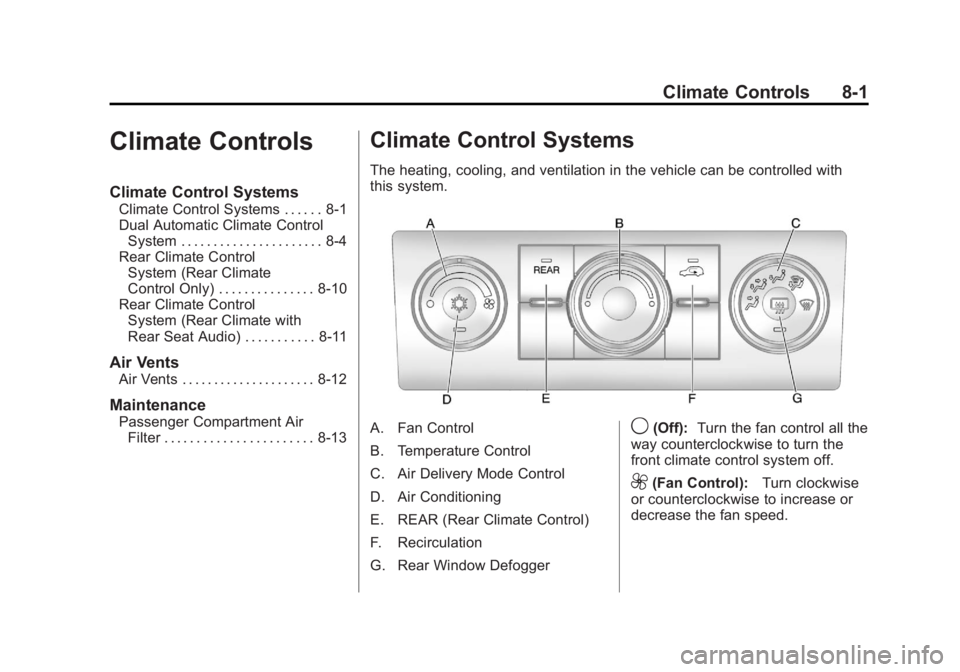
The heating, cooling, and ventilation in the vehicle can be controlled with
this system.
A. Fan Control
B. Temperature Control
C. Air Delivery Mode Control
D. Air Conditioning
E. REAR (Rear Climate Control)
F. Recirculation
G. Rear Window Defogger9(Off): Turn the fan control all the
way counterclockwise to turn the
front climate control system off.
9(Fan Control): Turn clockwise
or counterclockwise to increase or
decrease the fan speed.
Page 271 of 478
Black plate (13,1)GMC Acadia/Acadia Denali Owner Manual - 2011
Climate Controls 8-13
Maintenance
Passenger Compartment
Air Filter
The filter removes dust, pollen,
and other airborne irritants from
outside air and inside air when in
recirculation mode.
To find out what type of replacement
filter to use, seeMaintenance
Replacement Parts on page 11‑9.
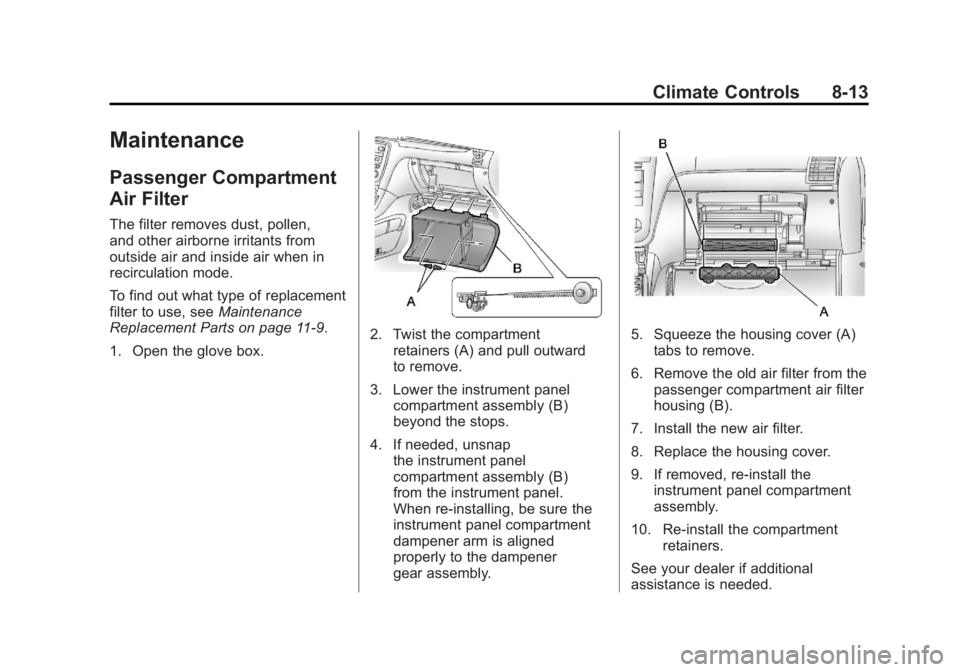
1. Open the glove box.
2. Twist the compartment retainers (A) and pull outward
to remove.
3. Lower the instrument panel compartment assembly (B)
beyond the stops.
4. If needed, unsnap the instrument panel
compartment assembly (B)
from the instrument panel.
When re-installing, be sure the
instrument panel compartment
dampener arm is aligned
properly to the dampener
gear assembly.5. Squeeze the housing cover (A)tabs to remove.
6. Remove the old air filter from the passenger compartment air filter
housing (B).
7. Install the new air filter.
8. Replace the housing cover.
9. If removed, re‐install the instrument panel compartment
assembly.
10. Re‐install the compartment retainers.
See your dealer if additional
assistance is needed.
Page 314 of 478
Black plate (42,1)GMC Acadia/Acadia Denali Owner Manual - 2011
9-42 Driving and Operating
Fuel
Use of the recommended fuel
is an important part of the proper
maintenance of this vehicle. To help
keep the engine clean and maintain
optimum vehicle performance, we
recommend the use of gasoline
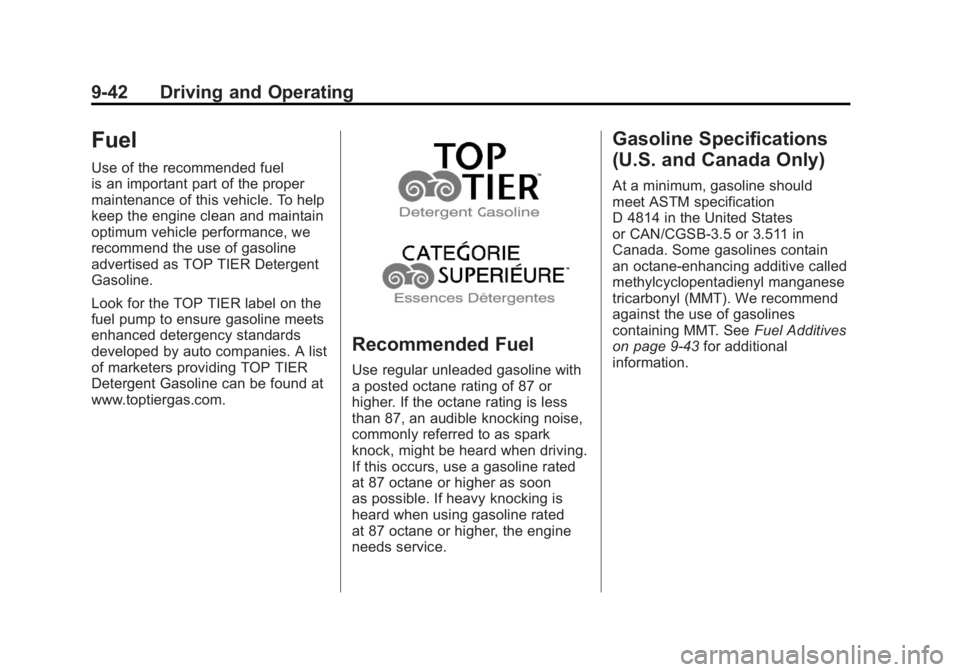
advertised as TOP TIER Detergent
Gasoline.
Look for the TOP TIER label on the
fuel pump to ensure gasoline meets
enhanced detergency standards
developed by auto companies. A list
of marketers providing TOP TIER
Detergent Gasoline can be found at
www.toptiergas.com.
Recommended Fuel
Use regular unleaded gasoline with
a posted octane rating of 87 or
higher. If the octane rating is less
than 87, an audible knocking noise,
commonly referred to as spark
knock, might be heard when driving.
If this occurs, use a gasoline rated
at 87 octane or higher as soon
as possible. If heavy knocking is
heard when using gasoline rated
at 87 octane or higher, the engine
needs service.
Gasoline Specifications
(U.S. and Canada Only)
At a minimum, gasoline should
meet ASTM specification
D 4814 in the United States
or CAN/CGSB‐3.5 or 3.511 in
Canada. Some gasolines contain
an octane-enhancing additive called
methylcyclopentadienyl manganese
tricarbonyl (MMT). We recommend
against the use of gasolines
containing MMT. SeeFuel Additives
on page 9‑43 for additional
information.
Page 320 of 478
Black plate (48,1)GMC Acadia/Acadia Denali Owner Manual - 2011
9-48 Driving and Operating
Pulling a Trailer
Here are some important points:
.There are many laws, including
speed limit restrictions that apply
to trailering. Check for legal
requirements.
.Consider using sway control.
SeeTowing Equipment on
page 9‑54.
.Do not tow a trailer at all during
the first 800 km (500 miles)
the new vehicle is driven.
The engine, axle or other
parts could be damaged.
.During the first 800 km
(500 miles) that a trailer is
towed, do not drive over 80 km/h
(50 mph) and do not make starts
at full throttle. This reduces wear
on the vehicle.
.The vehicle can tow in
D (Drive). Use a lower gear if
the transmission shifts too often.
See “Tow/Haul Mode” later in
this section.
.Obey speed limit restrictions
when towing a trailer.
.The vehicle is designed
primarily as a passenger and
load carrying vehicle. If a trailer
is towed, the vehicle will require
more frequent maintenance due
to the additional load.
Driving with a Trailer
Towing a trailer requires experience.
Get familiar with handling and
braking with the added trailer
weight. The vehicle is now longer
and not as responsive as the
vehicle is by itself.
Check all trailer hitch parts
and attachments, safety chains,
electrical connectors, lamps, tires
and mirror adjustments. If the trailer
has electric brakes, start the vehicle
and trailer moving and then apply
the trailer brake controller by hand
to be sure the brakes are working.
During the trip, check regularly to be
sure that the load is secure, and the
lamps and trailer brakes are working
properly.
Page 324 of 478
Black plate (52,1)GMC Acadia/Acadia Denali Owner Manual - 2011
9-52 Driving and Operating
Maintenance When Trailer
Towing
The vehicle needs service more
often when pulling a trailer. See this
manual's Maintenance Schedule
or Index for more information.
Things that are especially important
in trailer operation are automatic
transmission fluid, engine oil, axle
lubricant, belts, cooling system and
brake system. Inspect these before
and during the trip.
Check periodically to see that all
hitch nuts and bolts are tight.
Engine Cooling When Trailer
Towing
The cooling system may temporarily
overheat during severe operating
conditions. SeeEngine Overheating
on page 10‑19.
Trailer Towing
Three important considerations
have to do with weight:
.The weight of the trailer
.The weight of the trailer tongue
.The total weight on the vehicle's
tires
Weight of the Trailer
How heavy can a trailer safely be?
Speed, altitude, road grades,
outside temperature, special
equipment, and the amount of
tongue weight the vehicle can carry
must be considered. See “Weight
of the Trailer Tongue” later in this
section for more information. Maximum trailer weight is calculated
assuming only the driver is in
the tow vehicle and it has all the
required trailering equipment.
The weight of additional optional
equipment, passengers and cargo in
the tow vehicle must be subtracted
from the maximum trailer weight.
Use the following chart to determine
how much the vehicle can weigh,
based upon the vehicle model and
options.
Page 332 of 478
Black plate (4,1)GMC Acadia/Acadia Denali Owner Manual - 2011
10-4 Vehicle Care
Damage to vehicle components
resulting from the installation or use
of non‐GM certified parts, including
control module modifications, is
not covered under the terms of the
vehicle warranty and may affect
remaining warranty coverage for
affected parts.
GM Accessories are designed to
complement and function with other
systems on the vehicle. Your GM
dealer can accessorize the vehicle
using genuine GM Accessories.
When you go to your GM dealer
and ask for GM Accessories,
you will know that GM-trained
and supported service technicians
will perform the work using genuine
GM Accessories.
Also, seeAdding Equipment to
the Airbag-Equipped Vehicle on
page 3‑46.Vehicle Checks
Doing Your Own
Service Work
{WARNING
You can be injured and the
vehicle could be damaged if you
try to do service work on a vehicle
without knowing enough about it.
.Be sure you have sufficient
knowledge, experience,
the proper replacement
parts, and tools before
attempting any vehicle
maintenance task.
(Continued)
WARNING (Continued)
.Be sure to use the proper
nuts, bolts, and other
fasteners. Metric and
English fasteners can be
easily confused. If the wrong
fasteners are used, parts
can later break or fall off.
You could be hurt.
If doing some of your own
service work, use the proper
service manual. It tells you much
more about how to service the
vehicle than this manual can.