park assist GMC ACADIA 2011 User Guide
[x] Cancel search | Manufacturer: GMC, Model Year: 2011, Model line: ACADIA, Model: GMC ACADIA 2011Pages: 478, PDF Size: 5.52 MB
Page 302 of 478
Black plate (30,1)GMC Acadia/Acadia Denali Owner Manual - 2011
9-30 Driving and Operating
Parking Brake
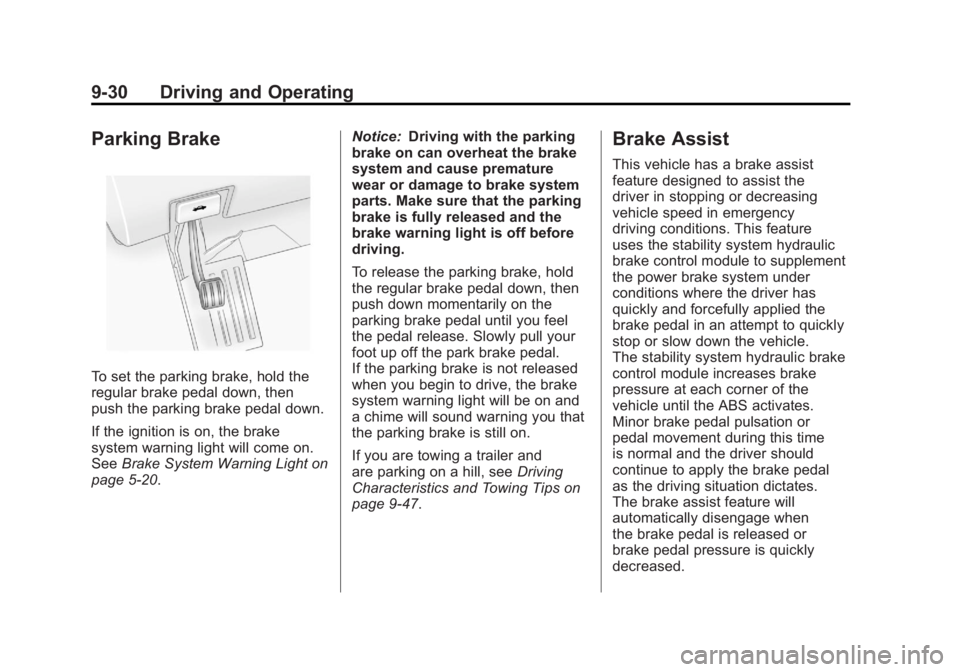
To set the parking brake, hold the
regular brake pedal down, then
push the parking brake pedal down.
If the ignition is on, the brake
system warning light will come on.
SeeBrake System Warning Light on
page 5‑20. Notice:
Driving with the parking
brake on can overheat the brake
system and cause premature
wear or damage to brake system
parts. Make sure that the parking
brake is fully released and the
brake warning light is off before
driving.
To release the parking brake, hold
the regular brake pedal down, then
push down momentarily on the
parking brake pedal until you feel
the pedal release. Slowly pull your
foot up off the park brake pedal.
If the parking brake is not released
when you begin to drive, the brake
system warning light will be on and
a chime will sound warning you that
the parking brake is still on.
If you are towing a trailer and
are parking on a hill, see Driving
Characteristics and Towing Tips on
page 9‑47.
Brake Assist
This vehicle has a brake assist
feature designed to assist the
driver in stopping or decreasing
vehicle speed in emergency
driving conditions. This feature
uses the stability system hydraulic
brake control module to supplement
the power brake system under
conditions where the driver has
quickly and forcefully applied the
brake pedal in an attempt to quickly
stop or slow down the vehicle.
The stability system hydraulic brake
control module increases brake
pressure at each corner of the
vehicle until the ABS activates.
Minor brake pedal pulsation or
pedal movement during this time
is normal and the driver should
continue to apply the brake pedal
as the driving situation dictates.
The brake assist feature will
automatically disengage when
the brake pedal is released or
brake pedal pressure is quickly
decreased.
Page 307 of 478
Black plate (35,1)GMC Acadia/Acadia Denali Owner Manual - 2011
Driving and Operating 9-35
When going up steep hills,
you might have to step on the
accelerator pedal to maintain
the vehicle speed. When going
downhill, you might have to brake
or shift to a lower gear to keep the
vehicle speed down. When the
brakes are applied the cruise
control is disengaged.
Ending Cruise Control
There are three ways to end cruise
control:
.Step lightly on the brake pedal.
.Press the[button.
.To turn off the cruise control,
press
Ton the steering wheel.
Erasing Speed Memory
The cruise control set speed is
erased from memory by pressing
the
Tbutton or if the ignition is
turned off.
Object Detection
Systems
Ultrasonic Parking Assist
For vehicles with the Ultrasonic
Rear Parking Assist (URPA) system,
it operates at speeds less than
8 km/h (5 mph), and assists the
driver with parking and avoiding
objects while in R (Reverse).
The sensors on the rear bumper are
used to detect the distance to an
object up to 2.5 m (8 ft) behind the
vehicle, and at least 25.4 cm (10 in)
off the ground.
{WARNING
The Ultrasonic Rear Parking
Assist (URPA) system does not
replace driver vision. It cannot
detect:
.Objects that are below the
bumper, underneath the
vehicle, or too close or far
from the vehicle.
.Children, pedestrians,
bicyclists, or pets.
If you do not use proper care
before and while backing, vehicle
damage, injury, or death could
occur. Even with URPA, always
check behind the vehicle before
backing up. While backing, be
sure to look for objects and check
the vehicle's mirrors.
Page 308 of 478
Black plate (36,1)GMC Acadia/Acadia Denali Owner Manual - 2011
9-36 Driving and Operating
How the System Works
URPA comes on automatically
when the shift lever is moved into
R (Reverse). A single tone sounds
to indicate the system is working.
URPA operates only at speeds less
than 8 km/h (5 mph).
An obstacle is indicated by audible
beeps. The interval between the
beeps becomes shorter as the
vehicle gets closer to the obstacle.
When the distance is less than
30 cm (12 in) the beeps are
continuous.
To be detected, objects must be at
least 25.4 cm (10 in) off the ground
and below liftgate level. Objects
must also be within 2.5 m (8 ft) from
the rear bumper. This distance may
be less during warmer or humid
weather.
The system can be disabled through
the Driver Information Center (DIC).
See“Park Assist” underVehicle
Personalization (With DIC Buttons)
on page 5‑47 for more information.
When the System Does Not
Seem to Work Properly
If the URPA system does not
activate due to a temporary
condition, the message PARK
ASSIST OFF or PARK ASST
BLOCKED SEE OWNERS
MANUAL will be displayed
on the DIC.
SERVICE PARK ASSIST: If this
message occurs, take the vehicle
to your dealer to repair the system.
PARK ASSIST OFF: This message
occurs if the driver disables the
system.
PARK ASST BLOCKED SEE
OWNERS MANUAL: This
message can occur under the
following conditions:
.The ultrasonic sensors are not
clean. Keep the vehicle's rear
bumper free of mud, dirt, snow,
ice and slush. For cleaning
instructions, see Exterior Care
on page 10‑90.
.The park assist sensors are
covered by frost or ice. Frost or
ice can form around and behind
the sensors and may not always
be seen; this can occur after
washing the vehicle in cold
weather. The message may
not clear until the frost or ice
has melted.
.A trailer was attached to the
vehicle, or a bicycle or an
object was hanging out of the
liftgate during the last drive
cycle. Once the attached object
is removed, URPA will return
to normal operation.
.A tow bar is attached to the
vehicle.
.The vehicle's bumper is
damaged. Take the vehicle to
your dealer to repair the system.
.Other conditions may affect
system performance, such as
vibrations from a jackhammer or
the compression of air brakes on
a very large truck.
Page 311 of 478
Black plate (39,1)GMC Acadia/Acadia Denali Owner Manual - 2011
Driving and Operating 9-39
The delay that is received after
shifting out of R (Reverse) is
approximately 10 seconds.
The delay can be cancelled by
performing one of the following:
.Pressing a hard key on the
navigation system.
.Shifting in to P (Park).
.Reach a vehicle speed of
5 mph (8 km/h).
There is a message on the rear
vision camera screen that states
“Check Surroundings for Safety”.
Adjusting the Brightness and
Contrast of the Screen
To adjust the brightness and
contrast of the screen, press the
MENU button while the rear vision
camera image is on the display.
Any adjustments made will only
affect the rear vision camera screen.
](Brightness) : Touch the
+ (plus) or –(minus) screen
buttons to increase or decrease
the brightness of the screen.
_(Contrast) : Touch the + (plus)
or –(minus) screen buttons to
increase or decrease the contrast
of the screen.
Symbols
The navigation system may have
a feature that lets the driver view
symbols on the navigation screen
while using the rear vision camera.
The Ultrasonic Rear Park Assist
(URPA) system must not be
disabled to use the caution symbols.
If URPA has been disabled and
the symbols have been turned on,
the Rear Parking Assist Symbols
Unavailable error message may
display. See Ultrasonic Parking
Assist on page 9‑35. The symbols appear when an object
has been detected by the URPA
system. The symbol may cover the
object when viewing the navigation
screen.
To turn the symbols on or off:
1. Make sure that URPA has not
been disabled.
2. Shift into P (Park).
3. Press the MENU hard key to enter the configure menu
options, then press the MENU
hard key repeatedly until Display
is selected or touch the Display
screen button.
4. Select the Rear Camera Options screen button. The Rear Camera
Options screen will display.
5. Touch the Symbols screen button. The screen button will
be highlighted when on.
Page 321 of 478
Black plate (49,1)GMC Acadia/Acadia Denali Owner Manual - 2011
Driving and Operating 9-49
Towing with a Stability Control
System
When towing, the sound of the
stability control system might be
heard. The system is reacting to the
vehicle movement caused by the
trailer, which mainly occurs during
cornering. This is normal when
towing heavier trailers.
Tow/Haul Mode
Tow/Haul assists when pulling a
heavy trailer or a large or heavy
load. The purpose of the Tow/Haul
mode is to:
.Reduce the frequency and
improve the predictability of
transmission shifts.
.Provide the same solid shift feel
as when the vehicle is unloaded.
.Improve control of vehicle speed
while requiring less throttle pedal
activity.
.Increase the charging system
voltage to assist in recharging
a battery installed in a trailer.
Press this button located on the
console to turn on and turn off the
Tow/Haul mode. SeeTow/Haul
Mode on page 9‑28.
The Tow/Haul light on the
instrument panel comes on to
indicate that Tow/Haul mode
has been selected.
Tow/Haul may be turned off by
pressing the button again, at
which time the indicator light on
the instrument panel will turn off.
The vehicle will automatically turn
off Tow/Haul every time it is started. Tow/Haul is designed to be most
effective when the vehicle and
trailer combined weight is at least
75 percent of the vehicle's Gross
Combined Weight Rating (GCWR).
See
Trailer Towing on page 9‑52.
Tow/Haul is most useful when
pulling a heavy trailer or a large
or heavy load under the following
driving conditions:.Travelling through rolling terrain.
.Travelling in stop and go traffic.
.Travelling in busy parking lots
where improved low speed
control of the vehicle is desired.
Operating the vehicle in Tow/Haul
when lightly loaded or with no trailer
will not cause damage but there is
no benefit. Such a selection when
unloaded may result in unpleasant
engine and transmission driving
characteristics and reduced fuel
economy.
Page 390 of 478
Black plate (62,1)GMC Acadia/Acadia Denali Owner Manual - 2011
10-62 Vehicle Care
{WARNING
Changing a tire can be
dangerous. The vehicle can
slip off the jack and roll over
or fall causing injury or death.
Find a level place to change the
tire. To help prevent the vehicle
from moving:1. Set the parking brake firmly.
2. Put an automatic transmission shift lever in
P (Park), or shift a manual
transmission to 1 (First) or
R (Reverse).
3. Turn off the engine and do not restart while the vehicle
is raised.
(Continued)
WARNING (Continued)
4. Do not allow passengers toremain in the vehicle.
5. Place wheel blocks on both sides of the tire at the
opposite corner of the tire
being changed.
This vehicle may come with a jack
and spare tire or a tire sealant
and compressor kit. To use the
jacking equipment to change
a spare tire safely, follow the
instructions below. Then see Tire
Changing on page 10‑71. To use
the tire sealant and compressor kit,
see Tire Sealant and Compressor
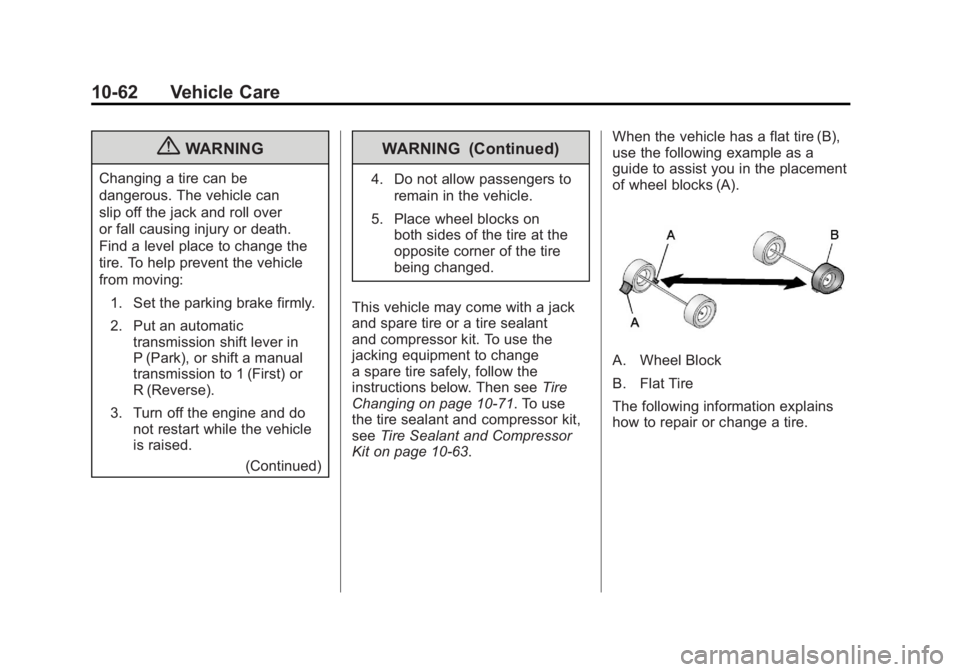
Kit on page 10‑63. When the vehicle has a flat tire (B),
use the following example as a
guide to assist you in the placement
of wheel blocks (A).
A. Wheel Block
B. Flat Tire
The following information explains
how to repair or change a tire.
Page 466 of 478
Black plate (2,1)GMC Acadia/Acadia Denali Owner Manual - 2011
i-2 INDEX
B
Battery . . . . . . . . . . . . . . . . . . . . . . . 10-26Jump Starting . . . . . . . . . . . . . . . 10-83
Load Management . . . . . . . . . . . . . 6-7
Power Protection . . . . . . . . . . . . . . 6-8
Voltage and ChargingMessages . . . . . . . . . . . . . . . . . . . 5-37
Blade Replacement, Wiper . . . 10-29
Bluetooth . . . . . . . . . . . . . . . . . . . . . . 7-50
Brake System Warning Light . . . 5-20
Brakes . . . . . . . . . . . . . . . . . . . . . . . . 10-24 Antilock . . . . . . . . . . . . . . . . . . . . . . . 9-29
Assist . . . . . . . . . . . . . . . . . . . . . . . . . 9-30
Fluid . . . . . . . . . . . . . . . . . . . . . . . . 10-25
Parking . . . . . . . . . . . . . . . . . . . . . . . 9-30
System Messages . . . . . . . . . . . . 5-38
Braking . . . . . . . . . . . . . . . . . . . . . . . . . 9-3
Break-In, New Vehicle . . . . . . . . . 9-17
Bulb Replacement . . . . . . . . . . . . 10-31 Fog Lamps . . . . . . . . . . . . . . . . . . . . 6-4
Halogen Bulbs . . . . . . . . . . . . . . 10-30
Headlamp Aiming . . . . . . . . . . . 10-30 Bulb Replacement (cont.)
Headlamps . . . . . . . . . . . . . . . . . 10-30
High Intensity Discharge
(HID) Lighting . . . . . . . . . . . . . 10-30
License Plate Lamps . . . . . . . 10-31
Buying New Tires . . . . . . . . . . . . . 10-54
C
Calibration . . . . . . . . . . . . . . . . . . . . . . 5-6
California Fuel Requirements . . . . . . . . . . . 9-43
Perchlorate Materials
Requirements . . . . . . . . . . . . . . . 10-3
Warning . . . . . . . . . . . . . . . . . . . . . . 10-3
Camera, Rear Vision . . . . . . . . . . 9-37
Canadian Vehicle Owners . . . . . . . . iii
Capacities and Specifications . . . . . . . . . . . . . . . . 12-2
Carbon Monoxide Engine Exhaust . . . . . . . . . . . . . . . 9-24
Liftgate . . . . . . . . . . . . . . . . . . . . . . . 2-10
Winter Driving . . . . . . . . . . . . . . . . . 9-9 Cargo
Cover . . . . . . . . . . . . . . . . . . . . . . . . . . 4-3
Management System . . . . . . . . . . 4-3
Tie Downs . . . . . . . . . . . . . . . . . . . . . 4-3
Cautions, Danger, and Warnings . . . . . . . . . . . . . . . . . . . . . . . . iv
CD Player . . . . . . . . . . . . . . . . . . . . . 7-14
CD/DVD Player . . . . . . . . . . . . . . . . 7-16
Center Console Storage . . . . . . . . 4-2
Chains, Tire . . . . . . . . . . . . . . . . . . 10-60
Charging
System Light . . . . . . . . . . . . . . . . . 5-17
Check Engine Light . . . . . . . . . . . . . . . . . . 5-18
IgnitionTransmission Lock . . . . . . . . 10-28
Child Restraints Infants and YoungChildren . . . . . . . . . . . . . . . . . . . . . 3-51
Lower Anchors and Tethers for Children . . . . . . . . . 3-57
Older Children . . . . . . . . . . . . . . . . 3-48
Securing . . . . . . . . . . . . . . . . 3-65, 3-67
Systems . . . . . . . . . . . . . . . . . . . . . . 3-53
Page 473 of 478
Black plate (9,1)GMC Acadia/Acadia Denali Owner Manual - 2011
INDEX i-9
O
Object Detection SystemMessages . . . . . . . . . . . . . . . . . . . . 5-42
Odometer . . . . . . . . . . . . . . . . . . . . . . 5-13
Off-Road Recovery . . . . . . . . . . . . . . . . . . . . . . 9-5
Oil
Engine . . . . . . . . . . . . . . . . . . . . . . . . 10-8
Engine Oil Life System . . . . . .10-11
Messages . . . . . . . . . . . . . . . . . . . . 5-40
Pressure Light . . . . . . . . . . . . . . . . 5-23
Older Children, Restraints . . . . . 3-48
Online Owner Center . . . . . . . . . . 13-7
OnStar
®System . . . . . . . . . . . . . . . 1-23
Operation, Infotainment System . . . . . . . . . . . . . . . . . . . . . . . . 7-2
Outlets Power . . . . . . . . . . . . . . . . . . . . . . . . . 5-9
Overheated Engine Protection
Operating Mode . . . . . . . . . . . . . 10-22
Overheating, Engine . . . . . . . . . . 10-19
P
Parade Dimming . . . . . . . . . . . . . . . . 6-7
Park Shifting Into . . . . . . . . . . . . . . . . . . . 9-21
Shifting Out of . . . . . . . . . . . . . . . . 9-23
Park Tilt Mirrors . . . . . . . . . . . . . . . . 2-18
Parking Assist, Ultrasonic . . . . . . . . . . . . . 9-35
Brake . . . . . . . . . . . . . . . . . . . . . . . . . 9-30
Brake and P (Park)Mechanism Check . . . . . . . . 10-28
Over Things That Burn . . . . . . . 9-23
Passenger Airbag Status Indicator . . . . . . . . . . . . . . . . . . . . . 5-16
Passenger Compartment Air Filter . . . . . . . . . . . . . . . . . . . . . . . . . 8-13
Passenger Sensing System . . . 3-41
Perchlorate Materials Requirements, California . . . . . 10-3
Personalization
Vehicle . . . . . . . . . . . . . . . . . . . . . . . 5-47 Phone
Bluetooth . . . . . . . . . . . . . . . . . . . . . 7-50
Power Door Locks . . . . . . . . . . . . . . . . . . . . 2-8
Mirrors . . . . . . . . . . . . . . . . . . . . . . . . 2-17
Outlets . . . . . . . . . . . . . . . . . . . . . . . . 5-9
Protection, Battery . . . . . . . . . . . . . 6-8
Retained Accessory (RAP) . . . 9-21
Seat Adjustment . . . . . . . . . . . . . . . 3-4
Steering Fluid . . . . . . . . . . . . . . . 10-22
Windows . . . . . . . . . . . . . . . . . . . . . 2-20
Pregnancy, Using Safety Belts . . . . . . . . . . . . . . . . . . . . . . . . . 3-30
Privacy Radio FrequencyIdentification (RFID) . . . . . . . 13-19
Program Courtesy Transportation . . . . .13-11
Proposition 65 Warning, California . . . . . . . . . . . . . . . . . . . . . 10-3
Page 477 of 478
Black plate (13,1)GMC Acadia/Acadia Denali Owner Manual - 2011
INDEX i-13
Tires (cont.)Pressure Light . . . . . . . . . . . . . . . . 5-23
Pressure Monitor System . . . 10-47
Rotation . . . . . . . . . . . . . . . . . . . . 10-52
Sealant and
Compressor Kit . . . . . . . . . . . 10-63
Sealant and Compressor Kit, Storing . . . . . . . . . . . . . . . . 10-70
Secondary Latch System . . . 10-80
Sidewall Labeling . . . . . . . . . . . 10-39
Terminology and
Definitions . . . . . . . . . . . . . . . . . 10-42
Uniform Tire Quality Grading . . . . . . . . . . . . . . . . . . . 10-57
Wheel Alignment and Tire Balance . . . . . . . . . . . . . . . . . . . 10-59
Wheel Replacement . . . . . . . . 10-59
When It Is Time for New Tires . . . . . . . . . . . . . . . . . . . . . . 10-53 Tow/Haul Mode . . . . . . . . . . . . . . . . 9-28
Tow/Haul Mode Light . . . . . . . . . . 5-22
Towing
Driving Characteristics . . . . . . . . 9-47
Equipment . . . . . . . . . . . . . . . . . . . . 9-54
General Information . . . . . . . . . . 9-46
Recreational Vehicle . . . . . . . . 10-87
Trailer . . . . . . . . . . . . . . . . . . . . . . . . 9-52
Vehicle . . . . . . . . . . . . . . . . . . . . . 10-87
Trailer Towing . . . . . . . . . . . . . . . . . 9-52
Transmission Automatic . . . . . . . . . . . . . . . . . . . . . 9-25
Fluid, Automatic . . . . . . . . . . . . 10-13
Messages . . . . . . . . . . . . . . . . . . . . 5-45
Transportation Program, Courtesy . . . . . . . . . . . . . . . . . . . . 13-11
Turn and Lane-Change Signals . . . . . . . . . . . . . . . . . . . . . . . . 6-4U
Ultrasonic Parking Assist . . . . . . 9-35
Uniform Tire QualityGrading . . . . . . . . . . . . . . . . . . . . . 10-57
Universal Remote System . . . . . 5-55 Operation . . . . . . . . . . . . . . . . . . . . . 5-59
Programming . . . . . . . . . . . . . . . . . 5-55
Using this Manual . . . . . . . . . . . . . . . . iv
V
Vehicle Canadian Owners . . . . . . . . . . . . . . . iii
Control . . . . . . . . . . . . . . . . . . . . . . . . 9-3
IdentificationNumber (VIN) . . . . . . . . . . . . . . . 12-1
Load Limits . . . . . . . . . . . . . . . . . . . 9-12
Messages . . . . . . . . . . . . . . . . . . . . 5-37
Personalization . . . . . . . . . . . . . . . 5-47
Reminder Messages . . . . . . . . . . 5-46
Remote Start . . . . . . . . . . . . . . . . . . 2-5
Security . . . . . . . . . . . . . . . . . . . . . . 2-13
Speed Messages . . . . . . . . . . . . . 5-46
Towing . . . . . . . . . . . . . . . . . . . . . . 10-87