seat GMC ACADIA 2011 User Guide
[x] Cancel search | Manufacturer: GMC, Model Year: 2011, Model line: ACADIA, Model: GMC ACADIA 2011Pages: 478, PDF Size: 5.52 MB
Page 22 of 478
Black plate (16,1)GMC Acadia/Acadia Denali Owner Manual - 2011
1-16 In Brief
Vehicle Features
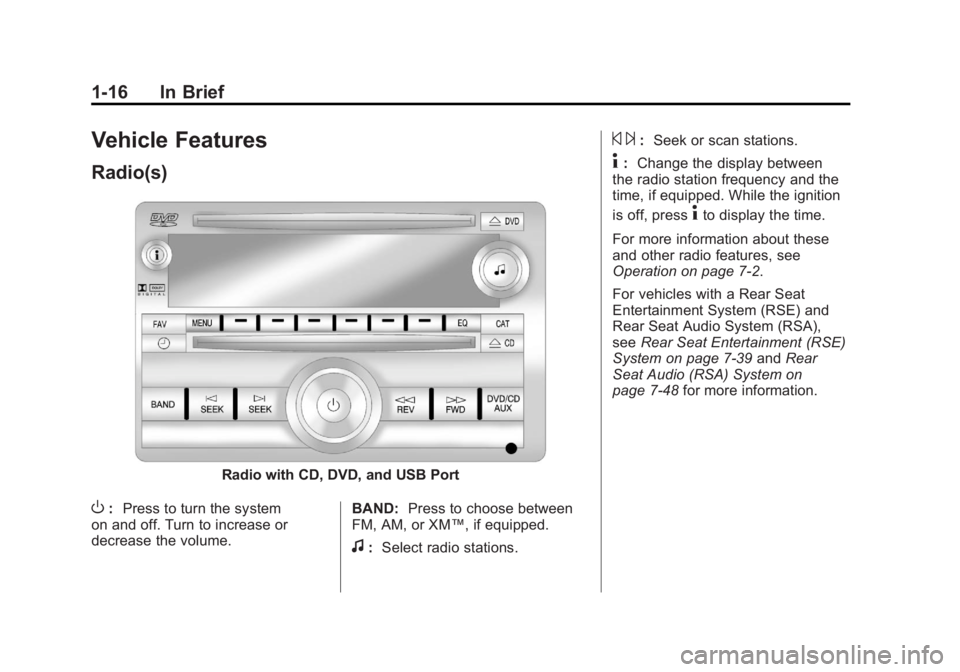
Radio(s)
Radio with CD, DVD, and USB Port
O:Press to turn the system
on and off. Turn to increase or
decrease the volume. BAND:
Press to choose between
FM, AM, or XM™, if equipped.
f: Select radio stations.
© ¨:Seek or scan stations.
4: Change the display between
the radio station frequency and the
time, if equipped. While the ignition
is off, press
4to display the time.
For more information about these
and other radio features, see
Operation on page 7‑2.
For vehicles with a Rear Seat
Entertainment System (RSE) and
Rear Seat Audio System (RSA),
see Rear Seat Entertainment (RSE)
System on page 7‑39 andRear
Seat Audio (RSA) System on
page 7‑48 for more information.
Page 36 of 478
Black plate (4,1)GMC Acadia/Acadia Denali Owner Manual - 2011
2-4 Keys, Doors and Windows
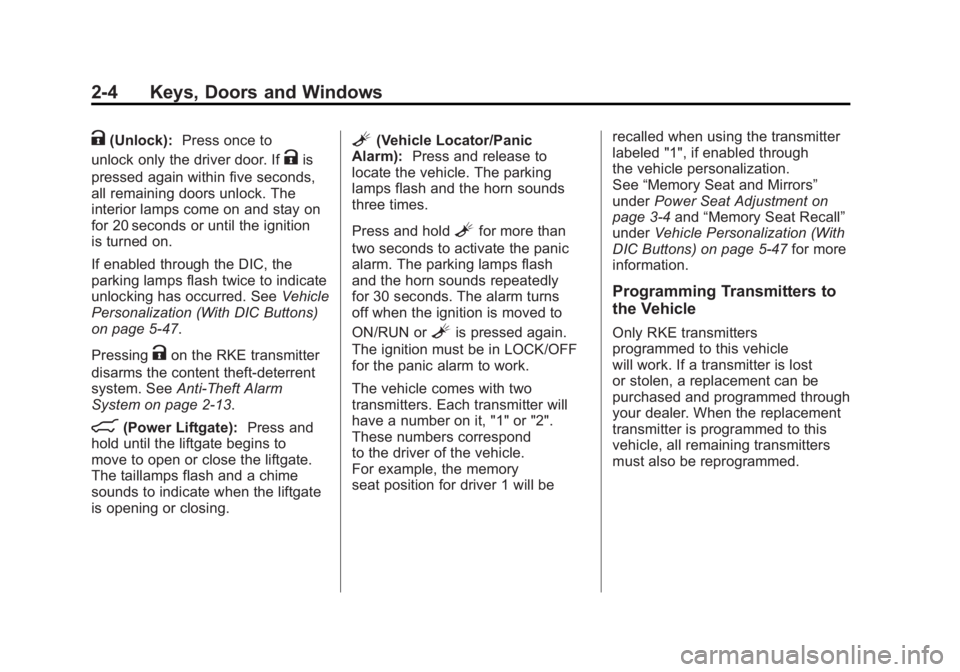
K(Unlock):Press once to
unlock only the driver door. If
Kis
pressed again within five seconds,
all remaining doors unlock. The
interior lamps come on and stay on
for 20 seconds or until the ignition
is turned on.
If enabled through the DIC, the
parking lamps flash twice to indicate
unlocking has occurred. See Vehicle
Personalization (With DIC Buttons)
on page 5‑47.
Pressing
Kon the RKE transmitter
disarms the content theft‐deterrent
system. See Anti-Theft Alarm
System on page 2‑13.
&(Power Liftgate): Press and
hold until the liftgate begins to
move to open or close the liftgate.
The taillamps flash and a chime
sounds to indicate when the liftgate
is opening or closing.
L(Vehicle Locator/Panic
Alarm): Press and release to
locate the vehicle. The parking
lamps flash and the horn sounds
three times.
Press and hold
Lfor more than
two seconds to activate the panic
alarm. The parking lamps flash
and the horn sounds repeatedly
for 30 seconds. The alarm turns
off when the ignition is moved to
ON/RUN or
Lis pressed again.
The ignition must be in LOCK/OFF
for the panic alarm to work.
The vehicle comes with two
transmitters. Each transmitter will
have a number on it, "1" or "2".
These numbers correspond
to the driver of the vehicle.
For example, the memory
seat position for driver 1 will be recalled when using the transmitter
labeled "1", if enabled through
the vehicle personalization.
See
“Memory Seat and Mirrors”
under Power Seat Adjustment on
page 3‑4 and“Memory Seat Recall”
under Vehicle Personalization (With
DIC Buttons) on page 5‑47 for more
information.
Programming Transmitters to
the Vehicle
Only RKE transmitters
programmed to this vehicle
will work. If a transmitter is lost
or stolen, a replacement can be
purchased and programmed through
your dealer. When the replacement
transmitter is programmed to this
vehicle, all remaining transmitters
must also be reprogrammed.
Page 38 of 478
Black plate (6,1)GMC Acadia/Acadia Denali Owner Manual - 2011
2-6 Keys, Doors and Windows
If the vehicle has the remote
start feature, the RKE transmitter
functions have an increased range
of operation. However, the range
may be less while the vehicle is
running.
There are other conditions which
can affect the performance of the
transmitter, seeRemote Keyless
Entry (RKE) System on page 2‑2
for additional information.
Starting the Engine Using
Remote Start
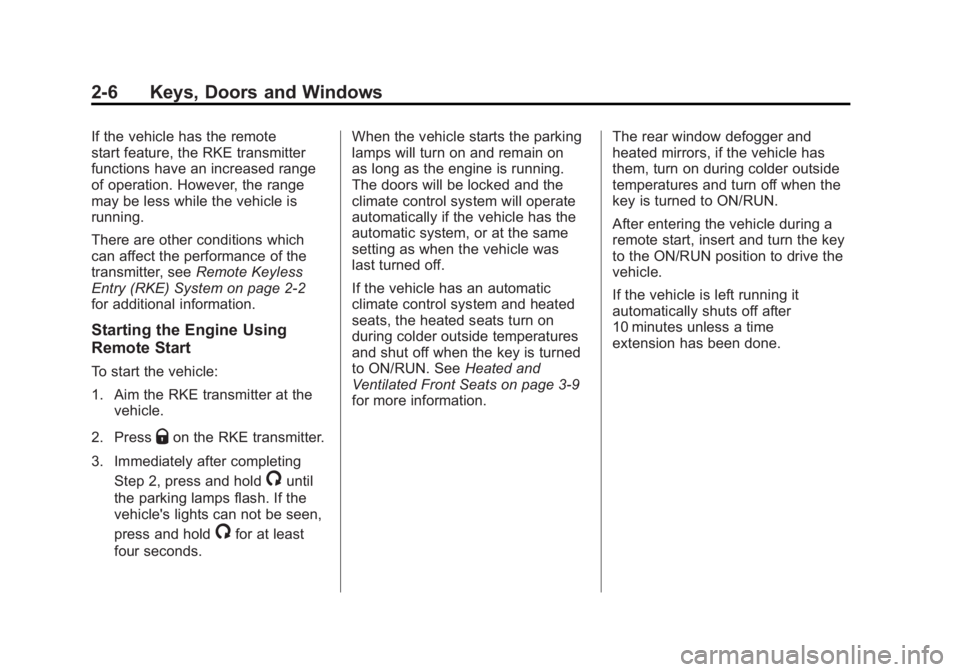
To start the vehicle:
1. Aim the RKE transmitter at the vehicle.
2. Press
Qon the RKE transmitter.
3. Immediately after completing Step 2, press and hold
/until
the parking lamps flash. If the
vehicle's lights can not be seen,
press and hold
/for at least
four seconds. When the vehicle starts the parking
lamps will turn on and remain on
as long as the engine is running.
The doors will be locked and the
climate control system will operate
automatically if the vehicle has the
automatic system, or at the same
setting as when the vehicle was
last turned off.
If the vehicle has an automatic
climate control system and heated
seats, the heated seats turn on
during colder outside temperatures
and shut off when the key is turned
to ON/RUN. See
Heated and
Ventilated Front Seats on page 3‑9
for more information. The rear window defogger and
heated mirrors, if the vehicle has
them, turn on during colder outside
temperatures and turn off when the
key is turned to ON/RUN.
After entering the vehicle during a
remote start, insert and turn the key
to the ON/RUN position to drive the
vehicle.
If the vehicle is left running it
automatically shuts off after
10 minutes unless a time
extension has been done.
Page 48 of 478
Black plate (16,1)GMC Acadia/Acadia Denali Owner Manual - 2011
2-16 Keys, Doors and Windows
To program the new additional key:
1. Verify that the new key hasa
1stamped on it.
2. Insert the already programmed key in the ignition and start the
engine. If the engine does not
start, see your dealer for service.
3. After the engine has started, turn the key to LOCK/OFF,
and remove the key.
4. Insert the key to be programmed and turn it to the ON/RUN
position within five seconds of
the original key being turned to
the LOCK/OFF position.
The security light turns off once
the key has been programmed.
5. Repeat Steps 1 through 4 if additional keys are to be
programmed. If the PASS-Key
®III+ key is lost
or damaged, see your dealer or a
locksmith to have a new key made.
The SERVICE THEFT
DETERRENT SYSTEM message
displays on the Driver Information
Center (DIC) when there is a
problem with the theft-deterrent
system. See Anti-Theft Alarm
System Messages on page 5‑43
for additional information.
Do not leave the key or device that
disarms or deactivates the theft
deterrent system in the vehicle.Exterior Mirrors
Convex Mirrors
{WARNING
A convex mirror can make things,
like other vehicles, look farther
away than they really are. If you
cut too sharply into the right lane,
you could hit a vehicle on the
right. Check the inside mirror or
glance over your shoulder before
changing lanes.
The passenger side mirror is convex
shaped. A convex mirror's surface is
curved so more can be seen from
the driver seat.
Page 52 of 478
Black plate (20,1)GMC Acadia/Acadia Denali Owner Manual - 2011
2-20 Keys, Doors and Windows
Windows
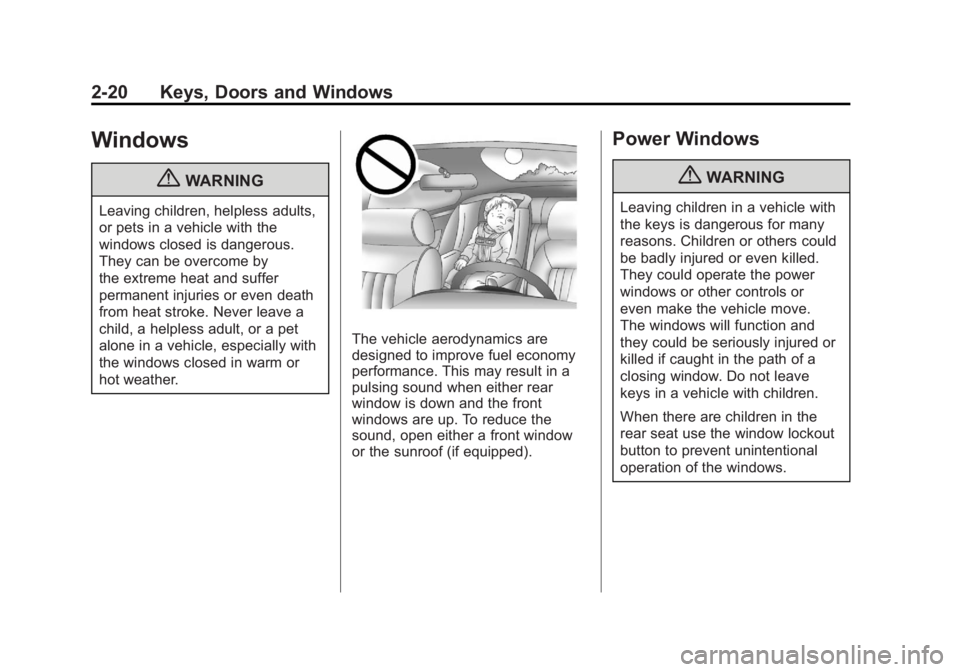
{WARNING
Leaving children, helpless adults,
or pets in a vehicle with the
windows closed is dangerous.
They can be overcome by
the extreme heat and suffer
permanent injuries or even death
from heat stroke. Never leave a
child, a helpless adult, or a pet
alone in a vehicle, especially with
the windows closed in warm or
hot weather.
The vehicle aerodynamics are
designed to improve fuel economy
performance. This may result in a
pulsing sound when either rear
window is down and the front
windows are up. To reduce the
sound, open either a front window
or the sunroof (if equipped).
Power Windows
{WARNING
Leaving children in a vehicle with
the keys is dangerous for many
reasons. Children or others could
be badly injured or even killed.
They could operate the power
windows or other controls or
even make the vehicle move.
The windows will function and
they could be seriously injured or
killed if caught in the path of a
closing window. Do not leave
keys in a vehicle with children.
When there are children in the
rear seat use the window lockout
button to prevent unintentional
operation of the windows.
Page 54 of 478
Black plate (22,1)GMC Acadia/Acadia Denali Owner Manual - 2011
2-22 Keys, Doors and Windows
Window Lockout
o(Window Lockout): The window
lockout switch is located with the
power window switches on the
driver door armrest. This feature
prevents the rear windows from
being operated, except from the
driver position. Press the switch to
turn the lockout feature on or off.
An indicator light will come on to
show the lockout feature is on.
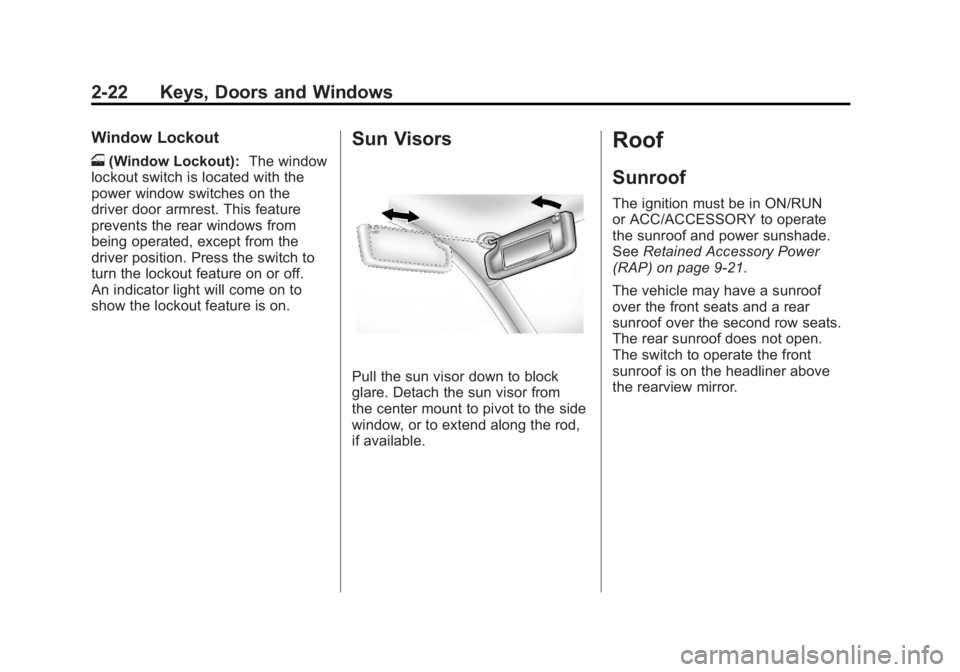
Sun Visors
Pull the sun visor down to block
glare. Detach the sun visor from
the center mount to pivot to the side
window, or to extend along the rod,
if available.
Roof
Sunroof
The ignition must be in ON/RUN
or ACC/ACCESSORY to operate
the sunroof and power sunshade.
See Retained Accessory Power
(RAP) on page 9‑21.
The vehicle may have a sunroof
over the front seats and a rear
sunroof over the second row seats.
The rear sunroof does not open.
The switch to operate the front
sunroof is on the headliner above
the rearview mirror.
Page 55 of 478
Black plate (23,1)GMC Acadia/Acadia Denali Owner Manual - 2011
Keys, Doors and Windows 2-23
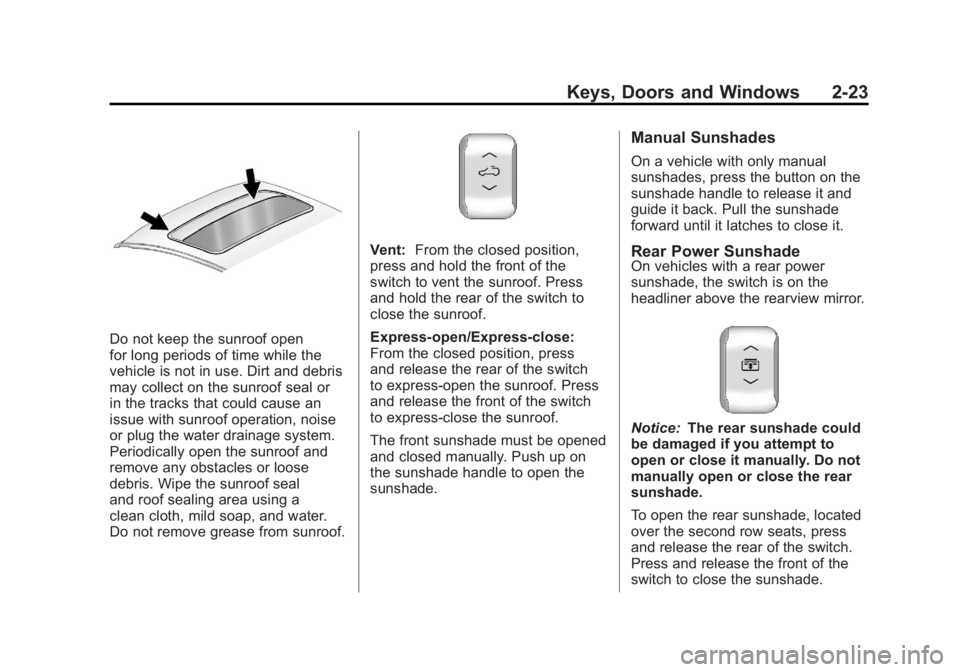
Do not keep the sunroof open
for long periods of time while the
vehicle is not in use. Dirt and debris
may collect on the sunroof seal or
in the tracks that could cause an
issue with sunroof operation, noise
or plug the water drainage system.
Periodically open the sunroof and
remove any obstacles or loose
debris. Wipe the sunroof seal
and roof sealing area using a
clean cloth, mild soap, and water.
Do not remove grease from sunroof.
Vent:From the closed position,
press and hold the front of the
switch to vent the sunroof. Press
and hold the rear of the switch to
close the sunroof.
Express-open/Express-close:
From the closed position, press
and release the rear of the switch
to express-open the sunroof. Press
and release the front of the switch
to express-close the sunroof.
The front sunshade must be opened
and closed manually. Push up on
the sunshade handle to open the
sunshade.
Manual Sunshades
On a vehicle with only manual
sunshades, press the button on the
sunshade handle to release it and
guide it back. Pull the sunshade
forward until it latches to close it.
Rear Power SunshadeOn vehicles with a rear power
sunshade, the switch is on the
headliner above the rearview mirror.
Notice: The rear sunshade could
be damaged if you attempt to
open or close it manually. Do not
manually open or close the rear
sunshade.
To open the rear sunshade, located
over the second row seats, press
and release the rear of the switch.
Press and release the front of the
switch to close the sunshade.
Page 57 of 478
Black plate (1,1)GMC Acadia/Acadia Denali Owner Manual - 2011
Seats and Restraints 3-1
Seats and
Restraints
Head Restraints
Head Restraints . . . . . . . . . . . . . . . 3-2
Front Seats
Seat Adjustment . . . . . . . . . . . . . . 3-3
Power Seat Adjustment . . . . . . . 3-4
Lumbar Adjustment . . . . . . . . . . . 3-6
Reclining Seatbacks . . . . . . . . . . 3-7
Heated and Ventilated FrontSeats . . . . . . . . . . . . . . . . . . . . . . . . 3-9
Rear Seats
Rear Seats . . . . . . . . . . . . . . . . . . 3-10
Third Row Seats . . . . . . . . . . . . . 3-13
Safety Belts
Safety Belts . . . . . . . . . . . . . . . . . . 3-16
How to Wear Safety BeltsProperly . . . . . . . . . . . . . . . . . . . . 3-19
Lap-Shoulder Belt . . . . . . . . . . . 3-25 Safety Belt Use During
Pregnancy . . . . . . . . . . . . . . . . . . 3-30
Safety Belt Extender . . . . . . . . . 3-31
Safety System Check . . . . . . . . 3-31
Safety Belt Care . . . . . . . . . . . . . 3-32
Replacing Safety Belt System Parts After a Crash . . . . . . . . . 3-32
Airbag System
Airbag System . . . . . . . . . . . . . . . 3-33
Where Are the Airbags? . . . . . 3-35
When Should an AirbagInflate? . . . . . . . . . . . . . . . . . . . . . 3-36
What Makes an Airbag Inflate? . . . . . . . . . . . . . . . . . . . . . 3-38
How Does an Airbag Restrain? . . . . . . . . . . . . . . . . . . . 3-38
What Will You See After an Airbag Inflates? . . . . . . . . . . . . 3-39
Passenger Sensing System . . . . . . . . . . . . . . . . . . . . . 3-41
Servicing the Airbag-Equipped Vehicle . . . . . . . . . . . . . . . . . . . . . 3-45 Adding Equipment to the
Airbag-Equipped Vehicle . . . 3-46
Airbag System Check . . . . . . . . 3-47
Replacing Airbag System Parts After a Crash . . . . . . . . . 3-48
Child Restraints
Older Children . . . . . . . . . . . . . . . 3-48
Infants and Young
Children . . . . . . . . . . . . . . . . . . . . 3-51
Child Restraint Systems . . . . . 3-53
Where to Put the Restraint . . . 3-55
Lower Anchors and Tethers for Children
(LATCH System) . . . . . . . . . . . 3-57
Replacing LATCH System Parts After a Crash . . . . . . . . . 3-64
Securing Child Restraints (Rear Seat) . . . . . . . . . . . . . . . . . 3-65
Securing Child Restraints (Right Front
Passenger Seat) . . . . . . . . . . . 3-67
Page 58 of 478
Black plate (2,1)GMC Acadia/Acadia Denali Owner Manual - 2011
3-2 Seats and Restraints
Head Restraints
The vehicle's front seats have
adjustable head restraints in the
outboard seating positions.
{WARNING
With head restraints that are
not installed and adjusted
properly, there is a greater
chance that occupants will suffer
a neck/spinal injury in a crash.
Do not drive until the head
restraints for all occupants are
installed and adjusted properly.
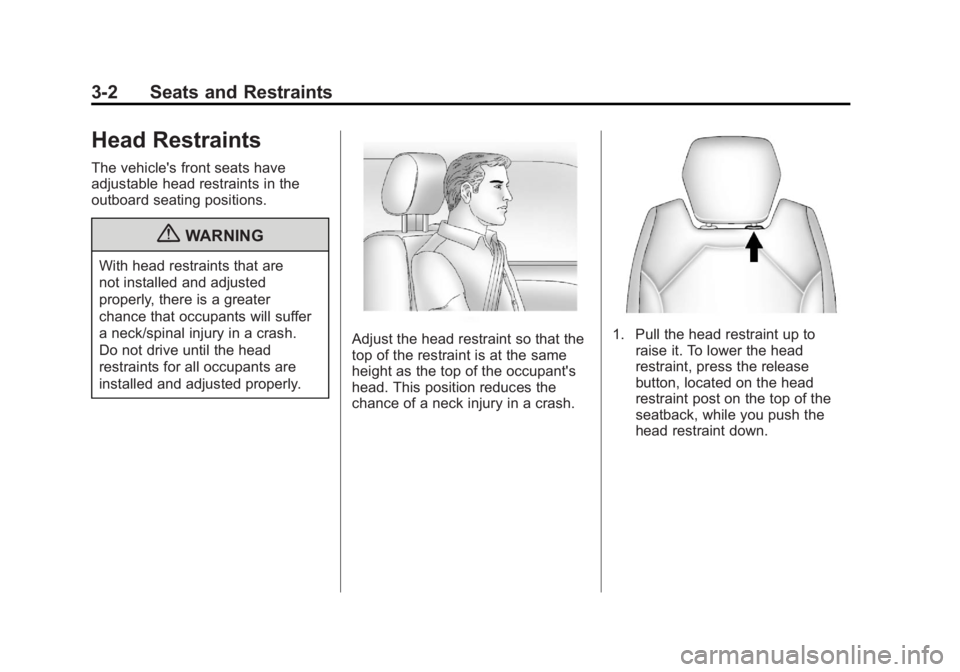
Adjust the head restraint so that the
top of the restraint is at the same
height as the top of the occupant's
head. This position reduces the
chance of a neck injury in a crash.1. Pull the head restraint up toraise it. To lower the head
restraint, press the release
button, located on the head
restraint post on the top of the
seatback, while you push the
head restraint down.
Page 59 of 478
Black plate (3,1)GMC Acadia/Acadia Denali Owner Manual - 2011
Seats and Restraints 3-3
2. Push down on the head restraintafter the button is released to
make sure that it is locked in
place.
The vehicle's second‐row seats
have head restraints in the outboard
seating positions that cannot be
adjusted.
The vehicle's third‐row seats have
headrests in the outboard seating
positions that cannot be adjusted.
The vehicle's head restraints and
headrests are not designed to be
removed.Front Seats
Seat Adjustment
{WARNING
You can lose control of the
vehicle if you try to adjust a
manual driver seat while the
vehicle is moving. The sudden
movement could startle and
confuse you, or make you push
a pedal when you do not want to.
Adjust the driver seat only when
the vehicle is not moving.
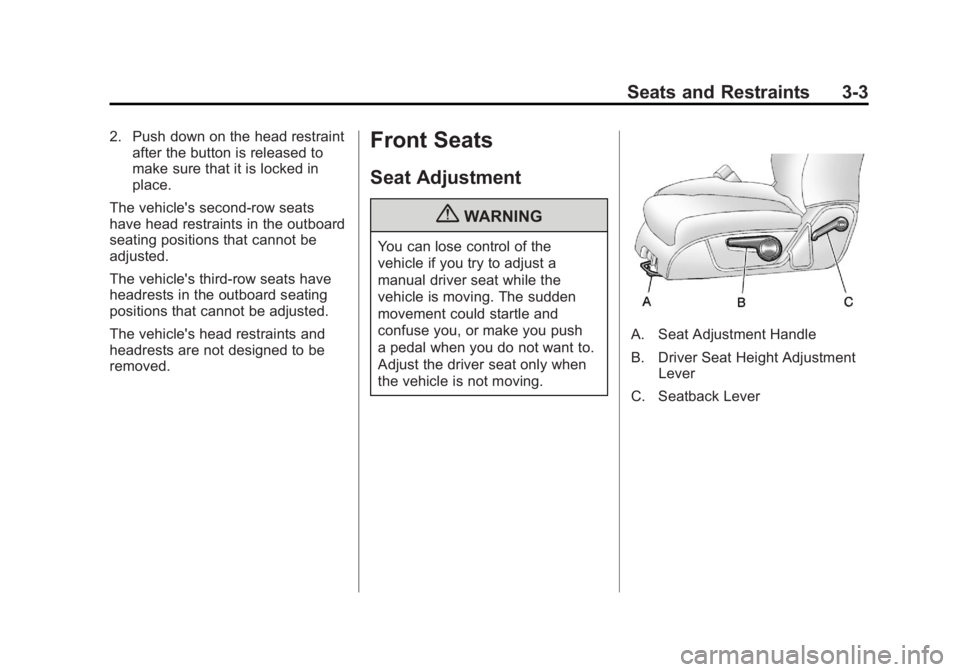
A. Seat Adjustment Handle
B. Driver Seat Height Adjustment Lever
C. Seatback Lever