tow GMC ACADIA 2011 User Guide
[x] Cancel search | Manufacturer: GMC, Model Year: 2011, Model line: ACADIA, Model: GMC ACADIA 2011Pages: 478, PDF Size: 5.52 MB
Page 69 of 478
Black plate (13,1)GMC Acadia/Acadia Denali Owner Manual - 2011
Seats and Restraints 3-13
3. Pull forward on the recliningseatback strap (B) and push
down on the seatback.
The head restraint will fold down
automatically.
To return the seatback to the
seating position, lift the upper
corner of the seatback and push
it rearward until it locks into place.
Push and pull on the seatback to
make sure it is locked. Pull up on
the head restraint to return it to the
upright, locked position.
Adjusting the Seats
To adjust the second row seats,
pull outward on the seat adjustment
handle (A). Slide the seat forward
or rearward to the desired position.
Release the handle, and push and
pull on the seat to make sure it is
locked.
Third Row Seats
{WARNING
Using the third row seating
position while the second row
is folded, or pushed forward in
the entry position, could cause
injury in a sudden stop or crash.
Be sure to return the seat to the
passenger seating position. Push
and pull on the seat to make sure
it is locked into place.
Folding the Seatback
Notice: Folding a rear seat with
the safety belts still fastened may
cause damage to the seat or the
safety belts. Always unbuckle the
safety belts and return them to
their normal stowed position
before folding a rear seat. To fold the third row seatback:
1. Remove anything on or under
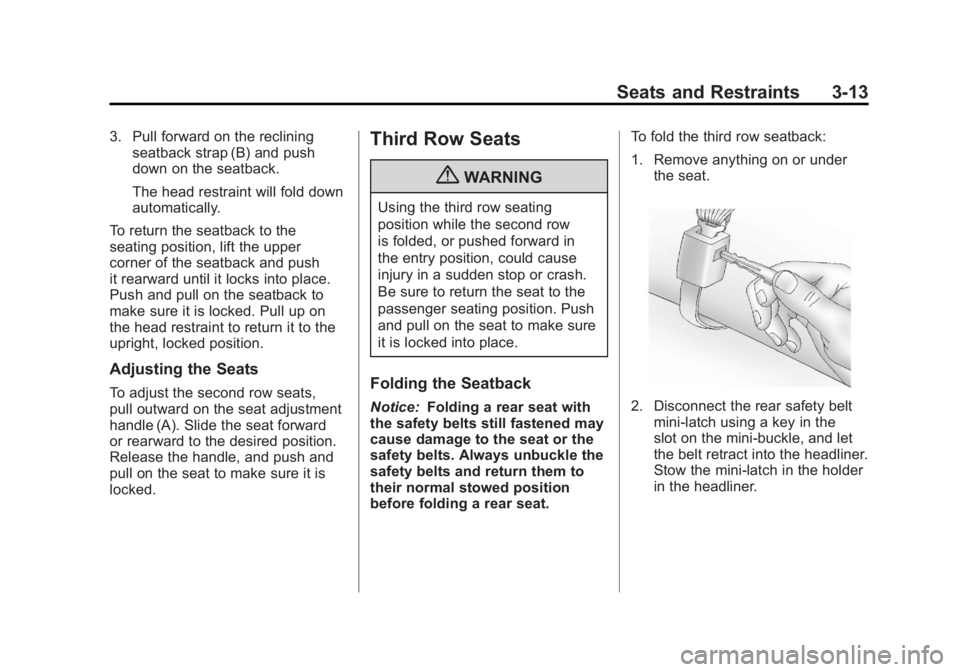
the seat.2. Disconnect the rear safety beltmini-latch using a key in the
slot on the mini-buckle, and let
the belt retract into the headliner.
Stow the mini-latch in the holder
in the headliner.
Page 71 of 478
Black plate (15,1)GMC Acadia/Acadia Denali Owner Manual - 2011
Seats and Restraints 3-15
Removing the Third Row Seats
To remove a third row seat:
1. Remove the cargomanagement system,
if available and installed.
See Cargo Management
System on page 4‑3.
2. Remove anything on or under the seat.
Notice: Folding a rear seat with
the safety belts still fastened may
cause damage to the seat or the
safety belts. Always unbuckle the
safety belts and return them to
their normal stowed position
before folding a rear seat.
3. Fold the seatback down.
See “Folding the Seatback”
earlier in this section.
4. Remove the rear bolts on the floor on each side of the seat. 5. Remove the seat by tilting it
slightly upward, and then pulling
it out of the rear of the vehicle in
one motion.
6. Replace the bolts in the floor holes for storage.
Installing the Third Row Seats
To reinstall a third row seat:
1. Before installing the seat
the seatback must be folded
forward. See “Folding the
Seatback” earlier in this section.
The seats must be placed in
the proper locations to attach
correctly. The wider seat must
be installed on the driver side
and the narrower seat on the
passenger side. Remove the
bolts from the holes in the floor
before installing the seats. 2. Place the seat on the vehicle
floor so that the front seat hooks
are on the vehicle bars.
3. Reinstall the bolts, and torque to 55Y (41 lb ft). Pull up on the
seat to make sure it is locked in
place.
4. Raise the seatback to the upright position. Push and pull
on the seatback to make sure it
is locked into place.
5. Reconnect the center safety belt mini-latch to the mini-buckle.
Do not let it twist.
Page 83 of 478
Black plate (27,1)GMC Acadia/Acadia Denali Owner Manual - 2011
Seats and Restraints 3-27
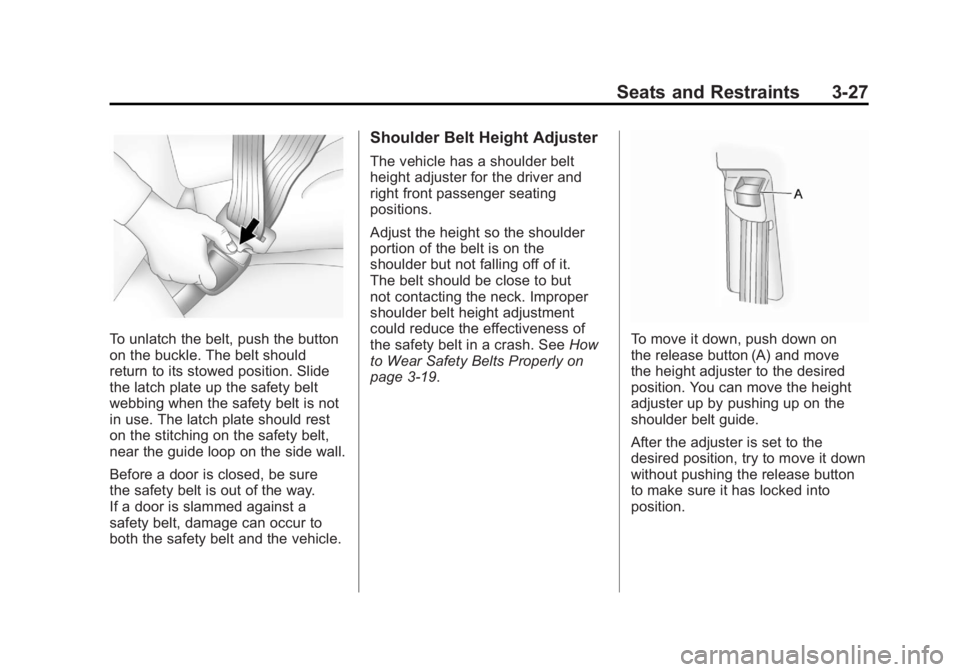
To unlatch the belt, push the button
on the buckle. The belt should
return to its stowed position. Slide
the latch plate up the safety belt
webbing when the safety belt is not
in use. The latch plate should rest
on the stitching on the safety belt,
near the guide loop on the side wall.
Before a door is closed, be sure
the safety belt is out of the way.
If a door is slammed against a
safety belt, damage can occur to
both the safety belt and the vehicle.
Shoulder Belt Height Adjuster
The vehicle has a shoulder belt
height adjuster for the driver and
right front passenger seating
positions.
Adjust the height so the shoulder
portion of the belt is on the
shoulder but not falling off of it.
The belt should be close to but
not contacting the neck. Improper
shoulder belt height adjustment
could reduce the effectiveness of
the safety belt in a crash. SeeHow
to Wear Safety Belts Properly on
page 3‑19.
To move it down, push down on
the release button (A) and move
the height adjuster to the desired
position. You can move the height
adjuster up by pushing up on the
shoulder belt guide.
After the adjuster is set to the
desired position, try to move it down
without pushing the release button
to make sure it has locked into
position.
Page 95 of 478
Black plate (39,1)GMC Acadia/Acadia Denali Owner Manual - 2011
Seats and Restraints 3-39
Rollover capable roof-rail airbags
are designed to help contain the
head and chest of occupants in
the outboard seating positions
in the first and second rows.
The rollover capable roof-rail
airbags are designed to help reduce
the risk of full or partial ejection in
rollover events, although no system
can prevent all such ejections.
But airbags would not help in
many types of collisions, primarily
because the occupant's motion
is not toward those airbags.
SeeWhen Should an Airbag
Inflate? on page 3‑36 for more
information.
Airbags should never be regarded
as anything more than a supplement
to safety belts.What Will You See After
an Airbag Inflates?
After the frontal airbags and
seat-mounted side impact airbags
inflate, they quickly deflate, so
quickly that some people may not
even realize an airbag inflated.
Roof-rail airbags may still be at least
partially inflated for some time after
they deploy. Some components of
the airbag module may be hot for
several minutes. For location of the
airbag modules, see What Makes
an Airbag Inflate? on page 3‑38.
The parts of the airbag that come
into contact with you may be warm,
but not too hot to touch. There may
be some smoke and dust coming
from the vents in the deflated
airbags. Airbag inflation does not
prevent the driver from seeing out
of the windshield or being able to
steer the vehicle, nor does it prevent
people from leaving the vehicle.
{WARNING
When an airbag inflates, there
may be dust in the air. This dust
could cause breathing problems
for people with a history of
asthma or other breathing trouble.
To avoid this, everyone in the
vehicle should get out as soon
as it is safe to do so. If you have
breathing problems but cannot
get out of the vehicle after an
airbag inflates, then get fresh air
by opening a window or a door.
If you experience breathing
problems following an airbag
deployment, you should seek
medical attention.
The vehicle has a feature that may
automatically unlock the doors, turn
on the interior lamps and hazard
warning flashers, and shut off the
fuel system after the airbags inflate.
Page 101 of 478
Black plate (45,1)GMC Acadia/Acadia Denali Owner Manual - 2011
Seats and Restraints 3-45
A wet seat can affect the
performance of the passenger
sensing system. Here is how:
.The passenger sensing system
may turn off the passenger
airbag when liquid is soaked
into the seat. If this happens,
the off indicator will be lit, and
the airbag readiness light on the
instrument panel will also be lit.
.Liquid pooled on the seat that
has not soaked in may make it
more likely that the passenger
sensing system will enable (turn
on) the passenger airbag while a
child restraint or child occupant
is on the seat. If the passenger
airbag is turned on, the on
indicator will be lit.
If the passenger seat gets wet, dry
the seat immediately. If the airbag
readiness light is lit, do not install
a child restraint or allow anyone
to occupy the seat. See Airbag
Readiness Light on page 5‑15
for important safety information. The on indicator may be lit if
an object, such as a briefcase,
handbag, grocery bag, laptop or
other electronic device, is put on
an unoccupied seat. If this is not
desired remove the object from
the seat.
{WARNING
Stowing of articles under the
passenger seat or between the
passenger seat cushion and
seatback may interfere with the
proper operation of the passenger
sensing system.
Servicing the
Airbag-Equipped Vehicle
Airbags affect how the vehicle
should be serviced. There are
parts of the airbag system in
several places around the vehicle.
Your dealer and the service manual
have information about servicing
the vehicle and the airbag system.
To purchase a service manual,
see
Service Publications Ordering
Information on page 13‑15.
{WARNING
For up to 10 seconds after the
ignition is turned off and the
battery is disconnected, an airbag
can still inflate during improper
service. You can be injured if you
are close to an airbag when it
inflates. Avoid yellow connectors.
They are probably part of the
airbag system. Be sure to follow
proper service procedures, and
make sure the person performing
work for you is qualified to do so.
Page 118 of 478
Black plate (62,1)GMC Acadia/Acadia Denali Owner Manual - 2011
3-62 Seats and Restraints
{WARNING
Do not attach more than one
child restraint to a single anchor.
Attaching more than one child
restraint to a single anchor could
cause the anchor or attachment
to come loose or even break
during a crash. A child or others
could be injured. To reduce the
risk of serious or fatal injuries
during a crash, attach only one
child restraint per anchor.
{WARNING
Children can be seriously injured
or strangled if a shoulder belt
is wrapped around their neck
and the safety belt continues to
tighten. Buckle any unused safety
belts behind the child restraint
so children cannot reach them.(Continued)
WARNING (Continued)
Pull the shoulder belt all the way
out of the retractor to set the lock,
if the vehicle has one, after the
child restraint has been installed.
Notice: Do not let the LATCH
attachments rub against the
vehicle’ s safety belts. This may
damage these parts. If necessary,
move buckled safety belts to
avoid rubbing the LATCH
attachments.
Do not fold the empty rear
seat with a safety belt buckled.
This could damage the safety
belt or the seat. Unbuckle and
return the safety belt to its
stowed position, before folding
the seat.
1. Attach and tighten the lower attachments to the
lower anchors. If the child
restraint does not have lower attachments or the desired
seating position does not have
lower anchors, secure the child
restraint with the top tether and
the safety belts. Refer to your
child restraint manufacturer
instructions and the instructions
in this manual.
1.1. Find the lower anchors
for the desired seating
position.
1.2. Recline the seatback to the full reclined position.
Make sure the second
row bench seatbacks are
aligned at the same angle
before placing the child
restraint on the seat. Make
sure the third row bench
seatbacks are both upright
before placing the child
restraint on the seat.
Page 122 of 478
Black plate (66,1)GMC Acadia/Acadia Denali Owner Manual - 2011
3-66 Seats and Restraints
4. Pull the shoulder belt all the wayout of the retractor to set the
lock. When the retractor lock is
set, the shoulder belt can be
tightened but not pulled out
of the retractor.5. To tighten the belt, push downon the child restraint, pull the
shoulder portion of the belt to
tighten the lap portion of the belt,
and feed the shoulder belt back
into the retractor. When installing
a forward-facing child restraint,
it may be helpful to use your
knee to push down on the child
restraint as you tighten the belt.
Try to pull the belt out of the
retractor to make sure the
retractor is locked. If the
retractor is not locked,
repeat Steps 4 and 5. 6. If the child restraint has a top
tether, follow the child restraint
manufacturer's instructions
regarding the use of the top
tether. See Lower Anchors and
Tethers for Children (LATCH
System) on page 3‑57 for more
information.
7. Before placing a child in the child restraint, make sure it is
securely held in place. To check,
grasp the child restraint at the
safety belt path and attempt to
move it side to side and back
and forth. When the child
restraint is properly installed,
there should be no more than
2.5 cm (1 in) of movement.
To remove the child restraint,
unbuckle the vehicle safety belt and
let it return to the stowed position.
If the top tether is attached to a top
tether anchor, disconnect it.
Page 125 of 478
Black plate (69,1)GMC Acadia/Acadia Denali Owner Manual - 2011
Seats and Restraints 3-69
6. To tighten the belt, push downon the child restraint, pull the
shoulder portion of the belt to
tighten the lap portion of the belt,
and feed the shoulder belt back
into the retractor. When installing
a forward-facing child restraint,
it may be helpful to use your
knee to push down on the child
restraint as you tighten the belt.
Try to pull the belt out of
the retractor to make sure
the retractor is locked. If the
retractor is not locked repeat
Steps 5 and 6. 7. Before placing a child in the
child restraint, make sure it is
securely held in place. To check,
grasp the child restraint at the
safety belt path and attempt to
move it side to side and back
and forth. When the child
restraint is properly installed,
there should be no more than
2.5 cm (1 in) of movement.
If the airbags are off, the off
indicator in the passenger airbag
status indicator will come on and
stay on when the vehicle is started.
If a child restraint has been
installed and the on indicator is lit,
see “If the On Indicator is Lit for a
Child Restraint” underPassenger
Sensing System on page 3‑41 for
more information.
To remove the child restraint,
unbuckle the vehicle safety belt and
let it return to the stowed position.
Page 133 of 478
Black plate (1,1)GMC Acadia/Acadia Denali Owner Manual - 2011
Instruments and Controls 5-1
Instruments and
Controls
Controls
Steering Wheel Adjustment . . . 5-2
Steering Wheel Controls . . . . . . 5-2
Horn . . . . . . . . . . . . . . . . . . . . . . . . . . 5-4
Windshield Wiper/Washer . . . . . 5-5
Rear WindowWiper/Washer . . . . . . . . . . . . . . . 5-6
Compass . . . . . . . . . . . . . . . . . . . . . 5-6
Clock . . . . . . . . . . . . . . . . . . . . . . . . . 5-8
Power Outlets . . . . . . . . . . . . . . . . . 5-9
Warning Lights, Gauges, and
Indicators
Warning Lights, Gauges, and Indicators . . . . . . . . . . . . . . . . . . . 5-11
Instrument Cluster . . . . . . . . . . . 5-12
Speedometer . . . . . . . . . . . . . . . . 5-13
Odometer . . . . . . . . . . . . . . . . . . . . 5-13
Tachometer . . . . . . . . . . . . . . . . . . 5-13
Fuel Gauge . . . . . . . . . . . . . . . . . . 5-13 Engine Coolant Temperature
Gauge . . . . . . . . . . . . . . . . . . . . . . 5-14
Voltmeter Gauge . . . . . . . . . . . . . 5-14
Safety Belt Reminders . . . . . . . 5-15
Airbag Readiness Light . . . . . . 5-15
Passenger Airbag Status Indicator . . . . . . . . . . . . . . . . . . . . 5-16
Charging System Light . . . . . . 5-17
Malfunction Indicator Lamp . . . . . . . . . . . . . 5-18
Brake System Warning Light . . . . . . . . . . . . . . . . . . . . . . . 5-20
Antilock Brake System (ABS) Warning Light . . . . . . . . . . . . . . 5-21
Tow/Haul Mode Light . . . . . . . . 5-22
StabiliTrak
®Indicator Light . . . 5-22
Engine Coolant Temperature Warning Light . . . . . . . . . . . . . . 5-22
Tire Pressure Light . . . . . . . . . . 5-23
Engine Oil Pressure Light . . . . 5-23
Security Light . . . . . . . . . . . . . . . . 5-24
High-Beam On Light . . . . . . . . . 5-24
Front Fog Lamp Light . . . . . . . . 5-24
Cruise Control Light . . . . . . . . . 5-24
Information Displays
Driver Information Center (DIC) (With DIC Buttons) . . . 5-25
Driver Information Center (DIC) (Without DIC
Buttons) . . . . . . . . . . . . . . . . . . . . 5-30
Head-Up Display (HUD) . . . . . 5-33
Vehicle Messages
Vehicle Messages . . . . . . . . . . . 5-37
Battery Voltage and Charging Messages . . . . . . . . . . . . . . . . . . 5-37
Brake System Messages . . . . 5-38
Cruise Control Messages . . . . 5-38
Door Ajar Messages . . . . . . . . . 5-38
Engine Cooling System Messages . . . . . . . . . . . . . . . . . . 5-39
Engine Oil Messages . . . . . . . . 5-40
Engine Power Messages . . . . 5-41
Fuel System Messages . . . . . . 5-41
Key and Lock Messages . . . . . 5-41
Lamp Messages . . . . . . . . . . . . . 5-41
Object Detection System
Messages . . . . . . . . . . . . . . . . . . 5-42
Page 151 of 478
Black plate (19,1)GMC Acadia/Acadia Denali Owner Manual - 2011
Instruments and Controls 5-19
To prevent more serious damage to
the vehicle:
.Reduce vehicle speed.
.Avoid hard accelerations.
.Avoid steep uphill grades.
.If towing a trailer, reduce the
amount of cargo being hauled
as soon as it is possible.
If the light continues to flash, when
it is safe to do so, stop the vehicle.
Find a safe place to park the
vehicle. Turn the vehicle off, wait at
least 10 seconds, and restart the
engine. If the light is still flashing,
follow the previous steps and see
your dealer for service as soon as
possible.
Light On Steady: An emission
control system malfunction has
been detected on the vehicle.
Diagnosis and service might be
required. The following may correct an
emissions system malfunction:
.Make sure the fuel cap is
fully installed. See
Filling
the Tank on page 9‑44.
The diagnostic system can
determine if the fuel cap has
been left off or improperly
installed. A loose or missing fuel
cap allows fuel to evaporate into
the atmosphere. A few driving
trips with the cap properly
installed should turn the light off.
.Make sure the electrical system
is not wet. The system could
be wet if the vehicle was driven
through a deep puddle of
water. The condition is usually
corrected when the electrical
system dries out. A few driving
trips should turn the light off.
.Make sure to fuel the vehicle
with quality fuel. Poor fuel quality
causes the engine not to run as
efficiently as designed and can
cause: stalling after start-up,
stalling when the vehicle is
changed into gear, misfiring,
hesitation on acceleration,
or stumbling on acceleration.
These conditions might go away
once the engine is warmed up.
If one or more of these
conditions occurs, change the
fuel brand used. It will require
at least one full tank of the
proper fuel to turn the light off.
See Recommended Fuel on
page 9‑42.
If none of the above have made
the light turn off, your dealer can
check the vehicle. The dealer
has the proper test equipment
and diagnostic tools to fix any
mechanical or electrical problems
that might have developed.