clock GMC ACADIA 2011 Owner's Guide
[x] Cancel search | Manufacturer: GMC, Model Year: 2011, Model line: ACADIA, Model: GMC ACADIA 2011Pages: 478, PDF Size: 5.52 MB
Page 395 of 478
Black plate (67,1)GMC Acadia/Acadia Denali Owner Manual - 2011
Vehicle Care 10-67
12. Unplug the power plug (H) fromthe accessory power outlet in
the vehicle.
13. Turn the sealant/air hose (F) counterclockwise to remove it
from the tire valve stem.
14. Replace the tire valve stem cap.
15. Replace the sealant/air hose (F), and the power
plug (H) back in their original
location.
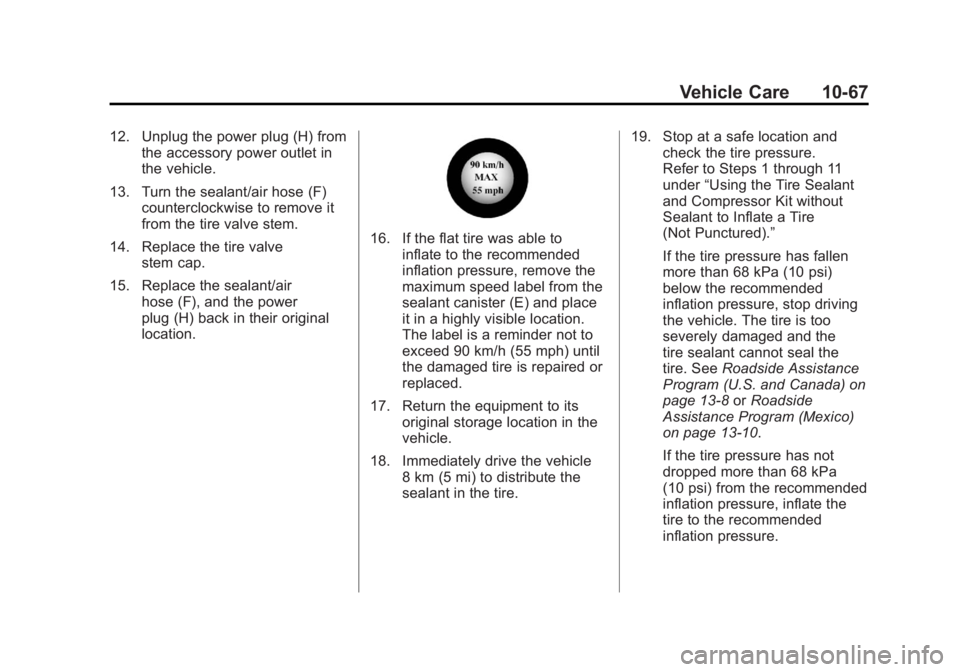
16. If the flat tire was able toinflate to the recommended
inflation pressure, remove the
maximum speed label from the
sealant canister (E) and place
it in a highly visible location.
The label is a reminder not to
exceed 90 km/h (55 mph) until
the damaged tire is repaired or
replaced.
17. Return the equipment to its original storage location in the
vehicle.
18. Immediately drive the vehicle 8 km (5 mi) to distribute the
sealant in the tire. 19. Stop at a safe location and
check the tire pressure.
Refer to Steps 1 through 11
under “Using the Tire Sealant
and Compressor Kit without
Sealant to Inflate a Tire
(Not Punctured).”
If the tire pressure has fallen
more than 68 kPa (10 psi)
below the recommended
inflation pressure, stop driving
the vehicle. The tire is too
severely damaged and the
tire sealant cannot seal the
tire. See Roadside Assistance
Program (U.S. and Canada) on
page 13‑8 orRoadside
Assistance Program (Mexico)
on page 13‑10.
If the tire pressure has not
dropped more than 68 kPa
(10 psi) from the recommended
inflation pressure, inflate the
tire to the recommended
inflation pressure.
Page 396 of 478
Black plate (68,1)GMC Acadia/Acadia Denali Owner Manual - 2011
10-68 Vehicle Care
20. Wipe off any sealant from thewheel, tire, and vehicle.
21. Dispose of the used sealant canister (E) and sealant/air
hose (F) assembly at a local
dealer or in accordance with
local state codes and practices.
22. Replace it with a new canister available from your dealer.
23. After temporarily sealing a tire using the tire sealant
and compressor kit, take the
vehicle to an authorized dealer
within a 161 km (100 mi) of
driving to have the tire repaired
or replaced.
Using the Tire Sealant and
Compressor Kit without
Sealant to Inflate a Tire
(Not Punctured)
To use the air compressor to inflate
a tire with air only and not sealant:
If a tire goes flat, avoid further tire
and wheel damage by driving slowly
to a level place. Turn on the hazard
warning flashers. See Hazard
Warning Flashers on page 6‑3.
See If a Tire Goes Flat on
page 10‑61 for other important
safety warnings.
1. Remove the tire sealant and compressor kit from its storage
location. See Storing the Tire
Sealant and Compressor Kit on
page 10‑70.
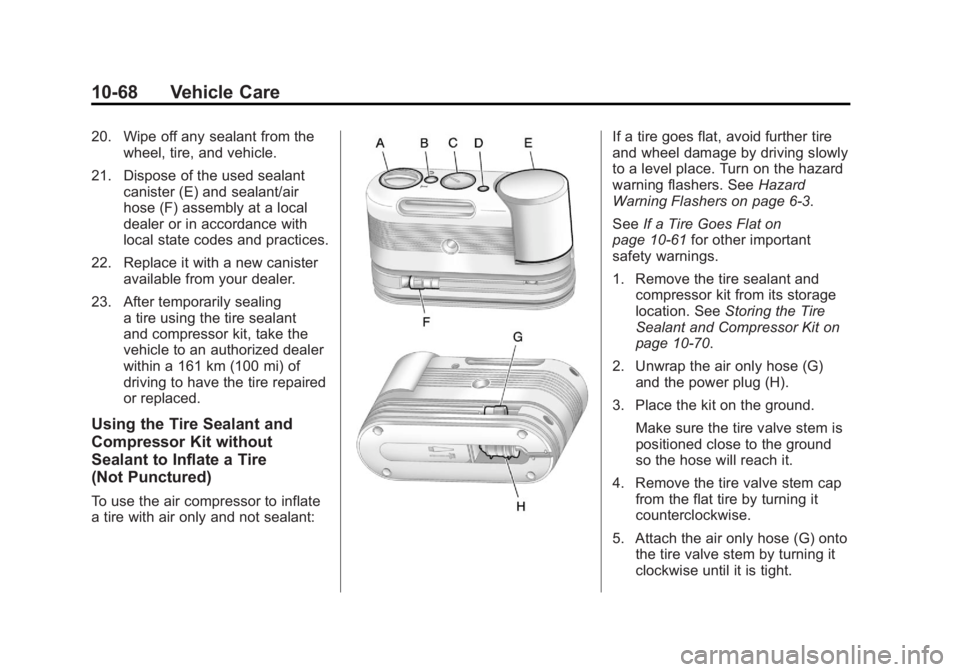
2. Unwrap the air only hose (G) and the power plug (H).
3. Place the kit on the ground. Make sure the tire valve stem is
positioned close to the ground
so the hose will reach it.
4. Remove the tire valve stem cap from the flat tire by turning it
counterclockwise.
5. Attach the air only hose (G) onto the tire valve stem by turning it
clockwise until it is tight.
Page 397 of 478
Black plate (69,1)GMC Acadia/Acadia Denali Owner Manual - 2011
Vehicle Care 10-69
6. Plug the power plug (H) into theaccessory power outlet in the
vehicle. Unplug all items from
other accessory power outlets.
See Power Outlets on page 5‑9.
If the vehicle has an accessory
power outlet, do not use the
cigarette lighter.
If the vehicle only has a cigarette
lighter, use the cigarette lighter.
Do not pinch the power plug
cord in the door or window.
7. Start the vehicle. The vehicle must be running while using the
air compressor.
8. Turn the selector switch (A) clockwise to the Air Only
position.
9. Press the on/off (B) button to turn the compressor on.
The compressor will inflate the
tire with air only. 10. Inflate the tire to the
recommended inflation
pressure using the pressure
gauge (C). The recommended
inflation pressure can be
found on the Tire and Loading
Information label. See Tire
Pressure on page 10‑45.
The pressure gauge (C) may
read higher than the actual tire
pressure while the compressor
is on. Turn the compressor off
to get an accurate reading.
The compressor may be turned
on/off until the correct pressure
is reached.
If you inflate the tire higher
than the recommended
pressure you can adjust
the excess pressure by
pressing the pressure deflation
button (D), if equipped, until
the proper pressure reading is
reached. This option is only
functional when using the air
only hose (G). 11. Press the on/off button (B)
to turn the tire sealant and
compressor kit off.
Be careful while handling the
tire sealant and compressor
kit as it could be warm after
usage.
12. Unplug the power plug (H) from the accessory power outlet in
the vehicle.
13. Disconnect the air only hose (G) from the tire
valve stem by turning it
counterclockwise, and replace
the tire valve stem cap.
14. Replace the air only hose (G) and the power plug (H) and
cord back in their original
locations.
Page 399 of 478
Black plate (71,1)GMC Acadia/Acadia Denali Owner Manual - 2011
Vehicle Care 10-71
2. Press the two tabs on the quickrelease buckle to release the
tire sealant and compressor kit
strap.
3. Remove the sealant and compressor kit from its tray.
To store the tire sealant and
compressor kit, reverse the steps.
Tire Changing
Removing Tools
The tools needed to remove the
spare tire are located in the storage
compartment on the driver side,
at the rear of the vehicle.
1. Open the jack storage compartment by pulling on
the latch tab, located toward
the rear of the vehicle, and
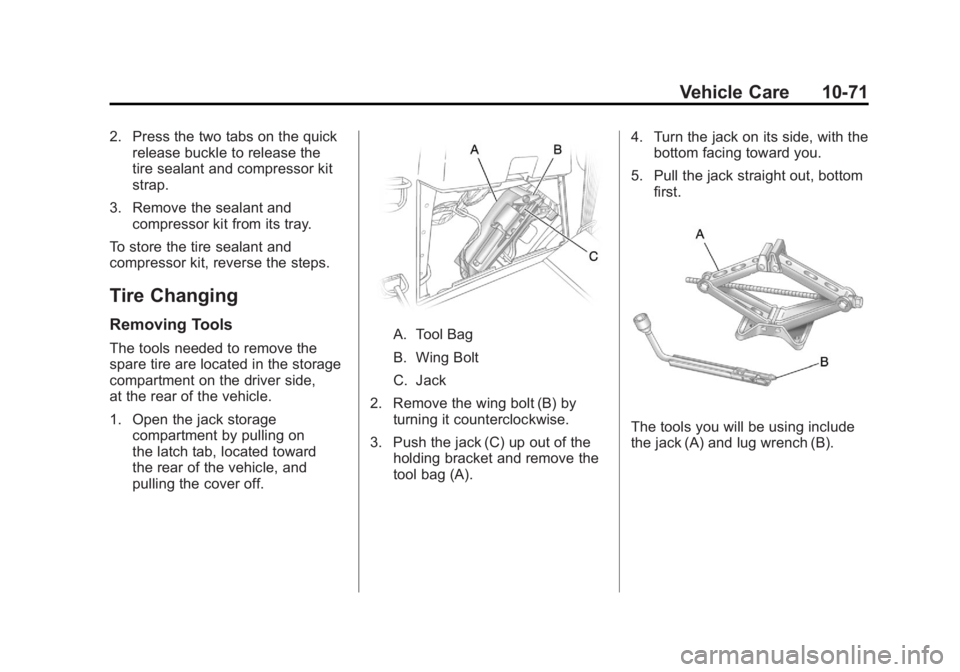
pulling the cover off.A. Tool Bag
B. Wing Bolt
C. Jack
2. Remove the wing bolt (B) by turning it counterclockwise.
3. Push the jack (C) up out of the holding bracket and remove the
tool bag (A). 4. Turn the jack on its side, with the
bottom facing toward you.
5. Pull the jack straight out, bottom first.
The tools you will be using include
the jack (A) and lug wrench (B).
Page 400 of 478
Black plate (72,1)GMC Acadia/Acadia Denali Owner Manual - 2011
10-72 Vehicle Care
Removing the Spare Tire
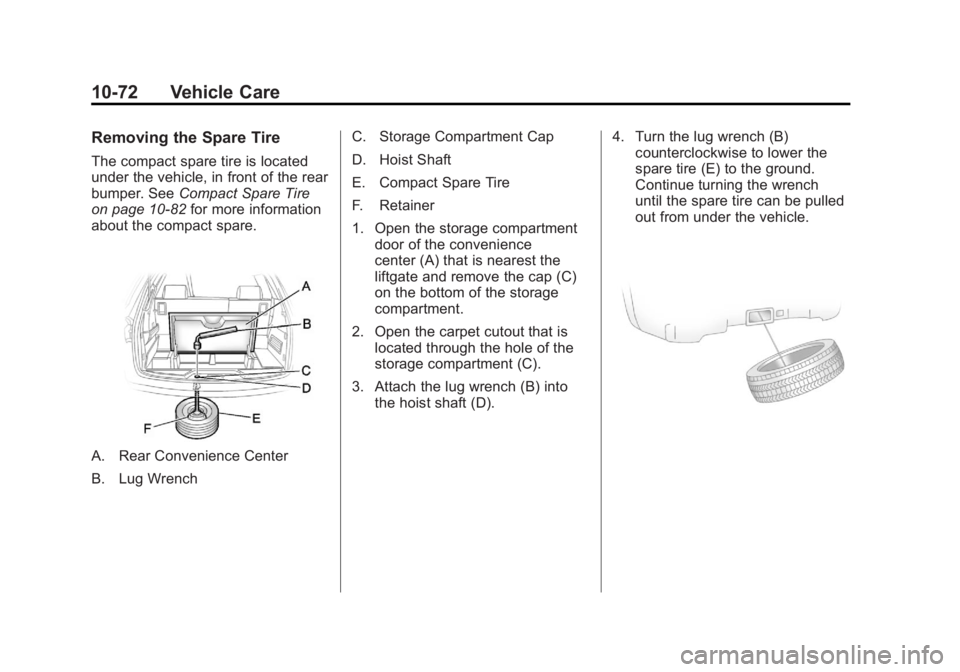
The compact spare tire is located
under the vehicle, in front of the rear
bumper. SeeCompact Spare Tire
on page 10‑82 for more information
about the compact spare.
A. Rear Convenience Center
B. Lug Wrench C. Storage Compartment Cap
D. Hoist Shaft
E. Compact Spare Tire
F. Retainer
1. Open the storage compartment
door of the convenience
center (A) that is nearest the
liftgate and remove the cap (C)
on the bottom of the storage
compartment.
2. Open the carpet cutout that is located through the hole of the
storage compartment (C).
3. Attach the lug wrench (B) into the hoist shaft (D). 4. Turn the lug wrench (B)
counterclockwise to lower the
spare tire (E) to the ground.
Continue turning the wrench
until the spare tire can be pulled
out from under the vehicle.
Page 401 of 478
Black plate (73,1)GMC Acadia/Acadia Denali Owner Manual - 2011
Vehicle Care 10-73
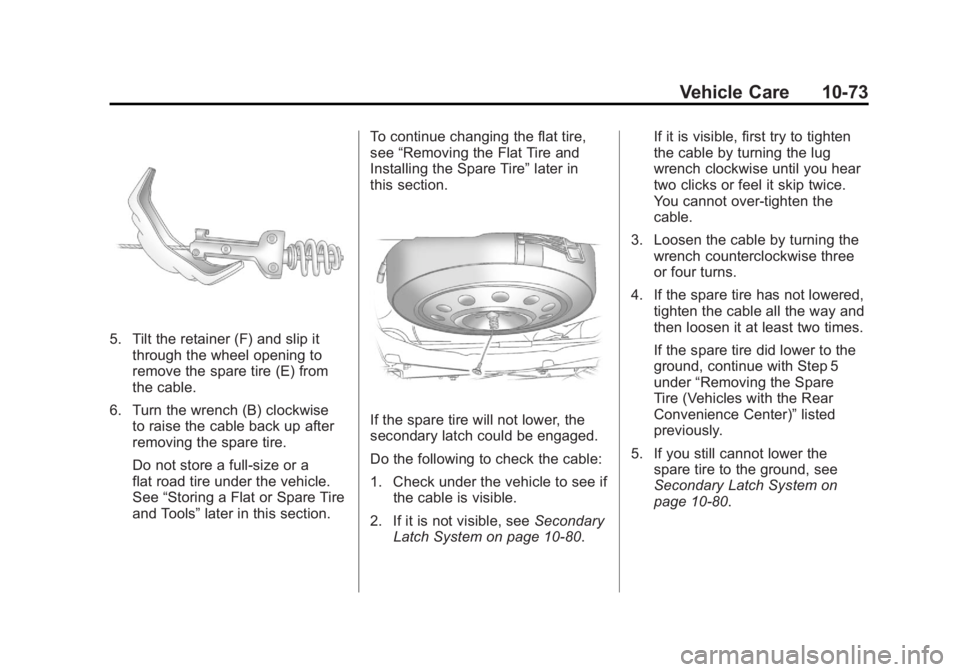
5. Tilt the retainer (F) and slip itthrough the wheel opening to
remove the spare tire (E) from
the cable.
6. Turn the wrench (B) clockwise to raise the cable back up after
removing the spare tire.
Do not store a full‐size or a
flat road tire under the vehicle.
See “Storing a Flat or Spare Tire
and Tools” later in this section. To continue changing the flat tire,
see
“Removing the Flat Tire and
Installing the Spare Tire” later in
this section.
If the spare tire will not lower, the
secondary latch could be engaged.
Do the following to check the cable:
1. Check under the vehicle to see if the cable is visible.
2. If it is not visible, see Secondary
Latch System on page 10‑80. If it is visible, first try to tighten
the cable by turning the lug
wrench clockwise until you hear
two clicks or feel it skip twice.
You cannot over‐tighten the
cable.
3. Loosen the cable by turning the wrench counterclockwise three
or four turns.
4. If the spare tire has not lowered, tighten the cable all the way and
then loosen it at least two times.
If the spare tire did lower to the
ground, continue with Step 5
under “Removing the Spare
Tire (Vehicles with the Rear
Convenience Center)” listed
previously.
5. If you still cannot lower the spare tire to the ground, see
Secondary Latch System on
page 10‑80.
Page 403 of 478
Black plate (75,1)GMC Acadia/Acadia Denali Owner Manual - 2011
Vehicle Care 10-75
Notice:If a jack is used to raise
the vehicle without positioning
it correctly, the vehicle could
be damaged. When raising the
vehicle on a jack, avoid contact
with the rear axle control arms.
5. Attach the lug wrench to the
jack, and turn the wrench
clockwise to raise the jack
head 3 inches (7.6 cm).
6. Do not raise the vehicle yet. Put the compact spare tire near you.
{WARNING
Getting under a vehicle when it
is jacked up is dangerous. If the
vehicle slips off the jack, you
could be badly injured or killed.
Never get under a vehicle when
it is supported only by a jack.
{WARNING
Raising the vehicle with the
jack improperly positioned can
damage the vehicle and even
make the vehicle fall. To help
avoid personal injury and vehicle
damage, be sure to fit the jack lift
head into the proper location
before raising the vehicle.
7. Raise the vehicle by turning the lug wrench clockwise in the jack.
Raise the vehicle far enough
off the ground so that there is
enough room for the spare tire
to fit under the wheel well.
8. Remove all the wheel nuts and the flat tire.
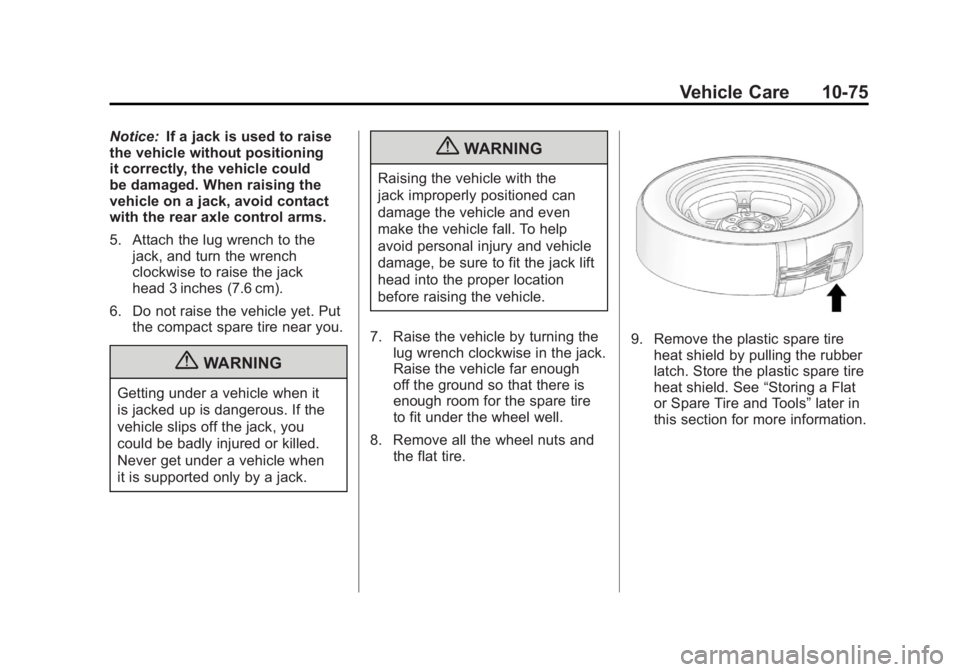
9. Remove the plastic spare tire
heat shield by pulling the rubber
latch. Store the plastic spare tire
heat shield. See “Storing a Flat
or Spare Tire and Tools” later in
this section for more information.
Page 404 of 478
Black plate (76,1)GMC Acadia/Acadia Denali Owner Manual - 2011
10-76 Vehicle Care
{WARNING
Rust or dirt on a wheel, or on the
parts to which it is fastened, can
make wheel nuts become loose
after time. The wheel could come
off and cause an accident. When
changing a wheel, remove any
rust or dirt from places where the
wheel attaches to the vehicle.
In an emergency, use a cloth or
a paper towel to do this; but be
sure to use a scraper or wire
brush later, if needed, to get all
the rust or dirt off. SeeIf a Tire
Goes Flat on page 10‑61.
{WARNING
Never use oil or grease on bolts
or nuts because the nuts might
come loose. The vehicle's wheel
could fall off, causing a crash. 10. Remove any rust or dirt from
the wheel bolts, mounting
surfaces, and spare wheel.
11. Place the spare tire on the wheel mounting surface.
12. Put the nuts on by hand by turning them clockwise until
the wheel is held against the
mounting surface. Make sure
the rounded end is toward the
wheel.
13. Lower the vehicle by attaching the lug wrench to the jack
and turning the wrench
counterclockwise. Lower
the jack completely.
{WARNING
Wheel nuts that are improperly or
incorrectly tightened can cause
the wheels to become loose or
come off. The wheel nuts should
be tightened with a torque wrench
(Continued)
WARNING (Continued)
to the proper torque specification
after replacing. Follow the torque
specification supplied by the
aftermarket manufacturer when
using accessory locking wheel
nuts. SeeCapacities and
Specifications on page 12‑2
for original equipment wheel
nut torque specifications.
Notice: Improperly tightened
wheel nuts can lead to brake
pulsation and rotor damage.
To avoid expensive brake repairs,
evenly tighten the wheel nuts
in the proper sequence and to
the proper torque specification.
See Capacities and Specifications
on page 12‑2 for the wheel nut
torque specification.
Page 408 of 478
Black plate (80,1)GMC Acadia/Acadia Denali Owner Manual - 2011
10-80 Vehicle Care
3. Reinstall the wing bolt (B) byturning clockwise.
4. To replace the cover, line up the tab at the front of the cover with
the notch in the cover opening.
Push the cover in place and
make sure that the rear clips are
in the slots and push the cover
closed.
Store the center cap or the plastic
bolt‐on wheel covers until a full
size tire is put back on the vehicle.
When you replace the compact
spare with a full‐size tire, reinstall
the bolt‐on wheel covers or the
center cap. Hand‐tighten them
over the wheel nuts, using the
lug wrench.Secondary Latch System
This vehicle has an underbody
mounted tire hoist assembly that
has a secondary latch system.
It is designed to stop the compact
spare tire from suddenly falling off
the vehicle if the cable holding the
spare tire is damaged. For the
secondary latch to work, the tire
must be stowed with the valve stem
pointing down. See Tire Changing
on page 10‑71 for instructions on
storing the spare tire correctly.
{WARNING
Before beginning this procedure
read all the instructions. Failure
to read and follow the instructions
could damage the hoist assembly
and you and others could get
hurt. Read and follow the
instructions listed next. To release the spare tire from the
secondary latch:
{WARNING
Someone standing too close
during the procedure could be
injured by the jack. If the spare
tire does not slide off the jack
completely, make sure no one is
behind you or on either side of
you as you pull the jack out from
under the spare.
1. If the cable is not visible, start this procedure at Step 3.
Page 409 of 478
Black plate (81,1)GMC Acadia/Acadia Denali Owner Manual - 2011
Vehicle Care 10-81
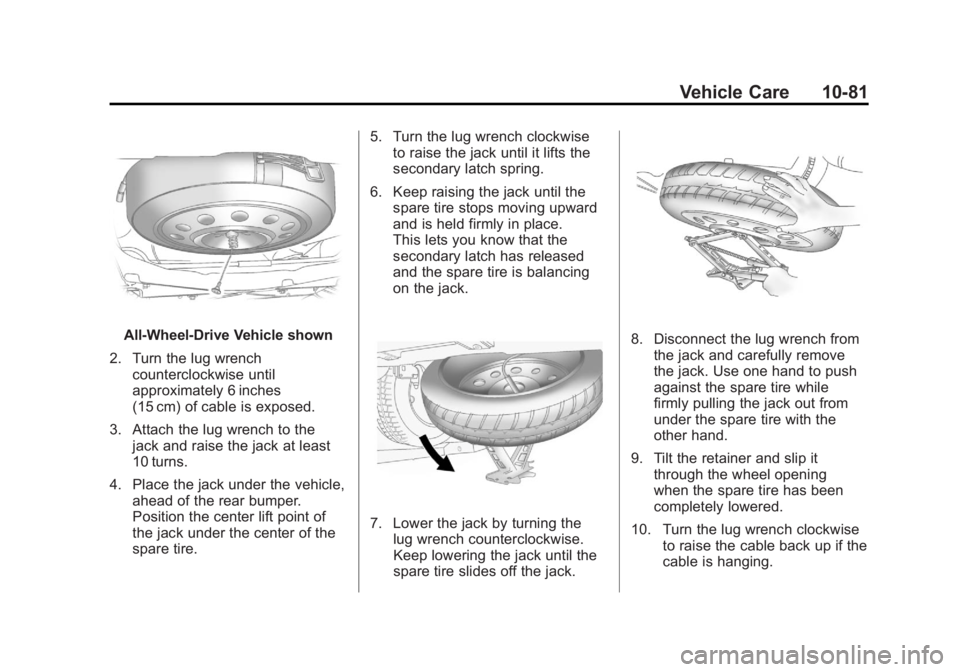
All‐Wheel‐Drive Vehicle shown
2. Turn the lug wrench counterclockwise until
approximately 6 inches
(15 cm) of cable is exposed.
3. Attach the lug wrench to the jack and raise the jack at least
10 turns.
4. Place the jack under the vehicle, ahead of the rear bumper.
Position the center lift point of
the jack under the center of the
spare tire. 5. Turn the lug wrench clockwise
to raise the jack until it lifts the
secondary latch spring.
6. Keep raising the jack until the spare tire stops moving upward
and is held firmly in place.
This lets you know that the
secondary latch has released
and the spare tire is balancing
on the jack.
7. Lower the jack by turning thelug wrench counterclockwise.
Keep lowering the jack until the
spare tire slides off the jack.
8. Disconnect the lug wrench from
the jack and carefully remove
the jack. Use one hand to push
against the spare tire while
firmly pulling the jack out from
under the spare tire with the
other hand.
9. Tilt the retainer and slip it through the wheel opening
when the spare tire has been
completely lowered.
10. Turn the lug wrench clockwise to raise the cable back up if the
cable is hanging.