instrument panel GMC ACADIA 2011 Owner's Manual
[x] Cancel search | Manufacturer: GMC, Model Year: 2011, Model line: ACADIA, Model: GMC ACADIA 2011Pages: 478, PDF Size: 5.52 MB
Page 1 of 478
Black plate (1,1)GMC Acadia/Acadia Denali Owner Manual - 2011
2011 GMC Acadia/Acadia Denali Owner ManualM
In Brief. . . . . . . . . . . . . . . . . . . . . . . . 1-1
Instrument Panel . . . . . . . . . . . . . . 1-2
Initial Drive Information . . . . . . . . 1-4
Vehicle Features . . . . . . . . . . . . . 1-16
Performance and Maintenance . . . . . . . . . . . . . . . . 1-20
Keys, Doors and Windows . . . 2-1
Keys and Locks . . . . . . . . . . . . . . . 2-2
Doors . . . . . . . . . . . . . . . . . . . . . . . . 2-10
Vehicle Security . . . . . . . . . . . . . . 2-13
Exterior Mirrors . . . . . . . . . . . . . . . 2-16
Interior Mirrors . . . . . . . . . . . . . . . . 2-19
Windows . . . . . . . . . . . . . . . . . . . . . 2-20
Roof . . . . . . . . . . . . . . . . . . . . . . . . . . 2-22
Seats and Restraints . . . . . . . . . 3-1
Head Restraints . . . . . . . . . . . . . . . 3-2
Front Seats . . . . . . . . . . . . . . . . . . . . 3-3
Rear Seats . . . . . . . . . . . . . . . . . . . 3-10
Safety Belts . . . . . . . . . . . . . . . . . . 3-16
Airbag System . . . . . . . . . . . . . . . . 3-33
Child Restraints . . . . . . . . . . . . . . 3-48 Storage
. . . . . . . . . . . . . . . . . . . . . . . 4-1
Storage Compartments . . . . . . . . 4-1
Additional Storage Features . . . 4-3
Roof Rack System . . . . . . . . . . . . . 4-5
Instruments and Controls . . . . 5-1
Controls . . . . . . . . . . . . . . . . . . . . . . . 5-2
Warning Lights, Gauges, and
Indicators . . . . . . . . . . . . . . . . . . . 5-11
Information Displays . . . . . . . . . . 5-25
Vehicle Messages . . . . . . . . . . . . 5-37
Vehicle Personalization . . . . . . . 5-47
Universal Remote System . . . . 5-55
Lighting . . . . . . . . . . . . . . . . . . . . . . . 6-1
Exterior Lighting . . . . . . . . . . . . . . . 6-1
Interior Lighting . . . . . . . . . . . . . . . . 6-5
Lighting Features . . . . . . . . . . . . . . 6-6
Infotainment System . . . . . . . . . 7-1
Introduction . . . . . . . . . . . . . . . . . . . . 7-1
Radio . . . . . . . . . . . . . . . . . . . . . . . . . . 7-7
Audio Players . . . . . . . . . . . . . . . . 7-14
Rear Seat Infotainment . . . . . . . 7-39
Phone . . . . . . . . . . . . . . . . . . . . . . . . 7-50 Climate Controls
. . . . . . . . . . . . . 8-1
Climate Control Systems . . . . . . 8-1
Air Vents . . . . . . . . . . . . . . . . . . . . . 8-12
Maintenance . . . . . . . . . . . . . . . . . 8-13
Driving and Operating . . . . . . . . 9-1
Driving Information . . . . . . . . . . . . . 9-2
Starting and Operating . . . . . . . 9-17
Engine Exhaust . . . . . . . . . . . . . . 9-24
Automatic Transmission . . . . . . 9-25
Drive Systems . . . . . . . . . . . . . . . . 9-28
Brakes . . . . . . . . . . . . . . . . . . . . . . . 9-29
Ride Control Systems . . . . . . . . 9-31
Cruise Control . . . . . . . . . . . . . . . . 9-33
Object Detection Systems . . . . 9-35
Fuel . . . . . . . . . . . . . . . . . . . . . . . . . . 9-42
Towing . . . . . . . . . . . . . . . . . . . . . . . 9-46
Conversions and Add-Ons . . . 9-56
Vehicle Care . . . . . . . . . . . . . . . . . 10-1
General Information . . . . . . . . . . 10-2
Vehicle Checks . . . . . . . . . . . . . . . 10-4
Headlamp Aiming . . . . . . . . . . . 10-30
Bulb Replacement . . . . . . . . . . 10-30
Electrical System . . . . . . . . . . . . 10-31
Page 7 of 478
Black plate (1,1)GMC Acadia/Acadia Denali Owner Manual - 2011
In Brief 1-1
In Brief
Instrument Panel
Instrument Panel . . . . . . . . . . . . . . 1-2
Initial Drive Information
Initial Drive Information . . . . . . . . 1-4
Remote Keyless Entry (RKE)System . . . . . . . . . . . . . . . . . . . . . . 1-4
Remote Vehicle Start . . . . . . . . . 1-5
Door Locks . . . . . . . . . . . . . . . . . . . 1-5
Liftgate . . . . . . . . . . . . . . . . . . . . . . . . 1-5
Windows . . . . . . . . . . . . . . . . . . . . . . 1-6
Seat Adjustment . . . . . . . . . . . . . . 1-6
Memory Features . . . . . . . . . . . . . 1-7
Second Row Seats . . . . . . . . . . . 1-8
Third Row Seats . . . . . . . . . . . . . . 1-9
Heated and Ventilated Seats . . . . . . . . . . . . . . . . . . . . . . . . 1-9 Head Restraint Adjustment . . . . 1-9
Safety Belts . . . . . . . . . . . . . . . . . . 1-10
Sensing System for
Passenger Airbag . . . . . . . . . . 1-10
Mirror Adjustment . . . . . . . . . . . . 1-10
Steering Wheel
Adjustment . . . . . . . . . . . . . . . . . 1-11
Interior Lighting . . . . . . . . . . . . . . 1-12
Exterior Lighting . . . . . . . . . . . . . 1-13
Windshield Wiper/Washer . . . . 1-13
Climate Controls . . . . . . . . . . . . . 1-14
Transmission . . . . . . . . . . . . . . . . 1-15
Vehicle Features
Radio(s) . . . . . . . . . . . . . . . . . . . . . 1-16
Satellite Radio . . . . . . . . . . . . . . . 1-17
Portable Audio Devices . . . . . . 1-18
Bluetooth
®. . . . . . . . . . . . . . . . . . . 1-18
Steering Wheel Controls . . . . . 1-18 Cruise Control . . . . . . . . . . . . . . . 1-19
Navigation System . . . . . . . . . . . 1-19
Storage Compartments . . . . . . 1-19
Power Outlets . . . . . . . . . . . . . . . 1-20
Sunroof . . . . . . . . . . . . . . . . . . . . . . 1-20
Performance and Maintenance
StabiliTrak®System . . . . . . . . . 1-20
Tire Pressure Monitor . . . . . . . . 1-21
Tire Sealant and Compressor Kit . . . . . . . . . . . . . 1-21
Engine Oil Life System . . . . . . 1-21
Driving for Better Fuel Economy . . . . . . . . . . . . . . . . . . . 1-22
Roadside Assistance Program . . . . . . . . . . . . . . . . . . . . 1-22
OnStar
®. . . . . . . . . . . . . . . . . . . . . 1-23
Page 8 of 478
Black plate (2,1)GMC Acadia/Acadia Denali Owner Manual - 2011
1-2 In Brief
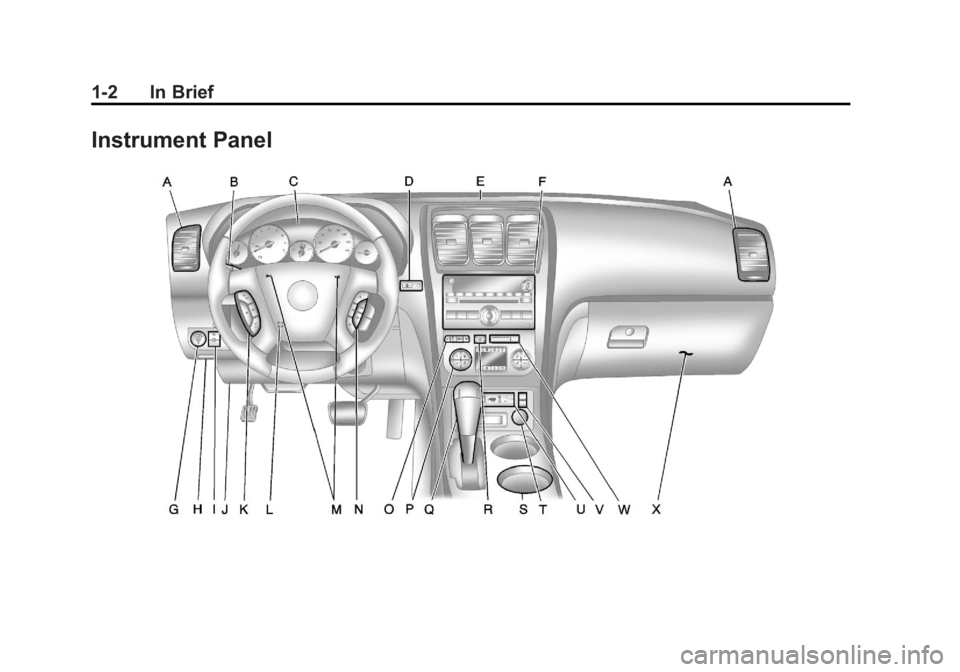
Instrument Panel
Page 9 of 478
Black plate (3,1)GMC Acadia/Acadia Denali Owner Manual - 2011
In Brief 1-3
A.Air Vents on page 8‑12.
B. Windshield Wiper/Washer on
page 5‑5.
C. Instrument Cluster on
page 5‑12.
D. Head-Up Display (HUD) on
page 5‑33 (If Equipped).
E. Instrument Panel Storage on
page 4‑1.
USB Port (Inside IP Storage).
See Auxiliary Devices on
page 7‑37.
F. Infotainment on page 7‑1.
Navigation/Radio System
(If Equipped). See Navigation
System manual.
G. Exterior Lamp Controls on
page 6‑1.
H. Hood Release. See Hood on
page 10‑5.
I. Instrument Panel Illumination
Control on page 6‑5. J. Data Link Connector (DLC)
(Out of View). See Malfunction
Indicator Lamp on page 5‑18.
K. Cruise Control on page 9‑33.
L. Steering Wheel Adjustment on
page 5‑2.
M. Horn on page 5‑4.
N. Steering Wheel Controls on
page 5‑2.
O. Driver Information Center (DIC) Buttons (If Equipped).
See Driver Information Center
(DIC) (With DIC Buttons) on
page 5‑25 orDriver Information
Center (DIC) (Without DIC
Buttons) on page 5‑30.
P. Dual Automatic Climate Control
System on page 8‑4.
Q. Console Shift Lever (If Equipped). See “Console
Shift Lever” underShifting
Into Park on page 9‑21.
R. Hazard Warning Flashers on
page 6‑3. S.
Cupholders on page 4‑1.
T. Power Outlets on page 5‑9.
U. Rear Window Wiper/Washer on
page 5‑6.
Traction Control System
(TCS) Disable Button.
See StabiliTrak
®System on
page 9‑31.
Tow/Haul Button (If Equipped).
See Tow/Haul Mode on
page 9‑28.
Power Liftgate Button
(If Equipped). See Liftgate on
page 2‑10.
V. Heated and Ventilated
Front Seats on page 3‑9
(If Equipped).
W. Passenger Airbag Status
Indicator on page 5‑16
(If Equipped).
X. Glove Box on page 4‑1.
Page 16 of 478
Black plate (10,1)GMC Acadia/Acadia Denali Owner Manual - 2011
1-10 In Brief
Safety Belts
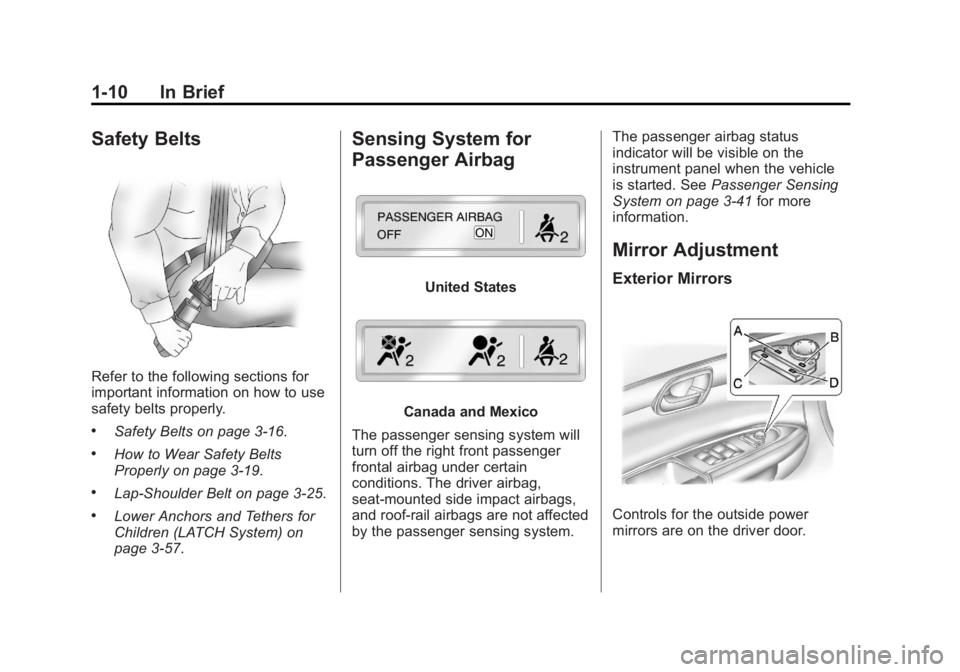
Refer to the following sections for
important information on how to use
safety belts properly.
.Safety Belts on page 3‑16.
.How to Wear Safety Belts
Properly on page 3‑19.
.Lap-Shoulder Belt on page 3‑25.
.Lower Anchors and Tethers for
Children (LATCH System) on
page 3‑57.
Sensing System for
Passenger Airbag
United States
Canada and Mexico
The passenger sensing system will
turn off the right front passenger
frontal airbag under certain
conditions. The driver airbag,
seat‐mounted side impact airbags,
and roof‐rail airbags are not affected
by the passenger sensing system. The passenger airbag status
indicator will be visible on the
instrument panel when the vehicle
is started. See
Passenger Sensing
System on page 3‑41 for more
information.
Mirror Adjustment
Exterior Mirrors
Controls for the outside power
mirrors are on the driver door.
Page 18 of 478
Black plate (12,1)GMC Acadia/Acadia Denali Owner Manual - 2011
1-12 In Brief
3. Pull or push the steering wheelcloser or away from you.
4. Push the lever (A) up to lock the steering wheel in place.
Do not adjust the steering wheel
while driving.
Interior Lighting
Dome Lamps
The dome lamps are located in the
overhead console and above the
rear seat passengers.
The dome lamps come on when a
door is opened, unless the dome
lamp override button is pressed in.
To manually turn them on, turn the
instrument panel brightness control
clockwise to the farthest position. Dome Lamp Override
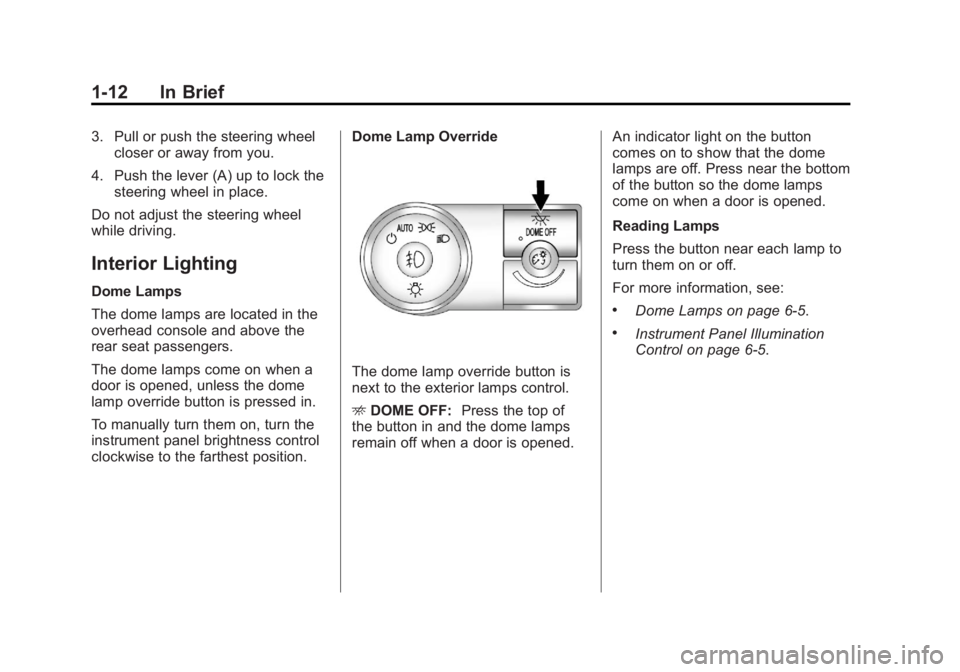
The dome lamp override button is
next to the exterior lamps control.
E
DOME OFF: Press the top of
the button in and the dome lamps
remain off when a door is opened. An indicator light on the button
comes on to show that the dome
lamps are off. Press near the bottom
of the button so the dome lamps
come on when a door is opened.
Reading Lamps
Press the button near each lamp to
turn them on or off.
For more information, see:
.Dome Lamps on page 6‑5.
.Instrument Panel Illumination
Control on page 6‑5.
Page 19 of 478
Black plate (13,1)GMC Acadia/Acadia Denali Owner Manual - 2011
In Brief 1-13
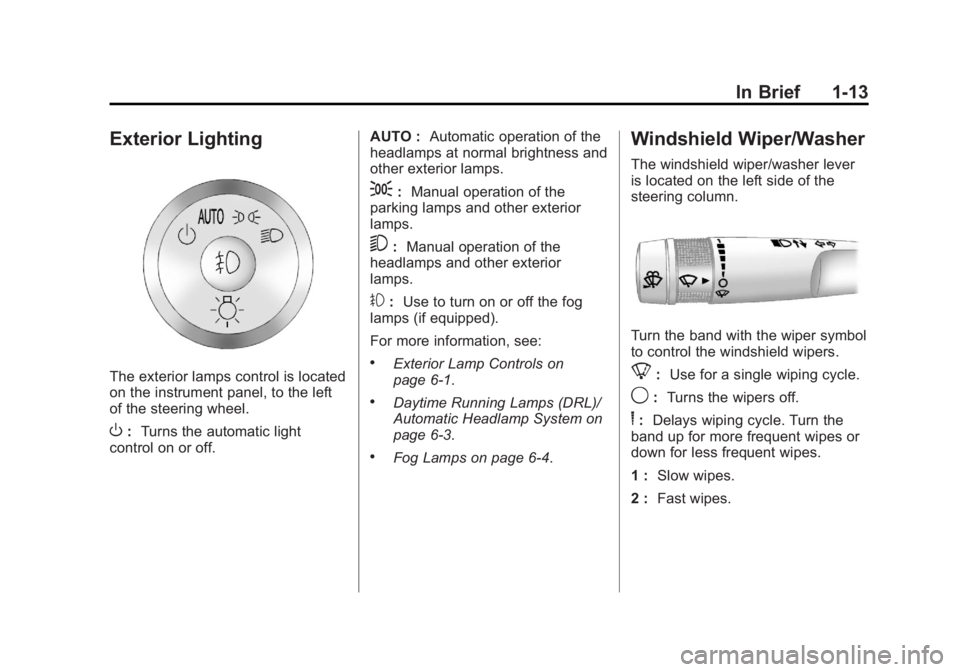
Exterior Lighting
The exterior lamps control is located
on the instrument panel, to the left
of the steering wheel.
O:Turns the automatic light
control on or off. AUTO :
Automatic operation of the
headlamps at normal brightness and
other exterior lamps.
;: Manual operation of the
parking lamps and other exterior
lamps.
5: Manual operation of the
headlamps and other exterior
lamps.
#: Use to turn on or off the fog
lamps (if equipped).
For more information, see:
.Exterior Lamp Controls on
page 6‑1.
.Daytime Running Lamps (DRL)/
Automatic Headlamp System on
page 6‑3.
.Fog Lamps on page 6‑4.
Windshield Wiper/Washer
The windshield wiper/washer lever
is located on the left side of the
steering column.
Turn the band with the wiper symbol
to control the windshield wipers.
8: Use for a single wiping cycle.
9:Turns the wipers off.
6:Delays wiping cycle. Turn the
band up for more frequent wipes or
down for less frequent wipes.
1 : Slow wipes.
2 : Fast wipes.
Page 20 of 478
Black plate (14,1)GMC Acadia/Acadia Denali Owner Manual - 2011
1-14 In Brief
Windshield Washer
J:Press the button at the end
of the turn signal/lane change
lever to spray washer fluid on
the windshield.
Rear Window Wiper/Washer
The rear wiper and rear wash button
is located on the instrument panel
below the climate control system.
Z (Rear Wiper): Press to turn the
rear wiper on and off. The wiper
speed cannot be changed.
Y (Wash): Press to spray
washer fluid on the rear window.
The window wiper will also
come on.
See Windshield Wiper/Washer on
page 5‑5 andRear Window Wiper/
Washer on page 5‑6.
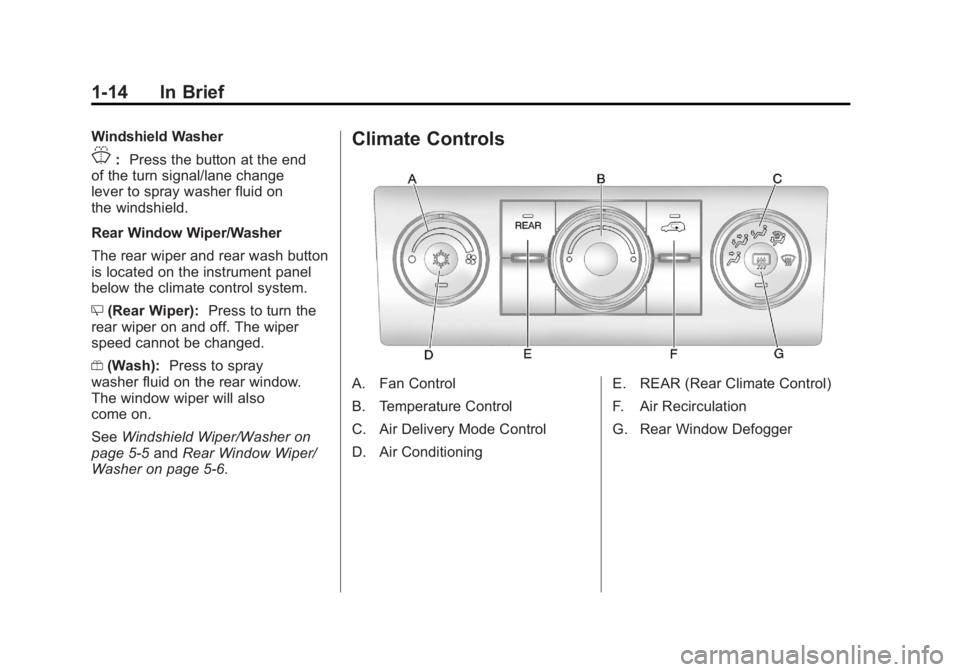
Climate Controls
A. Fan Control
B. Temperature Control
C. Air Delivery Mode Control
D. Air Conditioning E. REAR (Rear Climate Control)
F. Air Recirculation
G. Rear Window Defogger
Page 21 of 478
Black plate (15,1)GMC Acadia/Acadia Denali Owner Manual - 2011
In Brief 1-15
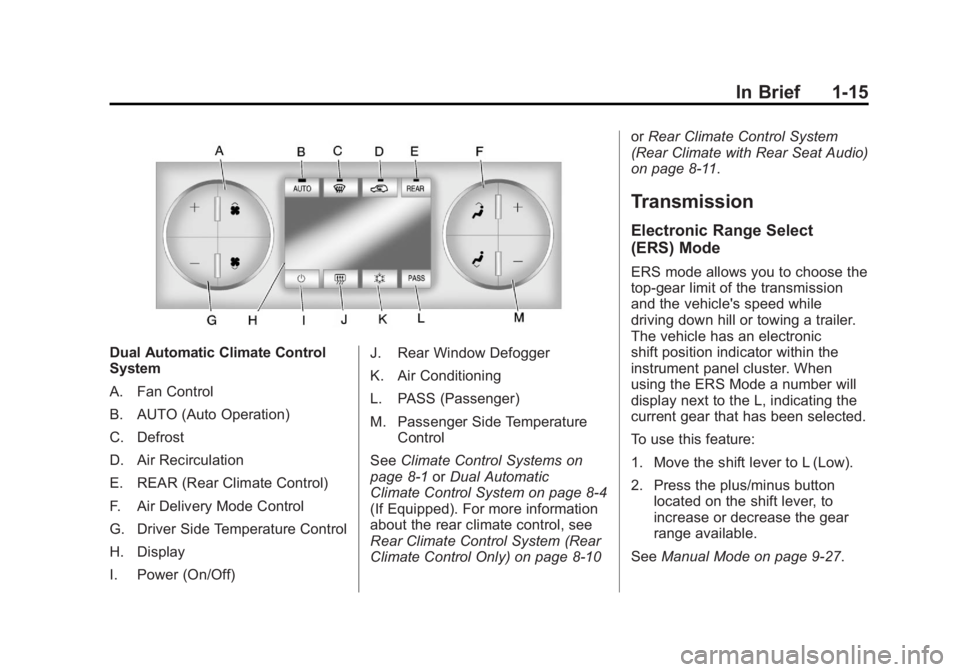
Dual Automatic Climate Control
System
A. Fan Control
B. AUTO (Auto Operation)
C. Defrost
D. Air Recirculation
E. REAR (Rear Climate Control)
F. Air Delivery Mode Control
G. Driver Side Temperature Control
H. Display
I. Power (On/Off)J. Rear Window Defogger
K. Air Conditioning
L. PASS (Passenger)
M. Passenger Side Temperature
Control
See Climate Control Systems on
page 8‑1 orDual Automatic
Climate Control System on page 8‑4
(If Equipped). For more information
about the rear climate control, see
Rear Climate Control System (Rear
Climate Control Only) on page 8‑10 or
Rear Climate Control System
(Rear Climate with Rear Seat Audio)
on page 8‑11.
Transmission
Electronic Range Select
(ERS) Mode
ERS mode allows you to choose the
top-gear limit of the transmission
and the vehicle's speed while
driving down hill or towing a trailer.
The vehicle has an electronic
shift position indicator within the
instrument panel cluster. When
using the ERS Mode a number will
display next to the L, indicating the
current gear that has been selected.
To use this feature:
1. Move the shift lever to L (Low).
2. Press the plus/minus button located on the shift lever, to
increase or decrease the gear
range available.
See Manual Mode on page 9‑27.
Page 26 of 478
Black plate (20,1)GMC Acadia/Acadia Denali Owner Manual - 2011
1-20 In Brief
Power Outlets
The vehicle has three 12‐volt
accessory power outlets which
can be used to plug in electrical
equipment, such as a cell phone
or MP3 player.
The power outlets are located:
.On the instrument panel below
the climate controls.
.At the rear of the center floor
console.
.In the rear cargo area.
To use the outlets, remove the
cover.
See Power Outlets on page 5‑9.
Sunroof
The ignition must be in ON/RUN or
ACC/ACCESSORY to operate the
sunroof and power sunshade. See
Retained Accessory Power (RAP)
on page 9‑21.
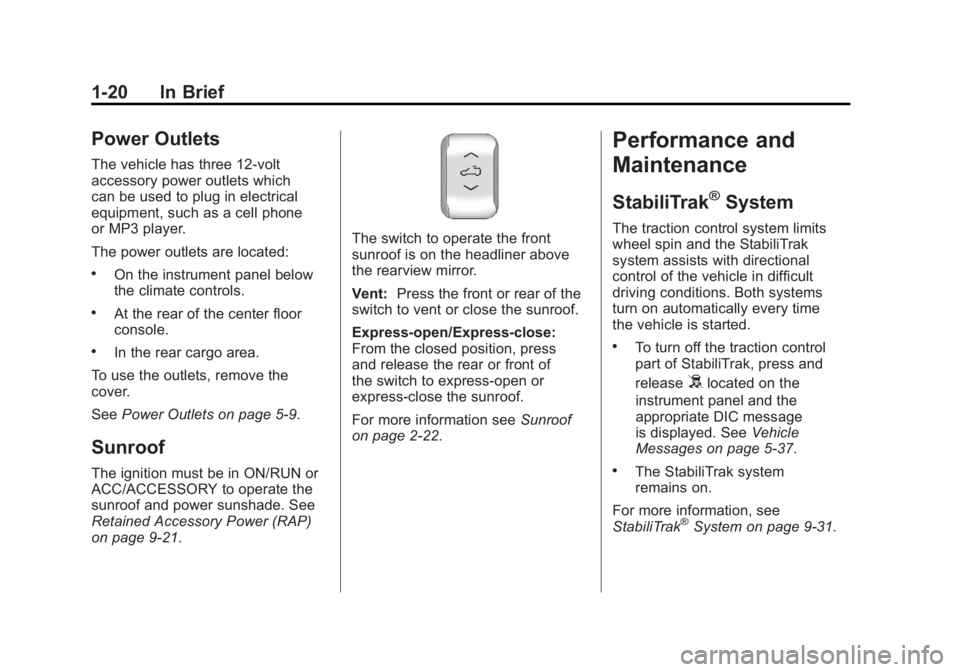
The switch to operate the front
sunroof is on the headliner above
the rearview mirror.
Vent: Press the front or rear of the
switch to vent or close the sunroof.
Express-open/Express-close:
From the closed position, press
and release the rear or front of
the switch to express-open or
express-close the sunroof.
For more information see Sunroof
on page 2‑22.
Performance and
Maintenance
StabiliTrak®System
The traction control system limits
wheel spin and the StabiliTrak
system assists with directional
control of the vehicle in difficult
driving conditions. Both systems
turn on automatically every time
the vehicle is started.
.To turn off the traction control
part of StabiliTrak, press and
release
5located on the
instrument panel and the
appropriate DIC message
is displayed. See Vehicle
Messages on page 5‑37.
.The StabiliTrak system
remains on.
For more information, see
StabiliTrak
®System on page 9‑31.