change wheel GMC ACADIA 2012 User Guide
[x] Cancel search | Manufacturer: GMC, Model Year: 2012, Model line: ACADIA, Model: GMC ACADIA 2012Pages: 468, PDF Size: 5.57 MB
Page 290 of 468
Black plate (32,1)GMC Acadia/Acadia Denali Owner Manual - 2012
9-32 Driving and Operating
Cruise Control
With cruise control, a speed of
about 40 km/h (25 mph) or more can
be maintained without keeping your
foot on the accelerator. Cruise
control does not work at speeds
below about 40 km/h (25 mph).
When the brakes are applied, the
cruise control is disengaged.
{WARNING
Cruise control can be dangerous
where you cannot drive safely at
a steady speed. So, do not use
the cruise control on winding
roads or in heavy traffic.
Cruise control can be dangerous
on slippery roads. On such roads,
fast changes in tire traction can
cause excessive wheel slip, and
you could lose control. Do not use
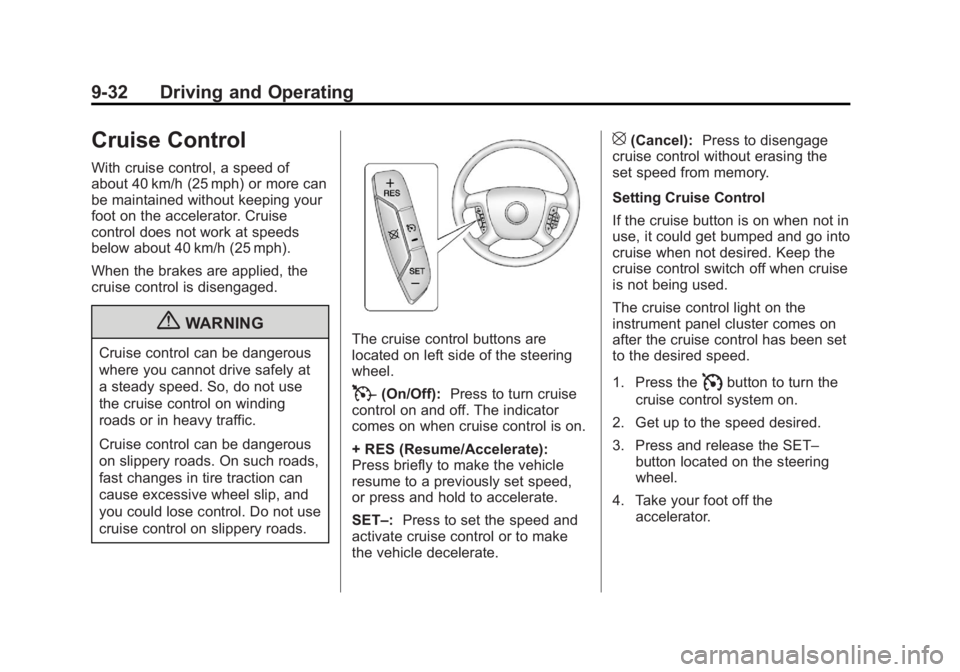
cruise control on slippery roads.The cruise control buttons are
located on left side of the steering
wheel.
T(On/Off):Press to turn cruise
control on and off. The indicator
comes on when cruise control is on.
+ RES (Resume/Accelerate):
Press briefly to make the vehicle
resume to a previously set speed,
or press and hold to accelerate.
SET–: Press to set the speed and
activate cruise control or to make
the vehicle decelerate.
[(Cancel): Press to disengage
cruise control without erasing the
set speed from memory.
Setting Cruise Control
If the cruise button is on when not in
use, it could get bumped and go into
cruise when not desired. Keep the
cruise control switch off when cruise
is not being used.
The cruise control light on the
instrument panel cluster comes on
after the cruise control has been set
to the desired speed.
1. Press the
Ibutton to turn the
cruise control system on.
2. Get up to the speed desired.
3. Press and release the SET– button located on the steering
wheel.
4. Take your foot off the accelerator.
Page 303 of 468
Black plate (45,1)GMC Acadia/Acadia Denali Owner Manual - 2012
Driving and Operating 9-45
For information on towing a disabled
vehicle, seeTowing the Vehicle on
page 10‑82. For information on
towing the vehicle behind another
vehicle such as a motor home, see
Recreational Vehicle Towing on
page 10‑82.
Driving Characteristics
and Towing Tips
{WARNING
The driver can lose control when
pulling a trailer if the correct
equipment is not used or the
vehicle is not driven properly.
(Continued)
WARNING (Continued)
For example, if the trailer is too
heavy, the brakes may not work
well—or even at all. The driver
and passengers could be
seriously injured. The vehicle may
also be damaged; the resulting
repairs would not be covered by
the vehicle warranty. Pull a trailer
only if all the steps in this section
have been followed. Ask your
dealer for advice and information
about towing a trailer with the
vehicle.
The vehicle can tow a trailer
when equipped with the proper
trailer towing equipment. For trailering capacity, see
Trailer
Towing on page 9‑49. Trailering
changes handling, acceleration,
braking, durability and fuel
economy. With the added weight,
the engine, transmission, wheel
assemblies and tires are forced to
work harder and under greater
loads. The trailer also adds wind
resistance, increasing the pulling
requirements. For safe trailering,
correctly use the proper trailering
equipment.
The following information has
important trailering tips and rules
for your safety and that of your
passengers. Read this section
carefully before pulling a trailer.
Page 335 of 468
Black plate (23,1)GMC Acadia/Acadia Denali Owner Manual - 2012
Vehicle Care 10-23
{WARNING
The brake wear warning sound
means that soon the brakes will
not work well. That could lead to
a crash. When the brake wear
warning sound is heard, have the
vehicle serviced.
Notice: Continuing to drive with
worn-out brake pads could result
in costly brake repair.
Some driving conditions or climates
can cause a brake squeal when the
brakes are first applied or lightly
applied. This does not mean
something is wrong with the brakes.
Properly torqued wheel nuts are
necessary to help prevent brake
pulsation. When tires are rotated,
inspect brake pads for wear and evenly tighten wheel nuts in the
proper sequence to torque
specifications in
Capacities and
Specifications on page 12‑2.
Brake linings should always be
replaced as complete axle sets.
Brake Pedal Travel
See your dealer if the brake pedal
does not return to normal height,
or if there is a rapid increase in
pedal travel. This could be a sign
that brake service might be
required.
Brake Adjustment
Every time the brakes are applied,
with or without the vehicle moving,
the brakes adjust for wear.
Replacing Brake System Parts
The braking system on a vehicle is
complex. Its many parts have to be
of top quality and work well together
if the vehicle is to have really good
braking. The vehicle was designed
and tested with top-quality brake
parts. When parts of the braking
system are replaced, be sure to get
new, approved replacement parts.
If this is not done, the brakes might
not work properly. For example,
installing disc brake pads that are
wrong for the vehicle, can change
the balance between the front
and rear brakes— for the worse.
The braking performance expected
can change in many other ways if
the wrong replacement brake parts
are installed.
Page 363 of 468
Black plate (51,1)GMC Acadia/Acadia Denali Owner Manual - 2012
Vehicle Care 10-51
SeeTire Pressure on
page 10‑44 andVehicle Load
Limits on page 9‑10.
Reset the Tire Pressure Monitor
System. See Tire Pressure
Monitor Operation on
page 10‑46.
Check that all wheel nuts are
properly tightened. See “Wheel
Nut Torque” underCapacities
and Specifications on
page 12‑2.
{WARNING
Rust or dirt on a wheel, or on the
parts to which it is fastened, can
make wheel nuts become loose
after time. The wheel could come
off and cause an accident. When
changing a wheel, remove any
rust or dirt from places where
the wheel attaches to the vehicle.
(Continued)
WARNING (Continued)
In an emergency, a cloth or a
paper towel can be used;
however, use a scraper or wire
brush later to remove all rust
or dirt.
Lightly coat the center of the
wheel hub with wheel bearing
grease after a wheel change or
tire rotation to prevent corrosion
or rust build-up. Do not get
grease on the flat wheel
mounting surface or on the
wheel nuts or bolts.
Check that the spare tire, if the
vehicle has one, is stored
properly. Push, pull, and then try
to rotate or turn the tire. If it
moves, tighten the cable. See
Tire Changing on page 10‑68.
When It Is Time for
New Tires
Factors such as maintenance,
temperatures, driving speeds,
vehicle loading, and road conditions
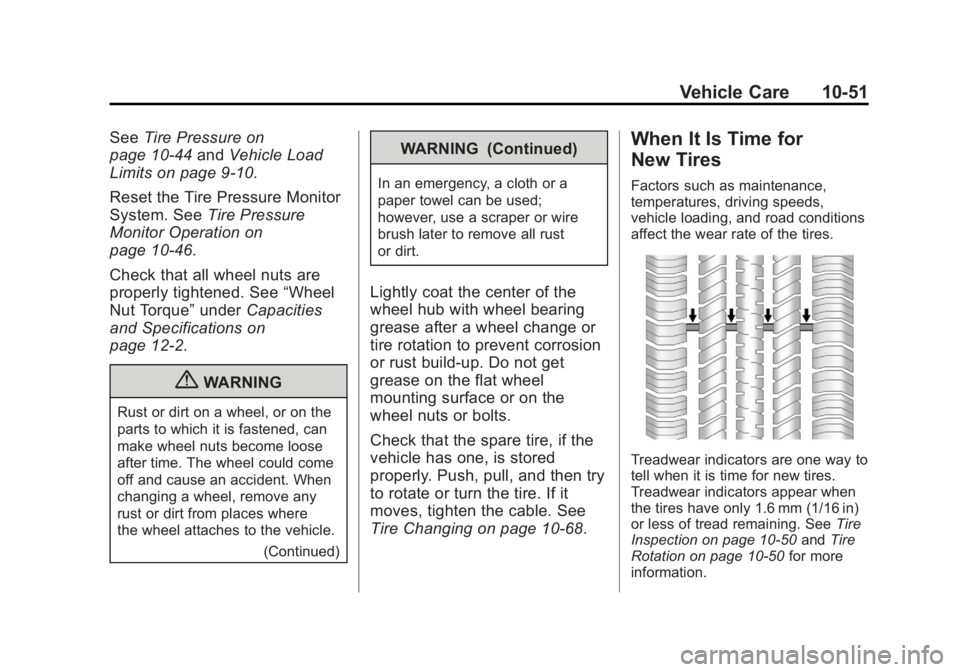
affect the wear rate of the tires.
Treadwear indicators are one way to
tell when it is time for new tires.
Treadwear indicators appear when
the tires have only 1.6 mm (1/16 in)
or less of tread remaining. See Tire
Inspection on page 10‑50 andTire
Rotation on page 10‑50 for more
information.
Page 371 of 468
Black plate (59,1)GMC Acadia/Acadia Denali Owner Manual - 2012
Vehicle Care 10-59
{WARNING
Changing a tire can be
dangerous. The vehicle can
slip off the jack and roll over or
fall causing injury or death.
Find a level place to change the
tire. To help prevent the vehicle
from moving:1. Set the parking brake firmly.
2. Put an automatic transmission in P (Park) or
a manual transmission in
1 (First) or R (Reverse).
3. Turn off the engine and do not restart while the vehicle
is raised.
(Continued)
WARNING (Continued)
4. Do not allow passengers toremain in the vehicle.
5. Place wheel blocks on both sides of the tire at the
opposite corner of the tire
being changed.
This vehicle may come with a jack
and spare tire or a tire sealant and
compressor kit. To use the jacking
equipment to change a spare tire
safely, follow the instructions below.
Then see Tire Changing on
page 10‑68. To use the tire sealant
and compressor kit, see Tire
Sealant and Compressor Kit on
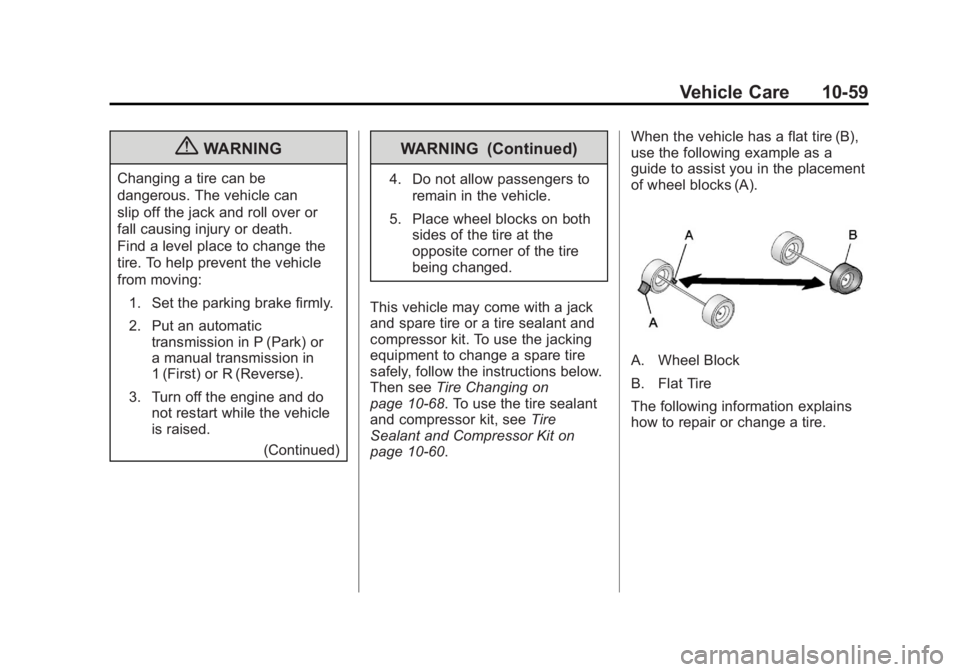
page 10‑60. When the vehicle has a flat tire (B),
use the following example as a
guide to assist you in the placement
of wheel blocks (A).
A. Wheel Block
B. Flat Tire
The following information explains
how to repair or change a tire.
Page 434 of 468
Black plate (8,1)GMC Acadia/Acadia Denali Owner Manual - 2012
13-8 Customer Information
GM Mobility
Reimbursement Program
(U.S. and Canada)
This program is available to
qualified applicants for cost
reimbursement of eligible
aftermarket adaptive equipment
required for the vehicle, such as
hand controls or a wheelchair/
scooter lift for the vehicle.
For more information on the limited
offer, visit www.gmmobility.com or
call the GM Mobility Assistance
Center at 1-800-323-9935.
Text Telephone (TTY) users,
call 1-800-833-9935.
General Motors of Canada
also has a Mobility Program.
Call 1-800-GM-DRIVE (463-7483)
for details. TTY users call
1-800-263-3830.
Roadside Assistance
Program (U.S. and
Canada)
For U.S.‐purchased vehicles, call
1‐888‐881‐3302; (Text Telephone
(TTY): 1‐888‐889‐2438).
For Canadian‐purchased vehicles,
call1-800-268-6800.
Service is available 24 hours a day,
365 days a year.
Calling for Assistance
When calling Roadside Assistance,
have the following information
ready:
.Your name, home address, and
home telephone number
.Telephone number of your
location
.Location of the vehicle
.Model, year, color, and license
plate number of the vehicle
.Odometer reading, Vehicle
Identification Number (VIN), and
delivery date of the vehicle
.Description of the problem
Coverage
Services are provided up to
5 years/160 000 km (100,000 mi),
whichever comes first.
In the U.S., anyone driving the
vehicle is covered. In Canada, a
person driving the vehicle without
permission from the owner is not
covered.
Roadside Assistance is not a part of
the New Vehicle Limited Warranty.
GMC and General Motors of
Canada Limited reserve the right to
make any changes or discontinue
the Roadside Assistance program at
any time without notification.
Page 466 of 468
Black plate (10,1)GMC Acadia/Acadia Denali Owner Manual - 2012
i-10 INDEX
S
Safety Belts . . . . . . . . . . . . . . . . . . . 3-15Care . . . . . . . . . . . . . . . . . . . . . . . . . . 3-23
Extender . . . . . . . . . . . . . . . . . . . . . . 3-22
How to Wear Safety BeltsProperly . . . . . . . . . . . . . . . . . . . . . 3-16
Lap-Shoulder Belt . . . . . . . . . . . . 3-17
Reminders . . . . . . . . . . . . . . . . . . . . 5-15
Replacing after a Crash . . . . . . 3-23
Use During Pregnancy . . . . . . . . 3-22
Safety Defects Reporting
Canadian Government . . . . . . 13-20
General Motors . . . . . . . . . . . . . 13-20
U.S. Government . . . . . . . . . . . 13-19
Safety Locks . . . . . . . . . . . . . . . . . . . . 2-9
Safety System Check . . . . . . . . . . 3-23
Satellite Radio . . . . . . . . . . . . . . . . . . 7-8
Scheduling Appointments . . . . . 13-14
Sealant Kit, Tire . . . . . . . . . . . . . . 10-60
Seats Adjustment, Front . . . . . . . . . . . . . . 3-3
Head Restraints . . . . . . . . . . . . . . . 3-2
Heated and Ventilated Front . . . 3-9
Lumbar Adjustment, Front . . . . . 3-4
Memory . . . . . . . . . . . . . . . . . . . . . . . . 3-7
Power Adjustment, Front . . . . . . 3-4 Seats (cont'd)
Rear . . . . . . . . . . . . . . . . . . . . . . . . . . 3-10
Reclining Seatbacks . . . . . . . . . . . 3-5
Third Row Seat . . . . . . . . . . . . . . . 3-12
Securing Child Restraints . . . . . . . . . . . . . . 3-54, 3-56
Security Light . . . . . . . . . . . . . . . . . . . . . . . . . . 5-24
OnStar
®. . . . . . . . . . . . . . . . . . . . . . 14-2
Vehicle . . . . . . . . . . . . . . . . . . . . . . . 2-13
Service Accessories andModifications . . . . . . . . . . . . . . . . 10-3
Doing Your Own Work . . . . . . . . 10-4
Engine Soon Light . . . . . . . . . . . . 5-18
Maintenance Records . . . . . . .11-14
Maintenance, General Information . . . . . . . . . . . . . . . . . . 11-1
Parts Identification Label . . . . . 12-1
Publications Ordering Information . . . . . . . . . . . . . . . . 13-18
Scheduling Appointments . . . 13-14
Vehicle Messages . . . . . . . . . . . . 5-43
Servicing the Airbag . . . . . . . . . . . 3-35
Shift Lock Control Function Check, Automatic
Transmission . . . . . . . . . . . . . . . . 10-26 Shifting
Into Park . . . . . . . . . . . . . . . . . . . . . . 9-20
Out of Park . . . . . . . . . . . . . . . . . . . 9-21
Signals, Turn and Lane-Change . . . . . . . . . . . . . . . . . 6-4
Spare Tire Compact . . . . . . . . . . . . . . . . . . . . 10-77
Specifications and Capacities . . . . . . . . . . . . . . . . . . . . 12-2
Speedometer . . . . . . . . . . . . . . . . . . 5-13
StabiliTrak Indicator Light . . . . . . . . . . . . . . . . 5-22
System . . . . . . . . . . . . . . . . . . . . . . . 9-30
Start Assist, Hills . . . . . . . . . . . . . . 9-29
Start Vehicle, Remote . . . . . . . . . . 2-5
Starter Switch Check . . . . . . . . . 10-26
Starting the Engine . . . . . . . . . . . . 9-18
Steering . . . . . . . . . . . . . . . . . . . . . . . . 9-4 Fluid, Power . . . . . . . . . . . . . . . . 10-21
Wheel Adjustment . . . . . . . . . . . . . 5-2
Wheel Controls . . . . . . . . . . . . . . . . 5-2
Storage Areas Armrest . . . . . . . . . . . . . . . . . . . . . . . . 4-2
Cargo Cover . . . . . . . . . . . . . . . . . . . 4-4
Cargo Management System . . . 4-4
Center Console . . . . . . . . . . . . . . . . 4-2
Page 467 of 468
Black plate (11,1)GMC Acadia/Acadia Denali Owner Manual - 2012
INDEX i-11
Storage Areas (cont'd)Convenience Net . . . . . . . . . . . . . . 4-5
Floor Console . . . . . . . . . . . . . . . . . 4-3
Glove Box . . . . . . . . . . . . . . . . . . . . . 4-1
Instrument Panel . . . . . . . . . . . . . . 4-1
Roof Rack System . . . . . . . . . . . . . 4-5
Storing the Tire Sealant and Compressor Kit . . . . . . . . . 10-68
Stuck Vehicle . . . . . . . . . . . . . . . . . . 9-10
Sun Visors . . . . . . . . . . . . . . . . . . . . . 2-23
Sunroof . . . . . . . . . . . . . . . . . . . . . . . . 2-23
Symbols . . . . . . . . . . . . . . . . . . . . . . . . . . iv
System Infotainment . . . . . . . . . . . . . . . . . . . 7-1
Roof Rack . . . . . . . . . . . . . . . . . . . . . 4-5
T
Tachometer . . . . . . . . . . . . . . . . . . . . 5-13
Text Telephone (TTY) Users . . . 13-6
Theft-Deterrent Systems . . . . . . . 2-14
Immobilizer . . . . . . . . . . . . . . . . . . . 2-14
Third-Row Seats . . . . . . . . . . . . . . . 3-12
Time . . . . . . . . . . . . . . . . . . . . . . . . . . . . 5-8 Tires
Buying New Tires . . . . . . . . . . . 10-52
Chains . . . . . . . . . . . . . . . . . . . . . . 10-57
Changing . . . . . . . . . . . . . . . . . . . 10-68
Compact Spare . . . . . . . . . . . . . 10-77
Designations . . . . . . . . . . . . . . . 10-40
Different Size . . . . . . . . . . . . . . . 10-54
If a Tire Goes Flat . . . . . . . . . . 10-58
Inflation Monitor System . . . . 10-46
Inspection . . . . . . . . . . . . . . . . . . 10-50
Messages . . . . . . . . . . . . . . . . . . . . 5-43
Pressure Light . . . . . . . . . . . . . . . . 5-23
Pressure Monitor System . . . 10-45
Rotation . . . . . . . . . . . . . . . . . . . . 10-50
Sealant andCompressor Kit . . . . . . . . . . . 10-60
Sealant and Compressor Kit, Storing . . . . . . . . . . . . . . . . 10-68
Sidewall Labeling . . . . . . . . . . . 10-38
Terminology and Definitions . . . . . . . . . . . . . . . . . 10-40
Uniform Tire Quality Grading . . . . . . . . . . . . . . . . . . . 10-54 Tires (cont'd)
Wheel Alignment and Tire
Balance . . . . . . . . . . . . . . . . . . . 10-56
Wheel Replacement . . . . . . . . 10-56
When It Is Time for New
Tires . . . . . . . . . . . . . . . . . . . . . . 10-51
Tow/Haul Mode . . . . . . . . . . . . . . . . 9-26
Tow/Haul Mode Light . . . . . . . . . . 5-22
Towing Driving Characteristics . . . . . . . . 9-45
Equipment . . . . . . . . . . . . . . . . . . . . 9-51
General Information . . . . . . . . . . 9-44
Recreational Vehicle . . . . . . . . 10-82
Trailer . . . . . . . . . . . . . . . . . . . . . . . . 9-49
Vehicle . . . . . . . . . . . . . . . . . . . . . 10-82
Trailer Towing . . . . . . . . . . . . . . . . . . . . . . . . 9-49
Transmission
Automatic . . . . . . . . . . . . . . . . . . . . . 9-23
Fluid, Automatic . . . . . . . . . . . . 10-12
Messages . . . . . . . . . . . . . . . . . . . . 5-44
Transportation Program, Courtesy . . . . . . . . . . . . . . . . . . . . 13-14
Turn and Lane-Change Signals . . . . . . . . . . . . . . . . . . . . . . . . 6-4