ECO mode GMC ACADIA 2012 Owner's Guide
[x] Cancel search | Manufacturer: GMC, Model Year: 2012, Model line: ACADIA, Model: GMC ACADIA 2012Pages: 468, PDF Size: 5.57 MB
Page 245 of 468
Black plate (1,1)GMC Acadia/Acadia Denali Owner Manual - 2012
Climate Controls 8-1
Climate Controls
Climate Control Systems
Climate Control Systems . . . . . . 8-1
Dual Automatic ClimateControl System . . . . . . . . . . . . . . 8-4
Rear Climate Control System (Rear Climate
Control Only) . . . . . . . . . . . . . . . 8-10
Rear Climate Control System (Rear Climate with
Rear Seat Audio) . . . . . . . . . . . 8-11
Air Vents
Air Vents . . . . . . . . . . . . . . . . . . . . . 8-12
Maintenance
Passenger CompartmentAir Filter . . . . . . . . . . . . . . . . . . . . 8-13
Climate Control Systems
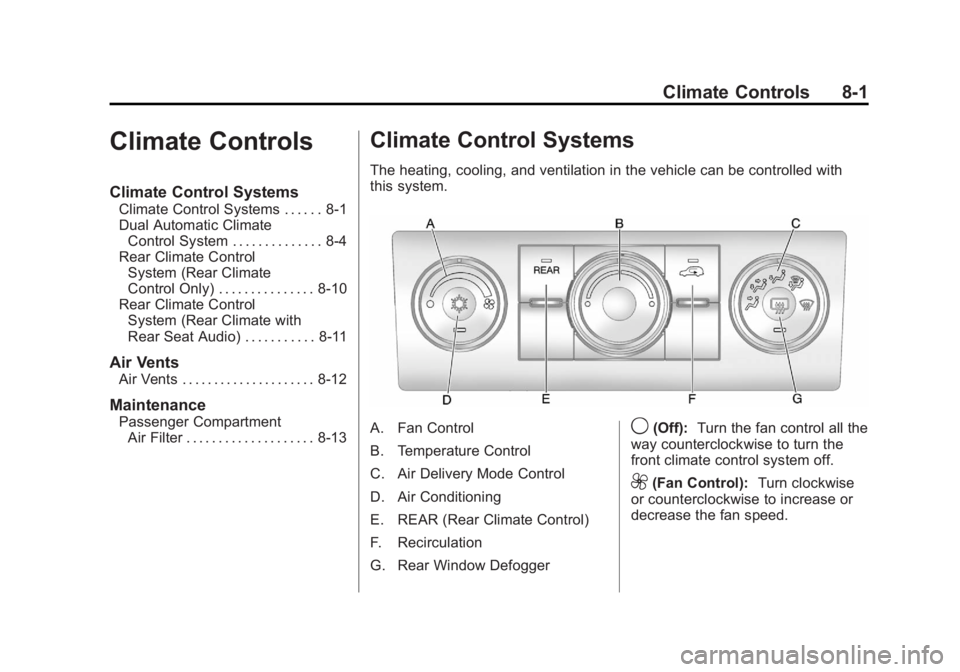
The heating, cooling, and ventilation in the vehicle can be controlled with
this system.
A. Fan Control
B. Temperature Control
C. Air Delivery Mode Control
D. Air Conditioning
E. REAR (Rear Climate Control)
F. Recirculation
G. Rear Window Defogger9(Off): Turn the fan control all the
way counterclockwise to turn the
front climate control system off.
9(Fan Control): Turn clockwise
or counterclockwise to increase or
decrease the fan speed.
Page 246 of 468
Black plate (2,1)GMC Acadia/Acadia Denali Owner Manual - 2012
8-2 Climate Controls
Temperature Control:Turn
clockwise or counterclockwise
to increase or decrease the
temperature of the air flowing
from the system.
Air Delivery Mode Control:
Turn clockwise or counterclockwise
to change the current airflow mode.
By positioning the right knob
between two modes, a combination
of those two modes is selected.
H(Vent): Air is directed to the
instrument panel outlets.
)(Bi-Level): Air is divided
between the instrument panel and
floor outlets. Some air is directed
toward the windshield and side
window outlets. Cooler air is
directed to the upper outlets and
warmer air to the floor outlets.
6(Floor): Air is directed to the
floor outlets, with some of the air
directed to the windshield, side
window, and second row floor outlets. In this mode, the system
automatically selects outside air.
Recirculation cannot be selected
while in floor mode.
-(Defog):
This clears the
windows of fog or moisture. Air is
directed to the windshield, floor
outlets, and side window vents.
When this mode is selected, the
system turns off recirculation and
runs the air conditioning unless the
outside temperature is less than
4°C (40°F). Recirculation cannot be
selected while in the defog mode.
Do not drive the vehicle until all the
windows are clear.
0(Defrost): This clears the
windshield of fog or frost more
quickly. Air is directed to the
windshield and side window vents,
with some to the floor vents. In this
mode, outside air is pulled inside
the vehicle. Recirculation cannot be
selected while in the defrost mode. The air conditioning system runs
automatically in this setting, unless
the outside temperature is less than
4°C (40°F). Do not drive the vehicle
until all windows are clear.
#(Air Conditioning):
Press to
turn the air conditioning system
on or off. An indicator light
comes on when A/C is on.
The air conditioning system does
not operate when the outside
temperature is below 4°C (40°F).
The indicator light flashes three
times and turns off when outside
conditions affect air conditioning
operation. This is normal.
For quicker cool down on hot days:
1. Open the windows to let hot air escape.
2. Select
Hmode.
3. Select
#.
4. Select the coolest temperature.
Page 247 of 468
Black plate (3,1)GMC Acadia/Acadia Denali Owner Manual - 2012
Climate Controls 8-3
5. Select the highest fan speed.
6. Close the windows after thehot air has escaped.
7. Once the vehicle's interior temperature is below the outside
temperature, select
@mode
for faster cooling.
Using recirculation for long periods
of time could cause the air inside
the vehicle to become too dry.
To prevent this from happening,
after the inside of the vehicle has
cooled, turn the recirculation
mode off.
The air conditioning system
removes moisture from the air, so
water might drip under the vehicle
while idling or after turning off the
engine. This is normal.
@(Recirculation): Press to turn
the recirculation mode on or off.
An indicator light comes on when
recirculation is on. When the engine
is turned off, the recirculation mode
automatically turns off and must be
re‐selected when the engine is
turned on again.
This mode recirculates and helps
to quickly cool the air inside the
vehicle. It can be used to prevent
outside air and odors from entering
the vehicle.
The recirculation mode cannot be
used with floor, defrost, or defogging
modes. If recirculation is selected in
these modes, the indicator flashes
three times and turns off. The air
conditioning also comes on when
this mode is activated unless the
outside air temperature is less than
4°C (40°F). While in recirculation
mode the windows can fog when
the weather is cold and damp. To clear the fog, select either the
defog or defrost mode and increase
the fan speed.
REAR (Rear Climate Control):
Press to turn the rear heating and
air conditioning on or off. See
Rear
Climate Control System (Rear
Climate Control Only) on page 8‑10
or Rear Climate Control System
(Rear Climate with Rear Seat Audio)
on page 8‑11.
Rear Window Defogger
The rear window defogger uses a
warming grid to remove fog from
the rear window.
1(Rear Window Defogger):
Press to turn the rear window
defogger on or off. The rear window
defogger stays on for about
10 minutes, before automatically
turning off. The defogger will
also turn off when the engine is
turned off.
Page 249 of 468
Black plate (5,1)GMC Acadia/Acadia Denali Owner Manual - 2012
Climate Controls 8-5
Display Function
Each time the temperature, mode,
or fan control buttons are pressed,
the climate control display shows
that function along with the inside
temperature setting. The outside
temperature is displayed on the
instrument panel cluster.
O(On/Off):Press to turn the
climate control system on or off.
While the system is off, outside air
still enters through the floor outlets,
but the air delivery mode can be
adjusted.
The climate control system will also
turn on if either the fan control,
defrost, AUTO, or air conditioning
buttons are pressed.
Automatic Operation
AUTO (Automatic): The system
automatically controls the inside
temperature, the air delivery, and
the fan speed. To use automatic mode:
1. Press the AUTO button.
When AUTO is selected, the
current temperature(s) selected
and AUTO is shown on the
display. The current air delivery
mode and fan speed also
appear for approximately
five seconds.
When AUTO is selected,
the air conditioning and air inlet
are automatically controlled.
The air conditioning runs when
the outside temperature is over
4°C (40°F). The system is
automatically set to outside air,
unless it is hot outside and
then the air inlet changes to
recirculation mode to help
quickly cool the vehicle.
The recirculation indicator light
will come on. 2. Set the temperature for the
driver and passenger.
To find a comfortable setting,
start with a 22°C (73°F)
temperature setting and allow
about 20 minutes for the
system to regulate. Use the
driver side or passenger side
temperature buttons to adjust
the temperature setting as
necessary. The system will
remain at the selected setting.
Choosing the warmest or coolest
temperatures does not cause
the vehicle to heat or cool more
quickly.
To avoid blowing cold air in
cold weather, the system delays
turning on the fan until warm air
is available. Press the fan
control to override this delay
and select the fan speed.
Page 251 of 468
Black plate (7,1)GMC Acadia/Acadia Denali Owner Manual - 2012
Climate Controls 8-7
6(Floor):Air is directed to the
floor outlets, with some of the air
directed to the windshield, side
window, and second row floor
outlets. In this mode, the system
uses outside air.
-(Defog): This mode clears the
windows of fog or moisture. Air is
directed to the windshield, floor
outlets, and side window vents.
When this mode is selected, the
system turns off recirculation and
runs the air conditioning compressor
unless the outside temperature is
less than 4°C (40°F). Do not drive
the vehicle until all the windows
are clear.
0(Defrost): Press to turn the
defrost on or off. This mode quickly
clears the windshield of fog or frost.
Air is directed to the windshield,
side window, and floor vents.
In this mode, outside air is
pulled inside the vehicle. The air conditioning system runs
automatically in this setting,
unless the outside temperature is
less than 4°C (40°F).
Do not drive the vehicle until all the
windows are clear.
While in defrost mode, if the PASS
button is pressed, the PASS button
indicator flashes three times to
show that the passenger climate
control system cannot be activated.
If the passenger temperature
buttons are adjusted while in
defrost mode, the driver
temperature indicator will change.
The passenger temperature will not
be displayed.
When returning to bi-level, vent,
or floor mode, the previous
temperature settings displays in
place of any change made while in
defrost mode.
Air Conditioning
#(Air Conditioning):
Press to
turn the air conditioning (A/C) on
and off. An indicator light comes on
when A/C is on.
The A/C does not work when the
outside temperature is below 4°C
(40°F). If
#is pressed the indicator
flashes three times and turns off to
show that the A/C mode is not
available. If the A/C is on and the
outside temperature drops below a
temperature which is too cool for
air conditioning to be effective, the
A/C indicator turns off to show that
the A/C mode has been canceled.
On hot days, open the windows
briefly to let hot inside air escape.
This helps reduce the time it takes
for the interior of the vehicle to
cool down.
Page 259 of 468
Black plate (1,1)GMC Acadia/Acadia Denali Owner Manual - 2012
Driving and Operating 9-1
Driving and
Operating
Driving Information
Distracted Driving . . . . . . . . . . . . . 9-2
Defensive Driving . . . . . . . . . . . . . 9-3
Drunk Driving . . . . . . . . . . . . . . . . . 9-3
Control of a Vehicle . . . . . . . . . . . 9-3
Braking . . . . . . . . . . . . . . . . . . . . . . . 9-3
Steering . . . . . . . . . . . . . . . . . . . . . . . 9-4
Off-Road Recovery . . . . . . . . . . . . 9-5
Loss of Control . . . . . . . . . . . . . . . . 9-5
Driving on Wet Roads . . . . . . . . . 9-6
Highway Hypnosis . . . . . . . . . . . . 9-7
Hill and Mountain Roads . . . . . . 9-7
Winter Driving . . . . . . . . . . . . . . . . . 9-8
If the Vehicle Is Stuck . . . . . . . . 9-10
Vehicle Load Limits . . . . . . . . . . 9-10
Starting and Operating
New Vehicle Break-In . . . . . . . . 9-15
Ignition Positions . . . . . . . . . . . . 9-16
Starting the Engine . . . . . . . . . . 9-18
Engine Heater . . . . . . . . . . . . . . . 9-19
Retained AccessoryPower (RAP) . . . . . . . . . . . . . . . 9-20 Shifting Into Park . . . . . . . . . . . . 9-20
Shifting out of Park . . . . . . . . . . 9-21
Parking over Things
That Burn . . . . . . . . . . . . . . . . . . 9-22
Engine Exhaust
Engine Exhaust . . . . . . . . . . . . . . 9-22
Running the Vehicle WhileParked . . . . . . . . . . . . . . . . . . . . . 9-23
Automatic Transmission
Automatic Transmission . . . . . 9-23
Manual Mode . . . . . . . . . . . . . . . . 9-25
Tow/Haul Mode . . . . . . . . . . . . . . 9-26
Drive Systems
All-Wheel Drive . . . . . . . . . . . . . . 9-27
Brakes
Antilock BrakeSystem (ABS) . . . . . . . . . . . . . . 9-27
Parking Brake . . . . . . . . . . . . . . . 9-28
Brake Assist . . . . . . . . . . . . . . . . . 9-29
Hill Start Assist (HSA) . . . . . . . 9-29
Ride Control Systems
StabiliTrak®System . . . . . . . . . 9-30
Cruise Control
Cruise Control . . . . . . . . . . . . . . . 9-32
Object Detection Systems
Ultrasonic Parking Assist . . . . 9-34
Rear Vision Camera (RVC) . . . . . . . . . . . . . 9-35
Fuel
Fuel . . . . . . . . . . . . . . . . . . . . . . . . . 9-40
Recommended Fuel . . . . . . . . . 9-40
Gasoline Specifications(U.S. and Canada Only) . . . . 9-40
California Fuel Requirements . . . . . . . . . . . . . . 9-40
Fuels in Foreign Countries . . . 9-41
Fuel Additives . . . . . . . . . . . . . . . 9-41
Filling the Tank . . . . . . . . . . . . . . 9-42
Filling a Portable Fuel Container . . . . . . . . . . . . . . . . . . . 9-44
Towing
General TowingInformation . . . . . . . . . . . . . . . . . 9-44
Driving Characteristics and Towing Tips . . . . . . . . . . . . . . . . 9-45
Trailer Towing . . . . . . . . . . . . . . . . 9-49
Towing Equipment . . . . . . . . . . . 9-51
Conversions and Add-Ons
Add-On Electrical Equipment . . . . . . . . . . . . . . . . . 9-53
Page 277 of 468
Black plate (19,1)GMC Acadia/Acadia Denali Owner Manual - 2012
Driving and Operating 9-19
If the vehicle starts briefly but
then stops again, repeat these
steps. This clears the extra
gasoline from the engine.
Do not race the engine
immediately after starting it.
Operate the engine and
transmission gently until the oil
warms up and lubricates all
moving parts.
Notice: The engine is designed to
work with the electronics in the
vehicle. If you add electrical parts
or accessories, you could change
the way the engine operates.
Before adding electrical
equipment, check with your
dealer. If you do not, the engine
might not perform properly.
Any resulting damage would
not be covered by the vehicle
warranty.Engine Heater
The engine coolant heater can
provide easier starting and better
fuel economy during engine
warm-up in cold weather conditions
at or below 0°F (−18°C). Vehicles
with an engine coolant heater
should be plugged in at least four
hours before starting. Some models
may have an internal thermostat in
the cord which will prevent engine
coolant heater operation at
temperatures above 0°F (−18°C).
To Use the Engine Coolant
Heater
1. Turn off the engine.
2. Open the hood and unwrap the electrical cord. The cord is
located on the driver side of the
engine compartment. It is routed
around the windshield washer
fluid reservoir.
3. Plug the cord into a normal, grounded 110-volt AC outlet.
{WARNING
Plugging the cord into an
ungrounded outlet could cause an
electrical shock. Also, the wrong
kind of extension cord could
overheat and cause a fire. You
could be seriously injured. Plug
the cord into a properly grounded
three-prong 110-volt AC outlet.
If the cord will not reach, use a
heavy-duty three-prong extension
cord rated for at least 15 amps.
4. Before starting the engine, be sure to unplug and store the
cord as it was before to keep it
away from moving engine parts.
If you do not, it could be
damaged.
The length of time the heater should
remain plugged in depends on
several factors. Ask a dealer in the
area where you will be parking the
vehicle for the best advice on this.
Page 283 of 468
Black plate (25,1)GMC Acadia/Acadia Denali Owner Manual - 2012
Driving and Operating 9-25
Notice:Shifting out of P (Park)
or N (Neutral) with the engine
running at high speed may
damage the transmission. The
repairs would not be covered by
the vehicle warranty. Be sure the
engine is not running at high
speed when shifting the vehicle.
D (Drive): This position is for
normal driving. It provides the best
fuel economy. If you need more
power for passing, and you are:
.Going less than 56 km/h
(35 mph), push the accelerator
pedal about halfway down.
.Going about 56 km/h (35 mph) or
more, push the accelerator all
the way down.
Notice: If the vehicle seems to
accelerate slowly or not shift
gears when you go faster, and
you continue to drive the vehicle
that way, you could damage the transmission. Have the vehicle
serviced right away. You can
drive in L (Low) when you are
driving less than 56 km/h (35 mph)
and D (Drive) for higher speeds
until then.
If the vehicle is stopped on a hill,
with your foot off the brake pedal,
the vehicle may roll. This is normal
and is due to the torque converter
designed to improve fuel economy
and performance. Use the brake to
hold the vehicle on a hill. Do not use
the accelerator pedal.
L (Low):
This position gives you
access to gear ranges. This
provides more engine braking but
lower fuel economy than D (Drive).
You can use it on very steep hills,
or in deep snow or mud.
Manual Mode
Electronic Range Select
(ERS) Mode
ERS mode allows you to choose
the top-gear limit of the transmission
and the vehicle's speed while
driving downhill or towing a trailer.
The vehicle has an electronic
shift position indicator within the
instrument panel cluster. When
using the ERS mode a number will
display next to the L, indicating the
current gear that has been selected.
To use this feature:
1. Move the shift lever to L (Low).
2. Press the plus/minus button located on the shift lever, to
increase or decrease the gear
range available.
Page 289 of 468
Black plate (31,1)GMC Acadia/Acadia Denali Owner Manual - 2012
Driving and Operating 9-31
system. See“Traction Control
Operation” following for more
information.
When the traction control system
has been turned off, system noises
may be heard and felt as a result of
the brake-traction control working.
It is recommended to leave the
system on for normal driving
conditions, but it may be necessary
to turn the system off if the vehicle
is stuck in sand, mud, ice, or snow,
and you want to “rock”the vehicle to
attempt to free it. It may also be
necessary to turn off the system
when driving in extreme off-road
conditions where high wheel spin is
required. See If the Vehicle Is Stuck
on page 9‑10.
Traction Control Operation
The traction control system is part
of the StabiliTrak system. Traction
control limits wheel spin by reducing
engine power to the wheels (engine
speed management) and by
applying the brakes as necessary. The traction control system is
enabled automatically when the
vehicle is started. It will activate and
the StabiliTrak light will flash if it
senses that any of the wheels are
spinning or beginning to lose
traction while driving. If traction
control is turned off, only the
brake-traction control portion of
traction control will work. The
engine speed management will be
disabled. In this mode, engine
power is not reduced automatically
and the driven wheels can spin
more freely. This can cause the
brake-traction control to activate
constantly.
Notice:
If the wheel(s) of one axle
is allowed to spin excessively
while the StabiliTrak
®, ABS, brake
warning lights, and any relevant
DIC messages are displayed, the
transfer case could be damaged.
The repairs would not be covered
by the vehicle warranty. Reduce
engine power and do not spin the wheel(s) excessively while
these lights and messages are
displayed.
The traction control system may
activate on dry or rough roads or
under conditions such as heavy
acceleration while turning or
abrupt upshifts/downshifts of the
transmission. When this happens,
a reduction in acceleration may be
noticed, or a noise or vibration may
be heard. This is normal.
If cruise control is being used when
the system activates, the StabiliTrak
light will flash and cruise control will
automatically disengage. Cruise
control may be reengaged when
road conditions allow. See
Cruise
Control on page 9‑32.
StabiliTrak may also turn off
automatically if it determines that a
problem exists with the system.
If the problem does not clear itself
after restarting the vehicle, see your
dealer for service.
Page 305 of 468
Black plate (47,1)GMC Acadia/Acadia Denali Owner Manual - 2012
Driving and Operating 9-47
.Improve control of vehicle speed
while requiring less throttle pedal
activity.
.Increase the charging system
voltage to assist in recharging a
battery installed in a trailer.
Press this button located on the
console to turn on and turn off the
Tow/Haul mode. SeeTow/Haul
Mode on page 9‑26.
The Tow/Haul light on the
instrument panel comes on to
indicate that Tow/Haul mode has
been selected.
Tow/Haul may be turned off by
pressing the button again, at which
time the indicator light on the
instrument panel will turn off.
The vehicle will automatically turn
off Tow/Haul every time it is started. Tow/Haul is designed to be most
effective when the vehicle and
trailer combined weight is at least
75 percent of the vehicle's Gross
Combined Weight Rating (GCWR).
See
Trailer Towing on page 9‑49.
Tow/Haul is most useful when
pulling a heavy trailer or a large or
heavy load under the following
driving conditions:
.Traveling through rolling terrain.
.Traveling in stop and go traffic.
.Traveling in busy parking lots
where improved low speed
control of the vehicle is desired.
Operating the vehicle in Tow/Haul
when lightly loaded or with no trailer
will not cause damage but there is
no benefit. Such a selection when
unloaded may result in unpleasant
engine and transmission driving
characteristics and reduced fuel
economy.
Following Distance
Stay at least twice as far behind the
vehicle ahead as you would when
driving the vehicle without a trailer.
This can help to avoid situations
that require heavy braking and
sudden turns.
Passing
More passing distance is needed
when towing a trailer. Because the
rig is longer, it is necessary to go
farther beyond the passed vehicle
before returning to the lane.
Backing Up
Hold the bottom of the steering
wheel with one hand. To move
the trailer to the left, move that
hand to the left. To move the trailer
to the right, move your hand to
the right. Always back up slowly
and, if possible, have someone
guide you.