flat tire GMC ACADIA 2012 Owner's Guide
[x] Cancel search | Manufacturer: GMC, Model Year: 2012, Model line: ACADIA, Model: GMC ACADIA 2012Pages: 468, PDF Size: 5.57 MB
Page 378 of 468
Black plate (66,1)GMC Acadia/Acadia Denali Owner Manual - 2012
10-66 Vehicle Care
If a tire goes flat, avoid further tire
and wheel damage by driving slowly
to a level place. Turn on the hazard
warning flashers. SeeHazard
Warning Flashers on page 6‑4.
See If a Tire Goes Flat on
page 10‑58 for other important
safety warnings.
1. Remove the tire sealant and compressor kit from its storage
location. See Storing the Tire
Sealant and Compressor Kit on
page 10‑68.
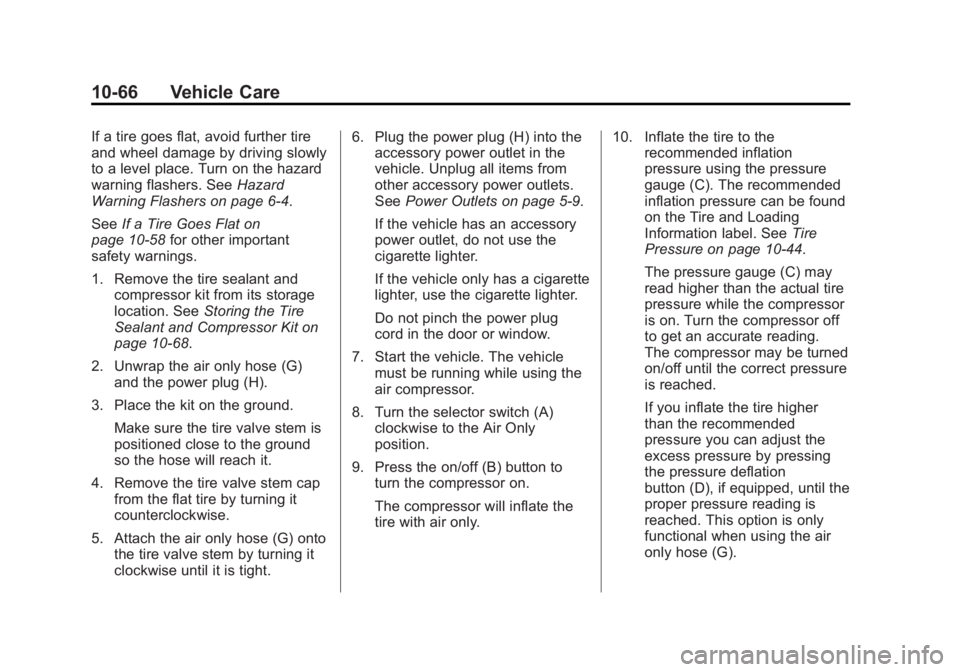
2. Unwrap the air only hose (G) and the power plug (H).
3. Place the kit on the ground. Make sure the tire valve stem is
positioned close to the ground
so the hose will reach it.
4. Remove the tire valve stem cap from the flat tire by turning it
counterclockwise.
5. Attach the air only hose (G) onto the tire valve stem by turning it
clockwise until it is tight. 6. Plug the power plug (H) into the
accessory power outlet in the
vehicle. Unplug all items from
other accessory power outlets.
See Power Outlets on page 5‑9.
If the vehicle has an accessory
power outlet, do not use the
cigarette lighter.
If the vehicle only has a cigarette
lighter, use the cigarette lighter.
Do not pinch the power plug
cord in the door or window.
7. Start the vehicle. The vehicle must be running while using the
air compressor.
8. Turn the selector switch (A) clockwise to the Air Only
position.
9. Press the on/off (B) button to turn the compressor on.
The compressor will inflate the
tire with air only. 10. Inflate the tire to the
recommended inflation
pressure using the pressure
gauge (C). The recommended
inflation pressure can be found
on the Tire and Loading
Information label. See Tire
Pressure on page 10‑44.
The pressure gauge (C) may
read higher than the actual tire
pressure while the compressor
is on. Turn the compressor off
to get an accurate reading.
The compressor may be turned
on/off until the correct pressure
is reached.
If you inflate the tire higher
than the recommended
pressure you can adjust the
excess pressure by pressing
the pressure deflation
button (D), if equipped, until the
proper pressure reading is
reached. This option is only
functional when using the air
only hose (G).
Page 379 of 468
Black plate (67,1)GMC Acadia/Acadia Denali Owner Manual - 2012
Vehicle Care 10-67
11. Press the on/off button (B) toturn the tire sealant and
compressor kit off.
Be careful while handling the
tire sealant and compressor kit
as it could be warm after
usage.
12. Unplug the power plug (H) from the accessory power outlet in
the vehicle.
13. Disconnect the air only hose (G) from the tire
valve stem by turning it
counterclockwise, and replace
the tire valve stem cap.
14. Replace the air only hose (G) and the power plug (H) and
cord back in their original
locations.
15. Place the equipment in the original storage location in the
vehicle.
The tire sealant and compressor kit
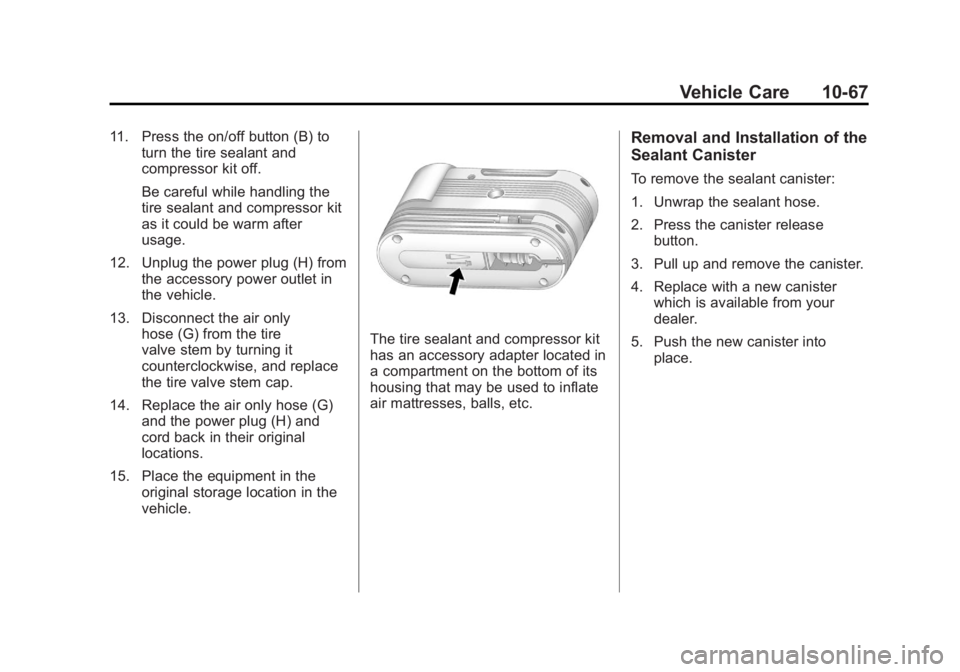
has an accessory adapter located in
a compartment on the bottom of its
housing that may be used to inflate
air mattresses, balls, etc.
Removal and Installation of the
Sealant Canister
To remove the sealant canister:
1. Unwrap the sealant hose.
2. Press the canister releasebutton.
3. Pull up and remove the canister.
4. Replace with a new canister which is available from your
dealer.
5. Push the new canister into place.
Page 382 of 468
Black plate (70,1)GMC Acadia/Acadia Denali Owner Manual - 2012
10-70 Vehicle Care
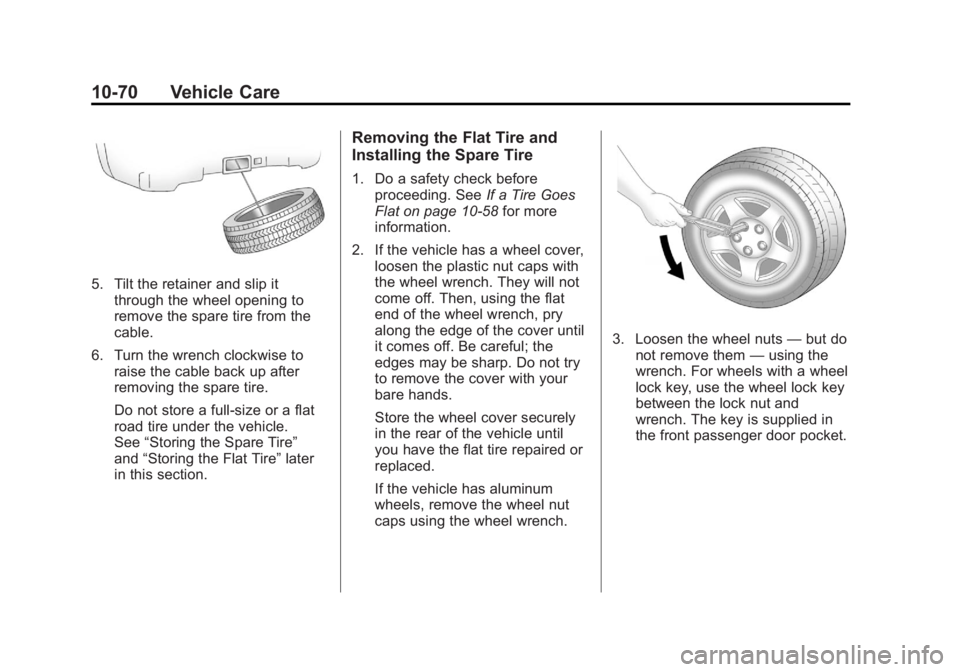
5. Tilt the retainer and slip itthrough the wheel opening to
remove the spare tire from the
cable.
6. Turn the wrench clockwise to raise the cable back up after
removing the spare tire.
Do not store a full‐size or a flat
road tire under the vehicle.
See “Storing the Spare Tire”
and “Storing the Flat Tire” later
in this section.
Removing the Flat Tire and
Installing the Spare Tire
1. Do a safety check before proceeding. See If a Tire Goes
Flat on page 10‑58 for more
information.
2. If the vehicle has a wheel cover, loosen the plastic nut caps with
the wheel wrench. They will not
come off. Then, using the flat
end of the wheel wrench, pry
along the edge of the cover until
it comes off. Be careful; the
edges may be sharp. Do not try
to remove the cover with your
bare hands.
Store the wheel cover securely
in the rear of the vehicle until
you have the flat tire repaired or
replaced.
If the vehicle has aluminum
wheels, remove the wheel nut
caps using the wheel wrench.
3. Loosen the wheel nuts —but do
not remove them —using the
wrench. For wheels with a wheel
lock key, use the wheel lock key
between the lock nut and
wrench. The key is supplied in
the front passenger door pocket.
Page 384 of 468
Black plate (72,1)GMC Acadia/Acadia Denali Owner Manual - 2012
10-72 Vehicle Care
{WARNING
Raising the vehicle with the jack
improperly positioned can
damage the vehicle and even
make the vehicle fall. To help
avoid personal injury and vehicle
damage, be sure to fit the jack lift
head into the proper location
before raising the vehicle.
7. Raise the vehicle by turning the wrench clockwise in the jack.
Raise the vehicle far enough off
the ground so that there is
enough room for the spare tire
to fit under the wheel well.
8. Remove all the wheel nuts and the flat tire.
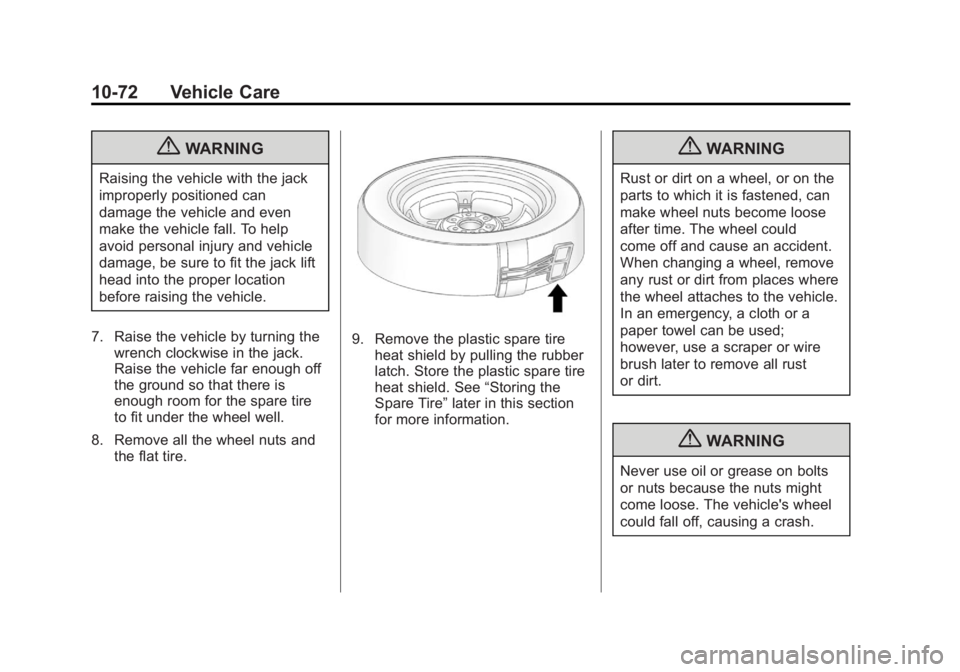
9. Remove the plastic spare tire
heat shield by pulling the rubber
latch. Store the plastic spare tire
heat shield. See “Storing the
Spare Tire” later in this section
for more information.
{WARNING
Rust or dirt on a wheel, or on the
parts to which it is fastened, can
make wheel nuts become loose
after time. The wheel could
come off and cause an accident.
When changing a wheel, remove
any rust or dirt from places where
the wheel attaches to the vehicle.
In an emergency, a cloth or a
paper towel can be used;
however, use a scraper or wire
brush later to remove all rust
or dirt.
{WARNING
Never use oil or grease on bolts
or nuts because the nuts might
come loose. The vehicle's wheel
could fall off, causing a crash.
Page 387 of 468
Black plate (75,1)GMC Acadia/Acadia Denali Owner Manual - 2012
Vehicle Care 10-75
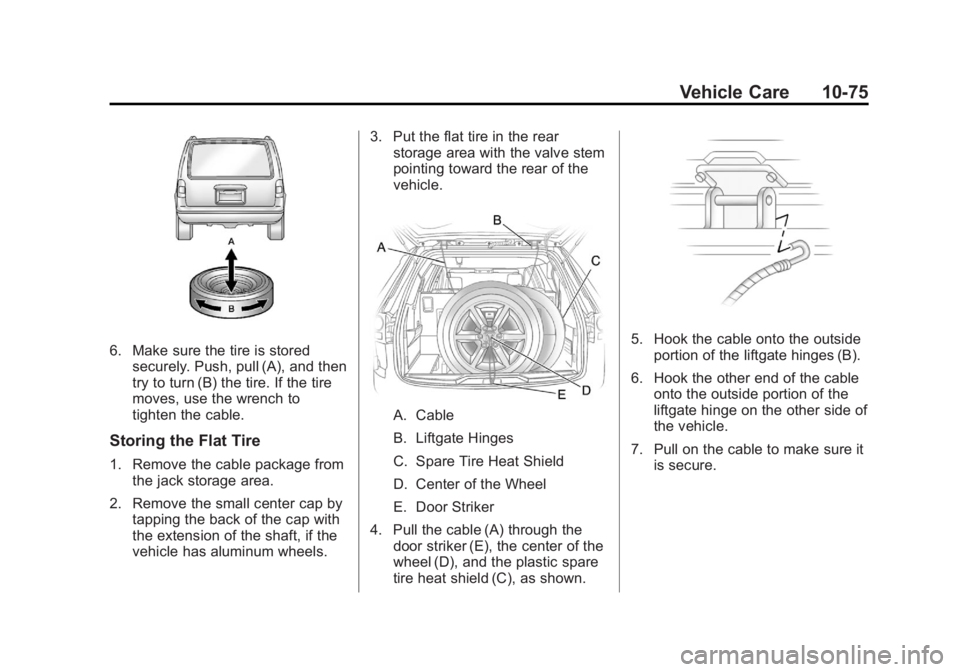
6. Make sure the tire is storedsecurely. Push, pull (A), and then
try to turn (B) the tire. If the tire
moves, use the wrench to
tighten the cable.
Storing the Flat Tire
1. Remove the cable package fromthe jack storage area.
2. Remove the small center cap by tapping the back of the cap with
the extension of the shaft, if the
vehicle has aluminum wheels. 3. Put the flat tire in the rear
storage area with the valve stem
pointing toward the rear of the
vehicle.
A. Cable
B. Liftgate Hinges
C. Spare Tire Heat Shield
D. Center of the Wheel
E. Door Striker
4. Pull the cable (A) through the door striker (E), the center of the
wheel (D), and the plastic spare
tire heat shield (C), as shown.
5. Hook the cable onto the outsideportion of the liftgate hinges (B).
6. Hook the other end of the cable onto the outside portion of the
liftgate hinge on the other side of
the vehicle.
7. Pull on the cable to make sure it is secure.
Page 389 of 468
Black plate (77,1)GMC Acadia/Acadia Denali Owner Manual - 2012
Vehicle Care 10-77
Compact Spare Tire
{WARNING
Driving with more than one
compact spare tire at a time
could result in loss of braking and
handling. This could lead to a
crash and you or others could be
injured. Use only one compact
spare tire at a time.
The compact spare tire, if the
vehicle has one, was fully inflated
when the vehicle was new, however,
it can lose air after a time. Check
the inflation pressure regularly.
It should be 420 kPa (60 psi).
After installing the compact spare
on the vehicle, stop as soon as
possible and make sure the
spare tire is correctly inflated. The compact spare is made to
perform well at speeds up to
105 km/h (65 mph) for distances up
to 5 000 km (3,000 mi), so you can
finish your trip and have the full-size
tire repaired or replaced at your
convenience. Of course, it is best to
replace the spare with a full-size tire
as soon as possible. The spare tire
will last longer and be in good
shape in case it is needed again.
Notice:
When the compact
spare is installed, do not take the
vehicle through an automatic
car wash with guide rails.
The compact spare can get
caught on the rails which can
damage the tire, wheel, and
other parts of the vehicle.
Do not use the compact spare on
other vehicles. And do not mix the compact spare
tire or wheel with other wheels or
tires. They will not fit. Keep the
spare tire and its wheel together.
The All-Wheel Drive (AWD) system
will be automatically disabled
when you use the compact spare.
To restore the AWD and prevent
excessive wear on the clutch in your
AWD, replace the compact spare
tire with a full-size tire as soon as
possible.
Notice:
Tire chains will not fit the
compact spare. Using them can
damage the vehicle and can
damage the chains too. Do not
use tire chains on the compact
spare.
Page 409 of 468
Black plate (3,1)GMC Acadia/Acadia Denali Owner Manual - 2012
Service and Maintenance 11-3
Maintenance
Schedule
Owner Checks and Services
At Each Fuel Stop
.Check the engine oil level.
SeeEngine Oil on page 10‑8.
Once a Month
.Check the tire inflation
pressures. See Tire Pressure on
page 10‑44.
.Inspect the tires for wear.
See Tire Inspection on
page 10‑50.
.Check the windshield washer
fluid level. See Washer Fluid on
page 10‑22.
Engine Oil Change
When the CHANGE ENGINE OIL
SOON message displays, have the
engine oil and filter changed within
the next 1 000 km/600 mi. If driven
under the best conditions, the
engine oil life system might not
indicate the need for vehicle service
for more than a year. The engine oil
and filter must be changed at least
once a year and the oil life system
must be reset. Your trained dealer
technician can perform this work.
If the engine oil life system is reset
accidentally, service the vehicle
within 5 000 km/3,000 mi since the
last service. Reset the oil life
system when the oil is changed.
See Engine Oil Life System on
page 10‑10.
Tire Rotation and
Required Services Every
12 000 km/7,500 mi
Rotate the tires, if recommended
for the vehicle, and perform the
following services. See Tire
Rotation on page 10‑50.
.Check engine oil level and oil
life percentage. If needed,
change engine oil and filter, and
reset oil life system. See Engine
Oil on page 10‑8 andEngine Oil
Life System on page 10‑10.
.Check engine coolant level.
See Engine Coolant on
page 10‑14.
.Check windshield washer fluid
level. See Washer Fluid on
page 10‑22.
Page 410 of 468
Black plate (4,1)GMC Acadia/Acadia Denali Owner Manual - 2012
11-4 Service and Maintenance
.Visually inspect windshield wiper
blades for wear, cracking,
or contamination. SeeExterior
Care on page 10‑86. Replace
worn or damaged wiper blades.
See Wiper Blade Replacement
on page 10‑28.
.Check tire inflation pressures.
See Tire Pressure on
page 10‑44.
.Inspect tire wear. See Tire
Inspection on page 10‑50.
.Visually check for fluid leaks.
.Inspect engine air cleaner filter.
See Engine Air Cleaner/Filter on
page 10‑12.
.Inspect brake system.
.Visually inspect steering,
suspension, and chassis
components for damaged, loose,
or missing parts or signs of
wear. See Exterior Care on
page 10‑86.
.Check restraint system
components. See Safety
System Check on page 3‑23.
.Visually inspect fuel system for
damage or leaks.
.Visually inspect exhaust system
and nearby heat shields for
loose or damaged parts.
.Lubricate body components.
See Exterior Care on
page 10‑86.
.Check starter switch.
See Starter Switch Check on
page 10‑26.
.Check automatic transmission
shift lock control function.
See Automatic Transmission
Shift Lock Control Function
Check on page 10‑26.
.Check ignition transmission lock.
See Ignition Transmission Lock
Check on page 10‑27.
.Check parking brake and
automatic transmission park
mechanism. See Park Brake and
P (Park) Mechanism Check on
page 10‑27.
.Check accelerator pedal for
damage, high effort, or binding.
Replace if needed.
.Visually inspect gas strut for
signs of wear, cracks, or other
damage. Check the hold open
ability of the strut. See your
dealer if service is required.
.Check tire sealant expiration
date, if equipped. See Tire
Sealant and Compressor Kit on
page 10‑60.
.Inspect sunroof track and seal,
if equipped. See Sunroof on
page 2‑23.
Page 417 of 468
Black plate (11,1)GMC Acadia/Acadia Denali Owner Manual - 2012
Service and Maintenance 11-11
Tires
Tires need to be properly inflated,
rotated, and balanced. Maintaining
the tires can save money, fuel, and
can reduce the risk of tire failure.
.Signs that the tires need to be
replaced include three or more
visible treadwear indicators; cord
or fabric showing through the
rubber; cracks or cuts in the
tread or sidewall; or a bulge or
split in the tire.
.Trained dealer technicians can
inspect and recommend the right
tires. Your dealer can also
provide tire/wheel balancing
services to ensure smooth
vehicle operation at all speeds.
Your dealer sells and services
name brand tires.Vehicle Care
To help keep the vehicle looking
like new, vehicle care products
are available from your dealer.
For information on how to clean and
protect the vehicle’s interior and
exterior, see
Interior Care on
page 10‑89 andExterior Care on
page 10‑86.
Wheel Alignment
Wheel alignment is critical for
ensuring that the tires deliver
optimal wear and performance.
.Signs that the alignment may
need to be adjusted include
pulling, improper vehicle
handling, or unusual tire wear.
.Your dealer has the required
equipment to ensure proper
wheel alignment. Windshield
For safety, appearance, and the
best viewing, keep the windshield
clean and clear.
.Signs of damage include
scratches, cracks, and chips.
.Trained dealer technicians can
inspect the windshield and
recommend proper replacement
if needed.
Wiper Blades
Wiper blades need to be cleaned
and kept in good condition to
provide a clear view.
.Signs of wear include streaking,
skipping across the windshield,
and worn or split rubber.
.Trained dealer technicians can
check the wiper blades and
replace them when needed.
Page 435 of 468
Black plate (9,1)GMC Acadia/Acadia Denali Owner Manual - 2012
Customer Information 13-9
GMC and General Motors of
Canada Limited reserve the right to
limit services or payment to an
owner or driver if they decide the
claims are made too often, or the
same type of claim is made many
times.
Services Provided
.Emergency Fuel Delivery:
Delivery of enough fuel for the
vehicle to get to the nearest
service station.
.Lock‐Out Service:Service to
unlock the vehicle if you are
locked out. A remote unlock
may be available if you have
OnStar
®. For security reasons,
the driver must present
identification before this
service is given.
.Emergency Tow From a Public
Road or Highway: Tow to the
nearest GMC dealer for warranty
service, or if the vehicle was in
a crash and cannot be driven.
Assistance is also given when
the vehicle is stuck in the sand,
mud, or snow.
.Flat Tire Change: Service to
change a flat tire with the spare
tire. The spare tire, if equipped,
must be in good condition and
properly inflated. It is the owner's
responsibility for the repair or
replacement of the tire if it is not
covered by the warranty.
.Battery Jump Start: Service to
jump start a dead battery.
.Trip Routing Service: Detailed
maps of North America when
requested either with the
most direct route or the most
scenic route. Additional travel
information is also available.
Allow three weeks for delivery.
.Trip Interruption Benefits and
Assistance: If your trip is
interrupted due to a warranty
failure, incidental expenses
may be reimbursed during the
5 years/(160 000 km) 100,000 mi
Powertrain warranty period.
Items considered are hotel,
meals, and rental car.
Services Not Included in
Roadside Assistance
.Impound towing caused by
violation of any laws.
.Legal fines.
.Mounting, dismounting,
or changing of snow tires,
chains, or other traction devices.
.Towing or services for vehicles
driven on a non-public road or
highway.