tow GMC ACADIA 2012 Workshop Manual
[x] Cancel search | Manufacturer: GMC, Model Year: 2012, Model line: ACADIA, Model: GMC ACADIA 2012Pages: 468, PDF Size: 5.57 MB
Page 310 of 468
Black plate (52,1)GMC Acadia/Acadia Denali Owner Manual - 2012
9-52 Driving and Operating
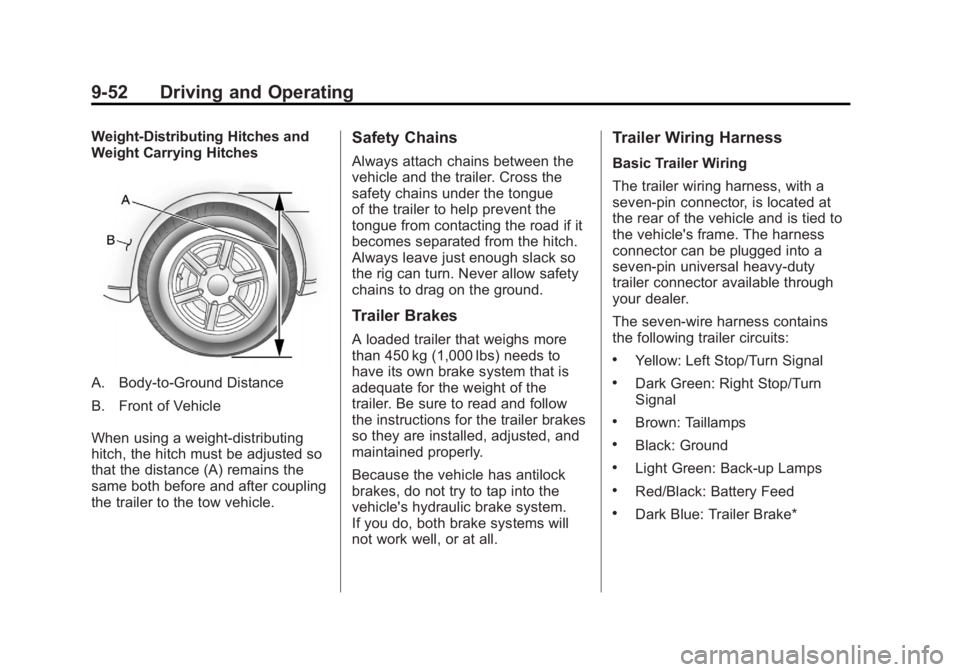
Weight-Distributing Hitches and
Weight Carrying Hitches
A. Body-to-Ground Distance
B. Front of Vehicle
When using a weight-distributing
hitch, the hitch must be adjusted so
that the distance (A) remains the
same both before and after coupling
the trailer to the tow vehicle.
Safety Chains
Always attach chains between the
vehicle and the trailer. Cross the
safety chains under the tongue
of the trailer to help prevent the
tongue from contacting the road if it
becomes separated from the hitch.
Always leave just enough slack so
the rig can turn. Never allow safety
chains to drag on the ground.
Trailer Brakes
A loaded trailer that weighs more
than 450 kg (1,000 lbs) needs to
have its own brake system that is
adequate for the weight of the
trailer. Be sure to read and follow
the instructions for the trailer brakes
so they are installed, adjusted, and
maintained properly.
Because the vehicle has antilock
brakes, do not try to tap into the
vehicle's hydraulic brake system.
If you do, both brake systems will
not work well, or at all.
Trailer Wiring Harness
Basic Trailer Wiring
The trailer wiring harness, with a
seven-pin connector, is located at
the rear of the vehicle and is tied to
the vehicle's frame. The harness
connector can be plugged into a
seven-pin universal heavy-duty
trailer connector available through
your dealer.
The seven-wire harness contains
the following trailer circuits:
.Yellow: Left Stop/Turn Signal
.Dark Green: Right Stop/Turn
Signal
.Brown: Taillamps
.Black: Ground
.Light Green: Back-up Lamps
.Red/Black: Battery Feed
.Dark Blue: Trailer Brake*
Page 311 of 468
Black plate (53,1)GMC Acadia/Acadia Denali Owner Manual - 2012
Driving and Operating 9-53
*The fuse for this circuit is installed
in the underhood electrical center,
but the wires are not connected.
They should be connected by your
dealer or a qualified service center.
If the back-up lamp circuit is not
functional, contact your dealer.
If a remote (non-vehicle) battery is
being charged, press the Tow/Haul
mode switch located on the center
console near the climate controls.
This will boost the vehicle system
voltage and properly charge the
battery. If the trailer is too light for
Tow/Haul mode, turn on the
headlamps (non‐HID only) as a
second way to boost the vehicle
system and charge the battery.Electric Trailer Brake Control
Wiring Provisions
These wiring provisions for an
electric trailer brake controller are
included with the vehicle as part
of the trailer wiring package.
The instrument panel contains
blunt cut wires behind the steering
column for the electric trailer brake
controller. The harness contains the
following wires:
.Red/Black: Power Supply
.White: Brake Switch Signal
.Gray: Illumination
.Dark Blue: Trailer Brake Signal
.Black: Ground
The electric trailer brake controller
should be installed by your dealer or
a qualified service center.
Conversions and
Add-Ons
Add-On Electrical
Equipment
Notice: Do not add anything
electrical to the vehicle unless
you check with your dealer first.
Some electrical equipment can
damage the vehicle and the
damage would not be covered
by the vehicle's warranty. Some
add-on electrical equipment can
keep other components from
working as they should.
Add-on equipment can drain the
vehicle's 12‐volt battery, even if the
vehicle is not operating.
The vehicle has an airbag system.
Before attempting to add anything
electrical to the vehicle, see
Servicing the Airbag-Equipped
Vehicle on page 3‑35 andAdding
Equipment to the Airbag-Equipped
Vehicle on page 3‑36.
Page 314 of 468
Black plate (2,1)GMC Acadia/Acadia Denali Owner Manual - 2012
10-2 Vehicle Care
Wheels and Tires
Tires . . . . . . . . . . . . . . . . . . . . . . . . 10-37
Tire Sidewall Labeling . . . . . . 10-38
Tire Designations . . . . . . . . . . . 10-40
Tire Terminology andDefinitions . . . . . . . . . . . . . . . . 10-40
Tire Pressure . . . . . . . . . . . . . . . 10-44
Tire Pressure Monitor System . . . . . . . . . . . . . . . . . . . 10-45
Tire Pressure Monitor Operation . . . . . . . . . . . . . . . . . 10-46
Tire Inspection . . . . . . . . . . . . . . 10-50
Tire Rotation . . . . . . . . . . . . . . . 10-50
When It Is Time for New Tires . . . . . . . . . . . . . . . . . . . . . . 10-51
Buying New Tires . . . . . . . . . . . 10-52
Different Size Tires and Wheels . . . . . . . . . . . . . . . . . . . 10-54
Uniform Tire Quality Grading . . . . . . . . . . . . . . . . . . . 10-54
Wheel Alignment and Tire Balance . . . . . . . . . . . . . . . . . . . 10-56 Wheel Replacement . . . . . . . . 10-56
Tire Chains . . . . . . . . . . . . . . . . . 10-57
If a Tire Goes Flat . . . . . . . . . . 10-58
Tire Sealant and
Compressor Kit . . . . . . . . . . . 10-60
Storing the Tire Sealant and Compressor Kit . . . . . . . . . . . 10-68
Tire Changing . . . . . . . . . . . . . . 10-68
Compact Spare Tire . . . . . . . . 10-77
Jump Starting
Jump Starting . . . . . . . . . . . . . . 10-78
Towing
Towing the Vehicle . . . . . . . . . 10-82
Recreational Vehicle Towing . . . . . . . . . . . . . . . . . . . . 10-82
Appearance Care
Exterior Care . . . . . . . . . . . . . . . 10-86
Interior Care . . . . . . . . . . . . . . . . 10-89
Floor Mats . . . . . . . . . . . . . . . . . . 10-92
General Information
For service and parts needs,
visit your dealer. You will receive
genuine GM parts and GM-trained
and supported service people.
Genuine GM parts have one of
these marks:
Page 320 of 468
Black plate (8,1)GMC Acadia/Acadia Denali Owner Manual - 2012
10-8 Vehicle Care
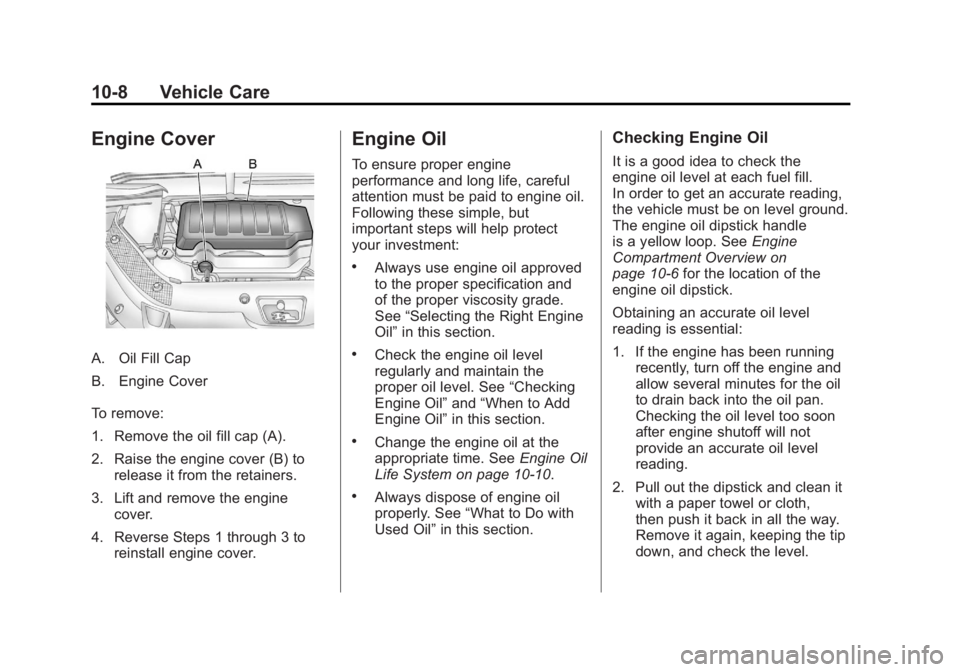
Engine Cover
A. Oil Fill Cap
B. Engine Cover
To remove:
1. Remove the oil fill cap (A).
2. Raise the engine cover (B) torelease it from the retainers.
3. Lift and remove the engine cover.
4. Reverse Steps 1 through 3 to reinstall engine cover.
Engine Oil
To ensure proper engine
performance and long life, careful
attention must be paid to engine oil.
Following these simple, but
important steps will help protect
your investment:
.Always use engine oil approved
to the proper specification and
of the proper viscosity grade.
See “Selecting the Right Engine
Oil” in this section.
.Check the engine oil level
regularly and maintain the
proper oil level. See “Checking
Engine Oil” and“When to Add
Engine Oil” in this section.
.Change the engine oil at the
appropriate time. See Engine Oil
Life System on page 10‑10.
.Always dispose of engine oil
properly. See “What to Do with
Used Oil” in this section.
Checking Engine Oil
It is a good idea to check the
engine oil level at each fuel fill.
In order to get an accurate reading,
the vehicle must be on level ground.
The engine oil dipstick handle
is a yellow loop. See Engine
Compartment Overview on
page 10‑6 for the location of the
engine oil dipstick.
Obtaining an accurate oil level
reading is essential:
1. If the engine has been running recently, turn off the engine and
allow several minutes for the oil
to drain back into the oil pan.
Checking the oil level too soon
after engine shutoff will not
provide an accurate oil level
reading.
2. Pull out the dipstick and clean it with a paper towel or cloth,
then push it back in all the way.
Remove it again, keeping the tip
down, and check the level.
Page 331 of 468
Black plate (19,1)GMC Acadia/Acadia Denali Owner Manual - 2012
Vehicle Care 10-19
If you do decide to lift the hood,
make sure the vehicle is parked on
a level surface.
Then check to see if the engine
cooling fans are running. If the
engine is overheating, both fans
should be running. If they are not,
do not continue to run the engine
and have the vehicle serviced.
Notice:Engine damage from
running the engine without
coolant is not covered by the
warranty.
Notice: If the engine catches fire
while driving with no coolant, the
vehicle can be badly damaged.
The costly repairs would not be
covered by the vehicle warranty.
See Overheated Engine
Protection Operating Mode on
page 10‑20 for information on
driving to a safe place in an
emergency.If Steam Is Coming from the
Engine Compartment
{WARNING
Steam from an overheated engine
can burn you badly, even if you
just open the hood. Stay away
from the engine if you see or hear
steam coming from it. Turn it off
and get everyone away from the
vehicle until it cools down. Wait
until there is no sign of steam or
coolant before you open
the hood.
If you keep driving when the
vehicles engine is overheated,
the liquids in it can catch fire.
You or others could be badly
burned. Stop the engine if it
overheats, and get out of the
vehicle until the engine is cool.
(Continued)
WARNING (Continued)
SeeOverheated Engine
Protection Operating Mode on
page 10‑20 for information on
driving to a safe place in an
emergency.
If No Steam Is Coming from
the Engine Compartment
If an engine overheat warning is
displayed but no steam can be seen
or heard, the problem may not be
too serious. Sometimes the engine
can get a little too hot when the
vehicle:
.Climbs a long hill on a hot day
.Stops after high-speed driving
.Idles for long periods in traffic
.Tows a trailer
Page 332 of 468
Black plate (20,1)GMC Acadia/Acadia Denali Owner Manual - 2012
10-20 Vehicle Care
If the overheat warning is displayed
with no sign of steam:
1. Turn the air conditioning off.
2. Turn the heater on to the highesttemperature and to the highest
fan speed. Open the windows as
necessary.
3. If in a traffic jam, shift to N (Neutral); otherwise,
shift to the highest gear while
driving —D (Drive) or L (Low).
If the temperature overheat gauge
is no longer in the overheat zone or
an overheat warning no longer
displays, the vehicle can be driven.
Continue to drive the vehicle slow
for about 10 minutes. Keep a safe
vehicle distance from the car in front
of you. If the warning does not come
back on, continue to drive normally.
If the warning continues, pull over,
stop, and park the vehicle
right away. If there is no sign of steam, idle the
engine for three minutes while
parked. If the warning is still
displayed, turn off the engine until it
cools down. Also, see
“Overheated
Engine Protection Operating Mode”
next in this section.
Overheated Engine
Protection
Operating Mode
This emergency operating mode lets
the vehicle be driven to a safe place
in an emergency situation. If an
overheated engine condition exists,
an overheat protection mode which
alternates firing groups of cylinders
helps prevent engine damage. In this mode, there is a significant
loss in power and engine
performance. The temperature
gauge indicates an overheat
condition exists. Driving extended
distances and/or towing a trailer in
the overheat protection mode
should be avoided.
Notice:
After driving in the
overheated engine protection
operating mode, to avoid engine
damage, allow the engine to cool
before attempting any repair.
The engine oil will be severely
degraded. Repair the cause of
coolant loss, change the oil
and reset the oil life system.
See Engine Oil on page 10‑8.
Page 363 of 468
Black plate (51,1)GMC Acadia/Acadia Denali Owner Manual - 2012
Vehicle Care 10-51
SeeTire Pressure on
page 10‑44 andVehicle Load
Limits on page 9‑10.
Reset the Tire Pressure Monitor
System. See Tire Pressure
Monitor Operation on
page 10‑46.
Check that all wheel nuts are
properly tightened. See “Wheel
Nut Torque” underCapacities
and Specifications on
page 12‑2.
{WARNING
Rust or dirt on a wheel, or on the
parts to which it is fastened, can
make wheel nuts become loose
after time. The wheel could come
off and cause an accident. When
changing a wheel, remove any
rust or dirt from places where
the wheel attaches to the vehicle.
(Continued)
WARNING (Continued)
In an emergency, a cloth or a
paper towel can be used;
however, use a scraper or wire
brush later to remove all rust
or dirt.
Lightly coat the center of the
wheel hub with wheel bearing
grease after a wheel change or
tire rotation to prevent corrosion
or rust build-up. Do not get
grease on the flat wheel
mounting surface or on the
wheel nuts or bolts.
Check that the spare tire, if the
vehicle has one, is stored
properly. Push, pull, and then try
to rotate or turn the tire. If it
moves, tighten the cable. See
Tire Changing on page 10‑68.
When It Is Time for
New Tires
Factors such as maintenance,
temperatures, driving speeds,
vehicle loading, and road conditions
affect the wear rate of the tires.
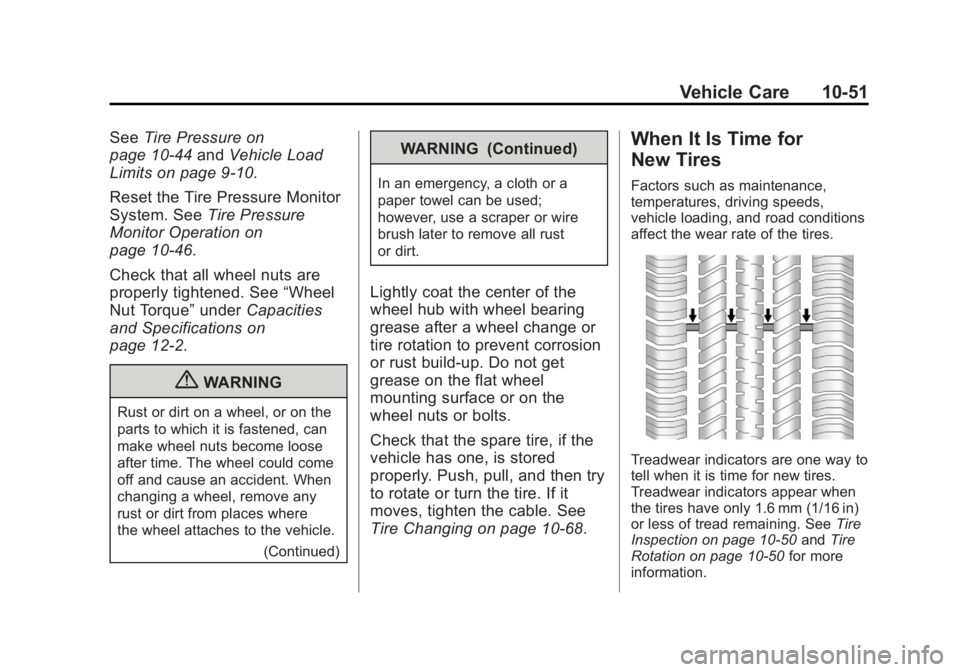
Treadwear indicators are one way to
tell when it is time for new tires.
Treadwear indicators appear when
the tires have only 1.6 mm (1/16 in)
or less of tread remaining. See Tire
Inspection on page 10‑50 andTire
Rotation on page 10‑50 for more
information.
Page 370 of 468
Black plate (58,1)GMC Acadia/Acadia Denali Owner Manual - 2012
10-58 Vehicle Care
If a Tire Goes Flat
It is unusual for a tire to blow out
while driving, especially if the tires
are maintained properly. SeeTires
on page 10‑37. If air goes out of a
tire, it is much more likely to leak
out slowly. But if there is ever a
blowout, here are a few tips about
what to expect and what to do:
If a front tire fails, the flat tire
creates a drag that pulls the vehicle
toward that side. Take your foot off
the accelerator pedal and grip the
steering wheel firmly. Steer to
maintain lane position, and then
gently brake to a stop, well off the
road, if possible.
A rear blowout, particularly on a
curve, acts much like a skid and
may require the same correction as
used in a skid. Stop pressing the
accelerator pedal and steer to straighten the vehicle. It may be
very bumpy and noisy. Gently
brake to a stop, well off the road,
if possible.
{WARNING
Driving on a flat tire will cause
permanent damage to the tire.
Re-inflating a tire after it has
been driven on while severely
underinflated or flat may cause a
blowout and a serious crash.
Never attempt to re-inflate a tire
that has been driven on while
severely underinflated or flat.
Have your dealer or an authorized
tire service center repair or
replace the flat tire as soon as
possible.
{WARNING
Lifting a vehicle and getting
under it to do maintenance or
repairs is dangerous without the
appropriate safety equipment and
training. If a jack is provided with
the vehicle, it is designed only for
changing a flat tire. If it is used for
anything else, you or others could
be badly injured or killed if the
vehicle slips off the jack. If a jack
is provided with the vehicle, only
use it for changing a flat tire.
If a tire goes flat, avoid further tire
and wheel damage by driving slowly
to a level place, well off the road,
if possible. Turn on the hazard
warning flashers. See Hazard
Warning Flashers on page 6‑4.
Page 380 of 468
Black plate (68,1)GMC Acadia/Acadia Denali Owner Manual - 2012
10-68 Vehicle Care
Storing the Tire Sealant
and Compressor Kit
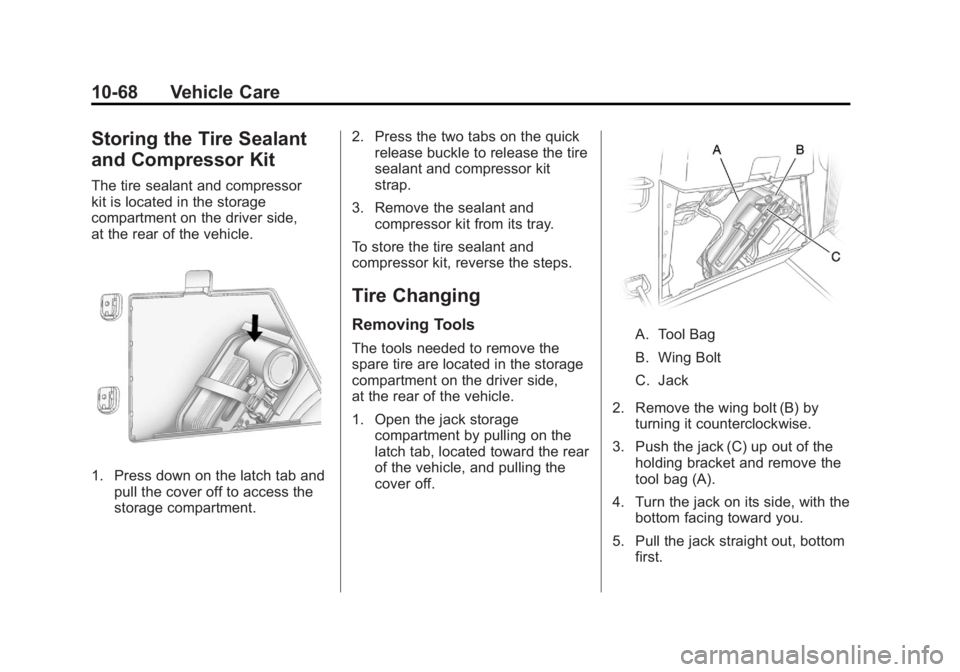
The tire sealant and compressor
kit is located in the storage
compartment on the driver side,
at the rear of the vehicle.
1. Press down on the latch tab andpull the cover off to access the
storage compartment. 2. Press the two tabs on the quick
release buckle to release the tire
sealant and compressor kit
strap.
3. Remove the sealant and compressor kit from its tray.
To store the tire sealant and
compressor kit, reverse the steps.
Tire Changing
Removing Tools
The tools needed to remove the
spare tire are located in the storage
compartment on the driver side,
at the rear of the vehicle.
1. Open the jack storage compartment by pulling on the
latch tab, located toward the rear
of the vehicle, and pulling the
cover off.A. Tool Bag
B. Wing Bolt
C. Jack
2. Remove the wing bolt (B) by turning it counterclockwise.
3. Push the jack (C) up out of the holding bracket and remove the
tool bag (A).
4. Turn the jack on its side, with the bottom facing toward you.
5. Pull the jack straight out, bottom first.
Page 384 of 468
Black plate (72,1)GMC Acadia/Acadia Denali Owner Manual - 2012
10-72 Vehicle Care
{WARNING
Raising the vehicle with the jack
improperly positioned can
damage the vehicle and even
make the vehicle fall. To help
avoid personal injury and vehicle
damage, be sure to fit the jack lift
head into the proper location
before raising the vehicle.
7. Raise the vehicle by turning the wrench clockwise in the jack.
Raise the vehicle far enough off
the ground so that there is
enough room for the spare tire
to fit under the wheel well.
8. Remove all the wheel nuts and the flat tire.
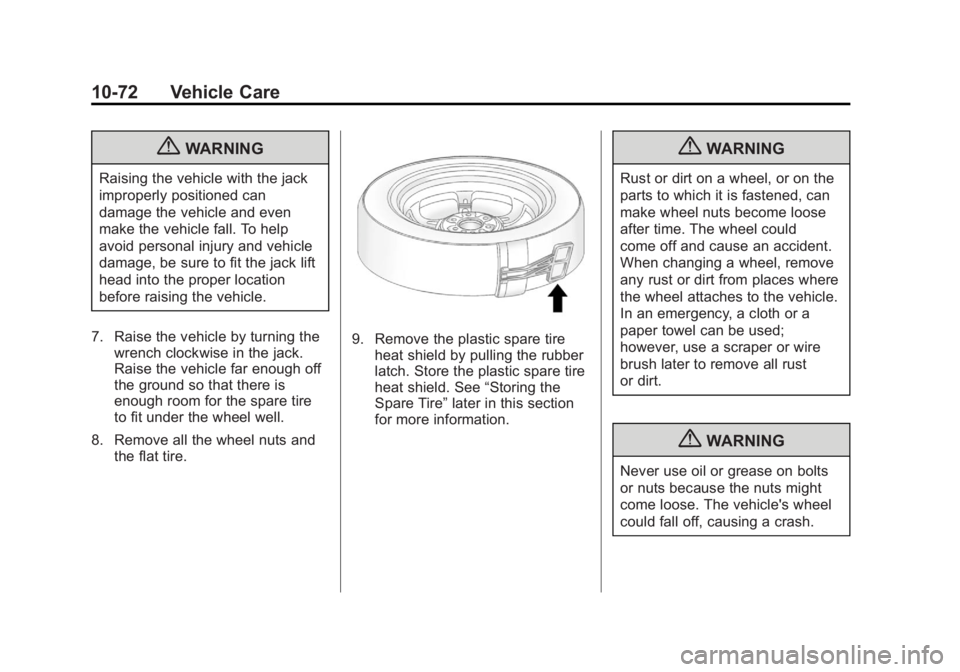
9. Remove the plastic spare tire
heat shield by pulling the rubber
latch. Store the plastic spare tire
heat shield. See “Storing the
Spare Tire” later in this section
for more information.
{WARNING
Rust or dirt on a wheel, or on the
parts to which it is fastened, can
make wheel nuts become loose
after time. The wheel could
come off and cause an accident.
When changing a wheel, remove
any rust or dirt from places where
the wheel attaches to the vehicle.
In an emergency, a cloth or a
paper towel can be used;
however, use a scraper or wire
brush later to remove all rust
or dirt.
{WARNING
Never use oil or grease on bolts
or nuts because the nuts might
come loose. The vehicle's wheel
could fall off, causing a crash.