rear view mirror GMC ACADIA 2012 Owner's Manual
[x] Cancel search | Manufacturer: GMC, Model Year: 2012, Model line: ACADIA, Model: GMC ACADIA 2012Pages: 468, PDF Size: 5.57 MB
Page 19 of 468
Black plate (13,1)GMC Acadia/Acadia Denali Owner Manual - 2012
In Brief 1-13
Interior Mirror
The automatic dimming rearview
mirror reduces the glare from
other vehicle headlamps. Each time
the vehicle is started, the dimming
feature comes on.
SeeAutomatic Dimming Rearview
Mirror on page 2‑20.
Steering Wheel
Adjustment
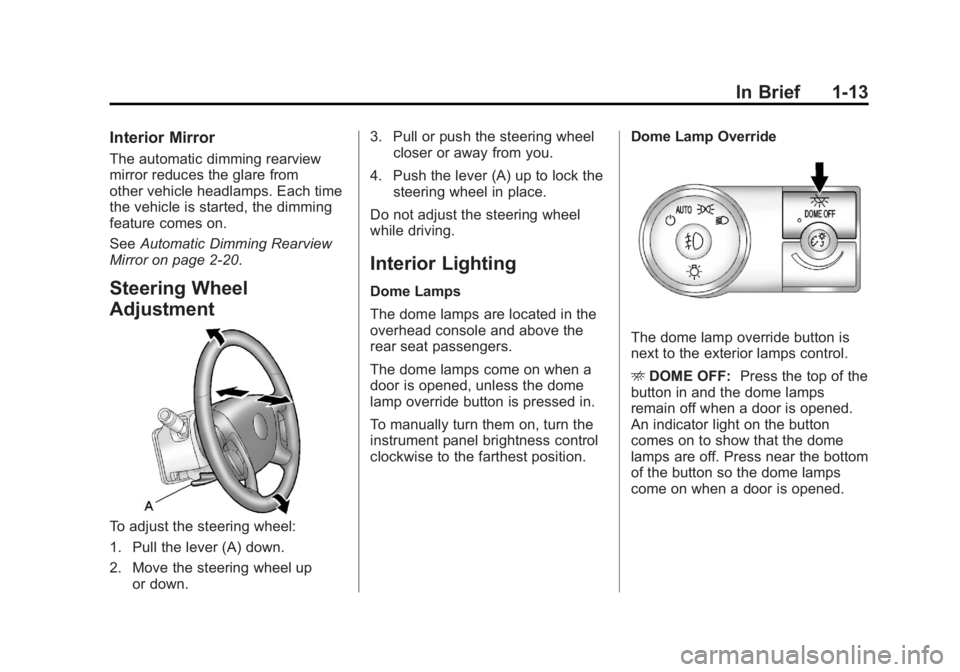
To adjust the steering wheel:
1. Pull the lever (A) down.
2. Move the steering wheel up or down. 3. Pull or push the steering wheel
closer or away from you.
4. Push the lever (A) up to lock the steering wheel in place.
Do not adjust the steering wheel
while driving.
Interior Lighting
Dome Lamps
The dome lamps are located in the
overhead console and above the
rear seat passengers.
The dome lamps come on when a
door is opened, unless the dome
lamp override button is pressed in.
To manually turn them on, turn the
instrument panel brightness control
clockwise to the farthest position. Dome Lamp Override
The dome lamp override button is
next to the exterior lamps control.
E
DOME OFF: Press the top of the
button in and the dome lamps
remain off when a door is opened.
An indicator light on the button
comes on to show that the dome
lamps are off. Press near the bottom
of the button so the dome lamps
come on when a door is opened.
Page 27 of 468
Black plate (21,1)GMC Acadia/Acadia Denali Owner Manual - 2012
In Brief 1-21
Storage Compartments
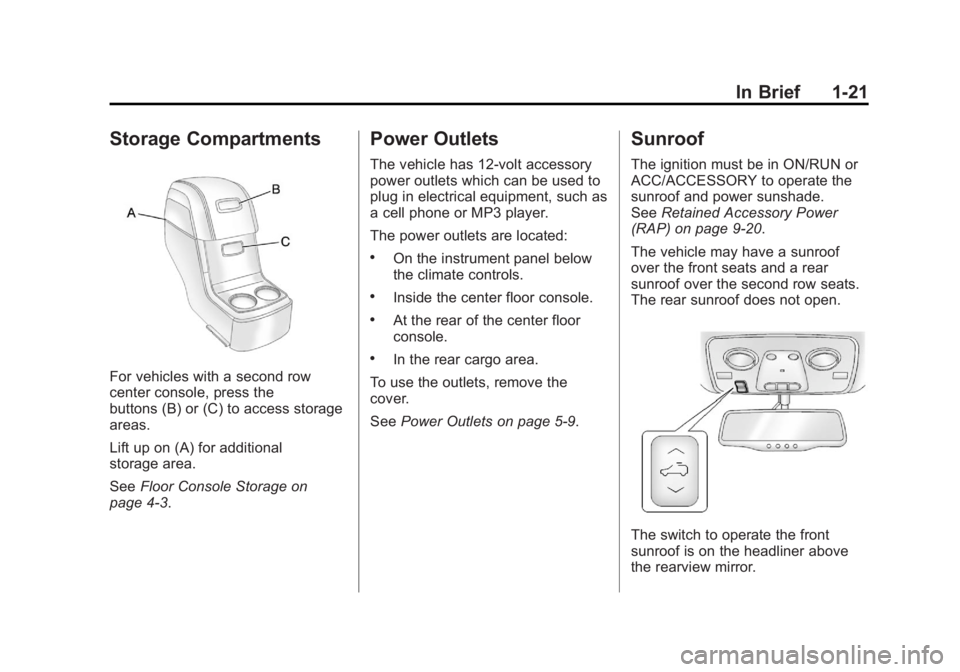
For vehicles with a second row
center console, press the
buttons (B) or (C) to access storage
areas.
Lift up on (A) for additional
storage area.
SeeFloor Console Storage on
page 4‑3.
Power Outlets
The vehicle has 12‐volt accessory
power outlets which can be used to
plug in electrical equipment, such as
a cell phone or MP3 player.
The power outlets are located:
.On the instrument panel below
the climate controls.
.Inside the center floor console.
.At the rear of the center floor
console.
.In the rear cargo area.
To use the outlets, remove the
cover.
See Power Outlets on page 5‑9.
Sunroof
The ignition must be in ON/RUN or
ACC/ACCESSORY to operate the
sunroof and power sunshade.
SeeRetained Accessory Power
(RAP) on page 9‑20.
The vehicle may have a sunroof
over the front seats and a rear
sunroof over the second row seats.
The rear sunroof does not open.
The switch to operate the front
sunroof is on the headliner above
the rearview mirror.
Page 33 of 468
Black plate (1,1)GMC Acadia/Acadia Denali Owner Manual - 2012
Keys, Doors, and Windows 2-1
Keys, Doors, and
Windows
Keys and Locks
Keys . . . . . . . . . . . . . . . . . . . . . . . . . . 2-2
Remote Keyless Entry (RKE)System . . . . . . . . . . . . . . . . . . . . . . 2-3
Remote Keyless Entry (RKE) System Operation . . . . . . . . . . . 2-3
Remote Vehicle Start . . . . . . . . . 2-5
Door Locks . . . . . . . . . . . . . . . . . . . 2-7
Power Door Locks . . . . . . . . . . . . 2-8
Delayed Locking . . . . . . . . . . . . . . 2-8
Automatic Door Locks . . . . . . . . . 2-9
Lockout Protection . . . . . . . . . . . . 2-9
Safety Locks . . . . . . . . . . . . . . . . . . 2-9
Doors
Liftgate . . . . . . . . . . . . . . . . . . . . . . 2-10
Vehicle Security
Vehicle Security . . . . . . . . . . . . . . 2-13
Anti-theft Alarm System . . . . . . 2-13
Immobilizer . . . . . . . . . . . . . . . . . . 2-14
Immobilizer Operation . . . . . . . 2-14
Exterior Mirrors
Convex Mirrors . . . . . . . . . . . . . . 2-16
Power Mirrors . . . . . . . . . . . . . . . . 2-16
Folding Mirrors . . . . . . . . . . . . . . . 2-17
Heated Mirrors . . . . . . . . . . . . . . . 2-17
Automatic Dimming Mirror . . . 2-18
Blind Spot Mirrors . . . . . . . . . . . 2-18
Park Tilt Mirrors . . . . . . . . . . . . . . 2-19
Interior Mirrors
Manual Rearview Mirror . . . . . . 2-19
Automatic Dimming Rearview Mirror . . . . . . . . . . . . . . . . . . . . . . . 2-20
Windows
Windows . . . . . . . . . . . . . . . . . . . . . 2-20
Power Windows . . . . . . . . . . . . . 2-21
Sun Visors . . . . . . . . . . . . . . . . . . . 2-23
Roof
Sunroof . . . . . . . . . . . . . . . . . . . . . . 2-23
Page 50 of 468
Black plate (18,1)GMC Acadia/Acadia Denali Owner Manual - 2012
2-18 Keys, Doors, and Windows
Automatic Dimming
Mirror
If the vehicle has the automatic
dimming mirror, the driver outside
mirror automatically adjusts for the
glare of the headlamps from behind.
This feature is controlled by the on
and off setting on the inside
rearview mirror. SeeAutomatic
Dimming Rearview Mirror on
page 2‑20 for more information.
Blind Spot Mirrors
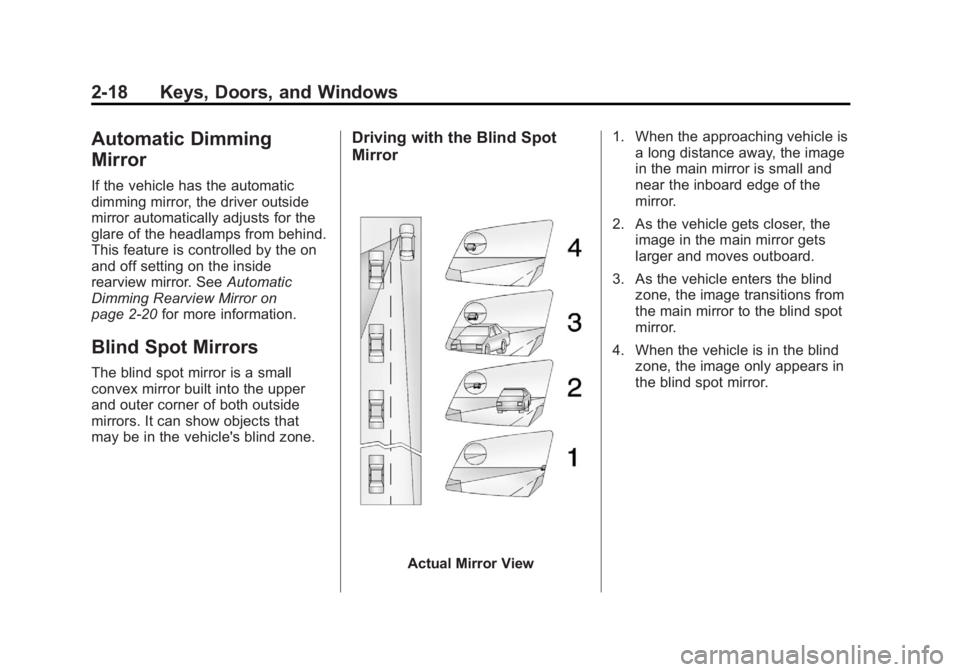
The blind spot mirror is a small
convex mirror built into the upper
and outer corner of both outside
mirrors. It can show objects that
may be in the vehicle's blind zone.
Driving with the Blind Spot
Mirror
Actual Mirror View 1. When the approaching vehicle is
a long distance away, the image
in the main mirror is small and
near the inboard edge of the
mirror.
2. As the vehicle gets closer, the image in the main mirror gets
larger and moves outboard.
3. As the vehicle enters the blind zone, the image transitions from
the main mirror to the blind spot
mirror.
4. When the vehicle is in the blind zone, the image only appears in
the blind spot mirror.
Page 51 of 468
Black plate (19,1)GMC Acadia/Acadia Denali Owner Manual - 2012
Keys, Doors, and Windows 2-19
Using the Outside Mirror with
the Blind Spot Mirror
1. Set the main mirror so that theside of the vehicle can just be
seen and the blind spot mirror
has an unobstructed view.
2. When checking for traffic or before changing a lane, look at
the main driver/passenger side
mirror to observe traffic in the
adjacent lane, behind your
vehicle. Check the blind spot
mirror for a vehicle in the blind
zone. Then, glance over your
shoulder to double check
before moving slowly into the
adjacent lane.
Park Tilt Mirrors
If the vehicle has the memory
package, the outside mirrors have a
park tilt feature. This feature tilts the
outside mirrors to a preselected
position when the vehicle is in
R (Reverse). This allows the driver
to view the curb for parallel parking.
The passenger and/or driver mirror
returns to its original position
when the vehicle is shifted out of
R (Reverse), or the ignition is turned
off or to OFF/LOCK.
This feature can be turned on or off
through the Driver Information
Center (DIC). See Vehicle
Personalization (With DIC Buttons)
on page 5‑46 for more information.
Interior Mirrors
Manual Rearview Mirror
Adjust the inside rearview mirror
for a clear view of the area behind
your vehicle. To avoid glare of
the headlamps from behind,
move the lever to the right for
nighttime use and to the center for
daytime use.
Vehicles with OnStar have three
control buttons located at the
bottom of the mirror. See your
dealer for more information about
OnStar and how to subscribe to it.
SeeOnStar Overview on page 14‑1.
Page 52 of 468
Black plate (20,1)GMC Acadia/Acadia Denali Owner Manual - 2012
2-20 Keys, Doors, and Windows
Automatic Dimming
Rearview Mirror
The vehicle may have an automatic
dimming inside rearview mirror.
Automatic dimming reduces the
glare from the headlamps of the
vehicle behind you. The dimming
feature comes on and the indicator
light illuminates each time the
ignition is turned to start.
O(On/Off):Press to turn the
dimming feature on or off.
The vehicle may also have a Rear
Vision Camera (RVC). See Rear
Vision Camera (RVC) on page 9‑35
for more information. If the vehicle has a RVC, the
O
button for turning the dimming
feature on or off will not be
available.
Vehicles with OnStar have three
additional control buttons for the
OnStar system. See
OnStar
Overview on page 14‑1.
Cleaning the Mirror
Do not spray glass cleaner directly
on the mirror. Use a soft towel
dampened with water.
Windows
{WARNING
Leaving children, helpless adults,
or pets in a vehicle with the
windows closed is dangerous.
They can be overcome by the
extreme heat and suffer
permanent injuries or even death
from heat stroke. Never leave a
child, a helpless adult, or a pet
alone in a vehicle, especially with
the windows closed in warm or
hot weather.
Page 55 of 468

Black plate (23,1)GMC Acadia/Acadia Denali Owner Manual - 2012
Keys, Doors, and Windows 2-23
Sun Visors
Pull the sun visor down or unhook it
and move it to the side to reduce
glare.
Visor Vanity Mirror
Lift the cover to use the mirror and
turn the lamps on.
Roof
Sunroof
The ignition must be in ON/RUN or
ACC/ACCESSORY to operate the
sunroof and power sunshade.
SeeRetained Accessory Power
(RAP) on page 9‑20.
The vehicle may have a sunroof
over the front seats and a rear
sunroof over the second row seats.
The rear sunroof does not open.
The switch to operate the front
sunroof is on the headliner above
the rearview mirror.
Vent: From the closed position,
press and hold the front of the
switch to vent the sunroof. Press
and hold the rear of the switch to
close the sunroof.
Express-open/Express-close:
From the closed position, press and
release the rear of the switch to
express-open the sunroof. Press
and release the front of the switch to
express-close the sunroof.
Page 183 of 468
Black plate (5,1)GMC Acadia/Acadia Denali Owner Manual - 2012
Lighting 6-5
Fog Lamps
Use the fog lamps for better vision
in foggy or misty conditions.
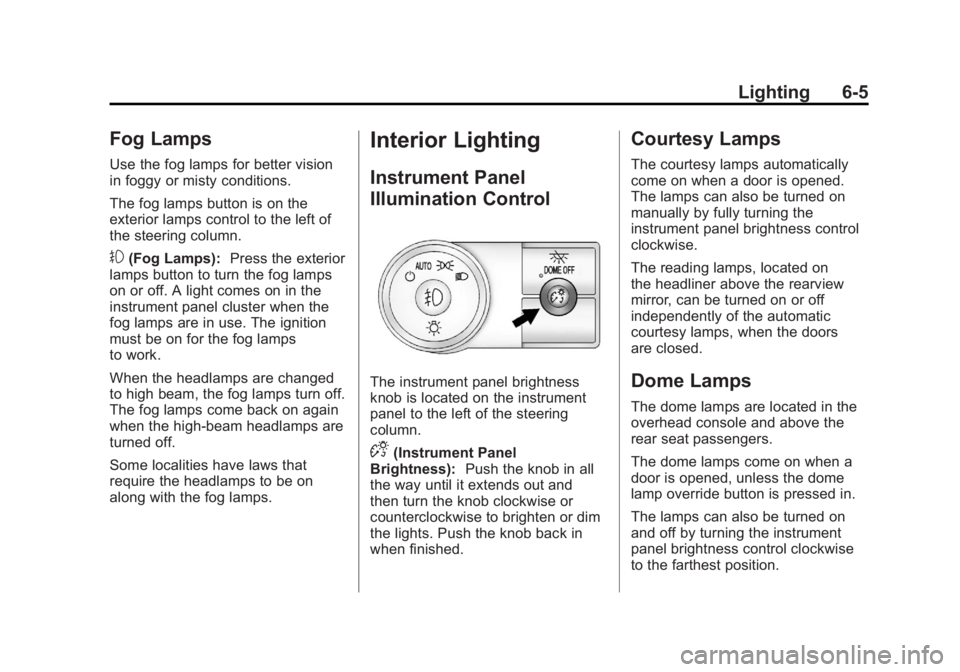
The fog lamps button is on the
exterior lamps control to the left of
the steering column.
#(Fog Lamps):Press the exterior
lamps button to turn the fog lamps
on or off. A light comes on in the
instrument panel cluster when the
fog lamps are in use. The ignition
must be on for the fog lamps
to work.
When the headlamps are changed
to high beam, the fog lamps turn off.
The fog lamps come back on again
when the high-beam headlamps are
turned off.
Some localities have laws that
require the headlamps to be on
along with the fog lamps.
Interior Lighting
Instrument Panel
Illumination Control
The instrument panel brightness
knob is located on the instrument
panel to the left of the steering
column.
D(Instrument Panel
Brightness): Push the knob in all
the way until it extends out and
then turn the knob clockwise or
counterclockwise to brighten or dim
the lights. Push the knob back in
when finished.
Courtesy Lamps
The courtesy lamps automatically
come on when a door is opened.
The lamps can also be turned on
manually by fully turning the
instrument panel brightness control
clockwise.
The reading lamps, located on
the headliner above the rearview
mirror, can be turned on or off
independently of the automatic
courtesy lamps, when the doors
are closed.
Dome Lamps
The dome lamps are located in the
overhead console and above the
rear seat passengers.
The dome lamps come on when a
door is opened, unless the dome
lamp override button is pressed in.
The lamps can also be turned on
and off by turning the instrument
panel brightness control clockwise
to the farthest position.
Page 248 of 468
Black plate (4,1)GMC Acadia/Acadia Denali Owner Manual - 2012
8-4 Climate Controls
Do not drive the vehicle until all
windows are clear.
For vehicles with heated outside
rearview mirrors, fog or frost is
cleared from the surface of the
mirror when
1is pressed.
Notice: Do not use anything
sharp on the inside of the rear
window. If you do, you could cut
or damage the warming grid, and
the repairs would not be covered
by the vehicle warranty. Do not
attach a temporary vehicle
license, tape, a decal, or anything
similar to the defogger grid.
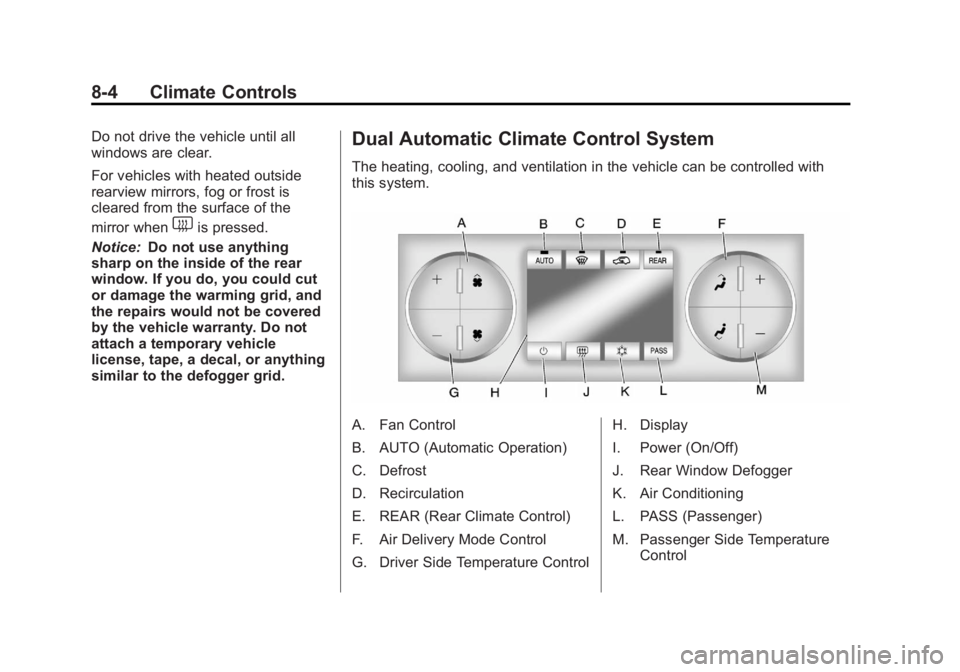
Dual Automatic Climate Control System
The heating, cooling, and ventilation in the vehicle can be controlled with
this system.
A. Fan Control
B. AUTO (Automatic Operation)
C. Defrost
D. Recirculation
E. REAR (Rear Climate Control)
F. Air Delivery Mode Control
G. Driver Side Temperature Control H. Display
I. Power (On/Off)
J. Rear Window Defogger
K. Air Conditioning
L. PASS (Passenger)
M. Passenger Side Temperature
Control
Page 252 of 468
Black plate (8,1)GMC Acadia/Acadia Denali Owner Manual - 2012
8-8 Climate Controls
The air conditioning system
removes moisture from the air, so
water might drip under the vehicle
while idling or after turning off the
engine. This is normal.
@(Recirculation):Press to turn
the recirculation mode on or off.
An indicator light comes on when
recirculation is on. When the engine
is turned off, the recirculation mode
automatically turns off and must be
re‐selected when the engine is
turned on again.
This mode recirculates and helps
to quickly cool the air inside the
vehicle. It can be used to prevent
outside air and odors from entering
the vehicle.
The recirculation mode cannot be
used with floor, defog, or defrosting
modes. If recirculation is selected
in these modes, the indicator
flashes three times and turns off. The air conditioning compressor
also comes on when this mode is
activated. While in recirculation
mode the windows can fog when
the weather is cold and damp.
To clear the fog, select either the
defog or defrost mode and increase
the fan speed.
REAR:
Press to turn the rear
heating and air conditioning on or
off. See Rear Climate Control
System (Rear Climate Control Only)
on page 8‑10 orRear Climate
Control System (Rear Climate with
Rear Seat Audio) on page 8‑11.
Rear Window Defogger
The rear window defogger uses a
warming grid to remove fog from the
rear window.
1(Rear Window Defogger):
Press to turn the rear window
defogger on or off. The rear window
defogger stays on for about
10 minutes, before turning off.
The defogger also turns off when
the engine is turned off. Do not drive
the vehicle until all the windows
are clear.
For vehicles with heated outside
rearview mirrors, fog or frost is
cleared from the surface of the
mirror when the rear window defog
button is pressed.
Notice: Do not use a razor blade
or sharp object to clear the inside
rear window. Do not adhere
anything to the defogger grid
lines in the rear glass. These
actions may damage the rear
defogger. Repairs would not be
covered by your warranty.