Change le GMC ACADIA 2014 Owner's Manual
[x] Cancel search | Manufacturer: GMC, Model Year: 2014, Model line: ACADIA, Model: GMC ACADIA 2014Pages: 414, PDF Size: 4.21 MB
Page 3 of 414
Black plate (3,1)GMC Acadia/Acadia Denali Owner Manual (GMNA-Localizing-U.S./Canada/
Mexico-6014315) - 2014 - crc - 8/15/13
Introduction iii
The names, logos, emblems,
slogans, vehicle model names, and
vehicle body designs appearing in
this manual including, but not limited
to, GM, the GM logo, GMC, the
GMC Truck Emblem, ACADIA, and
DENALI are trademarks and/or
service marks of General Motors
LLC, its subsidiaries, affiliates,
or licensors.
This manual describes features that
may or may not be on your specific
vehicle either because they are
options that you did not purchase or
due to changes subsequent to the
printing of this owner manual.Please refer to the purchase
documentation relating to your
specific vehicle to confirm each of
the features found on your vehicle.
For vehicles first sold in Canada,
substitute the name
“General
Motors of Canada Limited” for GMC
wherever it appears in this manual.
Keep this manual in the vehicle for
quick reference.
Canadian Vehicle Owners
Propriétaires Canadiens
A French language manual can be
obtained from your dealer, at
www.helminc.com, or from:
On peut obtenir un exemplaire de
ce guide en français auprès du
concessionnaire ou à l'adresse
savant:
Helm, Incorporated
Attention: Customer Service
47911 Halyard Drive
Plymouth, MI 48170
Using this Manual
To quickly locate information about
the vehicle, use the Index in the
back of the manual. It is an
alphabetical list of what is in the
manual and the page number where
it can be found.
Litho in U.S.A.
Part No. 22867654 B Second Printing©2013 General Motors LLC. All Rights Reserved.
Page 5 of 414
Black plate (5,1)GMC Acadia/Acadia Denali Owner Manual (GMNA-Localizing-U.S./Canada/
Mexico-6014315) - 2014 - crc - 8/15/13
Introduction v
Vehicle Symbol Chart
Here are some additional symbols
that may be found on the vehicle
and what they mean. For more
information on the symbol, refer to
the Index.
9:Airbag Readiness Light
!:Antilock Brake System (ABS)
%:Audio Steering Wheel Controls
or OnStar®(if equipped)
$: Brake System Warning Light
":Charging System
I:Cruise Control
B: Engine Coolant Temperature
O:Exterior Lamps
#:Fog Lamps
.: Fuel Gauge
+:Fuses
3: Headlamp High/Low-Beam
Changer
j: LATCH System Child
Restraints
*: Malfunction Indicator Lamp
::Oil Pressure
g:Outside Power Foldaway
Mirrors
}: Power
/:Remote Vehicle Start
>:Safety Belt Reminders
7:Tire Pressure Monitor
_: Tow/Haul Mode
t:Traction Control/StabiliTrak®
M:Windshield Washer Fluid
Page 9 of 414
Black plate (3,1)GMC Acadia/Acadia Denali Owner Manual (GMNA-Localizing-U.S./Canada/
Mexico-6014315) - 2014 - crc - 8/15/13
In Brief 1-3
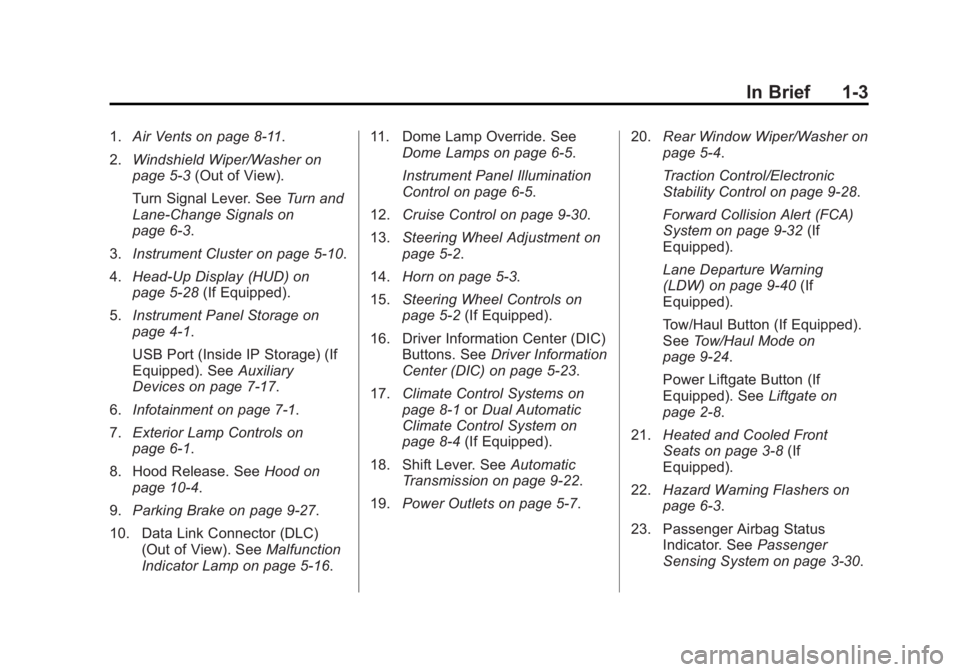
1.Air Vents on page 8-11.
2. Windshield Wiper/Washer on
page 5-3 (Out of View).
Turn Signal Lever. See Turn and
Lane-Change Signals on
page 6-3.
3. Instrument Cluster on page 5-10.
4. Head-Up Display (HUD) on
page 5-28 (If Equipped).
5. Instrument Panel Storage on
page 4-1.
USB Port (Inside IP Storage) (If
Equipped). See Auxiliary
Devices on page 7-17.
6. Infotainment on page 7-1.
7. Exterior Lamp Controls on
page 6-1.
8. Hood Release. See Hood on
page 10-4.
9. Parking Brake on page 9-27.
10. Data Link Connector (DLC) (Out of View). See Malfunction
Indicator Lamp on page 5-16. 11. Dome Lamp Override. See
Dome Lamps on page 6-5.
Instrument Panel Illumination
Control on page 6-5.
12. Cruise Control on page 9-30.
13. Steering Wheel Adjustment on
page 5-2.
14. Horn on page 5-3.
15. Steering Wheel Controls on
page 5-2 (If Equipped).
16. Driver Information Center (DIC) Buttons. See Driver Information
Center (DIC) on page 5-23.
17. Climate Control Systems on
page 8-1 orDual Automatic
Climate Control System on
page 8-4 (If Equipped).
18. Shift Lever. See Automatic
Transmission on page 9-22.
19. Power Outlets on page 5-7. 20.
Rear Window Wiper/Washer on
page 5-4.
Traction Control/Electronic
Stability Control on page 9-28.
Forward Collision Alert (FCA)
System on page 9-32 (If
Equipped).
Lane Departure Warning
(LDW) on page 9-40 (If
Equipped).
Tow/Haul Button (If Equipped).
See Tow/Haul Mode on
page 9-24.
Power Liftgate Button (If
Equipped). See Liftgate on
page 2-8.
21. Heated and Cooled Front
Seats on page 3-8 (If
Equipped).
22. Hazard Warning Flashers on
page 6-3.
23. Passenger Airbag Status Indicator. See Passenger
Sensing System on page 3-30.
Page 15 of 414
Black plate (9,1)GMC Acadia/Acadia Denali Owner Manual (GMNA-Localizing-U.S./Canada/
Mexico-6014315) - 2014 - crc - 8/15/13
In Brief 1-9
3. Pull up on the release lever onthe back of the seat.
4. Push the seatback forward to lay flat.
See Third Row Seats on page 3-11.
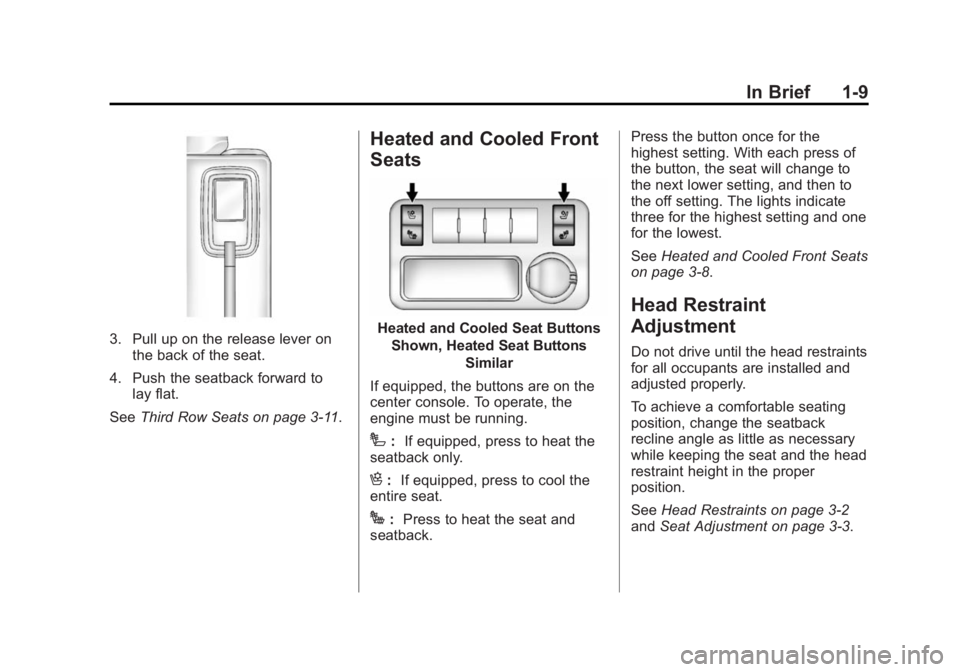
Heated and Cooled Front
Seats
Heated and Cooled Seat Buttons
Shown, Heated Seat Buttons Similar
If equipped, the buttons are on the
center console. To operate, the
engine must be running.
I: If equipped, press to heat the
seatback only.
H: If equipped, press to cool the
entire seat.
J: Press to heat the seat and
seatback. Press the button once for the
highest setting. With each press of
the button, the seat will change to
the next lower setting, and then to
the off setting. The lights indicate
three for the highest setting and one
for the lowest.
See
Heated and Cooled Front Seats
on page 3-8.
Head Restraint
Adjustment
Do not drive until the head restraints
for all occupants are installed and
adjusted properly.
To achieve a comfortable seating
position, change the seatback
recline angle as little as necessary
while keeping the seat and the head
restraint height in the proper
position.
See Head Restraints on page 3-2
and Seat Adjustment on page 3-3.
Page 20 of 414
Black plate (14,1)GMC Acadia/Acadia Denali Owner Manual (GMNA-Localizing-U.S./Canada/
Mexico-6014315) - 2014 - crc - 8/15/13
1-14 In Brief
Z:Press to turn the rear wiper on
and off. The wiper speed cannot be
changed.
Y: Press to spray washer fluid on
the rear window. The window wiper
will also come on.
See Windshield Wiper/Washer on
page 5-3 andRear Window Wiper/
Washer on page 5-4.
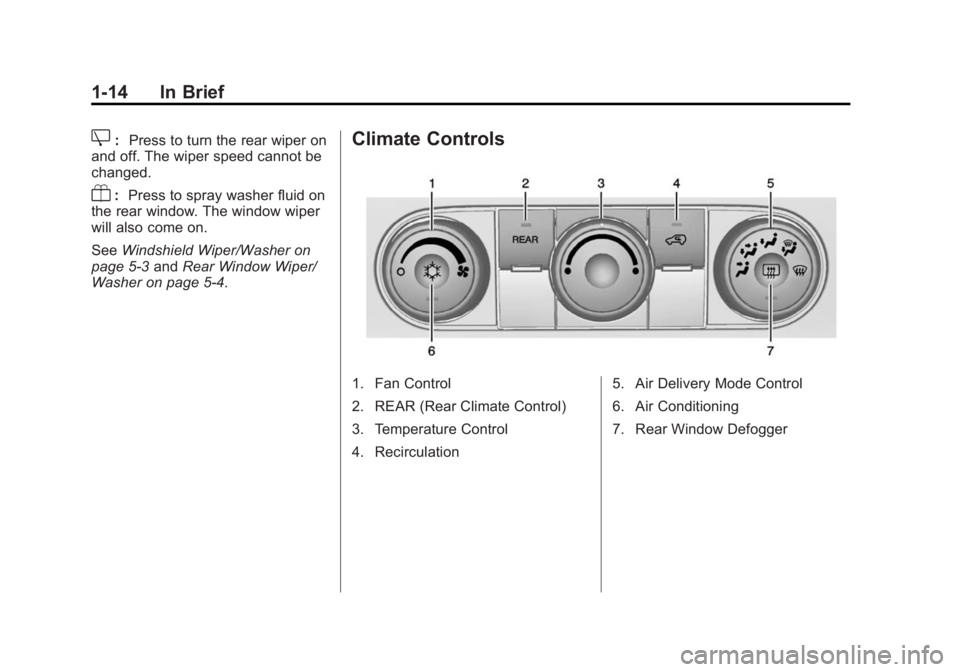
Climate Controls
1. Fan Control
2. REAR (Rear Climate Control)
3. Temperature Control
4. Recirculation 5. Air Delivery Mode Control
6. Air Conditioning
7. Rear Window Defogger
Page 22 of 414
Black plate (16,1)GMC Acadia/Acadia Denali Owner Manual (GMNA-Localizing-U.S./Canada/
Mexico-6014315) - 2014 - crc - 8/15/13
1-16 In Brief
Vehicle Features
Radio(s)
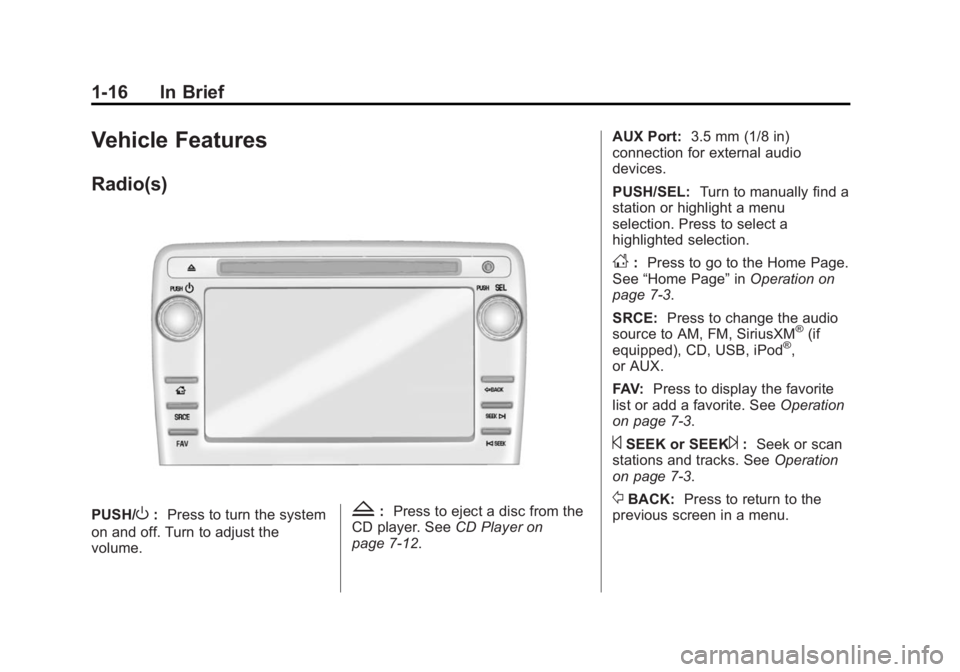
PUSH/O:Press to turn the system
on and off. Turn to adjust the
volume.Z: Press to eject a disc from the
CD player. See CD Player on
page 7-12. AUX Port:
3.5 mm (1/8 in)
connection for external audio
devices.
PUSH/SEL: Turn to manually find a
station or highlight a menu
selection. Press to select a
highlighted selection.
D: Press to go to the Home Page.
See “Home Page” inOperation on
page 7-3.
SRCE: Press to change the audio
source to AM, FM, SiriusXM
®(if
equipped), CD, USB, iPod®,
or AUX.
FAV: Press to display the favorite
list or add a favorite. See Operation
on page 7-3.
©SEEK or SEEK¨: Seek or scan
stations and tracks. See Operation
on page 7-3.
/BACK: Press to return to the
previous screen in a menu.
Page 23 of 414
Black plate (17,1)GMC Acadia/Acadia Denali Owner Manual (GMNA-Localizing-U.S./Canada/
Mexico-6014315) - 2014 - crc - 8/15/13
In Brief 1-17
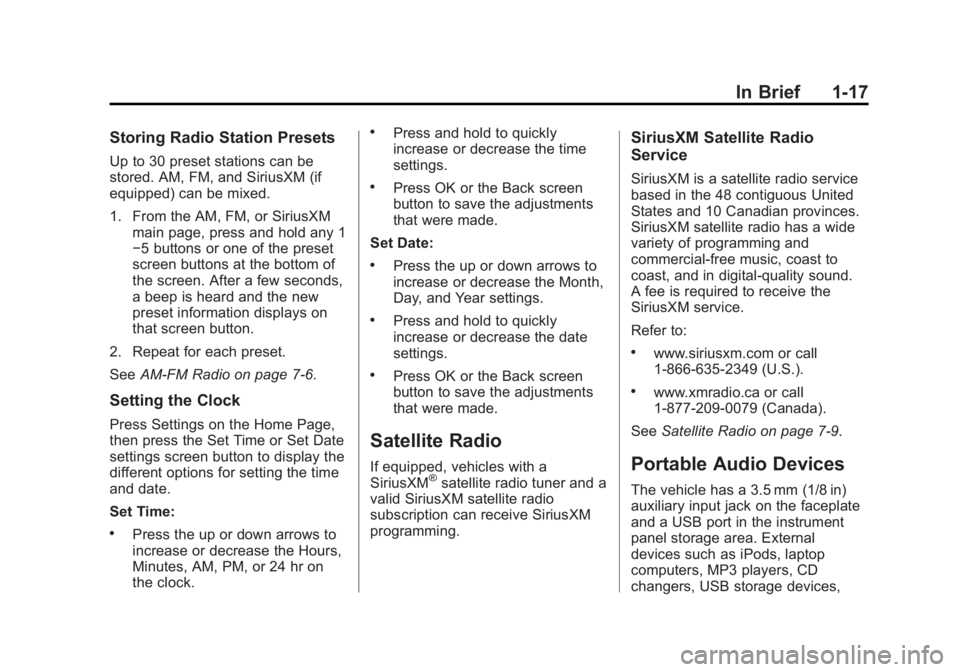
Storing Radio Station Presets
Up to 30 preset stations can be
stored. AM, FM, and SiriusXM (if
equipped) can be mixed.
1. From the AM, FM, or SiriusXMmain page, press and hold any 1
−5 buttons or one of the preset
screen buttons at the bottom of
the screen. After a few seconds,
a beep is heard and the new
preset information displays on
that screen button.
2. Repeat for each preset.
See AM-FM Radio on page 7-6.
Setting the Clock
Press Settings on the Home Page,
then press the Set Time or Set Date
settings screen button to display the
different options for setting the time
and date.
Set Time:
.Press the up or down arrows to
increase or decrease the Hours,
Minutes, AM, PM, or 24 hr on
the clock.
.Press and hold to quickly
increase or decrease the time
settings.
.Press OK or the Back screen
button to save the adjustments
that were made.
Set Date:
.Press the up or down arrows to
increase or decrease the Month,
Day, and Year settings.
.Press and hold to quickly
increase or decrease the date
settings.
.Press OK or the Back screen
button to save the adjustments
that were made.
Satellite Radio
If equipped, vehicles with a
SiriusXM®satellite radio tuner and a
valid SiriusXM satellite radio
subscription can receive SiriusXM
programming.
SiriusXM Satellite Radio
Service
SiriusXM is a satellite radio service
based in the 48 contiguous United
States and 10 Canadian provinces.
SiriusXM satellite radio has a wide
variety of programming and
commercial-free music, coast to
coast, and in digital-quality sound.
A fee is required to receive the
SiriusXM service.
Refer to:
.www.siriusxm.com or call
1-866-635-2349 (U.S.).
.www.xmradio.ca or call
1-877-209-0079 (Canada).
See Satellite Radio on page 7-9.
Portable Audio Devices
The vehicle has a 3.5 mm (1/8 in)
auxiliary input jack on the faceplate
and a USB port in the instrument
panel storage area. External
devices such as iPods, laptop
computers, MP3 players, CD
changers, USB storage devices,
Page 24 of 414
Black plate (18,1)GMC Acadia/Acadia Denali Owner Manual (GMNA-Localizing-U.S./Canada/
Mexico-6014315) - 2014 - crc - 8/15/13
1-18 In Brief
etc. can be connected to the
auxiliary port using a 3.5 mm (1/8 in)
input jack or the USB port
depending on the audio system.
If equipped, there are two USB
ports on the rear of the center
console that can be used for
charging only. They can charge
devices that draw 2.1 amps or less.
See the device’s owner manual for
the specification.
See Auxiliary Devices on page 7-17.
Bluetooth®
The Bluetooth®system allows users
with a Bluetooth-enabled mobile
phone to make and receive
hands-free calls using the vehicle
audio system and controls.
The Bluetooth-enabled mobile
phone must be paired with the
in-vehicle Bluetooth system before it
can be used in the vehicle. Not all
phones will support all functions.
See Bluetooth on page 7-20.
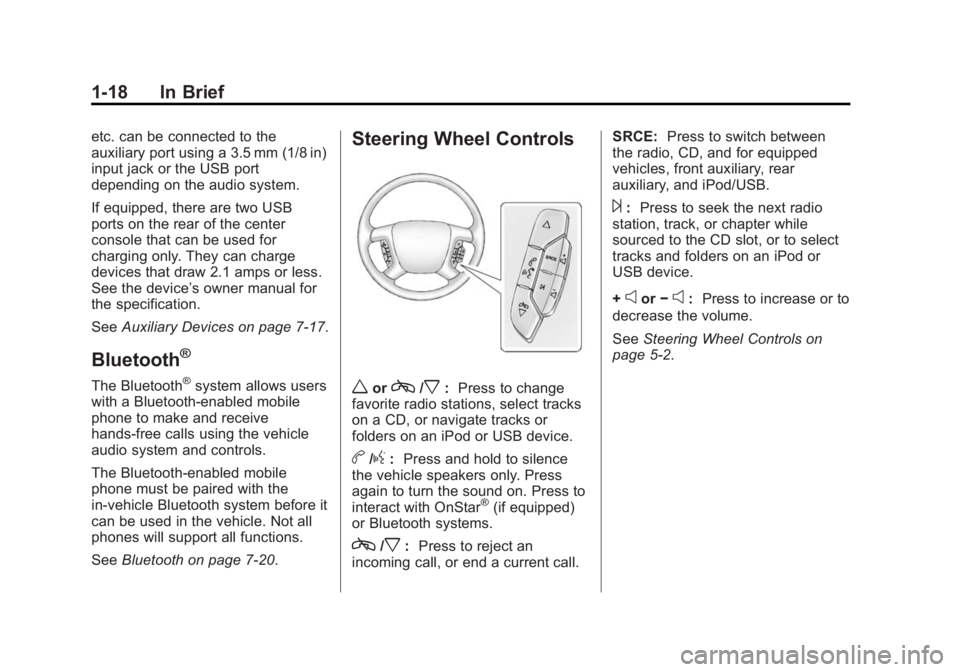
Steering Wheel Controls
worc/x:Press to change
favorite radio stations, select tracks
on a CD, or navigate tracks or
folders on an iPod or USB device.
b/g: Press and hold to silence
the vehicle speakers only. Press
again to turn the sound on. Press to
interact with OnStar
®(if equipped)
or Bluetooth systems.
c/x: Press to reject an
incoming call, or end a current call. SRCE:
Press to switch between
the radio, CD, and for equipped
vehicles, front auxiliary, rear
auxiliary, and iPod/USB.
¨: Press to seek the next radio
station, track, or chapter while
sourced to the CD slot, or to select
tracks and folders on an iPod or
USB device.
+
eor −e:Press to increase or to
decrease the volume.
See Steering Wheel Controls on
page 5-2.
Page 25 of 414
Black plate (19,1)GMC Acadia/Acadia Denali Owner Manual (GMNA-Localizing-U.S./Canada/
Mexico-6014315) - 2014 - crc - 8/15/13
In Brief 1-19
Cruise Control
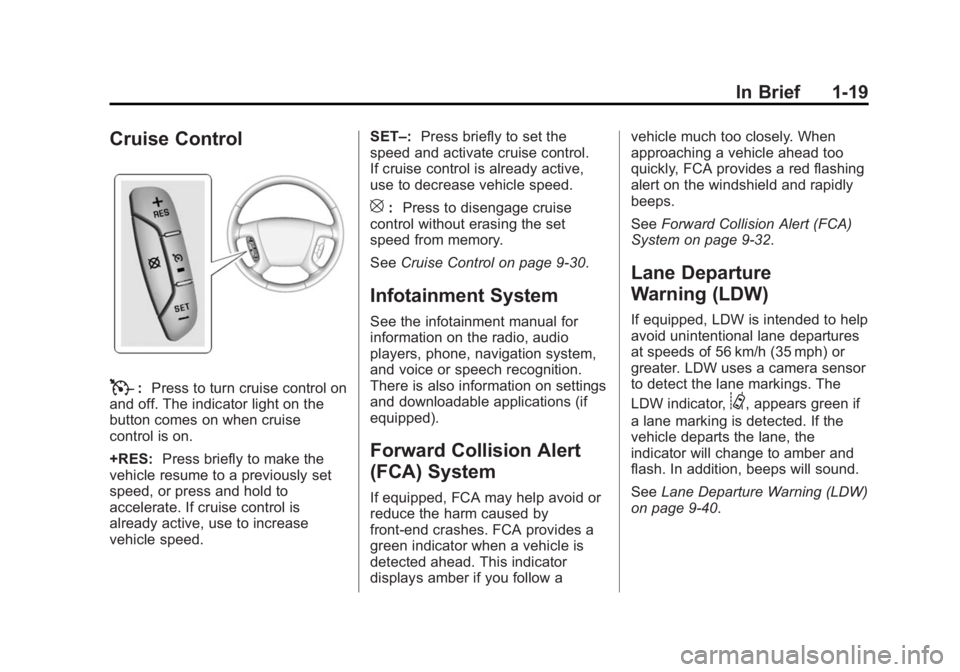
T:Press to turn cruise control on
and off. The indicator light on the
button comes on when cruise
control is on.
+RES: Press briefly to make the
vehicle resume to a previously set
speed, or press and hold to
accelerate. If cruise control is
already active, use to increase
vehicle speed. SET–:
Press briefly to set the
speed and activate cruise control.
If cruise control is already active,
use to decrease vehicle speed.
[: Press to disengage cruise
control without erasing the set
speed from memory.
See Cruise Control on page 9-30.
Infotainment System
See the infotainment manual for
information on the radio, audio
players, phone, navigation system,
and voice or speech recognition.
There is also information on settings
and downloadable applications (if
equipped).
Forward Collision Alert
(FCA) System
If equipped, FCA may help avoid or
reduce the harm caused by
front-end crashes. FCA provides a
green indicator when a vehicle is
detected ahead. This indicator
displays amber if you follow a vehicle much too closely. When
approaching a vehicle ahead too
quickly, FCA provides a red flashing
alert on the windshield and rapidly
beeps.
See
Forward Collision Alert (FCA)
System on page 9-32.
Lane Departure
Warning (LDW)
If equipped, LDW is intended to help
avoid unintentional lane departures
at speeds of 56 km/h (35 mph) or
greater. LDW uses a camera sensor
to detect the lane markings. The
LDW indicator,
@, appears green if
a lane marking is detected. If the
vehicle departs the lane, the
indicator will change to amber and
flash. In addition, beeps will sound.
See Lane Departure Warning (LDW)
on page 9-40.
Page 28 of 414
Black plate (22,1)GMC Acadia/Acadia Denali Owner Manual (GMNA-Localizing-U.S./Canada/
Mexico-6014315) - 2014 - crc - 8/15/13
1-22 In Brief
Tire Pressure Monitor
This vehicle may have a Tire
Pressure Monitor System (TPMS).
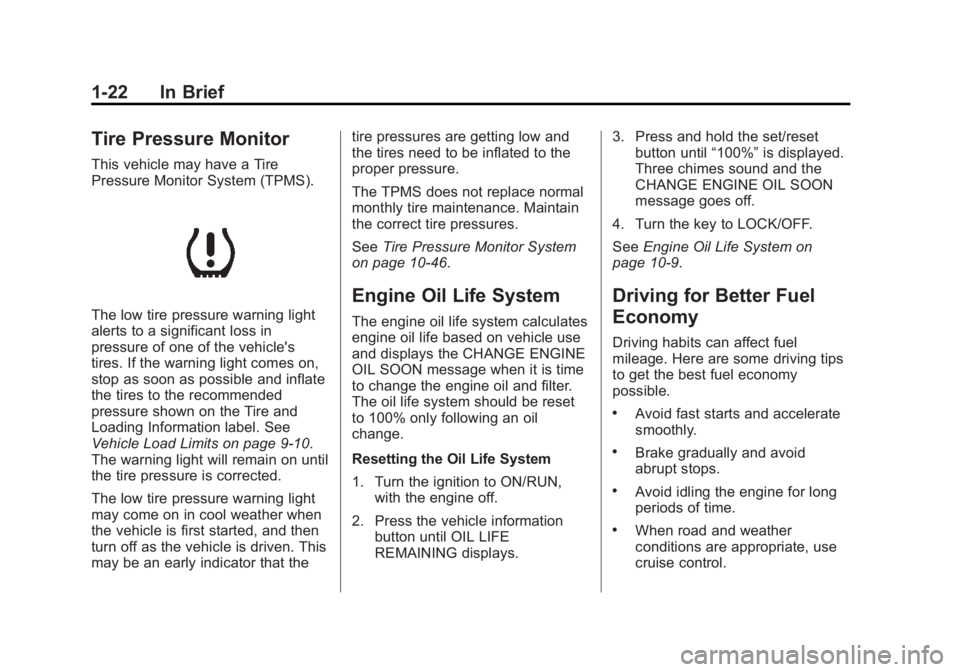
The low tire pressure warning light
alerts to a significant loss in
pressure of one of the vehicle's
tires. If the warning light comes on,
stop as soon as possible and inflate
the tires to the recommended
pressure shown on the Tire and
Loading Information label. See
Vehicle Load Limits on page 9-10.
The warning light will remain on until
the tire pressure is corrected.
The low tire pressure warning light
may come on in cool weather when
the vehicle is first started, and then
turn off as the vehicle is driven. This
may be an early indicator that thetire pressures are getting low and
the tires need to be inflated to the
proper pressure.
The TPMS does not replace normal
monthly tire maintenance. Maintain
the correct tire pressures.
See
Tire Pressure Monitor System
on page 10-46.
Engine Oil Life System
The engine oil life system calculates
engine oil life based on vehicle use
and displays the CHANGE ENGINE
OIL SOON message when it is time
to change the engine oil and filter.
The oil life system should be reset
to 100% only following an oil
change.
Resetting the Oil Life System
1. Turn the ignition to ON/RUN, with the engine off.
2. Press the vehicle information button until OIL LIFE
REMAINING displays. 3. Press and hold the set/reset
button until “100%”is displayed.
Three chimes sound and the
CHANGE ENGINE OIL SOON
message goes off.
4. Turn the key to LOCK/OFF.
See Engine Oil Life System on
page 10-9.
Driving for Better Fuel
Economy
Driving habits can affect fuel
mileage. Here are some driving tips
to get the best fuel economy
possible.
.Avoid fast starts and accelerate
smoothly.
.Brake gradually and avoid
abrupt stops.
.Avoid idling the engine for long
periods of time.
.When road and weather
conditions are appropriate, use
cruise control.