CD player GMC ACADIA 2015 User Guide
[x] Cancel search | Manufacturer: GMC, Model Year: 2015, Model line: ACADIA, Model: GMC ACADIA 2015Pages: 407, PDF Size: 4.46 MB
Page 186 of 407
Black plate (13,1)GMC Acadia/Acadia Denali Owner Manual (GMNA-Localizing-U.S./Canada/
Mexico-7576030) - 2015 - CRC - 8/18/14
Infotainment System 7-13
.The air is very humid. Try the
disc again later.
.There was a problem while
burning the disc.
.The label is caught in the player.
If the CD is not playing correctly, for
any other reason, try a known
good CD.
If any error continues, contact your
dealer.
MP3
Playing an MP3 CD
To play an MP3 CD, follow the same
instructions as “Playing an
Audio CD.”
The following guidelines must be
met when creating an MP3 disc,
otherwise the CD might not play:
.Sampling rate: 16 kHz,
22.05 kHz, 24 kHz, 32 kHz,
44.1 kHz, and 48 kHz.
.Bit rates supported: 8, 16, 24,
32, 40, 48, 56, 64, 80, 96, 112,
128, 144, 160, 192, 224, 256,
and 320 kbps.
.Maximum number of folders:
eight folders with 255 files per
folder.
.Maximum of 1,000 files on
a disc.
.Recorded on a CD-R or CD-RW
with a maximum capacity of
700 MB.
.The Artist/Album/Song Titles/
Genre information requires a CD
to be fully scanned before the
music navigator works with
these menus. MP3 Audio
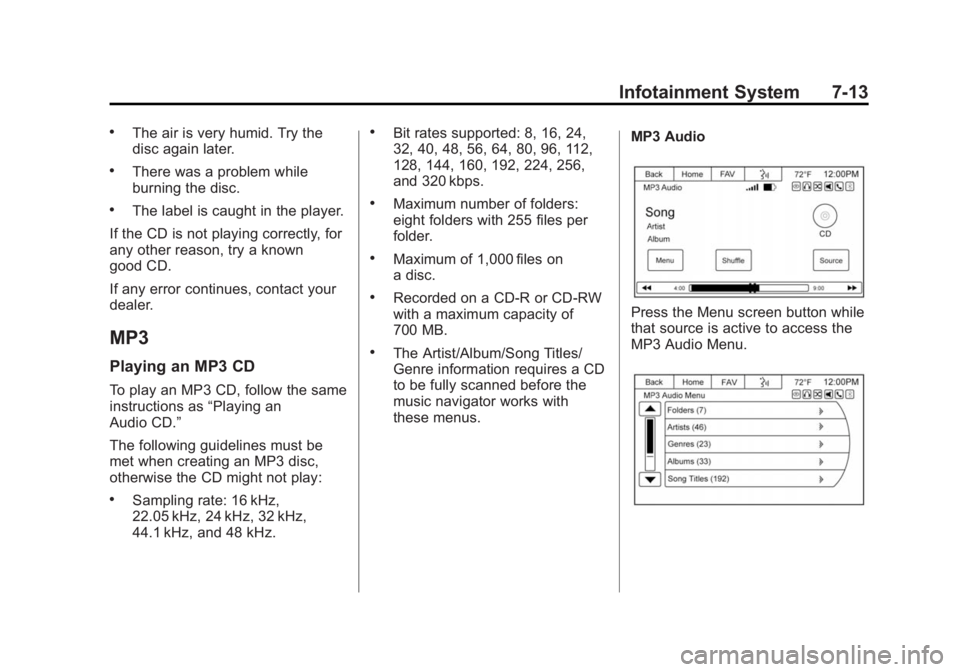
Press the Menu screen button while
that source is active to access the
MP3 Audio Menu.
Page 187 of 407
Black plate (14,1)GMC Acadia/Acadia Denali Owner Manual (GMNA-Localizing-U.S./Canada/
Mexico-7576030) - 2015 - CRC - 8/18/14
7-14 Infotainment System
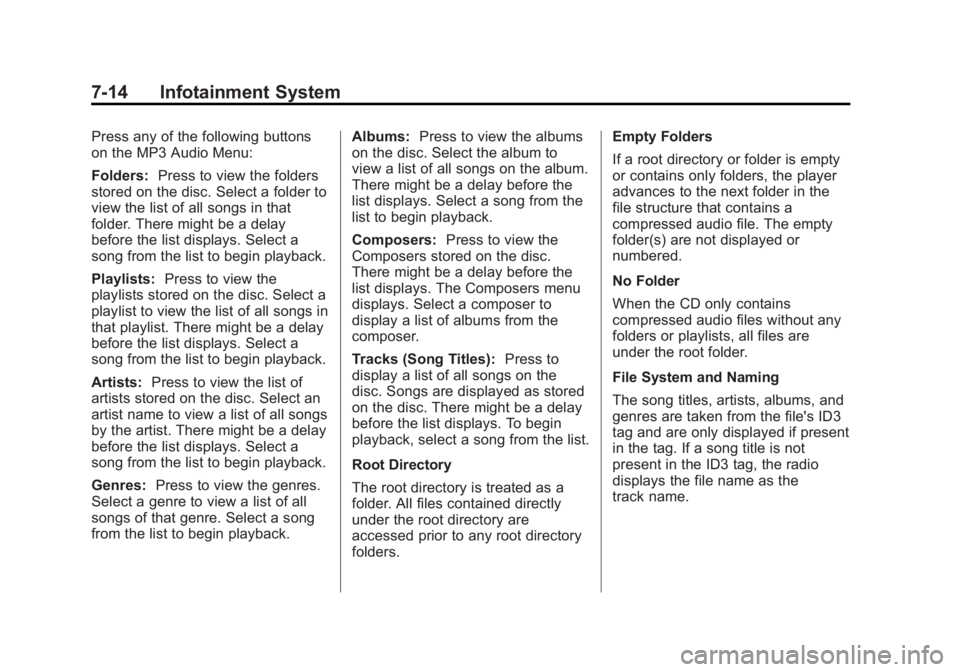
Press any of the following buttons
on the MP3 Audio Menu:
Folders:Press to view the folders
stored on the disc. Select a folder to
view the list of all songs in that
folder. There might be a delay
before the list displays. Select a
song from the list to begin playback.
Playlists: Press to view the
playlists stored on the disc. Select a
playlist to view the list of all songs in
that playlist. There might be a delay
before the list displays. Select a
song from the list to begin playback.
Artists: Press to view the list of
artists stored on the disc. Select an
artist name to view a list of all songs
by the artist. There might be a delay
before the list displays. Select a
song from the list to begin playback.
Genres: Press to view the genres.
Select a genre to view a list of all
songs of that genre. Select a song
from the list to begin playback. Albums:
Press to view the albums
on the disc. Select the album to
view a list of all songs on the album.
There might be a delay before the
list displays. Select a song from the
list to begin playback.
Composers: Press to view the
Composers stored on the disc.
There might be a delay before the
list displays. The Composers menu
displays. Select a composer to
display a list of albums from the
composer.
Tracks (Song Titles): Press to
display a list of all songs on the
disc. Songs are displayed as stored
on the disc. There might be a delay
before the list displays. To begin
playback, select a song from the list.
Root Directory
The root directory is treated as a
folder. All files contained directly
under the root directory are
accessed prior to any root directory
folders. Empty Folders
If a root directory or folder is empty
or contains only folders, the player
advances to the next folder in the
file structure that contains a
compressed audio file. The empty
folder(s) are not displayed or
numbered.
No Folder
When the CD only contains
compressed audio files without any
folders or playlists, all files are
under the root folder.
File System and Naming
The song titles, artists, albums, and
genres are taken from the file's ID3
tag and are only displayed if present
in the tag. If a song title is not
present in the ID3 tag, the radio
displays the file name as the
track name.
Page 188 of 407
Black plate (15,1)GMC Acadia/Acadia Denali Owner Manual (GMNA-Localizing-U.S./Canada/
Mexico-7576030) - 2015 - CRC - 8/18/14
Infotainment System 7-15
Preprogrammed Playlists
The radio recognizes
preprogrammed playlists; however,
there is no editing capability. These
playlists are treated as special
folders containing compressed
audio song files.
Auxiliary Devices
The vehicle has a 3.5 mm (1/8 in)
auxiliary input jack on the faceplate
and a USB port in the center stack.
If equipped, there are two USB
ports on the rear of the center
console that can be used for
charging only. They can charge
devices that draw 2.1 amps or less.
See the device’s owner manual for
the specification.
Using the 3.5 mm (1/8 in)
Auxiliary Input Jack
This is not an audio output; do not
plug a headphone set into the front
auxiliary input jack. Connect an
auxiliary input device such as an
iPod, laptop computer, MP3 player, CD player, or cassette tape player
to the auxiliary input jack for use as
another source for audio listening.
Drivers are encouraged to set up
any auxiliary device while the
vehicle is in P (Park). See
Defensive Driving on page 9-3
for
more information on driver
distraction.
To use an auxiliary input device,
connect a 3.5 mm (1/8 in) cable to
the radio's front auxiliary input jack.
Press SRCE to select the device.
Using the USB Port
The USB port can control a USB
storage device or an iPod using the
radio buttons and knobs.
USB Supported Devices
.USB Flash Drives
.Portable USB Hard Drives
.Fifth generation or later iPod
.iPod classic®(6th generation)
.iPod nano®(3G, 4G, 5G,
and 6G)
.iPod touch®(1G, 2G, 3G,
and 4G)
.iPhone®(2G, 3G, 3GS, 4, and 5)
.iPad®(1G, 2G)
Not all iPods and USB drives are
compatible with the USB port.
Make sure the iPod has the latest
firmware from Apple
®for proper
operation. iPod firmware can be
updated using the latest iTunes
®
application. See www.apple.com/
itunes.
For help identifying your iPod, go to
www.apple.com/support.
Page 192 of 407
Black plate (19,1)GMC Acadia/Acadia Denali Owner Manual (GMNA-Localizing-U.S./Canada/
Mexico-7576030) - 2015 - CRC - 8/18/14
Infotainment System 7-19
receive phone calls. The system
can be used while the key is in the
ON/RUN or ACC/ACCESSORY
position. The range of the Bluetooth
system can be up to 9.1 m (30 ft).
Not all phones support all functions,
and not all phones work with the
in-vehicle Bluetooth system. See
www.gm.com/bluetooth for more
information on compatible phones.
Voice Recognition
The Bluetooth system uses voice
recognition to interpret voice
commands to dial phone numbers
and name tags.
For additional information, say
“Help”while you are in a voice
recognition menu.
Noise: Keep interior noise levels to
a minimum. The system may not
recognize voice commands if there
is too much background noise. When to Speak:
A short tone
sounds after the system responds
indicating when it is waiting for a
voice command. Wait until the tone
and then speak.
How to Speak: Speak clearly in a
calm and natural voice.
Audio System
When using the in-vehicle Bluetooth
system, sound comes through the
vehicle's front audio system
speakers and overrides the audio
system. Use the audio system
volume knob, during a call, to
change the volume level. The
adjusted volume level remains in
memory for later calls. To prevent
missed calls, a minimum volume
level is used if the volume is turned
down too low.
Bluetooth Controls
Use the buttons located on the
steering wheel to operate the
in-vehicle Bluetooth system. See
Steering Wheel Controls on
page 5-2.
b/g(Press To Talk): Press to
answer incoming calls, confirm
system information, and start
speech recognition.
c/x(End): Press to end a call,
reject a call, or cancel an operation.
Pairing
A Bluetooth enabled cell phone
must be paired to the Bluetooth
system and then connected to the
vehicle before it can be used. See
the cell phone manufacturer's user
guide for Bluetooth functions before
pairing the cell phone. If a Bluetooth
phone is not connected, calls will be
made using OnStar Hands-Free
Calling, if equipped. See “OnStar”if
equipped.
Pairing Information
.A Bluetooth phone with MP3
capability cannot be paired to
the vehicle as a phone and an
MP3 player at the same time.
.Up to five cell phones can be
paired to the Bluetooth system.
Page 396 of 407
Black plate (1,1)GMC Acadia/Acadia Denali Owner Manual (GMNA-Localizing-U.S./Canada/
Mexico-7576030) - 2015 - CRC - 8/18/14
INDEX i-1
A
Accessories andModifications . . . . . . . . . . . . . . . . . 10-2
Accessory Power . . . . . . . . . . . . . . 9-19
Add-On Electrical Equipment . . . . . . . . . . . . . . . . . . . 9-53
Additional Information
OnStar
®. . . . . . . . . . . . . . . . . . . . . . 14-6
Additional Maintenance and Care . . . . . . . . . . . . . . . . . . . . . 11-8
Adjustments
Lumbar, Front Seats . . . . . . . . . . . 3-4
Air Cleaner/Filter, Engine . . . . . 10-10
Air Filter, Passenger Compartment . . . . . . . . . . . . . . . . 8-12
Air Vents . . . . . . . . . . . . . . . . . . . . . . 8-11
Airbag System
Check . . . . . . . . . . . . . . . . . . . . . . . . 3-35
How Does an AirbagRestrain? . . . . . . . . . . . . . . . . . . . 3-28
Passenger Sensing System . . . . . . . . . . . . . . . . . . . . . . 3-29
What Makes an Airbag Inflate? . . . . . . . . . . . . . . . . . . . . . . 3-27 Airbag System (cont'd)
What Will You See after an
Airbag Inflates? . . . . . . . . . . . . . 3-28
When Should an Airbag
Inflate? . . . . . . . . . . . . . . . . . . . . . . 3-26
Where Are the Airbags? . . . . . . 3-24
Airbags Adding Equipment to theVehicle . . . . . . . . . . . . . . . . . . . . . . 3-34
Passenger Status Indicator . . . 5-14
Readiness Light . . . . . . . . . . . . . . 5-14
Servicing Airbag-Equipped Vehicles . . . . . . . . . . . . . . . . . . . . . 3-34
System Check . . . . . . . . . . . . . . . . 3-22
Alarm Vehicle Security . . . . . . . . . . . . . . 2-11
Alert Side Blind Zone (SBZA) . . . . . . 9-36
All-Season Tires . . . . . . . . . . . . . . 10-38
All-Wheel Drive . . . . . . . . . 9-26, 10-23
AM-FM Radio . . . . . . . . . . . . . . . . . . . 7-6
Antenna Multi-band . . . . . . . . . . . . . . . . . . . . 7-11
Antilock Brake System (ABS) . . . . . . . . . . . . . . . . 9-26
Warning Light . . . . . . . . . . . . . . . . . 5-19 Appearance Care
Exterior . . . . . . . . . . . . . . . . . . . . . 10-75
Interior . . . . . . . . . . . . . . . . . . . . . . 10-80
Armrest Storage . . . . . . . . . . . . . . . . 4-2
Assistance Program, Roadside . . . . . . . . . . . . . . . . . . . . . 13-5
Audio Controller,
Rear (RAC) . . . . . . . . . . . . . . . . . . 7-17
Audio Players . . . . . . . . . . . . . . . . . 7-11 CD . . . . . . . . . . . . . . . . . . . . . . . . . . . 7-11
MP3 . . . . . . . . . . . . . . . . . . . . . . . . . . 7-13
Audio System Radio Reception . . . . . . . . . . . . . . 7-10
Rear Seat (RSA) . . . . . . . . . . . . . 7-16
Theft-Deterrent Feature . . . . . . . . 7-2
Automatic
Dimming Mirrors . . . . . . . . . . . . . . 2-16
Door Locks . . . . . . . . . . . . . . . . . . . . 2-7
Transmission . . . . . . . . . . . . . . . . . 9-22
Transmission Fluid . . . . . . . . . 10-10
Automatic Transmission
Manual Mode . . . . . . . . . . . . . . . . . 9-24
Shift Lock ControlFunction Check . . . . . . . . . . . 10-23
Auxiliary
Devices . . . . . . . . . . . . . . . . . . . . . . . 7-15
Page 397 of 407
Black plate (2,1)GMC Acadia/Acadia Denali Owner Manual (GMNA-Localizing-U.S./Canada/
Mexico-7576030) - 2015 - CRC - 8/18/14
i-2 INDEX
B
Battery . . . . . . . . . . . . . . . . . . . . . . . 10-22Jump Starting . . . . . . . . . . . . . . . 10-69
Load Management . . . . . . . . . . . . . 6-7
Power Protection . . . . . . . . . . . . . . 6-8
Voltage and ChargingMessages . . . . . . . . . . . . . . . . . . . 5-33
Blade Replacement, Wiper . . . 10-24
Bluetooth Overview . . . . . . . . . . . . . . . . . . . . . 7-18
Brake
System Warning Light . . . . . . . . 5-18
Brakes . . . . . . . . . . . . . . . . . . . . . . . . 10-20 Antilock . . . . . . . . . . . . . . . . . . . . . . . 9-26
Assist . . . . . . . . . . . . . . . . . . . . . . . . . 9-28
Fluid . . . . . . . . . . . . . . . . . . . . . . . . 10-21
Parking . . . . . . . . . . . . . . . . . . . . . . . 9-27
System Messages . . . . . . . . . . . . 5-33
Braking . . . . . . . . . . . . . . . . . . . . . . . . . 9-3
Break-In, New Vehicle . . . . . . . . . 9-14
Bulb Replacement . . . . . . . . . . . . 10-26 Headlamp Aiming . . . . . . . . . . . 10-25
Headlamps . . . . . . . . . . . . . . . . . 10-26
License Plate Lamps . . . . . . . 10-26
Buying New Tires . . . . . . . . . . . . . 10-53
C
Calibration . . . . . . . . . . . . . . . . . . . . . . 5-4
California
Fuel Requirements . . . . . . . . . . . 9-43
Perchlorate MaterialsRequirements . . . . . . . . . . . . . . . 10-2
Warning . . . . . . . . . . . . . . . . . . . . . . 10-2
Camera Rear Vision (RVC) . . . . . . . . . . . . 9-38
Canadian Vehicle Owners . . . . . . . . iii
Capacities and Specifications . . . . . . . . . . . . . . . . 12-2
Carbon Monoxide Engine Exhaust . . . . . . . . . . . . . . . 9-21
Liftgate . . . . . . . . . . . . . . . . . . . . . . . . 2-8
Winter Driving . . . . . . . . . . . . . . . . . 9-7
Cargo Cover . . . . . . . . . . . . . . . . . . . . . . . . . . 4-3
Management System . . . . . . . . . . 4-3
Tie-Downs . . . . . . . . . . . . . . . . . . . . . 4-3
Cautions, Danger, and Warnings . . . . . . . . . . . . . . . . . . . . . . . . iv
CD Player . . . . . . . . . . . . . . . . . . . . . 7-11
Center Console Storage . . . . . . . . 4-2
Chains, Tire . . . . . . . . . . . . . . . . . . 10-57
Charging System Light . . . . . . . . 5-15 Check
Engine Light . . . . . . . . . . . . . . . . . . 5-15
Ignition
Transmission Lock . . . . . . . . 10-23
Child Restraints Infants and YoungChildren . . . . . . . . . . . . . . . . . . . . . 3-38
Lower Anchors and Tethers for Children . . . . . . . . . 3-44
Older Children . . . . . . . . . . . . . . . . 3-36
Securing . . . . . . . . . . . . . . . . 3-51, 3-53
Systems . . . . . . . . . . . . . . . . . . . . . . 3-41
Circuit Breakers . . . . . . . . . . . . . . 10-28
Cleaning Exterior Care . . . . . . . . . . . . . . . 10-75
Interior Care . . . . . . . . . . . . . . . . 10-80
Climate Control Systems . . . . . . . 8-1 Air Conditioning . . . . . . . . . . . . . . . 8-1
Dual Automatic . . . . . . . . . . . . . . . . 8-4
Heating . . . . . . . . . . . . . . . . . . . . . . . . 8-1
Rear . . . . . . . . . . . . . . . . . . . . . 8-9, 8-10
Clock . . . . . . . . . . . . . . . . . . . . . . . . . . . 5-6
Cluster, Instrument . . . . . . . . . . . . 5-10
Collision Damage Repair . . . . . . 13-9
Compact Spare Tire . . . . . . . . . . 10-68