control arm GMC ACADIA 2017 User Guide
[x] Cancel search | Manufacturer: GMC, Model Year: 2017, Model line: ACADIA, Model: GMC ACADIA 2017Pages: 419, PDF Size: 5.89 MB
Page 204 of 419
GMC Acadia/Acadia Denali Owner Manual (GMNA-Localizing-U.S./Canada/
Mexico-9803770) - 2017 - crc - 7/12/16
Climate Controls 203
Automatic Operation
The system automatically controls
the following four functions to heat
or cool the vehicle to the desired
temperature:
.Fan Speed
. Air Delivery Mode
. Air Conditioning
. Recirculation
When the AUTO indicator light is lit,
all four functions are operating
automatically. Each function can be
manually set and the selected
setting will be shown. This cancels
full automatic operation and the
AUTO indicator light turns off.
Functions that are not manually set
will continue to be automatically
controlled, although the AUTO
indicator light will not be lit.
To place the system in
automatic mode: 1. Press AUTO.
2. Set the driver and passenger temperature. To find your comfort setting,
start with 22 °C (72 °F) and
allow the system time to
stabilize. Then adjust the
temperature as needed for best
comfort.
To improve fuel efficiency and to
cool the vehicle faster, recirculation
may be automatically selected in
warm weather.
The recirculation light will not come
on when automatically controlled.
Press
@to manually select
recirculation; press it again to select
outside air.
Do not cover the solar sensor on the
top of the instrument panel near the
windshield. This sensor regulates
air temperature based on sun load.
See “Sensors” later in this section.
Manual Operation
O:Press to turn the climate control
system on or off. Outside air still
enters the vehicle and is directed to
the floor. This direction can be
changed by pressing the air
delivery mode.
9: Turn clockwise or
counterclockwise to increase or
decrease the fan speed. Press the
knob to turn the fan off.
Press AUTO to return to automatic
operation.
Driver and Passenger
Temperature Control : The
temperature can be adjusted
separately for the driver and
passenger.
Turn the knob clockwise or
counterclockwise to increase or
decrease the driver or passenger
temperature setting.
SYNC : Press to link the passenger
and rear climate temperature
settings to the driver setting. The
SYNC indicator light will turn on.
When the passenger or rear climate
temperature settings are adjusted,
the SYNC indicator light is off.
The driver side or passenger side
temperature display shows the
temperature setting increasing or
decreasing.
Page 205 of 419
GMC Acadia/Acadia Denali Owner Manual (GMNA-Localizing-U.S./Canada/
Mexico-9803770) - 2017 - crc - 7/12/16
204 Climate Controls
Air Delivery Mode Control :PressY,\,[, or-to change the
direction of the airflow. An indicator
light comes on in the selected mode
button.
Changing the mode cancels the
automatic operation and the system
goes into manual mode. Press
AUTO to return to automatic
operation.
Y: Air is directed to the instrument
panel outlets.
\: Air is divided between the
instrument panel and floor outlets.
Some air is directed toward the
windshield and side window outlets.
[: Air is directed to the floor
outlets, with some to the windshield,
side window outlets, and second
row floor outlets.
-: This mode clears the windows
of fog or moisture. Air is directed to
the windshield, floor outlets, and
side window vents. The system
automatically forces outside air into
the vehicle and the air conditioning compressor will run, unless the
outside temperature is close to
freezing.
0:
Press to clear the windshield
of fog or frost more quickly. Air is
directed to the windshield and the
side window vents. The air
conditioning compressor also comes
on, unless the outside temperature
is below freezing.
Do not drive the vehicle until all
windows are clear.
See Air Vents 0207.
A/C : Press to turn the air
conditioning system on or off. An
indicator light comes on to show
that the air conditioning is enabled.
If the fan is turned off, the air
conditioner will not run. The A/C
light will stay on even if the outside
temperatures are below freezing.
@: Press to turn on recirculation.
An indicator light comes on. Air is
recirculated to quickly cool the
inside of the vehicle. It can also be
used to help reduce outside air and odors that enter the vehicle. The air
conditioning compressor also comes
on when this mode is activated.
Rear Window Defogger
The rear window defogger uses a
warming grid to remove fog from the
rear window.
K:
Press to turn the rear window
defogger on or off. An indicator light
on the button comes on to show that
the rear window defogger is on.
The rear window defogger only
works when the ignition is in ON/
RUN. The defogger turns off if the
ignition is turned to ACC/
ACCESSORY or LOCK/OFF.
Caution
Using a razor blade or sharp
object to clear the inside rear
window can damage the rear
window defogger. Repairs would
not be covered by the vehicle
warranty. Do not clear the inside
rear window with sharp objects.
Page 209 of 419
GMC Acadia/Acadia Denali Owner Manual (GMNA-Localizing-U.S./Canada/
Mexico-9803770) - 2017 - crc - 7/12/16
208 Climate Controls
Maintenance
Passenger Compartment
Air Filter
The filter reduces the dust, pollen,
and other airborne irritants from
outside air and inside air when in
recirculation mode.
The filter should be replaced as part
of routine scheduled maintenance.
SeeMaintenance Schedule 0368.
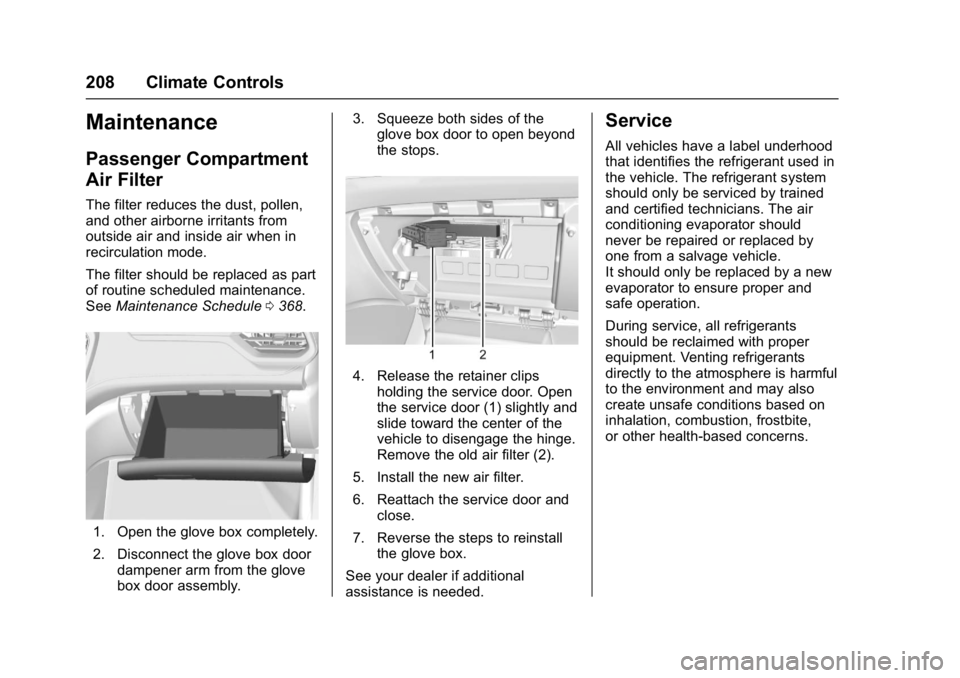
1. Open the glove box completely.
2. Disconnect the glove box door
dampener arm from the glove
box door assembly. 3. Squeeze both sides of the
glove box door to open beyond
the stops.
4. Release the retainer clips
holding the service door. Open
the service door (1) slightly and
slide toward the center of the
vehicle to disengage the hinge.
Remove the old air filter (2).
5. Install the new air filter.
6. Reattach the service door and close.
7. Reverse the steps to reinstall the glove box.
See your dealer if additional
assistance is needed.
Service
All vehicles have a label underhood
that identifies the refrigerant used in
the vehicle. The refrigerant system
should only be serviced by trained
and certified technicians. The air
conditioning evaporator should
never be repaired or replaced by
one from a salvage vehicle.
It should only be replaced by a new
evaporator to ensure proper and
safe operation.
During service, all refrigerants
should be reclaimed with proper
equipment. Venting refrigerants
directly to the atmosphere is harmful
to the environment and may also
create unsafe conditions based on
inhalation, combustion, frostbite,
or other health-based concerns.
Page 221 of 419
GMC Acadia/Acadia Denali Owner Manual (GMNA-Localizing-U.S./Canada/
Mexico-9803770) - 2017 - crc - 7/12/16
220 Driving and Operating
Blizzard Conditions
Stop the vehicle in a safe place and
signal for help. Stay with the vehicle
unless there is help nearby.
If possible, use Roadside
Assistance. SeeRoadside
Assistance Program 0388. To get
help and keep everyone in the
vehicle safe:
. Turn on the hazard warning
flashers.
. Tie a red cloth to an outside
mirror.
{Warning
Snow can trap engine exhaust
under the vehicle. This may
cause exhaust gases to get
inside. Engine exhaust contains
carbon monoxide (CO), which
cannot be seen or smelled. It can
cause unconsciousness and even
death.
If the vehicle is stuck in snow:
(Continued)
Warning (Continued)
.Clear snow from the base of
the vehicle, especially any
blocking the exhaust pipe.
. Open a window about 5 cm
(2 in) on the vehicle side
that is away from the wind,
to bring in fresh air.
. Fully open the air outlets on
or under the instrument
panel.
. Adjust the climate control
system to circulate the air
inside the vehicle and set
the fan speed to the highest
setting. See “Climate
Control Systems.”
For more information about CO,
see Engine Exhaust 0232.
To save fuel, run the engine for
short periods to warm the vehicle
and then shut the engine off and
partially close the window. Moving
about to keep warm also helps. If it takes time for help to arrive,
when running the engine, push the
accelerator pedal slightly so the
engine runs faster than the idle
speed. This keeps the battery
charged to restart the vehicle and to
signal for help with the headlamps.
Do this as little as possible, to
save fuel.
If the Vehicle Is Stuck
Slowly and cautiously spin the
wheels to free the vehicle when
stuck in sand, mud, ice, or snow.
If stuck too severely for the traction
system to free the vehicle, turn the
traction system off and use the
rocking method. See
Traction
Control/Electronic Stability
Control 0240.
{Warning
If the vehicle's tires spin at high
speed, they can explode, and you
or others could be injured. The
vehicle can overheat, causing an
engine compartment fire or other
(Continued)
Page 229 of 419
GMC Acadia/Acadia Denali Owner Manual (GMNA-Localizing-U.S./Canada/
Mexico-9803770) - 2017 - crc - 7/12/16
228 Driving and Operating
starts, let go of the button and
the accelerator. If the vehicle
starts briefly but then stops
again, do the same thing. This
clears the extra gasoline from
the engine. Do not race the
engine immediately after
starting it. Operate the engine
and transmission gently until
the oil warms up and lubricates
all moving parts.
Stop/Start System
{Warning
Exiting the vehicle without first
shifting into P (Park) may cause
the vehicle to move. You or others
may be injured. Because the
vehicle has the auto engine stop/
start feature, the vehicle's engine
might seem to be shut off;
however, once the brake pedal is
released, the engine will start up
again.
Shift to P (Park) and turn the
ignition to LOCK/OFF, before
exiting the vehicle.If equipped with the 2.5L L4 engine,
the vehicle has a fuel saving stop/
start system to shut off the engine to
help conserve fuel.
Auto Engine Stop/Start
When the brakes are applied and
the vehicle is at a complete stop,
the engine may turn off. When
stopped, the tachometer displays
AUTO STOP. See
Tachometer
0 127. When the brake pedal is
released or the accelerator pedal is
pushed, the engine will restart.
Auto Stop may be deactivated if:
. A minimum vehicle speed is not
reached.
. The engine or transmission is
not at the required operating
temperature.
. The outside temperature is not
in the required operating range,
typically between −10 °C (14 °F)
and 50 °C (122 °F).
. The shift lever is in any gear
other than D (Drive).
. The battery charge is low. .
The interior comfort level has not
reached the required level for
the climate control system or
defog settings.
. The Auto Stop time is greater
than two minutes.
Engine Heater
The engine coolant heater can
provide easier starting and better
fuel economy during engine
warm-up in cold weather conditions
at or below 0 °F (−18 °C). Vehicles
with an engine coolant heater
should be plugged in at least four
hours before starting. Some models
may have an internal thermostat in
the cord which will prevent engine
coolant heater operation at
temperatures above 0 °F (−18 °C).
Page 260 of 419
GMC Acadia/Acadia Denali Owner Manual (GMNA-Localizing-U.S./Canada/
Mexico-9803770) - 2017 - crc - 7/12/16
Driving and Operating 259
Assistance Systems for
Driving
If equipped, when driving the
vehicle in a forward gear, Forward
Collision Alert (FCA), Lane
Departure Warning (LDW), Lane
Keep Assist (LKA), Side Blind Zone
Alert (SBZA), Lane Change Alert
(LCA), Forward Automatic Braking
(FAB), and/or the Front Pedestrian
Braking (FPB) System can help to
avoid a crash or reduce crash
damage.
Forward Collision Alert
(FCA) System
If equipped, the FCA system may
help to avoid or reduce the harm
caused by front-end crashes. When
approaching a vehicle ahead too
quickly, FCA provides a red flashing
alert on the windshield and rapidly
beeps or pulses the driver seat.
FCA also lights an amber visual
alert if following another vehicle
much too closely.FCA detects vehicles within a
distance of approximately 60 m
(197 ft) and operates at speeds
above 40 km/h (25 mph). If the
vehicle has Adaptive Cruise Control
(ACC), it can detect vehicles to
distances of approximately 110 m
(360 ft) and operates at all speeds.
See
Adaptive Cruise Control 0246.
{Warning
FCA is a warning system and
does not apply the brakes. When
approaching a slower-moving or
stopped vehicle ahead too rapidly,
or when following a vehicle too
closely, FCA may not provide a
warning with enough time to help
avoid a crash. It also may not
provide any warning at all. FCA
does not warn of pedestrians,
animals, signs, guardrails,
bridges, construction barrels,
or other objects. Be ready to take
action and apply the brakes. See
Defensive Driving 0211. FCA can be disabled with the FCA
steering wheel control, or if your
vehicle is equipped with Adaptive
Cruise Control (ACC), through
vehicle personalization. See
“Collision/Detection Systems”
under
Vehicle Personalization 0157.
Detecting the Vehicle Ahead
FCA warnings will not occur unless
the FCA system detects a vehicle
ahead. When a vehicle is detected,
the vehicle ahead indicator will
display green. Vehicles may not be
detected on curves, highway exit
ramps, or hills, due to poor visibility;
or if a vehicle ahead is partially
blocked by pedestrians or other
objects. FCA will not detect another
vehicle ahead until it is completely
in the driving lane.
Page 263 of 419
GMC Acadia/Acadia Denali Owner Manual (GMNA-Localizing-U.S./Canada/
Mexico-9803770) - 2017 - crc - 7/12/16
262 Driving and Operating
Warning (Continued)
Complete attention is always
required while driving, and you
should be ready to take action
and apply the brakes and/or steer
the vehicle to avoid crashes.
FAB may slow the vehicle to a
complete stop to try to avoid a
potential crash. If this happens, FAB
may engage the Electric Parking
Brake (EPB) to hold the vehicle at a
stop. Release the EPB or firmly
press the accelerator pedal.
{Warning
FAB may automatically brake the
vehicle suddenly in situations
where it is unexpected and
undesired. It could respond to a
turning vehicle ahead, guardrails,
signs, and other non-moving
objects. To override FAB, firmly
press the accelerator pedal, if it is
safe to do so.
Intelligent Brake Assist (IBA)
IBA may activate when the brake
pedal is applied quickly by providing
a boost to braking based on the
speed of approach and distance to
a vehicle ahead.
Minor brake pedal pulsations or
pedal movement during this time is
normal and the brake pedal should
continue to be applied as needed.
IBA will automatically disengage
only when the brake pedal is
released.
{Warning
IBA may increase vehicle braking
in situations when it may not be
necessary. You could block the
flow of traffic. If this occurs, take
your foot off the brake pedal and
then apply the brakes as needed.
FAB and IBA can be disabled
through vehicle personalization. See
“Collision/Detection Systems” under
Vehicle Personalization 0157.
{Warning
Using FAB or IBA while towing a
trailer could cause you to lose
control of the vehicle and crash.
Turn the system to Alert, or if the
vehicle has ACC to Off, when
towing a trailer.
Front Pedestrian Braking
(FPB) System
If equipped, the FPB system may
help avoid or reduce the harm
caused by front-end crashes with
nearby pedestrians when driving in
a forward gear. FPB displays an
amber indicator,
~, when a nearby
pedestrian is detected directly
ahead. When approaching a
detected pedestrian too quickly,
FPB provides a red flashing alert on
the windshield and rapidly beeps or
pulses the driver seat. FPB can
provide a boost to braking or
automatically brake the vehicle. This
system includes Intelligent Brake
Assist (IBA), and the Forward
Automatic Braking (FAB) system
Page 352 of 419
GMC Acadia/Acadia Denali Owner Manual (GMNA-Localizing-U.S./Canada/
Mexico-9803770) - 2017 - crc - 7/12/16
Vehicle Care 351
When using a compact spare tire,
the ABS and Traction Control
systems may engage until the spare
tire is recognized by the vehicle,
especially on slippery roads. Adjust
driving to reduce possible
wheel slip.
Performance of the All-Wheel
Drive (AWD) system will be
automatically reduced to protect the
system when using the compact
spare. To restore the AWD and
prevent excessive wear on the
clutch in the AWD, replace the
compact spare tire with a full-size
tire as soon as possible.
Caution
When the compact spare is
installed, do not take the vehicle
through an automatic car wash
with guide rails. The compact
spare can get caught on the rails
which can damage the tire, wheel,
and other parts of the vehicle.Do not use the compact spare on
other vehicles.
Do not mix the compact spare tire or
wheel with other wheels or tires.
They will not fit. Keep the spare tire
and its wheel together.
Caution
Tire chains will not fit the compact
spare. Using them can damage
the vehicle and the chains. Do not
use tire chains on the compact
spare.
Jump Starting
Jump Starting - North
America
For more information about the
vehicle battery, see
Battery - North
America 0301.
If the battery has run down, try to
use another vehicle and some
jumper cables to start your vehicle.
Be sure to use the following steps to
do it safely.
{Warning
WARNING: Battery posts,
terminals, and related
accessories contain lead and lead
compounds, chemicals known to
the State of California to cause
cancer and birth defects or other
reproductive harm. Batteries also
contain other chemicals known to
the State of California to cause
cancer. WASH HANDS AFTER
HANDLING.
(Continued)
Page 364 of 419
GMC Acadia/Acadia Denali Owner Manual (GMNA-Localizing-U.S./Canada/
Mexico-9803770) - 2017 - crc - 7/12/16
Vehicle Care 363
Interior Care
To prevent dirt particle abrasions,
regularly clean the vehicle's interior.
Immediately remove any soils.
Newspapers or dark garments can
transfer color to the vehicle’s
interior.
Use a soft bristle brush to remove
dust from knobs and crevices on the
instrument cluster. Using a mild
soap solution, immediately remove
hand lotions, sunscreen, and insect
repellent from all interior surfaces or
permanent damage may result.
Use cleaners specifically designed
for the surfaces being cleaned to
prevent permanent damage. Apply
all cleaners directly to the cleaning
cloth. Do not spray cleaners on any
switches or controls. Remove
cleaners quickly.
Before using cleaners, read and
follow all safety instructions on the
label. While cleaning the interior,
open the doors and windows to get
proper ventilation.To prevent damage, do not clean
the interior using the following
cleaners or techniques:
.
Never use a razor or any other
sharp object to remove soil from
any interior surface.
. Never use a brush with stiff
bristles.
. Never rub any surface
aggressively or with too much
pressure.
. Do not use laundry detergents or
dishwashing soaps with
degreasers. For liquid cleaners,
use approximately 20 drops per
3.8 L (1 gal) of water.
A concentrated soap solution will
create streaks and attract dirt.
Do not use solutions that contain
strong or caustic soap.
. Do not heavily saturate the
upholstery when cleaning.
. Do not use solvents or cleaners
containing solvents.
Interior Glass
To clean, use a terry cloth fabric
dampened with water. Wipe droplets
left behind with a clean dry cloth.
If necessary, use a commercial
glass cleaner after cleaning with
plain water.
Caution
To prevent scratching, never use
abrasive cleaners on automotive
glass. Abrasive cleaners or
aggressive cleaning may damage
the rear window defogger.
Cleaning the windshield with water
during the first three to six months
of ownership will reduce tendency
to fog.
Speaker Covers
Vacuum around a speaker cover
gently, so that the speaker will not
be damaged. Clean spots with water
and mild soap.
Page 408 of 419

GMC Acadia/Acadia Denali Owner Manual (GMNA-Localizing-U.S./Canada/
Mexico-9803770) - 2017 - crc - 7/12/16
Index 407
IndexA
Accessories andModifications . . . . . . . . . . . . . . . . . . 283
Accessory Power . . . . . . . . . . . . . . . 230
Adaptive Cruise Control . . . . . . . . 246
Add-On Electrical Equipment . . . 280
Additional Information OnStar
®. . . . . . . . . . . . . . . . . . . . . . 402
Additional Maintenance and Care . . . . . . . . . . . . . . . . . . . . . . 374
Adjustments Lumbar, Front Seats . . . . . . . . . . . . 58
Agreements Trademarks and License . . . . . 200
Air Cleaner/Filter, Engine . . . . . . . 292
Air Conditioning . . . . . . . . . . . 202, 205
Air Filter, Passenger Compartment . . . . . . . . . . . . . . . . . 208
Air Vents . . . . . . . . . . . . . . . . . . . . . . . 207
Airbag System
Check . . . . . . . . . . . . . . . . . . . . . . . . . . 86
How Does an AirbagRestrain? . . . . . . . . . . . . . . . . . . . . . 80
Passenger Sensing System . . . . 81
What Makes an Airbag
Inflate? . . . . . . . . . . . . . . . . . . . . . . . . 79
What Will You See after an Airbag Inflates? . . . . . . . . . . . . . . . 80 Airbag System (cont'd)
When Should an Airbag
Inflate? . . . . . . . . . . . . . . . . . . . . . . . . 78
Where Are the Airbags? . . . . . . . . 77
Airbags Adding Equipment to theVehicle . . . . . . . . . . . . . . . . . . . . . . . . 86
Passenger Status Indicator . . . 131
Readiness Light . . . . . . . . . . . . . . 131
Servicing Airbag-Equipped Vehicles . . . . . . . . . . . . . . . . . . . . . . . 85
System Check . . . . . . . . . . . . . . . . . . 75
Alarm Vehicle Security . . . . . . . . . . . . . . . . 45
Alert Lane Change . . . . . . . . . . . . . . . . . 265
Side Blind Zone (SBZA) . . . . . . 264
All-Season Tires . . . . . . . . . . . . . . . . 316
All-Wheel Drive . . . . . . . . . . . . 236, 302
AM-FM Radio . . . . . . . . . . . . . . . . . . . 182
Antenna
Multi-band . . . . . . . . . . . . . . . . . . . . 185
Antilock Brake System (ABS) . . . 236
Warning Light . . . . . . . . . . . . . . . . . 135
Appearance Care Exterior . . . . . . . . . . . . . . . . . . . . . . . 358
Interior . . . . . . . . . . . . . . . . . . . . . . . . 363