wiper GMC ACADIA 2018 User Guide
[x] Cancel search | Manufacturer: GMC, Model Year: 2018, Model line: ACADIA, Model: GMC ACADIA 2018Pages: 423, PDF Size: 7.26 MB
Page 280 of 423
GMC Acadia/Acadia Denali Owner Manual (GMNA-Localizing-U.S./Canada/
Mexico-11349114) - 2018 - crc - 9/21/17
Vehicle Care 279
Vehicle Care
General Information
General Information . . . . . . . . . . 280
California Proposition65 Warning . . . . . . . . . . . . . . . . . 280
California Perchlorate Materials Requirements . . . . . 281
Accessories and Modifications . . . . . . . . . . . . . . . . 281
Vehicle Checks
Doing Your OwnService Work . . . . . . . . . . . . . . . 281
Hood . . . . . . . . . . . . . . . . . . . . . . . . . 282
Engine Compartment Overview . . . . . . . . . . . . . . . . . . . . 283
Engine Oil . . . . . . . . . . . . . . . . . . . . 286
Engine Oil Life System . . . . . . . 288
Automatic Transmission Fluid . . . . . . . . . . . . . . . . . . . . . . . . 289
Engine Air Cleaner/Filter . . . . . . 290
Cooling System . . . . . . . . . . . . . . 291
Engine Overheating . . . . . . . . . . 295
Washer Fluid . . . . . . . . . . . . . . . . . 296
Brakes . . . . . . . . . . . . . . . . . . . . . . . 297
Brake Fluid . . . . . . . . . . . . . . . . . . . 298
Battery - North America . . . . . . 299
All-Wheel Drive . . . . . . . . . . . . . . . 300 Starter Switch Check . . . . . . . . . 300
Automatic Transmission Shift
Lock Control Function
Check . . . . . . . . . . . . . . . . . . . . . . . 300
Park Brake and P (Park)
Mechanism Check . . . . . . . . . . 300
Wiper Blade Replacement . . . . 301
Windshield Replacement . . . . . 302
Gas Strut(s) . . . . . . . . . . . . . . . . . . 302
Headlamp Aiming
Headlamp Aiming . . . . . . . . . . . . 303
Bulb Replacement
Bulb Replacement . . . . . . . . . . . . 304
Halogen Bulbs . . . . . . . . . . . . . . . . 304
LED Lighting . . . . . . . . . . . . . . . . . 304
License Plate Lamp . . . . . . . . . . 304
Electrical System
High Voltage Devices and Wiring . . . . . . . . . . . . . . . . . . . . . . . 305
Electrical System Overload . . . 305
Fuses and Circuit Breakers . . . 306
Engine Compartment Fuse Block . . . . . . . . . . . . . . . . . . . . . . . . 306
Instrument Panel Fuse Block . . . . . . . . . . . . . . . . . . . . . . . . 309
Rear Compartment Fuse Block . . . . . . . . . . . . . . . . . . . . . . . . 311
Wheels and Tires
Tires . . . . . . . . . . . . . . . . . . . . . . . . . . 314
All-Season Tires . . . . . . . . . . . . . . 315
Winter Tires . . . . . . . . . . . . . . . . . . 315
Summer Tires . . . . . . . . . . . . . . . . 315
Tire Sidewall Labeling . . . . . . . . 316
Tire Designations . . . . . . . . . . . . . 318
Tire Terminology andDefinitions . . . . . . . . . . . . . . . . . . 319
Tire Pressure . . . . . . . . . . . . . . . . . 321
Tire Pressure for High-Speed Operation . . . . . . . . . . . . . . . . . . . 323
Tire Pressure Monitor System . . . . . . . . . . . . . . . . . . . . . . 323
Tire Pressure Monitor Operation . . . . . . . . . . . . . . . . . . . 324
Tire Inspection . . . . . . . . . . . . . . . . 328
Tire Rotation . . . . . . . . . . . . . . . . . 328
When It Is Time for New Tires . . . . . . . . . . . . . . . . . . . . . . . . 329
Buying New Tires . . . . . . . . . . . . . 330
Different Size Tires and Wheels . . . . . . . . . . . . . . . . . . . . . . 332
Uniform Tire Quality Grading . . . . . . . . . . . . . . . . . . . . . 332
Wheel Alignment and Tire Balance . . . . . . . . . . . . . . . . . . . . . 333
Wheel Replacement . . . . . . . . . . 334
Tire Chains . . . . . . . . . . . . . . . . . . . 334
If a Tire Goes Flat . . . . . . . . . . . . 335
Page 297 of 423
GMC Acadia/Acadia Denali Owner Manual (GMNA-Localizing-U.S./Canada/
Mexico-11349114) - 2018 - crc - 9/21/17
296 Vehicle Care
If the overheat warning is displayed
with no sign of steam:1. Turn the air conditioning off.
2. Turn the heater on to the highest temperature and to the
highest fan speed. Open the
windows as necessary.
3. When it is safe to do so, pull off the road, shift to P (Park) or
N (Neutral), and let the
engine idle.
If the engine coolant temperature
gauge is no longer in the
overheated area, the vehicle can be
driven. Continue to drive the vehicle
slowly for about 10 minutes. Keep a
safe distance from the vehicle in
front. If the warning does not come
back on, continue to drive normally
and have the cooling system
checked for proper fill and function.
If the warning continues, pull over,
stop, and park the vehicle
right away. If there is no sign of steam, idle the
engine for three minutes while
parked. If the warning is still
displayed, turn off the engine until it
cools down.
Washer Fluid
What to Use
When windshield washer fluid is
needed, be sure to read the
manufacturer's instructions before
use. If operating the vehicle in an
area where the temperature may fall
below freezing, use a fluid that has
sufficient protection against
freezing.
Adding Washer Fluid
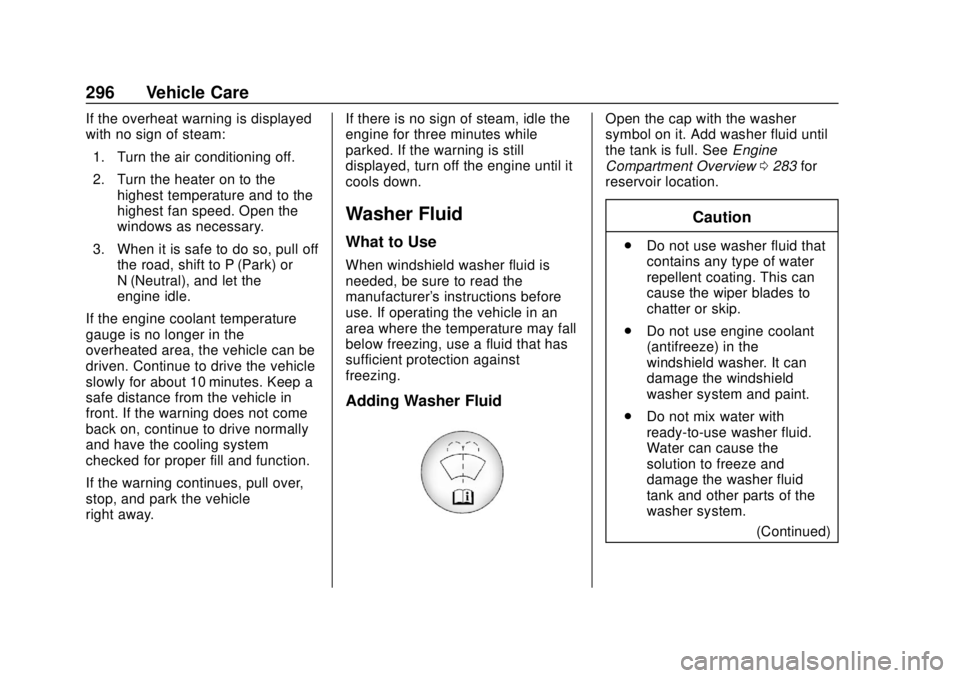
Open the cap with the washer
symbol on it. Add washer fluid until
the tank is full. See
Engine
Compartment Overview 0283 for
reservoir location.
Caution
. Do not use washer fluid that
contains any type of water
repellent coating. This can
cause the wiper blades to
chatter or skip.
. Do not use engine coolant
(antifreeze) in the
windshield washer. It can
damage the windshield
washer system and paint.
. Do not mix water with
ready-to-use washer fluid.
Water can cause the
solution to freeze and
damage the washer fluid
tank and other parts of the
washer system.
(Continued)
Page 302 of 423
GMC Acadia/Acadia Denali Owner Manual (GMNA-Localizing-U.S./Canada/
Mexico-11349114) - 2018 - crc - 9/21/17
Vehicle Care 301
Park on a fairly steep hill, with the
vehicle facing downhill. Keeping
your foot on the regular brake, set
the parking brake.
.To check the parking brake's
holding ability: With the engine
running and the transmission in
N (Neutral), slowly remove foot
pressure from the regular brake
pedal. Do this until the vehicle is
held by the parking brake only.
. To check the P (Park)
mechanism's holding ability:
With the engine running, shift to
P (Park). Then release the
parking brake followed by the
regular brake.
Contact your dealer if service is
required.
Wiper Blade Replacement
Windshield wiper blades should be
inspected for wear or cracking.
It is a good idea to clean or replace
the wiper blade assembly on a
regular basis or when worn. For proper windshield wiper blade
length and type, see
Maintenance
Replacement Parts 0378.
Caution
Allowing the wiper arm to touch
the windshield when no wiper
blade is installed could damage
the windshield. Any damage that
occurs would not be covered by
the vehicle warranty. Do not allow
the wiper arm to touch the
windshield.
Front Wiper Blade
Replacement
To replace the wiper blade
assembly:
1. Pull the windshield wiper assembly away from the
windshield.
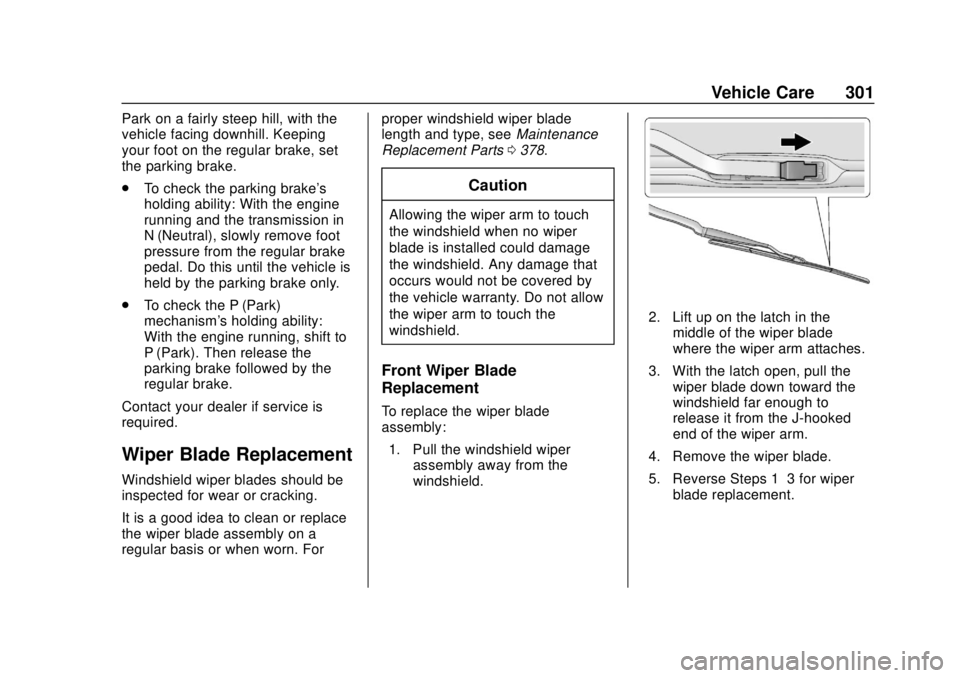
2. Lift up on the latch in themiddle of the wiper blade
where the wiper arm attaches.
3. With the latch open, pull the wiper blade down toward the
windshield far enough to
release it from the J-hooked
end of the wiper arm.
4. Remove the wiper blade.
5. Reverse Steps 1–3 for wiper blade replacement.
Page 303 of 423
GMC Acadia/Acadia Denali Owner Manual (GMNA-Localizing-U.S./Canada/
Mexico-11349114) - 2018 - crc - 9/21/17
302 Vehicle Care
Rear Wiper Blade Replacement
To remove the wiper blade:1. Lift the wiper arm away from the window. The rear wiper arm
will only lift off the glass at a
small angle to allow for wiper
blade removal. The rear wiper
arm will not lock in a service up
position so care should be
taken when replacing the rear
wiper blade.
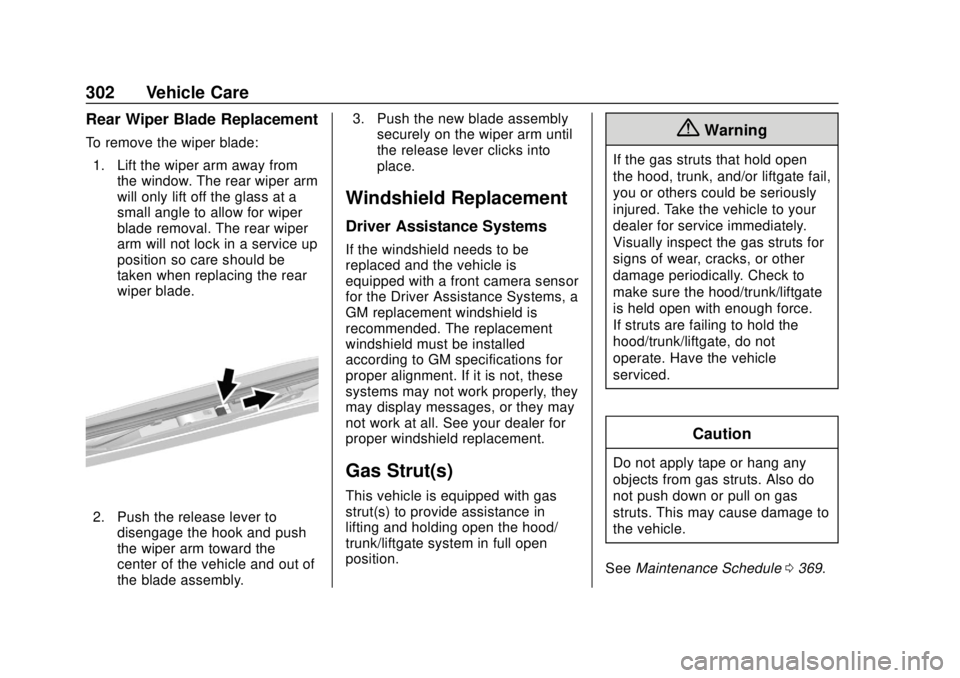
2. Push the release lever to
disengage the hook and push
the wiper arm toward the
center of the vehicle and out of
the blade assembly. 3. Push the new blade assembly
securely on the wiper arm until
the release lever clicks into
place.
Windshield Replacement
Driver Assistance Systems
If the windshield needs to be
replaced and the vehicle is
equipped with a front camera sensor
for the Driver Assistance Systems, a
GM replacement windshield is
recommended. The replacement
windshield must be installed
according to GM specifications for
proper alignment. If it is not, these
systems may not work properly, they
may display messages, or they may
not work at all. See your dealer for
proper windshield replacement.
Gas Strut(s)
This vehicle is equipped with gas
strut(s) to provide assistance in
lifting and holding open the hood/
trunk/liftgate system in full open
position.
{Warning
If the gas struts that hold open
the hood, trunk, and/or liftgate fail,
you or others could be seriously
injured. Take the vehicle to your
dealer for service immediately.
Visually inspect the gas struts for
signs of wear, cracks, or other
damage periodically. Check to
make sure the hood/trunk/liftgate
is held open with enough force.
If struts are failing to hold the
hood/trunk/liftgate, do not
operate. Have the vehicle
serviced.
Caution
Do not apply tape or hang any
objects from gas struts. Also do
not push down or pull on gas
struts. This may cause damage to
the vehicle.
See Maintenance Schedule 0369.
Page 306 of 423
GMC Acadia/Acadia Denali Owner Manual (GMNA-Localizing-U.S./Canada/
Mexico-11349114) - 2018 - crc - 9/21/17
Vehicle Care 305
Electrical System
High Voltage Devices and
Wiring
{Warning
Exposure to high voltage can
cause shock, burns, and even
death. The high voltage
components in the vehicle can
only be serviced by technicians
with special training.
High voltage components are
identified by labels. Do not
remove, open, take apart,
or modify these components.
High voltage cable or wiring has
orange covering or labels. Do not
probe, tamper with, cut, or modify
high voltage cable or wiring.
Electrical System
Overload
The vehicle has fuses and circuit
breakers to protect against an
electrical system overload.
When the current electrical load is
too heavy, the circuit breaker opens
and closes, protecting the circuit
until the current load returns to
normal or the problem is fixed. This
greatly reduces the chance of circuit
overload and fire caused by
electrical problems.
Fuses and circuit breakers protect
power devices in the vehicle.
Replace a bad fuse with a new one
of the identical size and rating.
If there is a problem on the road and
a fuse needs to be replaced, the
same amperage fuse can be
borrowed. Choose some feature of
the vehicle that is not needed to use
and replace it as soon as possible.
Headlamp Wiring
An electrical overload may cause
the lamps to go on and off, or in
some cases to remain off. Have the
headlamp wiring checked right away
if the lamps go on and off or
remain off.
Windshield Wipers
If the wiper motor overheats due to
heavy snow or ice, the windshield
wipers will stop until the motor cools
and will then restart.
Although the circuit is protected
from electrical overload, overload
due to heavy snow or ice may
cause wiper linkage damage.
Always clear ice and heavy snow
from the windshield before using the
windshield wipers.
If the overload is caused by an
electrical problem and not snow or
ice, be sure to get it fixed.
Page 308 of 423
GMC Acadia/Acadia Denali Owner Manual (GMNA-Localizing-U.S./Canada/
Mexico-11349114) - 2018 - crc - 9/21/17
Vehicle Care 307
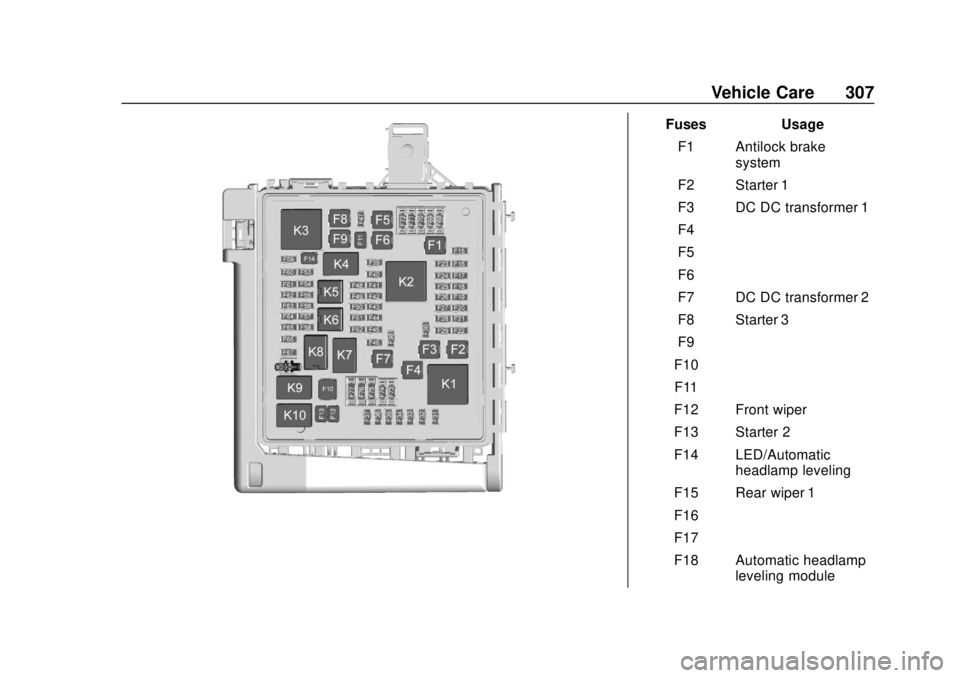
FusesUsage
F1 Antilock brake system
F2 Starter 1
F3 DC DC transformer 1
F4 –
F5 –
F6 –
F7 DC DC transformer 2
F8 Starter 3
F9 –
F10 –
F11 –
F12 Front wiper
F13 Starter 2
F14 LED/Automatic headlamp leveling
F15 Rear wiper 1
F16 –
F17 –
F18 Automatic headlamp leveling module
Page 309 of 423
GMC Acadia/Acadia Denali Owner Manual (GMNA-Localizing-U.S./Canada/
Mexico-11349114) - 2018 - crc - 9/21/17
308 Vehicle Care
FusesUsage
F19 –
F20 –
F21 –
F22 Electronic brake control module
F23 Parking/Trailer lamps
F24 Right trailer stoplamp/Turn
signal lamp
F25 Steering column lock
F26 –
F27 Left trailer stoplamp/ Turn signal lamp
F28 –
F29 –
F30 Washer pump
F31 Headlamp low-beam right
F32 Headlamp low-beam left
F33 Fog lamps Fuses
Usage
F34 Horn
F35 –
F36 Headlamp high-beam left
F37 Headlamp high-beam right
F38 Automatic headlamp leveling motor
F39 Transmission control module 1
F40 Left rear bus electrical center/
Ignition
F41 Instrument cluster
F42 Heating, ventilation, and air conditioning
F43 Head-up display
F44 –
F45 –
F46 –
F47 –
F48 Rear wiper 2 Fuses
Usage
F49 Interior rearview mirror/Trailer
F50 Fuel system control module
F51 Heated steering wheel
F52 Air conditioning clutch
F53 Transmission range control module
F54 Coolant pump
F55 –
F56 –
F57 Engine control module/Ignition
F58 Transmission control module/Ignition
F59 Engine control module battery
F60 Transmission control module 2
F61 O2 sensor 1/ Aeroshutter
Page 359 of 423
GMC Acadia/Acadia Denali Owner Manual (GMNA-Localizing-U.S./Canada/
Mexico-11349114) - 2018 - crc - 9/21/17
358 Vehicle Care
Appearance Care
Exterior Care
Locks
Locks are lubricated at the factory.
Use a de-icing agent only when
absolutely necessary, and have the
locks greased after using. See
Recommended Fluids and
Lubricants0377.
Washing the Vehicle
To preserve the vehicle's finish,
wash it often and out of direct
sunlight.
Caution
Do not use petroleum-based,
acidic, or abrasive cleaning
agents as they can damage the
vehicle's paint, metal, or plastic
parts. If damage occurs, it would
not be covered by the vehicle
warranty. Approved cleaning
products can be obtained from
(Continued)
Caution (Continued)
your dealer. Follow all
manufacturer directions regarding
correct product usage, necessary
safety precautions, and
appropriate disposal of any
vehicle care product.
Caution
Avoid using high-pressure
washes closer than 30 cm (12 in)
to the surface of the vehicle. Use
of power washers exceeding
8,274 kPa (1,200 psi) can result
in damage or removal of paint
and decals.
Caution
Do not power wash any
component under the hood that
has this
esymbol.
(Continued)
Caution (Continued)
This could cause damage that
would not be covered by the
vehicle warranty.
If using an automatic car wash,
follow the car wash instructions. The
windshield wiper and rear window
wiper, if equipped, must be off.
Remove any accessories that may
be damaged or interfere with the car
wash equipment.
Rinse the vehicle well, before
washing and after, to remove all
cleaning agents completely. If they
are allowed to dry on the surface,
they could stain.
Dry the finish with a soft, clean
chamois or an all-cotton towel to
avoid surface scratches and water
spotting.
Finish Care
Application of aftermarket clearcoat
sealant/wax materials is not
recommended. If painted surfaces
are damaged, see your dealer to
Page 361 of 423
GMC Acadia/Acadia Denali Owner Manual (GMNA-Localizing-U.S./Canada/
Mexico-11349114) - 2018 - crc - 9/21/17
360 Vehicle Care
Cleaning Exterior Lamps/
Lenses, Emblems, Decals, and
Stripes
Use only lukewarm or cold water, a
soft cloth, and a car washing soap
to clean exterior lamps, lenses,
emblems, decals, and stripes.
Follow instructions under "Washing
the Vehicle" previously in this
section.
Lamp covers are made of plastic,
and some have a UV protective
coating. Do not clean or wipe them
when dry.
Do not use any of the following on
lamp covers:
.Abrasive or caustic agents.
. Washer fluids and other cleaning
agents in higher concentrations
than suggested by the
manufacturer.
. Solvents, alcohols, fuels,
or other harsh cleaners.
. Ice scrapers or other hard items. .
Aftermarket appearance caps or
covers while the lamps are
illuminated, due to excessive
heat generated.
Caution
Failure to clean lamps properly
can cause damage to the lamp
cover that would not be covered
by the vehicle warranty.
Caution
Using wax on low gloss black
finish stripes can increase the
gloss level and create a
non-uniform finish. Clean low
gloss stripes with soap and
water only.
Air Intakes
Clear debris from the air intakes,
between the hood and windshield,
when washing the vehicle.
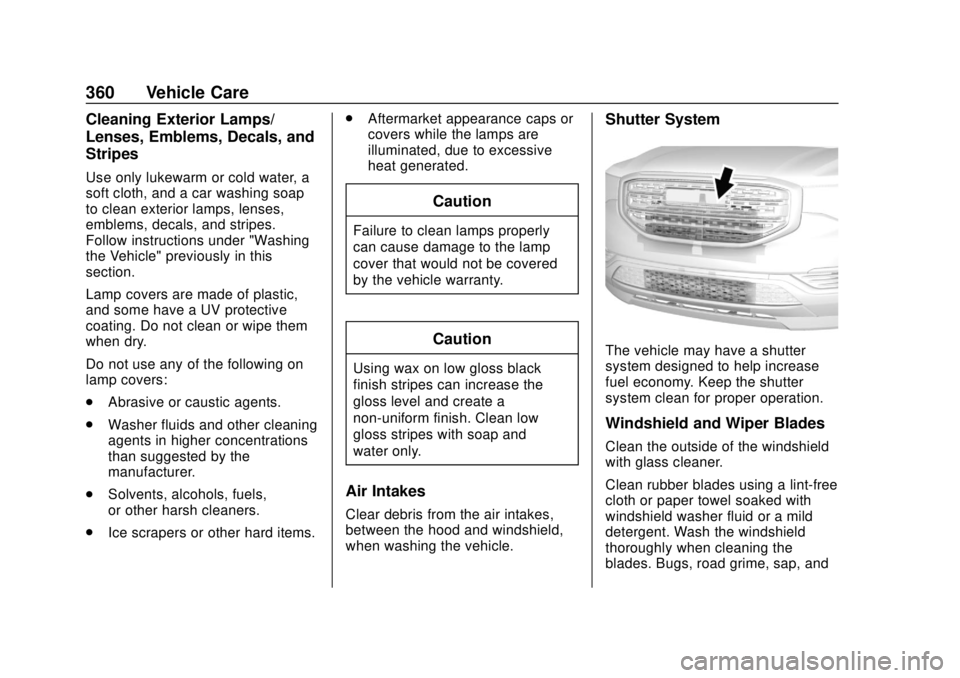
Shutter System
The vehicle may have a shutter
system designed to help increase
fuel economy. Keep the shutter
system clean for proper operation.
Windshield and Wiper Blades
Clean the outside of the windshield
with glass cleaner.
Clean rubber blades using a lint-free
cloth or paper towel soaked with
windshield washer fluid or a mild
detergent. Wash the windshield
thoroughly when cleaning the
blades. Bugs, road grime, sap, and
Page 362 of 423
GMC Acadia/Acadia Denali Owner Manual (GMNA-Localizing-U.S./Canada/
Mexico-11349114) - 2018 - crc - 9/21/17
Vehicle Care 361
a buildup of vehicle wash/wax
treatments may cause wiper
streaking.
Replace the wiper blades if they are
worn or damaged. Damage can be
caused by extreme dusty
conditions, sand, salt, heat, sun,
snow, and ice.
Weatherstrips
Apply weatherstrip lubricant on
weatherstrips to make them last
longer, seal better, and not stick or
squeak. Lubricate weatherstrips at
least once a year. Hot, dry climates
may require more frequent
application. Black marks from
rubber material on painted surfaces
can be removed by rubbing with a
clean cloth. SeeRecommended
Fluids and Lubricants 0377.
Tires
Use a stiff brush with tire cleaner to
clean the tires.
Caution
Using petroleum-based tire
dressing products on the vehicle
may damage the paint finish and/
or tires. When applying a tire
dressing, always wipe off any
overspray from all painted
surfaces on the vehicle.
Wheels and Trim —Aluminum
or Chrome
Use a soft, clean cloth with mild
soap and water to clean the wheels.
After rinsing thoroughly with clean
water, dry with a soft, clean towel.
A wax may then be applied.
Caution
Chrome wheels and other chrome
trim may be damaged if the
vehicle is not washed after driving
on roads that have been sprayed
with magnesium, calcium,
or sodium chloride. These
(Continued)
Caution (Continued)
chlorides are used on roads for
conditions such as ice and dust.
Always wash the chrome with
soap and water after exposure.
Caution
To avoid surface damage, do not
use strong soaps, chemicals,
abrasive polishes, cleaners,
brushes, or cleaners that contain
acid on aluminum or
chrome-plated wheels. Use only
approved cleaners. Also, never
drive a vehicle with aluminum or
chrome-plated wheels through an
automatic car wash that uses
silicone carbide tire cleaning
brushes. Damage could occur
and the repairs would not be
covered by the vehicle warranty.