ECO mode GMC ACADIA 2018 Owner's Guide
[x] Cancel search | Manufacturer: GMC, Model Year: 2018, Model line: ACADIA, Model: GMC ACADIA 2018Pages: 423, PDF Size: 7.26 MB
Page 203 of 423
GMC Acadia/Acadia Denali Owner Manual (GMNA-Localizing-U.S./Canada/
Mexico-11349114) - 2018 - crc - 9/21/17
202 Climate Controls
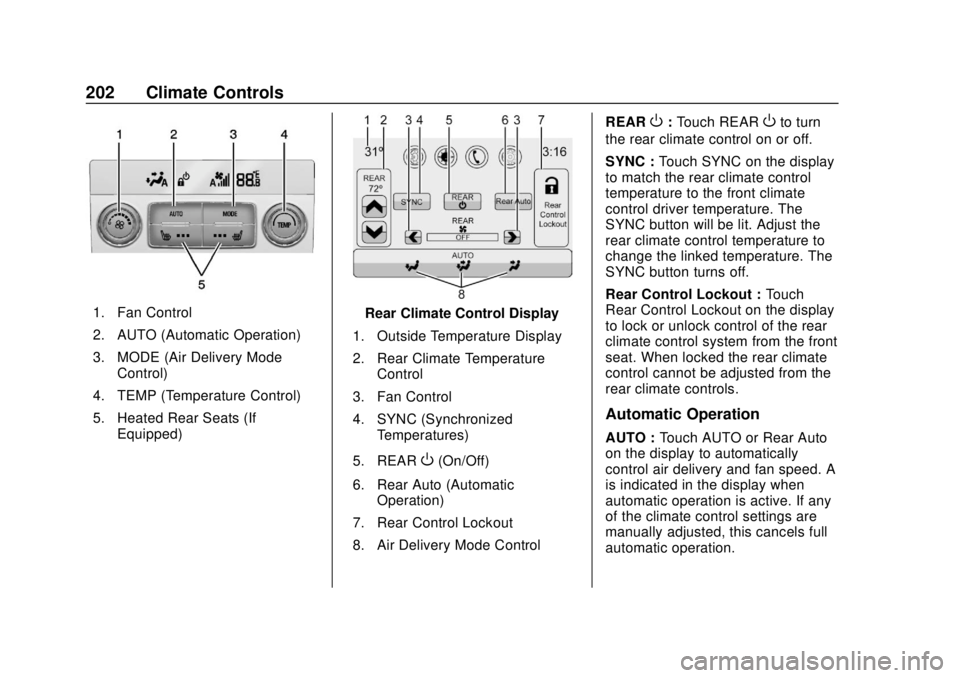
1. Fan Control
2. AUTO (Automatic Operation)
3. MODE (Air Delivery ModeControl)
4. TEMP (Temperature Control)
5. Heated Rear Seats (If Equipped)Rear Climate Control Display
1. Outside Temperature Display
2. Rear Climate Temperature Control
3. Fan Control
4. SYNC (Synchronized Temperatures)
5. REAR
O(On/Off)
6. Rear Auto (Automatic Operation)
7. Rear Control Lockout
8. Air Delivery Mode Control REAR
O:
Touch REAROto turn
the rear climate control on or off.
SYNC : Touch SYNC on the display
to match the rear climate control
temperature to the front climate
control driver temperature. The
SYNC button will be lit. Adjust the
rear climate control temperature to
change the linked temperature. The
SYNC button turns off.
Rear Control Lockout : Touch
Rear Control Lockout on the display
to lock or unlock control of the rear
climate control system from the front
seat. When locked the rear climate
control cannot be adjusted from the
rear climate controls.
Automatic Operation
AUTO : Touch AUTO or Rear Auto
on the display to automatically
control air delivery and fan speed. A
is indicated in the display when
automatic operation is active. If any
of the climate control settings are
manually adjusted, this cancels full
automatic operation.
Page 206 of 423
GMC Acadia/Acadia Denali Owner Manual (GMNA-Localizing-U.S./Canada/
Mexico-11349114) - 2018 - crc - 9/21/17
Driving and Operating 205
Driving and
Operating
Driving Information
Distracted Driving . . . . . . . . . . . . 206
Defensive Driving . . . . . . . . . . . . . 207
Drunk Driving . . . . . . . . . . . . . . . . . 207
Control of a Vehicle . . . . . . . . . . . 207
Braking . . . . . . . . . . . . . . . . . . . . . . . 207
Steering . . . . . . . . . . . . . . . . . . . . . . 208
Off-Road Recovery . . . . . . . . . . . 208
Loss of Control . . . . . . . . . . . . . . . 209
Off-Road Driving . . . . . . . . . . . . . 209
Driving on Wet Roads . . . . . . . . 214
Hill and Mountain Roads . . . . . 215
Winter Driving . . . . . . . . . . . . . . . . 215
If the Vehicle Is Stuck . . . . . . . . 217
Vehicle Load Limits . . . . . . . . . . . 217
Starting and Operating
New Vehicle Break-In . . . . . . . . . 221
Ignition Positions . . . . . . . . . . . . . 221
Starting the Engine . . . . . . . . . . . 223
Engine Heater . . . . . . . . . . . . . . . . 225
Retained AccessoryPower (RAP) . . . . . . . . . . . . . . . . 226
Shifting Into Park . . . . . . . . . . . . . 226
Shifting out of Park . . . . . . . . . . . 227 Parking over Things
That Burn . . . . . . . . . . . . . . . . . . . 228
Extended Parking . . . . . . . . . . . . 228
Engine Exhaust
Engine Exhaust . . . . . . . . . . . . . . 228
Running the Vehicle While Parked . . . . . . . . . . . . . . . . . . . . . . 229
Automatic Transmission
Automatic Transmission . . . . . . 229
Manual Mode . . . . . . . . . . . . . . . . . 231
Tow/Haul Mode . . . . . . . . . . . . . . . 232
Drive Systems
All-Wheel Drive . . . . . . . . . . . . . . . 232
Brakes
Antilock BrakeSystem (ABS) . . . . . . . . . . . . . . . 233
Electric Parking Brake . . . . . . . . 233
Brake Assist . . . . . . . . . . . . . . . . . . 235
Hill Start Assist (HSA) . . . . . . . . 235
Ride Control Systems
Traction Control/Electronic Stability Control . . . . . . . . . . . . . 236
Hill Descent Control (HDC) . . . 238
Driver Mode Control . . . . . . . . . . 238
Cruise Control
Cruise Control . . . . . . . . . . . . . . . . 240 Adaptive Cruise Control . . . . . . 242
Driver Assistance Systems
Driver Assistance Systems . . . 251
Assistance Systems for
Parking or Backing . . . . . . . . . . 252
Assistance Systems for Driving . . . . . . . . . . . . . . . . . . . . . . 256
Forward Collision Alert (FCA) System . . . . . . . . . . . . . . . . . . . . . . 256
Forward Automatic Braking (FAB) . . . . . . . . . . . . . . . 258
Front Pedestrian Braking (FPB) System . . . . . . . . . . . . . . . 260
Side Blind Zone Alert (SBZA) . . . . . . . . . . . . . . . . 262
Lane Change Alert (LCA) . . . . . 263
Lane Departure
Warning (LDW) . . . . . . . . . . . . . 264
Lane Keep Assist (LKA) . . . . . . 265
Fuel
Fuel . . . . . . . . . . . . . . . . . . . . . . . . . . 267
California Fuel Requirements . . . . . . . . . . . . . . . 267
Fuels in Foreign Countries . . . 268
Fuel Additives . . . . . . . . . . . . . . . . 268
Filling the Tank . . . . . . . . . . . . . . . 268
Filling a Portable Fuel Container . . . . . . . . . . . . . . . . . . . 270
Page 223 of 423
GMC Acadia/Acadia Denali Owner Manual (GMNA-Localizing-U.S./Canada/
Mexico-11349114) - 2018 - crc - 9/21/17
222 Driving and Operating
The Remote Keyless Entry (RKE)
transmitter must be in the vehicle for
the system to operate. If the
pushbutton start is not working, the
vehicle may be near a strong radio
antenna signal causing interference
to the Remote Keyless Entry (RKE)
system. SeeRemote Keyless Entry
(RKE) System Operation 030.
To shift out of P (Park), the vehicle
must be on and the brake pedal
must be applied.
Stopping the Engine/LOCK/
OFF (No Indicator Lights) : When
the vehicle is stopped, press
ENGINE START/STOP once to turn
the engine off.
If the vehicle is in P (Park), the
ignition will turn off, and Retained
Accessory Power (RAP) will remain
active. See Retained Accessory
Power (RAP) 0226.
If the vehicle is not in P (Park), the
ignition will return to ACC/
ACCESSORY and display the
message SHIFT TO PARK in the
Driver Information Center (DIC). When the vehicle is shifted into
P (Park), the ignition system will
turn off.
Do not turn the engine off when the
vehicle is moving. This will cause a
loss of power assist in the brake
and steering systems and disable
the airbags.
If the vehicle must be shut off in an
emergency:
1. Brake using a firm and steady pressure. Do not pump the
brakes repeatedly. This may
deplete power assist, requiring
increased brake pedal force.
2. Shift the vehicle to N (Neutral). This can be done while the
vehicle is moving. After shifting
to N (Neutral), firmly apply the
brakes and steer the vehicle to
a safe location.
3. Come to a complete stop, shift to P (Park), and turn the
ignition off.
4. Set the parking brake. See Electric Parking Brake 0233.{Warning
Turning off the vehicle while
moving may cause loss of power
assist in the brake and steering
systems and disable the airbags.
While driving, only shut the
vehicle off in an emergency.
If the vehicle cannot be pulled over,
and must be shut off while driving,
press and hold ENGINE START/
STOP for longer than two seconds,
or press twice in five seconds.
ACC/ACCESSORY (Amber
Indicator Light) : This mode allows
some electrical accessories to be
used when the engine is off.
With the ignition off, pressing the
button one time without the brake
pedal applied will place the ignition
system in ACC/ACCESSORY.
The ignition will switch from ACC/
ACCESSORY to off after
five minutes to prevent battery
rundown.
Page 224 of 423
GMC Acadia/Acadia Denali Owner Manual (GMNA-Localizing-U.S./Canada/
Mexico-11349114) - 2018 - crc - 9/21/17
Driving and Operating 223
ON/RUN/START (Green Indicator
Light) :This mode is for driving and
starting. With the ignition off, and
the brake pedal applied, pressing
the button once will place the
ignition system in ON/RUN/START.
Once engine cranking begins,
release the button. Engine cranking
will continue until the engine starts.
See Starting the Engine 0223. The
ignition will then remain in ON/RUN.
Service Mode
This power mode is available for
service and diagnostics, and to
verify the proper operation of the
malfunction indicator lamp as may
be required for emission inspection
purposes. With the vehicle off, and
the brake pedal not applied,
pressing and holding the button for
more than five seconds will place
the vehicle in Service Mode. The
instruments and audio systems will
operate as they do in ON/RUN, but
the vehicle will not be able to be
driven. The engine will not start in
Service Mode. Press the button
again to turn the vehicle off.Starting the Engine
Move the shift lever to P (Park) or
N (Neutral). The engine will not start
in any other position. To restart the
engine when the vehicle is already
moving, use N (Neutral) only.
Caution
Do not try to shift to P (Park) if the
vehicle is moving. If you do, you
could damage the transmission.
Shift to P (Park) only when the
vehicle is stopped.
Caution
If you add electrical parts or
accessories, you could change
the way the engine operates. Any
resulting damage would not be
covered by the vehicle warranty.
See Add-On Electrical Equipment
0 278.
Starting Procedure
1. With the Keyless Access
system, the RKE transmitter
must be in the vehicle. Press
ENGINE START/STOP with the
brake pedal applied. When the
engine begins cranking, let go
of the button.
The idle speed will go down as
the engine gets warm. Do not
race the engine immediately
after starting it.
If the RKE transmitter is not in
the vehicle, if there is
interference, or if the RKE
battery is low, the Driver
Information Center (DIC) will
display a message.
Caution
Cranking the engine for long
periods of time, by returning the
ignition to the START position
immediately after cranking has
ended, can overheat and damage
the cranking motor, and drain the
(Continued)
Page 226 of 423
GMC Acadia/Acadia Denali Owner Manual (GMNA-Localizing-U.S./Canada/
Mexico-11349114) - 2018 - crc - 9/21/17
Driving and Operating 225
Engine Heater
The engine heater can provide
easier starting and better fuel
economy during engine warm-up in
cold weather conditions at or below
0 °F (−18 °C). Vehicles with an
engine heater should be plugged in
at least four hours before starting.
Some models may have an internal
thermostat in the cord which will
prevent engine heater operation at
temperatures above 0 °F (−18 °C).
{Warning
Do not plug in the engine block
heater while the vehicle is parked
in a garage or under a carport.
Property damage or personal
injury may result. Always park the
vehicle in a clear open area away
from buildings or structures.
To Use the Engine Heater
1. Turn off the engine.
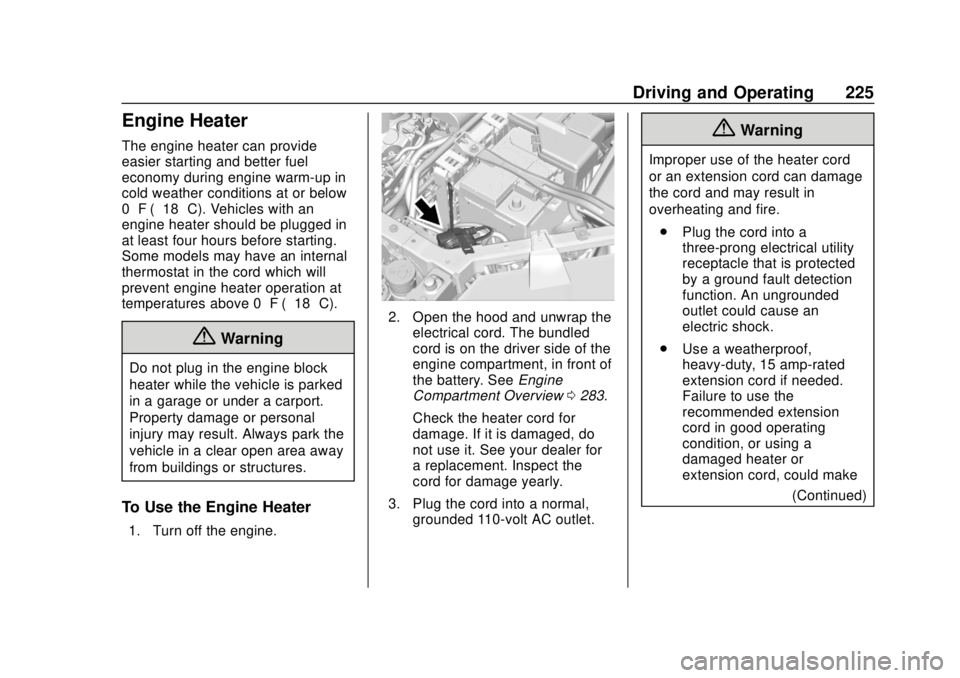
2. Open the hood and unwrap theelectrical cord. The bundled
cord is on the driver side of the
engine compartment, in front of
the battery. See Engine
Compartment Overview 0283.
Check the heater cord for
damage. If it is damaged, do
not use it. See your dealer for
a replacement. Inspect the
cord for damage yearly.
3. Plug the cord into a normal, grounded 110-volt AC outlet.
{Warning
Improper use of the heater cord
or an extension cord can damage
the cord and may result in
overheating and fire.
. Plug the cord into a
three-prong electrical utility
receptacle that is protected
by a ground fault detection
function. An ungrounded
outlet could cause an
electric shock.
. Use a weatherproof,
heavy-duty, 15 amp-rated
extension cord if needed.
Failure to use the
recommended extension
cord in good operating
condition, or using a
damaged heater or
extension cord, could make
(Continued)
Page 232 of 423
GMC Acadia/Acadia Denali Owner Manual (GMNA-Localizing-U.S./Canada/
Mexico-11349114) - 2018 - crc - 9/21/17
Driving and Operating 231
Caution
A transmission hot message may
display if the automatic
transmission fluid is too hot.
Driving under this condition can
damage the vehicle. Stop and idle
the engine to cool the automatic
transmission fluid. This message
clears when the transmission fluid
has cooled sufficiently.
D : This position is for normal
driving. If more power is needed for
passing, press the accelerator
pedal down.
Caution
If the vehicle does not shift gears,
the transmission could be
damaged. Have the vehicle
serviced right away.
If the vehicle is stopped on a hill,
with your foot off the brake pedal,
the vehicle may roll. This is normal
and is due to the torque converter designed to improve fuel economy
and performance. Use the brake to
hold the vehicle on a hill. Do not use
the accelerator pedal.
L :
This position gives you access
to gear ranges. This provides more
engine braking but lower fuel
economy than D (Drive). You can
use it on very steep hills, or in deep
snow or mud. See Manual Mode
0 231.
Operating Modes : The
transmission may operate in a lower
gear than normal to improve vehicle
performance. The engine speed
may be higher and there may be an
increase in noise during the
following conditions:
. When climbing a grade.
. When driving downhill.
. When driving in hot
temperatures, or at high altitude.
Manual Mode
Electronic Range Select
(ERS) Mode
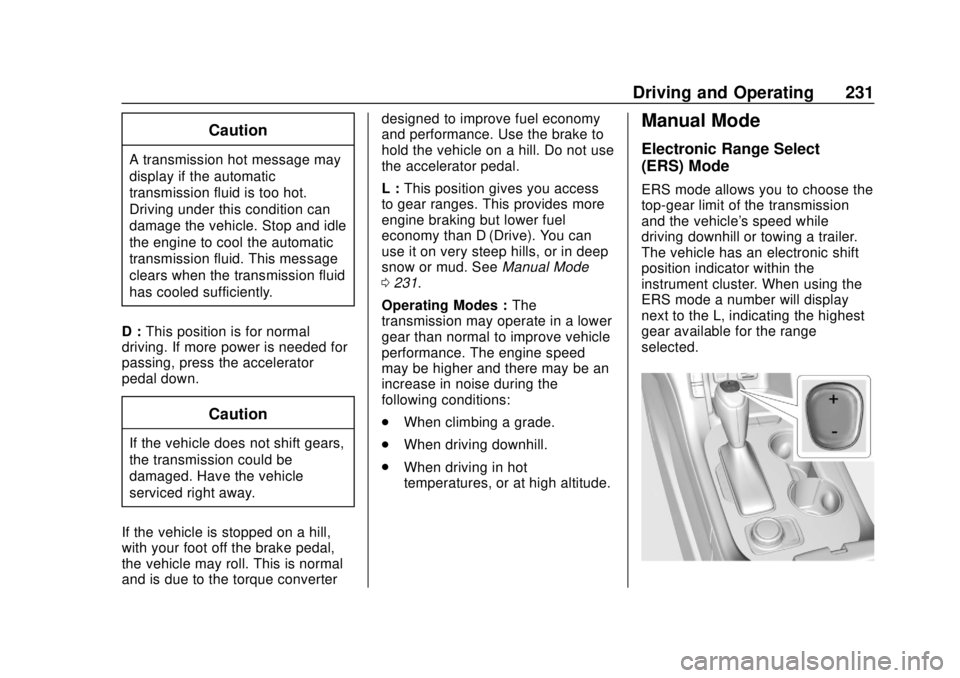
ERS mode allows you to choose the
top-gear limit of the transmission
and the vehicle's speed while
driving downhill or towing a trailer.
The vehicle has an electronic shift
position indicator within the
instrument cluster. When using the
ERS mode a number will display
next to the L, indicating the highest
gear available for the range
selected.
Page 233 of 423
GMC Acadia/Acadia Denali Owner Manual (GMNA-Localizing-U.S./Canada/
Mexico-11349114) - 2018 - crc - 9/21/17
232 Driving and Operating
To use this feature:1. Move the shift lever to L (Manual Mode).
2. Press + (Plus) or −(Minus) on
the shift lever to increase or
decrease the gear range
available.
When you shift from D (Drive) to
L (Manual Mode), the transmission
will shift to a pre-determined lower
gear range. The highest gear
available for this pre-determined
range is displayed next to the L in
the DIC. See Driver Information
Center (DIC) (Base and Midlevel)
0 145 orDriver Information Center
(DIC) (Uplevel) 0148. The number
displayed in the DIC is the highest
gear that the transmission will be
allowed to operate in. This means
that all gears below that number are
available. For example, when
4 (Fourth) is shown next to the L,
1 (First) through 4 (Fourth) gears are
automatically shifted by the vehicle.
The transmission will not shift into
5 (Fifth) until the + (Plus) button is
used or you shift back into D (Drive). If the transmission is in 6 (Sixth)
gear when L (Manual Mode) is
selected, a downshift to 4 (Fourth)
will be commanded. If in 5 (Fifth)
through 2 (Second) a single
downshift will occur.
While in L (Manual Mode), the
transmission will prevent shifting to
a lower gear range if the engine
speed is too high. You have a brief
period of time to slow the vehicle.
If vehicle speed is not reduced
within the time allowed, the lower
gear range shift will not be
completed. You must further slow
the vehicle, then press
−(Minus) to
the desired lower gear range.
Automatic Engine Grade Braking is
not available when the ERS is
active. It is available in D (Drive) for
both normal driving and Tow/Haul
Mode. While using the ERS, cruise
control and the Tow/Haul Mode can
be used. See Tow/Haul Mode 0232.
Tow/Haul Mode
See Driver Mode Control 0238.
Drive Systems
All-Wheel Drive
Vehicles with this feature can
operate in AWD Mode. See Driver
Mode Control 0238.
Page 236 of 423
GMC Acadia/Acadia Denali Owner Manual (GMNA-Localizing-U.S./Canada/
Mexico-11349114) - 2018 - crc - 9/21/17
Driving and Operating 235
PARK light is off. If either light stays
on after release is attempted, see
your dealer.
Caution
Driving with the parking brake on
can overheat the brake system
and cause premature wear or
damage to brake system parts.
Make sure that the parking brake
is fully released and the brake
warning light is off before driving.
Automatic EPB Release
The EPB will automatically release if
the vehicle is running, placed into
gear, and an attempt is made to
drive away. Avoid rapid acceleration
when the EPB is applied, to
preserve parking brake lining life.
Brake Assist
The Brake Assist feature is
designed to assist the driver in
stopping or decreasing vehicle
speed in emergency driving
conditions. This feature uses thestability system hydraulic brake
control module to supplement the
power brake system under
conditions where the driver has
quickly and forcefully applied the
brake pedal in an attempt to quickly
stop or slow down the vehicle. The
stability system hydraulic brake
control module increases brake
pressure at each corner of the
vehicle until the ABS activates.
Minor brake pedal pulsation or
pedal movement during this time is
normal and the driver should
continue to apply the brake pedal as
the driving situation dictates. The
Brake Assist feature will
automatically disengage when the
brake pedal is released or brake
pedal pressure is quickly
decreased.
Hill Start Assist (HSA)
Hill Start Assist (HSA) will activate
when the vehicle is stopped on a
moderate to steep grade to help
prevent it from rolling in an
unintended direction. After the brake
pedal has been released and before
the accelerator pedal has been
pressed, HSA uses braking
pressure to hold the vehicle
stationary. If HSA is holding the
vehicle, a DIC message displays.
HSA will not activate in a forward
drive gear when facing downhill,
or in R (Reverse) when facing uphill.
Select the duration of the HSA
feature through vehicle
personalization. See
”Extended Hill
Start Assist” under“Comfort and
Convenience” inVehicle
Personalization 0152. When
Standard Hold is selected, the
vehicle is held stationary for up to
two seconds after the brake pedal is
released. When Extended Hold is
selected, the vehicle is held
stationary for up to five minutes
after the brake pedal is released. In
either case, override the hold
feature by pressing the accelerator
pedal and attempting to drive away.
If Standard Hold is selected, it will
hold the vehicle for two seconds
unless the driver door is opened or
the driver seat belt is unbuckled
after releasing the brake pedal.
Page 239 of 423
GMC Acadia/Acadia Denali Owner Manual (GMNA-Localizing-U.S./Canada/
Mexico-11349114) - 2018 - crc - 9/21/17
238 Driving and Operating
To turn TCS and StabiliTrak on
again, press and release
g. The
Traction Off light
iand StabiliTrak
OFF light
gin the instrument cluster
turn off.
Adding accessories can affect the
vehicle performance. See
Accessories and Modifications
0 281.
Hill Descent
Control (HDC)
If equipped, HDC can be used when
driving downhill. It sets and
maintains vehicle speed while
descending a very steep incline in a
forward or reverse gear.
The HDC switch is on the center
console, behind the transmission
shift lever.
Press
5to enable or disable HDC.
Vehicle speed must be below
50 km/h (31 mph).
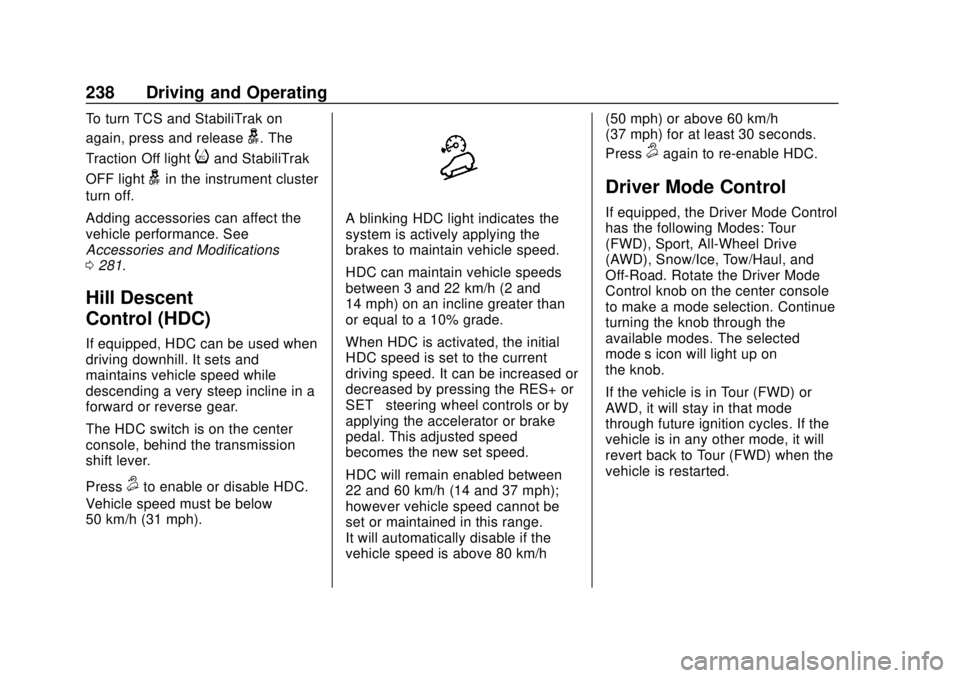
A blinking HDC light indicates the
system is actively applying the
brakes to maintain vehicle speed.
HDC can maintain vehicle speeds
between 3 and 22 km/h (2 and
14 mph) on an incline greater than
or equal to a 10% grade.
When HDC is activated, the initial
HDC speed is set to the current
driving speed. It can be increased or
decreased by pressing the RES+ or
SET– steering wheel controls or by
applying the accelerator or brake
pedal. This adjusted speed
becomes the new set speed.
HDC will remain enabled between
22 and 60 km/h (14 and 37 mph);
however vehicle speed cannot be
set or maintained in this range.
It will automatically disable if the
vehicle speed is above 80 km/h (50 mph) or above 60 km/h
(37 mph) for at least 30 seconds.
Press
5again to re-enable HDC.
Driver Mode Control
If equipped, the Driver Mode Control
has the following Modes: Tour
(FWD), Sport, All-Wheel Drive
(AWD), Snow/Ice, Tow/Haul, and
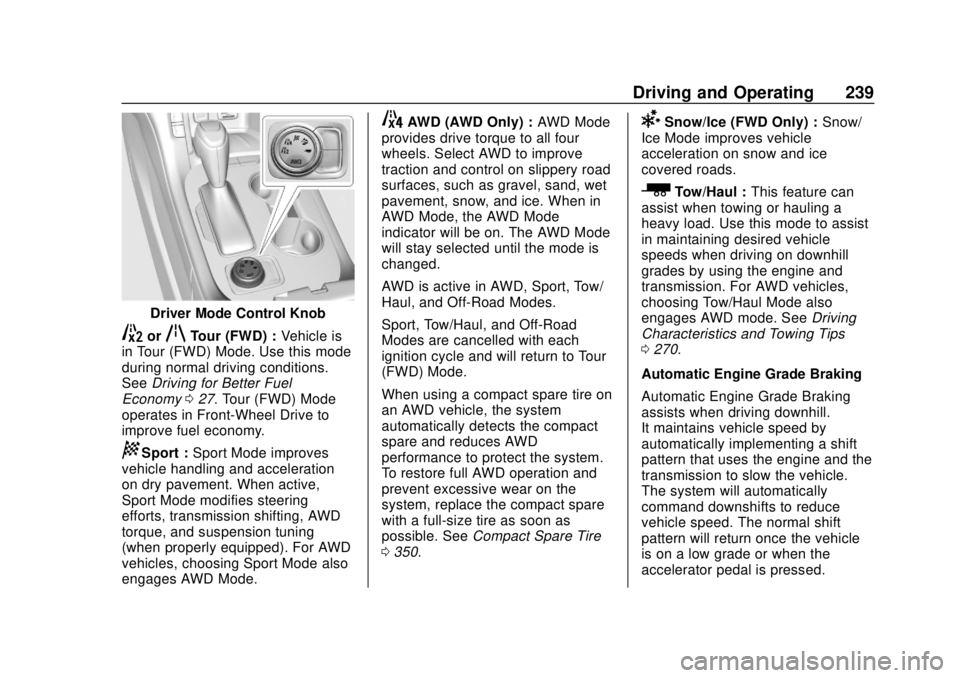
Off-Road. Rotate the Driver Mode
Control knob on the center console
to make a mode selection. Continue
turning the knob through the
available modes. The selected
mode’s icon will light up on
the knob.
If the vehicle is in Tour (FWD) or
AWD, it will stay in that mode
through future ignition cycles. If the
vehicle is in any other mode, it will
revert back to Tour (FWD) when the
vehicle is restarted.
Page 240 of 423
GMC Acadia/Acadia Denali Owner Manual (GMNA-Localizing-U.S./Canada/
Mexico-11349114) - 2018 - crc - 9/21/17
Driving and Operating 239
Driver Mode Control Knob
5orqTour (FWD) :Vehicle is
in Tour (FWD) Mode. Use this mode
during normal driving conditions.
See Driving for Better Fuel
Economy 027. Tour (FWD) Mode
operates in Front-Wheel Drive to
improve fuel economy.
8Sport : Sport Mode improves
vehicle handling and acceleration
on dry pavement. When active,
Sport Mode modifies steering
efforts, transmission shifting, AWD
torque, and suspension tuning
(when properly equipped). For AWD
vehicles, choosing Sport Mode also
engages AWD Mode.
4AWD (AWD Only) : AWD Mode
provides drive torque to all four
wheels. Select AWD to improve
traction and control on slippery road
surfaces, such as gravel, sand, wet
pavement, snow, and ice. When in
AWD Mode, the AWD Mode
indicator will be on. The AWD Mode
will stay selected until the mode is
changed.
AWD is active in AWD, Sport, Tow/
Haul, and Off-Road Modes.
Sport, Tow/Haul, and Off-Road
Modes are cancelled with each
ignition cycle and will return to Tour
(FWD) Mode.
When using a compact spare tire on
an AWD vehicle, the system
automatically detects the compact
spare and reduces AWD
performance to protect the system.
To restore full AWD operation and
prevent excessive wear on the
system, replace the compact spare
with a full-size tire as soon as
possible. See Compact Spare Tire
0 350.6Snow/Ice (FWD Only) : Snow/
Ice Mode improves vehicle
acceleration on snow and ice
covered roads.
_Tow/Haul : This feature can
assist when towing or hauling a
heavy load. Use this mode to assist
in maintaining desired vehicle
speeds when driving on downhill
grades by using the engine and
transmission. For AWD vehicles,
choosing Tow/Haul Mode also
engages AWD mode. See Driving
Characteristics and Towing Tips
0 270.
Automatic Engine Grade Braking
Automatic Engine Grade Braking
assists when driving downhill.
It maintains vehicle speed by
automatically implementing a shift
pattern that uses the engine and the
transmission to slow the vehicle.
The system will automatically
command downshifts to reduce
vehicle speed. The normal shift
pattern will return once the vehicle
is on a low grade or when the
accelerator pedal is pressed.