automatic transmission GMC ACADIA 2020 Owner's Manual
[x] Cancel search | Manufacturer: GMC, Model Year: 2020, Model line: ACADIA, Model: GMC ACADIA 2020Pages: 406, PDF Size: 6.78 MB
Page 7 of 406
GMC Acadia/Acadia Denali Owner Manual (GMNA-Localizing-U.S./Canada/
Mexico-13687875) - 2020 - CRC - 10/28/19
6 Introduction
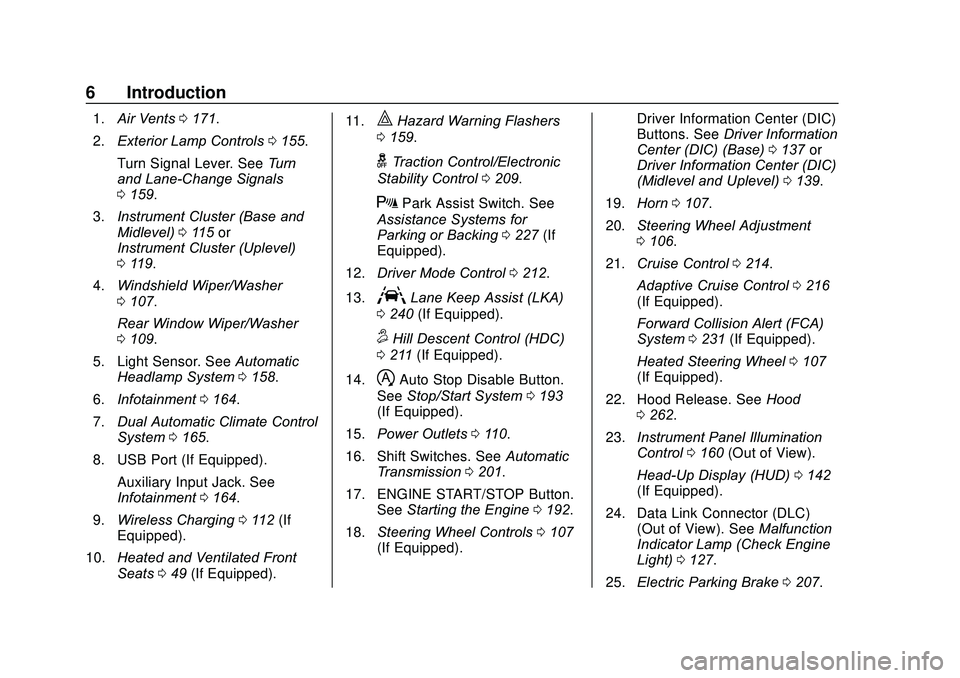
1.Air Vents 0171.
2. Exterior Lamp Controls 0155.
Turn Signal Lever. See Turn
and Lane-Change Signals
0 159.
3. Instrument Cluster (Base and
Midlevel) 0115 or
Instrument Cluster (Uplevel)
0 119.
4. Windshield Wiper/Washer
0107.
Rear Window Wiper/Washer
0 109.
5. Light Sensor. See Automatic
Headlamp System 0158.
6. Infotainment 0164.
7. Dual Automatic Climate Control
System 0165.
8. USB Port (If Equipped). Auxiliary Input Jack. See
Infotainment 0164.
9. Wireless Charging 0112 (If
Equipped).
10. Heated and Ventilated Front
Seats 049 (If Equipped). 11.|Hazard Warning Flashers
0 159.
gTraction Control/Electronic
Stability Control 0209.
XPark Assist Switch. See
Assistance Systems for
Parking or Backing 0227 (If
Equipped).
12. Driver Mode Control 0212.
13.
ALane Keep Assist (LKA)
0 240 (If Equipped).
5Hill Descent Control (HDC)
0 211 (If Equipped).
14.
hAuto Stop Disable Button.
See Stop/Start System 0193
(If Equipped).
15. Power Outlets 0110.
16. Shift Switches. See Automatic
Transmission 0201.
17. ENGINE START/STOP Button. SeeStarting the Engine 0192.
18. Steering Wheel Controls 0107
(If Equipped). Driver Information Center (DIC)
Buttons. See
Driver Information
Center (DIC) (Base) 0137 or
Driver Information Center (DIC)
(Midlevel and Uplevel) 0139.
19. Horn 0107.
20. Steering Wheel Adjustment
0106.
21. Cruise Control 0214.
Adaptive Cruise Control 0216
(If Equipped).
Forward Collision Alert (FCA)
System 0231 (If Equipped).
Heated Steering Wheel 0107
(If Equipped).
22. Hood Release. See Hood
0 262.
23. Instrument Panel Illumination
Control 0160 (Out of View).
Head-Up Display (HUD) 0142
(If Equipped).
24. Data Link Connector (DLC) (Out of View). See Malfunction
Indicator Lamp (Check Engine
Light) 0127.
25. Electric Parking Brake 0207.
Page 21 of 406
GMC Acadia/Acadia Denali Owner Manual (GMNA-Localizing-U.S./Canada/
Mexico-13687875) - 2020 - CRC - 10/28/19
20 Keys, Doors, and Windows
removed from the brake or the
vehicle speed becomes faster than
13 km/h (8 mph).
To unlock the doors:
.Press
Kon a door.
. Shift the transmission into
P (Park).
Automatic door locking cannot be
disabled. Automatic door unlocking
can be programmed. See Vehicle
Personalization 0146.
Lockout Protection
If the ignition is on or in ACC/
ACCESSORY and the power door
lock switch is pressed with the
driver door open, all the doors will
lock and only the driver door will
unlock.
If the vehicle is off and locking is
requested while a door is open,
when all doors are closed the
vehicle will check for RKE
transmitters inside. If an RKE
transmitter is detected and the
number of RKE transmitters inside has not reduced, the driver door will
unlock and the horn will chirp three
times.
Lockout Protection can be manually
overridden with the driver door open
by pressing and holding
Qon the
power door lock switch.
Open Door Anti Lock Out
If Open Door Anti Lock Out has
been turned on and the vehicle is
off, the driver door is open, and
locking is requested, all the doors
will lock and the driver door will
remain unlocked. When this function
is turned on, the driver door will only
lock when it is closed. The Open
Door Anti Lock Out feature can be
turned on or off. See Vehicle
Personalization 0146.
Safety Locks
The rear door safety locks prevent
passengers from opening the rear
doors from inside the vehicle.
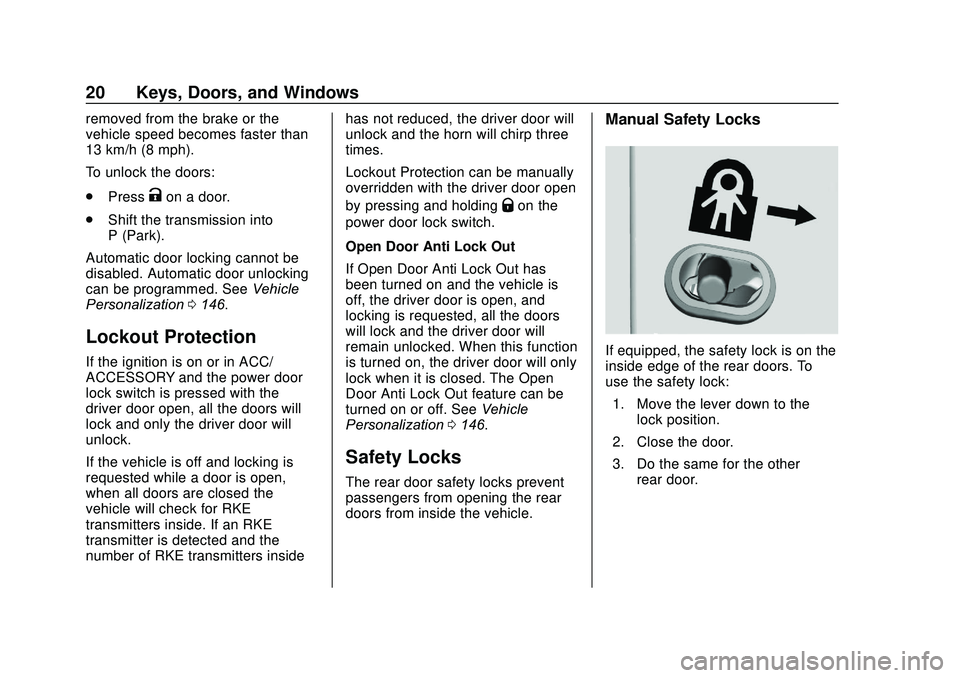
Manual Safety Locks
If equipped, the safety lock is on the
inside edge of the rear doors. To
use the safety lock:
1. Move the lever down to the lock position.
2. Close the door.
3. Do the same for the other rear door.
Page 49 of 406
GMC Acadia/Acadia Denali Owner Manual (GMNA-Localizing-U.S./Canada/
Mexico-13687875) - 2020 - CRC - 10/28/19
48 Seats and Restraints
4. Immediately press and hold the1 or 2 memory button matching
the above DIC welcome
message until two beeps
sound.
If too much time passes
between releasing SET and
pressing 1, the memory
position will not be saved and
two beeps will not sound.
Repeat Steps 3 and 4.
1 or 2 corresponds to the driver
number. See “Identifying Driver
Number” previously in this
section.
5. Repeat Steps 1–4 for a second driver using 1 or 2.
To save the position for
Band Seat
Exit Memory features, repeat
Steps 1–4 using
B. This saves the
position for getting out of the
vehicle.
Save preferred memory feature
positions to both 1 and 2 if you are
the only driver. Manually Recalling Memory
Positions
Press and hold 1, 2, or
Bto recall
the previously saved memory
positions if you are driver 1 or 2
identified in the DIC welcome
message.
To stop Manual Memory recall
movement, release 1, 2, or
Bor
press any of the following controls:
. Power seat
. Memory SET
. Power mirror, with the driver or
passenger side mirror selected
. Power steering wheel,
if equipped
Seat Entry Memory
The vehicle identifies the number of
the current driver ’s RKE transmitter
(1–8). See Remote Keyless Entry
(RKE) System Operation 08. If the
RKE transmitter is 1 or 2, and Seat
Entry Memory is enabled in vehicle
personalization, the positions saved
to the same memory button number
1 or 2 are automatically recalled when the vehicle is turned on,
or turned from off to ACC/
ACCESSORY. RKE transmitters 3–8
will not provide automatic memory
recalls.
To turn Seat Entry Memory on or off,
see
“Vehicle Personalization
Settings” previously in this section
and Vehicle Personalization 0146.
The transmission must be in
P (Park) to start Seat Entry Memory.
Seat Entry Memory recall will
complete if the vehicle is shifted out
of P (Park) prior to reaching the
saved memory position.
To stop Seat Entry Memory recall
movement, turn the vehicle off or
press any of the following controls:
. Power seat
. Memory SET, 1, 2, or
B
.
Power mirror, with the driver or
passenger side mirror selected
. Power steering wheel,
if equipped
If the saved memory seat position
does not automatically recall or
recalls to the wrong positions, the
Page 110 of 406
GMC Acadia/Acadia Denali Owner Manual (GMNA-Localizing-U.S./Canada/
Mexico-13687875) - 2020 - CRC - 10/28/19
Instruments and Controls 109
Rear Window Wiper/
Washer
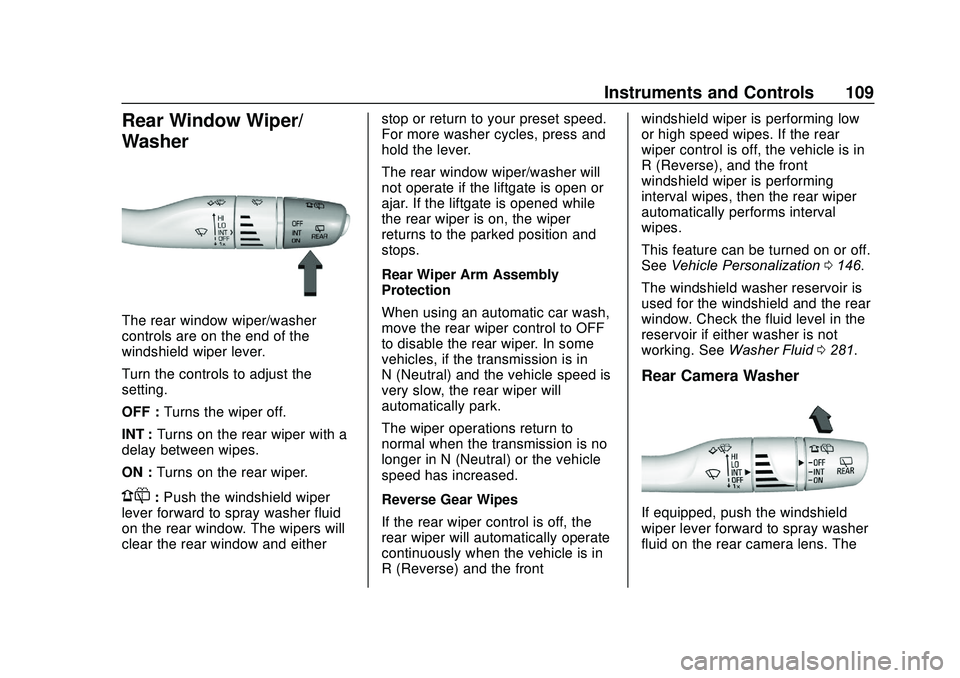
The rear window wiper/washer
controls are on the end of the
windshield wiper lever.
Turn the controls to adjust the
setting.
OFF :Turns the wiper off.
INT : Turns on the rear wiper with a
delay between wipes.
ON : Turns on the rear wiper.
1:Push the windshield wiper
lever forward to spray washer fluid
on the rear window. The wipers will
clear the rear window and either stop or return to your preset speed.
For more washer cycles, press and
hold the lever.
The rear window wiper/washer will
not operate if the liftgate is open or
ajar. If the liftgate is opened while
the rear wiper is on, the wiper
returns to the parked position and
stops.
Rear Wiper Arm Assembly
Protection
When using an automatic car wash,
move the rear wiper control to OFF
to disable the rear wiper. In some
vehicles, if the transmission is in
N (Neutral) and the vehicle speed is
very slow, the rear wiper will
automatically park.
The wiper operations return to
normal when the transmission is no
longer in N (Neutral) or the vehicle
speed has increased.
Reverse Gear Wipes
If the rear wiper control is off, the
rear wiper will automatically operate
continuously when the vehicle is in
R (Reverse) and the frontwindshield wiper is performing low
or high speed wipes. If the rear
wiper control is off, the vehicle is in
R (Reverse), and the front
windshield wiper is performing
interval wipes, then the rear wiper
automatically performs interval
wipes.
This feature can be turned on or off.
See
Vehicle Personalization 0146.
The windshield washer reservoir is
used for the windshield and the rear
window. Check the fluid level in the
reservoir if either washer is not
working. See Washer Fluid 0281.
Rear Camera Washer
If equipped, push the windshield
wiper lever forward to spray washer
fluid on the rear camera lens. The
Page 140 of 406
GMC Acadia/Acadia Denali Owner Manual (GMNA-Localizing-U.S./Canada/
Mexico-13687875) - 2020 - CRC - 10/28/19
Instruments and Controls 139
Presswandxto select“Reset
Best Score.” Press
Vto reset the
best average fuel economy. After
reset, the best value displays “-,-”
until the selected distance has been
traveled.
The display provides information on
how current driving behavior affects
the running average and how well
recent driving compares to the best
that has been achieved for the
selected distance.
Economy Trend : Shows history of
the Average Fuel Economy from the
last 50 km (30 mi). Each bar
represents about 5 km (3 mi) of
driving. During driving the bars will
shift to always reflect the most
recent distance on the right side.
Press and hold
Vto clear the graph
or to reset through the menu.
ECO Index : Provides feedback on
the efficiency of current driving
behavior. The bar graph shows a
value that is based on current fuel
consumption compared to what is
expected from the vehicle with good
and bad driving habits. Timer :
This display can be used as
a timer. To start the timer, press
V
while this display is active. The
display will show the amount of time
that has passed since the timer was
last reset. To stop the timer, press
V
briefly while this display is active
and the timer is running. To reset
the timer to zero, press and hold
V
while this display is active, or press
pand select reset.
Battery Voltage : Displays the
current battery voltage, if equipped.
Battery voltage changes are normal
while driving. See Charging System
Light 0127. If there is a problem
with the battery charging system,
the DIC will display a message.
Transmission Fluid
Temperature : Shows the
temperature of the automatic
transmission fluid in either degrees
Celsius (°C) or degrees
Fahrenheit (°F).
Blank Page : Shows no
information.
Driver Information Center
(DIC) (Midlevel and
Uplevel)
The DIC displays are shown in the
center of the instrument cluster in
the Info app. See Instrument Cluster
(Base and Midlevel) 0115 or
Instrument Cluster (Uplevel) 0119.
The displays show the status of
many vehicle systems. The controls
for the DIC are on the right steering
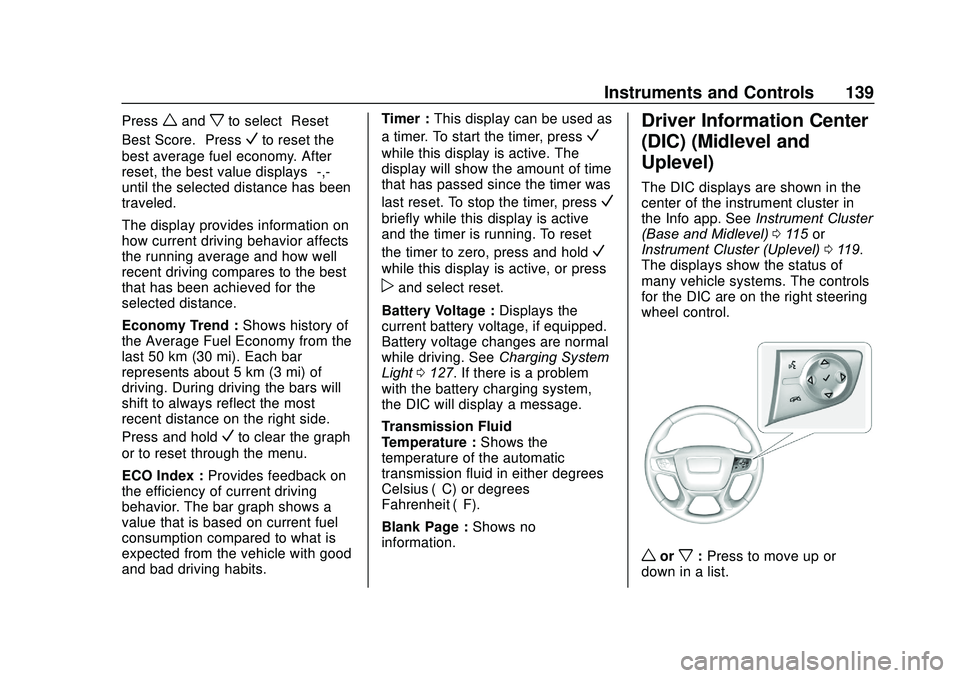
wheel control.
worx: Press to move up or
down in a list.
Page 143 of 406

GMC Acadia/Acadia Denali Owner Manual (GMNA-Localizing-U.S./Canada/
Mexico-13687875) - 2020 - CRC - 10/28/19
142 Instruments and Controls
Press and holdVto clear the graph
or press
pto reset through
the menu.
ECO Index : Provides feedback on
the efficiency of current driving
behavior. The bar graph shows a
value that is based on current fuel
consumption compared to what is
expected from the vehicle with good
and bad driving habits.
Speed Signs : Shows sign
information, which comes from a
roadway database in the onboard
navigation.
Off Road : Displays vehicle pitch
and roll information, road wheel
angle, and four-wheel drive (4WD)
status.
Following Distance : The following
distance to a moving vehicle ahead
in your path is indicated in following
time in seconds. See Forward
Collision Alert (FCA) System 0231.
Blank Page : Shows no
information. Transmission Fluid Temperature
Gauge :
Shows the temperature of
the automatic transmission fluid in
either degrees Celsius (°C) or
degrees Fahrenheit (°F).
Head-Up Display (HUD)
{Warning
If the HUD image is too bright or
too high in your field of view, it
may take you more time to see
things you need to see when it is
dark outside. Be sure to keep the
HUD image dim and placed low in
your field of view.
If equipped with HUD, some
information concerning the
operation of the vehicle is projected
onto the windshield. The information
is projected through the HUD lens
on the driver side of the instrument
panel and focused out toward the
front of the vehicle.
Caution
If you try to use the HUD image
as a parking aid, you may
misjudge the distance and
damage your vehicle. Do not use
the HUD image as a parking aid.
The HUD information can be
displayed in various languages. The
speedometer reading and other
numerical values can be displayed
in either English or metric units.
The language selection is changed
through the radio and the units of
measurement is changed through
the instrument cluster. See Vehicle
Personalization 0146 and "Options"
under Instrument Cluster (Base and
Midlevel) 0115 or
Instrument Cluster (Uplevel) 0119.
Page 159 of 406
GMC Acadia/Acadia Denali Owner Manual (GMNA-Localizing-U.S./Canada/
Mexico-13687875) - 2020 - CRC - 10/28/19
158 Lighting
.The parking brake is released or
the vehicle is not in P (Park).
When the DRL are on, the taillamps
and other lamps will not be on.
The DRL turn off when the
headlamps are turned to
Oor the
ignition is off. For vehicles first sold
in Canada, the DRL can only be
turned off when the vehicle is
parked.
Automatic Headlamp
System
When the exterior lamp control is
set to AUTO and it is dark enough
outside, the headlamps come on
automatically.
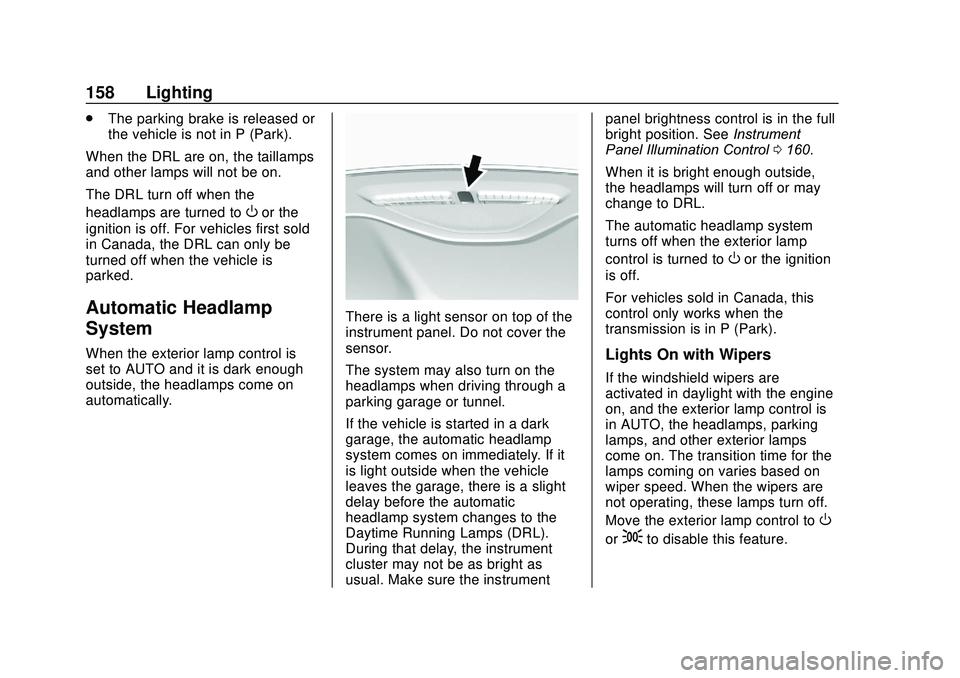
There is a light sensor on top of the
instrument panel. Do not cover the
sensor.
The system may also turn on the
headlamps when driving through a
parking garage or tunnel.
If the vehicle is started in a dark
garage, the automatic headlamp
system comes on immediately. If it
is light outside when the vehicle
leaves the garage, there is a slight
delay before the automatic
headlamp system changes to the
Daytime Running Lamps (DRL).
During that delay, the instrument
cluster may not be as bright as
usual. Make sure the instrument panel brightness control is in the full
bright position. See
Instrument
Panel Illumination Control 0160.
When it is bright enough outside,
the headlamps will turn off or may
change to DRL.
The automatic headlamp system
turns off when the exterior lamp
control is turned to
Oor the ignition
is off.
For vehicles sold in Canada, this
control only works when the
transmission is in P (Park).
Lights On with Wipers
If the windshield wipers are
activated in daylight with the engine
on, and the exterior lamp control is
in AUTO, the headlamps, parking
lamps, and other exterior lamps
come on. The transition time for the
lamps coming on varies based on
wiper speed. When the wipers are
not operating, these lamps turn off.
Move the exterior lamp control to
O
or;to disable this feature.
Page 174 of 406
GMC Acadia/Acadia Denali Owner Manual (GMNA-Localizing-U.S./Canada/
Mexico-13687875) - 2020 - CRC - 10/28/19
Driving and Operating 173
Driving and
Operating
Driving Information
Driving for Better FuelEconomy . . . . . . . . . . . . . . . . . . . . 174
Distracted Driving . . . . . . . . . . . . 174
Defensive Driving . . . . . . . . . . . . . 175
Drunk Driving . . . . . . . . . . . . . . . . . 175
Control of a Vehicle . . . . . . . . . . . 176
Braking . . . . . . . . . . . . . . . . . . . . . . . 176
Steering . . . . . . . . . . . . . . . . . . . . . . 176
Off-Road Recovery . . . . . . . . . . . 177
Loss of Control . . . . . . . . . . . . . . . 177
Off-Road Driving . . . . . . . . . . . . . 178
Driving on Wet Roads . . . . . . . . 182
Hill and Mountain Roads . . . . . 183
Winter Driving . . . . . . . . . . . . . . . . 184
If the Vehicle Is Stuck . . . . . . . . 185
Vehicle Load Limits . . . . . . . . . . . 186
Starting and Operating
New Vehicle Break-In . . . . . . . . . 190
Ignition Positions . . . . . . . . . . . . . 190
Starting the Engine . . . . . . . . . . . 192
Stop/Start System . . . . . . . . . . . . 193
Engine Heater . . . . . . . . . . . . . . . . 194 Retained Accessory
Power (RAP) . . . . . . . . . . . . . . . . 196
Shifting Into Park . . . . . . . . . . . . . 197
Shifting out of Park . . . . . . . . . . . 198
Parking over Things That Burn . . . . . . . . . . . . . . . . . . . 199
Active Fuel Management . . . . . 199
Extended Parking . . . . . . . . . . . . 200
Engine Exhaust
Engine Exhaust . . . . . . . . . . . . . . 200
Running the Vehicle While Parked . . . . . . . . . . . . . . . . . . . . . . 201
Automatic Transmission
Automatic Transmission . . . . . . 201
Manual Mode . . . . . . . . . . . . . . . . . 205
Tow/Haul Mode . . . . . . . . . . . . . . . 206
Drive Systems
All-Wheel Drive . . . . . . . . . . . . . . . 206
Brakes
Electric Brake Boost . . . . . . . . . . 206
Antilock BrakeSystem (ABS) . . . . . . . . . . . . . . . 206
Electric Parking Brake . . . . . . . . 207
Brake Assist . . . . . . . . . . . . . . . . . . 208
Hill Start Assist (HSA) . . . . . . . . 209
Ride Control Systems
Traction Control/Electronic Stability Control . . . . . . . . . . . . . 209
Hill Descent Control (HDC) . . . 211
Driver Mode Control . . . . . . . . . . 212
Cruise Control
Cruise Control . . . . . . . . . . . . . . . . 214
Adaptive Cruise Control . . . . . . 216
Driver Assistance Systems
Driver Assistance Systems . . . 225
Assistance Systems for Parking or Backing . . . . . . . . . . 227
Assistance Systems for Driving . . . . . . . . . . . . . . . . . . . . . . 231
Forward Collision Alert (FCA) System . . . . . . . . . . . . . . . . . . . . . . 231
Automatic Emergency Braking (AEB) . . . . . . . . . . . . . . . 234
Front Pedestrian Braking (FPB) System . . . . . . . . . . . . . . . 236
Side Blind Zone Alert (SBZA) . . . . . . . . . . . . . . . . 238
Lane Change Alert (LCA) . . . . . 238
Lane Keep Assist (LKA) . . . . . . 240
Fuel
Top Tier Fuel . . . . . . . . . . . . . . . . . 242
Recommended Fuel . . . . . . . . . . 242
Prohibited Fuels . . . . . . . . . . . . . . 243
Page 194 of 406
GMC Acadia/Acadia Denali Owner Manual (GMNA-Localizing-U.S./Canada/
Mexico-13687875) - 2020 - CRC - 10/28/19
Driving and Operating 193
Caution (Continued)
least 15 seconds between each
try, to let the cranking motor
cool down.
2. If the engine does not start after five to 10 seconds,
especially in very cold weather
(below −18 °C or 0 °F), it could
be flooded with too much
gasoline. Try pushing the
accelerator pedal all the way to
the floor and holding it there as
you press ENGINE START/
STOP, for up to a maximum of
15 seconds. Wait at least
15 seconds between each try,
to allow the cranking motor to
cool down. When the engine
starts, let go of the button and
the accelerator. If the vehicle
starts briefly but then stops
again, do the same thing. This
clears the extra gasoline from
the engine. Do not race the engine immediately after
starting it. Operate the engine
and transmission gently until
the oil warms up and lubricates
all moving parts.
Stop/Start System
The Stop/Start system will shut off
the engine to help conserve fuel.
It has components designed for the
increased number of starts.
{Warning
The automatic engine Stop/Start
feature causes the engine to shut
off while the vehicle is still on. Do
not exit the vehicle before shifting
to P (Park). The vehicle may
restart and move unexpectedly.
Always shift to P (Park), and then
turn the ignition off before exiting
the vehicle.
Auto Engine Stop/Start
When the brakes are applied and
the vehicle is at a complete stop,
the engine may turn off. When
stopped, the tachometer displays
AUTO STOP. See
Tachometer
0 121. When the brake pedal is
released or the accelerator pedal is
pressed, the engine will restart.
To maintain vehicle performance,
other conditions may cause the
engine to automatically restart
before the brake pedal is released.
Auto Stops may not occur and/or
auto restarts may occur because:
. The climate control settings
require the engine to be running
to cool or heat the vehicle
interior.
. The vehicle battery charge
is low.
. The vehicle battery has recently
been disconnected.
. Minimum vehicle speed has not
been reached since the last
Auto Stop
Page 195 of 406
GMC Acadia/Acadia Denali Owner Manual (GMNA-Localizing-U.S./Canada/
Mexico-13687875) - 2020 - CRC - 10/28/19
194 Driving and Operating
.The accelerator pedal is
pressed.
. The engine or transmission is
not at the required operating
temperature.
. The outside temperature is not
in the required operating range.
. The vehicle is in any gear other
than D (Drive).
. Tow/Haul Mode or other driver
modes have been selected.
. The vehicle is on a steep hill or
grade.
. The driver door has been
opened or driver seat belt has
been unbuckled.
. The hood has been opened.
. The Auto Stop has reached the
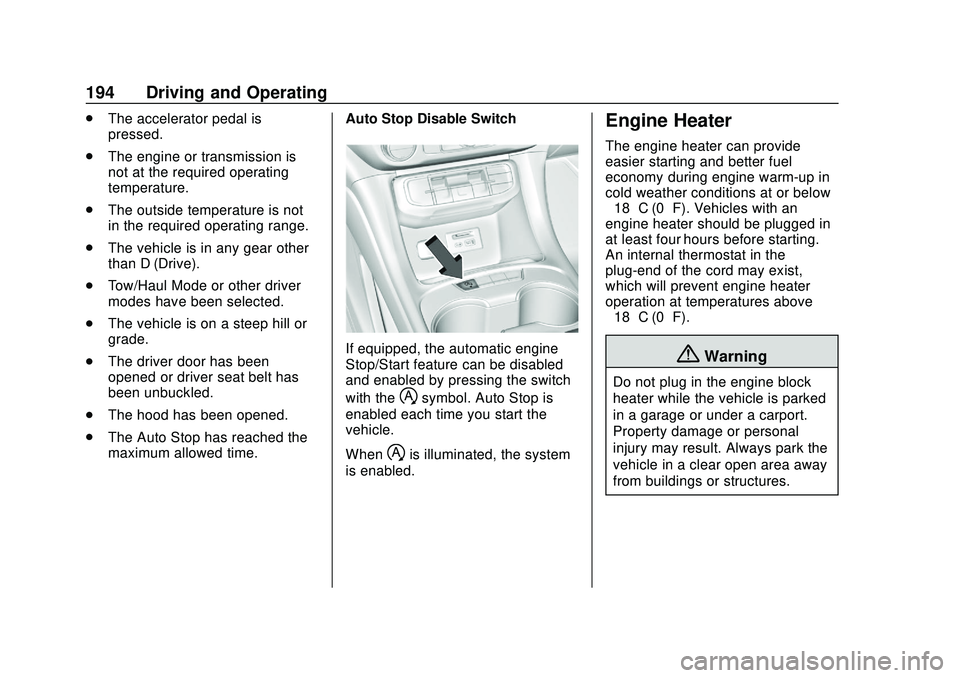
maximum allowed time. Auto Stop Disable Switch
If equipped, the automatic engine
Stop/Start feature can be disabled
and enabled by pressing the switch
with the
hsymbol. Auto Stop is
enabled each time you start the
vehicle.
When
his illuminated, the system
is enabled.
Engine Heater
The engine heater can provide
easier starting and better fuel
economy during engine warm-up in
cold weather conditions at or below
−18 °C (0 °F). Vehicles with an
engine heater should be plugged in
at least four hours before starting.
An internal thermostat in the
plug-end of the cord may exist,
which will prevent engine heater
operation at temperatures above
−18 °C (0 °F).
{Warning
Do not plug in the engine block
heater while the vehicle is parked
in a garage or under a carport.
Property damage or personal
injury may result. Always park the
vehicle in a clear open area away
from buildings or structures.